

The day usually starts well. Then the phone queue builds, a patient arrives with paper forms that don't match what's in the EMR, a referral sits in someone's inbox because one field is missing, and a clinician finishes the visit only to spend the next block typing notes and chasing billing details.
That's the reality many clinic managers and IT teams are dealing with. The problem often isn't a lack of software. It's that each step still depends on a person copying, checking, forwarding, re-entering, or following up. The work is digital on the surface, but manual underneath.
Healthcare workflow automation fixes that gap. It doesn't just turn paper into screens. It connects tasks, systems, and decisions so the next action happens when it should, with the right information attached. In HealthcareOps, that's the difference between a busy clinic and an organised one.
Canada is at an interesting point. Most organisations have already digitised records, but many still struggle with last-mile handoffs between intake, scheduling, documentation, referrals, billing, and follow-up. That's why automation matters now. It's becoming less about buying another tool and more about making existing tools work together.
If you're shaping operations strategy, reviewing integration priorities, or trying to reduce admin strain without adding headcount, focus here. For a broader view of how digital systems fit into day-to-day service delivery, Cleffex's piece on modern healthcare operations is a useful companion read.
Introduction to Intelligent Automation in Healthcare
At 8:15 a.m., the phones are already busy. One patient is booking a visit, another is asking whether a referral was sent, and a clinician is finishing notes from yesterday because the charting spilt past clinic hours. Every task is reasonable on its own. The strain comes from the handoffs between them.

Intelligent automation reduces that strain by connecting routine steps so work keeps moving without staff nudging each one forward manually. An appointment can trigger intake forms. Completed forms can update the chart. A signed note can flow to billing. A referral can enter a tracked queue instead of disappearing into email or fax.
The idea is simple. Busy clinics do not usually break because people stop working hard. They break because information stops moving at the right moment, to the right place, in the right format.
Why the timing matters in Canada
Canada's challenge is no longer basic digitisation. It is coordination.
A Canadian review found regular physician use of electronic health records rose from 36% in 2009 to 95% in 2024, while electronic information sharing between providers still lagged behind (Canadian evidence on EHR adoption and interoperability gaps). That combination matters. Many organisations already have the core systems. The missing piece is the last mile between them.
That last mile is where clinic operations get stuck. A referral leaves one system but does not land cleanly in another. A clinician records the visit, yet billing details still need a second pass. A patient message arrives, but no rule sends it to the right queue. High EHR adoption creates the foundation. It does not guarantee handoffs.
For teams mapping these gaps, Cleffex's guide to modern healthcare operations and digital service delivery gives useful context on how these workflows fit into day-to-day care.
The last-mile bottleneck most teams feel
This is why intelligent automation is getting attention now. In many Canadian settings, the opportunity is not replacing the EHR. It is connecting the work around it.
Referral orchestration is a good example. Staff should not need to monitor inboxes, check whether attachments are complete, then chase status updates one by one. Automation can route referrals based on rules, flag missing fields, and show where each case is waiting. It works like a parcel tracking system for clinical handoffs. People still make decisions, but they no longer have to hunt for the package.
AI scribes address another bottleneck. They reduce after-hours documentation, but their value grows when the note also feeds downstream tasks such as coding, billing review, or follow-up prompts. Low-code handoffs solve a similar problem for operations teams. They let clinics connect forms, messages, approvals, and queues without waiting for a large rebuild of every core platform.
Some clinics also pair workflow redesign with support services such as a medical virtual assistant to absorb repetitive admin work while internal processes are being cleaned up.
Intelligent automation improves healthcare operations when it removes waiting, re-entry, and missed handoffs between systems.
For clinic managers and IT teams, the starting questions are practical. Where does work pause for no clinical reason? Which steps depend on someone checking two systems? Where do referrals, notes, and follow-ups lose momentum between one tool and the next? Those pressure points are often the clearest starting place for automation.
What Healthcare Workflow Automation Really Means
A clinic can own a modern EMR and still rely on staff to chase files, re-enter data, and check three inboxes to move one patient to the next step. That is common in Canada. The systems are in place, but the handoffs between them often are not.
Healthcare workflow automation closes that last mile.
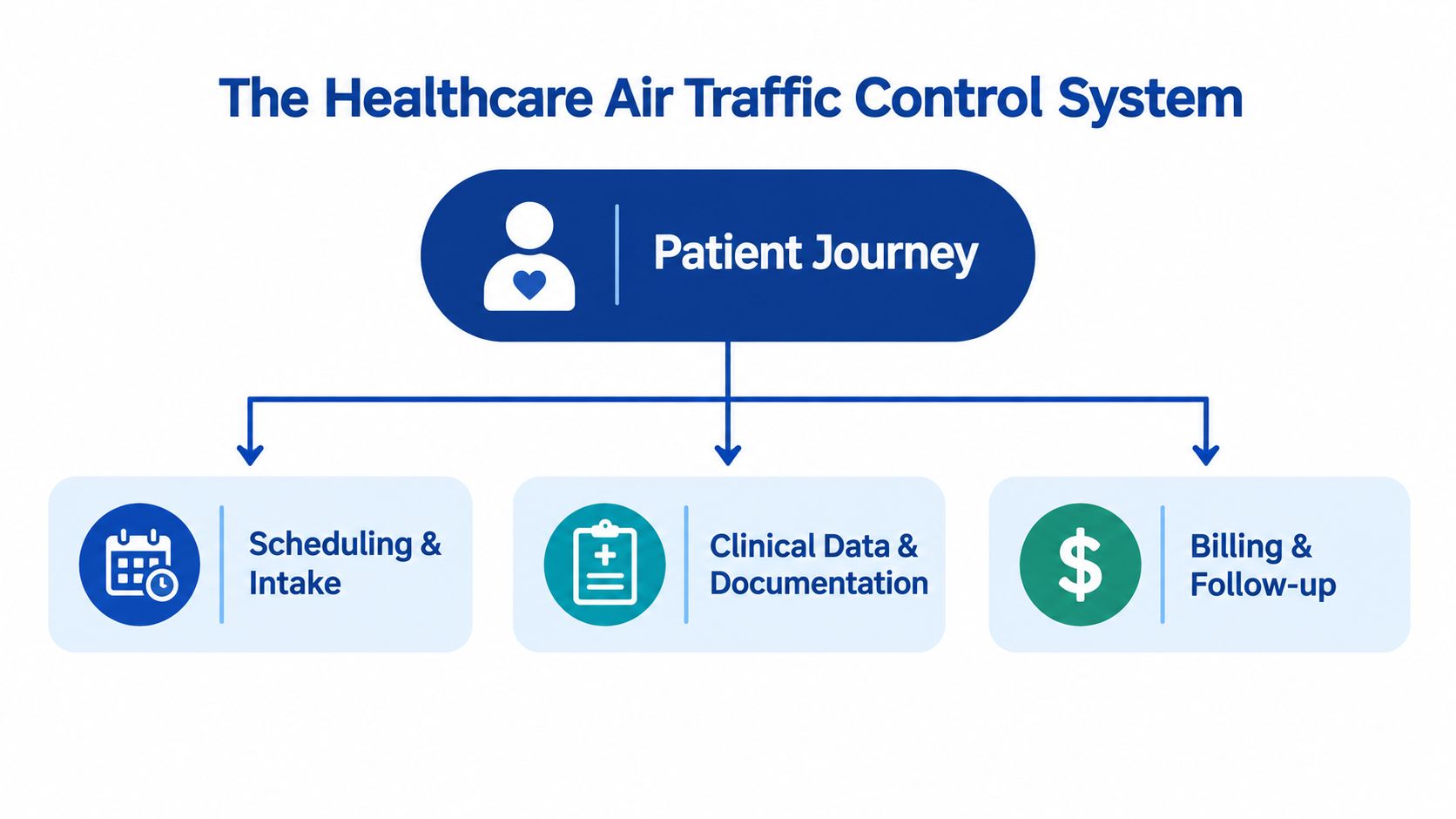
It works like air traffic control for care operations. Appointments, referrals, notes, lab orders, billing, and follow-up all need to move in the right order. If each step depends on someone noticing a message and pushing work along by hand, queues build fast. Automation adds rules, triggers, and handoffs so routine work keeps moving unless an exception needs human review.
Digitisation is not the same as orchestration
This distinction trips up many teams.
A scanned referral is digital storage. A portal form is digital intake. An EMR note is digital documentation. None of those, by themselves, coordinate the next action. If staff still have to read the document, decide where it goes, copy details into another system, and send a follow-up message, the workflow is still manual.
Core concept: Healthcare workflow automation uses triggers, rules, and integrations to move work to the next safe step without requiring a person to push every handoff.
That is why automation is broader than software adoption. It is operating logic. It answers practical questions such as: what starts the next task, where should it go, what information must travel with it, and when should a person step in?
How the model evolved in Canada
Canada gives a useful example of why this matters. EMR adoption rose sharply over time. A historical review reported that about 20% of Canadian practitioners used EMRs in 2006, rising to 62% in 2013, and noted over 91,000 clinicians were using EMR technology by 2014.
But high adoption never guaranteed strong data sharing. That gap has shaped daily operations across provinces and care settings. Many organisations digitised records first, then discovered that referrals, documentation, scheduling, and follow-up still stalled between systems, teams, and inboxes. In other words, Canada solved much of the record problem before it solved the coordination problem.
That is the situation many clinic managers and IT teams run into now. They are not replacing paper with software. They are trying to remove the friction between software tools that already exist.
What intelligent automation looks like in plain terms
A good test is simple. Ask whether work advances because a system recognised an event, or because a person remembered to move it.
Common signs of real automation include:
Trigger-based actions: A confirmed booking sends prep instructions, consent forms, or reminders automatically.
Rule-based routing: A referral missing required fields is sent back for completion instead of sitting in a generic queue.
System-to-system handoffs: Information entered once appears in the next step, such as scheduling, billing, or follow-up.
Exception handling: The system routes unusual or higher-risk cases to a person with the right context attached.
In Canadian settings, the highest-value examples often target the gaps between tools rather than the tools themselves. Referral orchestration reduces back-and-forth across fax, portal, and EMR workflows. AI scribes help when notes do more than save typing and can trigger coding review, tasks, or follow-up actions. Low-code handoffs help IT and operations teams connect forms, queues, approvals, and messages without waiting for a major platform replacement.
If your team is building a business case, it can help to see how other industries boost ROI with automation by cutting repeat handling and linking systems around real work. In healthcare, the same principle applies, with tighter privacy controls, clearer audit trails, and safer escalation rules.
Benefits and ROI That Healthcare Leaders Can Expect
The strongest case for automation usually isn't “new technology”. It's fewer dropped handoffs, less rework, and more time spent on care and coordination.
When an intake process feeds scheduling, documentation, and billing automatically, staff stop acting like human connectors between systems. That reduces friction in ways patients notice, and teams feel every day.
The operational gains leaders usually see first
Early benefits tend to appear in routine work rather than headline projects.
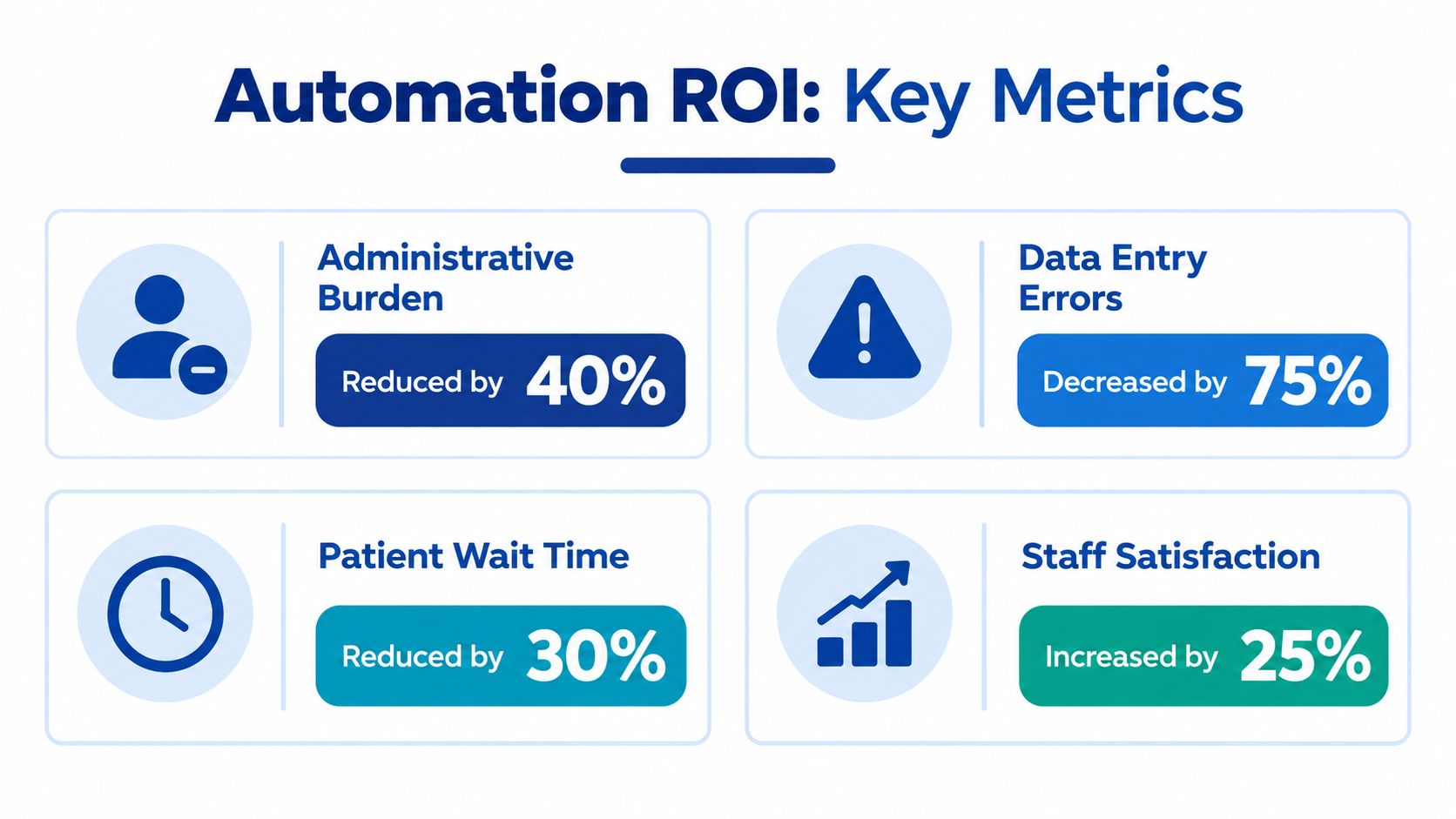
Less duplicate data entry: Front-desk and admin teams spend less time moving the same details between booking, forms, EMRs, and billing systems.
Fewer avoidable errors: Event-driven workflows reduce missed fields, inconsistent records, and forgotten follow-ups.
Quicker throughput: Patients move from booking to visit to billing with fewer pauses between steps.
Better staff focus: Clinicians and support teams spend more time on exceptions and patient needs, not repetitive clicks.
Practical rule: If a task happens often, follows a known pattern, and still requires someone to copy information manually, it's a strong automation candidate.
ROI is broader than cost cutting
Healthcare leaders sometimes undersell ROI by talking only about payroll savings. That's too narrow. A better view includes four levers.
| ROI lever | What improves | Why it matters |
|---|---|---|
| Capacity | Staff reclaim time from repetitive admin | Teams can absorb demand more smoothly |
| Accuracy | Fewer handoff and entry mistakes | Less rework, fewer claim or documentation issues |
| Speed | Work moves faster across departments | Delays shrink across scheduling, referrals, and follow-up |
| Experience | Staff and patients face less friction | Better adoption, better service continuity |
A practical way to read the return
Think in before-and-after terms.
Before automation, a referral arrives by fax or portal message, someone reads it, rekeys details, checks attachments, and sends follow-up emails. After automation, the referral enters a structured pathway, required fields are validated, status becomes visible, and exceptions are flagged early.
Before automation, a completed visit note may sit until someone remembers to route the next task. After automation, signing the note can trigger billing review, follow-up messaging, or care-plan reminders.
Canada's next ROI wave is already visible
A current Canadian example is documentation support at the point of care. Canada Health Infoway's AI Scribe Program launched in June 2025 with fully funded, one-year licences for pre-qualified AI scribe tools for eligible primary care clinicians across Canada. That matters because it places AI healthcare automation directly inside one of the heaviest clinical admin tasks: charting, record updates, and treatment-plan summaries.
For leaders, the takeaway is simple. The return comes when automation clears repeated operational drag, not when it adds one more disconnected app.
Common Use Cases Across the Patient Journey
The easiest way to understand healthcare workflow automation is to follow a patient from first contact to follow-up. Every stage has handoffs. Every handoff can either be manual and fragile, or structured and automated.
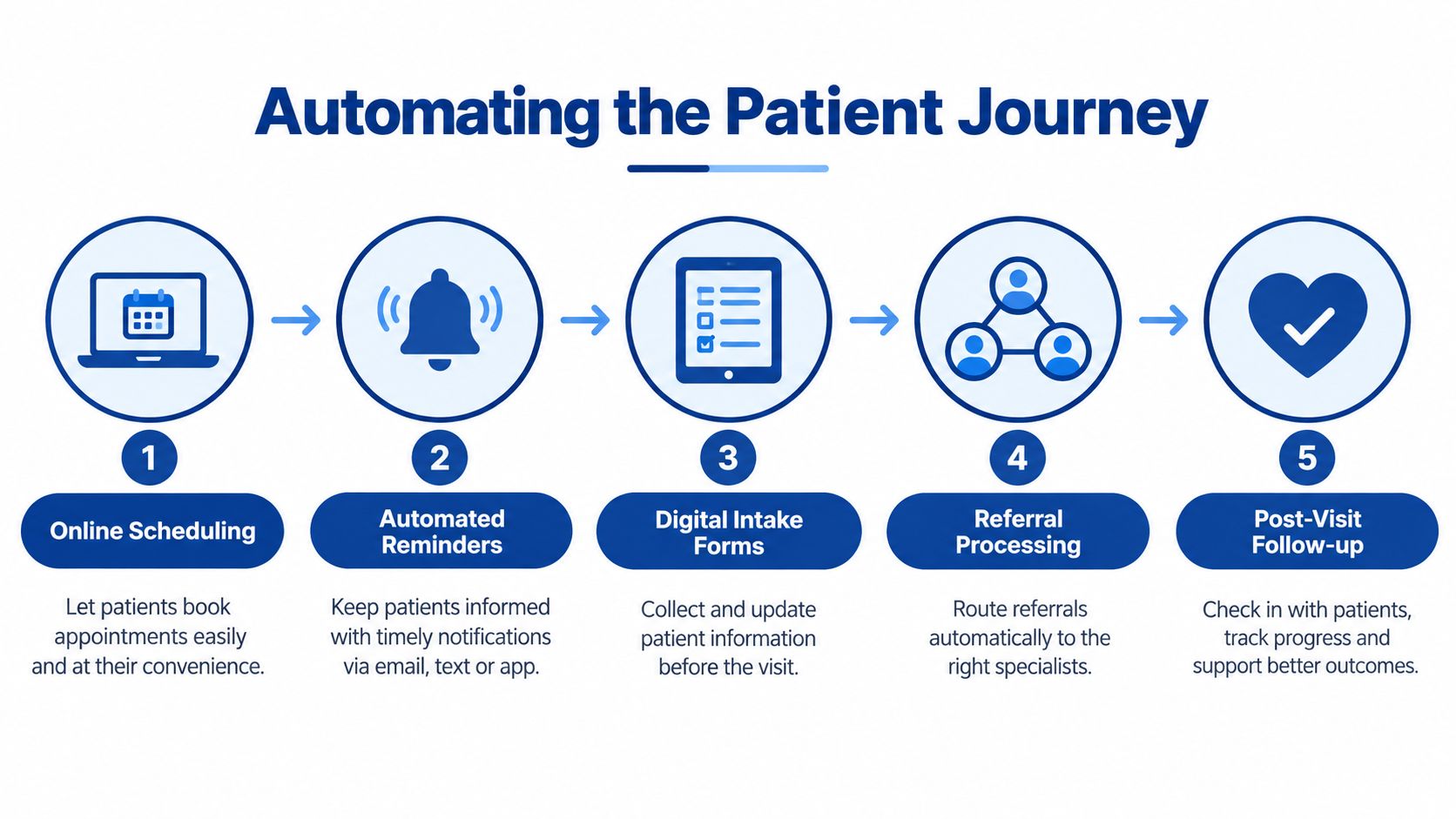
Scheduling and reminders
This is often the first entry point because the pain is visible. Calls stack up, schedules change, and staff spend hours confirming basic details.
A better flow looks like this:
Booking trigger: When a patient books, the system sends confirmation and visit instructions.
Reminder sequence: The workflow sends timed reminders based on appointment status.
Reschedule handling: If the patient changes the booking, reminders and downstream tasks update automatically.
Ontario practice guidance points to these handoffs as high-value targets. It highlights intake, scheduling, documentation, billing, and follow-up as key areas where low-code integration tools can connect EMRs, billing, and scheduling systems to automate reminders, prior authorisation, claims processing, and post-visit communication.
Intake and forms
Manual intake creates hidden waste. Patients repeat information. Staff transcribe it. Missing consent or insurance details cause downstream interruptions.
Good intake automation usually includes:
Pre-visit forms: Patients complete forms before arrival.
Validation rules: Required fields are checked before submission.
Record update logic: Approved information flows into the right parts of the patient record.
Exception routing: Unclear or incomplete data goes to a queue for review.
The best intake workflows don't just collect data. They decide where that data needs to go next.
Referral and wait-list orchestration
This is one of the most overlooked use cases in Canada, and one of the most important. Many teams automate booking and charting first, but referrals remain slow, opaque, and regionally fragmented.
Recent Canadian deployments show this issue is moving into the foreground. VitalHub's Novari Health implemented wait-list and referral management at Sunnybrook and in northern British Columbia, with progress tied to provincial digital health goals in 2026, according to the company's Canadian coverage.
A practical referral workflow often includes:
Structured intake of referrals
Automatic completeness checks
Priority and specialty routing
Wait-list status tracking
Updates back to referring providers
For organisations trying to join these pathways to broader systems, the primary challenge is often integration rather than interface design. That's where work on connected healthcare systems becomes operational, not just architectural.
Documentation, billing, and follow-up
Once the patient has been seen, another cluster of routine work begins.
Some common examples:
Clinical documentation: Dictation or ambient tools draft notes for clinician review.
Billing preparation: Signed documentation triggers coding or claims workflows.
Post-visit communication: The patient receives instructions, reminders, or check-ins.
Care gaps: Follow-up tasks appear automatically when review dates or actions are due.
This is also where healthcare process automation can compound value. One trigger can start several downstream actions without anyone needing to remember them.
Comparing Key Technologies Behind Automation
Not every automation tool does the same job. Some move information between systems. Some manage multi-step processes. Some generate content or suggestions. The confusion starts when teams buy one technology expecting it to solve a different kind of problem.
What each technology is actually good at
Here's a practical comparison.
Technology Comparison for Healthcare Workflow Automation
| Technology | Primary Purpose | Best Fit Use Case | Limitation to Consider |
|---|---|---|---|
| RPA | Mimics repetitive screen-based actions | Copying data between older systems that lack modern interfaces | Brittle if screens or steps change often |
| BPM or workflow engines | Manages rules, approvals, tasks, and escalations | Referrals, prior authorisation, exception handling, multi-step admin flows | Needs careful process design before rollout |
| Low-code orchestration | Connects apps with event-based workflows | Linking scheduling, intake, EMR, billing, and follow-up tools | Can become messy without governance |
| EHR integrations and APIs | Moves structured data between systems | Real-time updates across EMRs, portals, billing, devices, and apps | Depends on vendor access and data standards |
| AI and ML tools | Generates, classifies, predicts, or summarises | AI scribes, triage support, message routing, document handling | Needs oversight, validation, and privacy controls |
Why standards matter in Canada
In Canada, interoperability isn't just a technical ambition. It has named building blocks. The Connected Care roadmap defines specifications including the Pan-Canadian Patient Summary (PS-CA), the Pan-Canadian FHIR Exchange (CA:FeX), and CA Core+.
CIHI also states that the Canadian Core Data for Interoperability (CACDI) is a standardised set of health data elements and value sets that works with Canada Health Infoway's CA Core+ FHIR profiles to support meaningful exchange across jurisdictions.
That matters because automation breaks down when one system says “medication”, another says “current drug”, and a third stores the same concept in a different format. Standards reduce that mismatch.
Choosing without overcomplicating it
A simple decision approach helps:
Use RPA when you must bridge legacy systems quickly.
Use workflow or BPM tools when the problem involves queues, approvals, and exceptions.
Use low-code platforms when you need fast handoffs across several business tools.
Use FHIR-based integrations when long-term interoperability and structured exchange matter.
Use AI healthcare automation when the workflow depends on language, summarisation, or pattern recognition.
For teams evaluating ambient documentation, practical guidance on privacy-aware voice workflows can help frame requirements. A concise example is this piece on HIPAA-compliant dictation tips, especially for understanding why review steps and data controls still matter even when note creation is automated.
Implementation Roadmap and Best Practices for Success
Most automation projects fail for ordinary reasons. The team automates a broken process. Nobody agrees on who owns exceptions. Data flows aren't documented. Staff hear about the new workflow too late and work around it.
A steadier approach starts with process discipline.
Start with one workflow, not a grand platform vision
Pick a process with clear friction and repeated volume. Referral intake, appointment reminders, and post-visit documentation are common starting points because teams can see the delays and define the handoffs.
A useful sequence looks like this:
Map the current state
Document each step, system, handoff, and exception. Include who enters what, where data is copied, and where work waits.Redesign before automating
Remove unnecessary approvals, duplicate fields, and side-channel communication before you digitise them.Choose the integration method
Decide whether the workflow needs API-based exchange, low-code orchestration, RPA, or AI components.Pilot in a controlled area
Start with one clinic, one speciality, or one admin pathway.Measure operational behaviour
Track whether work moves more cleanly, not just whether the software runs.
Build privacy and compliance into the design
In Canadian clinical settings, compliance can't be bolted on later. Recent Canadian guidance stresses the need for explicit consent handling, revocable patient consent, documented data-flow maps, and a Privacy Impact Assessment under PIPEDA and provincial rules such as PHIPA before deployment.
If your team can't explain where patient data goes, who can access it, and how consent is handled, the workflow isn't ready.
That applies especially to AI scribes, automated triage support, message routing, and any patient-facing workflow.
Design for interoperability, not just local efficiency
Canada's policy direction is also becoming clearer. The federal government introduced legislation in 2024 and again in 2026 to require IT companies providing digital health services in Canada to adopt common standards, support secure information exchange, and prohibit data blocking. The 2026 proposal would apply only in provinces and territories without substantially similar legislation.
For implementation teams, that means today's shortcuts can become tomorrow's migration problems.
Practical safeguards that improve adoption
Train by role: Front-desk staff, clinicians, billing teams, and IT each need different workflow training.
Define exception ownership: Someone must own incomplete referrals, failed syncs, and consent conflicts.
Test with real scenarios: Include edge cases, not only the happy path.
Document data movement: This helps with privacy review, troubleshooting, and vendor accountability.
Use integration partners where needed: Organisations such as Cleffex Digital Ltd provide healthcare software integration services that connect medical platforms, data flows, and AI-enabled workflows in a structured way when internal teams need delivery support.
For a grounded view of what integration planning looks like in practice, this guide to healthcare data integration is worth reviewing before build decisions are locked in.
Conclusion and Next Steps for HealthcareOps Leaders
Healthcare workflow automation works when it fixes the last mile of operations. That means the awkward spaces where staff still chase information, retype data, and manually move tasks from one system to another.
In Canada, that's the opportunity. Record adoption is already high. The bigger challenge is making systems exchange information cleanly enough for automation to reduce manual handoffs. That's why referral orchestration, AI scribes, low-code handoffs, and standards-based integration matter so much right now.
The practical path is usually narrower than teams expect. Start with one workflow that repeatedly causes friction. Map it clearly. Remove waste before you automate it. Then connect the tools people already use so the next action happens by design, not by memory.
Good automation doesn't replace judgement. It protects judgement from being buried under routine admin.
Frequently Asked Questions
What is healthcare workflow automation?
It's the use of software, rules, integrations, and sometimes AI to move clinical and administrative work through a defined process automatically. That can include booking, intake, referrals, documentation, billing, and follow-up.
How is healthcare workflow automation different from simple digitisation?
Digitisation turns paper into electronic records or forms. Automation goes further by triggering actions, routing tasks, validating information, and connecting systems so staff don't have to handle every step manually.
Why is interoperability such a big issue in Canada?
Because many providers already use electronic records, but information still doesn't move smoothly between organisations. That limits how much value automation can deliver across referrals, care transitions, and shared workflows.
Are AI scribes safe to use in clinics?
They can be useful, but they need proper consent handling, clear review steps, documented data flows, and privacy assessment before deployment. Clinicians should review outputs rather than treating generated notes as final by default.
What is a good first automation project for a clinic?
A good first project is usually a repeated, high-friction workflow such as appointment reminders, digital intake, referral triage, or post-visit follow-up. The best starting point is the one your staff complain about every week.
How should IT and operations teams work together on this?
Operations should define the workflow, exceptions, and service goals. IT should design the integrations, security, data handling, and monitoring. Automation succeeds when both groups treat it as an operational redesign, not just a software install.
Cleffex helps healthcare organisations connect EMRs, digital platforms, devices, and AI-enabled workflows so automation works across the full care journey, not only inside one tool. If your team is planning referral orchestration, intake automation, or standards-based healthcare integration, visit Cleffex Digital Ltd to explore how those systems can be designed and delivered in practice.