

Monday at 8:07 a.m. The phones are already ringing. A patient is asking whether their referral was received. A clinician is waiting for records from another practice. Someone at the front desk is retyping the same demographic details from a form into the EMR because the patient used a different spelling in one field. Billing has a claim on hold because an insurer wants one more document. None of this is dramatic. That's why it often goes unmanaged.
Most clinics don't have a single giant efficiency problem. They have a hundred tiny handoffs. One person checks a portal, another sends a fax, someone else copies a note, and a clinician gets pulled in to answer a status question that should have resolved itself. That hidden coordination work is where workflow automation in healthcare earns its keep.
The mistake is to think automation starts with a bot or an API. In practice, it starts with a queue. If your team spends the day moving information from one place to another, chasing missing context, or reminding the next person to act, the problem isn't lack of effort. It's lack of orchestration.
The Real Problem Automation Solves in a Clinic
A busy clinic rarely breaks because staff aren't working hard enough. It breaks because too much of the day depends on humans noticing, remembering, forwarding, and checking.
At 8:15 a.m., a patient completes an intake form. At 8:23, the form sits in an inbox because nobody has opened it yet. At 8:31, the receptionist spots that the insurance field is incomplete and calls the patient back. At 8:46, the clinician starts the visit without the outside lab result because nobody linked the incoming document to the chart. By lunch, three people have touched the same piece of information, and none of them did the work they were hired to do.
The hidden bottleneck is coordination
Clinic managers often look for a single department to optimise. Front desk. Billing. Nursing. Referrals. That's understandable, but the friction usually sits between those teams.
A useful way to think about it is this:
Work isn't just tasks. It's also the handoff between tasks.
Delays aren't always caused by complexity. They're often caused by waiting.
Errors don't only come from bad judgment. They come from rekeying, copy-paste, and missed status changes.
That's why workflow automation in healthcare is less about replacing people and more about removing the administrative glue work that keeps stealing their attention.
Practical rule: If a process requires staff to keep asking “Has anyone done this yet?”, it's a strong automation candidate.
In Canada, the foundation for this work is already in place. Statistics Canada reported that in 2024, 92% of Canadian health care providers had access to a digital health system, and 52% used such systems to send or share patient clinical information with providers outside their main practice setting. The same release showed variation across provinces, including Alberta at 96% access and 72% external sharing, British Columbia at 95% and 59%, Ontario at 92% and 54%, and Manitoba at 85% and 48%. That matters because intake, referrals, chart updates, and care coordination all depend on digital exchange rather than paper-only workflows, as shown in Statistics Canada's 2024 digital health reporting.
Small automation wins change the day. A submitted form creates a task automatically. A referral status update routes to the right person. A completed visit triggers documentation follow-up without anyone remembering to send it. The clinic feels calmer not because there's less work, but because less work is spent coordinating work.
What Workflow Automation Actually Means
When people hear “automation”, they often picture a robot typing into a screen. Sometimes that's part of it, but it's not the whole picture.
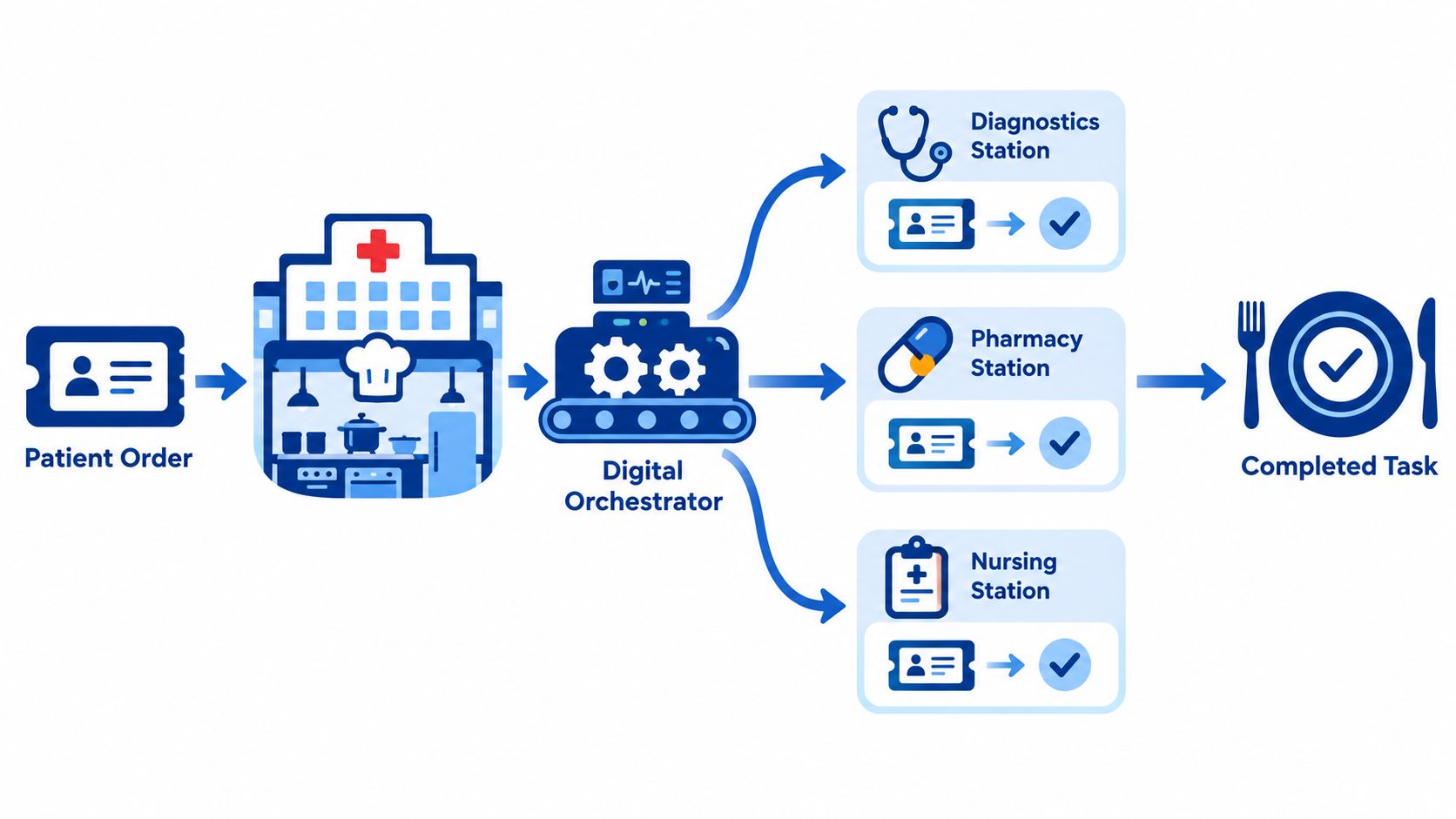
A better analogy is a restaurant kitchen. A server takes an order, the ticket moves to the right station, the grill handles one part, the salad station handles another, and the pass confirms when the meal is ready to go out. The kitchen doesn't run well because one cook works faster. It runs well because the ticket moves cleanly from step to step.
Workflow automation in healthcare works the same way. A patient action, staff action, or system event triggers the next appropriate step. The point isn't to automate everything. The point is to make sure the right work reaches the right person or system at the right time.
The five building blocks
Here are the core tools, in plain language first.
RPA handles repetitive screen work. If a staff member has to click through the same web portal steps repeatedly, an RPA bot can sometimes do that.
BPM manages the overall process. It decides what happens first, what happens next, and what should happen when something goes wrong.
APIs let systems talk directly. Instead of a person copying data from one app to another, the apps exchange it themselves.
FHIR and HL7 are healthcare data formats and exchange standards. They help systems share clinical information in structured ways.
AI helps with unstructured inputs such as free-text notes, scanned forms, or spoken conversations.
Why orchestration matters more than any one tool
Most failed automation efforts have the same flaw. The clinic buys one clever tool and expects the bottleneck to disappear. It doesn't, because the bottleneck usually lives in the connections.
Canadian clinic guidance increasingly describes this work as event-driven orchestration. A scheduling event, form submission, or status change can trigger communications, task routing, and EMR updates. The same guidance also stresses governance controls such as named automation owners, quarterly log reviews, override capability for front-desk staff, and Canadian data storage and processing aligned with PHIPA and PIPA requirements, as outlined in this Canadian guide to healthcare automation software.
Think of the orchestrator as the dispatcher. It notices the event, applies rules, and sends work where it belongs. Without that layer, you don't have an automated workflow. You have scattered tools.
The clinic doesn't need the fanciest tool first. It needs a dependable way to move work forward without staff chasing it.
High-Impact Use Cases Across the Patient Journey
The easiest way to judge automation is to walk the patient journey and ask a simple question at each step: what is staff doing here that a system could prepare, route, validate, or follow up on?
That approach keeps the discussion practical. It also stops teams from buying a tool that only improves one corner of the process while the delays move somewhere else.
Where automation fits best
| Use Case | Automation Technology | Typical Outcome |
|---|---|---|
| Intake | OCR, form validation, API integration with EMR | Less rekeying, fewer demographic errors, faster check-in |
| Scheduling | Rules engine, reminders, status triggers | Cleaner calendars, quicker responses to changes, better use of slots |
| Prior authorisation | RPA, document assembly, workflow routing | Staff review exceptions instead of building every request manually |
| Billing | Claim scrubbing, code suggestion, task automation | Fewer preventable submission issues and more consistent follow-up |
| Results and triage | Rule-based routing, inbox automation, AI support | Faster delivery of the right item to the right clinician or team |
| Discharge and follow-up | Template automation, messaging workflows, task assignment | More reliable next steps after the visit |
The strongest candidates are repetitive and rules-based
Intake is often the first win because it combines volume with predictable structure. A digital form can capture demographics, consent, and history before the visit. Validation rules can catch missing fields before staff have to call the patient back. If the form connects properly to the EMR, the receptionist stops acting as a human data bridge.
Scheduling is another common target. Not because booking itself is complex, but because the exceptions are exhausting. Wrong visit type. Missing prep instructions. Cancellation without follow-up. Good automation applies simple rules so that a schedule change triggers the next step automatically.
For clinics evaluating communication tools around these handoffs, it helps to look at how a frontline healthcare communication platform supports routing, messaging, and escalation across staff roles. The key question isn't whether the platform sends messages. It's whether those messages are tied to workflow states.
Clinical support doesn't have to mean clinical autonomy
Prior authorisation, billing follow-up, and result routing are good examples of “human-in-the-loop” automation. The system gathers, drafts, checks, or routes. A staff member handles the exceptions or approves the output.
That distinction matters. In real clinics, the best automation rarely removes people from the process completely. It removes the repetitive assembly work around the decision. A nurse shouldn't spend time hunting for which inbox holds a result. A biller shouldn't rebuild the same follow-up task list from scratch. A clinician shouldn't manually summarise every routine interaction if a draft can be reviewed and finalised.
Compliance and Security as Design Constraints
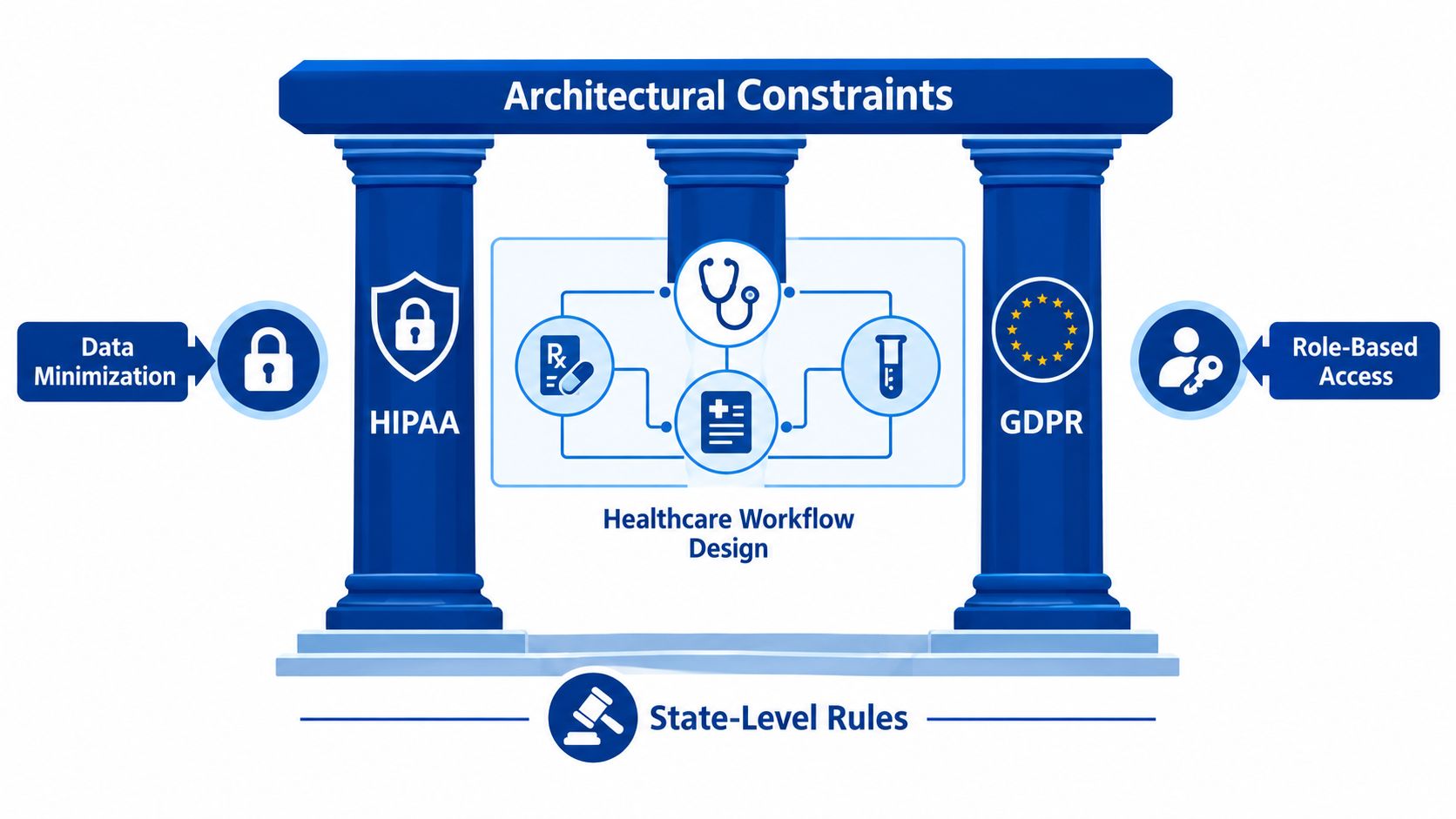
Privacy rules shouldn't arrive at the end of the project as a legal checklist. They belong at the start, because they shape the design of the workflow itself.
If an intake bot collects too much information, that's a design flaw. If a prior-authorisation script lets the wrong role see unnecessary clinical detail, that's a design flaw. If an AI summarisation tool can't show who reviewed and approved a draft, that's a design flaw too.
What compliant design usually includes
A sound workflow design typically builds in:
Data minimisation: Collect and move only the information needed for that specific step
Role-based access: Front desk, clinician, billing, and admin staff should not all see the same fields by default
Audit trails: Every automated action should be logged so teams can reconstruct what happened
Encryption controls: Data should be protected in transit and at rest
Vendor accountability: Contracts, including Business Associate Agreements where applicable, need to match how the system is used
Break-glass access: Emergency access must be possible, but visible and controlled
Clinics that want a practical non-legal overview often benefit from material focused specifically on compliance workflow automation, because it frames compliance as workflow architecture rather than paperwork.
Good security reduces rework
Teams sometimes treat privacy controls as friction. In reality, weak controls create more operational pain later. You end up retrofitting permissions, rebuilding logs, and explaining inconsistent documentation during reviews.
A useful companion topic is secure system design in health IT. This overview of data security in healthcare information systems is relevant because automation multiplies whatever security habits already exist. If access models are sloppy in a manual process, automation scales the sloppiness.
A compliant workflow isn't the one with the most approvals. It's the one where each action, permission, and exception was designed intentionally.
A Realistic Implementation Roadmap
Most clinics don't need a grand transformation programme. They need a sensible sequence. Start small, prove that the workflow improves, then extend the pattern.
The trap is starting with software selection. That feels productive because vendors are tangible. But if the team hasn't mapped the current process, the clinic often ends up digitising confusion.
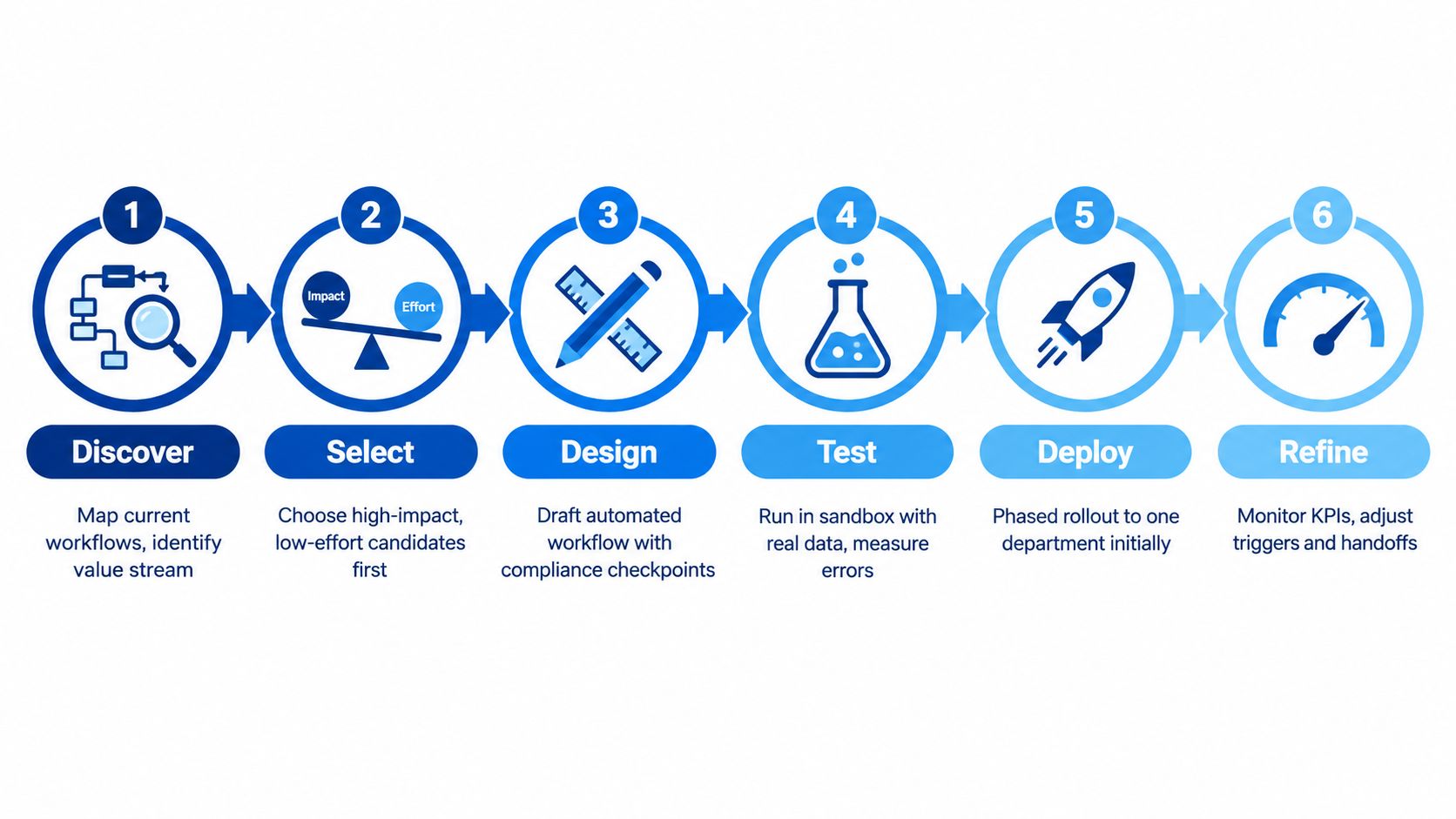
A practical six-phase path
Discover the current workflow
Sit with the people doing the work. Map what triggers the process, where information comes from, where it gets stuck, and how exceptions are handled. Include front desk, clinicians, and back-office staff.Select one candidate carefully
Use a simple impact-versus-effort screen. Favour high-volume, rules-based, low-clinical-risk processes with obvious pain points. Good examples are intake, referral routing, or documentation prep.Design the future state
Define the trigger, the rules, the handoffs, the exception path, and the audit requirements. Decide what the system does automatically and where a person must review or approve.Pilot in a controlled setting
Run a short pilot with a narrow scope. Capture a baseline before launch, then compare the process after automation is live. End-user acceptance testing matters here. So does a clear go or no-go review.Validate with the people affected
Ask clinicians and staff what changed in their day, not just whether the tool functioned. A technically successful pilot can still fail if it shifts hidden workload onto another team.Scale with a backlog, not a scramble
Once one workflow works, add the next one to a managed automation backlog. That creates compounding value because each connected workflow reduces another handoff.
Integration is where gains start to add up
Workflow automation in healthcare becomes more useful when the EMR, practice management system, and revenue cycle tools share context. If those platforms stay isolated, each win remains local.
For teams planning that layer, this guide to healthcare data integration is worth reviewing because orchestration depends on reliable movement of data between systems. In some projects, clinics use off-the-shelf workflow platforms. In others, they use a custom integration partner such as Cleffex Digital Ltd to connect healthcare software, AI components, and operational workflows around existing systems. The right choice depends on how specialised the workflow is and how much control the clinic needs.
The first pilot should be boring
That sounds counterintuitive, but it's usually right. Don't pick the most clinically sensitive workflow first. Pick one where the team can learn how automation behaves in production without putting care delivery under unnecessary strain.
A boring pilot gives you something valuable: operational trust.
Measuring ROI Without Counting the Wrong Things
Leaders usually ask one fair question early: how will we know this is working?
The wrong answer is to point at activity. “We automated a lot of tasks” sounds impressive and means very little. A clinic can automate dozens of low-value steps and still leave staff overloaded.
What to measure instead
Use a balanced scorecard that mixes financial, operational, quality, and workforce indicators.
| Dimension | KPI | Why It Matters |
|---|---|---|
| Financial | Denial-related rework volume | Shows whether revenue-cycle automation is reducing preventable follow-up |
| Financial | Time spent per prior authorisation | Indicates whether staff effort is dropping in a meaningful way |
| Operational | Time from intake submission to chart readiness | Captures whether pre-visit preparation is moving faster |
| Operational | Time to appointment confirmation or rescheduling | Reflects patient access and front-desk responsiveness |
| Quality | Data-entry correction rate | Highlights whether automation is reducing avoidable errors |
| Quality | Exception handling volume | Reveals where rules are too weak or too rigid |
| Workforce | Clinician documentation burden | Connects automation to real day-to-day relief |
| Workforce | Overtime or after-hours admin work | Helps show whether work is actually being removed, not shifted |
Start with baseline discipline
Measure the current state before you automate. Then run the pilot long enough to see whether the change holds. If staffing, policy, or payer behaviour changed at the same time, note that clearly. Otherwise, teams tend to give the automation credit for everything that improved nearby.
This is especially important in Canada, where adoption is moving quickly but the evidence base around long-term clinic economics and workload distribution is still thin. Public discussion increasingly highlights rapid adoption, including the Infoway-funded AI scribe rollout and broader digital use tracking, but key questions remain about long-term ROI, workflow redesign, and whether burden is reduced for all staff or shifted to reception and billing teams, as reflected in Statistics Canada survey context on digital health use and barriers.
For revenue-focused workflows, it also helps to review practical examples of medical billing automation solutions so finance and operations leaders use the same definitions when discussing value.
Measure patient access, staff effort, and error reduction together. If you only track speed, you may miss that the clinic simply moved work downstream.
Pitfalls, Trade-Offs, and Best Practices
Automation can absolutely make a clinic worse if the underlying process is messy. That's the part vendors don't always stress.
A broken workflow doesn't become efficient because software touches it. It becomes a faster broken workflow. Staff then spend their time cleaning up exceptions, distrusting alerts, and building workarounds outside the system.
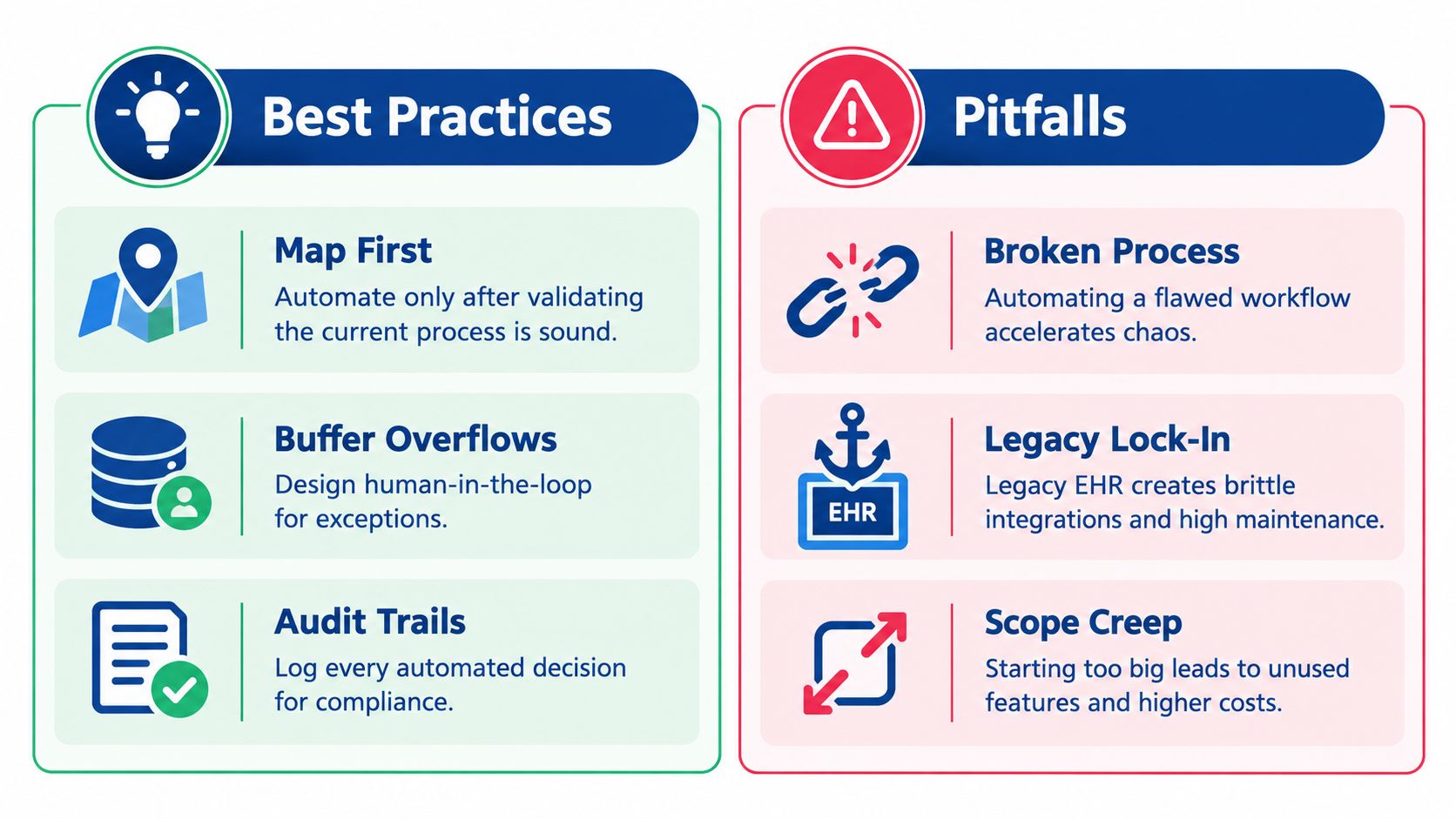
Common failure modes
Automating a bad process: If steps are unclear, ownership is vague, or exceptions are constant, automation just accelerates the confusion.
Leaning too hard on brittle screen automation: RPA has a place, but when it's used because systems can't integrate properly, maintenance grows quickly.
Creating alert fatigue: A workflow that notifies everyone about everything trains staff to ignore it.
Shifting burden sideways: Some automations help clinicians while creating hidden work for admin, billing, or IT teams.
Starting too large: Broad programmes with vague goals often lose support before the first process is stable.
What stronger teams do differently
They map the process before they touch the tool. They prefer native APIs and structured integrations where available. They keep a human review point around clinical judgement. They use shadow-launch periods so staff can compare automated output with the old workflow before full cutover.
There's also a structural trade-off in Canadian healthcare that matters here. AI use is rising quickly across administrative, record-management, and care settings, yet legacy infrastructure remains embedded. In 2025, 87% of Canadian IT decision-makers in healthcare said AI was used in patient care, up from 72% the previous year. The same report said 68% used AI for updating patient records, 52% used AI for administrative tasks compared with 11% the year before, 60% used AI to process and analyse medical data, and 41% used it to help diagnose medical conditions. At the same time, 99% of Canadian healthcare organisations still relied on legacy infrastructure, with 71% using outdated systems to operate telehealth and IoT devices, according to this report on AI adoption and legacy IT in Canadian healthcare.
A short best-practice list
Start with a measurable pain point: Pick a workflow staff already complain about for specific reasons.
Assign a clinical champion: Someone has to judge whether the new process works in real care settings.
Design for auditability: Logs, overrides, approvals, and exceptions must be visible.
Review quarterly: Workflows drift as policies, staff roles, and system dependencies change.
One more example fits here. Canada Health Infoway launched the national AI Scribe Program in June 2025 to support primary care clinicians with AI-powered documentation tools that transcribe and summarise patient interactions in real time, update medical records, and summarise treatment plans. Infoway says those tools reduce repetitive administrative work and shift clinician time from documentation to care delivery, as described in the AI Scribe Program overview. That's useful progress, but it doesn't remove the need to tune workflow design around review, ownership, and downstream handoffs.
Your 30-Day Starting Plan and Final Checklist
If you're a clinic manager and want a sensible starting point, keep the first month simple.
A four-week start
Week 1
Map three candidate workflows. Pick processes with visible friction, such as intake, referral status handling, or prior-authorisation prep. Capture baseline time, error points, and who touches the work.Week 2
Choose one high-volume, rules-based workflow. Run a process discovery session with the people who do the work daily. Mark every handoff, approval, exception, and status check.Week 3
Decide whether you need a configurable platform, a vendor product, or custom integration support. Shortlist two options. Confirm privacy, audit, interoperability, and override requirements before anyone demos features.Week 4
Launch a tightly scoped pilot. Use one success metric and one exit criterion. If the workflow improves and staff trust it, plan the next connected process. If it doesn't, adjust the design before scaling.
Final checklist
Governance owner assigned
Clinical champion named
Baseline captured
Security and privacy review completed
Exception path defined
Audit trail confirmed
Rollback plan documented
Pilot metric agreed
Review date scheduled
Next workflow identified only after the first one stabilises
Cleffex Digital Ltd helps healthcare organisations design and build secure software, system integrations, and AI-enabled workflow solutions that fit real clinical and operational processes. If you're trying to connect your EMR, automate administrative handoffs, or pilot a compliant healthcare workflow, visit Cleffex Digital Ltd to explore how their team approaches healthcare technology delivery.