

The patient is at reception, but the referral is still in an inbox. Their appointment appears in the calendar, yet the clinician can't see the latest medication list. Someone starts making calls while another colleague checks a spreadsheet. A modern healthcare operations platform should help staff resolve this kind of mismatch, not give them another screen to watch.
The useful question isn't whether the software connects to your systems. It's whether your team can keep work moving when information arrives late, looks inconsistent, or never arrives at all.
Why Fragmented Systems Slow Care Down
Consider a typical referral handover. A receptionist receives a document, enters the patient's details into the booking system and sends a message to the clinical team. The clinician checks whether the referral contains enough information. If something is missing, someone must contact the referring practice.
Each person may do their task correctly. The delay sits between the tasks, where ownership becomes unclear.
When local organisation creates shared confusion
Think of an airport where every gate keeps its own timetable. Each gate team might be organised, but passengers still miss connections because nobody coordinates the whole journey. Separate scheduling tools, faxed referrals, and disconnected portals create a similar problem in healthcare.
Canada's experience shows why digital records alone aren't enough. EMR use among Canadian primary-care physicians rose from 73% in 2015 to 93% in 2022. Widespread record digitisation is a foundation, not proof that organisations work together.
At the front desk, fragmentation can mean:
Repeated entry: Staff copy patient details between systems instead of confirming them once.
Unclear status: A referral is marked as sent, but nobody knows whether the receiving team accepted it.
Conflicting information: The patient portal shows something different from the clinic's working record.
Hidden responsibility: Everyone can see a problem, but nobody has been assigned to resolve it.
Start with the handover
Before replacing software, follow a patient's journey across departments. Record who sends information, who needs it next and what confirms that the handover is complete.
Cleffex's guide to breaking down healthcare data silos offers related context for examining disconnected information.
The central buying questions then become practical. Can staff identify the next action? Can they see what's missing? Who takes responsibility when a handover fails? Those questions matter more than the length of a feature list.
What a Healthcare Operations Platform Actually Does
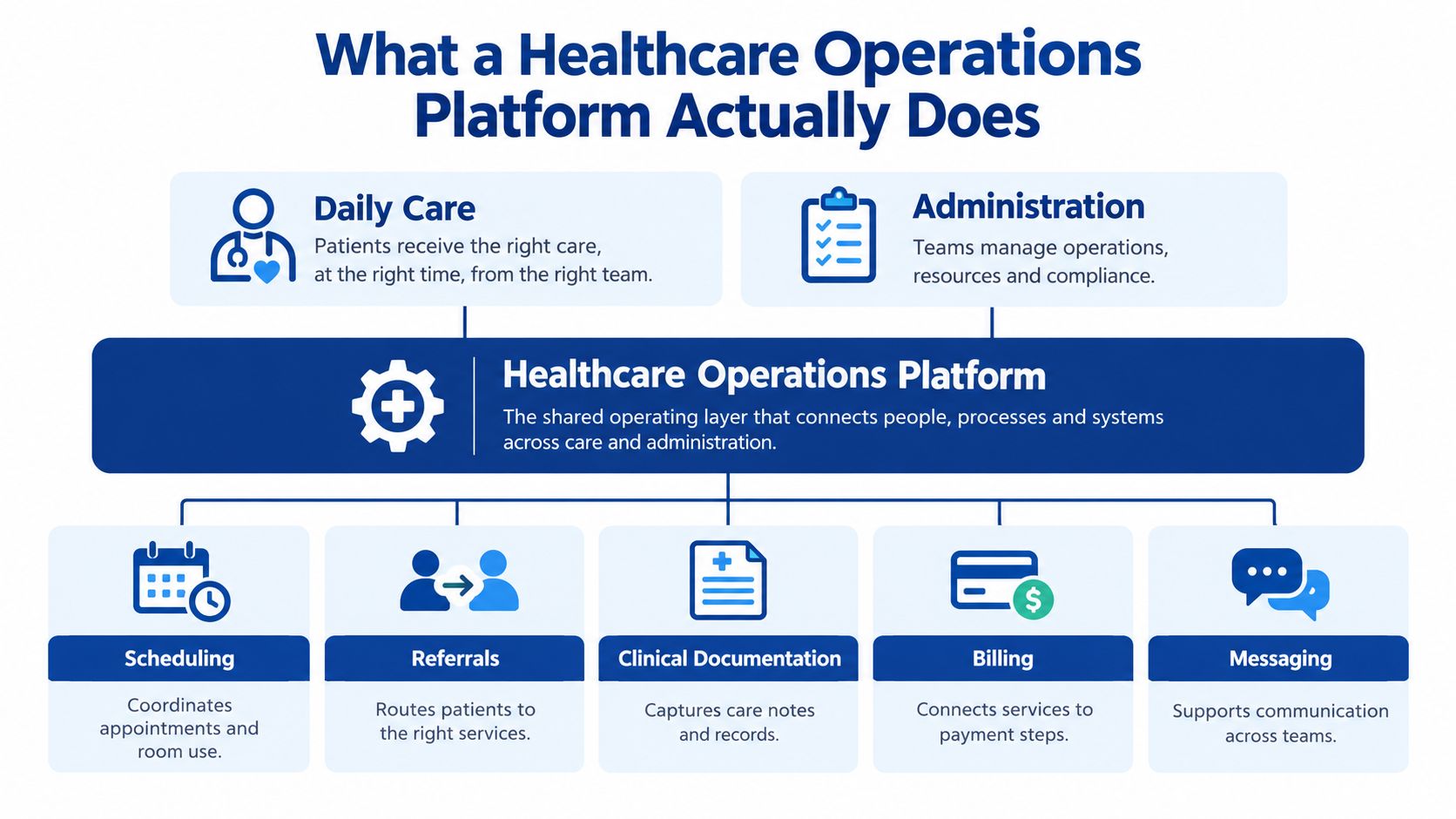
A healthcare operations platform is a shared operating layer that coordinates daily care and administration. It should connect scheduling, referrals, clinical documentation, billing, messaging and reporting without requiring staff to reconstruct the patient's journey manually.
Start with an appointment booking. The receptionist selects a service and clinician. That booking may also require a suitable room, a patient reminder, an insurance eligibility check where relevant and a record for operational reporting.
The following diagram brings those connected functions together.
A shared operating layer, not another record
Think of the platform as a central nervous system. It passes signals between parts of the organisation. It doesn't make every decision or replace every specialist system.
For example, the clinical record can remain the place where a clinician documents care. The operations platform should know whether the documentation needed for the next administrative task is ready, without asking reception staff to inspect clinical notes unnecessarily.
A useful way to assess HealthcareOps software is to separate its supporting layers:
Core workflows: The tasks, states and handovers that describe how work progresses.
Integration: Connections that bring relevant information into those workflows.
Security: Controls that determine who can view information or perform an action.
Automation: Rules that carry out permitted routine steps.
Analytics: Measures that help managers understand workload, delays and completion.
Follow an action through to its outcome
A reminder feature illustrates the difference between a tool and a platform. Sending a message is a task. Handling delivery failure, recording the patient's response and updating the booking team's work queue is an operational workflow.
For that narrower scheduling use case, Recepta.ai's article on how to reduce patient no-shows with scheduling automation provides a useful discussion prompt. During evaluation, ask a supplier to demonstrate what staff see when a reminder cannot be delivered, rather than accepting the successful-send screen alone.
Practical rule: Evaluate the whole task, including the unsuccessful path, before accepting a feature as complete.
A standalone electronic record or generic project tool may support part of this work. Neither should be treated as an integrated healthcare platform just because it stores information or assigns tasks. The test is whether people can coordinate a real care journey across the systems they use.
Workflows and Automation That Keep Care Moving
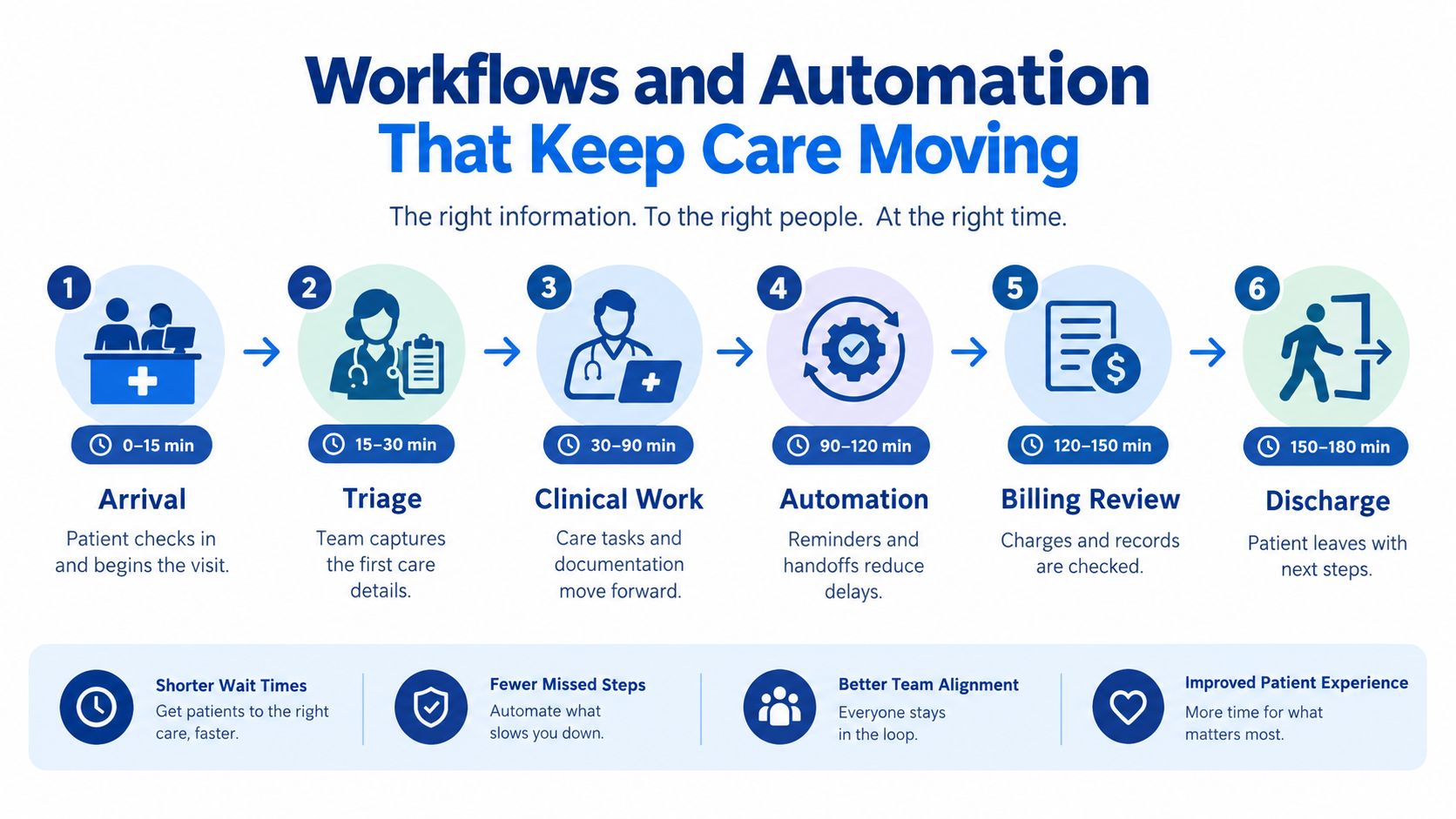
An appointment list tells you who is expected. A patient-flow view should tell you where each person is waiting, what they need next and which team can act.
For a hospital pathway, capture timestamps for arrival, triage, clinician assessment, diagnostic orders, result availability, disposition, admission or transfer, discharge and follow-up. In a clinic, the equivalent sequence may be simpler. The principle stays the same: measure transitions, not just attendance.
The diagram shows how administrative and clinical work can sit within a connected journey.
Look beyond the typical wait
Averages can hide patients who remain stuck. CIHI distinguishes the median, the point at which half of patients have waited less, from the 90th percentile, which describes the long-wait tail affecting roughly one in ten patients.
A useful dashboard should therefore show both typical waits and longer waits. It should also separate stages. If diagnostic results are ready but patients are still waiting for disposition, ordering more tests won't address that particular bottleneck.
CIHI's priority-procedure wait-time reporting also measures procedure volume and the proportion receiving care within established benchmarks. That distinction matters: completing more work isn't the same as improving timely access.
Automate coordination, preserve clinical judgement
Good starting points are tasks with a clear trigger, an agreed action and a named person responsible when the rule can't complete.
Pending results: Flag a result that hasn't arrived within the locally agreed window and assign follow-up.
Referral routing: Send an accepted referral to the appropriate service queue using approved routing rules.
Discharge preparation: Prompt transport, documentation or follow-up tasks when authorised staff confirm readiness.
Outstanding handovers: Escalate work that remains unacknowledged rather than repeatedly sending the same notification.
Automation should stop where clinical assessment is required. Software can surface an overdue result, but trained staff must decide what that result means for the patient.
For implementation planning, Cleffex's guide to healthcare workflow automation for operations provides a related starting point. Choose a workflow because its rules and responsibilities are clear, not because it produces the most impressive demonstration.
Interoperability That Works in Everyday Operations
An API connection proves that systems can communicate under defined conditions. It doesn't prove that a referral can be completed when the medication history is missing, or the patient identifiers disagree.
That distinction should shape every integration demonstration. Ask the supplier to send an incomplete record, repeat a message and interrupt an external connection. Then watch what happens at the receiving desk.
Shared meaning comes before reliable action
Standards help organisations agree on what information means. A date field must represent the same event. A medication code must refer to the intended medicine. An identifier must retain its connection to the organisation that issued it.
CIHI is developing the Pan-Canadian Health Data Content Framework and Canadian Core Data for Interoperability, designed to work with Canada Health Infoway's CA Core+ FHIR profiles.
For buyers, the practical question is how these standards appear in working software. Ask to see validation results, code mappings and retained source identifiers, not just a standards logo.
What happens when the referral is incomplete
Suppose a referral arrives without its medication history. A dependable workflow should make the gap visible without presenting the partial record as complete.
Reconciliation queue: Place the referral where authorised staff can review the missing information.
Provenance label: Show which organisation supplied each item and when it was received.
Consent status: Distinguish unavailable information from information that cannot be shared under the applicable permission.
Exception owner: Assign someone to request the missing material and record the response.
Duplicate handling: Flag possible matches for review rather than combining uncertain records.
A message can arrive successfully while the work remains unfinished.
FaxZen's data exchange guidance for healthcare providers can support discussions about exchange options. Keep those discussions grounded in the staff response to missing or failed information.
Cleffex's overview of healthtech interoperability solutions provides further integration context. Ask any partner how they will monitor failed messages, unmapped codes and time spent resolving exceptions. Those are operational acceptance criteria, not optional maintenance details.
Security and Privacy Built Into Every Workflow
A staff member notices that patient information was exported to the wrong recipient. The immediate problem isn't whether the platform has a security settings page. It's whether the team can identify what happened, limit further exposure and document its response.
A credible healthcare operations management system should support those actions within the same working environment staff use for scheduling, referrals and reporting.
Make everyday access deliberate
Ontario's Personal Health Information Protection Act requires health information custodians to take reasonable steps to protect personal health information against theft, loss and unauthorised use or disclosure. The obligation also covers unauthorised copying, modification and disposal, as explained in the Information and Privacy Commissioner of Ontario's privacy-breach response guidance.
Translate that responsibility into visible controls. Reception staff should receive access appropriate to their duties. Export permissions should be deliberate. Audit trails should show who viewed or changed a record, while retention and disposal rules should have clear owners.
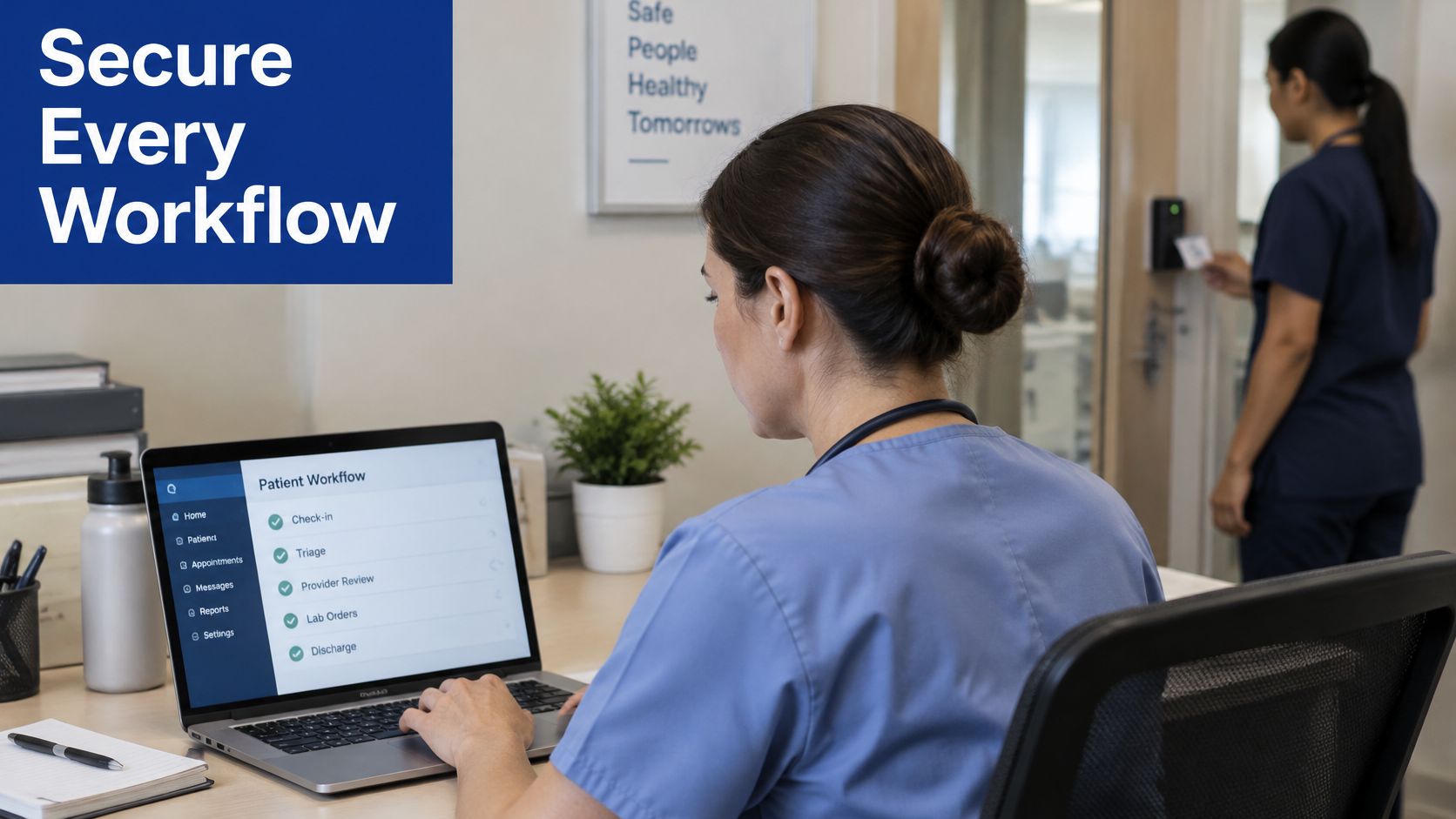
Security also needs to fit the physical working day, including shared workspaces and controlled access areas.
Make the incident response traceable
For the mistaken export, the platform should help authorised staff:
Record the incident: Capture discovery time, the suspected disclosure and the person coordinating the response.
Identify affected information: Establish which records and recipients are involved without relying on memory.
Contain further exposure: Support credential changes, access restrictions or system isolation where appropriate.
Preserve evidence: Retain relevant logs and document actions without overwriting the original sequence.
Track notifications: Record decisions, approvals and communications with affected people or authorities.
Ontario's commissioner describes immediate protocol activation, notification of relevant staff, containment and assessment of reporting duties in its privacy-breach reporting guidance. Certain breaches must be reported at the first reasonable opportunity. Ontario's requirements are a concrete example, not a substitute for reviewing the rules applicable to each deployment.
Ask a supplier to demonstrate the response using a fictional incident. Can the privacy lead reconstruct who did what and when? Can the team trace information into connected systems? A reassuring policy document isn't enough if staff must assemble the operational evidence manually.
Choosing or Building the Right Platform
Buying, configuring, and building are different responsibility models, not just different price points. Decide how much workflow change you can accept and who will maintain the result before comparing demonstrations.
A ready-made product can suit a clinic whose processes closely match the product's supported workflows. A configurable modular product may suit an organisation that needs different queues, forms or approval paths without taking responsibility for the entire application. Custom development deserves consideration when essential workflows or integrations cannot be accommodated safely within those options.
Criteria for Choosing a Healthcare Operations Platform
| Criterion | What to Check | Why It Matters |
|---|---|---|
| Interoperability depth | Demonstrated handling of incomplete records, failed exchanges and standards mapping | Connectivity must support usable information |
| Workflow fit | Staff can complete real scenarios without maintaining parallel spreadsheets | A feature list can conceal daily workarounds |
| Security controls | Role permissions, audit evidence, export controls and incident workflows | Privacy obligations require practical actions |
| Reporting | Clear definitions, stage-level measures and usable exports | Managers need to understand delays, not just count activity |
| Scalability | Additional sites, queues, users and interfaces can be supported | Growth should not require rebuilding the operating model |
| Long-term responsibility | Named owners for maintenance, upgrades, support and integration changes | Problems continue after the initial launch |
A smaller clinic may favour straightforward support and limited configuration. A hospital or insurer may place greater emphasis on governance across departments, interfaces and organisational boundaries. Neither should accept vague promises about what they can add later.
Test the patient side as carefully
In 2025, 69% of Canadians could access at least one type of electronic health information, but only 13% had online access to all three core components: laboratory and imaging results, non-COVID-19 immunisation records, and medication history and renewals.
Test whether a patient can understand what is available, what is missing and whom to contact. Don't mistake a polished login screen for a complete service.
For organisations considering custom work, Cleffex Digital Ltd, a Canada-based subsidiary of Bridge Global, develops custom software and healthcare software integration solutions for clinics, hospitals and startups. Its role can include connecting existing systems and developing workflow or reporting components around them.
Ask every supplier or development partner the same questions: What is included? What remains manual? Who supports each interface? How can you retrieve your data if the relationship ends? Clear answers are more useful than an expansive roadmap.
Frequently Asked Questions and Your Next Step
Does a platform replace an electronic medical record?
Not necessarily. Set the boundary before choosing software: which system owns clinical documentation, which manages operational tasks and which may update shared information?
Ask for a written responsibility map. A system should not overwrite information merely because it received a newer message. Your team needs agreed rules for authoritative records, permitted changes and disputes.
How should we scope a pilot?
Choose a bounded workflow with a recognisable beginning and end, such as referral receipt through to booking. Define what is included, what remains outside the pilot and how staff will return to the previous process if necessary.
Use representative, appropriately protected test scenarios before live operation. Include unsuccessful paths, such as a patient who cannot be contacted or a referring practice that doesn't respond. Agree on acceptance criteria before the demonstration, rather than deciding afterwards that the software looked useful.
What should we measure during the early months?
Start with a baseline from your existing process, using the same definitions you'll apply after launch. Review operational effort as well as completion.
Time to usable information: How long before staff have what they need to act?
Manual touches: Where must someone copy information, chase a response or correct an entry?
Reopened work: Which apparently completed tasks return because something was missed?
Staff confidence: Can colleagues explain the current status and next action without asking another team?
Discuss the results with frontline staff. A dashboard may show completion while receptionists describe a new workaround that the reporting doesn't capture.
Does a small clinic need a full platform?
Not automatically. If the main difficulty is a narrow scheduling issue, a focused improvement may be more appropriate than a broad replacement.
Ask reception, clinical, administrative and privacy colleagues to identify the handovers they struggle to complete. Involve them in testing, and make sure somebody has time and authority to act on their feedback.
A useful first move: Map the work before choosing the software.
This week, follow a real workflow using an anonymised example. List every handover, mark each point where information is retyped or delayed, and identify who currently resolves the problem. Take that map into a scoped assessment so the discussion starts with observable work rather than a product catalogue.
Cleffex Digital Ltd offers custom healthcare software development and integration services to help connect existing systems and support dependable operational workflows. Visit Cleffex Digital Ltd to explore its healthcare software services and discuss a scoped assessment using your workflow map, exception list and support requirements.