

Canadian family physicians using electronic medical records rose from a 73.0% baseline in 2015 to 92.6% in 2023–24, yet the information patients repeat at the door still rarely arrives in that record on its own. Healthcare intake automation uses digital forms, automatic checks and system connections to collect and route patient information before and at arrival, with staff stepping in only for exceptions.
You're likely watching that gap this morning. Someone is at the counter with a pen, rewriting a medication list the clinic already holds somewhere else. The chart is digital. The path into the chart often isn't. This guide treats that path as a connection problem, not a faster form.
What Healthcare Intake Automation Means in Practice
A referral sits in the clinic inbox before the doors open. It already names the medication, the diagnosis and the reason for the visit. An hour later, the patient still faces a blank form, because that letter never became fields the chart can store.
Healthcare intake automation does three jobs. Judge it by whether each answer reaches the clinical record without a second typing.
Capture means structured digital patient intake for demographics, consent, insurance, symptoms and referral documents. Those items need to be fields, not a photo of handwriting. Check means validation rules that catch a missing insurer or a mismatched date at entry, before anyone has to search for it. Route means sending clean fields to the electronic medical record, and sending unsettled cases to a staff queue with a reason attached.
Hotel pre-arrival check-in splits the work the same way. Guests confirm the name, dates and payment before the desk, so reception handles a broken key card rather than a blank registration card. Automated medical forms should leave clinic staff with exceptions of that kind. A form that staff still retype has not reached the chart. Rules can flag a blank medication list. They cannot supply a drug name the patient does not remember. That case belongs in the staff queue, with the reason written on it.
| Criterion | Paper intake | Automated intake |
|---|---|---|
| Path into the chart | Details stay on paper until staff retype them | Structured fields write into the record without a second entry |
| Error checking | Mistakes surface at the desk or after the visit | Validation at entry flags missing or invalid fields |
| Visibility before the visit | Usually none until the patient arrives | A clinician-ready summary is in the chart before the appointment |
| Staff effort | Registration and transcription happen on arrival | Staff handle flagged exceptions only |
| How the patient completes it | In person, on paper | Phone, computer, or assisted completion at the clinic |
Health Canada reported that family-physician EMR use moved from 73.0% in 2015 to 86.0% in 2021–22 and 92.6% in both 2022–23 and 2023–24. Those figures describe how common the digital chart has become. They do not, by themselves, put waiting-room answers into that chart. Automation counts when capture, check and route finish that path.
Practical rule: Sketch how one patient's details travel today, from first phone call to the chart, and mark every place a person retypes a field.
How Automated Intake Works From Referral to Visit
The picture below compresses the path into five stages. The working checklist splits the same path into eight actions, because each handoff is where data usually gets lost.
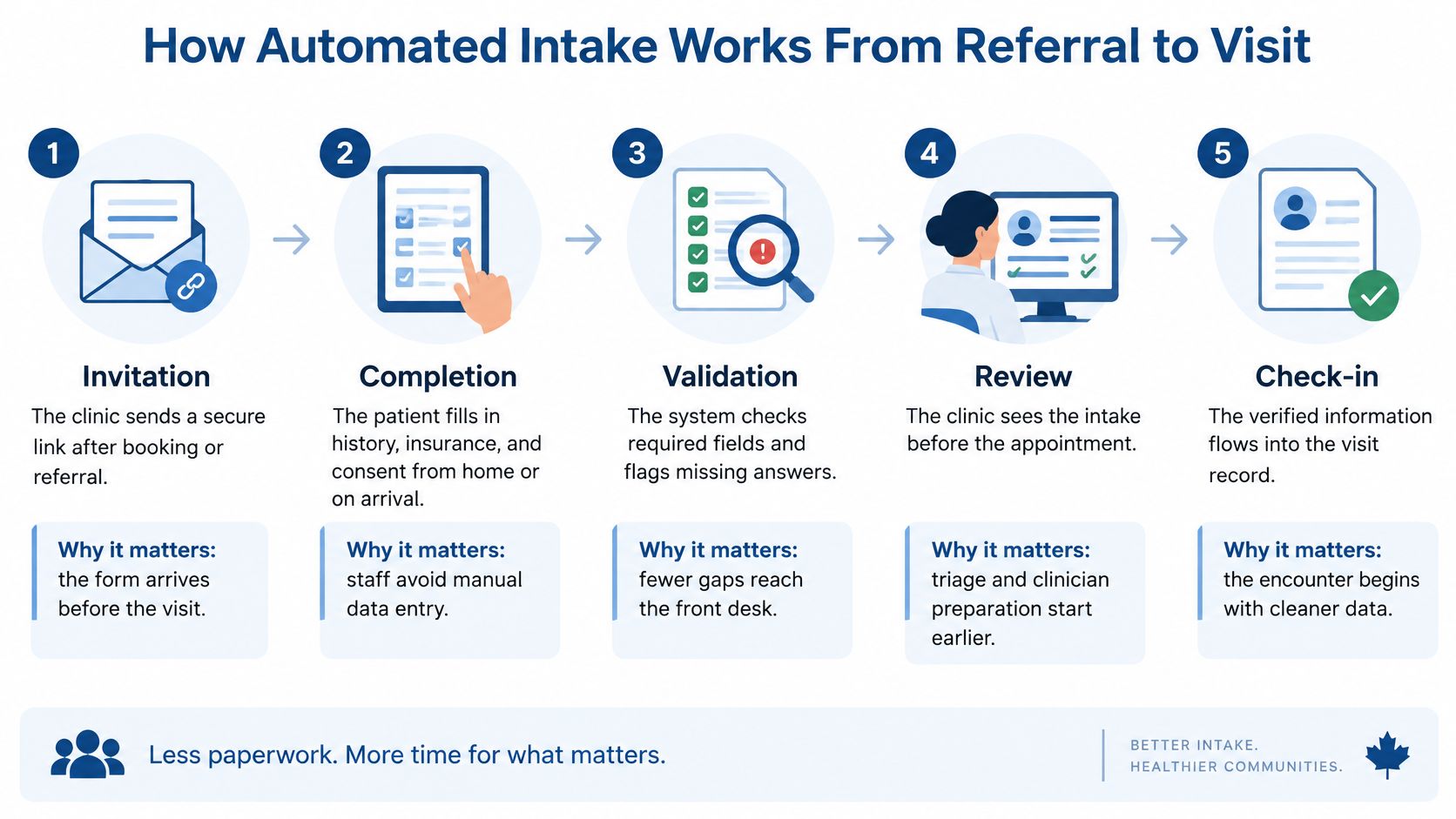
Invitation: The clinic sends a secure link after booking or referral, so the form arrives before the patient does anything else. That timing is what makes pre-visit preparation possible.
Identity and consent: The patient confirms who they are and records consent choices, and each choice is saved with a timestamp. Closer Innovation Labs healthcare eSignatures are a useful reference for consent forms that need a clear signature trail rather than a scanned scribble.
Structured questionnaire: Dropdowns and date pickers replace free-text boxes, and rules reject impossible values, such as a date of birth in the future. Structured fields are what an interface can write into a chart. A PDF usually can't.
Eligibility and insurance: Where a payer or registry link exists, the system checks coverage details instead of asking the desk to phone a help line. A failed check should say what failed, not vanish into a generic error.
Exception routing: Urgent symptoms, mismatched identity or unanswered required items go to a staff queue with a plain reason. This is the step that protects safety without turning every form into a phone call.
Record transfer: Approved fields are written to the electronic medical record through a standards-based interface. If a referral is part of that path, the same discipline applies to healthcare referral automation, where completeness matters more than a pretty status screen.
Clinician review: The clinician sees a summary and the history gaps before the visit, so the appointment starts with questions that still need a person.
Arrival: The patient confirms details on a kiosk or with staff, and the visit starts with the record already in place. Confirmation is a check, not a second full registration.
Say a specialist clinic used to ask every patient, at the desk, for the referring physician, the test date and the insurer, even when the referral letter already held all three. After the link went out with the booking, those three questions left the counter. Staff only opened a file when the letter was missing, or the coverage check failed.
The usual slip sits at step 5. Teams route too much to the queue, including items a validation rule or a patient correction could have settled. The form looks fast, and the desk is as busy as before.
Where Intake Automation Fits Across Clinic Workflows
Patient registration software is not one product for one doorway. The first data that matters changes with the setting, and so does the system that must receive it.
| Setting | Main intake goal | Data captured first | Key handoff |
|---|---|---|---|
| Family practice | Complete history before a routine visit | Demographics, medications, consent, recent concerns | Electronic medical record |
| Specialist clinic | Confirm the referral is complete | Referral letter, prior tests, imaging, insurance | Specialist scheduling and triage |
| Hospital outpatient clinic | Register once across departments | Identity, coverage, appointment type, care team | Hospital information system |
| Emergency department | Start the registration clock and triage fast | Identity, presenting complaint, allergies | Triage and admission records |
| Virtual care | Verify identity and device readiness | Identity, consent for remote care, location, contact details | Clinician consultation and record |
A family practice fails if medications never reach the EMR. A specialist clinic fails if the referral letter stays in an inbox while scheduling treats the patient as ready. Hospital outpatients fail when each department opens a new registration. Emergency registration has to be short, because the clock is already running. Virtual care fails if identity and location are guessed after the video starts.
Ontario Health separates Wait 1, the time from referral to consultation with a clinician, from Wait 2, the time from a decision to treatment or diagnostic imaging, and its model includes administrative, clinical and demographic data. An intake platform should timestamp referral receipt, validation, triage, clinician review, appointment booking and referral closure, not only the final appointment. Those stamps show whether delay comes from missing documents, manual eligibility checks, a triage queue or appointment capacity.
Why the clock starts at registration
Ontario Health also defines emergency-department length of stay from the earlier of triage or registration until admission or discharge. A missing registration time hides whether the delay began at the door. The useful benchmark is median and 90th-percentile time from intake submission to a complete, clinician-reviewable referral, because a long tail of incomplete files can hold up access even when the average looks fine.
Conversation tools can sit beside this, not instead of it. Yellow.ai on healthcare conversational AI shows how a guided exchange can collect answers, while the intake system still has to land those answers in the record. Pair that with a clear view of patient engagement technology so reminders don't become a second silo.
Pick one setting, list the three events that start or stop the clock for its patients, and confirm the intake system records each one.
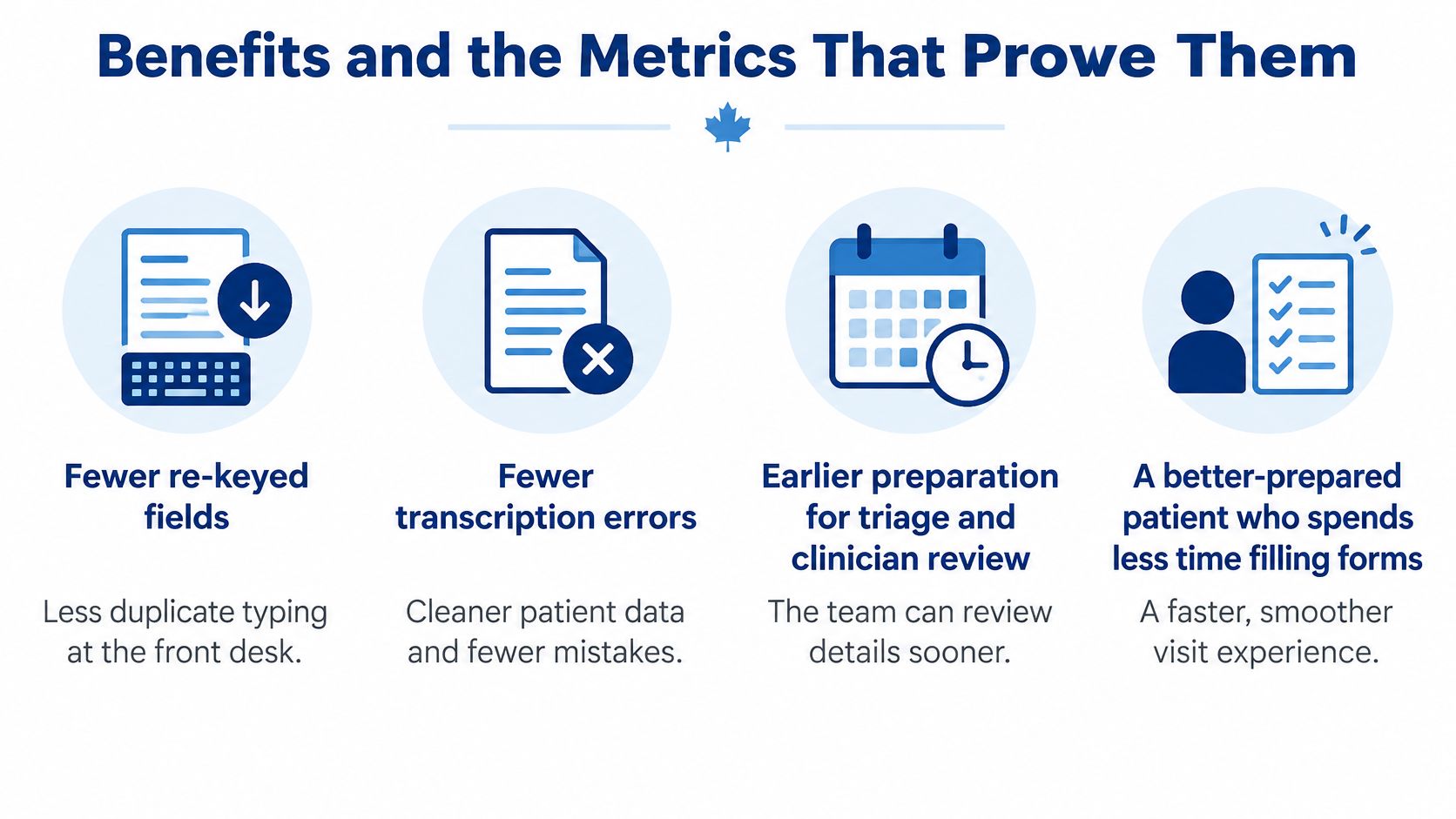
Benefits and the Metrics That Prove Them
A patient finishes every field on a tablet in the waiting room. Ten minutes later, a clerk types the same name, consent, and insurance into the chart, because the answers never arrived there. The form worked. The connection did not. Treat intake automation as that connection: captured data has to reach the clinical record without a second typing pass. A completed screen works like a labelled envelope. Until someone files it in the chart, the clinician still opens an empty folder.
Administrative work already consumes a substantial share of physicians' time. A national picture will not forecast one clinic's intake project. The clinic's own baseline is the most reliable measure of gains.
Judge each benefit by whether the chart received the data, not by how fast the form closed:
Fewer re-keyed fields: Demographics, consent, and insurance land once, in the record staff use.
Fewer transcription errors: The chart matches what the patient entered, and corrections stay distinguishable from the original.
Earlier preparation: Triage and the clinician can read a summary before the slot, not during it.
A better-prepared patient: Less of the visit is spent reconstructing a history from memory.
Automation cannot type into a record it cannot reach. If staff still re-enter those fields, the visit starts from the same blank page.
| Metric | What it reveals | How to calculate |
|---|---|---|
| Administrative minutes per completed intake | Staff time spent on each registration | Logged staff time divided by completed intakes |
| Manual re-entry rate | Records still retyped between systems | Records with manual field changes divided by total records |
| Median time to clinician-reviewable referral | Typical speed of a complete submission | Middle value of submission-to-ready times |
| 90th-percentile time to referral | Delays for the slowest tenth of submissions | Value below which 90% of submissions fall |
| Form abandonment rate | Patients who start but do not finish | Started forms without submission divided by started forms |
| Share routed to staff queues | Exception load on staff | Flagged submissions divided by total submissions |
Read each row as a connection test. Minutes per intake show whether registration work shrank. Re-entry rate shows records still copied by hand. Median and 90th-percentile times show how long a submission takes to become something a clinician can review. Abandonment shows who starts and stops. The staff-queue share shows how much still needs a person. Measure for four to six weeks before go-live, keep the same definitions after launch, and ignore completion rates that hide re-entry.
Limits, Silos and Equity Risks to Plan For
More digital intake can add work if it becomes another place data goes to sit. Statistics Canada reports that 92% of Canadian healthcare providers had access to a digital health system in 2024, but only 52% used one to share clinical information outside their main practice. Insufficient integration was the leading barrier, reported by 50% of providers, and 46% said their systems could not electronically send or share clinical information.
Watch for these limits before you celebrate a go-live.
A new silo: Data no other system can read. Warning sign: staff still print or re-key.
Stalled queues: Incomplete submissions pile up. Warning sign: a rising exception rate.
English-only or jargon-heavy forms: Warning sign: high abandonment among patients who prefer another language.
No reliable internet or smartphone: Warning sign: calls asking for paper forms.
Questionnaire fatigue: Very long forms. Warning sign: skipped sections.
Over-automation: No person left for patients who need help. Warning sign: complaints that there is nobody to ask.
A Statistics Canada analysis of official-language care found that French-speaking adults in Ontario near hospitals designated to provide services in French had a 34% predicted probability of receiving care in their preferred official language, compared with 16% nearer non-designated hospitals. Intake that assumes English, reliable internet and independent completion can exclude people. Test-assisted and paper routes in the pilot.
Automation supports clinical judgement. It doesn't replace it. A flagged symptom is a prompt for a clinician, not a diagnosis.
The federal announcement on connected care points to the Pan-Canadian Interoperability Roadmap for common standards on secure transfer, and to proposed legislation that would require digital-health companies to adopt common standards for protected exchange. Design patient onboarding automation to share data from the start, or you will rebuild the silo you meant to close.
Security, Privacy and Compliance Essentials
Intake holds sensitive data from the first click, so controls belong in the build, not in a later policy binder.

The Public Health Agency of Canada requires the Canadian Primary Care Sentinel Surveillance Network to follow the privacy legislation of the province where data is collected, and data is de-identified before the agency receives it. Its secure environment uses encrypted connections and stops researchers from copying data, taking screenshots or reaching the internet from the workspace. Researchers can't download raw data, link it to other datasets or send it onward. An intake platform isn't a research database, but that is the level of restraint sensitive health data deserves. Patients can opt out of that network by speaking with their primary-care practitioner or participating staff. Offer a comparable, documented route for correction or withdrawal where provincial rules allow it.
A minimum control list
Collect less: Only what registration, triage or care needs.
Encrypt: In transit and at rest.
Limit roles: Front-desk staff shouldn't open clinical notes they don't need.
Keep immutable audit logs: Who saw or changed a field, and when.
Split analytics: Identifiable details stay out of reporting extracts.
Record consent: Explain each data category and store the status.
Allow correction: A clear route where the governing rules permit it.
In Canada, PIPEDA sits alongside provincial health privacy laws. Our guide to PIPEDA in healthcare is the place to start that check. In the United States, HIPAA is the baseline, and Matil's HIPAA compliance guidance is a practical read on document sharing under that regime. In the European Union, GDPR applies. Confirm which regime governs your site, and ask vendors for audit reports, not a slide that says "compliant".
Frequently Asked Questions About Intake Automation
Does healthcare intake automation replace front-desk staff?
No. It moves effort from typing and chasing forms to exceptions, flagged reviews and patients who need a person. A desk with nobody left to help is a failed design, not a lean one.
How is intake automation different from AI triage or chatbots?
Intake collects and routes information. Triage tools and chatbots add clinical or conversational decision support, and that needs its own clinical governance. Don't let a chat window stand in for a record interface.
How long does implementation usually take?
It depends on how many systems you connect and which record system you use. A single-clinic pilot with one EMR link is far quicker than a multi-site hospital rollout. Ask for a phased timeline before you compare prices.
Can patients who can't use a computer or phone still complete intake?
Yes, if you planned for it. Offer phone or assisted completion and a paper fallback, and test those routes in the pilot. The checklist in the next section is how you test a vendor's answers against a real clinic.
Confirm These Checks Before You Commit to a Platform
Start with one clinic or one department, not the whole organisation, and decide go or no-go before any contract is signed. Put the same questions to every vendor. We build software for regulated healthcare workflows and integrate it with hospital systems, and we should face the same test.
Does the platform write approved fields to our electronic medical record through standard APIs, and which record systems are already live?
Can each data element be mapped to our provincial or hospital field definitions?
Are audit trails and consent records exportable?
Is assisted completion available in both official languages, by phone and for proxy caregivers?
What is the fallback when the system is down, including how staff capture paper and reconcile it later?
Who owns the data when we leave?
Set a four-to-six-week baseline, run an eight-to-twelve-week pilot in one setting, and judge it on minutes per intake, re-entry rate, median and 90th-percentile time to a clinician-ready referral, abandonment and the share sent to staff. A pretty demo that can't show those numbers is not ready. Read how we approach healthcare software integration and score that work with the same six questions you would give any other supplier.
Cleffex Digital Ltd builds healthcare software integration for North American healthtech teams, connecting intake, compliance and clinical systems without a second round of typing. If your clinic is ready to test whether patient details reach the chart, visit Cleffex Digital Ltd and start with one department, one interface and a baseline you can measure.