

Ontario's Ministry of Health reported that by 2025–2026, more than 300,000 frontline health-care providers could access integrated patient records, including hospital reports, lab test results, diagnostic images, drug information, and immunisation data, up from more than 266,000 in March 2023. That's the key shift behind healthcare workflow integration. The question is no longer whether a hospital has digital tools; it's whether those tools help clinicians, administrators, and patients move through care without friction.
In practice, that distinction is where most projects succeed or fail. A site can have an EHR, a patient portal, lab systems, and scheduling software, yet still leave nurses toggling between screens, clerks re-keying demographics, and physicians waiting on scanned documents. When workflows stay fragmented, connectivity becomes a technical achievement with little operational value.
Why Healthcare Workflow Integration Matters Now
Canadian care teams already live with the gap between digital systems and usable workflows. Ontario's reporting shows that more than 300,000 frontline health-care providers can now access integrated patient records across hospital reports, lab results, diagnostic images, drug information, and immunisation data, but the operational win only appears when that access shortens triage, reduces callbacks, and keeps handoffs intact. The technology is only half the story. The other half is whether the nurse, physician, registrar, or pharmacist can use it without extra clicks and workarounds.
The real problem is not storage; it's movement
A connected platform that still forces staff to jump between portals is only partially useful. In one common pattern, a clinician opens the EHR for the chart, a separate lab portal for results, and a third system for medication history. Meanwhile, administrative staff are still copying identifiers into downstream systems, because the interfaces don't carry the right context end to end.
That kind of fragmentation is why workflow projects need to be judged on daily practice, not architecture diagrams. If you're trying to close referral gaps or clean up discharge follow-up, resources like reducing denials with RCM automation are useful because they show how downstream administration depends on upstream workflow quality. The same logic applies to clinical coordination. Better integration reduces rework before it becomes a billing, safety, or satisfaction issue.
Practical rule: if a workflow still depends on fax, manual re-entry, or a second login, it isn't really integrated yet.
The internal mechanics matter too. A connected care strategy only becomes durable when the workflow itself is redesigned, not just the interface between systems. That's why a guide like connected healthcare systems is relevant here. It frames integration as an operating model, not a software feature.
Why the urgency keeps rising
Ageing patients, multi-morbidity, and short staffing make disconnected systems harder to tolerate. Every time a clinician has to reconstruct the story from fragments, cognitive load goes up, and decision-making slows down. That's not an abstract usability issue; it's an operational one.
The organisations acting now are setting the baseline for what “normal” care delivery looks like over the next decade. In the Canadian context, that means treating healthcare workflow integration as core infrastructure, not an optional upgrade.
Understanding Healthcare Workflow Integration
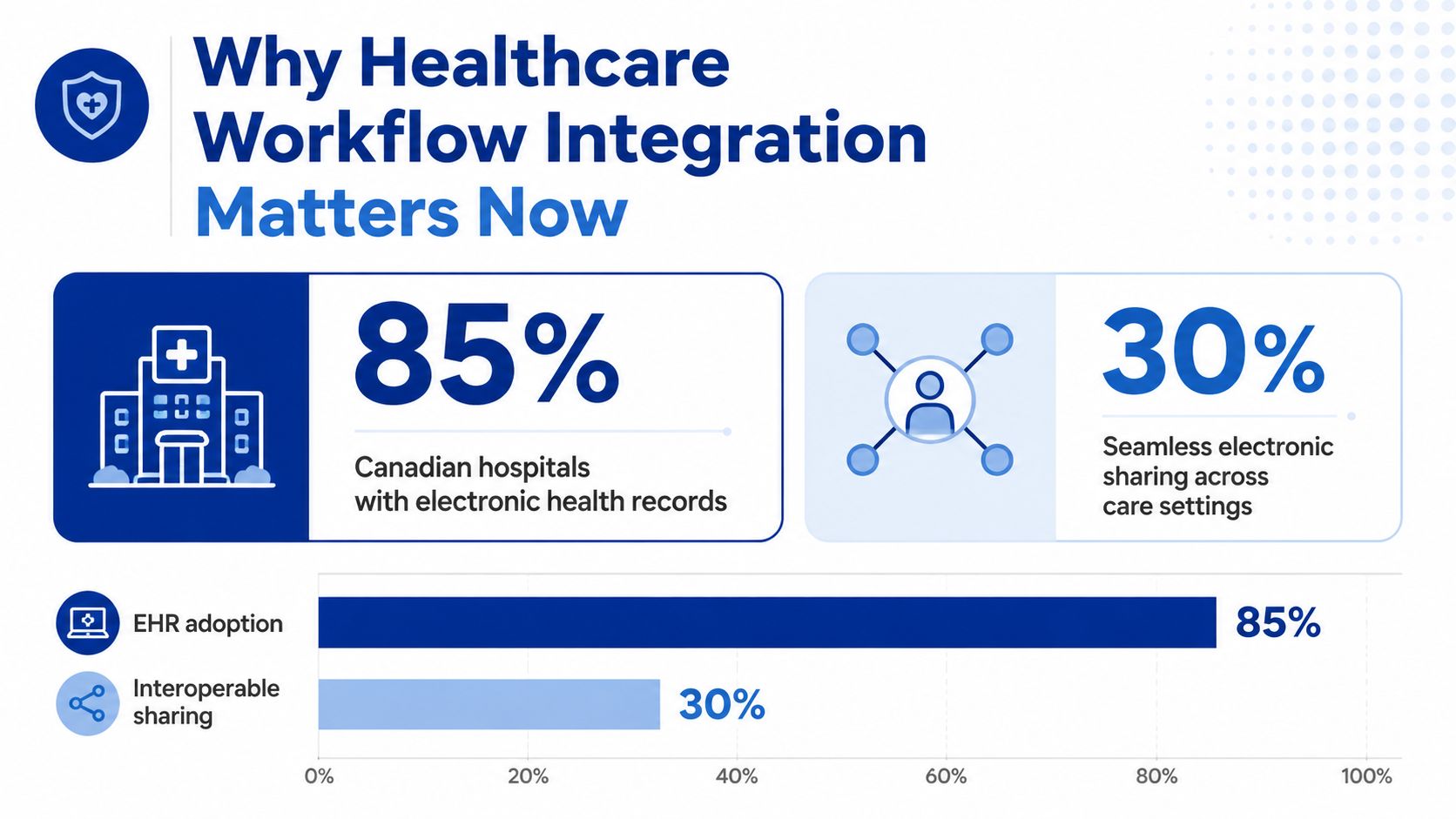
A chart showing 85 per cent of Canadian hospitals use EHRs while only 30 per cent share data smoothly would say a lot about the problem. Connectivity is common. Workflow adoption is not.
At a practical level, healthcare workflow integration has three maturity levels. Basic connectivity moves data between systems, but staff still patch the gaps. Process automation removes some manual steps through triggers. Workflow orchestration goes further, routing the right task or information based on clinical context.
From data exchange to orchestration
Most organisations stop at basic connectivity. A message reaches another system, but staff still interpret it, validate it, and move it along by hand. That helps, yet it leaves the hardest part untouched, the work clinicians and clerks still do outside the system.
Process automation is more useful. A lab result can trigger a notification, a discharge summary can create a follow-up task, or a referral can open a work queue without someone chasing it by phone. The value is practical. It reduces repetitive handling and lowers the number of places where work gets stuck.
Orchestration is the point where integration starts to support the workflow itself. Ontario's provincial access model, where clinicians can view hospital reports, lab test results, diagnostic images and reports, drug information, and immunisation data in one place, shows how multi-source access can support decisions rather than just aggregate records. That is a workflow layer, not just a data layer.
A good integration design starts with the task the clinician is trying to finish, then works backwards to the systems that must cooperate.
That order matters because API connectivity alone can still leave the experience fragmented. A vendor may say the systems are linked, but if a physician still has to reconcile conflicting screens or a clerk has to re-enter the same demographic data twice, the project has only moved the friction around.
What integration really means
Operationally, integration connects clinical, administrative, and patient-facing systems so information, tasks, and decisions move without manual intervention. That includes the chart, the scheduling layer, the referral path, the patient communication layer, and the reporting stack. It also means the workflow design has to reflect how care happens, not how a data model is drawn.
The misconception to avoid is simple. A platform with APIs is not automatically integrated.
Real integration is measured by whether people stop translating between systems. That usually takes more than technical interface work. It needs process mapping, local ownership, and a clear view of the hidden handoffs that slow care. The workflow analysis complete roadmap is useful here because it focuses on those handoffs and the delays they create.
Standards and Integration Patterns That Power Connected Care
Canadian healthcare still runs on a mixed stack, so no single standard solves everything. Ontario's interoperability planning shows that HL7 v2 remains active for community data contribution, while FHIR DSTU2 specifications have been developed for independent health facilities to submit reports into health record management systems (Ontario interoperability plan). That hybrid model is normal. In live environments, legacy transport and newer APIs have to coexist.
Where each standard actually fits
HL7 v2 is the workhorse for hospital feeds, especially admissions, discharges, transfers, and lab messaging. It persists because it's embedded in existing infrastructure and still gets the job done where vendors and sites have long-standing interfaces.
FHIR is the modern layer for granular, app-level exchange. It's the better fit for patient-facing portals, provincial data-sharing networks, and workflow-aware services that need structured resources rather than flat messages. The operational advantage is that it supports cleaner application behaviour, but only when the source and recipient both agree on the data content.
HL7 CDA still matters for document exchange, especially discharge summaries and other narrative artefacts that need to travel as a complete clinical document. It's not as flexible as FHIR, but it remains useful where the goal is a faithful handoff rather than a fine-grained query.
| Standard / Pattern | Primary Use Case | Where It Lives in the Stack | Key Limitation |
|---|---|---|---|
| HL7 v2 | ADT, lab feeds, legacy hospital messaging | Transport and interface layer | Rigid structure, limited granularity |
| FHIR | App-level exchange, portals, modern provincial services | Application and interoperability layer | Needs shared resource design and governance |
| CDA | Discharge summaries, clinical documents | Document exchange layer | Document-centric, not workflow-native |
| Point-to-point APIs | Simple bilateral connections | Direct system-to-system links | Hard to scale and maintain |
| Middleware and integration engines | Multi-system orchestration | Core integration backbone | Requires governance and interface ownership |
| RPA | Legacy screens with no API | Stopgap automation layer | Fragile if overused |
Why patterns matter as much as standards
Point-to-point APIs can be fine for a narrow bilateral exchange, but they become brittle as the number of systems grows. Middleware and integration engines, including products such as Mirth or Rhapsody, are usually the backbone in larger hospital environments because they centralise routing, transformation, and monitoring. That's where orchestration becomes manageable instead of chaotic.
RPA has a place too. When an older EMR or administrative system has no practical API, a bot can bridge the gap and reduce manual work. It's a pragmatic stopgap, not a long-term architecture. If you use it to hide a design problem, you'll inherit a maintenance problem later.
The architectural lesson is straightforward. Use FHIR for future-facing services, middleware for complexity, and RPA only where the legacy environment leaves you no cleaner option. For implementation detail on the interface side, the healthcare API integration operations guide is a useful companion.
Clinical and Business Benefits Beyond Data Exchange
The strongest business cases for integration usually miss the point. They count messages, records, and interfaces, then assume those volumes translate into value. They don't, unless the workflow burden drops for the people doing the work.
Measure burden relief, not just system throughput
The Royal College's 2024 task force is blunt about this. It says procurement should evaluate end-user experience, workflow, and clinician burden, and interoperability projects should be co-designed with practising clinicians (Royal College task force report). That framing matters because faster data exchange can still produce faster frustration if the user has to reconcile multiple screens or chase missing context.
The benefits that matter are concrete:
Fewer duplicate entries, because demographics, allergies, and medication histories arrive once and flow forward.
Less fax-based handoff work, because referrals and updates move electronically instead of through manual reprocessing.
Lower context switching, because staff do not need to bounce between disconnected screens for one patient story.
Faster decisions, because the care team sees relevant data in one workstream instead of piecing it together.
Those are clinician benefits. On the administrative side, cleaner workflows help discharge planning, referral handling, and claims preparation. The best outcomes show up when a problem is fixed at the point where work starts, not after the fact in a reporting dashboard.
If the nurse's shift gets harder after the integration goes live, the project has failed no matter how elegant the interface engine looks.
The business case also needs to recognise support load. When systems stop fighting each other, IT teams see fewer tickets about duplicate data, failed handoffs, and “which system is right?” questions. That matters because support teams in healthcare don't have spare capacity to absorb preventable friction.
What good ROI looks like
ROI should be measured where the work happens. If discharge coordination improves, if referral quality is cleaner, and if help desk noise drops, the integration is doing real work. If the dashboard shows healthy interface uptime but frontline users still avoid the system, the investment hasn't been absorbed into practice.
For operational teams that want a broader automation view, revenue cycle management AI is relevant because it connects workflow quality to documentation and downstream administrative performance. That connection is exactly why integration and operations can't be separated in healthcare.
| Friction Point | Integration Benefit | Measurable Outcome |
|---|---|---|
| Duplicate data entry | Shared patient context | Less re-keying |
| Fax handoffs | Electronic task routing | Fewer manual follow-ups |
| Disconnected screens | Unified clinical view | Lower context switching |
| Missing referral detail | Structured data capture | Cleaner downstream processing |
Architecture and Security Considerations for Canadian Healthcare
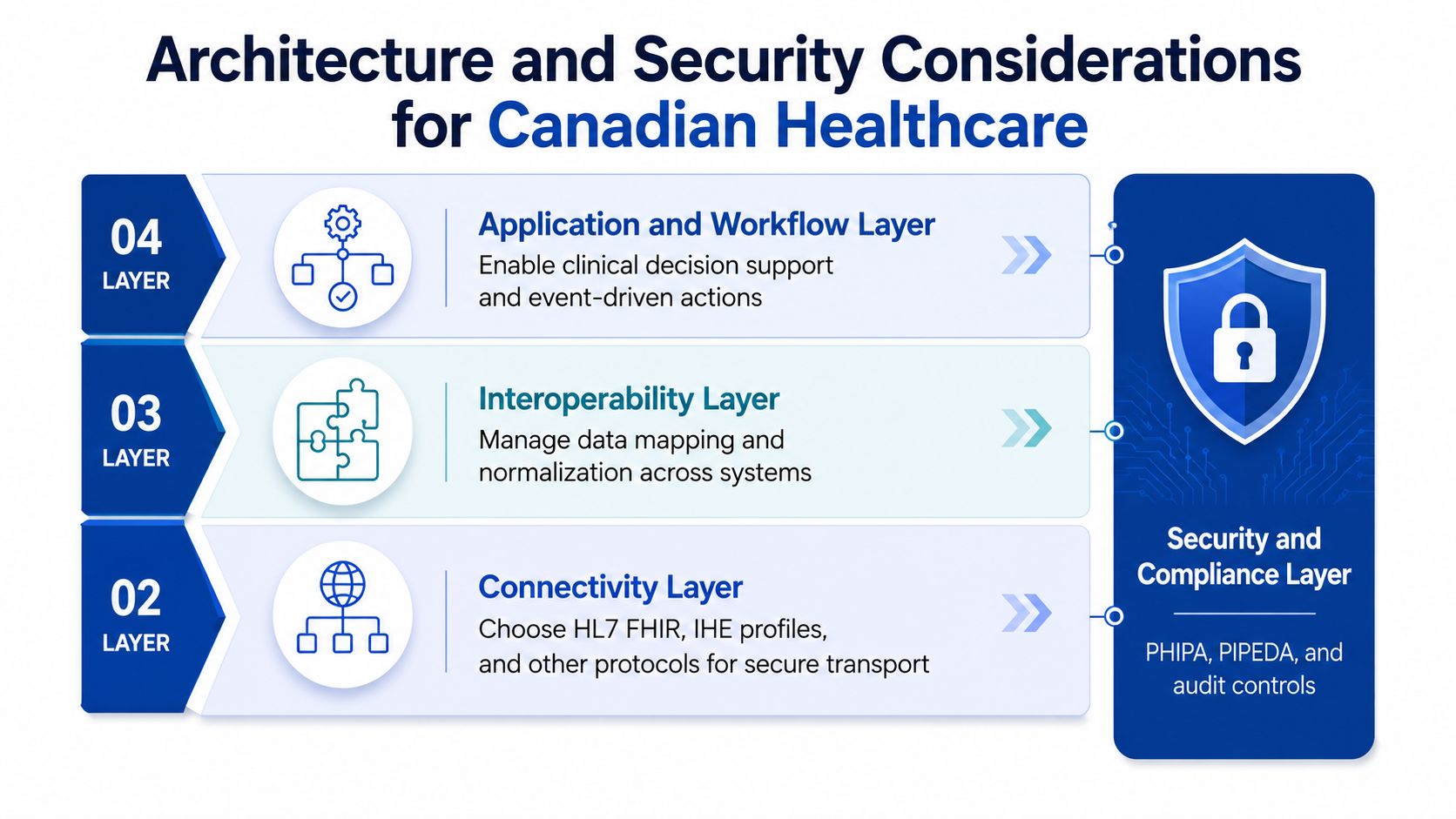
Integration only succeeds in production when the architecture aligns with the practical demands of a hospital or clinic environment. The initial choice is the transport pattern. Point-to-point links are suitable for narrow cases, middleware is better for multi-system environments, and event-driven designs help when different systems need to react to a shared change without constant polling.
Build the stack in layers
The data layer comes next. FHIR resource mapping, master patient index reconciliation, and code normalisation are the unglamorous tasks that keep one patient from becoming three records in three systems. If the data model is messy, the workflow layer inherits that mess and turns it into user pain.
The application and workflow layer is where clinical decision support and event-driven actions belong. The system can route a task, surface a result, or prompt a follow-up without making the clinician hunt for the next step.
A practical integration stack usually has to respect the existing provincial mix. Ontario's planning shows HL7 v2 and FHIR coexisting in the same ecosystem, which is exactly what teams should expect in real deployments.
Security is part of workflow design
Security and compliance aren't separate from integration. In Canada, the project has to align with provincial and federal privacy obligations, including PHIPA in Ontario, PIPEDA for cross-provincial handling, and similar provincial controls elsewhere. The practical questions are the ones that stall go-live if they're ignored.
Consent handling: If a patient's directive isn't carried consistently, users lose trust fast.
Audit logging: Logs need to support clinical governance and privacy review, not just technical troubleshooting.
Encryption boundaries: Teams need to decide where encryption starts and ends, especially when cloud services or middleware are involved.
Privacy impact review: Cloud hosting usually needs assessment before procurement locks the design.
A secure integration that creates more manual work is still a bad design. Security has to fit the workflow, not fight it.
The Canadian direction of travel is also clear. The Government of Canada has described the Shared Pan-Canadian Interoperability Roadmap as a long-term vision for secure health information exchange across systems and to patients themselves. That means governance, not just transport, is now part of the architecture conversation.
Implementation Roadmap and Adoption Metrics
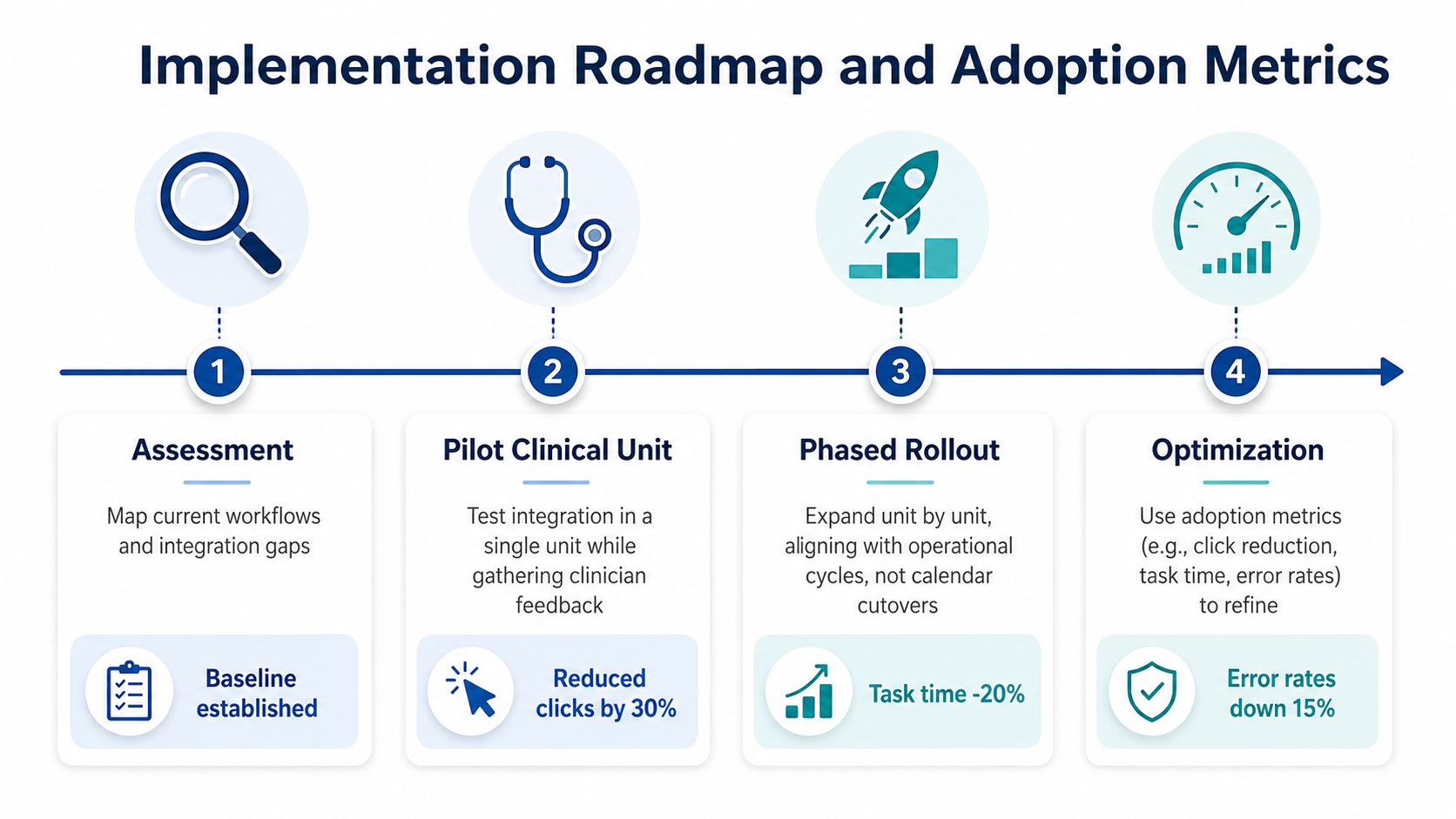
Big-bang cutovers usually fail in healthcare because care doesn't pause for a deployment weekend. A safer path is phased, starting with workflow discovery and ending with continuous optimisation. That approach gives clinicians time to react, and it gives IT time to fix the parts that only become visible once real users touch the system.
Phase one starts with the actual work
Discovery should map the current workflow, including the detours. That means finding where staff print, fax, duplicate entry, or call another unit to confirm data that should already be available. If you don't map those shortcuts, you'll automate around them and preserve the same friction in digital form.
A good pilot targets one high-friction workflow, not the whole hospital. That gives the team a narrow feedback loop and avoids spreading a half-finished design too widely. In practice, the pilot should involve the people who do the work every day, not just the sponsor group.
Adoption metrics need to tell the truth
Technical uptime is not enough. You need measures that show whether the integration is being absorbed into practice.
| Phase | What to Watch | Why It Matters |
|---|---|---|
| Assessment | Existing handoffs and duplicate work | Shows where the burden really sits |
| Pilot clinical unit | Login frequency and task completion | Reveals whether staff are using the workflow |
| Phased rollout | Manual workarounds still in use | Exposes where the design still leaks |
| Optimisation | Help desk ticket patterns | Indicates whether support demand is falling |
The best signal is often the absence of workarounds. If staff keep using side channels, the system may be technically live but operationally ignored. That's why rollout plans need iterative redesign, not just training decks.
The Ontario experience is a useful reminder that adoption is the hard part. Even with broad access to integrated records, real value still depends on whether frontline users trust the workflow enough to rely on it consistently.
Choosing the Right Development Partner
Partner selection should recognise that integration is an operating capability, not a one-time build. A vendor that can connect systems but cannot support adoption, governance, and iterative improvement will leave you with a technically linked platform that clinicians work around.
Score for workflow success, not just technical competence
Clinician co-design should be a filter in vendor selection, as reflected in the Royal College task force report. If a proposal cannot explain how frontline users will shape the workflow, that is a warning sign. The gap usually appears after go-live, when the interface looks complete, but the care team still relies on side channels.
A practical evaluation matrix looks like this:
| Evaluation Dimension | Red Flag to Avoid | Best Practice to Select |
|---|---|---|
| Technical depth | Generic integration claims | Proven FHIR, HL7, and engine experience |
| Healthcare domain expertise | No hospital or clinic references | Direct work in Canadian care settings |
| Co-design capability | No clinician involvement plan | Structured clinician workshops and testing |
| Long-term support | Build-and-forget posture | Post-go-live monitoring and iteration |
Common procurement mistakes show up early
The lowest-cost bid often looks attractive until the integration hits governance, privacy, and support requirements. Another common mistake is choosing a team that treats the project as a fixed-scope build. Healthcare workflows change, and the platform has to change with them.
Relationships with major EHR environments also matter. Epic, Cerner, Meditech, and OSCAR each bring different constraints, and a good partner knows how to work within hospital IT governance without creating avoidable conflict. Cleffex Digital Ltd is one option in this space, with healthcare software integration work that connects medical devices, SaMD applications, and digital platforms to hospital EHR environments.
For a practical way to assess vendor fit, this guide to choosing a healthcare technology partner in Canada is a useful reference point.