

A clinic director in Northern Ontario has the same basic question as a virtual care founder in Toronto: will this platform work for the people who need it, and will it keep working once clinicians depend on it every day? That's where most telemedicine software development advice falls short. It usually starts with feature lists and polished product screens, then skips the constraints that decide whether the business holds up.
In Canada, those constraints are practical. A video-first workflow may look clean in a product demo, but it breaks down quickly when patients have inconsistent connectivity, limited data plans, or live far from specialist care. That's why the more useful planning question isn't “What features should we add?” It's “What operating model, technical architecture, and fallback paths make care delivery usable outside major urban centres?” As noted in this discussion of telemedicine software development standards and challenges, Canada's 2024 telecom environment still shows meaningful regional differences in connectivity quality and affordability.
That single reality changes product decisions early. It affects whether your default visit mode should be video or adaptive escalation from messaging to audio to video. It changes how you queue patients, how you design file uploads, how you handle reconnects, and how you think about clinician time. It also changes your business case. A platform that works only in well-connected urban corridors may still be a good product. It is not a broadly viable telemedicine service in Canada.
Teams that build healthcare platforms successfully usually treat telemedicine as an operational system, not just an app. That means discovery, workflow design, infrastructure, integrations, auditability, and support all carry equal weight. A good general primer on healthcare software development helps frame that broader mindset, but telemedicine adds its own pressure points because patient interaction happens in real time and clinical trust can erode in seconds.
Beyond the Code: A Strategic Introduction
The projects that struggle most often begin with the wrong assumption. They assume access problems are solved once a patient can log in. In practice, access only starts there.
A Canadian telemedicine platform has to survive real usage conditions. A patient may join from a farm, a remote community, a small regional town, or a mobile phone in a parking lot outside work. A physician may be moving between in-person care and virtual consults in the same half-day. An administrator may be triaging referrals while trying to confirm eligibility, reminders, and provider availability. If the software treats all of that like a standard video meeting, it will create friction immediately.
Viability Comes Before Velocity
Many founders want to move straight to building decisions. React Native or Flutter. AWS or Azure. WebRTC or third-party API. Those are important, but they come after a more fundamental choice: what service model are you running?
For Canadian telemedicine, I usually push clients to answer these questions first:
Who is the primary user group?
Family practice, mental health, specialist follow-up, chronic care, or employer-sponsored care all create different scheduling and documentation demands.
What happens when bandwidth drops?
If the platform can't degrade gracefully to audio, chat, or asynchronous follow-up, your care model is fragile.
Which provincial constraints matter?
Procurement, privacy review, and records handling vary enough that “we'll sort compliance later” becomes expensive very quickly.
How does the clinic get paid and staffed?
Even a clinically sound workflow can fail if handoffs, charting, and reimbursement steps stay manual.
Practical rule: If your business model depends on uninterrupted video for every visit, test that assumption before you invest heavily in custom-built work.
The Real Product Is the Service System
Telemedicine software development works when the technical platform matches the care pathway. That means the product isn't only the app patients see. It's also the routing rules, clinician console, consent flow, integration layer, documentation support, notifications, and fallback operations behind the scenes.
Weak planning is frequently exposed. Teams often overinvest in front-end polish and underinvest in queue logic, role design, and exception handling. Patients remember the waiting room timer. Clinicians remember whether they had the right chart data at the right moment. Operations staff remember whether missed connections created support tickets all day.
In healthcare, the software only feels simple when the underlying system is well organised.
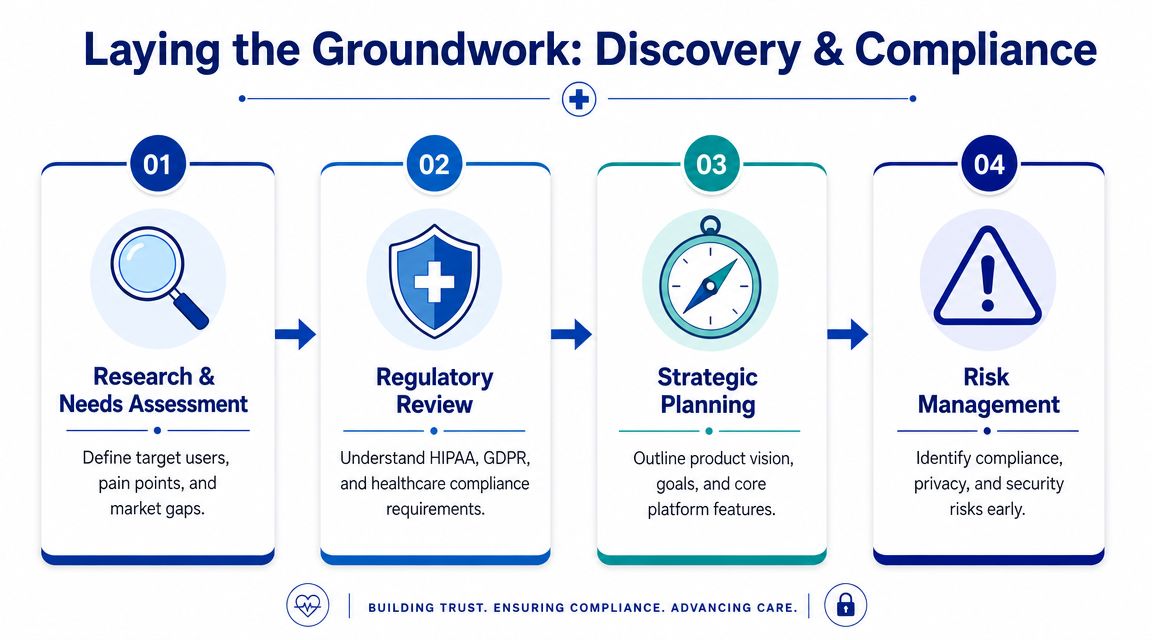
Laying the Groundwork: Discovery and Compliance
Most telemedicine failures begin before development starts. They begin when a team treats discovery as a short requirements workshop instead of a risk-reduction exercise.
Start With the Care Model, Not the Feature Set
A platform for dermatology follow-up doesn't need the same flow as a mental health service or a primary care triage product. If you skip that distinction, you'll build generic functionality that satisfies nobody.
The discovery phase should map three journeys in parallel:
Patient journey from intake through booking, consent, visit access, follow-up, and records requests.
Clinician journey from schedule preparation through consult, note-taking, orders, and post-visit actions.
Administrative journey covering triage, provider assignment, billing support, exceptions, and audit handling.
Each journey should identify where data enters the system, where a person makes a decision, and where a workflow can fail. That creates better requirements than a simple feature wishlist ever will.
Compliance Has To Shape Architecture
Canadian buyers often ask whether they can “add compliance after launch.” The honest answer is no, not without rework. Privacy, retention, access control, auditability, and consent handling affect data models, user roles, logs, integrations, and infrastructure choices from day one.
A useful benchmark comes from California. Because of its scale and sustained telehealth use, software built for that market has had to prioritise scale, multilingual access, deep integration, reliability, and privacy from the start, as discussed in this overview of healthcare software development trends and telehealth demands. That lesson applies directly to Canadian projects: privacy and operational reliability aren't add-ons. They are product requirements.
For cross-border products, teams also need to think carefully about where PIPEDA, provincial rules, HIPAA, and sometimes GDPR overlap or diverge. Consent language, data residency expectations, breach response procedures, and vendor management can all shift depending on your deployment and market.
If your security lead is formalising controls and evidence collection, this guide for CISO HIPAA compliance automation is a practical reference for operationalising compliance work instead of leaving it in documents no one maintains.
A Stronger Discovery Sequence
A compliance-first discovery phase is the best pattern here. The sequence is usually more important than the tooling.
Define the exact clinical service: Narrow the first release to a service line with a clear operational owner.
Map sensitive data touchpoints: Identify where patient information is created, viewed, transmitted, stored, exported, or deleted.
Specify role boundaries: Physician, nurse, admin, support agent, and patient should not share broad default permissions.
Review integration obligations early: EHR, LIS, HIE, pharmacy, and payment dependencies can reshape scope before design locks in.
Document exception paths: Missed appointments, dropped sessions, duplicate records, emergency escalation, and consent withdrawal all need explicit handling.
The safest healthcare products don't start with code. They start with clear accountability for every screen, every data movement, and every exception.
A disciplined approach to compliance-driven software development is often what separates a build that reaches production from one that gets stuck in legal and operational review.
Designing for Trust Patient and Provider Workflows
Trust in telemedicine is built through behaviour, not branding. Users decide whether your platform feels safe and competent based on a handful of moments: sign-up, booking, waiting, joining, documenting, and follow-up.
The Patient Experience Should Reduce Uncertainty
Consider a patient trying to book a follow-up visit after work. They don't want to decode clinical jargon or wonder whether they joined correctly. The strongest patient flows do a few things quietly and well.
The platform explains what kind of appointment is being booked. It shows whether the visit is video, audio, or message-based. It makes consent readable. It confirms what the patient needs before the session starts, such as ID, photos, medication list, or symptom notes. Then it sends reminders that are useful rather than noisy.
Poor patient UX usually fails in small ways. The login flow is too rigid. The waiting room gives no status. The camera permissions prompt appears without context. Reconnection feels like being kicked out of care.
The Clinician Workflow Must Protect Attention
Now look at the same visit from the provider side. The clinician opens the dashboard between appointments and needs context fast. They need the patient identity, reason for visit, prior notes, uploaded files, and the next likely action. They do not need five tabs, a cluttered screen, or alerts that compete with clinical reasoning.
A reliable clinician workflow often looks boring in a demo, which is exactly right. It should support rapid orientation and low-friction documentation.
Pre-visit summary: Surface the minimum useful context before the call starts.
Live consultation controls: Mute, reconnect, invite another participant, and switch modality without hunting through menus.
Structured notes: Reduce free-text overload where templates make sense, but don't force clinicians into rigid forms during complex encounters.
Post-visit actions: Orders, referrals, instructions, and patient messages should happen from the same workspace.
“If clinicians have to remember the software while treating the patient, the interface is doing too much.”
Design Details That Matter More Than Teams Expect
A virtual waiting room needs more than a spinner. It should explain whether the clinician is running late, whether the connection is being tested, and what to do if the visit fails. A file upload flow should accept imperfect patient behaviour, including rotated photos, large image files, and interrupted uploads. Notifications should be channel-aware because some patients respond to email, while others only react to SMS or in-app prompts.
This is also where trust signals matter. Clear labels, professional language, visible consent status, and straightforward account recovery all help. Healthcare users don't reward clever UX. They reward systems that feel organised, calm, and predictable.
Building the Engine Backend Architecture and Core Features
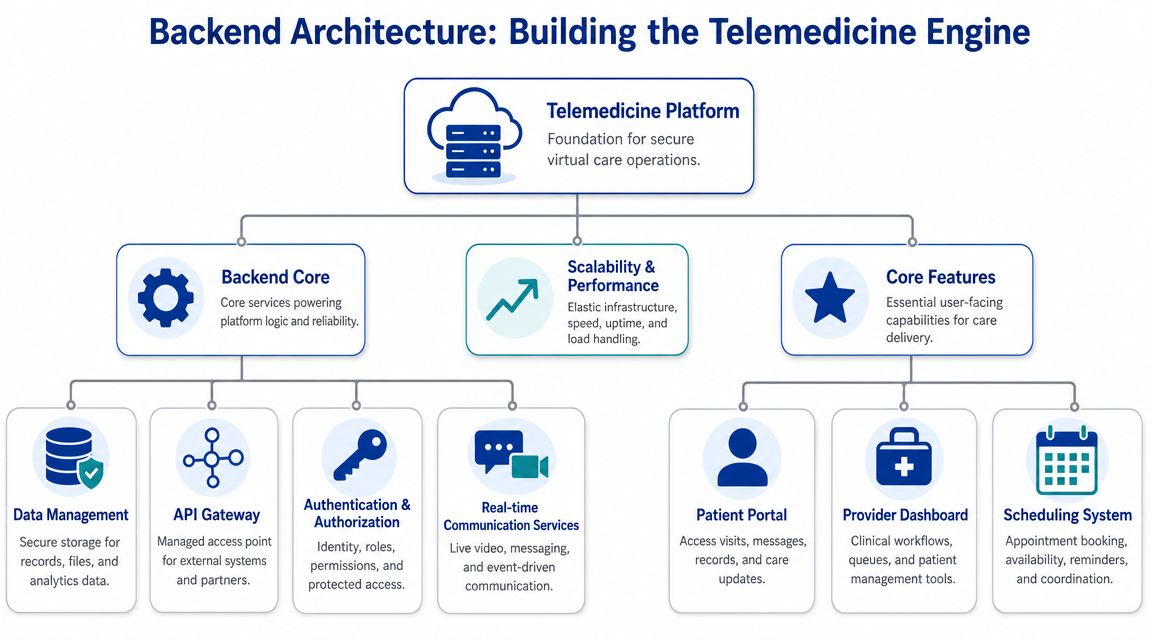
The backend determines whether your product can mature into a dependable clinical platform or remain a brittle demo with good screens. In telemedicine software development, architecture decisions affect not only scale but also auditability, failure isolation, and integration risk.
Why Modular Cloud Architecture Usually Wins
A practical expert workflow starts with compliance-aware discovery, then moves into a modular cloud architecture. One peer-reviewed telemedicine platform used a layered modular design, and that pattern is useful because it isolates clinical workflows, supports scaling, and reduces integration risk in regulated deployments, as described in this resource on telemedicine development processes and architecture.
That doesn't mean every team should jump straight into dozens of microservices. It means you should separate responsibilities early enough that scheduling, authentication, communications, records exchange, and notifications don't become one tangled deployment unit.
Monolith or Microservices
For most early-stage telemedicine products, the best first architecture is often a modular monolith. It gives you strong boundaries without the operational burden of full microservices too early. Teams only benefit from microservices when they also have the engineering maturity to handle service discovery, distributed logging, independent deployment, and failure analysis.
| Factor | Monolithic Architecture | Microservices Architecture |
|---|---|---|
| Initial delivery | Faster to start when the team is small, and the scope is narrow | Slower at first because platform engineering work increases |
| Operational complexity | Lower. Easier local development and simpler deployment | Higher. Needs stronger DevOps, tracing, and service management |
| Isolation of failures | Weaker. A defect can affect a larger application area | Stronger when services are well-bounded |
| Compliance review | Simpler to reason about at the beginning | More moving parts to document, secure, and audit |
| Scaling patterns | Coarser scaling across the application | Finer control for high-load services like video support or notifications |
| Integration flexibility | Good enough for many MVPs | Better when many external systems evolve independently |
Core Backend Capabilities Worth Getting Right
The non-video services often decide whether the platform feels production-ready.
Identity and access management: Role-based access, session handling, and delegated permissions need clear rules from the outset.
Scheduling engine: Appointment types, clinician availability, buffers, time zones, and rescheduling logic deserve serious design attention.
Notification service: Reminders, join links, consent prompts, and post-visit instructions should be template-driven and traceable.
Clinical data layer: Separate patient profile data from operational event data so audit trails stay clear.
Integration gateway: Centralise outbound and inbound connections for EHR, payment, pharmacy, or lab interfaces.
Cloud Choices and Implementation Judgment
AWS, Azure, and GCP can all support a compliant telemedicine stack. The better choice usually depends on your team's deployment experience, managed services strategy, and client procurement preferences. In Canadian healthcare work, procurement and existing enterprise standards often influence this decision more than pure feature comparison.
If you need a custom engineering partner, internal product team, or external delivery group to build around those constraints, Cleffex Digital Ltd is one option among many for healthcare-focused custom software delivery. What matters more than vendor branding is whether the team can show disciplined architecture decisions, documentation habits, and healthcare workflow understanding.
Enabling Virtual Care Real-Time Communication and Integrations
Real-time communication is the obvious centrepiece of a telemedicine platform. Integrations are what make it useful in actual care delivery. If either side is weak, clinicians will work around the software.

Build Versus Buy for Video and Audio
Founders often underestimate the engineering cost of live communication. Raw WebRTC gives control, but it also hands your team responsibility for signalling, session management, reconnect handling, device variance, network adaptation, and observability. That's a lot to own while you are still validating a healthcare product.
Using a communication platform such as Twilio, Agora, or a comparable managed API often shortens the path to a stable first release. The trade-off is dependency, pricing sensitivity, and less control over edge behaviour.
A sensible rule is this: build custom media infrastructure only when communication itself is your product differentiator. If your differentiator is an access model, clinical workflow, or specialised care pathway, buying the live layer is usually the better business decision.
Integrations: Decide Whether Clinicians Stay in Your Platform
A beautiful telemedicine interface still fails if clinicians must re-enter notes in an EHR, confirm prescriptions elsewhere, and track payments in a separate admin system. Integration is where operational value appears.
The main integration categories usually include:
EHR and EMR connections: Use standards such as HL7 and FHIR where available, but plan for vendor-specific realities.
Pharmacy and e-prescribing workflows: Reduce manual callbacks and fragmented medication handling.
Payments and billing support: Patients expect straightforward settlement, and clinics need traceable financial events.
Lab and diagnostic exchanges: Even simple result availability changes follow-up workflow design.
Identity and SSO: Larger organisations often require alignment with existing staff access models.
Implementation note: treat every third-party integration as a product stream of its own. Each one has separate validation, error handling, and support needs.
AI and Remote Monitoring Need a Tighter Scope
Many telemedicine proposals now include AI triage, summarisation, symptom capture, or remote patient monitoring by default. That sounds ambitious, but Canadian healthcare settings need a narrower lens. Recent reporting has pushed virtual care toward hybrid models, making the core design question: which workflows should stay synchronous, and which should move to asynchronous or monitored care? This trade-off is especially important where privacy, interoperability, and provincial procurement requirements shape implementation, as discussed in this analysis of virtual care models in Canadian healthcare.
That means AI should start with bounded operational uses. Intake summarisation, document classification, message drafting, and navigation support are often easier to justify than clinically assertive automation. Remote monitoring also works best when paired with a defined care pathway with clear review responsibilities.
If you're exploring conversational interfaces in a mobile experience, this guide on streaming AI responses to React Native is helpful for the delivery mechanics, but the healthcare decision still comes first: what should the model do, who reviews it, and where does the output become part of the clinical workflow?
Hardening the Platform Security and Rigorous Testing
Healthcare teams often talk about security as if it sits beside the product. It doesn't. In telemedicine, security is part of the user experience because it shapes trust, permissions, reliability, and incident response.
Security Controls That Shouldn’t Be Negotiable
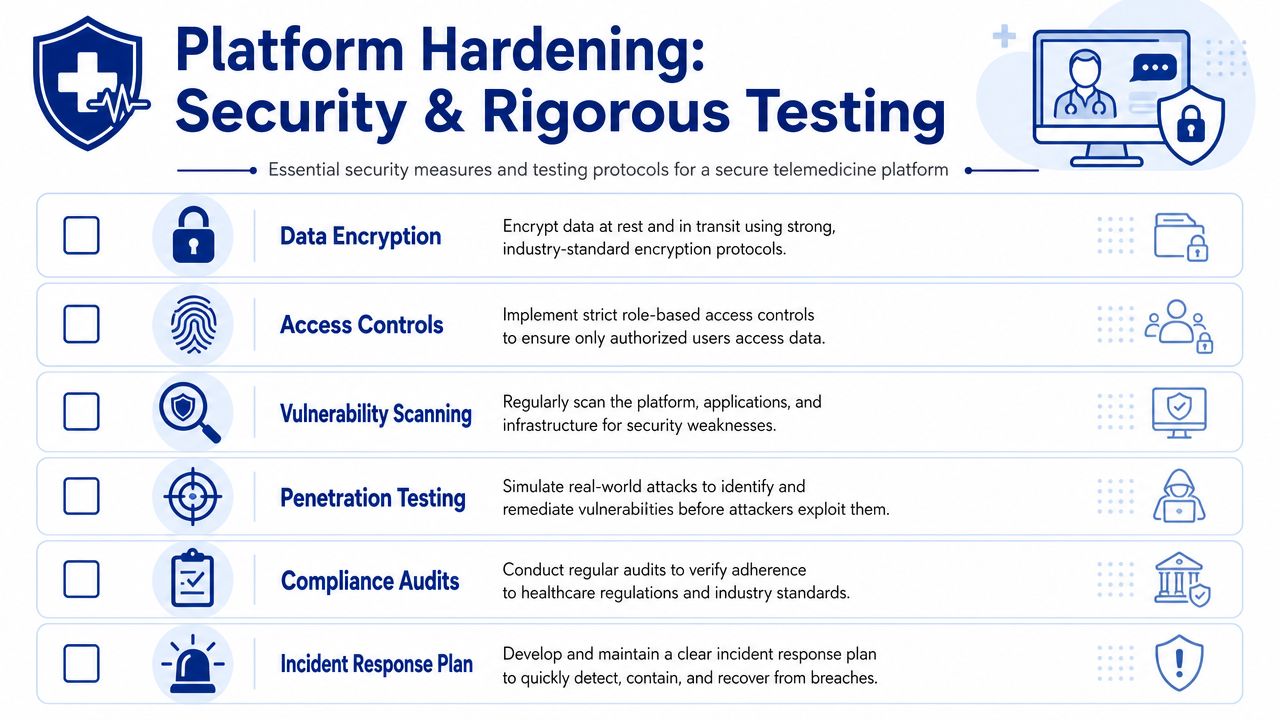
At a minimum, the platform needs strong encryption for data in transit and at rest, clear role-based access control, secure session management, and complete audit logging. Those basics are familiar. The harder part is implementation discipline.
Access control should reflect actual clinic behaviour. A receptionist shouldn't have the same visibility as a physician. A support agent shouldn't be able to browse records while diagnosing a login issue. Temporary access for troubleshooting should be explicit, time-limited, and logged.
Audit logs also need to be useful, not ceremonial. You want to know who viewed a patient record, who changed appointment details, who exported data, and what happened during administrative overrides.
Testing Has To Mimic Production Stress
Basic QA won't protect a telemedicine system. You need layered testing that reflects how care delivery fails.
Unit and integration tests: Confirm core logic and service boundaries.
Workflow tests: Validate complete scenarios such as booking, joining, documenting, and follow-up.
Performance tests: Examine load around peak clinic hours, reminder bursts, and concurrent session handling.
Security testing: Run vulnerability scanning, dependency review, and penetration testing against realistic threat paths.
Recovery testing: Simulate dropped sessions, partial outages, and failed third-party callbacks.
A secure healthcare product remains predictable when users make mistakes, networks fail, or external services respond badly.
Independent Review Matters
Internal teams get blind to their own assumptions. That's why serious healthcare products benefit from an external security review before broad rollout. Penetration testers, privacy reviewers, and infrastructure specialists will often find misconfigurations or unsafe operational habits that don't show up in functional QA.
A solid reference for teams formalising technical safeguards is this guide to secure healthcare software development. The value isn't in a checklist alone. It's in turning security controls into a repeatable engineering practice.
Launching and Scaling Your Telemedicine Service
Going live doesn't prove the platform is done. It proves the platform has entered operations. That's when the actual maintenance burden begins.
Release Carefully and Automate What You Can
A telemedicine deployment should use a controlled CI/CD pipeline with review gates, environment separation, rollback procedures, and clear ownership of release approvals. Healthcare teams need confidence that a new build won't cause unintended alterations to charting, consent capture, or session handling on a busy clinic day.
Monitoring should cover more than uptime. Track appointment creation failures, reminder delivery, call join errors, reconnect frequency, integration queue backlogs, and unusual admin actions. Those indicators often reveal patient-facing problems before support tickets make the pattern obvious.
Set Realistic Timelines With Stakeholders
Stakeholders often ask how long telemedicine software development takes without agreeing on what they mean by “telemedicine platform.” Industry guidance suggests a basic MVP with video visits and scheduling can take about 3 to 4 months, while a fuller platform with EHR integration, e-prescriptions, analytics, and AI support often takes 9 to 12 months or longer, according to this review of telehealth software development timelines and risks.
Those ranges are useful because they force a better conversation. Are you shipping a market test, or are you building an operational care system? The answer changes architecture, staffing, validation, and budget expectations.
Most Delays Happen After People Think the Hard Part Is Over
The biggest schedule and quality problems usually cluster around third-party integrations, performance bottlenecks, and weak security or compliance testing. In other words, they appear at the edges. Teams often hit feature completeness, then discover the EHR connector still needs rework, support staff need new permissions, or reporting doesn't match operational needs.
That's why launch planning should include:
Pilot scope controls: Start with a smaller user group or narrower service line.
Post-launch validation windows: Reserve time for observation and fixes, not just feature handoff.
Support readiness: Train clinic staff on issue triage, account recovery, and visit failure procedures.
Operational analytics: Define what “healthy usage” looks like before the first release.
For organisations planning the support side of a healthcare SaaS operation, this guide to healthcare SaaS support efficiency is useful because support load becomes part of product quality very quickly after launch.
The most mature telemedicine platforms don't scale because they add features fast. They scale because they standardise releases, watch the right signals, and keep improving the workflows that fail unnoticed.
If you're planning a telemedicine platform and need a team that can align architecture, compliance, UX, and operational rollout, Cleffex Digital Ltd works with organisations that need custom software built around real business constraints rather than generic feature templates.