

A patient gets registered at the front desk. Minutes later, the ward clerk can't see the admission. The lab receives an order with a missing identifier. The pharmacy gets the patient, but with the wrong visit context. Everyone blames “the interface”, even though nobody has defined what the interface is supposed to guarantee once it leaves a developer's laptop and enters production.
That's the world of HL7 interface development.
Interface development frequently starts at the wrong level. Developers open a sample ADT message, talk about segments and delimiters, and jump straight into mapping fields. Syntax matters, but syntax is rarely what sinks a project. Projects fail because the team picked the wrong standard for the job, built a brittle architecture, ignored security until late, or treated testing as a final checkbox rather than as part of the design.
In Canadian healthcare, this matters even more because systems rarely live in isolation. Hospitals, labs, diagnostic platforms, provincial services, and clinic networks all need to exchange data across organisational boundaries. A major milestone in that shift was Canada Health Infoway, which has supported pan-Canadian interoperability since 2001 and has invested over CA$2 billion in digital health projects, making standards-based exchange the practical route to scale (HealthIT.gov on interoperability investments).
The practical question isn't “How do I parse an HL7 message?” It's “How do I build an interface that survives vendor quirks, security reviews, volume spikes, and support calls at 2 a.m.?”
Introduction: Navigating Health Data Exchange
When health data exchange works, clinicians barely notice it. Registration updates flow into the EHR. Orders move to downstream systems. Results come back without manual re-entry. That's exactly how it should feel.
When it fails, the breakdown is immediate. Staff create workarounds, duplicate patient records appear, and downstream teams stop trusting the feed. Once trust is gone, even a technically functioning interface gets treated as unreliable.
What HL7 Is Solving in Practice
Primarily, HL7 interface development is about making unlike systems behave as if they belong to one workflow. A hospital information system may produce one format. A lab platform may expect another. A pharmacy system may accept the same patient identity, but only if the visit context is carried in a specific way. Your job is to broker that exchange accurately and consistently.
That means more than translating fields. It means deciding:
Which standard fits the integration? Legacy v2 messaging, modern FHIR APIs, or both.
Which transport and architecture fit operations? Direct feeds, middleware, queued delivery, or hybrid exchange.
Which controls make the interface supportable? Validation, observability, retries, and rollback.
Practical rule: If support staff can't answer “what happened to this message?” within a few minutes, the interface isn't production-ready.
What Mid-Level Developers Usually Underestimate
The first big surprise is that technical mapping is often the easy part. The harder problems come from ambiguity. Source systems send optional fields unpredictably. Vendors interpret the same trigger differently. Message acknowledgements create false confidence. A feed can return ACK all day and still deliver bad or incomplete business data.
The second surprise is operational ownership. Someone has to monitor queues, review rejects, maintain code maps, coordinate version changes, and prove that patient data remained protected throughout the exchange. That's where strong projects separate from fragile ones.
Laying the Foundation: Standards and Architecture
The architecture decision usually gets made in one meeting and then haunts the project for years.
A hospital wants ADT messages out of the EHR, a provincial service wants an API, and the security team wants to know where PHI will sit, how it will be encrypted, and who can trace access after go-live. If you start coding before those questions are settled, the interface will work in test and become expensive in production.
Choosing Between v2, v3, and FHIR
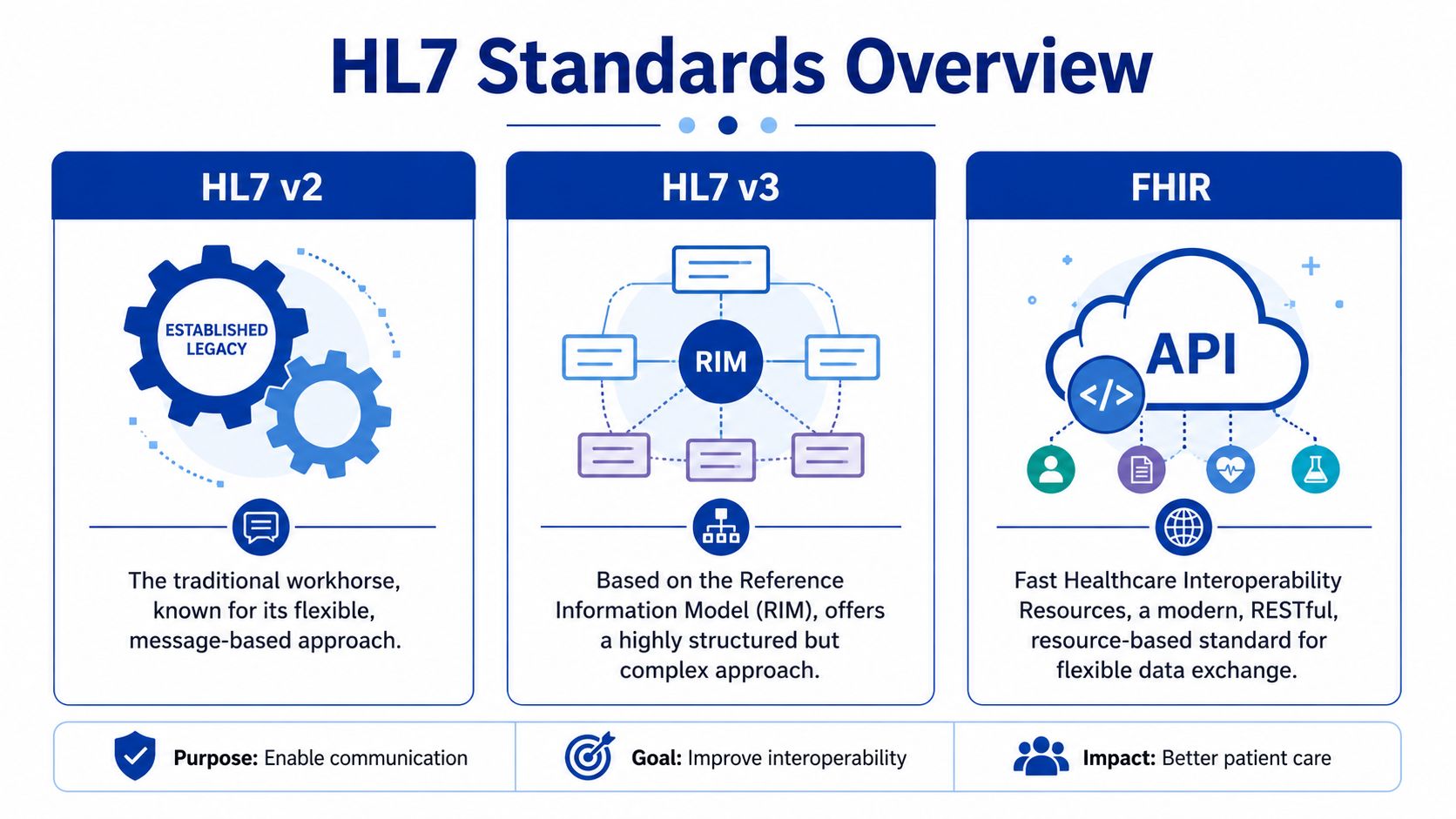
Pick the standard based on the workflow, the systems you have, and the operating model you can support.
HL7 v2.x still carries a large share of real hospital traffic. It remains the practical choice for ADT, orders, results, and other event-driven exchanges where both systems already support v2 and the business process is well understood. The downside is familiar to anyone who has maintained more than a few feeds. Two vendors can both claim "v2 compliant" and still disagree on segment usage, trigger behaviour, optional fields, and code sets.
HL7 v3 exists in some products and programmes, but few teams choose it for net-new work unless a vendor or jurisdiction requires it. It gives you more structure than v2, but that structure comes with more implementation overhead and less flexibility when the source system is messy.
FHIR fits a different delivery model. It works well for API-based access, external applications, patient-facing services, and shared services that need a cleaner contract than a stream of event messages. HL7 provides the base standard and implementation framework through its FHIR specification. That makes FHIR attractive for modern development. It does not remove the hard parts. You still need identity matching, consent handling, authorisation design, rate control, auditability, and version governance.
| Standard | Best fit | Trade-off |
|---|---|---|
| HL7 v2.x | Hospital workflows, legacy EHRs, ADT/ORM/ORU exchanges | Widely supported, but vendor interpretation varies |
| HL7 v3 | Required product-specific or jurisdictional implementations | More formal structure, more build and maintenance effort |
| FHIR | APIs, patient apps, shared services, cloud integrations | Cleaner resource model, but many core systems still need v2 alongside it |
What Usually Works in Canadian Projects
Canadian environments rarely let you optimise for one system alone. A regional hospital may have local interface needs, but the same data often has to align with provincial repositories, shared registries, public health reporting, or cross-organisation access rules. That changes the architecture discussion.
A practical pattern is to keep v2 where it already serves the operational workflow well, then expose or translate selected data through FHIR where reuse, external access, or standards-based APIs add real value. That hybrid approach is common because it respects the installed base instead of pretending legacy systems will disappear on the project timeline.
If you are assessing that API layer, review examples of FHIR integration services in healthcare interoperability against your existing engine, identity, and access control model.
One warning from experience. Teams sometimes choose FHIR to signal modernisation, then route it through the same weak operational practices they used for old feeds. A FHIR endpoint without proper authentication design, audit logging, throttling, and support ownership is still a fragile integration.
Point-to-Point Versus Interface Engine
The transport pattern matters as much as the message format.
A direct point-to-point build can be the right call for a narrow interface with stable requirements, clear ownership, and a short path between sender and receiver. It reduces initial setup and can be perfectly reasonable for one or two tightly bound connections. The cost arrives later. Every new destination, mapping change, credential rotation, certificate update, or vendor upgrade has to be handled in multiple places.
An interface engine gives you one place for routing, transformation, message persistence, acknowledgements, alerting, and operational review. In a multi-system hospital or regional environment, that usually means lower support overhead and fewer hidden dependencies. It also helps with Canadian compliance work because audit trails, access controls, and transmission logging are easier to standardise in one managed layer than across custom scripts and one-off services.
Use this rule set:
Point-to-point works for limited, stable exchanges with low expansion risk.
An interface engine works better when several systems need shared transforms, centralised monitoring, and controlled change management.
A hybrid architecture is common when v2 feeds remain the system-of-record event source, and FHIR services provide controlled access for newer consumers.
Real-time and batch should be decided separately. Admissions, orders, and clinically sensitive updates usually need immediate delivery or a very short delay. Reconciliation loads, reporting extracts, and secondary data distribution can often run in scheduled batches if the business owner accepts the lag.
Good architecture is boring in the best way. It makes security review easier, production support faster, and future change less painful.
The Core Development Workflow: Parsing and Mapping
Monday at 6:15 a.m., registration starts sending ADT messages before the downstream team is on shift. The feed connects, ACKs come back, and everyone assumes the interface is healthy. By 8:00 a.m., half the new patients are missing in the target system because the sender changed which PID identifier comes first. That is what parsing and mapping work looks like in production. The hard part is not reading pipes and carets. It is turning variable, imperfect source data into behaviour that the receiving system can trust.

Start With Message Behaviour, Not Message Syntax
By the time development starts, teams usually have a sample message set, an interface specification of uneven quality, and target requirements that already contain gaps. The first job is to close those gaps before writing transforms. Confirm which trigger events matter, which fields drive workflow, who owns terminology mapping, and what should happen when the source sends incomplete data.
In Canadian deployments, this often gets more complicated than vendor demos suggest. Provincial identifiers, local MRNs, temporary registration values, and site-specific encounter rules can all coexist in the same flow. A v2 feed can carry the event quickly, but it rarely settles the identity policy for you. FHIR can model the resource more cleanly, but only if both sides support the profiles and search behaviour you need. In mixed environments, the practical answer is often simple. Parse v2 for event delivery, then map carefully into the target model that the receiving system can support today.
Write down the decisions that change message handling:
Which identifier is primary
Which identifier is acceptable as a fallback
Whether empty fields mean "clear the target value" or "ignore this update"
Which code sets are source-owned versus interface-owned
When to reject, when to quarantine, and when to pass with a warning
If those rules live only in a developer's head, support will suffer.
Use the Engine To Make Decisions Visible
An interface engine gives you one place to parse, transform, route, and inspect failures. That is useful, but the tool is only the workbench. The quality of the interface still comes from the decisions expressed inside it.
If your team is comparing platforms before build, this overview of the best EHR integration tools is useful for framing the discussion around channel design, operational visibility, and connector support.
A workable channel flow usually looks like this:
Receive and identify the message by sender, message type, trigger event, and facility context.
Validate the minimum structure so malformed messages fail early and predictably.
Parse into segments, fields, components, and repeats without assuming optional content will always be present.
Apply explicit mapping rules for identifiers, demographics, encounter data, and coded values.
Separate business rejects from technical failures so analysts know whether to fix data or infrastructure.
Persist enough trace detail for support without dumping unnecessary PHI into logs.
That order matters. If you transform before validating identity assumptions, you can create records that are technically accepted and operationally wrong.
Parsing an ADT Feed the Way Production Support Needs It
ADT is where many developers learn the difference between a working interface and a supportable one. On paper, the message is straightforward. In real environments, the edge cases arrive fast.
| Segment | What you usually pull from it | Why it matters |
|---|---|---|
| MSH | Message metadata, sender, trigger | Routing, version handling, traceability |
| PID | Patient identity and demographics | Patient matching and update rules |
| PV1 | Visit or encounter details | Visit creation, status, location, downstream workflow |
Start with MSH because routing errors waste time. Confirm sending application, facility, version, message type, and trigger event before touching business logic. Then move to PID and decide which repetitions and assigning authorities you trust. After that, evaluate PV1 in the context of the receiving system. Some targets care significantly about visit number and patient class. Others only need a subset and will ignore the rest.
The common failure pattern is simple. A sender changes a field population rule during an upgrade, the message still validates, and your mapping inadvertently starts using the wrong identifier or encounter context. That is why production-grade parsing does not stop at syntax validation. It checks whether the data still matches the business rule you designed.
Make Mapping Rules Boring, Explicit, and Easy To Review
Good mapping logic is readable by someone who did not write it. That sounds basic, but it is where many first major projects go off course. Developers try to compress logic into clever scripts, hide fallback rules in utility functions, or mix code translation with routing decisions. Six months later, nobody can explain why an A08 updated one target and skipped another.
A better pattern is to keep each transform narrow and named:
Extract the candidate identifiers
Rank them by approved source priority
Normalise names, dates, and phone formats
Translate codes using a controlled table
Apply target-specific conditional logic
Fail with a clear reason when a required rule is not met
For example, if PID-3 contains multiple identifiers, do not just take the first repetition. Filter by assigning authority and identifier type, then choose the approved value. If none is present, route the message to a quarantine path with a reason an analyst can act on. That is slower to design than a quick field-to-field map, but it prevents the worst class of interface defect. Silent bad data.
v2 Versus FHIR Changes the Mapping Work, Not the Need for Discipline
Mid-level developers often assume FHIR removes the messy part. It helps, but only in specific ways. FHIR gives you named resources, typed elements, and cleaner semantics than raw v2 segments. It also introduces its own implementation work. Profile alignment, cardinality differences, terminology bindings, paging, versioning, and API error handling all need attention.
In real hospital environments, especially where legacy departmental systems remain in place, v2 is still the event source for admissions, transfers, discharges, results, and orders. FHIR often sits at the edge for newer consumers, mobile apps, provincial services, or controlled data access. That means your mapping layer may need to translate not just v2 to a database schema, but v2 events into a FHIR resource model with enough consistency that downstream systems can search and reconcile safely.
The trade-off is practical. v2 usually wins on installed base and event availability. FHIR usually wins on resource clarity and modern access patterns. Neither one excuses weak mapping discipline.
Measure Success by Downstream Behaviour
A clean parse is not the goal. The goal is that the right patient, visit, and clinical event appear in the right system, at the right time, with failure paths that operations can work with.
Published clinical integration research in PMC describes measurable workflow improvements after HL7-based integration, including faster patient identification and shorter journey times in the care process (clinical integration study in PMC). That is the reason to be strict about parsing and mapping. Good interface logic reduces manual cleanup, cuts duplicate investigation, and gives downstream teams data they can act on without guessing what the interface meant.
Integrating Security and Compliance by Design
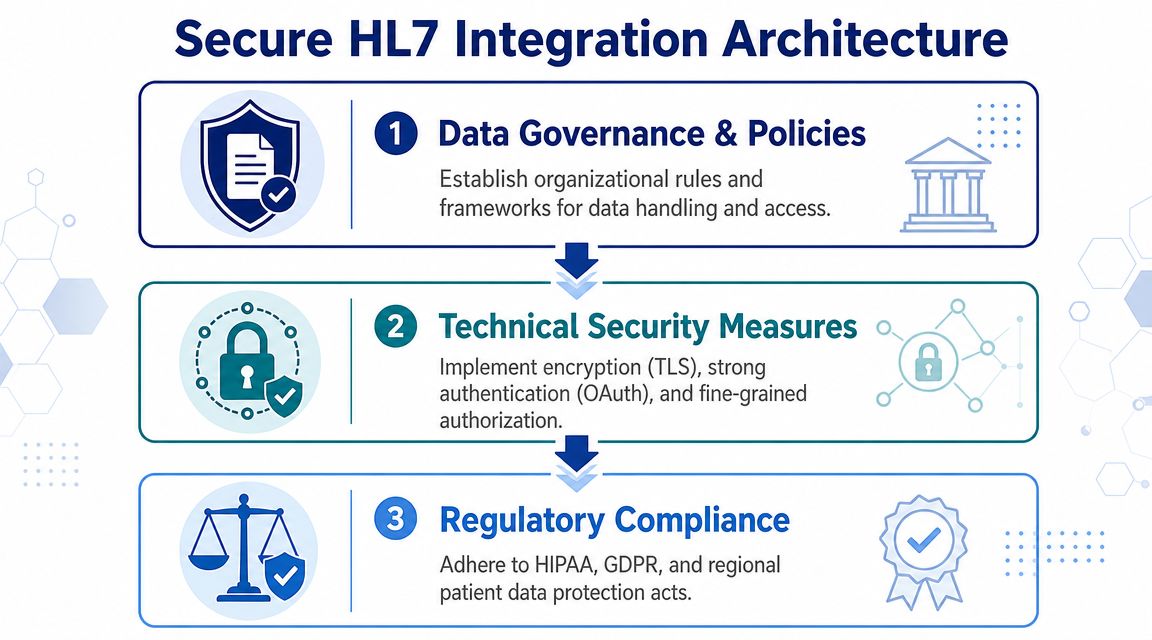
A functioning HL7 feed can still be a bad integration if it exposes patient data, can't prove message integrity, or gives operations no way to detect abuse. Security isn't a hardening pass after the build. It's part of the interface design.
Why Legacy HL7 Creates Hidden Risk
Many teams inherit assumptions that are no longer safe. They treat a private network as enough. They treat ACK as proof that the transaction is fine. They trust old connectivity patterns because they've “always worked”.
Recent security guidance is much less forgiving. Many HL7 v2.x implementations still transmit data in cleartext, and ACKs only confirm receipt, not integrity. That's why network segmentation, encrypted transport, and continuous monitoring are central design decisions, not optional extras (TXOne guidance on HL7 protocol vulnerabilities and mitigation).
What To Put Into the Design From Day One
If you're building or modernising an interface, secure the channel and the endpoints together.
Encrypt transport. Use protected transport rather than assuming the network path is trusted.
Segment the network. Keep interface traffic constrained to approved paths and systems.
Authenticate endpoints. Don't let any sender that can reach the port become a trusted publisher.
Log message handling events. You need auditability for troubleshooting and privacy review.
Monitor continuously. Security reviews don't stop at go-live.
For organisations moving more of their integration estate into hosted environments, it can help to align interface controls with a broader end-to-end cloud security program so network, platform, and application responsibilities don't drift apart.
Compliance in the Canadian Setting
In Canada, privacy expectations are not abstract. Healthcare organisations are expected to protect electronic health information with controls that can stand up to operational scrutiny. If you're working in Ontario, for example, PHIPA discussions quickly become practical: who accessed what, how data moved, and whether the organisation can demonstrate reasonable safeguards.
That's why compliance work belongs in implementation design, not only in policy binders. This overview of healthcare compliance software development is useful if your team is trying to connect engineering controls to compliance requirements.
A secure interface does three things at once. It protects the message in transit, restricts who can exchange it, and leaves an audit trail that operations can actually use.
A Pragmatic Guide to Testing and Deployment
It is 6:15 a.m. on go-live day. ADT messages are flowing, ACKs look fine, and registration staff still cannot find two newly admitted patients in the target system. That kind of failure is common in HL7 work. The message passed the transport. The workflow still broke.
Testing has to prove more than syntactic validity. It has to show that the interface behaves correctly under messy conditions, across retries, after source corrections, and during the first production surge. In Canadian hospital environments, that usually means mixed estates. Legacy HL7 v2 feeds still carry core admission and results traffic, while newer projects push selected workflows toward FHIR APIs. The trade-off is practical. V2 is fast to integrate with older systems but often hides weak validation and inconsistent local conventions. FHIR gives cleaner resource models and better alignment with modern auth patterns, but deployment gets harder when one side of the exchange still depends on an interface engine, batch timing, or vendor-specific profiles.
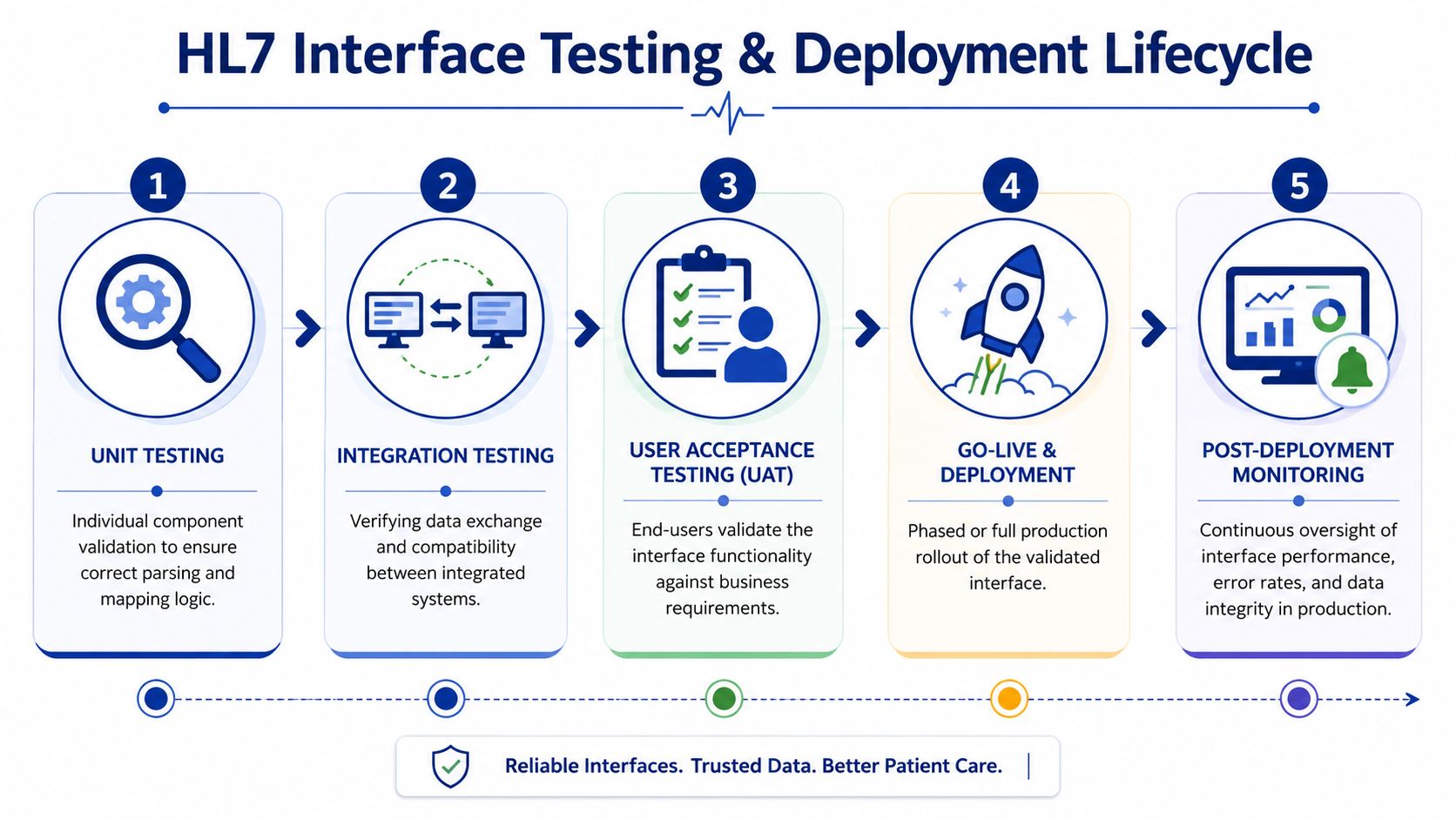
The Test Layers That Actually Matter
Different test layers catch different failure modes. Skip one, and you usually find the gap in production.
Unit Testing
Start with the narrow logic. Validate segment parsing, code translations, date handling, null behaviour, and field-level transforms. If A04 and A08 messages populate the same demographic field through different source patterns, write tests for both. Mid-level developers often stop after the happy path. Do not. Include malformed segments, unexpected repetitions, and local code values that the source team swears they will never send.
Integration Testing
Then verify system behaviour across the wire. Test the actual sender and receiver when possible, or use stubs that reproduce actual acknowledgements, latency, and connection limits. Confirm more than connectivity. Check MLLP session handling, character encoding, ACK timing, duplicate message control IDs, and what the destination does when one required field is missing.
Volume and Stress Testing
Production load exposes queue design, retry policy, and database bottlenecks faster than any code review. A feed can look stable at ten messages a minute and fail badly during morning registration peaks or bulk result releases. Run sustained load, burst load, and failure-recovery scenarios. Watch what happens after the downstream system slows down for twenty minutes, then recovers. That is where weak replay logic and poor back-pressure handling show up.
End-to-End Testing
This is the test that operations and clinical teams actually care about. A valid HL7 message is not the goal. The goal is that the patient, order, visit, or result appears in the right place, with the right timing, and triggers the expected downstream action. For FHIR-based workflows, end-to-end testing should also cover token expiry, scope errors, pagination, and version conflicts. Those issues do not exist in the same way in classic v2 interfaces, but they fail just as hard in production.
Deployment Planning Should Be Conservative
Go-live plans fail when teams treat deployment like a code release instead of an operational cutover. The safer approach is boring on purpose.
Use a rollback path that has been tested, not just described in a meeting. If the target starts ingesting bad data, the team needs to know whether rollback means stopping the feed, restoring a snapshot, replaying corrected messages, or all three. Those are different recovery models, and they have different privacy and audit consequences.
A phased cutover is usually easier to control than a big-bang switch. That may mean one site, one message type, or one patient cohort first. In a Canadian setting, especially across provincial systems or shared services environments, phased deployment also gives privacy, operations, and vendor support teams time to confirm that actual data handling matches the approved design.
A usable go-live plan includes:
A tested rollback procedure with named decision-makers.
A phased cutover approach where the workflow allows it.
Defined hypercare coverage across interface, application, and operational teams.
A replay process for recoverable errors and delayed downstream availability.
Clear exit criteria before handing the interface to standard support.
What Good Test Data Looks Like
Bad test data creates false confidence. If every sample message is clean, complete, and current, the interface has not really been tested.
Use data sets that reflect what hospitals and clinics produce. Include missing optional fields, late corrections, cancelled visits, merges, duplicate updates, repeated OBX segments, and messages that arrive out of order. If the project includes both v2 and FHIR components, test the same business event across both representations. That is often where semantic mismatches surface. A v2 feed may tolerate a local code or free-text value that a FHIR profile rejects.
A short checklist helps keep the team honest:
| Test focus | What to prove |
|---|---|
| Data accuracy | Fields map correctly, including edge cases and source variations |
| Workflow behaviour | Staff see the expected outcome in the destination system |
| Failure handling | Retries, rejects, duplicate checks, and replay work as designed |
| Operational readiness | Support teams can trace, explain, and recover a bad message |
One caution from real projects. UAT should confirm that the workflow is fit for use. It should not be the first place anyone notices that the parser fails on a repeated field or that the destination imperceptible drops an update with an old timestamp. Engineering needs to catch those defects earlier.
Post-Deployment Monitoring and Avoiding Pitfalls
Go-live is only the handoff from project mode to operations mode. If nobody is watching the interface, the first sign of trouble may come from a clinician, registrar, or billing user who notices that something is missing hours after the fault began.
What To Monitor Continuously
A useful monitoring view doesn't need to be flashy. It needs to answer operational questions quickly.
Watch for:
Queue depth so you can spot backlog before users feel it.
Success and error rates, so reject spikes aren't hidden in normal traffic.
ACK and NACK patterns so that communication issues become visible early.
Processing latency so “working” doesn't hide “too slow to be useful”.
Connection health so stale or zombie sessions don't sit unnoticed.
Common Failures and Their Likely Causes
Post-deployment issues often repeat. The pattern matters more than the exact product.
| Symptom | Likely cause | First check |
|---|---|---|
| Messages are received, but data is wrong | Mapping drift or source format change | Compare current payload to approved spec |
| Queue keeps growing | Downstream slowness or failed retry loop | Inspect destination response and retry settings |
| ACKs look normal, but workflow fails | Business-level validation is missing | Review target system processing, not just transport |
| Intermittent duplicates | Replay logic or source resend behaviour | Correlate message control IDs and retry rules |
The Support Habits That Keep Interfaces Healthy
Experienced teams avoid heroics. They use discipline.
Keep interface specifications current. Review logs after vendor updates. Treat every recurring manual workaround as a signal that the integration model needs correction. If the same rejection appears every week, that isn't noise. That's undocumented business logic trying to force its way into operations.
The teams that do this well also separate temporary exceptions from permanent rules. A one-off message repair is fine. Baking a workaround into the transform without documenting the reason is how technical debt enters clinical exchange.
The mature stance on HL7 interface development is simple. Build for change, monitor for drift, and assume every partner system will eventually surprise you.
If your team is planning a new healthcare integration or trying to stabilise an inherited one, Cleffex Digital Ltd is one option for custom software and healthcare interoperability work in a Canadian delivery context. They work on secure, compliant software projects, including healthcare-focused development where HL7, FHIR, testing discipline, and operational support all need to fit together.