

Writing new code 47% faster, documenting code functionality 50% faster, and refining existing code 63% faster changes the conversation about software delivery from curiosity to operating model, according to Fortune Business Insights on generative AI in the SDLC market. For Canadian firms, that matters because the country already had 48,929 software publishing and computer systems design businesses in 2023, which means this isn't a niche trend affecting a few venture-backed labs. It touches a large domestic base of companies that build, customise, integrate, and maintain software every day.
From a practical leadership standpoint, the question isn't whether generative AI can produce code. It can. The key questions are narrower and more useful. Where does it create reliable business value? Where does it introduce risk? Which use cases fit a Canadian SME with a small engineering team, and which ones only work once governance, architecture, and security controls are already mature?
That's where most generic advice falls apart. It treats a ten-person product team the same way it treats a global engineering organisation, and it treats a healthcare workflow the same way it treats a marketing microsite. In practice, generative AI and software development produce durable results only when the adoption model aligns with the company's constraints, data sensitivity, and delivery process.
Why Generative AI in Software Development Matters Now
Fortune Business Insights reports that generative AI tools can help developers write new code 47% faster, document code functionality 50% faster, and refine existing code 63% faster. For Canadian SMEs, those numbers matter less as a headline and more as an operating constraint. Teams already stretched across delivery, support, compliance, and maintenance cannot afford much wasted effort.
Why This Matters in Canada
Canadian firms rarely have excess engineering capacity. A ten-person team may be supporting client projects, maintaining legacy integrations, responding to security requirements, and shipping new features in the same quarter. In insurance, healthcare, and other regulated environments, the pressure is higher because every release also carries review, audit, and data-handling obligations.
North America is also the most active market for these tools, with Fortune Business Insights noting that the region accounted for 43.61% of the generative AI in SDLC market in 2025. Canadian companies are buying, competing, hiring, and bidding in that same market. If your competitors can shorten iteration cycles on internal tools, service portals, claims workflows, or reporting systems, your delivery timelines start to look expensive.
That affects more than engineering metrics.
It affects quote accuracy, client confidence, backlog size, and the speed at which the business can respond when priorities change.
The Real Shift Is Operational
Generative AI is often presented as a coding aid. In practice, the larger gain for many SMEs comes from reducing routine work around the code. Documentation, test scaffolding, summarising existing logic, and first-pass refactoring are the tasks that consume time without creating much visible business value. They still need to be done well.
That is why adoption decisions should be tied to bottlenecks, not hype. I have seen small teams get value quickly when they apply these tools to work that is repetitive, easy to review, and low risk to validate. I have also seen teams waste time by asking an AI assistant to design core business logic without enough context, controls, or senior review.
For regulated organisations, this distinction is even more important. Speed helps, but only if the output can be verified, traced, and kept within approved data boundaries.
Where the Business Case Shows Up First
The strongest early use cases are usually plain and measurable:
Drafting routine code for standard components, APIs, and integrations
Producing documentation that would otherwise be delayed or skipped
Refining existing code in mature systems where engineers can review changes quickly
Reducing low-value effort so senior developers spend more time on architecture, risk decisions, and stakeholder communication
For a Canadian healthcare provider, that might mean faster internal tooling with stricter review around patient data. For an insurer, it may mean shortening delivery time on broker portals or policy admin enhancements without exposing sensitive records to public models. For a smaller software firm, it may mean the same team can handle more client work without adding headcount immediately.
The point is straightforward. Generative AI matters now because it changes unit economics in software delivery. The firms that benefit are not the ones chasing full automation. They are the ones applying it selectively, with clear controls, in places where faster output turns into better margins, steadier delivery, or lower operational strain.
Understanding Core Generative AI Concepts
A lot of confusion comes from treating generative AI like a smarter version of traditional software. It isn't. Traditional software follows explicit rules written in advance. Generative AI produces likely outputs based on patterns it learned from large amounts of data.
The easiest way to explain it to non-technical stakeholders is this. A calculator gives the same correct result for the same formula every time. A large language model, or LLM, behaves more like a very capable assistant that works from patterns, context, and examples. It can draft, summarise, explain, transform, and generate. It can also be confidently wrong.
What Makes It Generative
“Generative” means the system creates new output rather than only retrieving or sorting existing information. In software work, that output can include code, comments, tests, user stories, release notes, API summaries, or refactoring suggestions.
That doesn't mean it understands your business the way your team does. It predicts useful next content based on the prompt and surrounding context. If the prompt is vague, the result is usually vague. If the prompt is specific, grounded, and constrained, the result is more usable.
A few terms matter:
LLM means the model that interprets language and generates output
Prompt means the instruction and context you provide
Context window refers to how much information the model can consider in one interaction
Tokens are the chunks of text the model processes internally, which affect how input and output are handled
Grounding means supplying the model with relevant internal information so it answers against your actual material rather than general patterns
How Developers Actually Use It
Developers rarely get the most value by asking for “build me an app.” The better pattern is narrower. Ask for a function, a test case, a migration script outline, a summary of a code module, or a first draft of acceptance criteria.
Generative AI is strongest when the task is specific enough to review quickly and important enough to save meaningful time.
This is why prompt quality matters. A strong prompt usually includes the goal, constraints, language or framework, coding standards, security expectations, and expected output format. That turns the model from a novelty into a working assistant.
Where People Overestimate It
Business stakeholders often assume the tool “knows” the system if it has access to the repository. It doesn't know your priorities, your risk tolerance, or the reason a strange-looking workaround exists in production. It can infer patterns, but it still needs human judgment.
The most useful mental model is a creative assistant, not an autonomous engineer. It can speed up drafts and expand options. Your team still decides what's safe, correct, maintainable, and compliant.
That distinction matters even more in regulated settings. A tool that generates plausible output quickly can be helpful, but speed without review moves errors downstream.
Reshaping the Software Development Lifecycle
The biggest mistake I see is limiting AI to code completion inside the IDE. That produces local wins, but software delivery is a chain. If requirements are weak, tests are thin, and deployment is manual, a faster coding step won't fix the overall flow.
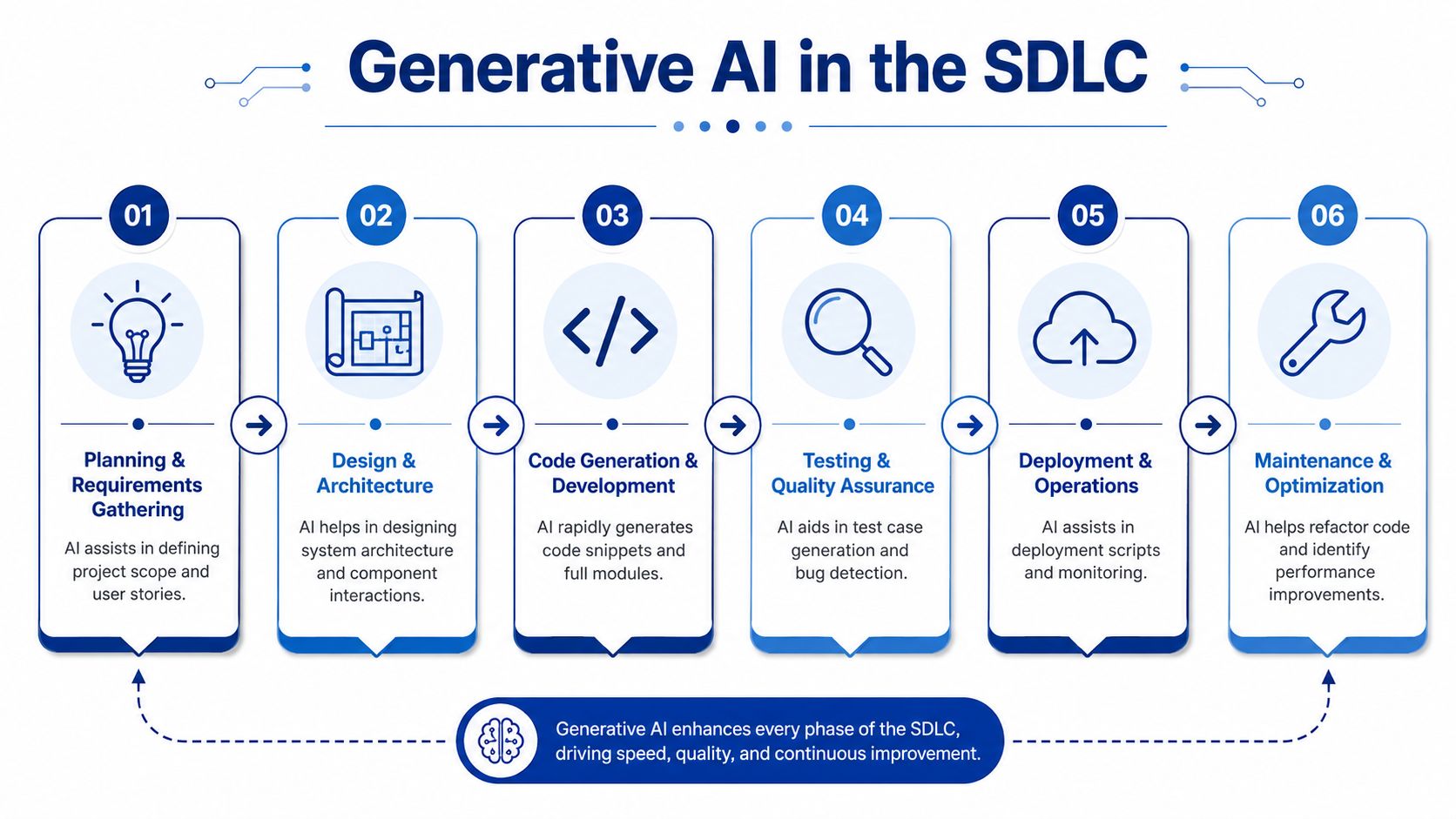
The better view is to examine how generative AI changes each stage of the software development lifecycle, from planning through maintenance.
What Changes Phase by Phase
In planning, teams can use AI to turn rough business input into draft user stories, edge cases, and acceptance criteria. That doesn't replace product judgement, but it helps teams start with more complete artefacts.
In design, the tools can propose architecture patterns, data flows, interface contracts, and trade-offs. The proposals are useful as starting points, especially when the team needs to compare implementation options quickly.
During development, the obvious use case is code generation. The less obvious one is explanation. AI can summarise unfamiliar modules, suggest refactors, and help developers work through a large codebase with greater efficiency.
Testing is one of the highest-value areas. Teams can generate unit tests, expand edge-case coverage, and create more complete test scenarios from requirements or source files. That's especially useful in SMEs where test discipline often lags feature pressure.
Deployment and operations also shift. AI can help draft pipeline logic, infrastructure definitions, release notes, and troubleshooting steps. In maintenance, it can support refactoring, documentation updates, and issue triage.
Traditional SDLC vs. GenAI-Powered SDLC
| SDLC Phase | Traditional Activity | GenAI-Enhanced Activity |
|---|---|---|
| Planning & Requirements | Manual gathering of business needs, user stories, and acceptance criteria | AI assists in drafting scope, user stories, edge cases, and acceptance criteria for team review |
| Design & Architecture | Architects and senior developers create diagrams, interfaces, and patterns from scratch | AI proposes architecture options, component interactions, and implementation approaches |
| Development | Developers write boilerplate, integrations, and repetitive logic manually | AI generates code snippets, scaffolds modules, explains code, and suggests refactors |
| Testing & QA | Test cases are written manually, often late in the cycle | AI drafts unit tests, expands test coverage, and highlights likely failure paths |
| Deployment & Operations | Teams build scripts, release notes, and runbooks through separate manual effort | AI supports deployment scripts, operational summaries, monitoring guidance, and issue analysis |
| Maintenance & Optimisation | Developers inspect legacy code and troubleshoot issues manually | AI helps summarise old code, identify refactoring opportunities, and suggest performance improvements |
A useful way to think about this is process design. If your team is also comparing dev process models, AI adoption should fit the way work already flows through Agile, iterative, or hybrid delivery, not sit awkwardly beside it.
Why Isolated Gains Often Disappoint
A single AI assistant inside one developer's editor can speed up one person's task list. It won't automatically improve handoffs, reviews, release quality, or production learning. That broader shift only happens when AI use is connected to planning, testing, documentation, and operations.
A more detailed example of that wider delivery impact appears in this discussion of AI in software development and DevOps, which is useful if your concern is flow across the pipeline rather than coding alone.
Teams get the best outcomes when they use AI to reduce friction across artefacts, not just keystrokes inside the editor.
That's the difference between a tool experiment and an operating model change.
Choosing Your Architecture and Tooling Stack
Tool choice matters less than integration pattern. Many companies start by asking which coding assistant to buy. A better question is where the AI capability should live, who can use it, what data it can touch, and how outputs move into your delivery workflow.
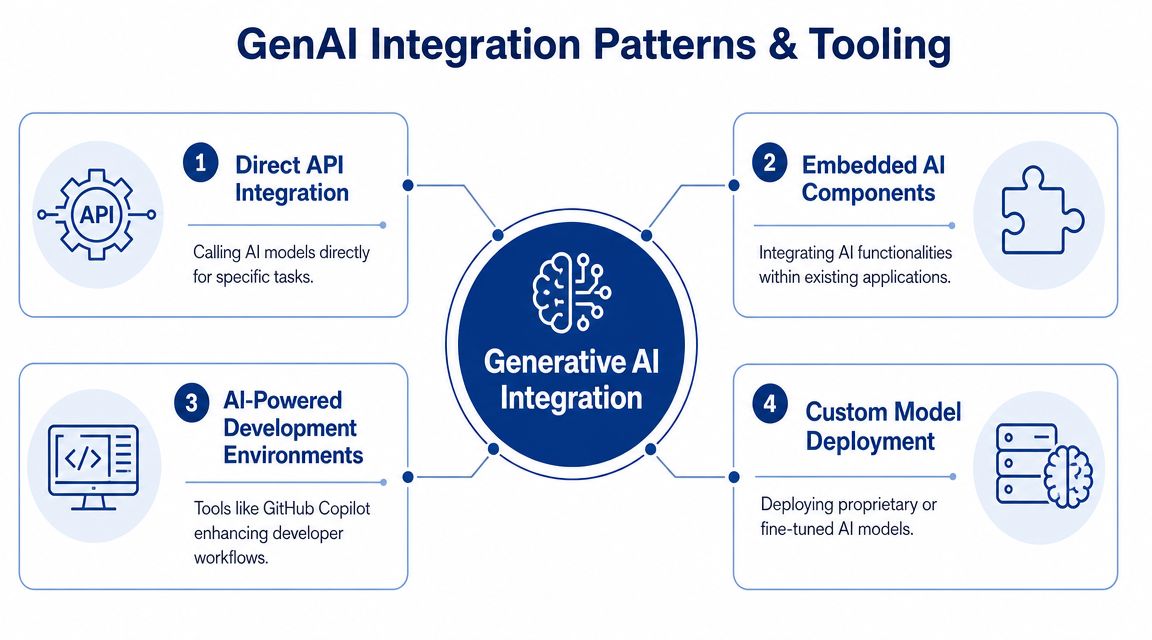
Four Common Patterns
IDE copilots are the simplest entry point. Tools such as GitHub Copilot sit close to the developer and improve drafting speed, boilerplate generation, and in-editor assistance. They're easy to pilot, but their impact stays narrow if the rest of the pipeline remains manual.
Direct API integration fits teams that want AI for specific tasks inside internal systems. That might include generating summaries, converting business rules into structured drafts, or producing support scripts from tickets. This gives more control, but also shifts responsibility for prompt design, security, and monitoring onto your team.
Embedded AI components work when AI needs to appear inside an existing product or workflow. That's common in internal knowledge tools, support dashboards, or administrative systems where the AI must operate within a defined process rather than as a free-form assistant.
Custom model deployment or private hosting becomes relevant when the company handles sensitive data, needs tighter control, or wants model behaviour aligned with internal standards. This is a more demanding operationally, but often necessary in regulated environments.
What Works for SMEs and What Doesn’t
For most Canadian SMEs, it's sensible to begin with tooling that reduces friction quickly and doesn't require a platform rebuild. That usually means one or two controlled use cases, a clear review process, and limited data exposure.
What doesn't work is buying several disconnected AI products and assuming they'll add up to a strategy. They often create new silos. Developers use one assistant, QA experiments with another, and operations sees no benefit because nothing connects.
According to AWS's prescriptive guidance on accelerating the software development lifecycle with generative AI, the stronger pattern is an end-to-end platform with CI/CD and DevSecOps, because isolated copilots don't remove downstream bottlenecks in testing or deployment. The same guidance cites PwC's view that this approach can boost productivity and speed by 20%–50% by shifting engineers from repetitive tasks to higher-value design work.
A Practical Stack Decision
If you're choosing a stack, decide in this order:
Data sensitivity first. Public, internal, confidential, or regulated data each requires different tool boundaries.
Workflow target second. Are you improving coding, testing, documentation, ticketing, deployment, or all of them?
Control model third. Do you want vendor-hosted convenience or private deployment?
Governance fourth. Who approves prompts, templates, output review standards, and usage policies?
Teams building more autonomous workflows should also study how agent-style systems are structured. This guide for AI agent developers is useful because it shows how task orchestration, instructions, and control boundaries become more important as automation expands.
One implementation option in this market is Cleffex Digital Ltd, which offers custom software development, full-cycle delivery, and AI integrations using models such as GPT, Claude, and Gemini. That kind of provider sits between generic off-the-shelf tooling and a fully internal build, which can suit firms that need customised workflows without creating an in-house AI platform team.
Adapting Your Engineering Team and Skills for the AI Era
The team question is more important than the tool question. Once AI handles more drafting work, the value of a developer shifts upward. Less time goes into boilerplate and first-pass implementation. More time goes into framing the problem, validating output, and protecting system quality.
That shift is already visible in usage. GitHub reported that its 2024 survey covered 2,000 respondents and found that upward of 97% had used AI coding tools at some point, and MIT Sloan summarised experimental results showing Copilot increased completed weekly tasks by 26% on average, with junior developers gaining 27% to 39% and senior developers 8% to 13%, as described in GitHub's research on the growing AI wave.
Junior Developers Gain Speed, but Not Exemption From Review
For junior staff, these tools can act like an always-available assistant for syntax, scaffolding, test drafts, and code explanation. That can reduce time spent on routine implementation details.
But managers need to be careful here. Faster output from less experienced developers is only useful if the review system is strong. Otherwise, the team produces more plausible-looking mistakes at a higher rate.
A practical approach is to train juniors to ask the model for options, explanations, and tests, not for final answers. A key skill is learning to challenge the output. Why this pattern? What assumptions is it making? What security implications did it skip?
Senior Developers Become Force Multipliers
Senior engineers still code, but their biggest value increasingly sits in architecture, standards, review, and system-level decisions. They define the rails that make AI useful rather than chaotic.
That means their job expands in three directions:
Prompt and workflow design so the team asks better questions and gets more structured outputs
Architectural governance so that generated code aligns with boundaries, patterns, and maintainability expectations
Risk review so fast drafts don't bypass security, performance, or compliance constraints
A GenAI-enabled team doesn't need fewer experienced engineers. It needs seniors who can review more intelligently and teach the team how to use AI without lowering the bar.
New Skills Worth Training Now
The strongest training plans aren't generic AI workshops. They focus on the habits that improve delivery quality:
Prompt discipline so requests include context, constraints, and expected output format
Critical reading so developers inspect generated code with the same scepticism they'd apply to unknown third-party code
Repository awareness so people understand where AI can help and where domain-specific complexity still requires human design
Privacy-safe usage, so no one pastes confidential information into the wrong environment
For teams that need a practical reference on crafting better prompts while keeping privacy in mind, this guide to private AI prompting is a useful companion.
The organisational change is straightforward. Reward judgement, not just speed.
Managing Security and Compliance in Regulated Industries
For insurance, healthcare, and similar sectors, the central issue isn't whether generative AI can accelerate work. It's whether the organisation can use it without creating a privacy or compliance incident.

The Software Engineering Institute notes that public GenAI services are intended for public data and can be problematic for sensitive or proprietary inputs, which is especially relevant for Canadian buyers in insurance and healthcare, as discussed in SEI's perspectives on generative AI in software engineering and acquisition. That single point should shape the entire adoption plan.
The Real Risk Profile
In regulated settings, the danger usually comes from ordinary behaviour. A developer pastes production logic with embedded business rules into a public tool. A business analyst includes sample claims data in a prompt. A support engineer asks an AI assistant to explain an error using a log excerpt that contains personal information.
None of those actions may look dramatic in the moment. Together, they can breach internal policy, contractual obligations, or privacy expectations.
The second risk is trusting the generated output too quickly. Security flaws, weak validation, missing edge cases, and incorrect assumptions can all enter the system if teams treat AI output as pre-approved.
Security-First Principles That Actually Work
The firms handling this well tend to adopt a few clear controls early.
Separate approved and unapproved use cases. Make it explicit which tasks may use public tools and which require controlled environments.
Strip sensitive data before prompting. Sanitisation should be part of the workflow, not left to individual judgment.
Keep a human reviewer accountable. Someone must own the final decision on code, documentation, test logic, and release impact.
Prefer constrained workflows over open-ended prompting. Templates, approved prompt patterns, and bounded tasks reduce accidental exposure.
Align AI usage with existing compliance practice. Your AI policy shouldn't sit outside software governance. It should fit inside it.
A compliance-led delivery model is often easier to operationalise when AI controls are folded into the broader software lifecycle. This overview of compliance-driven software development is useful because it frames controls as part of the engineering discipline rather than a separate legal afterthought.
In regulated industries, convenience is a weak reason to choose a tool. Control is the stronger one.
What To Avoid
Avoid broad internal rollouts before you define data classes, approved environments, and review responsibilities. Avoid assuming vendor assurances remove your own accountability. Avoid giving teams ambiguous guidance like “use common sense.” That fails the first time someone is under deadline pressure.
The firms that succeed here don't move more slowly. They move with tighter boundaries.
Building a Practical Adoption Roadmap and ROI Case
SMEs don't need a grand AI transformation programme to get started. They need a sequence that reduces risk, creates a visible win, and avoids spending months on architecture before any value appears.
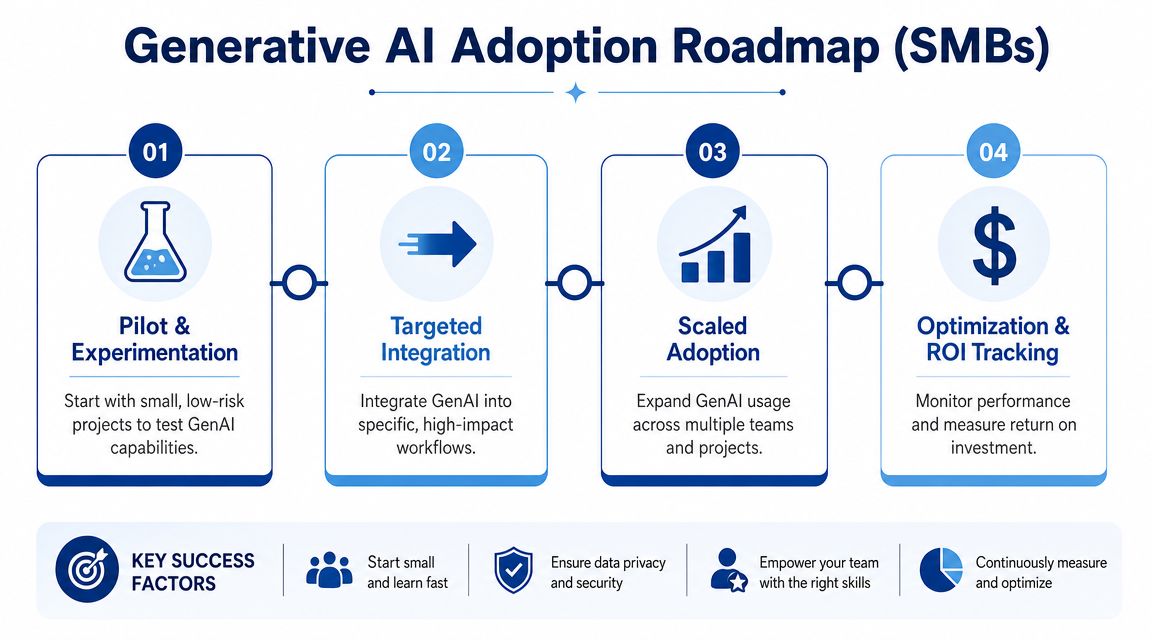
Oracle's guidance is useful here: generative AI is especially effective for boilerplate, code review, and test generation, not necessarily for creating complex systems from scratch, which makes a targeted adoption strategy a better fit for Canadian SMEs, as noted in Oracle's overview of generative AI in software development.
Crawl With Low-Risk, Reviewable Work
Start where the output is easy to inspect, and the downside is limited. Good candidates include documentation drafts, unit test generation, internal utility scripts, code summaries for onboarding, and first-pass user story drafts.
These use cases do two things. They save time quickly, and they teach the team how to review AI output without putting production-critical logic at immediate risk.
The mistake is starting with a core system rewrite, a complex claims engine, or a clinical workflow with edge cases your team already struggles to document. AI won't simplify domain complexity just because the interface feels easy.
Walk by Targeting One Business Bottleneck
Once the team has some confidence, pick a workflow that causes repeated friction. That might be slow test creation, poor documentation handoff, repetitive integration work, or support backlog triage.
The ROI case becomes clearer. You're no longer asking whether AI is impressive. You're asking whether it reduces the effort in a constraint that the business already feels.
Examples by sector help:
Insurance teams can use AI to draft rule documentation, test cases, and support scripts around claims or policy workflows, while keeping sensitive data out of prompts.
Healthcare organisations can apply it to documentation support, data transformation logic, and development artefacts around anonymised workflows where strong review remains in place.
Automotive businesses can use it for internal admin tools, service workflow automation, and integration code around dealership or service operations.
Ecommerce and retail teams can use it for catalogue tooling, admin automation, and rapid iteration on back-office software that supports customer experience.
Run With Governance, Not Just Enthusiasm
When several teams want in, formalise the operating model. Define approved tools, usage boundaries, review standards, and measurement. At this stage, AI should be part of the delivery process rather than a side habit of a few developers.
A structured planning template helps here. This technology roadmap template is useful for turning scattered AI ideas into prioritised delivery work tied to business outcomes.
Don't justify AI adoption with abstract innovation language. Justify it with a backlog problem the business already wants solved.
How To Discuss ROI Without Inventing Certainty
For SMEs, ROI discussions should stay grounded in observed process improvements. Look at reduced time spent on documentation, lower effort for repetitive test writing, faster onboarding into older modules, and smoother review preparation.
You don't need heroic assumptions. You need evidence that one or two constrained use cases reduced delivery friction enough to justify broader investment.
That's how practical adoption compounds. One repeatable gain becomes a policy, then a workflow, then a delivery capability.
Your Actionable Next Steps for GenAI Integration
Most organisations don't need more opinion pieces about AI. They need a next-week plan. The right next step depends on whether you own business outcomes or engineering execution, so the checklist should be different for each group.
Checklist for Business Leaders
Pick one bottleneck, not a broad ambition. Choose a delivery problem that already costs time, such as documentation lag, slow test preparation, or recurring integration work.
Set boundaries before rollout. Decide what data can be used, which teams can pilot, and which environments are approved.
Define success in operational terms. Use practical measures such as turnaround time, rework reduction, documentation completeness, or backlog throughput. Keep the measures close to the workflow.
Choose a pilot with visible review. Avoid hidden experiments. Pick a process where managers and technical leads can inspect inputs, outputs, and effort changes directly.
Ask for governance with the proposal. Any AI pilot request should include ownership, review steps, and escalation rules, not just tool costs.
Treat regulated workflows separately. Insurance and healthcare use cases need stricter controls from day one. Don't let a general pilot policy spill into sensitive domains.
Checklist for Engineering Managers and Teams
Start with constrained tasks. Use AI for code explanation, unit test drafts, boilerplate, refactoring suggestions, or documentation before attempting complex system logic.
Write prompt templates. Standardise prompts for common jobs like test generation, acceptance criteria drafts, code summaries, and migration planning.
Review AI output like third-party code. Run the same security, quality, and maintainability checks you'd apply to external contributions.
Document approved usage patterns. Make it clear which repositories, data types, and tasks are allowed with which tools.
Train juniors to question output. The goal isn't dependence. It's faster learning with stronger review habits.
Give seniors architecture authority. They should define the rails, not just clean up mistakes after the fact.
Connect tooling to the delivery flow. If AI use never reaches tests, documentation, and deployment support, the productivity gain will stay local.
One Final Operating Principle
Generative AI and software development fit together well when the organisation is honest about what the tool is for. It's not a replacement for judgment. It's a multiplier for teams that already know how to review, prioritise, and ship.
That's why the most successful adoptions don't begin with moonshot expectations. They begin with disciplined use in areas where speed, structure, and human oversight can coexist.
If you're a business owner, your next move is to identify a narrow workflow worth improving. If you're an engineering lead, your next move is to define the review and security rules before people create their own.
If you're evaluating how to apply generative AI inside real delivery workflows, Cleffex Digital Ltd works with businesses on custom software, AI integrations, and full-cycle development that can fit both growth-stage SMEs and compliance-sensitive environments.