

A lot of Canadian businesses reach the same point at roughly the same stage of growth. Sales is tracking opportunities in one system, operations is updating spreadsheets, finance is exporting reports from ERP, and customer service is retyping the same information into yet another tool. Nothing is fully broken, but everything takes longer than it should. Errors creep in. Audit trails get thin. Leaders start asking why a simple status update needs three people and two spreadsheets.
That's usually when enterprise application development stops sounding like an IT project and starts looking like an operating model decision. If your business runs on disconnected tools, your people become the integration layer. That's expensive, slow, and risky, especially in healthcare, insurance, and other regulated environments where process gaps quickly become compliance problems.
Beyond Spreadsheets: What Is Enterprise Application Development

Enterprise application development is the design and build of software that supports core business operations across teams, departments, and systems. In practice, that means applications for workflow automation, claims processing, scheduling, intake, approvals, inventory, customer portals, reporting, and the connective logic around ERP and CRM.
The simplest way to think about it is this. A website presents information. An enterprise application runs the business.
What These Applications Actually Solve
Most organisations don't need software for the sake of software. They need fewer handoffs, cleaner data, and more control over how work moves from one team to the next. A well-designed enterprise application becomes a single operational layer where rules, data, and decisions live together.
That matters when:
Staff duplicate effort: Teams enter the same customer, patient, policy, or order data in multiple places.
Approvals stall work: Requests sit in inboxes because no one can see ownership or status.
Reporting is delayed: Leaders wait for exported spreadsheets instead of seeing live operational data.
Compliance becomes manual: Audit evidence depends on screenshots, email chains, and memory.
I often describe it as building a digital nervous system. A spreadsheet is a notebook on one desk. An enterprise application is the network that lets the whole body react in a coordinated way.
A business can tolerate manual work for a while. It usually can't scale manual coordination.
Why This Matters in Canada Now
This isn't a niche investment category anymore. In Canada, enterprise application development sits inside a large software economy. Statista projects the Canadian software market will generate about US$30.72 billion in revenue in 2026, with annual growth of 4.10% expected from 2026 to 2030, according to Statista's software market outlook.
For decision-makers, the implication is straightforward. Canadian businesses are treating software as core infrastructure, not an optional enhancement. That's especially true when they need to modernise legacy processes, support distributed teams, or create secure customer-facing portals.
Custom Build Versus Buying Off the Shelf
Off-the-shelf platforms still have a place. If your process is standard and your differentiation doesn't depend on it, buying can be sensible. But custom enterprise application development becomes the better path when your business has one or more of these conditions:
Your Workflow Is Specialised
Insurance claims, patient intake, service scheduling, underwriting support, or dealer operations often don't fit neatly into generic software.Your Workflow Is Specialised
The new application has to work with existing ERP, CRM, identity, and reporting systems.Compliance Shapes the Design
Data handling, access controls, and hosting decisions can't be bolted on later.User Experience Affects Adoption
If staff hate the workflow, they'll find workarounds. Then your “system of record” becomes fiction.
Enterprise application development is really about replacing fragmented operational habits with a system designed around how your business actually works. Done well, it reduces friction. Done poorly, it creates a more expensive mess than the one you started with.
Choosing Your Application Architecture Blueprint
Architecture decisions shape cost, speed, resilience, and how painful change will feel a year from now. Most executives don't need deep engineering detail, but they do need to understand the consequences. If you choose the wrong structure, every future feature costs more than it should.
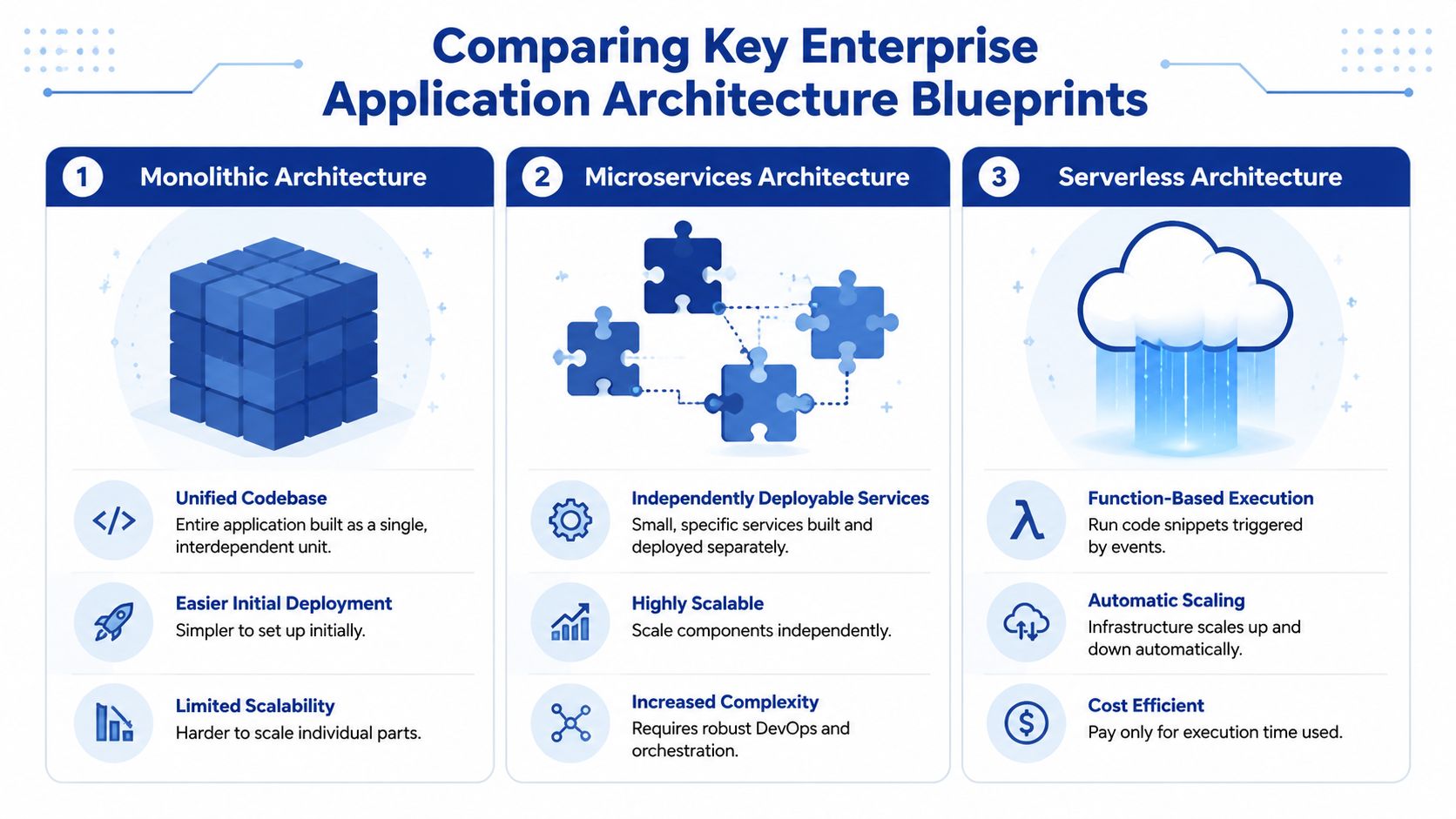
The Three Common Blueprints
A monolith is like one large office building. Everything sits inside it. Easier to plan, easier to enter, and simpler to secure at the start. But if the billing floor needs renovation, the whole building feels the disruption.
Microservices are more like a campus of smaller specialist buildings. Claims processing sits in one, identity in another, notifications in a third. You can expand one building without rebuilding the whole campus, but you now need roads, security gates, utilities, and maintenance between them.
Serverless is closer to renting rooms only when you need them. Small functions run in response to events. You don't manage much infrastructure directly, which is useful for bursty workloads or isolated processes, but it can become awkward when the application needs long-running logic, complex state, or strict operational consistency.
What Canadian Firms Should Optimise For
For Canadian organisations serving distributed teams or variable demand, cloud-native architecture is increasingly the baseline. Research focused on Canada notes that cloud-native and microservices designs are no longer optional when applications must support distributed teams and elastic workloads, and that enterprises are adopting hybrid and multi-cloud approaches to address modernisation, resilience, and data residency needs, as outlined in this Canadian cloud-native architecture discussion.
That doesn't mean every app should start as microservices. It means architecture should support change, controlled scaling, and workload placement. If part of the system must stay in-region and another part can run more flexibly, your design needs to accommodate that from the start.
A useful primer on cloud native principles from TekRecruiter explains the operational mindset behind this approach. It's not just about containers or Kubernetes. It's about designing for independent deployment, resilience, and observability.
Application Architecture Comparison
| Criterion | Monolithic | Microservices | Serverless |
|---|---|---|---|
| Initial build speed | Fastest for a small, focused team | Slower because boundaries and integration need more planning | Fast for narrow event-driven features |
| Operational complexity | Lower at first | Higher. Requires mature DevOps, monitoring, and service governance | Lower infrastructure management, but debugging and dependency tracing can get tricky |
| Scaling model | Scale the whole application together | Scale services independently | Scale automatically per function or event |
| Best fit | Early-stage products, internal tools, simpler workflows | Large enterprise systems with multiple domains and teams | Notifications, document processing, integrations, scheduled jobs |
| Risk profile | Changes can affect the whole system | Faults can be isolated if boundaries are well designed | Vendor-specific patterns can affect portability |
| Compliance flexibility | Harder to separate sensitive and non-sensitive workloads | Stronger control over service placement and data boundaries | Useful for selected workloads, less ideal as the only pattern for regulated core platforms |
What Works and What Usually Fails
A monolith works well when the domain is still forming, and one team owns the whole product. It fails when leaders expect independent scaling and rapid parallel delivery but won't invest in release discipline.
Microservices work when the business has clear domain boundaries, multiple teams, and real integration demands. They fail when companies split a simple app into too many services too early. That creates distributed confusion, not distributed agility.
Serverless works for event-driven components such as file handling, notifications, and background automation. It fails when teams try to force a complete enterprise platform into function-sized pieces with no coherent domain model.
Practical rule: Start with the simplest architecture that can survive your next stage of complexity, not the architecture that looks most modern on a slide.
If you need a more detailed technical breakdown of trade-offs, these enterprise application architecture patterns give a useful lens for matching patterns to business context.
The Technology Stacks That Build Enterprise Apps
Once the architecture is set, the next question is less philosophical. What are you building with?
A tech stack is the set of technologies used across the interface, server logic, data layer, and deployment pipeline. Leaders don't need to memorise frameworks, but they should know what drives the choice. The wrong stack won't usually kill a project on day one. It will slow hiring, complicate support, and increase long-term maintenance costs.
Front End Choices and Business Impact
On the front end, teams often choose frameworks like React, Angular, or Vue for web applications. For mobile, they might use native iOS and Android development, or cross-platform options such as Flutter or React Native.
The business question isn't which framework is trendier. It's whether your users need a rich interface, offline capability, fast form handling, strong accessibility support, or mobile-first workflows. A claims dashboard for internal adjusters has different interaction needs than a patient booking portal or a dealership sales app.
Angular often fits organisations that want more structure and consistency across a large engineering team. React is common when teams want flexibility and a large ecosystem. Neither choice is automatically superior. The better one is usually the one your team can govern and extend reliably.
Back End Choices and Where They Fit
For back-end development, common enterprise options include .NET, Java, Node.js, and Python.
A few practical patterns show up repeatedly:
.NET fits well in Microsoft-heavy environments using Azure, Active Directory, SQL Server, and enterprise identity tooling.
Java remains common in large, long-lived enterprise systems where stability, mature frameworks, and deep integration matter.
Node.js can be efficient for API-heavy applications and teams that want one language across front-end and back-end.
Python is often useful where workflow logic intersects with analytics, automation, or AI-related services.
What matters most is fit with your existing environment. If your internal team knows .NET and your infrastructure already leans Microsoft, forcing a Java stack because another vendor prefers it may create a talent and support problem you'll be paying for long after launch.
Databases and Data Shape
Most enterprise applications use some mix of SQL and NoSQL databases.
SQL databases such as PostgreSQL, SQL Server, and MySQL are typically the right default when your data is relational, transactional, and audit-sensitive. They're a strong fit for policies, claims, appointments, invoices, inventory, and approvals.
NoSQL databases can help when the data is document-heavy, rapidly changing in structure, or tied to high-volume event streams. They're useful tools, but they shouldn't be selected because they sound more modern.
The database should match the shape of the business problem. Don't choose a data model that your users can't reason about later.
A Practical Selection Lens
When evaluating a stack, I'd push a client to ask five things:
What can the current team support after go-live?
Which stack fits the security and identity model already in place?
How easy will it be to hire or augment engineers for this stack in future?
Does the stack support the integration pattern the business needs?
Will the platform still feel maintainable when the application doubles in scope?
This is also where delivery partners matter. Some firms build mostly in one ecosystem and shape the problem around that preference. Others adapt the stack to the client's operating reality. For example, Cleffex Digital Ltd works on custom web and enterprise software projects, which is useful when a business needs a stack aligned to its existing systems rather than a one-size-fits-all implementation.
Good stack choices feel boring in the best possible way. They let the business move faster without creating avoidable technical debt.
How Modern Enterprise Applications Get Built and Delivered
The old model was simple. Gather requirements for months, build for months, test near the end, and hope the business still wants the same thing by launch. That approach still appears in heavily documented organisations, but it performs poorly when priorities shift, or users discover problems only after seeing the product.
Modern enterprise application development works better when delivery happens in short cycles and release processes are automated.

Agile and DevOps in Plain Terms
Agile means building in increments. The team delivers a small usable slice, gets feedback, and improves it. That reduces the risk of spending months on the wrong feature.
DevOps is the operating discipline that lets those increments move safely into production. Think of Agile as deciding to build a car in tested assemblies rather than all at once. DevOps is the assembly line that moves each part through quality checks, packaging, and release without chaos.
When these two are disconnected, teams still struggle. A team can work in two-week sprints and still release badly if deployment, testing, and rollback are manual.
What Mature Delivery Looks Like
A healthy delivery model usually includes:
Version control with disciplined branching so teams can work in parallel without trampling one another.
Automated testing for core business rules, APIs, and security-critical paths.
Continuous integration that checks code quality and integration issues early.
Continuous delivery so releases become routine, not stressful events.
Environment consistency across development, test, and production.
The point isn't process theatre. It's reducing release risk. Every manual deployment step is an opportunity for drift, omission, or panic.
For teams trying to tighten release flow and reduce handoff friction, this cloud DevOps software delivery guide is a practical reference.
Where Low-Code Fits and Where It Doesn’t
Low-code and no-code tools are now part of the enterprise conversation, whether engineering teams like it or not. Gartner predicts that by 2026, 70% of new enterprise applications will use low-code or no-code technologies.
That projection matters, but the bigger question is governance. Low-code can be useful for internal workflow tools, simple forms, departmental apps, and prototypes. It becomes dangerous when organisations let uncontrolled citizen development produce business-critical systems with weak review, poor security standards, and inconsistent data handling.
A Hybrid Model Is Usually the Safest
In regulated Canadian sectors, the best pattern is usually a hybrid one.
Use low-code for:
Internal process automation
Rapid prototypes
Department-specific tools with limited integration depth
Keep traditional engineering for:
Core transaction systems
Identity and access-sensitive applications
Complex integrations
Customer-facing products where scale and compliance matter
Low-code is a delivery option, not a governance model.
The strongest teams set approval workflows, platform standards, data access rules, and ownership boundaries before adoption spreads. Otherwise, the short-term speed gain turns into long-term clean-up.
Integrating Systems and Unifying Business Data
Most enterprise applications fail without warning at the integration layer. The interface looks polished, users can log in, and a pilot appears promising. Then someone asks for customer history from CRM, invoice status from ERP, policy data from a core platform, and documents from a records system. That's when the difficult work starts.
An enterprise app has value because it connects work, not because it creates another isolated screen.
Why API-First Matters
An API is a controlled way for systems to exchange data and trigger actions. A useful analogy is a universal power adapter. If you design the adapter first, you can connect the device to different outlets safely. If you build the device with no standard connection in mind, every new country becomes a custom wiring job.
That's what API-first design does. It defines how the application will communicate before teams bury logic inside the interface or hard-code assumptions about other systems.
API-first design helps you:
Protect legacy systems by exposing only the needed functions.
Support multiple channels such as web apps, mobile apps, and partner portals.
Improve maintainability because integrations are structured instead of improvised.
Enable phased modernisation without forcing every old system to change at once.
Point-to-Point Versus Managed Integration
A common early mistake is point-to-point integration. The app talks directly to CRM, ERP, the document repository, and the reporting database with custom logic for each connection. It works at first, then becomes brittle. Every system change ripples through the application.
Middleware or an integration platform gives you a cleaner pattern. Instead of every system speaking to every other system directly, you create an organised traffic layer. That layer can transform data, apply rules, log events, and control access.
Here's the difference in practical terms:
Point-to-point is faster for a quick prototype.
Middleware-led integration is safer when the application will grow, serve multiple departments, or depend on legacy platforms.
What To Integrate First
Leaders often ask whether they should start with every integration at once. Usually, no.
Start with the flows that block operational visibility or create the most rework:
Identity and user provisioning
Customer, patient, member, or policy master data
Status updates that affect downstream teams
Documents and audit records
Financial events that need traceability
This creates a usable core without dragging the project into a giant integration programme.
If your application can't trust the data coming in, users won't trust the workflow going out.
Rollout planning matters here, too. Even a technically clean integration can cause support strain if teams don't understand what changed. This guide on reducing support load during rollouts is helpful when you're planning communication around new workflows, permissions, and system transitions.
The Real Objective
The target isn't “more integrations.” The target is one reliable business process across systems. In an insurance context, that might mean intake, verification, document collection, approval, and payment status, all visible in one place. In healthcare, it may mean appointment, records, billing, and communication workflows staying aligned without exposing internal complexity to frontline staff.
Good integration design removes guesswork. Bad integration design makes every team maintain its own version of reality.
Ensuring Security and Compliance by Design
Security gets mishandled when teams treat it as a final checklist before launch. In enterprise application development, especially for Canadian organisations handling regulated data, that approach is reckless. Security is part of the architecture, the delivery process, the access model, and the integration design.
If the application touches customer records, patient information, policy data, or financial workflows, security decisions affect whether the platform is usable at all.

The Controls That Matter First
For Canadian organisations, enterprise apps must prioritise security, identity, and integration. Best practices emphasise role-based access control and strong authentication because these applications often orchestrate data across multiple systems. Weak controls lead to duplicated data, inconsistent workflows, and greater breach exposure, which is especially costly under Canadian privacy obligations, as described in this guidance on enterprise application security and access practices.
In practical terms, the minimum serious discussion should include:
Authentication
How users prove who they are. Usually tied to a central identity provider rather than app-specific passwords.Authorisation
What each user can see, approve, edit, export, or administer. This should reflect roles, not informal team habits.Encryption
Protection for data in transit and at rest.Auditability
Logs that show who did what, when, and through which pathway.
What Regulated Sectors Should Insist On
Healthcare and insurance teams should ask sharper questions than “Is it secure?” They should ask:
Where does sensitive data reside?
Can access be restricted by role, region, team, or business unit?
How are privileged actions logged and reviewed?
Can the system integrate with existing identity and security tooling?
How are APIs protected from misuse or overexposure?
Those questions matter because security incidents rarely begin with a dramatic hack. Many start with weak permissions, excessive access, exposed interfaces, or unreviewed integrations.
Compliance Is a Design Constraint
PIPEDA and sector-specific privacy expectations change system design choices. Data handling, retention, consent-aware workflows, and hosting boundaries can't be left to vendor defaults. If a development partner can't explain how security controls align with Canadian compliance expectations, they're not ready for the work.
For a useful external reference on validating application risk posture, this resource on securing web applications for compliance covers the role of testing and verification before production exposure.
A more implementation-focused perspective on compliance-driven software development is also useful when the business case has to satisfy both IT and compliance stakeholders.
Security by design means the application makes the safe action the default action.
What Doesn’t Work
A few patterns repeatedly cause trouble:
Shared accounts that destroy accountability
Broad admin access granted for convenience
Front-end only permission checks with weak back-end enforcement
Direct legacy system exposure without a controlled integration layer
Late security reviews after workflows and data flows are already locked in
Good security does add effort early. But that effort is cheaper than reworking permissions, redesigning APIs, and rebuilding trust after a preventable incident.
Planning Your Modernisation Roadmap and Measuring ROI
Most organisations don't have a greenfield environment. They have old systems, undocumented dependencies, and business processes that still matter even if the technology underneath them is overdue for replacement. That's why modernisation strategy matters as much as architecture.
The wrong move isn't usually “doing nothing.” It's trying to replace too much at once and breaking operations that the business still depends on.
Modernise in Layers, Not in One Leap
For regulated Canadian sectors such as healthcare and insurance, a safer path is API-led integration and incremental refactoring, not an immediate switch to microservices. That phased approach is highlighted in this discussion of enterprise app modernisation for regulated operations, where preserving continuity and reducing migration risk are central concerns.
A practical roadmap often looks like this:
Stabilise the Current State
Identify critical workflows, fragile dependencies, and essential compliance requirements.Expose Key Functions Through APIs
Create controlled access points around legacy capabilities instead of cutting directly into core systems.Replace One Bounded Workflow at a Time
Start with a process that delivers visible value without threatening the whole operation.Retire Old Components Gradually
Once the new path is proven, shift traffic and reduce reliance on the legacy module.
This is close to the strangler pattern in practice. The new system grows around the old one until the old component can be safely removed.
How To Choose the First Target
The first module shouldn't be selected only because it's technically easy. It should sit where business value and operational safety meet.
Good candidates often include:
Manual approval workflows
Customer or patient intake
Document-heavy processes
Status tracking across departments
Internal portals replacing email-based coordination
Poor first candidates are usually the most heavily entangled financial or clinical core systems unless a strong integration boundary already exists.
Pick the first modernisation target where users will feel the improvement, and the business can tolerate careful iteration.
Measuring ROI Without Forcing Fake Precision
Many teams make the ROI case too narrowly by focusing only on licence savings or headcount reduction. Enterprise application development often creates value in more operational ways.
Track outcomes such as:
| KPI | What it tells you |
|---|---|
| Cycle time | Whether work moves faster from request to completion |
| Manual touchpoints | Whether duplicate entries and handoffs are decreasing |
| Error rates | Whether the system is reducing rework and inconsistent records |
| User adoption | Whether staff prefer the new workflow to the old workaround |
| Release frequency | Whether the team can improve the product without major disruption |
| Audit readiness | Whether evidence and traceability are easier to produce |
| Support volume | Whether the application is simplifying operations or creating confusion |
The Business Case Leaders Can Defend
A strong business case links technical choices directly to business outcomes:
Microservices or modular architecture support controlled scaling and change.
API-led integration protects legacy operations while enabling modern workflows.
Secure identity and access design reduces compliance risk.
Agile and DevOps shorten the distance between need and delivery.
Incremental migration avoids operational shock.
That's the decision-making framework Canadian businesses need. Don't ask which technology is most fashionable. Ask which sequence of decisions improves service, reduces operational risk, and gives the business room to change safely.
If your organisation is weighing custom enterprise application development, modernising legacy workflows, or planning a phased architecture for a regulated environment, Cleffex Digital Ltd can be a useful partner to evaluate. They work on custom software, cloud, and agile delivery initiatives for Canadian businesses that need practical execution tied to business outcomes, not just technical implementation.