

More than one in four Canadian primary care physicians, 27% in the Canadian Institute for Health Information's virtual care reporting, already use remote monitoring or connected medical devices to follow patients with chronic conditions. The Commonwealth Fund international average sits at about 19%, which puts Canada roughly nine points ahead of its peers. The devices are already in the field. The bottleneck is somewhere else.
It's in the queue. A monitoring platform produces readings faster than any care team can absorb them, and every decision that matters downstream flows from that imbalance. How many alerts a nurse can clear in a shift sets your threshold logic. What happens when a reading never arrives sets your exception handling. Which province the data sits in sets your architecture.
Remote patient monitoring software development is a triage discipline dressed up as a device project. The feature list is the least interesting document in the build. The alert rule set and the escalation matrix are the ones that decide whether the thing works.
The Building Blocks of an RPM Platform
A patient with heart failure steps on the scale at seven in the morning and takes her blood pressure before breakfast. Her care team needs both numbers within minutes, because a two-kilo overnight gain plus a systolic reading above her personal target is the pattern that so often comes before an admission. Delivered at a clinic appointment next Tuesday, those numbers are a history lesson.
That appetite for minutes is what turned a niche service into national infrastructure. Before the pandemic, remote patient monitoring in Canada had scaled slowly, enrolling 14,819 patients nationally in 2019. Across the following twelve months, more than 15,000 traditional chronic-disease-management patients and approximately 23,000 COVID-19 patients joined monitoring programmes, as Health Canada's review of the bilateral virtual care agreements records. One platform suddenly served a stable heart failure cohort and a short-term respiratory cohort at the same time, with different schedules and different escalation rules.
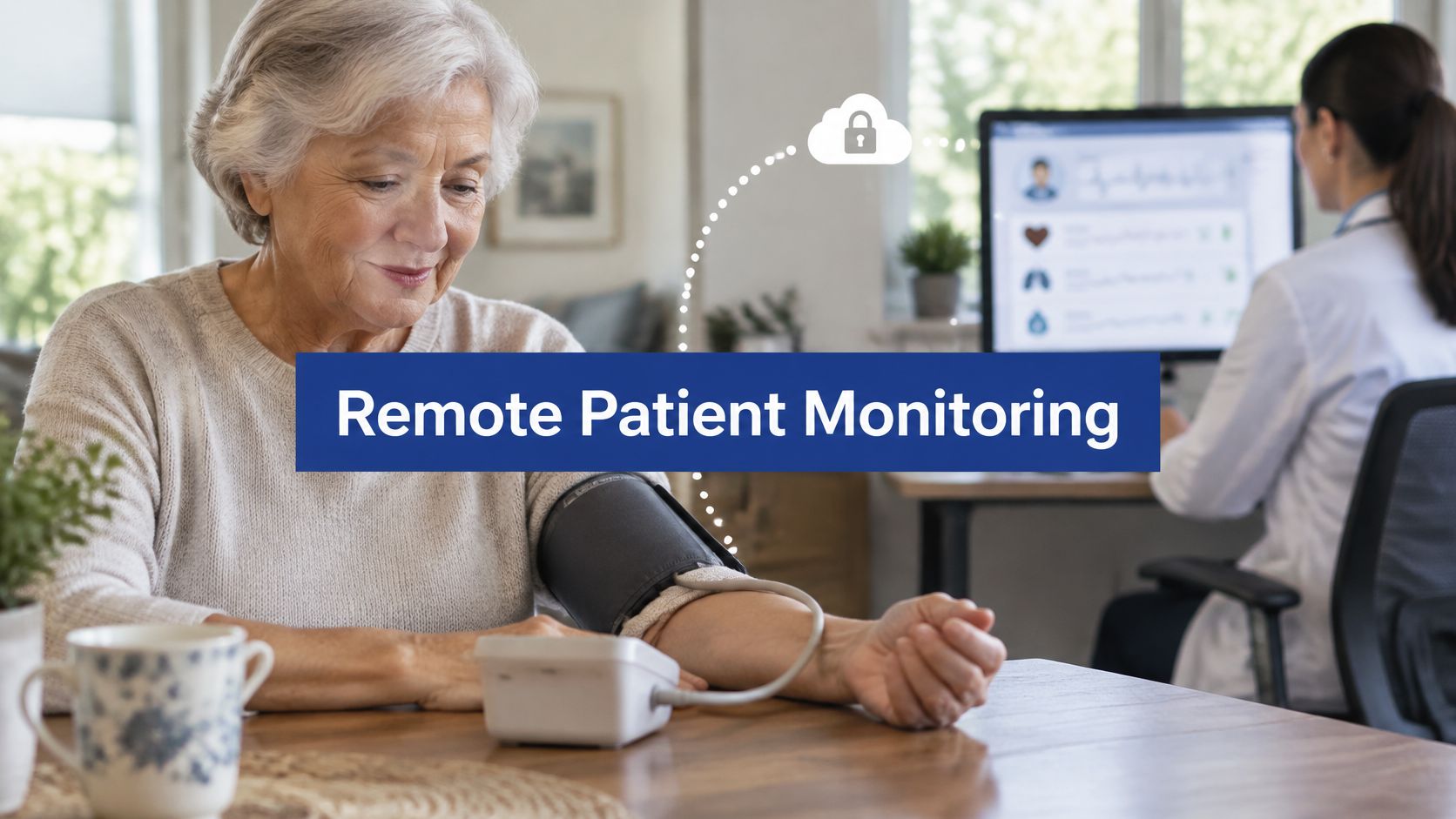
The shape most programmes settle into looks like this, with the patient at home and the clinician looking at numbers while they still matter.
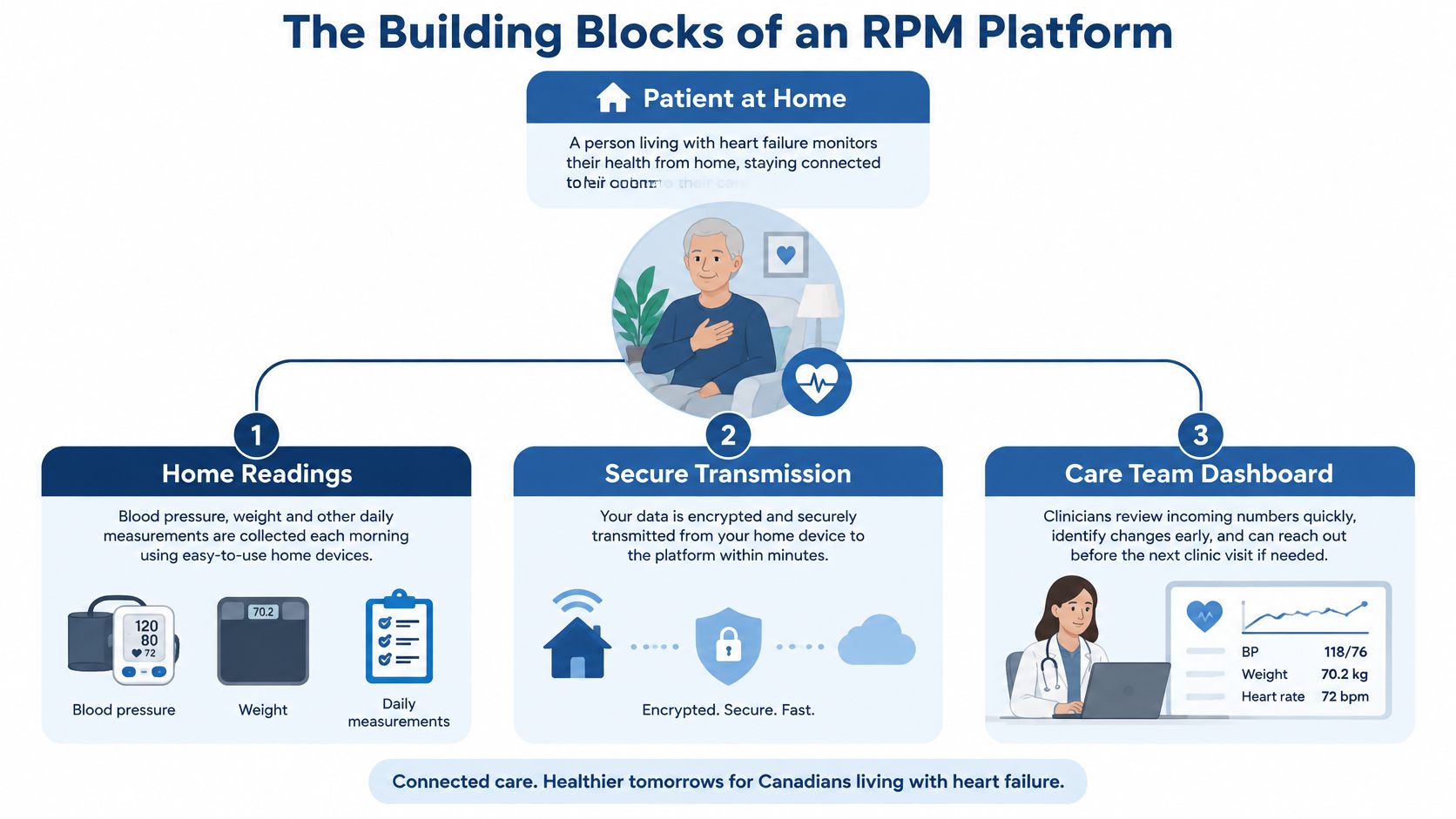
The seven layers from cuff to clinician
Seven layers sit between that bathroom scale and a nurse's decision, and each one exists to stop a specific failure.
| Layer | What it does | Build note |
|---|---|---|
| Device and app ingestion | Receives readings from Bluetooth cuffs, oximeters, scales and patient apps | Accept mixed formats and timestamp every reading |
| Data pipeline and storage | Validates, normalises and stores time-series vitals | Keep raw readings separate from clinical summaries |
| Rules and alert engine | Compares each reading with the patient's care-plan range | Make thresholds configurable by clinicians, not hard-coded |
| Clinician dashboard | Shows prioritised patients and their trends | Sort by risk, not alphabetically |
| Patient app and reminders | Prompts measurements and collects symptoms | Design for low digital literacy and shared devices |
| Integration layer | Exchanges data with EHRs and other systems | Use HL7 FHIR or HL7 v2 interfaces where the EHR supports them |
| Access control and audit | Records who viewed or changed what, and when | Log every alert acknowledgement |
The layers aren't equal in weight, and the budget conversations usually misjudge two of them. The rules engine grows every time a clinician says "but for this patient, 150 is fine", and per-patient thresholds mean the engine is configuration, not code. The audit layer looks like a compliance chore until the first incident review, when someone needs to know who saw a deteriorating reading and what they did about it.
Device plumbing is the part teams scope first, and it's the part that decides whether the rest is possible at all. Our notes on IoT solutions for healthcare and patient care go deeper on that side of the stack.
One test before you approve the architecture
Name your first clinical condition, the two or three devices it uses, and the individual clinician who acts on each alert tier. Then walk the seven layers and confirm each one earns its place for that single pathway. If a layer has no defined consumer at the end of the walk, you're building it for a roadmap, not for care.
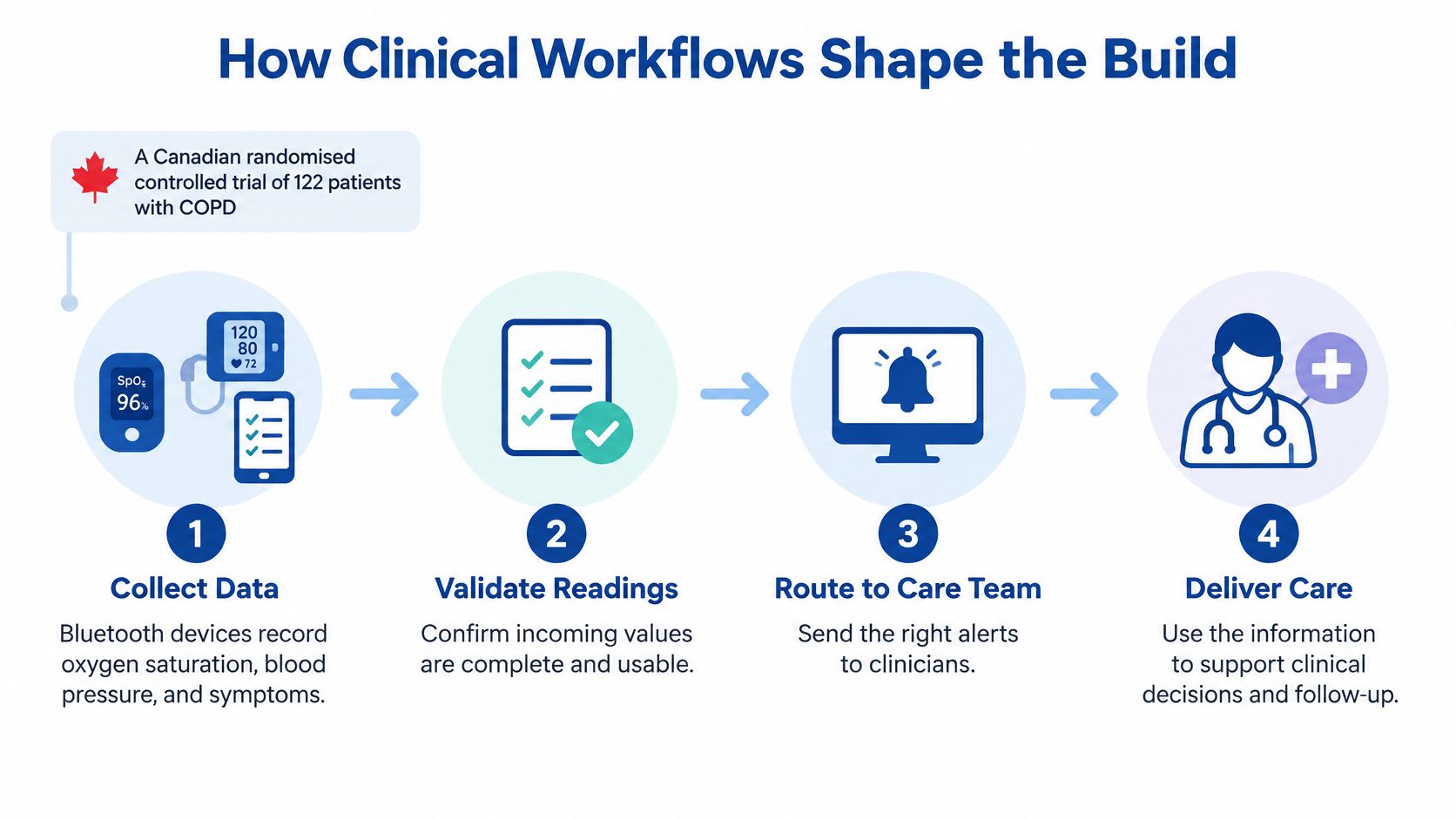
How Clinical Workflows Shape the Build
A Canadian randomised controlled trial enrolled 122 patients with chronic obstructive pulmonary disease and split them into standard care, self-monitoring and clinician-supported remote monitoring groups, with 41 patients in each intervention arm and 40 in standard care. Participants used Bluetooth-enabled devices to measure oxygen saturation, blood pressure, temperature, weight and symptoms. The trial published in the Journal of Medical Internet Research found no significant differences between the groups in hospitalisations, emergency-department visits, clinic visits, self-management measures or respiratory quality of life.
Read that result carefully. The devices worked. The data arrived. Care didn't change enough to show up in outcomes, because measurement without a matching clinical process produces records, not treatment.
From reading to action in six steps
The path from a home reading to a documented intervention has six stations, and a platform either supports all of them or breaks at whichever one it skipped.
The reading arrives and is stamped. Device identifier, patient identifier and a trusted timestamp, all attached before anything else happens.
It is checked against the care-plan range. That patient's range, set at enrolment by a clinician, not a population default.
It is assigned an alert tier. Routine, advisory, urgent, or missing data.
The right clinician sees it in a prioritised queue. Risk first, then recency, with the patient's history one click away.
The action is recorded. Who called, when, what was agreed, what changed in the plan.
The outcome is reviewed later. Did the intervention prevent the admission, or just generate activity?
Saskatchewan shows what this looks like at scale. Its RPM technology was reported to let one healthcare worker monitor approximately 100 patients, while the province had enrolled just over 1,200 patients in its COVID-19 RPM programme by 9 March 2021, according to the province's action plan under the bilateral virtual care agreement. That ratio only works when routine readings land on a dashboard and genuine deterioration reaches a person.
Alert tiers and the response each one needs
Four tiers cover almost every pathway. The triggers below are illustrative; the clinical protocol sets the values.
| Tier | Example trigger | Required response | Escalation if unanswered |
|---|---|---|---|
| Routine | Reading within the care-plan range | Stored and shown in the trend view | None |
| Advisory | Systolic blood pressure above target on two readings in a row | Nurse message review the same working day | Repeat alert after 24 hours |
| Urgent | Oxygen saturation below the protocol threshold | Clinician contacts the patient within the hour | Escalate to on-call clinician if no contact is logged |
| No data | No reading received within the scheduled window | Automated reminder, then a staff call | Flag as a monitoring gap on the dashboard |
Thresholds belong to the patient and to the protocol behind them, never to an engineering default. A systolic of 150 means one thing for a stable 82-year-old and something quite different for a 45-year-old three days after a medication change. Build the rule engine so a clinician can set the range during enrolment, and so repeated readings from the same episode collapse into a single alert instead of paging four times.
Design rule: every alert needs a named owner and a stated response time. If nobody can answer who receives it and by when, delete the rule.
Nova Scotia's home-monitoring model shows the same discipline in simpler form. Patients used home blood-pressure monitors, heart-rate monitors and daily self-assessment tools, then reported on a regular schedule to an assigned provider working from an established care plan, as the province's RPM action plan describes. Schedules and protocol-based escalation, not a firehose of continuous readings.
That exception logic doesn't only apply inside RPM. Programmes such as New Jersey doctor visits for dementia patients depend on somebody noticing a change between scheduled contacts, and the missing-data alert is the software equivalent of that instinct. Treat an absent reading as a clinical signal, not an empty cell. If you're mapping how these decision points fit together across a service, our guide to healthcare workflow automation covers the surrounding processes.
Connecting Devices and EHRs Without Data Gaps
Monitoring data earns its keep when it reaches the record clinicians already have open. Until then, it's a second inbox nobody checks.
Start at the device. Many home devices pair over Bluetooth Low Energy, and the phone app is the gateway. Others, especially cellular hubs and vendor platforms, expose only a cloud API or their own SDK. A patient monitoring system that handles one and not the other will fail the first time a clinic lends out a cellular scale to a patient without a smartphone. Build the ingestion layer to accept both paths and to record which path a reading came from, because support calls get much shorter when the answer is visible.
Canadian virtual-care policy already treats this as foundational rather than optional. Remote patient monitoring, secure messaging and information sharing, videoconferencing, patient access to test results and back-end integration are named as priority capabilities, and privacy, data standards and technology standards are described as essential enablers for sharing patient information across digital technologies in the Alberta bilateral agreement documentation. IoT healthcare integration that stops at the cuff has solved the easy half.
The data path in order
Four steps carry a reading from the home to the chart, and each has a failure mode worth planning for.
The device pairs with the patient app. Identity is bound here, and a shared device must still resolve to the right patient at measurement time.
The reading is stamped with device and patient identifiers. Serial number to patient mapping is the single most common source of misfiled data.
The integration layer maps it to a standard resource. Blood pressure, weight and saturation become HL7 FHIR resources such as Patient, Device and Observation, with codes that the receiving system recognises.
The EHR accepts the observation and clinician notes flow back. Where older hospital systems send admission or discharge events over HL7 v2, support that too rather than forcing an upgrade you don't control.
The governance argument runs the same way. One monitoring platform connected to the hospital EHR is easier to run than four disconnected tools, because staff aren't switching screens to reconstruct a history. That principle is worth holding even when a vendor demo looks better in isolation.
Four questions for the EHR vendor
Ask these before estimating, not after.
Which FHIR version and profiles do you accept?
Read access and write access are different products, and write-back is where projects stall.
Do we get write permissions for Observation resources, or only a PDF summary?
The answer can move a timeline by months.
Is there a sandbox with realistic test patients?
Integration estimates based on documentation alone are guesses.
How are duplicate and out-of-order readings handled?
Devices retransmit after a dropped connection, and the same reading arriving twice shouldn't count twice.
We build custom IoT solutions for healthcare, including connected healthcare environments and monitoring software, and we provide healthcare software integration for North American healthtech companies connecting devices and applications to hospital EHRs. When you want that scoped properly, the healthcare software integration service is the place to start.
The test at the end is simple. Can a clinician see a home reading in the EHR within the window the care plan requires, without logging into a second system?
Security, Privacy and Provincial Compliance
The question teams ask too late is which law applies to the data. It should be the first question in discovery, because the answer shapes the data model.
Baseline controls are not negotiable and shouldn't be a differentiator: encryption in transit and at rest, role-based access, unique clinician logins, audit trails of every view and change, and configurable retention periods. A 2025 review of remote monitoring in Canada names interoperability, privacy, security and accessibility as the major barriers, and describes virtual care governance as fragmented across provinces in a way that creates continuity-of-care problems across borders.
The image below is the conversation between the clinical owner and the person who has to sign off on compliance that is needed early.

Where the provinces actually diverge
"Build once, deploy nationally" is a poor strategy for Canadian RPM, and the reason isn't technical. A platform can be perfectly interoperable and still fail operationally because payment models, procurement, clinical accountability and health-information statutes differ by province.
Ontario's health privacy law and Alberta's health information statute set different rules for consent and for who counts as the custodian of a record. Data residency expectations differ. Breach notification routes differ. So the workable pattern is a national core with configurable provincial adapters: residency routing, consent capture, retention and breach workflow all treated as configuration rather than forked codebases.
That connects custom software development to enterprise integration. A wearable app with no adapter layer is a demo.
The regulatory question you answer first
Software that analyses readings to support diagnosis or treatment decisions may be regulated as a medical device by Health Canada, depending on its intended purpose. Software that only transfers, stores, and displays readings usually sits outside that. The distinction sits in your intended-use statement, so write it before the first sprint and confirm the position with regulatory specialists. A feature that turns a trend line into a treatment recommendation moves the product closer to regulation, and that changes timelines, documentation and testing.
For teams also serving US customers, the state-level picture adds another layer, and this plain-language explanation of Washington consumer health data rules is worth reading before you assume federal HIPAA covers everything.
Four decisions before the first line of code
Where the data is stored: Named hosting region and the approved environment for each health organisation you serve.
Who holds consent: Who captures it, in what form, and where the record of it lives.
How a breach is reported: Which regulator, which timeline, which internal owner.
How long records are kept: Retention schedules per jurisdiction, enforced in the platform rather than in a policy document.
Our PIPEDA healthcare compliance guide walks through the federal layer that sits under all of this.
Must-Have Features and Safe Fallbacks
A team that tries to ship every feature in the first release delays its pilot by a quarter, then pilots something nobody trusts. The order below protects the pilot.
Scheduled reminders and guided measurements. The patient is told what to take, when, and in what order.
A single clinician queue with risk-sorted alerts. One screen, worst first.
The no-data alert. A missing reading is a clinical event, not an empty row.
Offline capture with sync. Readings taken without signal sync later, keeping their original timestamps.
Manual vitals entry. For the patient whose cuff died on a Sunday, typed values with a clear source flag beat nothing.
SMS or phone escalation. When the app can't reach the patient, the platform still can.
Audit logs and consent records. Cheap to build early, expensive to retrofit.
Why fallbacks beat connectivity arguments
The usual framing is rural broadband. The evidence is more interesting. Statistics Canada reporting found no difference between rural and urban patients in whether they had a virtual appointment in the preceding 12 months, even though rural patients were less likely to rely exclusively on virtual care. The same analysis cites estimates that 13% of emergency-department visits among rural or remote residents could potentially have been managed virtually, compared with 7% among urban residents, as set out in Statistics Canada's analysis of virtual care access.
The gap isn't signal. It's usability, and who gets left out when the workflow assumes a confident smartphone user with reliable broadband.
Practical rule: write fallbacks as testable requirements, not intentions. "A reading captured offline syncs within four hours of reconnection" is a requirement. "Works offline" is a wish.
Testable fallback requirements
Shared device, single identity: A tablet used by three family members still files each reading under the right patient.
Missing reading, defined alert: No data inside the scheduled window triggers a reminder, then a staff task.
Device failure, manual path: A patient can enter a reading by hand, and the dashboard marks it as self-reported.
Language and accessibility: Set during onboarding, with large-type single-action screens, not buried in settings.
Features worth deferring until the base is stable: trend analytics, predictive risk scores and consumer wearable integrations. Each needs clean longitudinal data and clinical validation before it earns a place in a care pathway, and shipping them early borrows credibility you'll need later.
Implementation Stages and What They Cost
Timeline and budget belong in the same conversation, because a stage you didn't fund reappears as a delay later. The durations below are planning estimates for a focused MVP covering one condition, two or three device types and one EHR integration.
| Stage | Typical duration | Main cost driver | Output |
|---|---|---|---|
| Discovery and clinical scoping | 2-4 weeks | Clinician interviews and protocol review | Agreed scope and alert rules |
| Architecture and integration design | 3-6 weeks | Number of EHR and device integrations | Data model and interface specification |
| MVP build | 3-5 months | Device types, app platforms and dashboard depth | Working pilot release |
| Clinical pilot | 6-12 weeks | Support staff and monitored patient numbers | Data on alert volume and response times |
| Scale-up and provincial adapters | 3-6 months | Number of provinces and compliance reviews | Production release for each jurisdiction |
What the timeline really looks like
Six to ten months to a clinician pilot is a realistic path for that scope. Most of the variance lives in two places: how fast clinicians will agree on the alert rules, and whether the target EHR grants write access.
Discovery ends with a signed-off alert rule set. Architecture ends with an interface specification a third party could build against. The MVP build ends with a working release in a sandbox. The pilot ends with numbers on alert volume per nurse per shift and median response time, which are the two metrics that predict whether scale-up is safe.
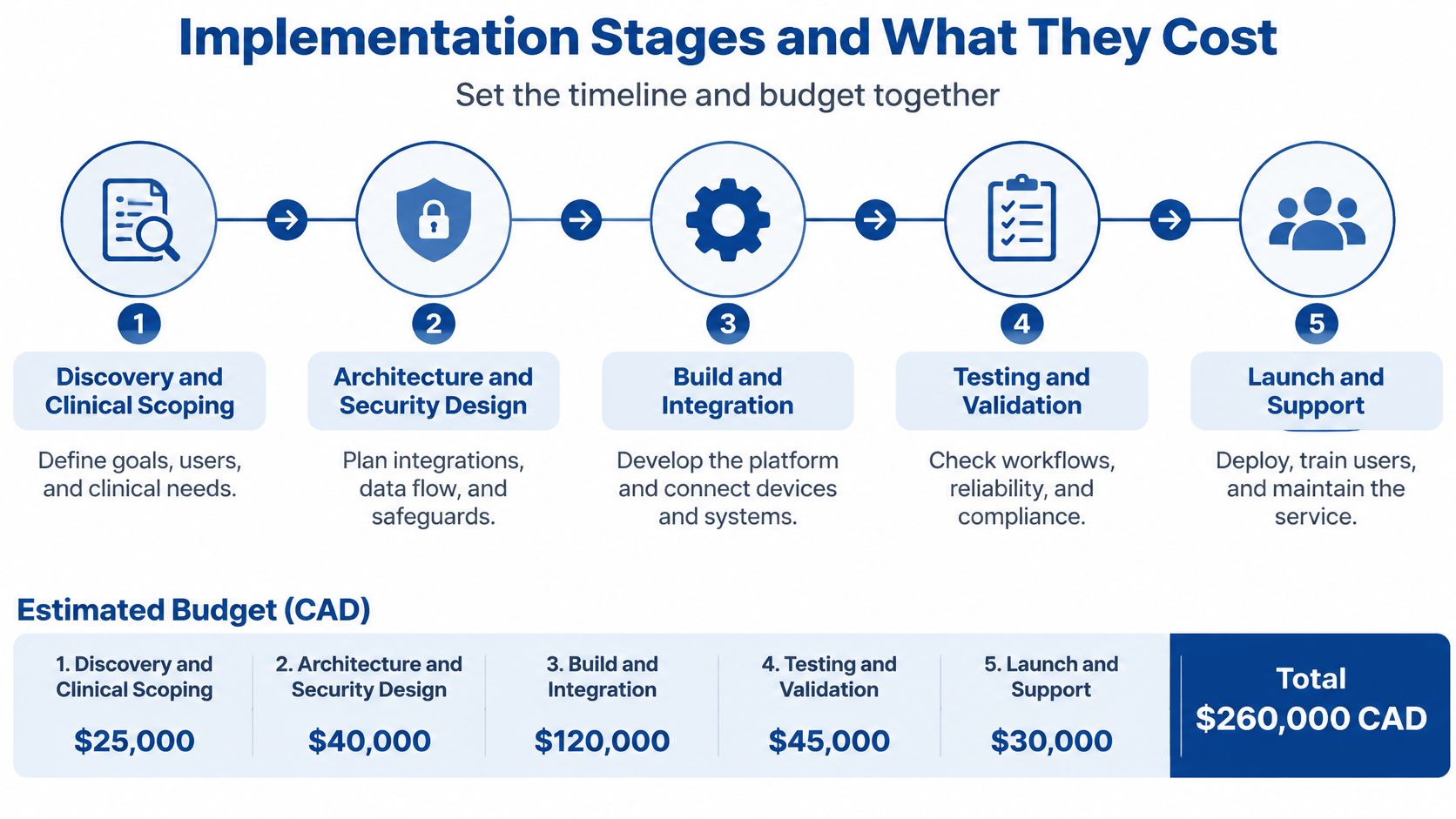
Cost drivers, not a single price
Nobody credible quotes one number for an RPM platform. The scope variables do the pricing:
Device types and gateways: Bluetooth through a phone, cellular hub, or vendor cloud API. Each new model is a new integration and new support surface.
EHR integrations: One connection is a project. Three connections are a programme.
Dashboard depth: A triage queue with history and intervention logging costs materially more than a chart.
Compliance reviews per province: Each jurisdiction adds review time, not just paperwork.
Clinical staff time: Discovery and pilot hours are a real line item, and the one teams most often forget.
A worked budget you can recalculate
Take a four-person team across a 20-week MVP, working 40-hour weeks. That's 3,200 hours; at an illustrative blended rate of $90 an hour, it comes to roughly $288,000. Swap in your own blended rate and your own team size and the arithmetic still holds. Then add the two items that sit outside the build: a compliance review for each province you launch in, and ongoing maintenance once the first patients are onboarded.
The delivery model matters as much as the rate. Our engagement with Axana followed an Agile, iterative approach with step-by-step MVP delivery so clinicians and stakeholders could feed back early, and that pattern suits monitoring work because alert rules always change once real patients generate real readings. If you're mapping this build against a wider release sequence, this product lifecycle stages guide is a useful reference for where clinical validation sits.
Before you spend anything: agree the pilot success measures in writing. A pilot without pre-agreed metrics on alert response times and unanswered readings produces an opinion, not evidence.
Questions Teams Ask Before Building RPM Software
Can we extend an existing EHR-connected monitoring tool instead of building one?
Often yes, when the vendor exposes FHIR interfaces and genuine write-back. Test it in a sandbox on your own patient population, then read the licence limits and data-retention settings before you decide, because a tool that can't store what your province requires isn't an option.
Do patients need a smartphone?
No. Plan a device-only path, and count how many of your patients share a handset with a family member. Shared devices change how the platform identifies the patient at measurement time, and that decision belongs in the data model rather than in a workaround.
Is RPM software a medical device?
It depends on intended purpose. Write the intended-use statement early and confirm the position with regulatory specialists, since a feature that converts readings into treatment decisions moves the product closer to regulation and changes your testing and documentation obligations.
How do we know the pilot worked?
Compare alert response times and unanswered readings against the targets you set before the build began, and track patient-level outcomes such as days spent at home rather than app logins. Engagement metrics flatter a platform that isn't changing care.
Run the first-condition test from the start of this guide, and take the result into a scoping conversation. You can see the wider portfolio on the Cleffex homepage, and the healthcare software integration service page sets out the integration scope in more detail.
Cleffex Digital Ltd builds custom healthcare software and integrations, including remote monitoring platforms, clinician dashboards and HL7 FHIR connections into hospital EHRs, for clinics, healthtech companies and insurers across North America. If you're planning a monitoring programme and want the alert rules, device integrations and provincial requirements costed before the first sprint, that conversation is worth having early. Visit Cleffex Digital Ltd to start scoping it.