


A patient leaves hospital on a Friday with a new blood-pressure tablet. The ward pharmacist has the list. The family doctor does not, until someone phones on Monday. The community pharmacy fills last month's prescription because that is the list it still holds. Nobody lacked a computer. They lacked a shared way to pass one medication list, with the same drug names, the same patient, and a record of who was allowed to see it.
Healthcare data integration is that shared way. It is less about buying another connector and more about making records mean the same thing on both sides of a handoff. Connected healthcare systems only help when a clinician can trust what arrives.
What a Healthcare Data Integration Layer Actually Does
Statistics Canada reported that in 2024, 92% of Canadian healthcare providers had access to a digital health system, while only 52% used such a system to send or share patient clinical information with providers outside their main practice setting. In that same survey, insufficient integration between different systems was the leading barrier, identified by 50% of providers, and 46% said their systems lacked the ability to send or share information electronically.
Digitisation already happened inside many buildings. The stall is at the boundary.

Picture a multilingual interpreter seated between specialists who each speak a different dialect. Nobody has to learn every other dialect. Each person speaks to the interpreter, who translates and passes the message on. A healthcare data integration layer is that interpreter for software.
Three parts, not one pipe
The layer is the shared set of connectors, data rules and services that sit between source systems and the applications that need their data. Sources include the electronic health record, the laboratory, imaging, the pharmacy and the insurer. Apps include the clinic inbox, a patient portal and a care-team alert.
It has three parts.
Connectors: They read and write each source in that source's own format, so a 15-year-old hospital feed does not have to be replaced on day one.
A standards layer: It maps codes, identifiers and units into one shared model, so "metformin 500 mg" is not three different strings.
A control layer: It handles security, logging, monitoring and retries, so a failed send is visible and can be repeated safely.
Say a patient is discharged at 16:10. The medication list must reach the GP and the community pharmacy within the hour, without a clerk retyping it. The connector pulls the list from the hospital record. The standards layer aligns drug names and the patient identifier. The control layer checks that the GP clinic is allowed to receive it, writes an audit entry, and retries if the pharmacy system is briefly down.
Buying a connector before the drug names, patient identifiers and permissions agree is how projects look finished and still fail at the bedside.
Sketch the systems your organisation runs today. Mark which of the three parts you already have, and which exist only inside one vendor's walls. That sketch is the brief for everything that follows.
Systems and Standards Your Layer Must Connect
A typical estate is a hospital electronic health record, a laboratory system, an imaging archive, a pharmacy dispensing system, a patient portal and an insurer claims platform. Each stores different data in a different shape. Healthcare system integration fails when teams treat those shapes as a detail to fix later.
"Standard" is the shared dialect. For modern, resource-based exchange, that dialect is usually HL7 FHIR. Older hospital traffic still travels as HL7 v2 messages. Imaging files follow DICOM. Shared meaning comes from terminologies such as SNOMED CT for clinical terms, LOINC for lab tests, and ICD-10-CA/CCI for diagnoses and interventions in Canada. A message can be technically valid and still be useless if the code, the unit or the patient identity does not match.
Read the risk column first
Canada adds its own content rules before you pick a mapping tool. The Pan-Canadian Health Data Content Framework, and its smaller Canadian Core Data for Interoperability subset, define what must be exchanged. CA Core+ turns those content rules into FHIR structures. Canada Health Infoway's FHIR Terminology Server stores and distributes approved international and Canadian terminologies, so mapping is not a one-off spreadsheet.
A practical walk-through of healthcare interoperability with HL7 FHIR APIs shows why profile conformance comes before you shortlist vendors.
| System | Typical data | Standard or format to expect | Common risk |
|---|---|---|---|
| Electronic health record | Notes, diagnoses, medications, allergies | HL7 FHIR R4, HL7 v2 ADT and ORU messages | Local codes differ between clinics |
| Laboratory information system | Test orders and results | HL7 v2 ORU messages, FHIR Observation | Units and reference ranges vary |
| Imaging archive (PACS and RIS) | CT, MRI and X-ray studies and reports | DICOM, DICOMweb, HL7 v2 orders | Very large files slow transfers |
| Pharmacy system | Dispensing history and medication lists | FHIR MedicationRequest, vendor-specific feeds | Same drug recorded under different names |
| Patient portal or mobile app | Patient-entered data, bookings, consent | FHIR R4 REST APIs or vendor-specific APIs | Identity and consent checks fail silently |
| Insurer or claims platform | Eligibility, claims and payments | Proprietary APIs or flat files in Canada; X12 EDI in the US | Schemas differ and change without notice |
| Terminology services | Diagnosis, procedure and lab test meanings | SNOMED CT, LOINC, ICD-10-CA/CCI | Local terms never mapped to shared codes |
The risk column is where most timelines slip. Read it before you choose connectors. Write the human owner of each system beside that risk, because a feed without an owner breaks on the first vendor upgrade and nobody is on the hook to fix it.
Choosing Healthcare API Integration Patterns
Choose the pattern by who consumes the data and how quickly they need it.
A layer rarely uses one pattern. A patient app wants one current medication list. A hospital admission system still pushes a stream of messages. An insurer is happy with a file after midnight. Healthcare API integration is the modern slice of that mix, not the whole of it.
Canada Health Infoway's CA:FeX specification promotes FHIR RESTful exchange that works with both modern FHIR servers and existing non-FHIR infrastructure. The specification focuses on clinical documents and defines several patterns, so an integration layer can show one consistent FHIR face while adapters translate older HL7, proprietary or document formats behind it. Replacing every hospital, clinic, laboratory and insurer system is neither cheap nor realistic.
Five patterns, five jobs
| Pattern | Best for | Trade-off | Example |
|---|---|---|---|
| FHIR REST API | Apps, portals and mobile tools that read or write single records | Needs conformant profiles and a FHIR server | Patient app pulling the current medication list |
| HL7 v2 messaging | Hospital admission and lab result feeds from legacy systems | Loosely specified, and each vendor implements it differently | Admission alert sent from hospital to a clinic |
| Document exchange | Sharing discharge summaries and reports between providers | Coarser than resource-level data | Discharge summary shared with the family doctor |
| Event notifications (webhooks) | Alerting downstream apps when a result or status changes | Needs retries, ordering and duplicate handling | New lab result pushing an alert to the care team app |
| Scheduled batch transfer (SFTP) | Nightly reporting, claims and analytics feeds | Not real time, so errors surface late | Overnight claims file sent to an insurer |
A FHIR REST call suits a portal that asks, "What is this patient's list right now?" HL7 v2 suits the admission feed a clinic has received for years. Document exchange suits a discharge summary the family doctor reads as a whole, even though you cannot query one allergy out of it. Webhooks suit a potassium result that should wake the on-call team. A nightly SFTP file suits claims, where tomorrow morning is soon enough.
Practical rule: Real-time clinical alerts need events. Overnight claims reconciliation can run as a batch. Do not force both jobs through the same pipe.
If you are unsure, write the consumer and the deadline on one line before you name the pattern. "GP inbox, within one hour" points to an event or a message. "Finance report, next business day" points to a batch. That single line stops teams from building a real-time platform for a job that only needed a file.
Building Security and Privacy Into the Layer
The Office of the Privacy Commissioner of Canada classifies health information as generally sensitive under PIPEDA's safeguards principle. Organisations must protect personal information against loss, theft, unauthorised access, disclosure, copying, use or modification. Safeguards include passwords, encryption, firewalls and patches, plus access limits, training and agreements. They should match sensitivity, volume, distribution, format and risk, and they should be reviewed through audits or testing.
Security added after the interfaces are live is a sticker on a leak. Design it into the layer, or every new connector becomes another copy of a chart with weaker locks than the system it came from.
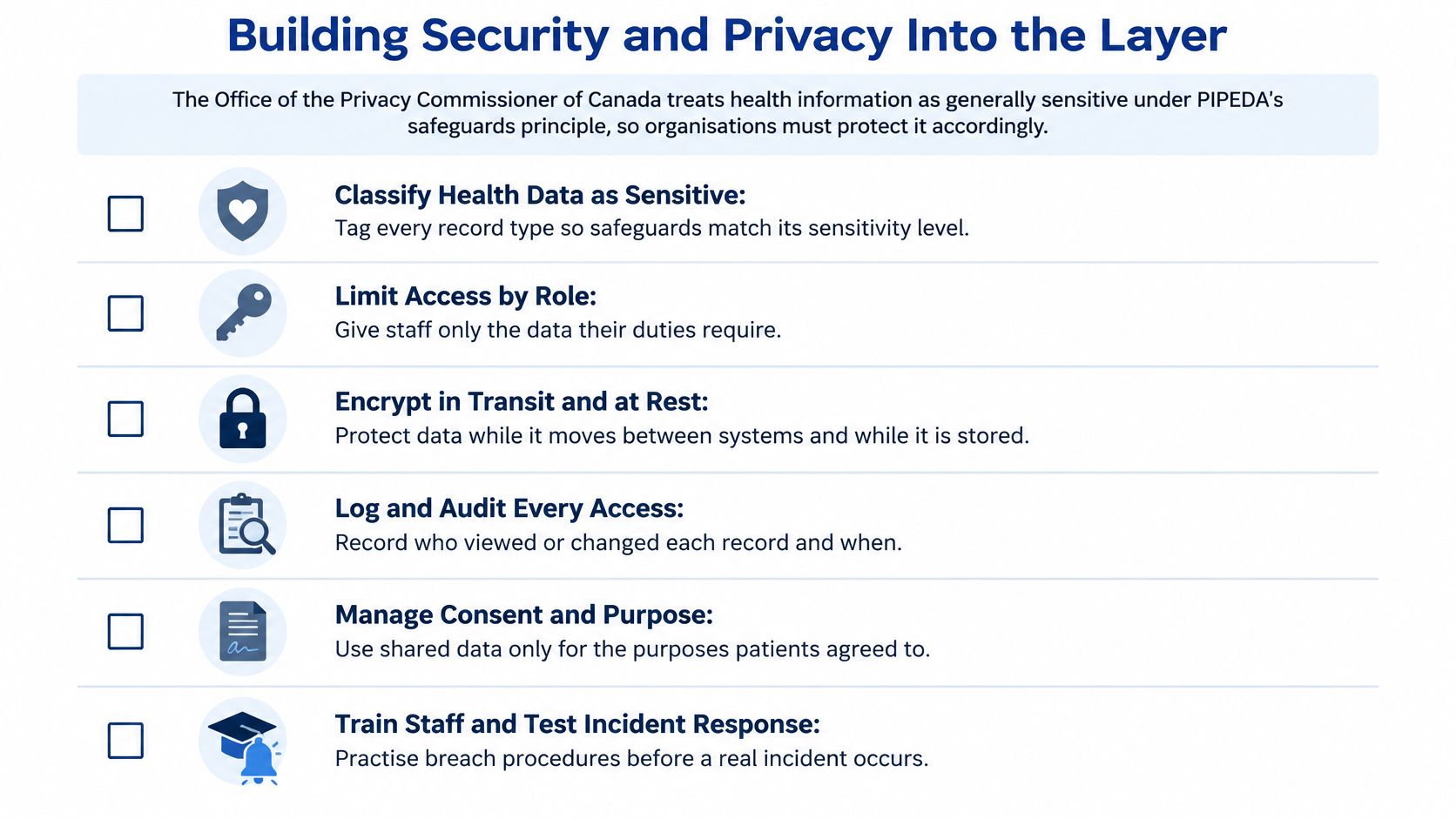
Safeguards that belong in the design
Least privilege, by role: Every connector and every user gets only the fields that the workflow needs. A booking app does not receive the full psychiatry note.
Encryption in transit and at rest: Protect the medication list while it moves and while it sits in a queue overnight.
Audit logs of every read and write: Record who looked, who changed a value, and when. Review the logs; don't only store them.
Interface monitoring: Alert when messages fail, spike, or arrive from an unexpected source.
A secrets vault and rotation: Don't leave interface passwords in a config file on a shared drive.
Tests after each significant change: Replay known messages and run a security check before the new mapping reaches a clinic.
Minimum necessary data, and pseudonymisation for analytics: A quality report does not need a name and a health number if a coded identifier will do.
Provincial health privacy statutes, such as Ontario's PHIPA, can sit beside federal rules. Consent, identity and access differ by province. Keep those rules in a jurisdiction module, separate from the reusable connectors and the shared data model. A useful companion is this practical guide to healthcare data governance, which covers who may correct a record and who signs off a new use.
Say an insurer asks for lab history to confirm a claim. Send the tests that decision needs, for that patient, for that purpose, with an audit line. Don't open the whole chart "because the pipe is already there."
Build the Layer in Six Phases, Starting With One Workflow
A recent jurisdictional assessment found that integrated EHR exchange is limited across Canada's 10 provinces and 3 territories, with nearly all jurisdictions lacking interoperability across hospitals, community specialists and primary care, as described in this jurisdictional assessment. Near-universal electronic records have not produced one national behaviour. Connecting two systems does not mean a clinician in the next setting can interpret the result.
Judge the architecture on three things: whether data can travel, whether it means the same thing, and whether a real workflow can finish without retyping. A useful measure is the share of required workflows that exchange structured data end to end, covering patient identity, medications, allergies, diagnoses, results and referrals. Inventory interfaces by province and care sector before you pick middleware, because maturity is not even across the country.
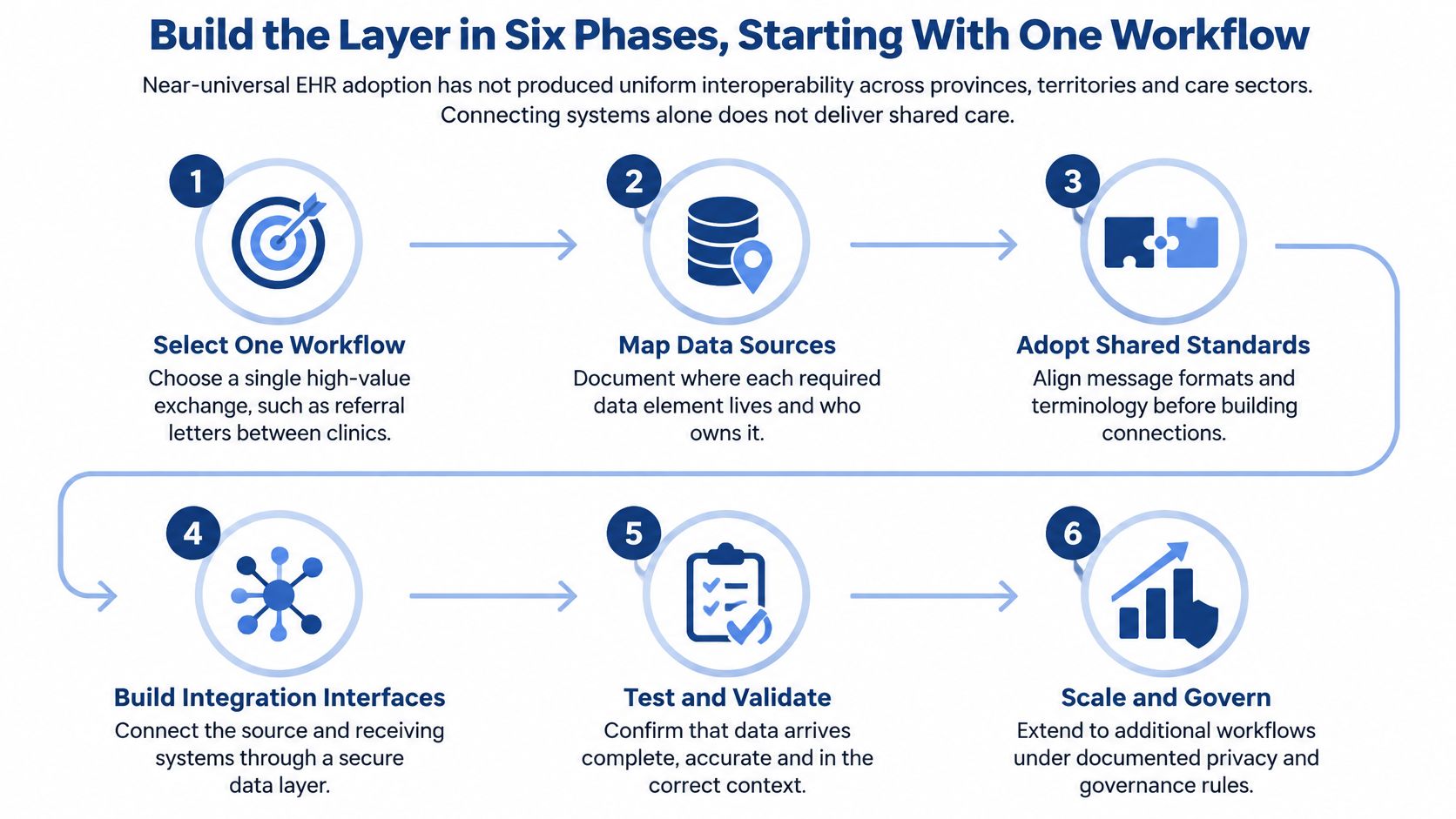
Start with one workflow that has obvious clinical value, such as discharge medication reconciliation, and only two or three source systems. Healthcare workflow integration is easier to govern when the first release has a single definition of done.
Six phases
Inventory: List every source, its owner, its data and the sites that use it. A discharge summary that lives in three hospital systems is three sources, not one.
Pick the workflows: Choose two or three, and agree the success measure in a sentence a nurse would recognise, such as "the GP sees the discharge medicines without retyping."
Write the canonical model: Define value sets for identity, medications, allergies, diagnoses, results and referrals before anyone codes an adapter.
Build connectors: Use HL7 v2, DICOM or a file transfer where the source offers nothing better. Don't wait for a perfect API.
Check meaning: Add terminology mapping, identifier matching and validation that rejects a wrong unit, not only a broken message shape.
Pilot and watch: Test with real scenarios, monitor live traffic, and fix the errors clinicians run into most often.
Put that on a 90-day calendar. Weeks 1 to 3 cover the inventory and the success measure. Weeks 4 to 8 cover the model, two connectors and the first validation rules. Weeks 9 to 12 are a supervised pilot, with duplicate rates and error rates reviewed each week.
You are done with a workflow when structured data moves from source to receiver with no manual re-entry. Count workflows that pass, not interfaces that are "up."
Cleffex Digital provides healthcare software integration for North American healthtech companies, including hospital connectivity and custom API development, through our healthcare software integration work and the wider practice at Cleffex.
Common Problems and How to Fix Them
After go-live, failures show up in a familiar order. Start from the symptom a clinician reports, then check the likely cause. Don't reopen the whole architecture because one feed looks wrong.
| Symptom | Likely cause | Fix |
|---|---|---|
| Messages arrive but clinicians cannot use the data | Local codes and units differ between systems | Map to shared value sets and convert units in the adapter |
| Same patient appears under two records | Identifiers differ across sites | Use a master patient index with matching rules and a steward review queue |
| Lab values look wrong or out of range | Units and reference ranges not aligned | Store units with each value and reconcile reference ranges per lab |
| Feed breaks after a vendor update | Interface tied to an old version | Version-controlled contracts with automated tests on every release |
| Large imaging transfers time out | Whole files sent in synchronous calls | Share links to the archive and run transfers as background jobs |
| Alerts arrive twice or out of order | No duplicate detection | Give every event a unique ID and handle replays safely |
| Clinics report missing fields | Mapping built once for one site only | Run a gap analysis per site and per care setting |
Before go-live, replay a sample of real messages through each adapter, send duplicate events on purpose, and check one set of patients across every site. Those three tests catch most rows in the table before a clinician does.
Keep the first release as a pilot on a single workflow. Each fix can be proven there before the layer reaches more sites and more care settings. A mapping that works for one hospital lab is not a national mapping until a second site has tried to break it.
Frequently Asked Questions About Building an Integration Layer
How long does a first layer take?
A focused pilot on one workflow is usually measured in months, not years. Scope is the biggest driver, so keep the first release to two or three source systems and one clinical handoff you can watch.
Should we build or buy?
Buy connectors and terminology services where mature options exist. Build the canonical data model and the business rules yourselves, because they reflect local workflows, local consent and the way your clinics name a drug in practice. A bought platform will not invent that meaning for you.
Who should own the layer?
Name three owners, not a committee. A clinical lead owns workflow meaning. A data steward owns identifiers and quality. A security lead owns access, logs and audits. If a feed fails, each of them should know whether it is their problem.
Which Canadian standards should we follow?
Start with CA Core+ for FHIR structures and the Canadian Core Data for Interoperability subset for content. Check the Pan-Canadian Interoperability Roadmap for direction, because federal and provincial rules may differ. Pair that content work with the pattern choice and the privacy design already set out here, rather than treating standards as a separate project.
Cleffex Digital Ltd builds healthcare software integration and custom APIs that connect hospital, clinic and insurer systems without throwing out the records you already run. If you want a first workflow designed around shared meaning, identifiers and privacy, talk with Cleffex Digital Ltd about a scoped pilot. Bring the list of systems you sketched, and we will help you pick the one handoff worth connecting first.