

Your customer unsubscribes from promotional emails, but a discount code lands in their inbox the next morning. Your support team apologises, marketing checks its settings, and everyone discovers a different version of the same customer record.
That's the problem ecommerce data integration needs to solve. Connecting applications isn't enough if they disagree about who the customer is, what they ordered, or whether you're allowed to contact them. Reliable integration gives each system a clear responsibility and makes customer permissions part of every relevant exchange.
What Ecommerce Data Integration Really Means
The unsubscribe scenario looks like an email problem. In reality, the storefront might hold an updated preference, the CRM might retain an older contact record, and a scheduled import might have added the shopper back to a campaign.
Each application can work exactly as configured while the overall customer experience fails. Conflicting rules, not just missing connectors, create the disconnect.
Ecommerce data integration connects business systems so customer details, orders, stock and permissions move accurately, on time and under agreed rules.

Think of a post office sorting centre. Every parcel has an address, follows a known route and leaves a receipt when it changes hands. Your order, payment confirmation and refund should travel the same way, rather than relying on departments to send messages manually.
The sorting centre doesn't own everything inside every parcel. Likewise, integration doesn't mean replacing all your software with a single enormous database.
What a useful connection must deliver
A working integration needs more than a successful connection test:
Consistent facts: A payment marked as refunded shouldn't remain recorded as collected in accounting.
Timely updates: Information must arrive before someone makes a decision that depends on it.
Rules that travel: A customer's marketing preference must accompany the information used to select campaign recipients.
These requirements apply to customer data integration as much as order processing. Matching a customer's purchases to their CRM profile is useful only if you also preserve the purpose and permissions attached to that information.
In 2025, 92% of Canadian small and medium-sized businesses used digital tools, but only 10% had fully integrated those tools across operations, according to the Canadian Federation of Independent Business.
Start with decisions, not software
Before buying another application, decide which system should answer each business question. Where does your team check available stock? Who can correct a customer's email address? Which record decides whether an offer can be sent?
Those answers form a system map. Combined with an appropriate integration approach and a staged implementation path, they give you a practical foundation without forcing you to rebuild the entire store.
The Systems Most Ecommerce Stores Connect
Every system should own some information and borrow the rest. Ownership means having the authority to create or correct a particular fact, not being the only application allowed to display it.
For the retail and ecommerce operating environment, this table shows the responsibilities worth mapping before connecting applications.
Systems in a typical ecommerce stack and the data they own
| System | Data it owns | Data it needs from others | Example tools |
|---|---|---|---|
| Storefront | Accounts, carts, order history, browsing events | Stock levels, product catalogue, prices | Shopify, WooCommerce, Magento |
| Payment processor | Payment status, tokens, refund records | Order ID, amount, currency | Moneris, Stripe |
| ERP and accounting | Invoices, tax, cost of goods | Order totals, tax, stock movements | NetSuite, Sage |
| CRM | Contact history, segments, support notes | Orders, consent status, lifetime value | Salesforce, HubSpot |
| Warehouse or fulfilment | Stock counts, pick and pack status | Confirmed orders, returns | Warehouse or 3PL software |
| Carrier tools | Tracking numbers, delivery promises | Dispatch date, parcel details | Canada Post, UPS, Purolator |
| Email and marketing | Campaign history, opt-ins and unsubscribes | Contact details, purchase segments | Klaviyo, Mailchimp |
| Analytics | Sessions, events, attribution | Order and revenue data | Google Analytics 4 |
| Helpdesk | Tickets and conversation history | Order status and customer details | Zendesk, Freshdesk |
Separate operational records from useful copies
The storefront, payment processor and warehouse coordinate the purchase itself. Accounting records its financial consequences. A storefront can display payment status, but the payment processor remains authoritative about whether a charge succeeded.
Product information needs the same discipline. Decide where descriptions, variants and specifications are maintained before distributing them, using an ecommerce product information management approach rather than letting every channel edit its own catalogue independently.
The CRM, helpdesk and marketing tools need context, not unrestricted copies of every field. An agent in Zendesk needs delivery status; a campaign in Klaviyo needs the relevant audience attributes and permission to use them.
Refund events can also inform customer communications. When mapping that hand-off, explore Klaviyo refund alerts from Disputely as a resource for understanding how refund-related notifications can fit into a marketing workflow.
Peaks expose weak ownership
Statistics Canada reported seasonally adjusted retail eCommerce sales of C$4.3 billion in December 2024, up 3.1% from the previous month. Busy periods make stale records particularly troublesome because more decisions happen while updates are still travelling.
An item can appear available after it sells out. A support agent can promise dispatch while looking at yesterday's order status. Neither problem is fixed by adding another dashboard.
As a quick diagnostic, count the applications holding a customer's email address. If your own stack has more than two, give that field a named owner and document how corrections reach its copies.
How Customer and Order Data Move Between Systems
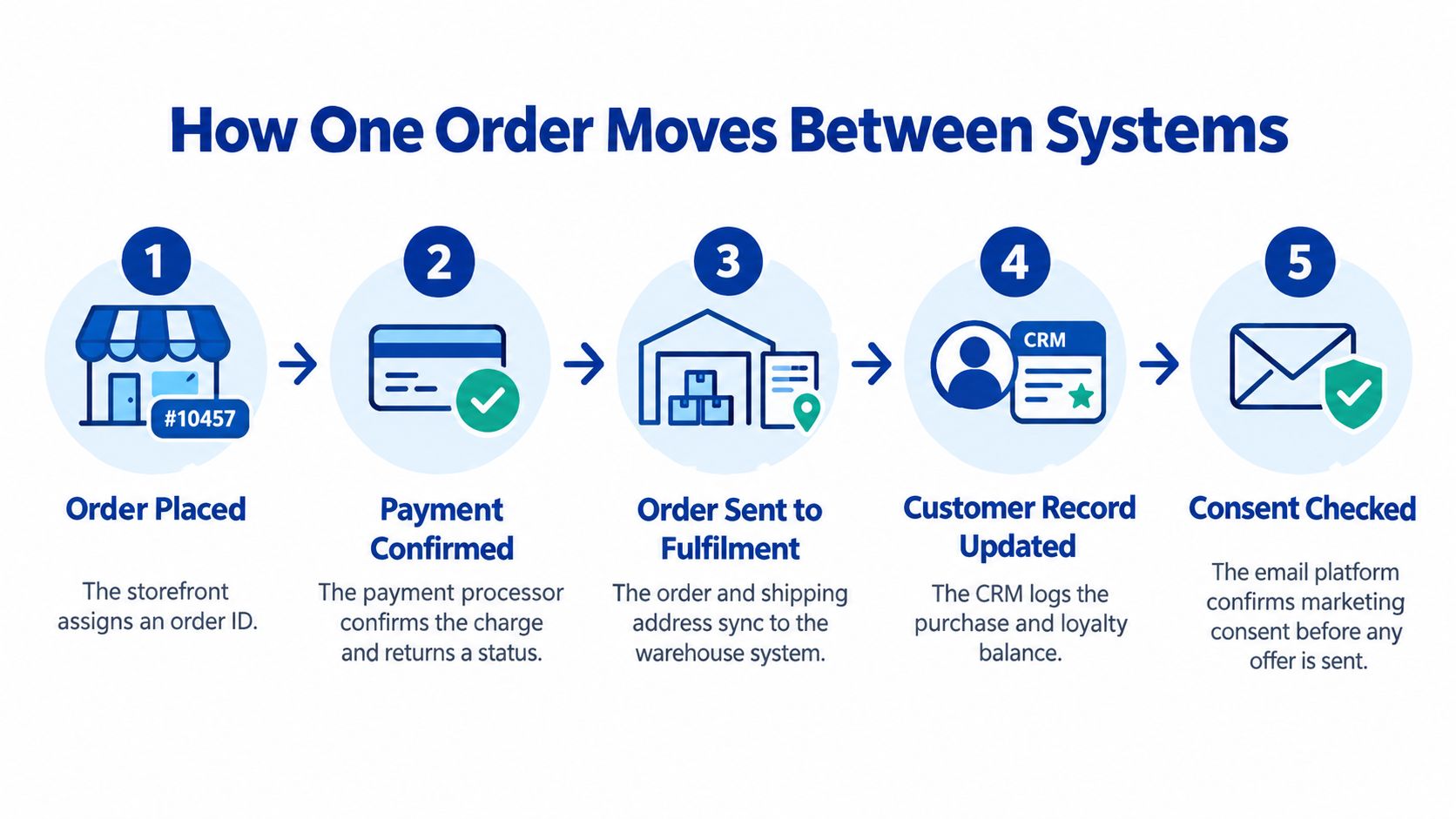
Follow a single purchase through the stack before designing a wider customer profile. The order ID should connect the journey, while each application contributes the facts it controls.
Follow the transaction through its lifecycle
The shopper places an order: The storefront creates the order ID and records SKUs, quantities, delivery details and checkout totals. Keep that identifier attached to subsequent messages so another application doesn't mistake an update for a new purchase.
The processor confirms payment: Moneris or Stripe returns its transaction reference, amount, currency and payment status. Don't treat a browser's success page as the authoritative confirmation, because the customer can close the page before your store receives the result.
The order reaches accounting and fulfilment: Send the ERP the order ID, totals and tax breakdown, while the warehouse receives the items and shipping instructions it needs. Distinguish an order awaiting payment from one authorised for release.
Inventory changes at the agreed event: The stock-owning system applies the quantity adjustment against the SKU and order ID. Define reservation expiry and late-payment handling so a payment confirmed after stock was released doesn't authorise unavailable goods without anyone noticing.
The warehouse confirms dispatch: Its dispatch record links the order, shipped quantities and parcel to the tracking number supplied through the carrier connection. Separate partially shipped items from those still awaiting fulfilment.
The carrier reports delivery progress: Carrier-owned tracking events update the customer-facing delivery status and trigger appropriate service notifications. Retain the event time so a delayed message doesn't replace a newer delivery update.
Returns and refunds travel back: The returns workflow records received items, the processor owns the refund result, and accounting receives the financial adjustment. A refund that never reaches accounting leaves the customer's experience and your financial records telling different stories.
Run profile and inventory updates alongside orders
Customer changes don't wait for another purchase. Route profile corrections and consent updates through the CRM's agreed governance process, then distribute approved changes to the storefront and email tool.
For a broader explanation of linking identities and records, the YipSMS guide to customer data integration from YipSMS Inc. offers useful context. Keep identity matching separate from permission: recognising a shopper doesn't automatically authorise marketing.
Inventory follows a different route, from the warehouse or designated stock owner to the storefront. Restocking, damage and offline sales can change availability without creating a new web order.
Draw the full journey on a page before buying or building anything. Mark who sends each event, who receives it and what happens when delivery fails.
Integration Approaches Compared, From Simple to Scalable
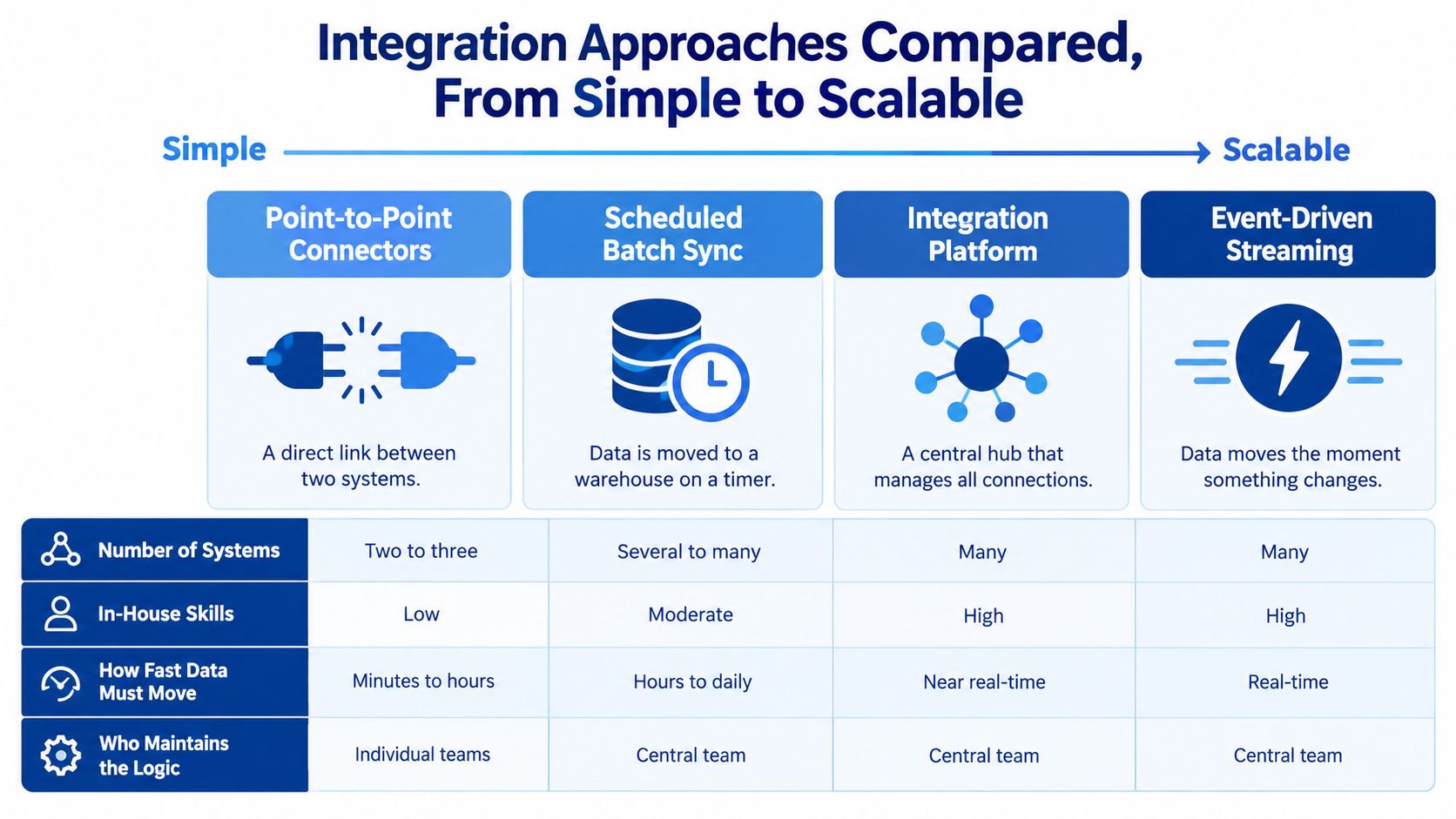
Point-to-point integration resembles a house where every room has its own extension cord. It's quick to arrange initially, but tracing a fault becomes harder as you add rooms and connections.
Choose an approach by considering your applications, internal skills, update deadlines and maintenance responsibility. Scalable means manageable as requirements change, not merely more technically elaborate.
Compare where the integration logic lives
Native connectors link applications directly through plugins or built-in integrations. They suit straightforward workflows, provided someone checks their field mappings, error reports and update policies.
Middleware, also called an integration platform as a service or iPaaS, acts like a managed power strip with a controller. Tools such as Celigo or Boomi can map and route information centrally, although your team still needs someone responsible for the business rules.
An API-led integration layer exposes shared services for customers, orders and stock through documented ecommerce APIs. A canonical data model, meaning an agreed common format, lets applications exchange information without every connection inventing its own definitions; this is an architectural choice to assess during ecommerce development planning.
A retail data platform brings information together for reporting, segmentation and personalisation, then can send approved audiences back to marketing tools. It isn't usually the operational authority that decides whether the final item can be sold.
Integration approaches compared
| Approach | How it works | Best for | Main risk |
|---|---|---|---|
| Native app connectors | Built-in plugins sync two tools directly | One store with three or four apps | Every new link adds another point of failure |
| Middleware or iPaaS | A hosted tool maps and moves data between apps | Many SaaS tools and no in-house developers | Fees rise with volume, and logic sits in a vendor tool |
| API-led integration layer | Shared services expose orders, customers and stock through eCommerce APIs | Custom rules, several channels, growing catalogues | Needs ongoing engineering and documentation |
| Retail data platform | Data is copied to a central store, then segments are pushed back to tools | Reporting, segmentation and personalisation | Data can lag, so it is not a real-time stock or order control |
Build reliability into the chosen approach
For an API layer, require idempotency keys so processing a retried request doesn't create another order. Use versioned schemas, or explicitly numbered message formats, so application changes don't unexpectedly break recipients.
Include event timestamps to distinguish when something happened from when its message arrived. These controls support recoverable processing, rather than assuming every message arrives immediately and in order.
Scheduled batch updates and event-driven streaming are delivery methods, not substitutes for ownership rules. Overnight reporting can use batches; availability checks may need event-driven updates or direct stock queries.
Choose connectors for a simple, single-store setup with a small app collection.
Choose middleware when SaaS applications need coordination without a dedicated development team.
Choose an API layer when channels share complex rules or custom workflows.
Add a retail data platform when cross-system analysis is the missing capability.
Benefits and Challenges Worth Weighing
In 2025, 78% of Canadians surveyed by KPMG agreed or somewhat agreed that staff equipped with data-driven tools would improve their shopping experience, according to KPMG's connected commerce findings. The useful outcome isn't more software for staff to open, but reliable answers within the tools they already use.
Benefits customers can notice
Accurate availability: Product pages reflect the stock your fulfilment team can allocate.
Informed support: Agents can see the latest relevant order event without asking the customer to repeat it.
Cleaner customer records: Shared identifiers help teams avoid splitting purchase history across duplicate profiles.
Faster refund handling: Staff can follow the approval, processing and reconciliation stages without copying details between screens.
Respectful marketing: Campaign selection uses current preferences rather than an old exported contact list.
For an additional store-owner perspective, ServeApps' explanation of system integration for Shopify store owners is useful when identifying which manual hand-offs deserve attention.
The benefits are easier to evaluate when you name a specific task. “Improve customer experience” is difficult to test; “let support confirm whether a refund was processed” gives the project a clear acceptance condition.
Challenges to budget for
Legacy limitations: Older software may lack a usable API, forcing controlled file transfers or replacement decisions.
Unclear field ownership: Customer service and marketing can overwrite each other's corrections unless editing responsibilities are explicit.
Usage-based costs: Middleware charges can increase as event traffic grows, particularly when workflows repeatedly fetch unchanged records.
Skills gaps: Small teams still need someone who understands mappings, permissions and failure recovery.
Maintenance after launch: Platform updates, changed credentials, and retired API versions can interrupt previously working connections.
Practical rule: Prioritise integration when staff repeatedly copy information by hand or when those hand-offs produce customer-facing mistakes.
Not every store needs full integration immediately. Start with the order and stock workflows that determine whether you can accept and fulfil a purchase, while ensuring essential consent controls aren't deferred.
Assign an owner to ongoing operation, not just delivery of the project. Someone must review failures, approve rule changes and confirm that automation still behaves as intended.
Convenience alone isn't a sufficient success measure. The same connection that helps an agent answer a question can also distribute personal information unnecessarily if access and purpose haven't been defined.
Using Customer Data Without Losing Customer Trust
90% of Canadians are at least somewhat concerned about the privacy of their personal information online, while 59% feel more comfortable sharing data when businesses explain its use, provide preference controls and offer opt-out choices, according to DHL's Canada shopper report. Customer trust belongs in the architecture, not in a final compliance checklist.
The Office of the Privacy Commissioner of Canada's PIPEDA consent guidance says individuals must understand what information is collected, who receives it, its purposes and relevant risks or consequences; withdrawal is subject to legal or contractual restrictions and reasonable notice. Non-essential uses need a clear choice.
Give each data category a sharing boundary
Use the following as a design starting point, not a universal legal classification.
Customer data types, purposes and sharing rules
| Customer data | Typical purpose | Consent approach | Sharing rule |
|---|---|---|---|
| Order and payment records | Fulfil and reconcile orders | Needed for the transaction, disclosed at checkout | Share necessary records with ERP and payment processor; store tokens only |
| Contact and shipping details | Deliver and support orders | Needed for the transaction | Share necessary fields with carrier and helpdesk, not ad platforms |
| Marketing preferences | Send emails and offers | Clear opt-in and an easy opt-out | Propagate opt-outs to every marketing tool promptly |
| Browsing and behaviour data | Personalised recommendations | Optional, explained in a notice, with opt-out | Keep out of the ERP; pseudonymise where possible |
| Loyalty and profile attributes | Tailored rewards and offers | Consent recorded with its purpose | Delete on withdrawal or retention expiry, subject to applicable retention obligations |
A customer data platform design should preserve these boundaries rather than treating every collected attribute as available for every purpose. Pseudonymisation reduces direct identification, but it doesn't automatically remove privacy obligations.
Make permissions operational
Keep card numbers out of the storefront database and CRM: Use payment-provider tokens and restrict operational copies to necessary reconciliation references, amounts, currency and status. The Privacy Commissioner's electronic payments guidance explains the personal-information flows involved in electronic payments and the need for appropriate safeguards.
Separate transaction processing from optional marketing: A shipping address needed to deliver an order shouldn't become an advertising attribute by default. A purchase confirmation and a promotional offer need distinct workflow rules.
Distribute withdrawals and deletion instructions deliberately: Maintain an appropriately limited suppression mechanism so an old import cannot reactivate marketing or recreate a deleted profile. Retained accounting records should never be able to repopulate an optional customer audience by accident.
Give customers a visible preference centre where they can correct details and control optional uses. That makes accuracy a shared process rather than leaving staff to interpret scattered requests.
This is general guidance, not legal advice. Check applicable federal and provincial obligations, retention requirements and consent practices with counsel.
How to Implement Ecommerce Data Integration Step by Step
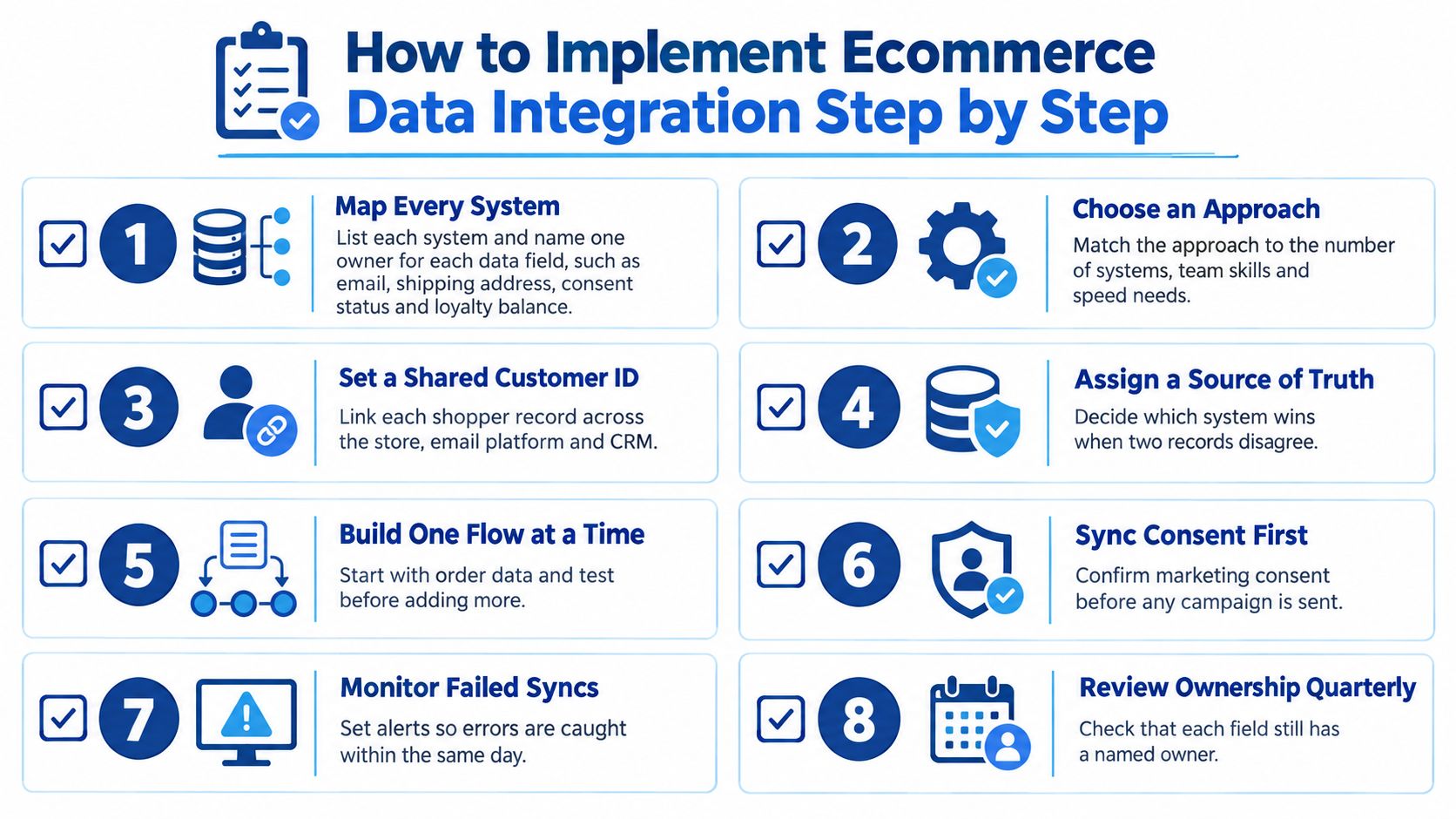
Treat implementation as a sequence of testable decisions. A connector is ready only when the store team knows what it should do, how failure appears and who can recover it safely. Missing connectors are easy to spot. Rule conflicts are quieter: one tool treats a guest checkout as a new customer, another merges it into an existing profile, while a third keeps an older consent value.
Establish the model and responsibilities
Map systems and field owners: List where email addresses, shipping details, consent status and loyalty balances are created and corrected, then assign a responsible person to each field. A common slip is naming an application owner without deciding who resolves disputed values.
Choose and justify the approach: Document the required update speed, available skills and maintenance responsibility alongside the architectural decision. A connector that advertises compatibility with both applications can still carry the wrong rule for refunds, splits or marketplaces.
Define the shared data model: Establish canonical entities for SKU, customer, order, tax and shipment, including identifier mappings, currencies and status definitions. Treating a product's display name as its identifier can merge distinct variants when descriptions change.
Build controlled connectors: Apply the idempotency, schema-versioning and timestamp controls described in the architecture comparison, then test replay and recovery. A frequent slip is generating a fresh idempotency key during every retry, which defeats the protection.
For accounting and operational mappings, an ERP integration planning guide helps identify dependencies before development begins. Agree how cancellations, discounts and partial fulfilment are represented, rather than testing only straightforward purchases.
Prove the controls under failure
Encode consent and retention as decision rules: Give permission, purpose and retention their own fields with source and timestamp, then define which system wins when two tools disagree. Downstream jobs should read that result instead of inferring intent from message content.
Reconcile independently: Compare order totals, tax, payment status and stock balances at defined intervals using records from both sides of each connection. Checking only whether a request returned success can miss a record accepted with incorrectly mapped fields.
Measure successful outcomes: Track the share of orders synchronised without manual correction, split by channel and endpoint, alongside failure age and recovery status. Combining every endpoint into an overall result can hide a persistently unreliable marketplace connection.
Trace a customer journey end to end: Follow a test order through cart, order, fulfilment, email and analytics. At each hop, record the stated purpose, copied fields, access owner, retention clock and deletion route, then reconcile any two tools that label the same event differently.
Acceptance test: Pause a receiving application during order import, send the same webhook twice, restore the connection and confirm one order, one stock change and no repeated customer message.
Keep an operational runbook with the integration itself: safe replay instructions, the order in which endpoints can be retried, and the named person responsible for approving changes before they reach production.
Frequently Asked Questions Before You Start
Do small stores need custom APIs, or are apps enough?
Apps are often enough for a single-channel store using a small collection of straightforward tools. Custom work becomes useful when channels or markets need different rules that native settings can't represent reliably.
Can personalisation work when customers decline tracking?
Yes, you can respond to choices made during the current visit and, where the purpose and permissions allow, use existing order history. For example, recommend compatible accessories for a selected product without building an ongoing behavioural profile the shopper hasn't agreed to.
How do I know the integration works?
Track orders synchronised without manual correction, review failed synchronisations weekly and monitor duplicate records. Also test a deliberately interrupted workflow, because a healthy dashboard during normal operation doesn't prove that recovery works.
When should a team bring in outside help?
Consider help when you can't resolve field ownership, a connector repeatedly fails, or you need a consent-aware architecture for retail and ecommerce workflows. Among specialist developers, platform partners and internal engineering options, we at Cleffex, a Canada-based software company, build custom API layers and integrate Shopify, WooCommerce and Magento with CRMs and ERPs.
Compare your stack against the systems table, mark the hand-off causing the most customer confusion, and use that marked-up map to frame a focused discussion with Cleffex.
Cleffex Digital Ltd offers custom API development and eCommerce integrations that connect customer, order and operational systems. Bring your system map and a failing workflow to Cleffex Digital Ltd to discuss an integration approach that fits your tools, ownership rules and customer permissions.