

Many healthcare teams realise they're not audit-ready at the worst possible moment. A notice arrives. Someone asks for access logs, approval history, training records, policy versions, and proof that a control was working six months ago. The app may be functioning well for users, but the evidence behind it is scattered across tickets, inboxes, cloud consoles, and people's memories.
That's the gap this article is about. Audit-ready healthcare software isn't just software with encryption turned on and a policy folder in SharePoint. It's software built so that the evidence exists before anyone asks for it. That changes how you scope features, structure your SDLC, design access, store logs, validate data, and handle AI-assisted workflows.
Laying the Foundation for Compliance
Teams usually fail audits long before the audit starts. They fail when product decisions are made without a control owner. They fail when engineers push changes without preserving approval history. They fail when operations treat logging as a debugging tool instead of legal evidence.
That's why the starting point isn't a regulation. It's an engineering position: compliance has to be built into the product lifecycle from day one.
The market is moving in that direction already. The global healthcare compliance software market was valued at USD 2,778.2 million in 2022 and is projected to reach USD 6,503.3 million by 2030, growing at a CAGR of 11.6%, driven by the shift from manual compliance methods to automated tools with real-time documentation, automated tracking, and centralised oversight, according to Grand View Research's healthcare compliance software market report.
Stop Treating Compliance As Paperwork
A bolt-on compliance approach usually looks familiar:
Requirements first, controls later: Product teams define workflows, data movement, and integrations before anyone asks whether the choices are supportable during an audit.
Security review near release: By then, the architecture is fixed, and every missing control turns into rework.
Documentation after the fact: Engineers and PMs try to reconstruct intent from tickets and chat threads.
Audit prep as a separate project: The team pauses delivery to gather screenshots, exports, and spreadsheets.
That approach is expensive because it creates friction in every later phase. It also produces weak evidence. Auditors don't just want a statement that a control exists. They want to see how it operates, who owns it, when it ran, what changed, and whether exceptions were tracked.
Practical rule: If your team can't answer “how would we prove this?” during design, the feature isn't finished enough to build.
A better path is to define a small set of essential requirements early. For most healthcare products, this includes access control, encryption strategy, audit logging, policy versioning, change approval, incident handling, and evidence retention. If you need a grounded primer on the baseline expectations, this guide to HIPAA-compliant software requirements is useful because it translates legal obligations into concrete software concerns.
Build the Evidence Path Before the Feature Path
I've found that PMs and developers work better when compliance is framed as a product quality attribute, not a legal burden. It answers practical questions:
Can we trace a data change to a user action?
Can we show who approved a release?
Can we prove a permission was limited by role?
Can we retrieve the exact policy version in force at the time?
Those questions belong in discovery, estimation, and acceptance criteria. A compliance-aware delivery model also helps avoid duplicate effort across teams. Cleffex has a useful perspective on compliance-driven software development that aligns with this mindset: build controls into delivery, instead of wrapping them around finished software.
Mapping Your Regulatory Landscape
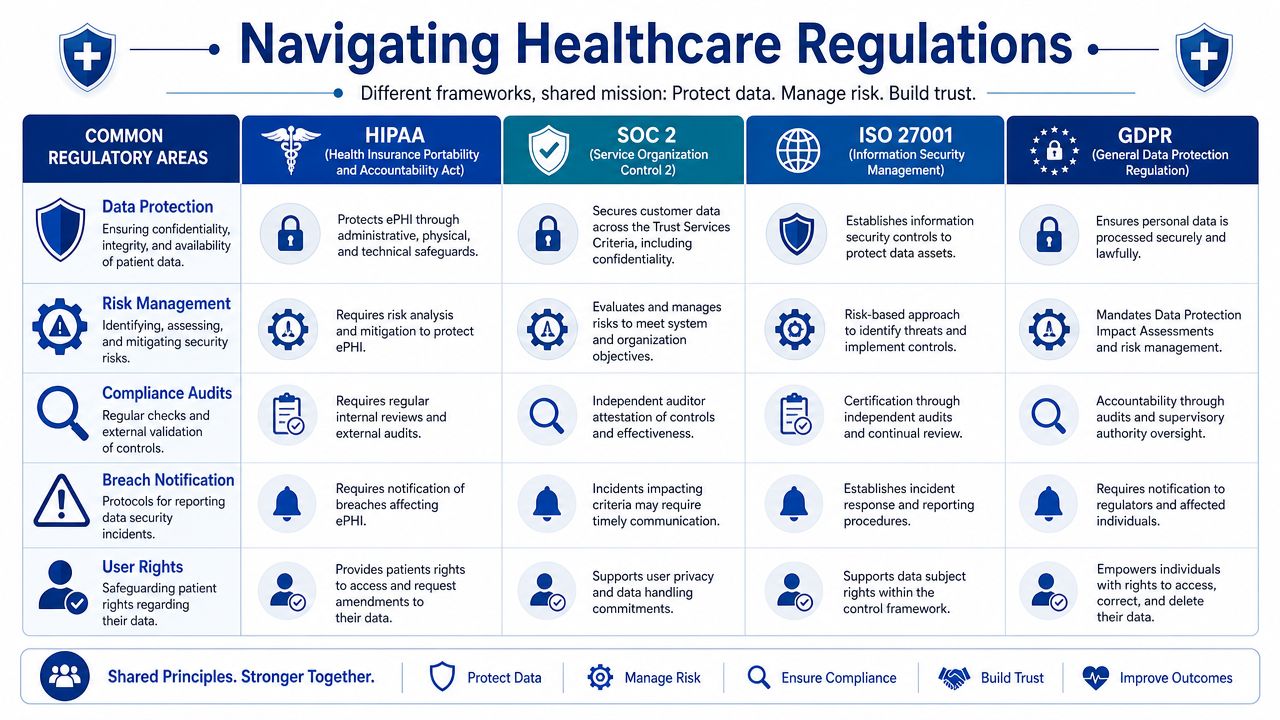
Healthcare teams often get stuck because they approach regulation as a list of acronyms. That creates two bad outcomes. Either they overbuild controls they don't need, or they miss shared control areas that satisfy multiple frameworks at once.
The practical move is to map regulations to software control areas, not to legal clauses in isolation.
What Each Framework Is Really Asking For
HIPAA matters because healthcare apps handle protected health information and need safeguards around confidentiality, integrity, and access. In engineering terms, that pushes you toward access restrictions, auditability, secure transmission, and controlled disclosure.
SOC 2 matters when buyers, partners, and enterprise customers want assurance that your systems are operated with disciplined security and control practices. It often affects how you formalise monitoring, change management, access review, and vendor oversight.
ISO 27001 matters when you need an information security management system that's organised, repeatable, and governed over time. It's less about one feature and more about whether the organisation can manage risk systematically.
GDPR comes into play when personal data from people in the EU is involved. For product teams, that changes how you think about lawful processing, deletion workflows, data minimisation, access requests, and cross-border handling.
Regulations differ in scope and language, but your engineers will still implement a familiar set of controls: identity, logging, encryption, retention, approval, monitoring, and documentation.
If you're defining QA and release criteria, it helps to think in terms of testable controls rather than legal prose. This article on testing healthcare applications is a useful companion because it ties regulated expectations to concrete testing work.
Regulatory Mapping for Healthcare Software Controls
| Control Area | HIPAA Security Rule Requirement | SOC 2 Trust Services Criteria | ISO 27001:2022 Annex A Control |
|---|---|---|---|
| Access control | Limit access to ePHI based on role and need | Logical access security and user provisioning discipline | Identity management and access control |
| Audit logging | Record and review system activity affecting sensitive data | Monitoring and traceability of critical events | Logging, monitoring, and event recording |
| Change management | Protect integrity of systems handling health data | Controlled change approval and implementation | Change management and secure development |
| Risk management | Identify and address risks to protected information | Ongoing risk assessment and control operation | Risk treatment within the ISMS |
| Policy control | Maintain documented security procedures | Formalised control documentation and governance | Documented policies, procedures, and review |
| Incident response | Respond to security incidents involving health data | Detect, manage, and learn from incidents | Information security incident management |
Use One Control To Satisfy Many Obligations
A secure audit log is a good example. Teams sometimes treat it as a HIPAA-only requirement, but it usually supports much more than that. The same logging architecture can help with customer assurance, internal investigations, access reviews, and operational troubleshooting.
When you map regulations properly, product decisions become clearer:
Design one identity model that supports least privilege across admin, clinician, support, and integration users.
Use one logging standard for sensitive actions, not separate logging rules by team.
Tie documentation to controls so policies, tests, and tickets all reference the same requirement.
Review shared evidence once and use it across multiple audit contexts where appropriate.
The goal isn't to make every app compliant with every framework. It's to identify which obligations apply to your product, then implement controls that are technically coherent and reusable.
Engineering Security Into Your Development Lifecycle
Many teams still make the same mistake. They build features first, then ask security and compliance to review the result before release. That creates rushed exceptions, brittle fixes, and gaps no one can explain later.
For audit-ready healthcare software, the benchmark is different. Evidence generation has to be part of the delivery itself.
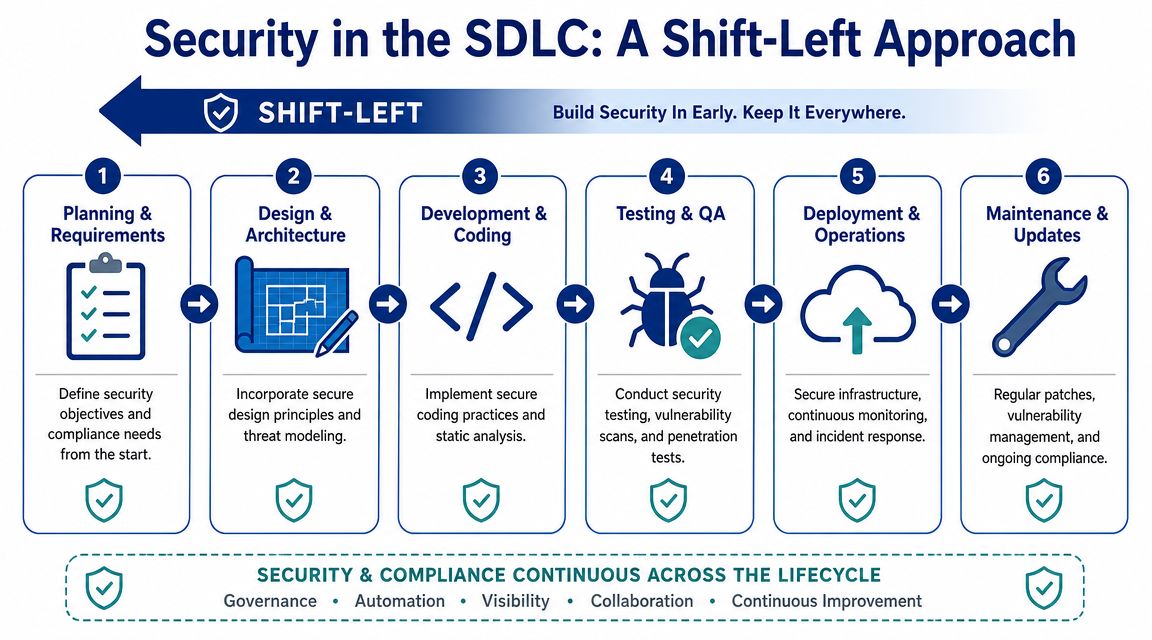
A strong summary comes from Bridge Global's guidance on audit-ready healthcare builds: the most common failure mode is treating compliance as a phase gate before release, while the operational benchmark is to make evidence generation part of the CI/CD pipeline so every change is documented, tested, approved, and tracked from code commit to deployment artefact to log record, reducing rework and audit-failure risk, as described in this article on building audit-ready healthcare software.
What Shift-Left Looks Like in Practice
Shift-left doesn't mean adding more meetings. It means making controls executable earlier.
During planning, define security acceptance criteria alongside user stories. If a feature touches PHI, state up front how access will be limited, what must be logged, what data must be masked, and what approval path applies.
During design, run threat modelling at the workflow level. Don't stop at “the database is encrypted.” Ask where data enters, where it is transformed, who can export it, what background jobs touch it, and how failures are observed.
During development, automate what can be checked automatically:
SAST in pull requests: Catch insecure patterns before merge.
Dependency scanning in builds: Flag risky packages and outdated components.
Secrets detection: Stop credentials and tokens from entering repositories.
Policy checks in infrastructure pipelines: Prevent insecure configurations from being deployed.
Make Traceability Automatic
A release should produce evidence without anyone assembling it by hand. That means your toolchain should already show:
| SDLC stage | Evidence you should retain |
|---|---|
| Requirements | Approved stories, control references, risk notes |
| Design | Architecture decisions, threat model outputs |
| Development | Commit history, code reviews, test results |
| Build | Scan outputs, dependency reports, and artefact records |
| Release | Approvals, deployment logs, environment history |
| Operations | Runtime alerts, incidents, access events, remediation records |
If a developer can bypass a control to “move faster”, the process isn't audit-ready. It's just an undocumented risk.
That's why manual sign-offs in chat tools are weak evidence. Use systems that preserve timestamps, reviewers, revision history, and artefact linkage. If the release process depends on someone remembering to upload proof later, it will break under audit pressure.
Security Controls That Belong in the Pipeline
The goal isn't to drown the team in checks. It's to put the right checks in the right place.
Before code merges: Enforce peer review, branch protections, and automated scans.
Before deployment: Require approved builds, environment-specific controls, and release traceability.
After deployment: Monitor privileged actions, failed access attempts, configuration drift, and incident signals.
For teams refining that baseline, these software security best practices offer a practical checklist that fits well into healthcare delivery pipelines.
Implementing Robust Access Controls and Audit Trails
Encryption protects data at rest and in transit. That matters. But auditors usually dig just as hard into a different question: who had access, what did they do, and can you prove the record hasn't been altered?
That's why access control and audit logging deserve their own design work. They aren't side effects of infrastructure. They are application behaviours.
A broader market signal supports that shift. Audit readiness is moving from periodic review to continuous evidence capture, and the global audit software market was valued at USD 3.1 billion in 2024 and is expected to reach USD 9.7 billion by 2034, with growth tied to digital transformation, cloud adoption, real-time collaboration, and reduced manual error, as noted by Inovaare's audit management platform overview.
Design RBAC From Job Reality, Not Org Charts
A common RBAC mistake is to mirror department names. That looks tidy on a slide and fails in production. Real systems need permissions based on tasks.
A support agent may need to view limited account metadata but not clinical notes. A billing specialist may need claims status but not psychotherapy records. An engineer may need production observability but not unrestricted patient data.
Build roles around actions such as view, create, modify, approve, export, and administer. Then narrow those actions by data type, tenant, workflow, or environment.
A workable access model usually includes:
Baseline roles: Clinician, operations, billing, support, admin, integration.
Privilege boundaries: Separate data access from system administration.
Approval rules: Privileged access should require explicit, reviewable approval.
Regular review: Stale permissions should be easy to detect and remove.
What an Audit-Ready Log Actually Contains
Too many teams log events that are useful for debugging and useless for audit defence. “Update successful” is not an audit trail.
A defensible log should answer four questions clearly: who acted, what changed, which record was affected, and when it happened. In healthcare workflows, I'd also want the source context. Was it a user action, an API call, a batch job, or an integration?
Working standard: Log security-sensitive and data-sensitive actions in enough detail that an independent reviewer can reconstruct the event without interviewing the engineer who built it.
That typically includes login events, failed access attempts, role changes, record views where appropriate, edits, exports, deletions, approvals, configuration changes, policy acknowledgements, and administrative overrides.
For documents that leave the system, redaction workflows matter too. Teams handling evidence packs, patient correspondence, or attachments often need a consistent process before sharing files outside controlled environments. A practical reference is this guide on how to redact documents with OkraPDF.
Protect the Logs From the People Who Use the System
Logs aren't valuable if privileged users can alter or delete them without a trace. Treat them as evidence, not just telemetry.
That usually means separation between the application and the log store, retention rules, restricted deletion capability, and clear review processes. If your policy says “all admin actions are logged”, but your architecture allows admins to tamper with those logs, the control is weak, no matter how good the policy sounds.
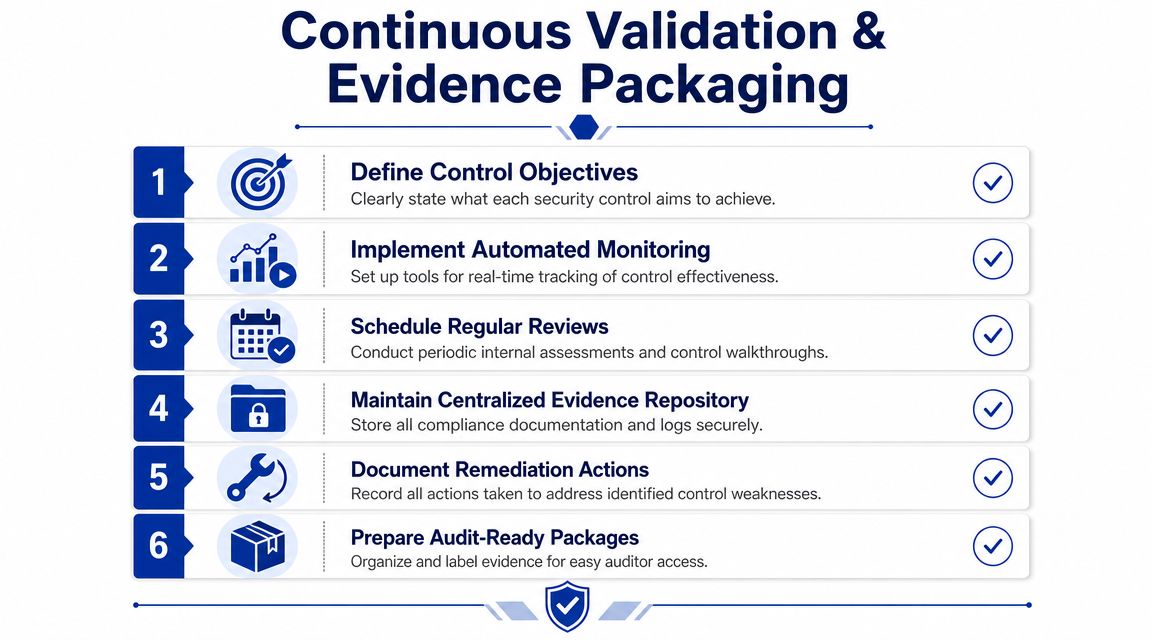
Continuous Validation and Evidence Packaging
A team that only tests controls when an audit is announced doesn't have a control programme. It has a document sprint.
That difference matters most in CMS-style environments, where proving that controls worked over time is often more important than producing a polished set of documents at the end. The defensible approach is a year-round validation cadence: validate the universe or data sets on a defined schedule, run monthly data checks, perform internal audits using CMS criteria, and conduct quarterly mock audits. The same guidance warns that organisations waiting for audit notification lose the ability to prove continuous control effectiveness, as described in Inovaare's discussion of why CMS audit readiness breaks down.
Replace Pre-Audit Panic With a Standing Rhythm
A practical cadence works because it exposes control drift early. Someone changes a workflow. An integration starts dropping fields. A role gets broader than intended. A policy is updated, but training records lag. Those aren't unusual failures. They're normal operational changes that need to be caught routinely.
A simple validation rhythm might look like this:
Monthly: Data quality checks, exception review, and access review sampling.
Quarterly: Mock audits, control walkthroughs, and remediation review.
On change: Revalidation after major releases, architecture changes, or new integrations.
The point isn't the ceremony. It's preserving a continuous chain of proof.
Build an Evidence Package Auditors Can Actually Use
Most evidence repositories fail because they're organised by department rather than by control. Auditors don't want a maze of folders named “Security stuff final v3”. They want to inspect whether a requirement is supported by policy, implementation, operation, and remediation history.
Your evidence package should be version-controlled and tied to specific controls. For each control, include the relevant policy, system screenshots where appropriate, test outputs, approval records, review history, exception logs, and corrective actions.
A lean structure often works best:
| Evidence category | What belongs there |
|---|---|
| Control definition | Requirement mapping, owner, purpose |
| Operating evidence | Logs, tickets, approvals, reports |
| Validation evidence | Test results, mock audit findings, review notes |
| Remediation evidence | CAP items, owner, due date, closure proof |
Audits go smoother when your evidence tells one coherent story. The policy says what should happen. The system record shows what did happen. The remediation log shows how you handled exceptions.
For teams formalising that process, these IT audit tools and techniques are useful to review because they help translate internal validation work into repeatable audit operations.
Future-Proofing Your Software With AI Governance
Many healthcare teams still assume that if they've handled RBAC, encryption, and standard audit logging, they're ready for the next audit cycle. That assumption is getting weaker.
It breaks down fastest when the product includes AI-assisted triage, coding support, claims review, patient messaging, summarisation, or recommendation engines. Traditional controls still matter, but they don't answer the new question: how do you prove why an AI-influenced decision happened, using which model state, with which inputs, under which review process?

A useful framing comes from MindCore's discussion of audit-ready healthcare infrastructure: the key unanswered question in healthcare compliance is how to prove audit readiness for embedded AI workflows, and auditors are beginning to ask for versioned AI model documentation and traceable decision logs for human review, especially where models change frequently.
Why Standard Application Logs Aren’t Enough
A normal application log might tell you that a user clicked “approve” or that a message was sent. That helps, but it may not explain what the AI system suggested, what context it used, whether confidence or rule thresholds were involved, or whether a human overrode the recommendation.
For AI features, you need more than event logging. You need decision context.
That usually means preserving:
Model version used at the time of inference
Prompt, rules, or configuration state
Input source lineage
Output shown to the user
Human action taken afterwards
Fallback or override path where applicable
Without that, an auditor or internal investigator may be able to prove that the system acted, but not whether it acted appropriately.
The Minimum Governance Layer for AI-Driven Features
A practical AI governance layer in healthcare software should include versioned model documentation, deployment approval history, dataset provenance where relevant, and a reviewable decision log. This doesn't require full explainability for every model in every context. It does require disciplined traceability.
I'd separate AI evidence into three buckets:
Model Governance Records
Keep the model version, release notes, intended use, limitations, approval status, and rollback history.Operational Decision Logs
Capture the input-output transaction in a way that supports later review without exposing unnecessary data.Human Oversight Records
Show whether a clinician, coder, reviewer, or support agent accepted, edited, or rejected the suggestion.
Questions Product Teams Should Answer Before Launch
If your roadmap includes AI, these are no longer edge questions:
What exactly gets logged when the model produces a recommendation?
How long will you retain that record?
How do you trace a user complaint to the specific model version involved?
What happens when the model is updated but the workflow remains the same?
Who signs off that the model is still fit for use in that workflow?
Some development partners can help, especially when the work spans app engineering, integration, and compliance-aware AI implementation. Cleffex Digital Ltd is one example of a software development company that works across healthcare software, integration, and AI-driven solutions. The key requirement, whichever partner or internal team you use, is that they design evidence capture for AI workflows before those features reach production.
Audit-ready healthcare software used to mean proving that systems were secure and controlled. That's still true. But for AI-enabled products, the standard is moving toward proving that machine-assisted decisions are documented, reviewable, and bounded by governance.
If your team is building or modernising a healthcare platform and needs help turning compliance requirements into working software controls, Cleffex Digital Ltd can be evaluated as a development partner for secure application delivery, healthcare integrations, and compliance-aware AI implementations.