


A lot of teams hit the same moment. The product works, clinicians like the workflow, the pilot is moving, and then someone asks a simple question: “Can we use this with US patients?” That's when a solid healthcare app suddenly turns into a compliance programme.
For Canadian clinics, startups, and software vendors, that shift is bigger than many expect. You're not just deciding whether to encrypt a database or add a login challenge. You're deciding whether your software can cross a legal border without dragging risk, delay, and mistrust with it.
Your Guide to Navigating Healthcare Software Compliance
A common scenario looks like this. A clinic in Ontario launches virtual services. A Canadian digital health company lands interest from a US partner. A billing or intake platform that worked well under local privacy expectations now needs to stand up to HIPAA scrutiny because American patient data is entering the system.
That changes the stakes immediately.
Canada has its own privacy framework. But Canadian healthcare providers must comply with US HIPAA regulations when managing American patient data, and that matters even more because Canada ranked 10th globally in healthcare data breaches according to this overview of HIPAA compliance in Canadian healthcare privacy. In practice, that means HIPAA is not a distant US-only issue for Canadian companies. It's a market-access requirement.
Why this becomes a business issue fast
If your software touches scheduling, intake, claims, messaging, clinical notes, imaging, or reporting, compliance affects more than legal review.
Sales cycles slow down: US buyers start asking about access controls, breach handling, and contracts before they ask about product features.
Trust becomes technical: A clean interface doesn't reassure anyone if your team can't explain logging, encryption, or user provisioning.
Operations get exposed: Informal workflows, shared accounts, and ad hoc exports become liabilities the moment cross-border data enters the system.
Teams often learn this the hard way. They built a useful product, but not a defensible one.
Practical rule: HIPAA pressure rarely starts with a regulator. It usually starts with a prospect, partner, legal team, or security questionnaire.
The upside is that compliance work often improves the product. Stronger permissions reduce internal confusion. Better audit trails help support teams diagnose issues. More disciplined workflows also help clinics streamline revenue cycle operations because patient, billing, and operational data stop moving through uncontrolled side channels.
The Canadian lens matters
Canadian firms can't treat HIPAA and PHIPA or PIPEDA as interchangeable. They overlap, but they aren't the same. A software design that satisfies one set of assumptions may still fall short when data origin, consent expectations, breach handling, and vendor responsibilities shift across jurisdictions.
That's why HIPAA-compliant healthcare software has to be built as a working system of controls. Not a checklist taped on at the end.
What Exactly Is HIPAA-Compliant Software?
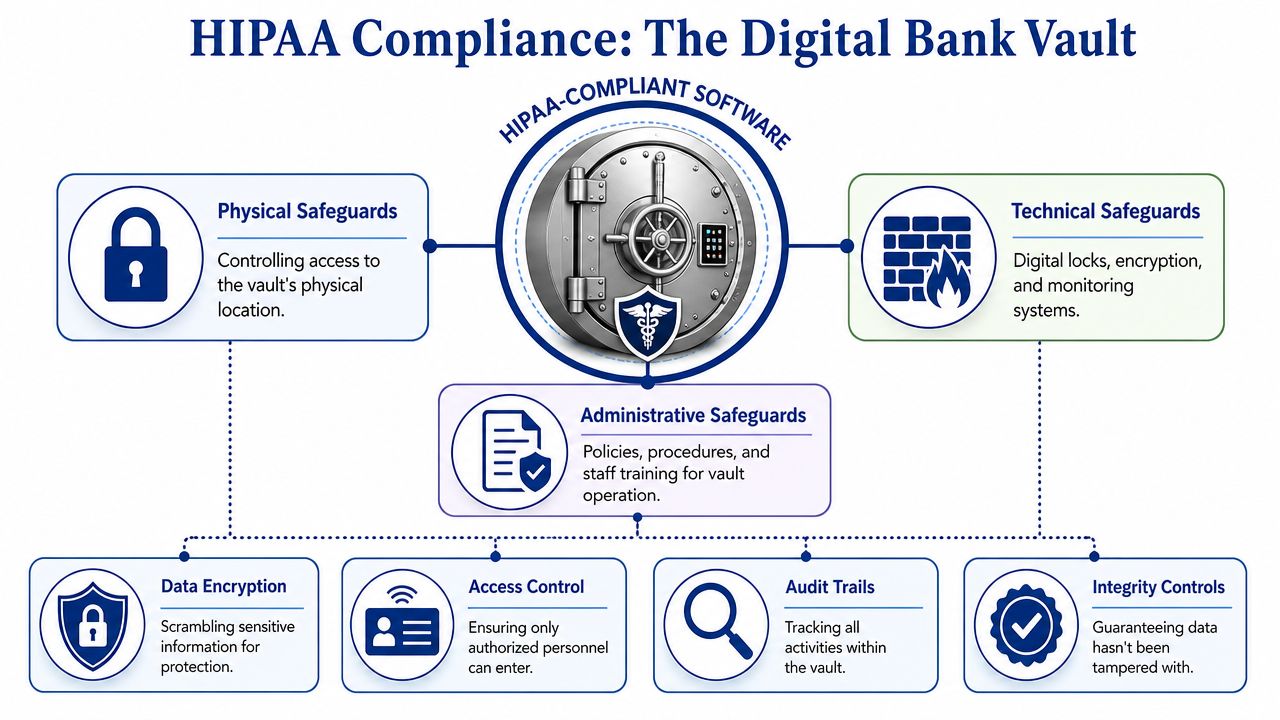
The easiest way to understand HIPAA-compliant healthcare software is to stop thinking of it as an app and start thinking of it as a vault.
A vault isn't secure because it has one strong lock. It's secure because the whole design works together. The walls are reinforced. Entry is controlled. Cameras record activity. Staff follow procedures. The same logic applies to healthcare software.
What the software is protecting
The valuables inside the vault are electronic protected health information, usually shortened to ePHI. In practical terms, that includes patient information stored or transmitted electronically when it can identify a person and relates to care, treatment, payment, or health status.
That means ePHI isn't limited to an electronic medical record. It can also appear in:
Patient portals
Claims and billing workflows
Referral messages
Uploaded documents
Care coordination notes
Analytics datasets if identity can still be tied back to a patient
If your product handles those flows, you don't get compliance by adding one “secure mode” toggle.
Compliance is architecture, not branding
One of the most persistent mistakes in healthcare software buying is asking whether a product is “HIPAA certified”. That question sounds sensible, but it points teams in the wrong direction. What matters is whether the software, hosting setup, operational controls, contracts, and day-to-day use support HIPAA obligations.
Imagine it as building a secure house.
The doors and locks are access controls.
The wiring and alarm system are monitoring and logging.
The safe inside the house is encryption.
The household rules are policies, training, and incident response.
If one part fails, the whole model weakens. Great encryption won't save you from shared logins. Strong user roles won't help if nobody reviews suspicious access. A polished vendor demo doesn't prove that backups, retention, and incident handling are organised properly.
HIPAA compliance isn't something you buy off a shelf. You design for it, document it, operate it, and keep proving it.
What good teams understand early
Teams that do this well shift their mindset early:
| Misconception | What actually works |
|---|---|
| “We'll add compliance near launch.” | Build security and privacy controls into the architecture from the start. |
| “Our cloud provider handles HIPAA.” | The provider may secure infrastructure, but your app design and operations still matter. |
| “Only the clinical module is sensitive.” | Any workflow handling identifiable patient data can fall into scope. |
That's the foundation. Once that clicks, the rest of HIPAA starts to look less like legal fog and more like engineering discipline.
The Three Pillars of HIPAA Safeguards
HIPAA safeguards fall into three categories. That division matters because many teams overinvest in one pillar and neglect the others. They harden the application but ignore staff access reviews. Or they write policies nobody follows. Or they lock down the office and leave the logs useless.
The better way to think about it is simple. Administrative safeguards govern people and process. Physical safeguards protect devices and environments. Technical safeguards are the controls enforced by systems and software.
HIPAA safeguards at a glance
| Safeguard Type | Focus | Example |
|---|---|---|
| Administrative | Governance, training, risk management, accountability | Staff training, access review process, breach response workflow |
| Physical | Hardware, devices, facilities, workstation handling | Locked server room, screen privacy, device disposal policy |
| Technical | System-enforced protection of ePHI | RBAC, audit logs, session controls, encryption |
Administrative safeguards shape real behaviour
Administrative controls are where leadership proves it's serious. These safeguards decide who approves access, how incidents are escalated, how risk is reviewed, and how staff are trained to handle patient data in ordinary work.
This is also where many software projects stumble. Teams document a policy set for procurement, then never operationalise it. A policy that says “least privilege” means nothing if managers never remove stale permissions or if support staff keep broad admin rights because it's convenient.
A strong administrative baseline usually includes:
Access governance: Who approves new accounts, role changes, and urgent access.
Training discipline: Staff learn how the system should be used, not just where buttons are.
Incident routines: Security issues move through a defined response path instead of informal chat messages.
Physical safeguards are still relevant in cloud environments
Some teams hear “cloud” and assume physical controls belong to someone else. That's incomplete. Even if infrastructure sits in a managed data centre, laptops, mobile devices, office workstations, and printed exports still create exposure.
Physical safeguards cover the boring but critical controls that stop avoidable leaks.
Workstation security: Shared terminals in reception areas need stronger session handling and privacy controls.
Device management: Lost laptops and unmanaged phones can become breach vectors.
Facility access: On-premises servers, networking gear, and backup media still need controlled access.
A surprising number of compliance failures don't start with sophisticated attacks. They start with convenience. An unlocked terminal, a reused account, a file copied to the wrong device.
Technical safeguards create proof, not just protection
Technical controls matter because they don't rely on memory. The software enforces them every time. Access can be restricted, events can be logged, and suspicious behaviour can be surfaced whether or not a busy employee remembers the policy.
That's especially important in Canada's regulated healthcare context. Under PHIPA, health information custodians must notify the Information and Privacy Commissioner of breaches, and controls such as RBAC and tamper-proof audit logs are foundational in that environment, as noted in Statistics Canada's discussion of electronic information sharing and related requirements.
The useful mental model is this:
Administrative safeguards decide what should happen
Physical safeguards reduce environmental exposure
Technical safeguards prove what did happen
You need all three. A one-legged stool doesn't stand for long.
Essential Technical Controls for Your Software
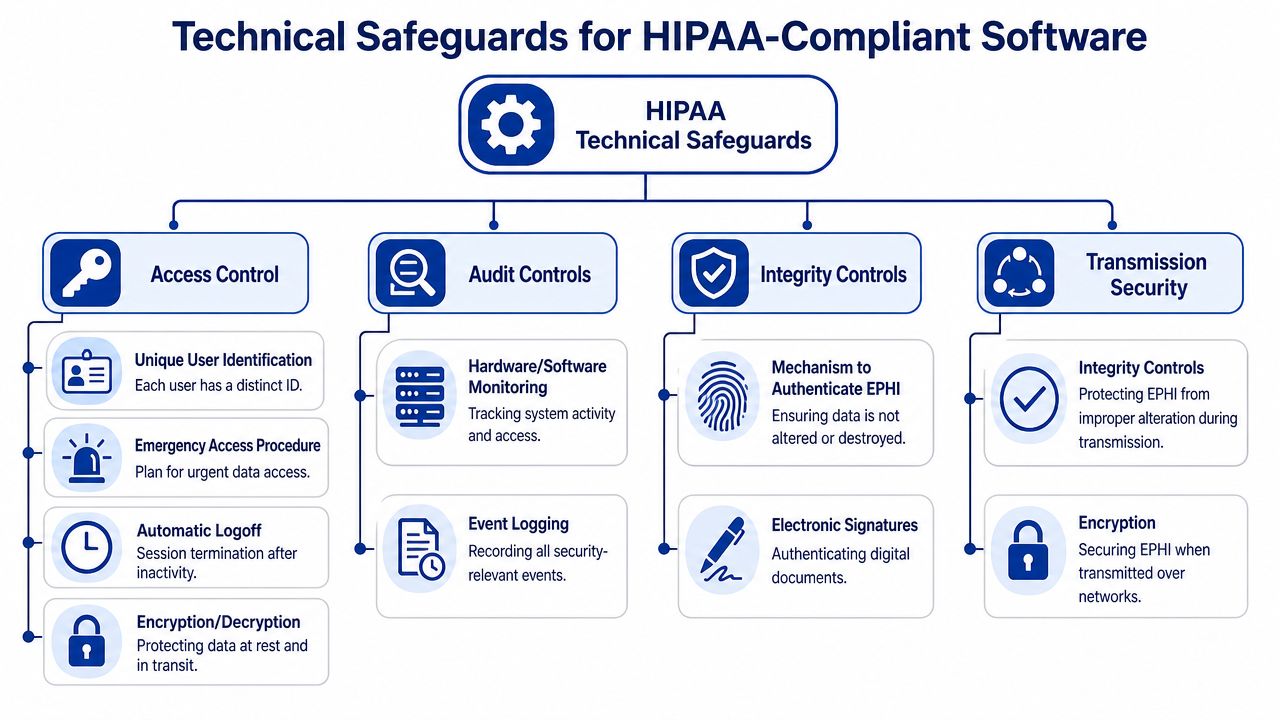
When teams ask what to build first, I usually answer with four controls: access, encryption, auditability, and integrity. If those are weak, everything else becomes harder to defend.
Legal language needs to become implementation detail. Developers need concrete requirements. Product owners need to understand why some shortcuts are unacceptable. Security teams need evidence they can verify.
Access control has to be enforceable
Role-based access control is not the same as a few coarse user types. Real RBAC maps permissions to job function, data sensitivity, and workflow boundaries. A clinician, scheduler, biller, and support agent should not see the same records or perform the same actions.
A strong model also uses unique user IDs and multi-factor authentication. According to this HIPAA software development checklist, RBAC with unique user IDs and MFA enforces least privilege and generates immutable audit logs that trace each access event. That's what makes investigation possible when something goes wrong.
What doesn't work:
Shared team accounts
Permanent super-admin access
Role sprawl without review
Support impersonation without logging and approval controls
Encryption needs clear standards
If a vendor says data is “encrypted”, ask what that means exactly. For software handling ePHI, the standard cited in Digital Health Canada's guidance on HIPAA compliance in software development is AES-256 for data at rest and TLS 1.2 or higher for data in transit.
That matters because encryption is not decorative. If a server is compromised, properly encrypted stored data remains unreadable without the decryption key.
Here's the practical split:
At rest: Databases, file storage, backups, and exported records need strong encryption controls.
In transit: APIs, browser sessions, mobile traffic, system integrations, and document exchange need protected transport channels.
Teams working through messaging, referrals, and file exchange often benefit from reviewing patterns for secure document sharing in healthcare settings, because document workflows are one of the fastest ways sensitive data escapes a well-designed core application.
Audit logs must answer real questions
A good audit log is not a generic stream of system noise. It should answer who accessed what, when, from where, what action was taken, and whether the action succeeded or failed.
That means your logging design should include:
Access events: View, create, edit, export, print, delete
Privilege changes: Role assignments, admin elevation, MFA resets
Security events: Failed logins, session expiry, unusual access attempts
Data movement: External sharing, API transfers, bulk downloads
For teams designing these controls at the application and infrastructure layers, this guide to data security in healthcare information systems is a useful companion because it helps connect software patterns with operational risk.
If your logs can't support an investigation, they're not really audit controls. They're just storage.
Integrity controls prevent silent damage
Healthcare software can't only protect secrecy. It also has to preserve correctness. Integrity controls help detect unauthorised alteration, accidental corruption, and workflow misuse.
In practice, that includes versioning, signed records where appropriate, controlled update paths, and safeguards around imports, synchronisation jobs, and administrative edits. A treatment note altered by the wrong user is not just a security issue. It can become a patient safety issue.
The technical goal is straightforward. Make bad access difficult. Make sensitive data unreadable when intercepted or exposed. Make every meaningful action traceable. Make unauthorised changes detectable.
Your Vendor Assessment and Implementation Checklist
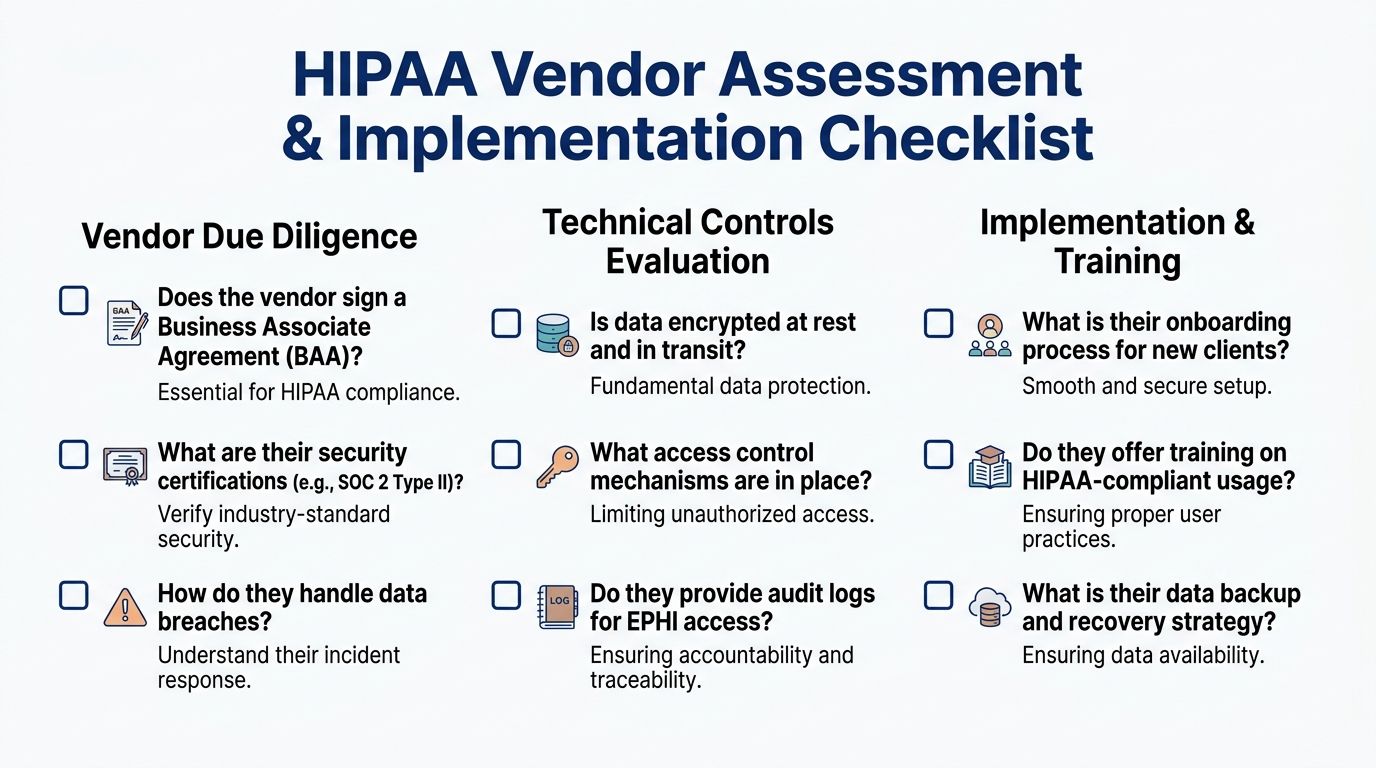
“HIPAA-ready” is easy to say in a sales call. The decisive test is whether a vendor can answer direct questions without hand-waving. If they can't explain how their controls work, you should assume the controls are weak, immature, or inconsistently implemented.
Buyers often make the same mistake. They ask broad questions like “Are you compliant?” and get broad answers back. Ask operational questions instead. That's where weak vendors start to wobble.
Questions that cut through marketing
Use these in procurement meetings, technical reviews, or internal architecture sign-off.
Contract accountability: Will you sign a Business Associate Agreement, and when in the buying process will you provide it?
Access model clarity: Show how RBAC is configured. Don't describe it. Demonstrate role creation, least-privilege assignment, and account deactivation.
Identity control: Explain how unique user IDs and MFA are enforced for staff, admins, contractors, and emergency access situations.
Audit visibility: Show the actual audit trail interface and what data an administrator can review after a suspected incident.
Encryption detail: State how data is protected at rest and in transit, using specific standards and scope.
Incident handling: Walk through the breach response process, notification responsibilities, and escalation path.
What to ask for in implementation review
Even if the software is sound, implementation can ruin it. I've seen strong products deployed with weak role models, broad default permissions, and no admin training. That's not a vendor problem alone. It's a governance problem.
Ask your internal team or delivery partner:
Who owns role design after go-live?
How terminated or transferred staff lose access?
How often are audit logs reviewed?
How are backup and recovery tested?
How is configuration drift detected after changes?
A practical framework for this kind of build-and-governance discipline is outlined in compliance-driven software development, especially when software teams need compliance controls embedded in delivery work rather than treated as legal overhead.
Red flags worth acting on
You don't need a dramatic failure to walk away. Small evasions are often enough.
Vague architecture answers: “Our cloud provider handles security” is incomplete.
No product-level evidence: If they can't show audit events or access policy enforcement, don't assume they exist.
Friction around contracts: Hesitation on the BAA usually signals misalignment.
Overbroad admin access: Convenience-based permissions tend to stay forever.
A capable vendor or internal team should be able to explain control design in plain language. If they can't, they probably can't support it under pressure either.
Navigating Cloud AI and Modern Compliance Challenges
Cloud and AI didn't simplify compliance. They changed where the difficult parts sit.
A cloud platform can give you secure building blocks, but those blocks don't assemble themselves into a compliant application. The same goes for AI. A model can create value in triage, documentation, coding support, or patient communication, but it can also move sensitive data into places your governance never anticipated.

Cloud shifts responsibility; it doesn't remove it
Using AWS, Azure, or Google Cloud doesn't make your application compliant by default. It gives you infrastructure options that can support compliant design. Your team still owns application permissions, tenant isolation, logging decisions, retention rules, API exposure, secrets handling, and operational discipline.
That's the part many organisations underestimate. They choose a HIPAA-eligible service and assume the hard work is done. In reality, managed infrastructure only narrows one slice of risk.
The cloud provider secures the building. You still decide who gets keys, which rooms they can enter, and whether anyone records what happened inside.
AI raises different kinds of risk
AI features create special problems because they often cut across normal data boundaries. Prompt content may include ePHI. Training pipelines can accidentally pull in patient-linked records. Output can expose more context than a user needs. Even de-identified datasets can create trouble if re-identification risk isn't handled carefully.
For teams exploring this space, AI in medical software development is a useful lens because it connects model design choices with software governance and healthcare delivery realities.
Cross-border software needs data origin awareness
Canadian companies handling cross-border healthcare data need more than a generic privacy banner. According to this discussion of HIPAA in Canada and SOC 2 privacy alignment, software must use jurisdictional data tagging so ePHI is labelled with its origin, such as US-HIPAA, and then processed under the right rule set.
That is a practical architecture pattern, not a legal slogan.
If data origin is tagged at ingestion, the software can drive downstream behaviour more safely:
Storage rules can differ by jurisdiction
Access policies can reflect legal scope
Export and sharing flows can be restricted correctly
Retention and disclosure logic can follow the right framework
Without that, cross-border systems rely too heavily on human memory. That's not reliable enough for regulated health data.
Your Action Roadmap to HIPAA Compliance
For healthcare organisations, start with operational reality. Map where patient data enters, who touches it, which vendors handle it, and where informal workarounds exist. Then review contracts, tighten user access, train staff on actual system use, and make log review and incident response part of routine operations rather than emergency theatre.
For software companies, build compliance into the delivery model. Define ePHI boundaries early, design RBAC before feature sprawl sets in, enforce encryption standards in architecture decisions, and make audit logging part of acceptance criteria. Treat security review as part of release readiness, not an afterthought before procurement.
Two roadmaps that work in practice
For clinics and healthcare operators: Inventory systems, confirm vendor responsibilities, remove shared access habits, and make accountable ownership clear for roles, reviews, and breach handling.
For product and engineering teams: Design for least privilege, log meaningful events, test failure scenarios, and document controls so they can be explained to buyers, auditors, and internal teams without improvisation.
The main point is simple. HIPAA compliance becomes manageable when you stop treating it like abstract regulation and start treating it like disciplined software and operational design. That's how HIPAA-compliant healthcare software gets built. Not through promises, but through repeatable controls that hold up when someone finally asks hard questions.
If your team is building healthcare platforms, modernising legacy workflows, or adapting software for regulated cross-border use, Cleffex Digital Ltd can help you turn compliance requirements into practical architecture, delivery processes, and secure product decisions.