


You're probably staring at a stack of problems that all arrived at once. The old system is slow, clinicians are working around it, reporting is messy, and every department wants the upgrade to solve its own pain point without adding another layer of friction. In a healthcare technology upgrade, that's the starting line, not the vendor demo.
The hard truth is that the software rarely fails on its own. Upgrade programmes usually break when leadership treats them like an installation project instead of an organisational change effort, then asks clinicians to absorb a new workflow after the go-live date is already fixed. In Canadian hospitals, the programmes that hold together usually do the unglamorous work first: workflow redesign, training, governance, and post-go-live support, because that's where adoption is won or lost.
The scale of the shift matters too. 91% of office-based physicians and more than 99% of non-federal acute care hospitals in the U.S. had adopted a certified EHR by 2024, which shows how far digital recordkeeping has moved from optional to foundational infrastructure, with interoperability improving materially as well, including 70% of hospitals interoperable by 2023 and 92% of prescribers with e-prescribing capability. For Canadian providers, that reality raises the bar. A modern upgrade has to support connected care, claims, patient access, and secure data exchange, not just new screens.
Why Most Healthcare Technology Upgrades Really Fail
A CIO usually feels the break point long before the board does. The system starts showing its age through slow charting, duplicate data entry, brittle interfaces, and workarounds that make every change request feel like a small clinical rebellion. By the time a vendor is shortlisted, the organisation usually wants relief more than a plan, and that is where the trouble begins.
The mistake is treating the upgrade mainly as a software decision. The Canadian modernisation study by Cresswell and Sheikh shows that successful change required workflow redesign, infrastructure changes, leadership involvement, training, and a stabilisation period after go-live. That matches what many teams learn the hard way: the technical installation is the easiest part, while organisational fit decides whether the new platform gets used or resisted.
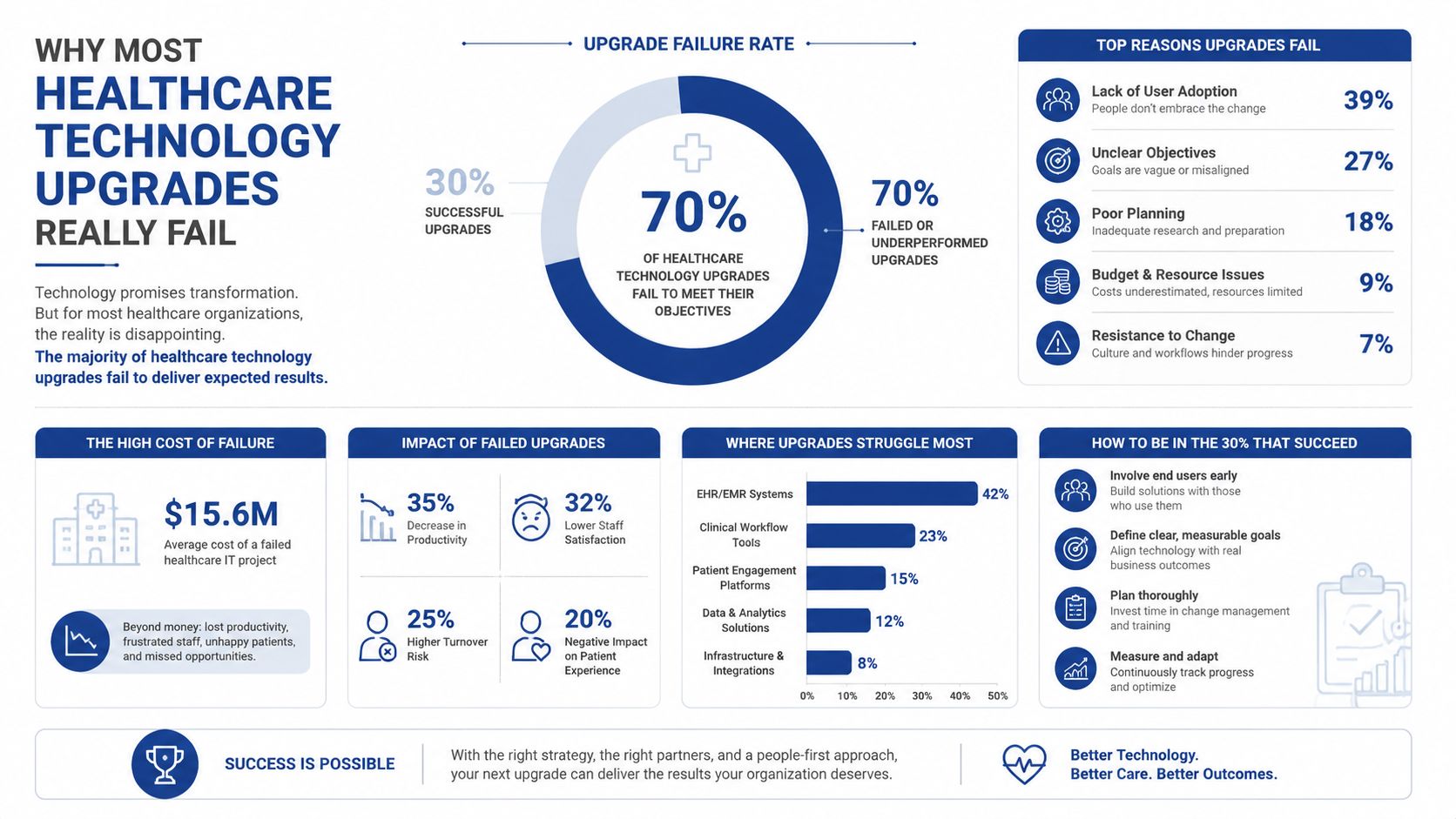
The failure pattern I see most often
A hospital selects a vendor, sets a go-live date, and compresses training into the last few weeks. Leadership assumes the new process will settle down after launch, but clinicians are still using legacy habits, front-desk staff are improvising, and the support desk is flooded with issues that were predictable months earlier. The system is live, but the workflow is not.
Practical rule: if the team cannot describe the future-state workflow in plain language before procurement, the project is not ready for implementation.
The Canadian literature also reflects the broader risk of change work. In one modernisation review, project-management inefficiencies accounted for a large share of failure modes in healthcare software programmes. That does not mean the upgrade is doomed. It means the programme needs governance that includes clinical leaders, operational leaders, and the people who do the work, not just IT.
The good programmes win early. They define what must change, what can stay the same, and who is accountable when the workflow starts to drift after launch. They also make room for clinician feedback before the upgrade hardens into routine. That is the part many hospitals miss, and it is why a strong healthcare technology partner in Canada has to support the organisational work, not just the configuration. The bad ones assume adoption will follow installation. It usually does not.
Running a Needs Assessment That Actually Surfaces Reality
A proper needs assessment starts before anyone opens a vendor deck. The point is to make the current state visible in enough detail that leadership can see where the pain is coming from, and where a technology change would remove friction instead of moving it somewhere else. That means looking at the clinical pathway, the administrative pathway, and the patient journey as one system.
Map the work, not just the system
Start with a current-state workflow map. Trace how referrals come in, how orders move, how results are reviewed, where billing touches the record, and which steps still depend on manual re-entry or memory. Then sit with front-desk staff, nurses, physicians, billing teams, and managers. They'll tell you where workarounds exist, and those workarounds usually reveal the true requirement better than a steering committee does.
A useful assessment also separates must-have from nice-to-have. A new telehealth module, for example, might need scheduling and billing integration on day one, while a patient education portal can wait if it doesn't affect safety or throughput. If you don't rank requirements, every feature looks equally urgent, and procurement becomes a popularity contest.
Strong assessment teams ask what breaks on a busy Monday morning, not what looks impressive in a demo.
Build a vendor-neutral requirement set
The best way to stay vendor-neutral is to write requirements as business outcomes and operational constraints. Document data quality issues, interface dependencies, privacy obligations, device integrations, and manual steps that should disappear. Then turn that into a gap analysis with three columns: current state, future state, and what has to change to get there.
For a healthcare technology upgrade, the assessment should also capture total cost inputs. That includes training time, backfill needs, integration effort, and post-go-live support, not just licence fees. If you skip those items, the eventual business case will look cleaner than the programme really is.
A practical checklist looks like this:
Clinical workflows: Note where charting, ordering, and result review slow down.
Patient journeys: Map booking, check-in, follow-up, and access to records.
Integration touchpoints: List every system that sends or receives data.
Compliance gaps: Identify privacy, auditability, and retention issues.
Cost drivers: Capture training, downtime, support, and integration work.
Once those items are documented, the organisation can write a defensible RFP instead of reacting to the first polished sales presentation. That's the point where the upgrade stops being a guess and starts being a decision.
Choosing a Vendor Without Getting Sold To
A good vendor conversation feels specific, because the vendor understands your operating reality. A bad one is mostly architecture theatre, with broad promises, shallow references, and a demo environment that bears little resemblance to your data, your constraints, or your support burden. The board wants confidence, but confidence should come from evidence, not sales polish.
The easiest way to compare vendors is to score them against the same criteria. For mid-sized Canadian healthcare organisations, five buckets usually matter most: interoperability, security and compliance, implementation method, total cost of ownership, and references from comparable organisations. The purpose is not to make procurement mechanical. It's to make the decision explainable.
Cleffex's healthcare technology partner guidance in Canada is a useful lens here because it frames the vendor choice as a delivery relationship, not just a product purchase.
Vendor Evaluation Scoring Matrix
| Criterion | Weight | What to Verify | Red Flag |
|---|---|---|---|
| Interoperability track record | High | Real API maturity, HL7 and FHIR support, proven integrations | Demo-only connectivity with no production examples |
| Security and compliance posture | High | Access controls, audit logging, privacy processes, incident response | Vague answers on breach handling or data residency |
| Implementation methodology | High | Phased rollout plan, training model, super-user support | “Fast go-live” claims with no change plan |
| Total cost of ownership | High | Licence, implementation, training, support, upgrades | Low entry price that hides services and change costs |
| References | Medium | Similar size, similar clinical complexity, similar governance needs | Only glowing references from unrelated organisations |
Questions that expose weak vendors
Ask how they handle identity matching across legacy systems, how they support role-based workflows, and what their first ninety days after go-live look like. Ask for a real implementation plan, not just a proposal timeline. Ask who owns issue triage when the interface starts failing at 7 a.m. on a Monday.
The sharpest red flags are easy to spot. A vendor who can't explain their support model, won't discuss implementation staffing, or dodges questions about data portability is not a safe long-term partner. The same goes for contracts that make it expensive to leave. If the organisation feels trapped by year three, the selection process failed before the first deployment.
A build-versus-buy-versus-blend decision should follow the same discipline. Buy where the workflow is standard, build where the process is strategically unique, and blend where integration and configurability matter more than either extreme. That keeps the upgrade aligned with the organisation instead of forcing the organisation to reorganise around the software.
Planning Data Migration and Interoperability
A migration plan that starts with system mapping usually misses the primary risk. In a hospital, the harder work is deciding which records must be accurate on day one, which data can stay in the old system for reference, and which workflows need redesign before anyone touches the switch.
Legacy records almost always carry duplicate identities, incomplete fields, inconsistent formats, and notes that were never built for modern exchange. If that is left until cutover week, clinicians lose confidence quickly. One missing allergy, encounter, or referral is enough to make the new platform feel unsafe at the point of care.
Canadian implementation evidence points to phased deployment and explicit workflow redesign, because that is where upgrade programs are usually won or lost. Migration is not just a technical mapping exercise. It is a clinical risk-management problem with a data layer attached.
Move in waves, not all at once
Start with the data domains, then set the sequence. Demographics, encounters, medications, lab results, billing, documents, and unstructured content such as legacy notes and imaging all behave differently, and they should not be treated as one migration stream. Decide what moves, what is archived, and what stays read-only in the old system. Pulling everything forward because it feels safer usually creates more clutter, more validation work, and more confusion for the users who have to live with the result.
HL7 v2 to FHIR mapping needs clear decisions about where the source of truth lives and how much transformation the organisation can tolerate without breaking downstream workflows. If the programme depends on interoperability, the team should test identity reconciliation early, because mismatched patient records can cause trouble even when the interface itself looks healthy. For a practical view of how interface design and integration services fit into that work, see FHIR integration services for healthcare interoperability. Keep a parallel-run validation period long enough for business users to compare outputs, not just interface logs.
Practical rule: if the migration team cannot name the rollback path for the first 72 hours, the cutover is too aggressive.
Validate before you switch
Use sample records that reflect real complexity, not cleaned-up test data. Check duplicate patients, split encounters, attached documents, and free-text notes that do not fit neatly into structured fields. In telehealth integrations, confirm that scheduling, documentation, and billing all agree on the same appointment state before go-live. If one system says the visit happened and another says it did not, the billing team will find out before IT does.
The migration checklist should be owned by data stewards, interface analysts, clinical leads, and operations managers together. That shared ownership keeps the programme from turning into a backend-only exercise. It also protects the organisation from the most common post-launch surprise: the interface technically works, but the workflow does not.
Designing Security and Compliance into the Upgrade
A healthcare technology upgrade falls apart fast if security and compliance are treated as an afterthought. They need to shape the architecture, access model, logging approach, and runbooks from the start, because those choices determine what the organisation can defend later during an audit or an incident. In Canadian healthcare, the job is to turn privacy obligations into working controls, not policy language that sits in a binder.
The first question is straightforward. Who can see what, when, and for what purpose? Once that is clear, the technical design becomes easier to justify and easier to audit. Role-based access, encryption at rest and in transit, and audit logging are the baseline for any healthcare technology upgrade that handles patient data.
Turn legal duties into engineering controls
A data-protection impact assessment should happen before build or configuration work begins. Use it to classify data by sensitivity, set retention rules, and identify cross-border exposure if vendors or support teams will touch data outside Canada. If the programme includes analytics or AI, the consent posture needs to be explicit, because model use can change how data is accessed and reused. For a practical security baseline, Cleffex's guidance on data security in healthcare information systems is useful because it ties access design, governance, and auditability to the same operating model.
Teams that also need a disposal and retirement lens should include the Georgia ITAD compliance guide in their planning. It is a useful reference point for secure asset disposition and for thinking through compliance boundaries in regulated environments.
Make incident response operational, not theoretical
Every deployment should have a breach-detection and notification runbook tied to the jurisdictions involved. It needs to spell out who triages the alert, who freezes access, who notifies legal, and who documents the chain of events. If the team has to invent that sequence during an incident, the response will be slow and inconsistent.
The same logic applies to AI components. If a model is introduced without clear governance, data residency decisions, and review rights, the upgrade inherits a new class of risk. Strong security design does not slow modernisation. It keeps the organisation from discovering weak spots after patients and regulators already can.
Executing a Phased Rollout That Clinicians Actually Adopt
A phased rollout respects how clinical teams work. It starts small, learns quickly, and widens only after the workflow holds up in practice. That approach fits the Canadian evidence base, which points to preparatory training, an adaptive period, clinician involvement, and post-go-live stabilisation as the ingredients that make adoption stick (Canadian case report).
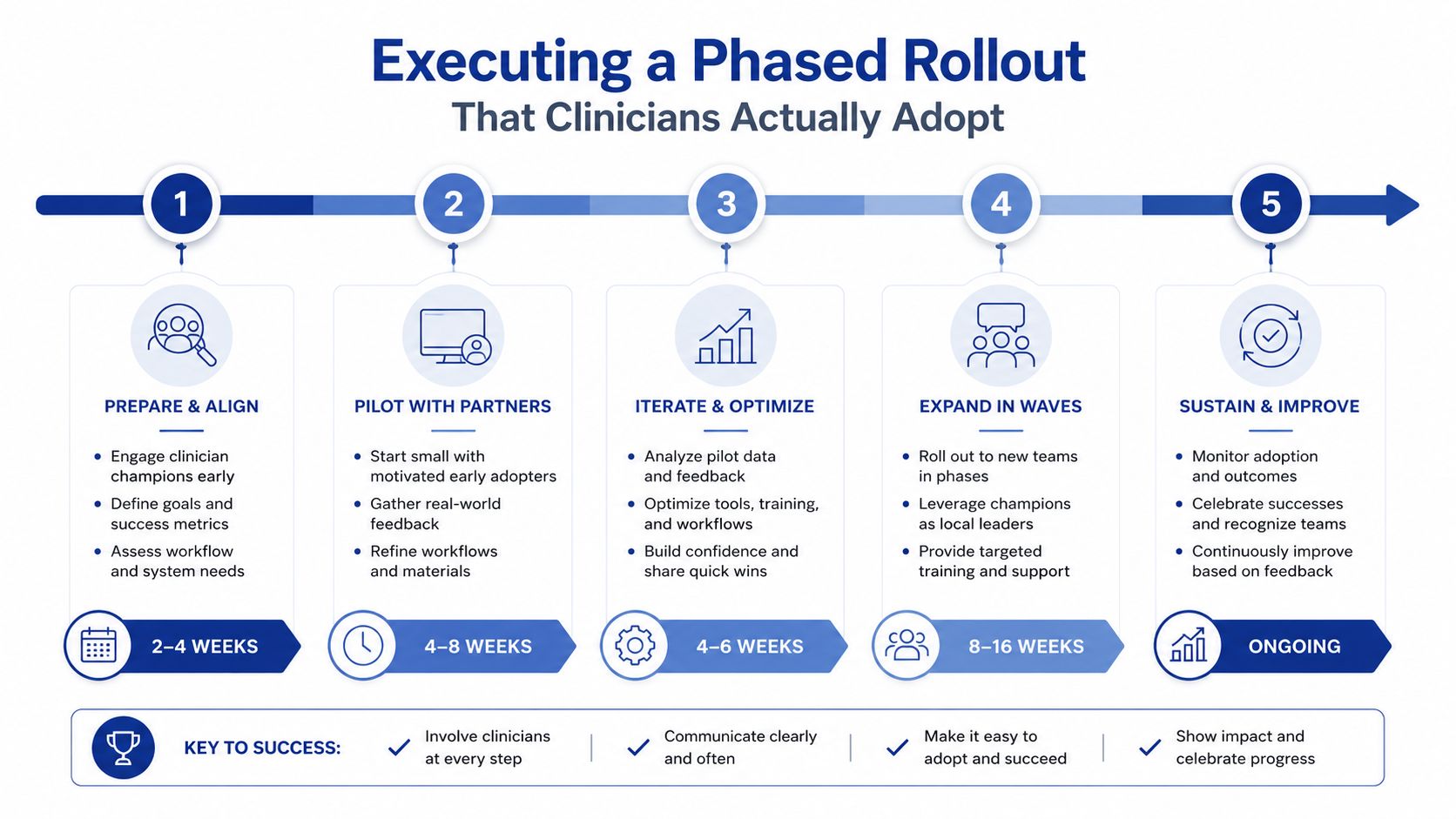
Use pilots to prove the workflow
Pick one site, one service line, or one unit that can tolerate early friction without putting the whole organisation at risk. Build a super-user network there first, then use those people to pressure-test training materials, escalation paths, and role-specific workflows. If the pilot team can't complete the key tasks without leaning on IT every few minutes, the design still needs work.
Training should not be one generic session. Physicians, nurses, administrative staff, and billing teams need different examples, different shortcuts, and different success criteria. The Canadian case showed that many physicians switched to electronic documentation before mandatory go-live once a proper preparation phase was in place, which tells you that behaviour changes faster when people can practise before the deadline.
Strong rollout programmes treat training as transformation, not orientation.
Protect the stabilisation period
The first weeks after go-live are not the finish line. They are the beginning of the operating test. That's when command-centre staffing matters, because issues need to be triaged quickly, patterns need to be separated from one-off tickets, and frontline staff need a fast route to answers. Underfund this phase and the upgrade starts to feel broken, even if the underlying platform is sound.
Underserved or low-connectivity settings need different tactics. Time, cost, and workflow integration are common barriers in those environments, so lighter modules, offline-capable steps where possible, and stronger community outreach may matter more than feature depth. A rollout that works in a tertiary hospital can still fail in a smaller or more constrained setting if the design assumes stable capacity everywhere.
The best signal that adoption is healthy is simple. Staff stop asking how to work around the system and start asking how to improve it. That only happens when the rollout has enough structure to support real use, not just technical launch.
Measuring Success and Optimising After Go-Live
A healthcare technology upgrade should be governed for a year, not just launched in a weekend. The leadership team needs a simple rhythm: baseline, first 90 days, six months, and twelve months, with named owners for workflow, support, finance, and clinical performance. If nobody owns optimisation after go-live, the organisation drifts back into workarounds and the new platform becomes just another expensive layer.
The value case also has to stay real. Standardisation and automation can generate meaningful operating savings, with one major healthcare IT investment analysis estimating savings of roughly $25,000 to $44,000 per bed annually and payback often landing in 2 to 4 years. Those figures are useful as a benchmark, but only if the organisation tracks the operational changes that produce them.
Track outcomes that reflect actual use
Measure clinician satisfaction, time-to-chart-close, no-show handling, billing cycle efficiency, and patient access measures. Ignore vanity metrics that only show activity, not value. If ticket volume stays high while workaround usage also stays high, the implementation is signalling that the workflow still doesn't fit.
A simple dashboard should answer four questions. Are clinicians using the system the way it was designed? Are patients reaching care more easily? Is the revenue cycle cleaner? Are support issues falling in the right categories? If the answer to any of those is no, the response needs to be specific, not generic.
Use the first 90 days to tune the system
The first 90 days should be a structured optimisation window. Revisit training gaps, remove unnecessary clicks, tighten interface logic, and renegotiate vendor commitments where the implementation reality doesn't match the contract promises. That's also the right time to identify which features should be expanded later and which ones should stay off the roadmap for now.
A good programme leaves the organisation with more than a new platform. It leaves behind a governance model that can carry the next wave, whether that's analytics, AI, patient self-service, or deeper interoperability. The upgrade is successful when it becomes the foundation for the next decision, not the end of the discussion.
If you're planning a healthcare technology upgrade and want a delivery partner that understands workflow redesign, integration, and compliance in regulated environments, Cleffex Digital Ltd can help shape the programme from discovery through rollout. Visit Cleffex Digital Ltd to discuss modernisation support for healthcare platforms, interoperability, and secure custom software delivery.