

If you're running a clinic right now, you already know where the day breaks down. Front-desk staff are juggling reschedules. Claims go out with preventable mistakes. Clinicians finish appointments, then get buried in documentation and follow-up admin. Nobody feels slow, but the operation still leaks time and money.
That's why healthcare operations software matters. It isn't a shiny add-on. It's the operating layer that keeps scheduling, billing, communication, staffing, reporting, and compliance from pulling in different directions. When it's chosen well, staff spend less time chasing information and more time moving patients through care without avoidable friction.
In smaller clinics, the pain usually looks like staffing pressure. In larger groups or hospital environments, it looks like disconnected systems and poor visibility. Either way, the fix is the same. You need software that ties work to outcomes, not software that just adds more screens.
From Chaos To Control With Healthcare Operations Software
A busy clinic can look organised from the outside and still be operationally unstable. One cancellation creates a gap in the day. A referral arrives late. Insurance details weren't verified properly. A claim gets kicked back. Someone on staff stays late to clean it up. Then the same cycle repeats tomorrow.
That pattern is expensive because labour already sits at the centre of healthcare economics. Nationally, labour costs represented 46% of hospital expenses in 2023, which is why workflow automation, staffing optimisation, revenue-cycle visibility, and operational analytics matter so much in care delivery (healthcare analytics and operations context). When one of your biggest cost lines is people time, wasted effort isn't a minor issue. It's a margin issue.
What This Software Actually Does
Healthcare operations software is best understood as the control layer for daily execution. It connects the tasks that usually live in separate places:
Scheduling and registration so patient flow starts cleanly
Billing and claims workflows so revenue doesn't stall
Staff coordination so people are assigned where demand is highest
Operational reporting so leaders can see bottlenecks before they spread
Patient communication, such as reminders, follow-ups, and updates, doesn't depend on manual calls
This category is growing because operators are under pressure to do more without adding more headcount. The global healthcare SaaS market is projected to grow from USD 38.50 billion in 2025 to USD 102.98 billion by 2035, reflecting a broad move toward software-enabled operations and staffing relief (healthcare SaaS market projection).
Practical rule: If your team is re-entering the same information in more than one system, you don't have a staffing problem first. You have a workflow design problem.
Why Clinics Should Treat It As Infrastructure
Directors often buy point tools because the pain feels local. A scheduler wants a booking fix. Billing wants cleaner claims. Managers want reports. That approach usually creates a bigger mess.
The better move is to treat healthcare operations software as core infrastructure. It should reduce rework across the whole patient and payment journey. If the software doesn't improve handoffs between front desk, care delivery, billing, and leadership, it isn't solving the underlying problem.
The Core Modules of Your Operational Toolkit
A clinic director usually feels the failure before they see it in a report. The front desk is backed up by 9:15. Two providers are waiting on intake. One claim goes out with the wrong subscriber data. By the end of the day, staff are staying late to fix problems that started with disconnected systems. The right module set stops that chain reaction.
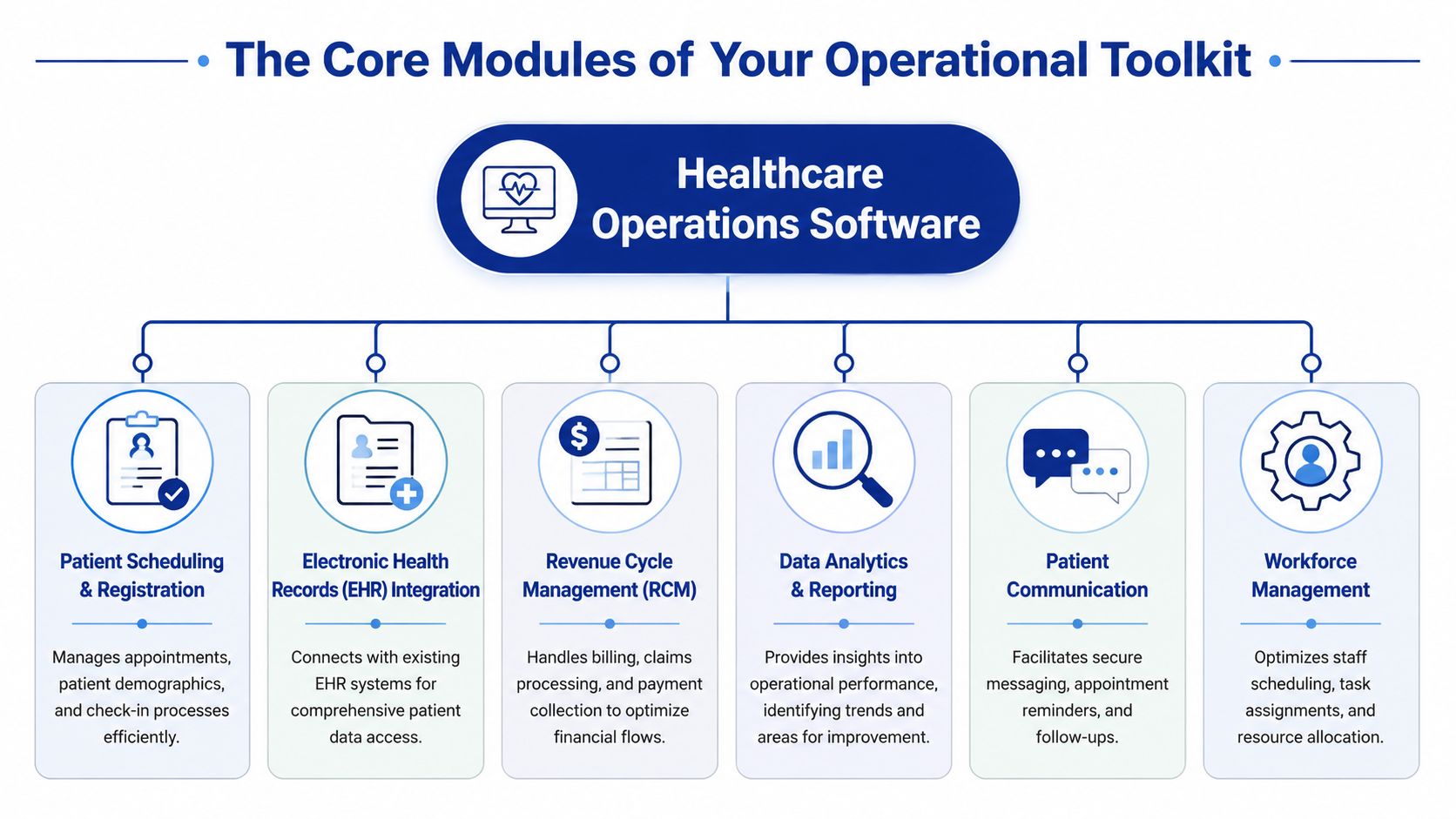
Buy software in modules, but judge it as one operating system. Each module should cut a specific form of waste, whether that is rework, delays, denials, overtime, or compliance exposure. If a module cannot improve a measurable outcome, it does not belong on your shortlist.
The Modules That Matter Most
These six modules carry the operational load for clinics, hospitals, and payer-facing teams.
| Module | Primary Function | Solves Problem Of… |
|---|---|---|
| Patient Scheduling and Registration | Manages appointments, intake, demographics, and check-in | Double-booking, missed information, and front-desk delays |
| EHR Integration | Connects operational workflows with patient records | Staff switching systems, incomplete context, duplicated entry |
| Revenue Cycle Management | Handles billing, claims, payments, and follow-up | Billing errors, denied claims, and delayed cash flow |
| Data Analytics and Reporting | Tracks operational and financial performance | Poor visibility, slow decisions, hidden bottlenecks |
| Patient Communication | Supports reminders, secure messaging, and follow-ups | No-shows, manual call volume, fragmented communication |
| Workforce Management | Supports staff scheduling and resource allocation | Poor coverage, burnout, and uneven workload distribution |
The mistake I see most often is treating these as separate purchases. They are operational controls. Scheduling affects staffing. Documentation affects coding. Communication affects no-show rates and throughput. Analytics should expose all of it in one view.
Revenue Cycle and Workflow Automation
Start with revenue cycle management if your clinic is dealing with claim rework, delayed payments, or too many manual corrections. RCM has the fastest path to ROI because it touches cash flow directly and exposes weak handoffs between intake, documentation, and billing.
Industry analysis from Business Research Insights on integrated healthcare management systems links these platforms to lower billing errors and stronger operational efficiency because they reduce duplicate entry and standardise workflows. This represents significant value. A good RCM module catches missing insurance data before the claim leaves, flags coding and eligibility issues early, and gives managers a clear view of where revenue is getting stuck.
Do not settle for claims submission alone. You want work queues, denial trend tracking, eligibility checks, and edit rules that stop preventable mistakes upstream.
Documentation and Staff Relief
Documentation design affects staffing more than many directors admit. If clinicians chart late, coders wait. If coders wait, claims slow down. If claims slow down, cash gets tight, and managers start cutting in the wrong places.
The fix is not more tolerance for after-hours work. The fix is better workflow support. Voice capture, structured templates, and tighter EHR integration reduce admin load and shorten the time from visit completion to billable claim. That improves staff retention and lowers the hidden labour cost of operational lag.
Buy modules that remove duplicate work, not modules that make duplicate work easier to manage.
Analytics, Communication, and Workforce Control
Operations run on visibility. Without it, managers respond to complaints instead of patterns. A usable analytics layer should show where intake stalls, which locations are generating denials, how provider schedules affect room utilisation, and where labour costs are climbing faster than volume. For teams building that reporting layer, this guide to efficient healthcare operational analytics is a useful reference.
Patient communication belongs in the same conversation. Automated reminders, intake prompts, follow-up messages, and secure patient updates reduce no-shows and take pressure off front-desk staff. They also lower security risk compared with ad hoc texting or personal-device workarounds.
Workforce management often gets pushed to the end of the buying cycle. That is a mistake. Staffing shortages are now an operating reality, not a temporary disruption. You need schedule visibility, demand-based assignment, and clear coverage rules built into the system. If managers cannot see workload, open shifts, and bottlenecks in real time, labour costs rise, and patient access gets worse.
Key Benefits for Clinics, Hospitals, and Payers
Healthcare operations software earns its budget when it changes the economics of care delivery. If it doesn't improve efficiency, compliance, or cash flow, it's just another system to maintain.
The pressure is real across the provider market. Hospital operating margins rebounded from 2.7% in 2022 to 5.2% in 2023, but that doesn't mean anyone has room to relax. Financial health is still fragile, and Medicare and Medicaid accounted for 67% of hospital discharges, which makes billing accuracy, compliance, and reporting operationally critical (healthcare analytics in clinical operations).
What Providers Gain
For clinics and hospitals, the biggest gains come from fewer breakdowns between departments. Scheduling errors don't stay in scheduling. They affect room use, staff time, patient satisfaction, and eventually claims quality.
The strongest provider-side benefits usually look like this:
Cleaner revenue flow because front-end data is captured correctly, and billing teams spend less time fixing preventable mistakes
Better throughput because staff can see where delays are forming and redirect effort faster
Lower administrative drag because routine tasks move through rules, alerts, and automated handoffs
Improved leadership visibility because managers can act on operational data instead of complaints and guesswork
If you want a deeper view of how operational data supports those decisions, Cleffex has a useful piece on efficient healthcare operational analytics.
What Payers and Payer-Facing Teams Gain
Payers care about a different version of the same problem. They need cleaner claims, better utilisation management, and more reliable reporting. Software that links quality, claims, and workflow data in one environment makes those tasks easier to execute with less manual intervention.
That's why I push clients to stop treating operations software as “back office” technology. It directly affects whether care delivery and reimbursement stay aligned.
Better operations software doesn't just help staff work faster. It helps the organisation make fewer expensive mistakes.
My Recommendation
If you're deciding whether to fund operations software or delay it, fund it. But don't approve a vague “digital transformation” project. Approve a business case tied to denials, cycle time, scheduling friction, staffing strain, and reporting effort. That's where the return shows up.
Seamless Integration With Your Healthcare Ecosystem
Standalone software is a liability. If a new platform creates another data island, you'll spend more time reconciling records than solving problems. Integration isn't a technical bonus. It's the condition that makes healthcare operations software usable.
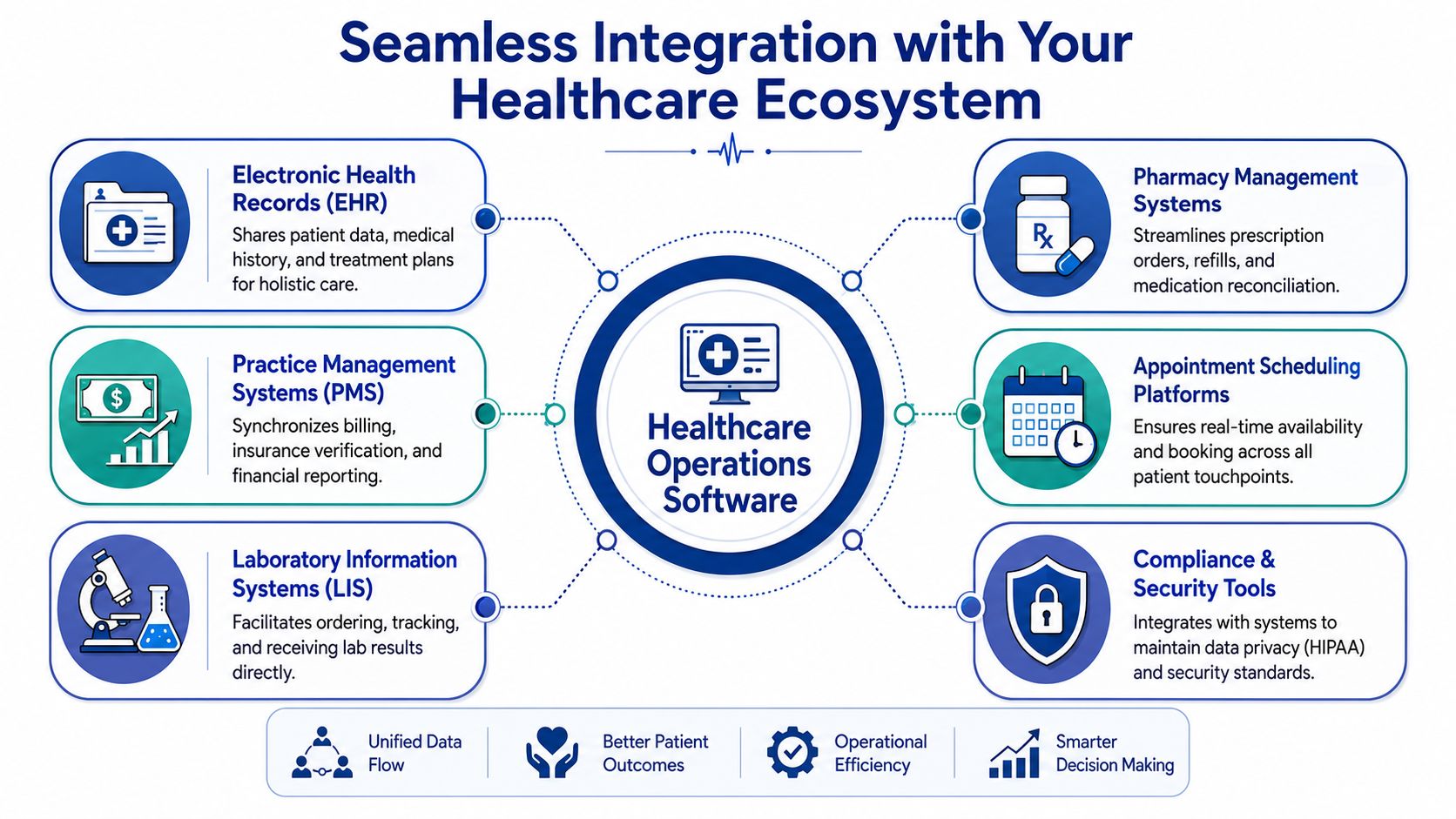
What Good Integration Looks Like
Modern healthcare systems are built for interoperability using FHIR, HL7, and DICOM. They typically rely on microservices and API-driven design so EHRs, IoMT devices, and analytics platforms can exchange data without brittle custom integrations (healthcare software product development and interoperability).
In plain language:
HL7 helps systems exchange core healthcare information
FHIR makes data sharing more flexible and developer-friendly
DICOM handles imaging-related information
APIs let systems pass information in a structured, maintainable way
If a vendor can't explain how its platform handles these standards, walk away.
Why API-Driven Architecture Matters
Older healthcare environments often rely on one-off interfaces built for a single workflow. They work until one field changes, one system upgrades, or one team adds a new process. Then everything becomes fragile.
Cloud-native, API-driven architecture fixes that. It gives you cleaner connections between operations software and the rest of your stack, including EHR, practice management, lab, pharmacy, and reporting systems. It also makes feature rollout faster and reduces dependence on vendor-specific workarounds.
For a practical look at this side of implementation, Cleffex outlines the basics in its guide to FHIR integration services for healthcare interoperability.
Integration Questions To Ask Vendors
Don't ask, “Do you integrate with our systems?” Every vendor will say yes. Ask sharper questions.
Which standards do you support natively?
How do you handle version changes and schema updates?
What data flows in real time, and what is batch-based?
Who owns and monitors the interfaces after go-live?
Can we expose data to downstream analytics without rebuilding everything?
A strong answer sounds operational, not theatrical. You want specifics about workflows, dependencies, alerts, and maintenance responsibility.
If you're running a multi-site clinic or coordinating with labs and external partners, integration quality decides whether your software becomes an asset or another source of delay.
Navigating Compliance and Modern Security Threats
Most healthcare software conversations still treat security like a checklist. Encryption. Login controls. Audit trail. Done. That mindset is outdated.
The primary issue is access design. Your clinic probably has remote staff, external billing support, third-party vendors, and hybrid workflows. In that environment, broad network access is dangerous because it gives too many people too much reach.
Why Old Access Models Fail
A lot of healthcare organisations still operate with a castle-and-moat security model. Once a user gets inside, they can touch far more than they should. That's exactly how over-permissioning becomes normal.
A better model is Zero Trust. Verified guidance in this area is direct: many buyers ask not only what the software does, but how to prevent over-permissioning. Legacy access models don't fit distributed healthcare workflows, and a Zero Trust approach that continuously evaluates identity and limits access by role is now the standard (why legacy access models fail in healthcare).
Give users access to the exact systems they need for the exact work they do, and no more.
What To Require From a Vendor
You don't need a vendor to recite security buzzwords. You need them to show how access is controlled across real workflows.
Ask for evidence of:
Role-based access design so clinicians, administrators, contractors, and vendors don't share broad permissions
Identity-aware controls that evaluate who the user is and what device they're using
Layered protections such as encryption, OAuth 2.0 or OpenID Connect, and centralised monitoring
Logging and anomaly visibility so suspicious access patterns can be reviewed quickly
For teams reviewing privacy exposure and enforcement risk, Trackingplan on HIPAA data privacy is a useful reference to keep in the evaluation file.
Compliance Isn’t Separate From Operations
Many buying teams make a bad mistake. They treat compliance as legal review after the product decision. That's backwards. Access control, auditability, and workflow permissions shape daily operations from day one.
If you're comparing custom or purpose-built solutions, this overview of healthcare compliance software development is a practical starting point for the questions your technical team should ask.
My view is simple. If a vendor talks a lot about automation and very little about permission design, they don't understand healthcare operations.
How To Evaluate and Select the Right Software Partner
Software selection fails when teams buy demos instead of operating models. A polished interface means very little if onboarding drags, integrations break, and staff revert to spreadsheets in month three.
The right partner should fit your workflow reality, not just your feature wishlist.
Start With Pain Points, Not Product Categories
Before you shortlist vendors, define the operational failures you want fixed. Be specific. “Improve efficiency” is useless. “Reduce claim rework caused by front-desk data errors” is useful.
Write down where the friction lives:
Front desk: Appointment errors, registration delays, insurance mismatch.
Clinical handoff: Documentation lag, missing information, poor visibility.
Billing: Rework, denial patterns, payment delays.
Management: Weak reporting, no staffing view, reactive decisions.
If a vendor can't map its system to those exact pain points, move on.
Use a Harder Scorecard
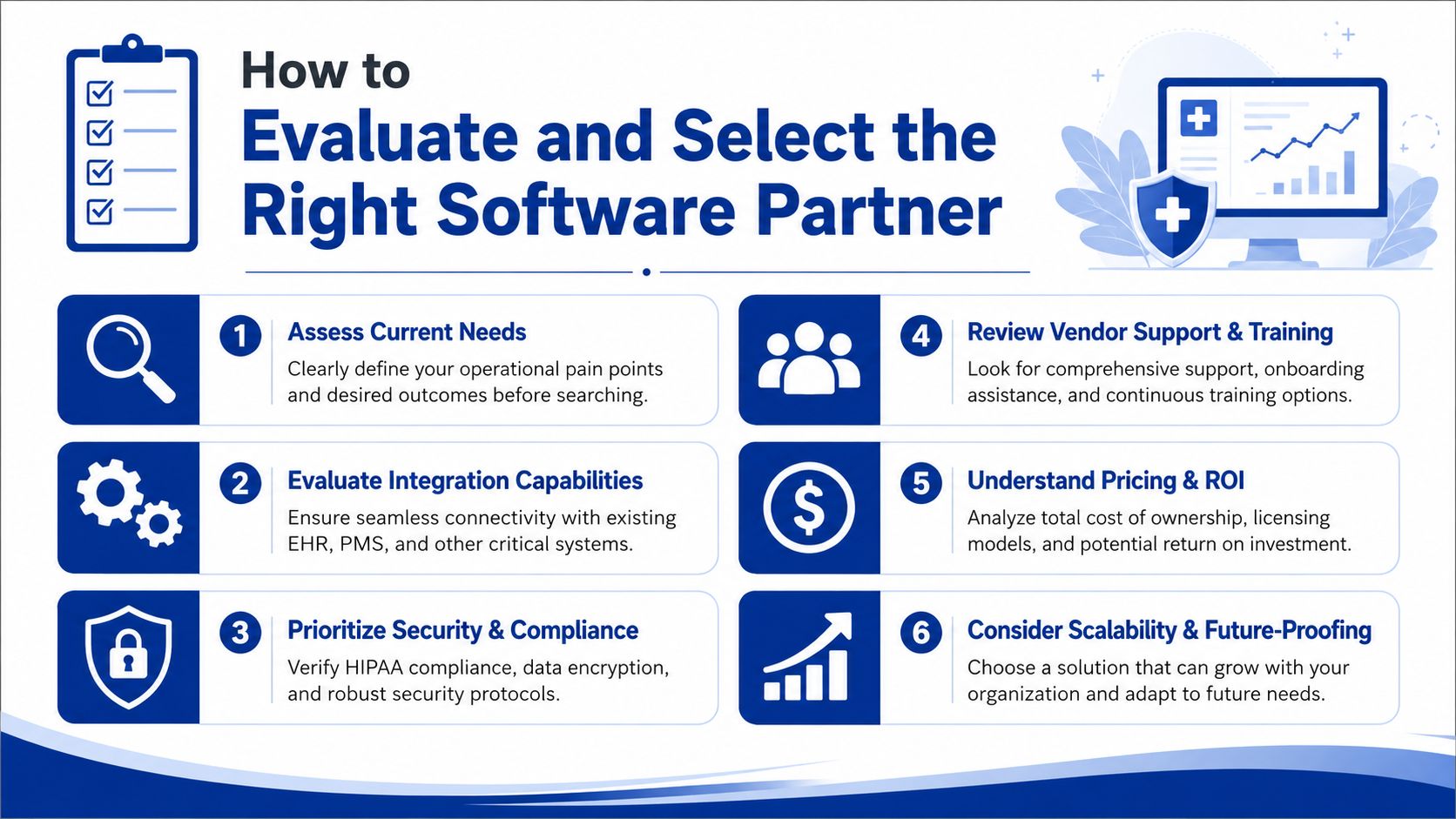
Most clinics need a practical scorecard, not a giant procurement document. I recommend evaluating six categories.
Workflow Fit
Can the software match how your clinic operates, or will staff need awkward workarounds?Integration Depth
Can it connect cleanly to your EHR, billing environment, labs, and reporting stack without fragile custom fixes?Security Posture
Does the vendor show mature access control, logging, and compliance thinking?Support and Training
Who handles onboarding, user training, issue escalation, and post-launch optimisation?Scalability
Can the platform support more providers, more locations, or more services without forcing a rebuild?Total Cost of Ownership
What will you pay in configuration effort, support dependency, internal admin time, and future changes?
Red Flags I’d Take Seriously
Some warning signs are easy to miss during procurement.
A vendor leads with features, not workflows
Integration answers stay vague
Security discussion is reduced to “we're compliant”
Reporting is mostly static and not operationally useful
Implementation depends heavily on your staff figuring things out
One sensible option in the market is a custom development partner such as Cleffex Digital Ltd, which builds software for regulated healthcare workflows and integration-heavy environments. That approach fits organisations whose needs don't line up with rigid off-the-shelf products.
The point isn't to buy custom by default. The point is to avoid buying software that forces your operation to bend around the tool.
Measuring Success and Embracing the Future of Operations
Monday morning starts with a full waiting room, two call-outs at the front desk, and a billing queue that keeps growing. If your new software cannot reduce that pressure within 60 to 90 days, the rollout did not succeed. Go-live is an IT milestone. Operational improvement is the true test.
What To Measure After Launch
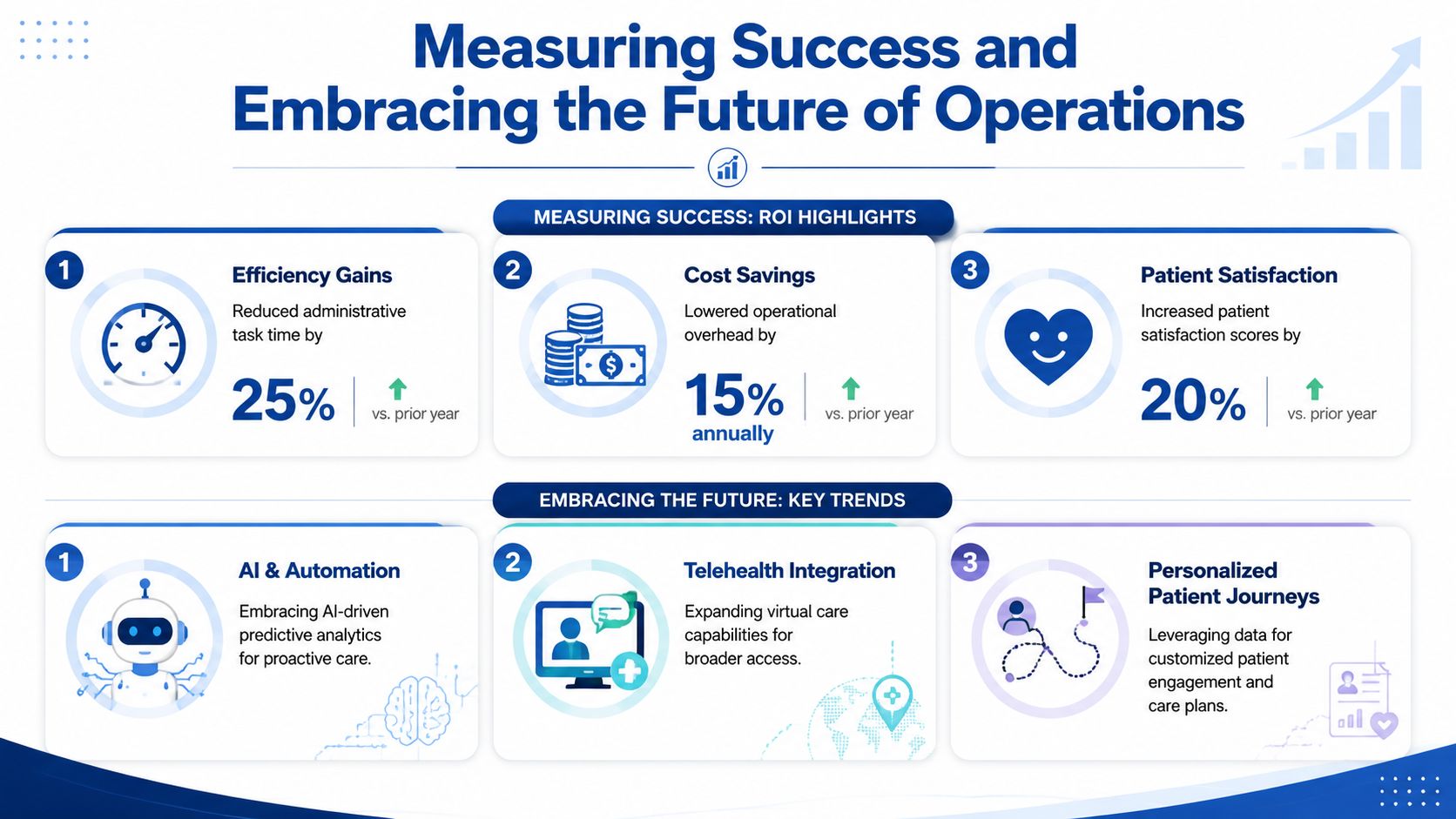
Measure outcomes that affect margin, staff capacity, and patient flow. Skip vanity metrics like login counts and dashboard views. A clinic director should be able to answer a simple question every month. Did the system cut waste, reduce risk, and make care delivery easier?
Use a focused scorecard:
Billing accuracy by tracking claim errors, rework volume, denial patterns, and time spent correcting avoidable mistakes.
Administrative workload can be measured by the amount of staff time spent on manual entry, status checks, and phone-based coordination.
Revenue cycle performance through cleaner handoffs from registration to coding to payment, with fewer delays and fewer dropped tasks.
Documentation time can be reduced by checking whether clinicians and support staff are spending less time on repetitive fields and duplicate updates.
Operational visibility is achieved by confirming that managers can spot backlogs, staffing gaps, and throughput issues before they hit patient service levels.
As noted earlier, integrated management platforms often improve billing quality and operational efficiency when they remove duplicate entry and tighten handoffs across intake, scheduling, documentation, and payment. That matters because staffing is expensive, denied claims are avoidable, and delayed information slows every department it touches.
Do not wait six months to review results. Check adoption and workflow friction in the first 30 days, process metrics by 60 days, and financial impact by 90 days. If correction work, overtime, or claim follow-up is still climbing, the system or the configuration needs attention.
What the Future Will Reward
The next generation of healthcare operations software will cut administrative load first. AI-assisted documentation, predictive staffing, exception-based work queues, and faster operational reporting will help smaller teams manage more volume without burning out. That is the core value. Better staffing coverage, fewer avoidable delays, and more time directed toward patient care.
Security and workforce pressure will shape these decisions just as much as features. A tool that saves clicks but creates access-control gaps, weak audit trails, or extra cleanup work is a bad investment. The right platform helps you run leaner without creating compliance exposure or depending on heroics from your staff.
Choose systems that let you improve processes in increments. You should be able to add automation, refine routing rules, and expand reporting without rebuilding the operation each time priorities change.
If your clinic still depends on manual workarounds, disconnected reports, and overstretched employees to keep the day together, the problem is not patience. The problem is your operating model.
If your clinic is weighing a new platform or considering a custom build, Cleffex Digital Ltd is one option to evaluate for secure, compliant healthcare software aligned to operational workflows, interoperability needs, and long-term scalability.