

You're already living the problem if a nurse has to open one system for the chart, another for messages, and a third for a remote reading while the patient waits on the phone. The issue isn't that healthcare has gone digital; it's that the digital pieces still don't behave like one care system. HealthTech integration is the work of making those pieces exchange data cleanly, safely, and in a way clinicians can use.
For Canadian teams, that matters even more because the system is publicly funded, provincially administered, and built on coordination rather than a single national platform. Integration is now a core infrastructure question, not a nice-to-have feature. The rest of this guide unpacks what that means in practice, from EHR integration and healthcare interoperability to healthcare API integration, workflow fit, and equity.
Why HealthTech Integration Matters Now
A product manager ships a patient app that looks great in demos. A clinical lead agrees to pilot it. Then the first week arrives, and staff are manually copying information into the EHR, checking a second inbox for updates, and reconciling records when names or codes don't match.
That is the current state of many integration projects. The bottleneck is no longer basic digitisation. It's whether systems can exchange usable information across workflows without creating more work than they remove.
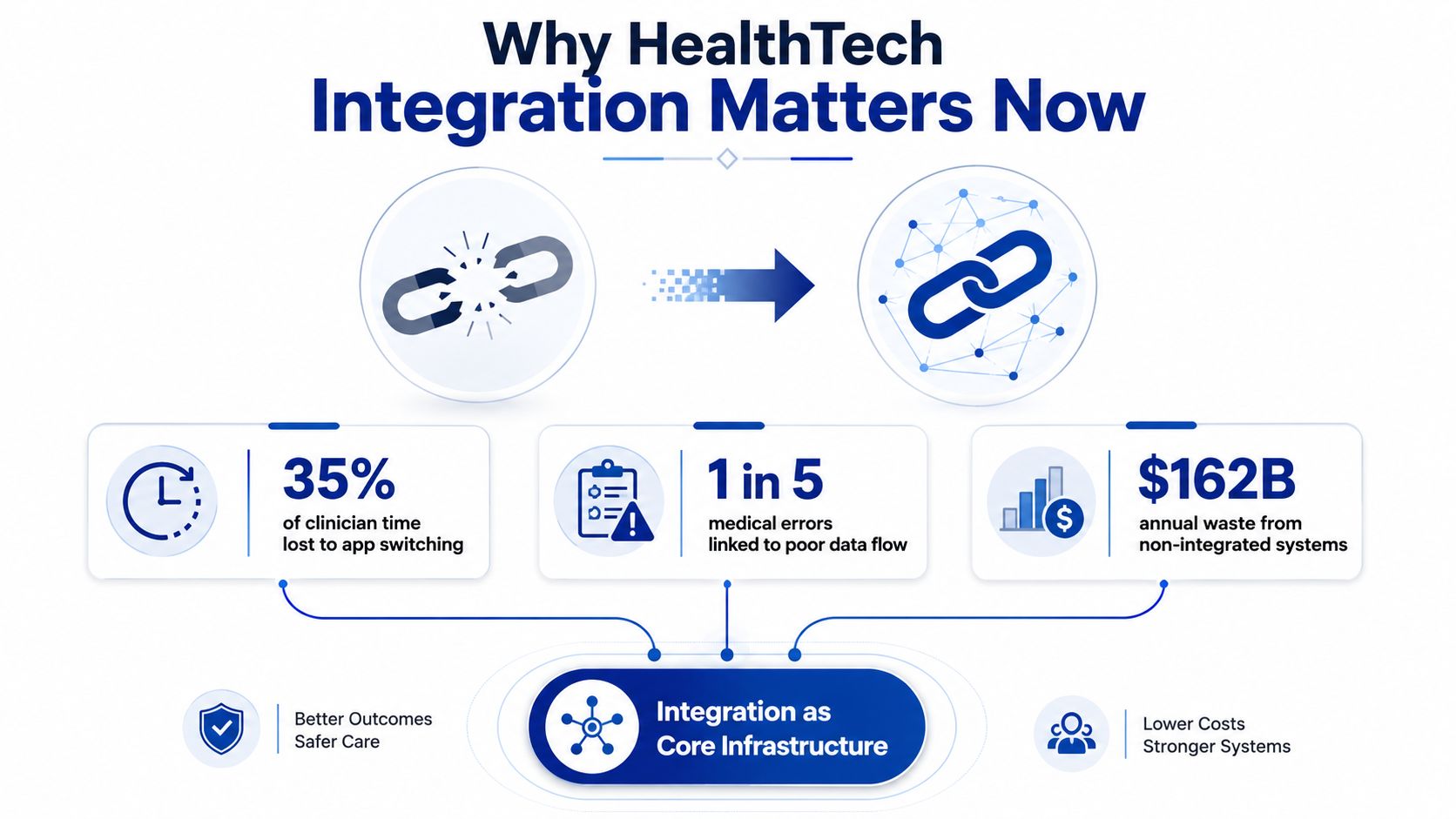
The broader shift is unmistakable. In a 2024 review, hospital EHR use had increased tenfold since 2009, while physician use had increased fivefold over the same period, and 70% of hospitals were interoperable as of 2023 according to the same review and a related 2024 JMIR analysis. That tells you integration has already moved from pilot territory into mainstream operations. The question now is whether the connections are good enough to support clinical work at scale.
Practical rule: if a workflow still depends on someone retyping data, the integration isn't finished; it's merely installed.
For Canadian organisations, the stakes are structural. Provinces, hospitals, pharmacies, labs, and insurers all have to coordinate across different systems and standards. That's why integration decisions affect not just implementation speed, but the long-term shape of connected care, referral flow, and analytics readiness.
What HealthTech Integration Actually Means
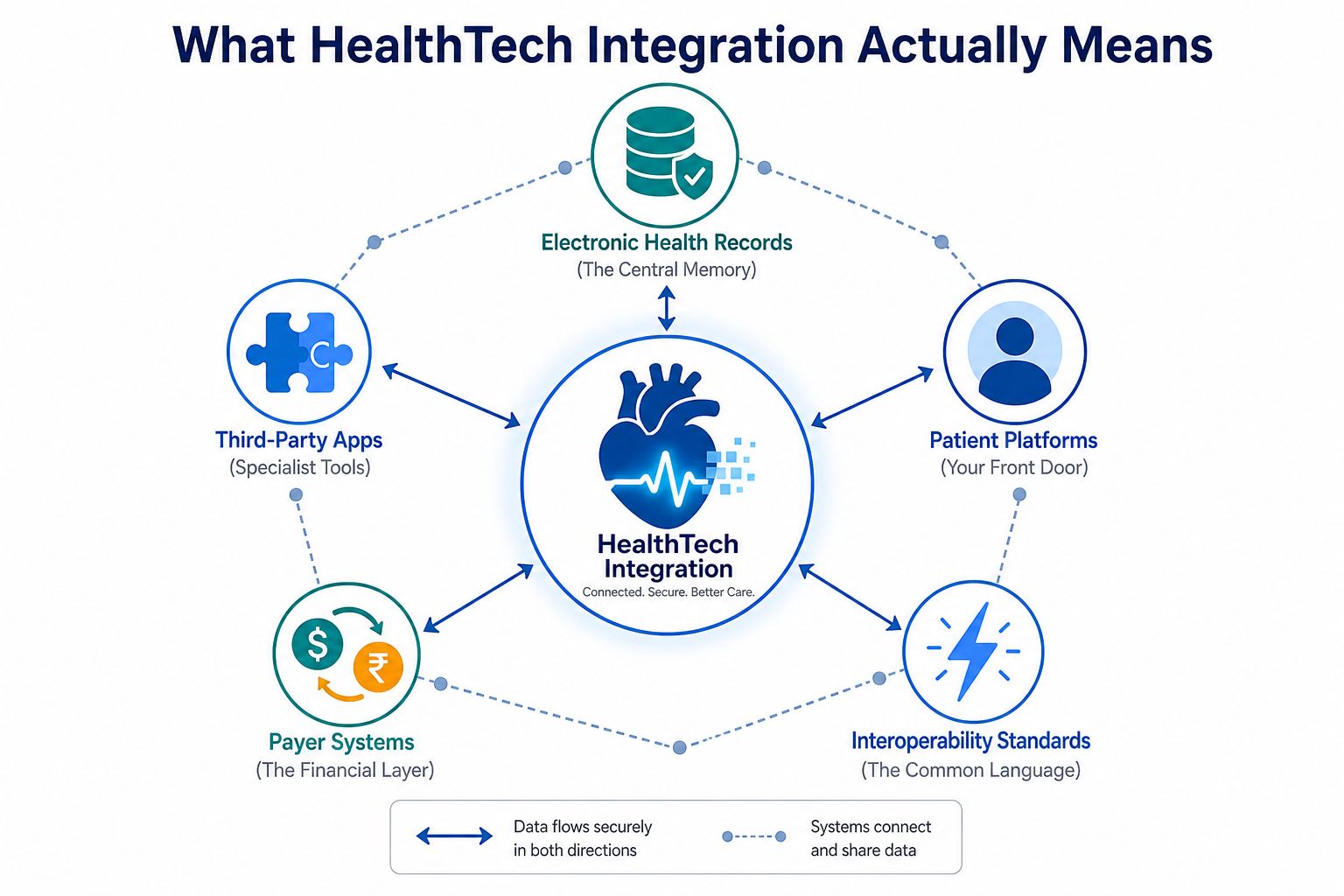
In plain English, HealthTech integration means different healthcare systems can share the right data, in the right format, at the right time. It's not one product. It's the set of connections, rules, and checks that let an EHR, an app, a portal, and a payer system behave like parts of one service.
Think of a hospital as a group of departments that all keep their own files. Integration gives them a common filing cabinet and a translator. The cabinet holds the record, and the translator makes sure the terms, codes, and units mean the same thing on both sides.
At a practical level, the main building blocks are easy to name:
Electronic Health Records, the central clinical memory.
Third-party apps, which add specialist functions such as intake, monitoring, education, or decision support.
Patient platforms, where people book, message, view results, or submit home data.
Payer systems, which handle eligibility, authorisation, claims, and related financial exchange.
Interoperability standards, which act as the common language across those systems.
A useful way to separate integration from a one-off export is this. An export gives you a file. Integration supports ongoing exchange, validation, and workflow use. That difference matters when a care team needs current data, not a spreadsheet from yesterday.
If you're also thinking about automation, contract flow, or shared service rules between organisations, the discussion around automating healthcare agreements with Legitt AI is a useful example of how digital coordination extends beyond records alone.
The part people miss
Integration is not just plumbing. It's an operating model for data exchange. If you can explain which systems need to talk, what each one owns, and what happens when data conflicts, you're already thinking more clearly than most first-time projects do.
Benefits of Connected Health Systems
A connected system matters most on a busy day. A clinician opens one chart and sees recent home readings, medication changes, and a message from the care team, while the patient can still use the portal or app without repeating the same details in three different places. That kind of setup is where integration starts to show its value, because the issue is workflow fit as much as data exchange.
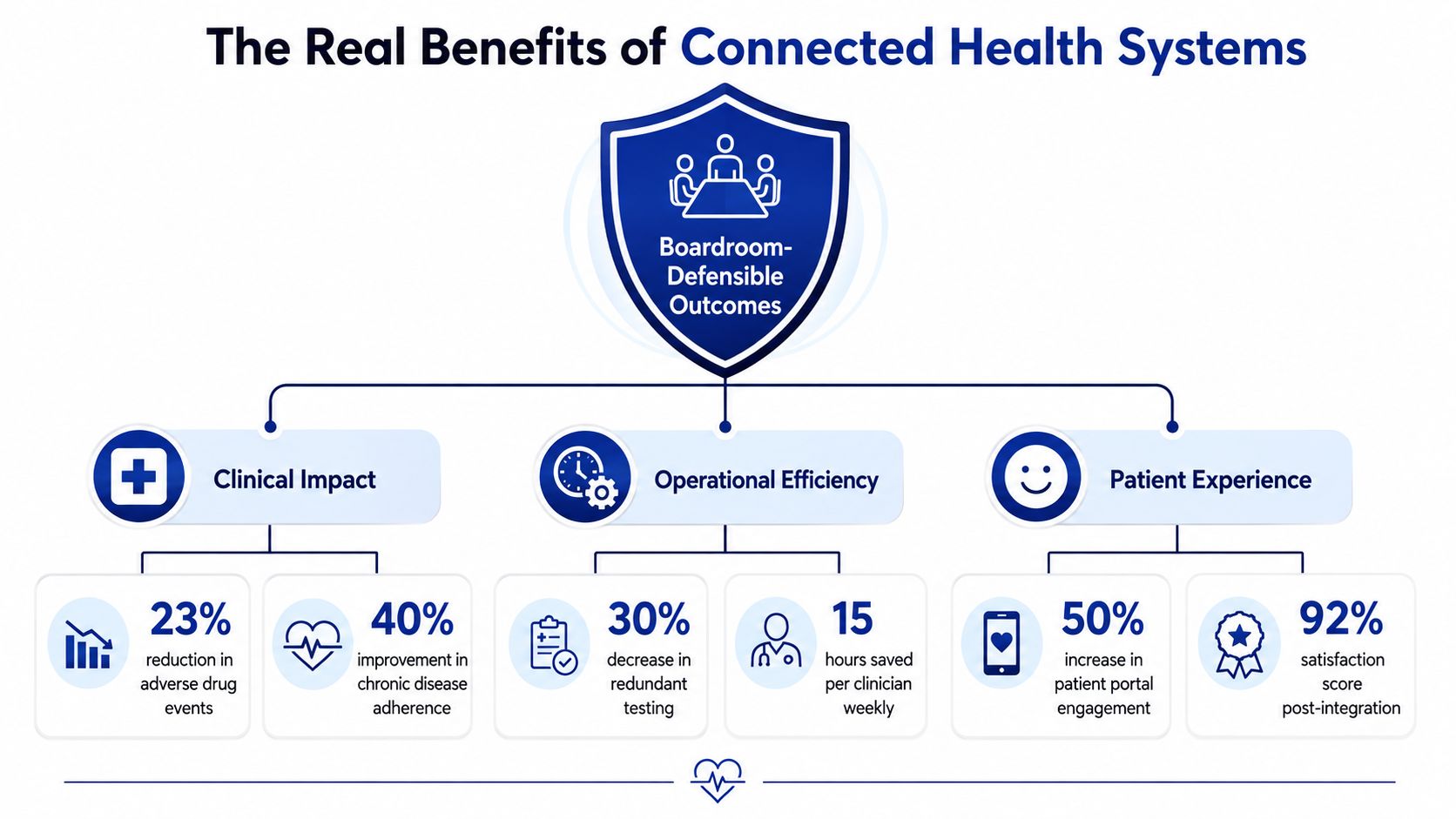
The strongest case for integration is that it can support measurable clinical and operational outcomes that leaders can defend in a boardroom. The benefit becomes clearer when you tie it to a specific workflow, not to a vague promise of better care.
The most practical evidence comes from the link between app data and EHRs. A 2024 systematic review of mHealth app data integration found benefits in patient education and self-management, real-time recording and sharing with clinicians, stronger decision support, better patient-clinician communication, and improved patient outcomes. That matters because it shows integration value in day-to-day use, not just in architecture diagrams.
Clinical benefit is usually where the business case starts
A separate patient safety review found that organisations implementing electronic health records had 30% higher guideline adherence, a 54% reduction in medication errors, and a 36% reduction in adverse drug reactions. The same review also reported that bar-code medication administration integrated with electronic medication administration records may reduce medication administration errors by 50% to 80%. Those figures are not a promise that every project will reach the same result, but they do show why connected clinical platforms deserve serious attention. For teams planning that kind of rollout, the practical details of FHIR integration services and compliance can shape whether the workflow holds up after go-live.
Operational and patient-facing gains come from the same connection
Connected workflows also reduce friction. When clinicians can see current data instead of hunting through disconnected screens, turnaround improves and manual re-entry drops. Patients benefit when their app, portal, and care team share the same record, because they can manage more confidently and communicate without repeating the same story.
Boardroom test: if you can't describe the integration in terms of safety, turnaround, communication, and follow-through, you probably don't have a complete business case yet.
The outcome is a cleaner set of things to measure. Better guideline adherence, fewer medication errors, faster clinical handoffs, and stronger patient engagement can all be tracked without overstating what the system does. That is the difference between a useful integration programme and another software purchase.
Interoperability Standards and Integration Architectures
The standards conversation gets messy fast because people use acronyms before they agree on the job each standard is supposed to do. A simpler way to think about it is this. HL7 v2 is often about established messaging, FHIR is about modern API-based exchange, and the integration layer is what normalises, routes, and validates the data before it reaches a live workflow.
That layering matters because the primary failure point is usually inconsistent structure, not raw transport. Technical guidance on healthcare data integration emphasises field mapping, normalisation, and a sandbox validation phase before go-live, so mismatched terminology, duplicate records, and unsupported formats are caught early. In other words, the hard work is making sure the receiving system can properly understand what it gets.
| Standard | Format | Best For | Typical Limits |
|---|---|---|---|
| HL7 v2 | Legacy message-based exchange | Stable institutional messaging and existing interfaces | Can be harder to adapt cleanly across modern apps |
| FHIR | API-friendly resource model | App integration, patient-facing services, modern interoperability | Needs careful mapping and implementation discipline |
| Integration layer | Routing, transformation, validation | Connecting multiple systems with different schemas | Adds design complexity, but reduces chaos later |
A working architecture typically includes a few essential components:
Source mapping, so each field has a clear owner.
Code and unit normalisation, so measurements and terminologies align.
Sandbox testing, so bad records fail safely before production.
Monitoring, so teams can see where data stalls or breaks.
Governance, so changes don't corrupt downstream workflows.
If you need a deeper compliance-oriented view of FHIR implementation choices, the FHIR integration services guide to compliance is a useful companion read.
Where teams usually go wrong
They start by asking which standard is “best”. The better question is which standard fits the workflow, the source system, and the maintenance burden your team can support. Once that's clear, the architecture usually becomes much less controversial.
The Hard Problems Most Integration Guides Skip
A project can pass technical review and still fail on the ward, in the clinic, or at the front desk. That usually happens when the workflow does not fit, the digital skill level is uneven, trust is thin, or the organisation is not ready to absorb the change.
A 2023 scoping review found that workflow integration, policy and insurance barriers, time, and cost remain major blockers to meaningful use of digital health technologies. That is more than an implementation annoyance. A tool can be technically correct and still be unusable if it adds clicks, slows a handoff, or leaves staff unsure what to do next.
Digital access changes the design brief
A review focused on digital health equity warns that, unless teams design and evaluate deliberately, digital health can widen disparities for older adults, marginalised ethnic groups, people with low socioeconomic status, and people who face access barriers such as limited broadband or secure devices. WHO/Europe's work points in the same direction, showing that services still miss people with greater health needs and language barriers when tools are not adapted to diverse needs and limited digital access.
That changes the design brief in practical ways. If your patient platform assumes a secure smartphone, fluent English, and high digital confidence, the usable population shrinks before launch. If your clinical workflow assumes every clinician can learn a new tool at the same pace, adoption will be uneven, and support calls will rise.
A simple test helps here: ask who can use the system without help, who needs help sometimes, and who is likely to be excluded altogether. If you cannot answer that clearly, the integration plan is not ready.
Integration should reduce burden for the people doing the work, not move the burden onto the people least able to absorb it.
A simple equity checklist
Check language support early, before build decisions harden.
Test with low-bandwidth and low-device scenarios, not only ideal conditions.
Map every new task to a real clinical workflow, so the product follows care delivery instead of a demo flow.
Give front-line staff a way to escalate exceptions, because every system will produce edge cases.
Budget for training and support, because trust is built in daily use, not in slide decks.
A working architecture needs that same discipline. The technical stack only succeeds when the human side is designed with equal care. A product that fits the workflow, supports lower-confidence users, and gives staff a clear path for exceptions will usually perform better than one that is elegant on paper but awkward in practice.
For teams thinking through the surrounding infrastructure, the healthcare cloud migration practical playbook can help frame the operational trade-offs alongside integration planning.
That is the difference between digitising an old process and improving it. One adds software. The other changes whether the system is usable.
A Pragmatic Roadmap for Implementation
A serious integration project starts with discovery, not vendor demos. The first task is to identify which data needs to move, which workflow needs it, who owns the source of truth, and what happens when records disagree. That keeps the design anchored in clinical reality instead of in abstract diagrams.
From there, architecture decisions should follow the use case. Some teams need patient demographics and appointment data first. Others need results, medication lists, or encounter notes. The right sequence depends on where the friction is greatest and where the operational risk is highest.
Build the project around evidence, not optimism
A practical delivery plan usually includes these phases:
Discovery and scope, where teams map users, systems, data objects, and exceptions.
Architecture and standards selection, where HL7 v2, FHIR, or a hybrid approach is chosen with the workflow in mind.
Build and mapping, where fields, codes, and units are normalised.
Sandbox validation, where duplicate records, missing terminology, and edge cases are tested before production.
Pilot and controlled rollout, where a small clinical group uses the integration in live work.
Scaling and improvement, where monitoring and feedback shape the next release.
Security and compliance need to sit through all of it, not at the end. In healthcare, connected systems raise the bar on privacy, confidentiality, auditability, and regulatory discipline, so the project team has to treat those as core design requirements, not documentation tasks.
For a useful companion perspective on the delivery side, the healthcare cloud migration practical playbook helps frame how infrastructure choices affect implementation pace and operational resilience.
KPIs that actually tell you something
The AHRQ Health IT Evaluation Toolkit recommends measurable process and outcome indicators, and integration guidance commonly tracks throughput, latency, error rate, availability, data completeness, turnaround time, denial management, and charge capture. The point isn't to measure everything. It's to see where the workflow fails.
Delivery lead's rule: if a KPI can't show whether data moved, arrived cleanly, and supported the next clinical action, it's probably not the right KPI.
Real-World Examples of HealthTech Integration in Action
A patient app that feeds home readings into an EHR is one of the clearest examples. The clinician sees the data in context, the patient does not have to repeat measurements manually, and the care conversation becomes more specific. That app-to-EHR link is a practical example of how integration can support better clinical review and fewer handoff gaps.
Remote monitoring works the same way, but the operational stakes are tighter. If alerts, readings, and summaries do not land in the right place, teams either miss important changes or create a second workflow just to triage them. Integration matters because the system has to support action, not just collection.
Patient portals show another layer of value. When scheduling, messaging, and records sit in one experience, patients spend less time chasing the right channel and more time following the plan. The gain is continuity, and for teams working with patients who have different levels of digital confidence, that matters just as much as convenience.
Hospital and clinic workflows make the point even more clearly. EHR and medication-administration integration gives these examples real weight because connected systems can help reduce errors, support adherence, and make care teams more confident that the data they see is current enough to act on.
A strong integration project still depends on workflow fit, not just technical connection. A patient app may technically write into the record, but if the reading lands in a place clinicians do not check, the value disappears. The same logic applies to portals and remote monitoring. The architecture has to match how people work, and if your team is comparing build versus partner support, the healthcare technology partner in Canada guide is a practical place to frame that decision.
Choosing the Right Vendor, Partner, and Next Steps
Vendor selection gets easier when you stop asking who has the slickest demo and start asking who can survive the actual workflow. Look for domain expertise, standards support, security posture, references, total cost of ownership, and alignment with your roadmap. If a partner can't explain how they handle mapping, validation, and clinical exceptions, they're not ready for a live environment.
A good short list should also include how the partner supports implementation after go-live. Healthcare integrations don't end at launch; they change with the EHR, the portal, the app, and the regulatory environment. That's why roadmap fit matters as much as feature fit.
For teams comparing in-house build with outside support, this guide on choosing a healthcare technology partner in Canada is a sensible place to frame the decision. If you need a service model, the healthcare software integration service page is the clearest place to see how a delivery partner can support connected workflows across systems. Cleffex Digital Ltd also offers healthcare software integration for teams that need secure connections between medical devices, digital platforms, and hospital EHRs.
If you're a founder, your next move is to define the first workflow that needs to work end to end. If you're a CIO or clinical leader, your next move is to decide which data objects and success metrics the steering committee will review.
FAQs
What is healthtech integration in simple terms?
It's the process of connecting healthcare systems so data can move between them safely and usefully. That includes EHRs, apps, patient platforms, and payer systems.
Why is EHR integration so hard?
Because systems often store the same information in different structures, terminologies, and workflows. The problem is usually mismatch, not just connectivity.
Which standards matter most?
HL7 v2 and FHIR are the most practical starting points for most modern projects. The right choice depends on the source system and the workflow you need to support.
How do I know if integration is working?
Track throughput, latency, error rate, availability, data completeness, and the clinical or operational outcome tied to the workflow. If the metric doesn't show movement from source to destination, it's not enough.
How can integration affect equity?
Poorly designed systems can widen gaps for people with language barriers, limited access, or low digital confidence. Good design tests those scenarios early and budgets for support.
If your team is planning an EHR, app, or patient-platform integration, Cleffex Digital Ltd can help you scope the workflow, choose the right standards, and design a secure build path that fits clinical operations. Visit Cleffex Digital Ltd to start a conversation about healthcare software integration that's built for real-world care delivery.