

Most organisations don’t decide to rebuild their operations in one dramatic moment. It happens after enough friction piles up. Staff start flagging duplicate entries. Appointment slots go unused because reminders and rescheduling live in separate tools. Managers can’t answer basic questions quickly because the data sits in too many places.
CareOps gives that mess discipline. Think of it as healthcare’s version of operational engineering. Instead of treating clinical care, scheduling, communications, and reporting as separate domains, CareOps treats them as one delivery system.
What Operational Chaos Usually Looks Like
A fragmented environment often creates the same symptoms:
Manual reconciliation: teams compare records across systems to confirm what happened
Broken communication loops: patient updates don’t reach the people who need them at the right time
Workflow drift: staff invent local workarounds because the official process is too slow
Low visibility: leaders can’t see bottlenecks until they become complaints or compliance risks
Practical rule: If a frontline team needs a spreadsheet to keep the real workflow running, the stack isn’t finished.
The move from chaos to coordinated care isn’t about buying the most advanced software on the market. It’s about building a stack where each layer has a clear role, data moves predictably, and teams share the same operational picture.
What Coordinated Care Looks Like in Practice
In a healthy CareOps setup, the EHR remains the clinical record. Scheduling knows staff capacity. Patient engagement tools handle reminders and follow-ups. Integration services keep records in sync. Analytics surfaces exceptions instead of forcing managers to hunt through exports.
That’s the point of a modern careops tech stack. It turns care delivery into an observable, manageable system rather than a string of disconnected tasks.
What Is CareOps and Why Your Tech Stack Matters
CareOps is the operating model for designing, running, and improving care delivery. The easiest way to explain it is through a DevOps analogy. DevOps broke down the wall between software development and operations. CareOps does something similar across clinicians, operations, product, and engineering.
It’s not just a cultural term. It becomes real when teams can define a care flow, assign ownership, automate repetitive steps, and measure where the process breaks. Without the right stack, that ambition stays theoretical.

CareOps Is a System, Not a Software Category
A lot of teams make the same mistake. They ask, “What’s the best CareOps platform?” when the better question is, “What operating model are we trying to support?”
A stack matters because every care pathway crosses multiple functions. Intake touches forms, triage rules, and patient communication. A home visit depends on routing, documentation, staff availability, and escalation logic. Virtual care needs secure video, consent handling, note capture, and handover back into the clinical record.
When those pieces live in isolation, staff become the integration layer.
Why Fragmented Stacks Fail
A fragmented environment usually creates four predictable problems:
Data arrives late
Staff don’t trust dashboards when core updates depend on manual entry.Ownership gets blurred
Nobody knows whether an issue is clinical, operational, or technical, so it sits unresolved.Automation stays shallow
Teams can automate reminders, but not the full workflow from intake to outcome.Patient experience becomes inconsistent
The organisation may think in departments, but the patient experiences one journey.
The best stacks reduce hand-offs, not just clicks.
This is also where AI enters the discussion sensibly. AI is useful when it supports the operating model, not when it’s layered on top of a bad process. For teams thinking about centralised workflows and operational support, Optimising business operations with AI is a useful read because it frames AI as part of operational design rather than a novelty feature.
What a Good Stack Actually Does
A well-designed modern careops tech stack should help teams do three things consistently:
Coordinate work across roles
Move data once and reuse it everywhere appropriate
Make bottlenecks visible early
If the stack can’t support those outcomes, it doesn’t matter how polished the interface looks.
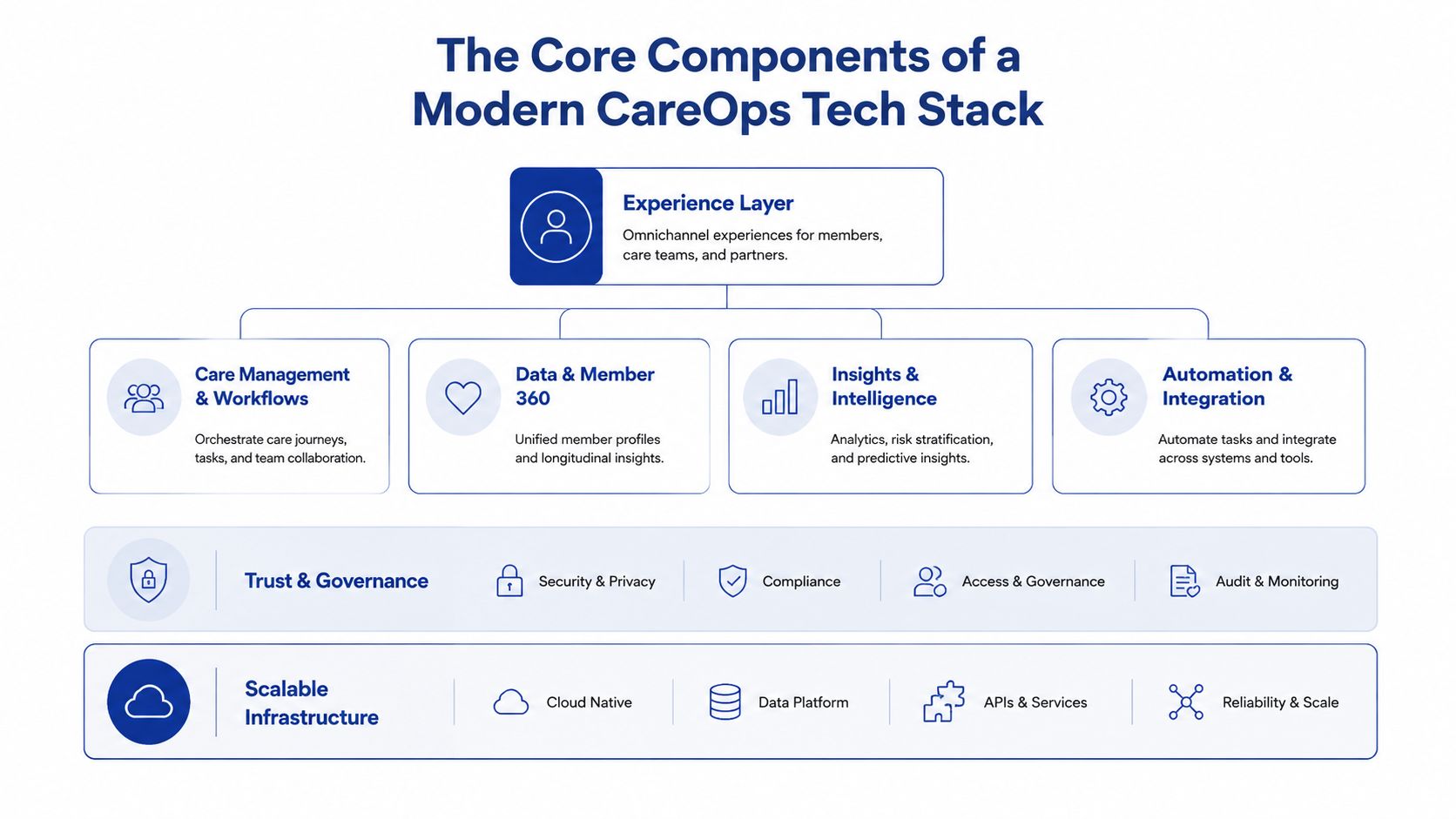
The Core Components of a Modern CareOps Tech Stack
A durable stack is layered. Each layer has a job. Problems start when one tool is expected to do everything, or when too many tools overlap, and nobody can explain which system is authoritative.
Clinical Systems
The EHR or EMR is the clinical source of truth. It stores encounters, diagnoses, medications, assessments, and core documentation. In Canada, stacks often need to work alongside systems already embedded in care delivery, rather than replacing them outright.
That means architecture decisions should respect the existing record while exposing the right data safely to downstream tools.
Patient Engagement and CRM
This is the communication hub. It manages intake, reminders, follow-ups, campaigns, patient support queues, and non-clinical relationship workflows. Some organisations use a CRM to coordinate service operations and patient outreach, while keeping clinical decisions inside the EHR.
This layer becomes especially useful when care pathways span multiple interactions over time, such as onboarding, chronic care support, home care, or post-discharge follow-up.
Scheduling and Workforce Logistics
Scheduling isn’t just about calendars. In CareOps, it’s the logistics engine. It needs to understand provider availability, appointment types, travel constraints for field teams, exceptions, and cancellations.
For home care and community settings, this layer often includes route planning and dispatch logic. For virtual services, it needs to manage secure session links and contingency workflows when patients can’t connect.
Telehealth and Virtual Care Delivery
Virtual care tools should plug into the rest of the operating environment. Secure video on its own isn’t enough. The platform has to support consent, identity checks, documentation handoff, and operational support before and after the visit.
Teams comparing options should look beyond the meeting interface. AONMeetings' guide to secure telehealth is useful here because it focuses on the practical security and compliance considerations that often get missed during product selection.
Interoperability and API Layer
This is the universal translator. It handles data exchange between systems using standards, APIs, mappings, and event flows. In healthcare, that usually means designing around interoperability from day one rather than treating it as a later integration project.
FHIR matters here because it gives teams a standard structure for common healthcare data objects. Organisations planning connected workflows across clinical and operational systems should understand the implementation basics in this guide to integrate FHIR with EHR systems.
Architecture check: If every new workflow requires custom export-import work, the interoperability layer is too weak.
Orchestration and Workflow Automation
This is the central nervous system. It runs the logic between systems. A referral is accepted, so the triage queue updates. A visit is completed, so the documentation review starts. A risk flag appears, so the care team gets notified.
Without orchestration, organisations have integrated data but not integrated operations.
Analytics and Intelligence
Analytics should answer operational questions quickly. Where are delays happening? Which pathways generate the most manual work? Which hand-offs fail most often? Good reporting combines clinical, operational, and experience signals without forcing leaders to rely on ad hoc spreadsheets.
AI can support this layer through summarisation, classification, forecasting, and queue prioritisation, but only when governance is clear.
Security, Privacy, and Cloud Foundation
Security can’t sit on the edge of the stack. It needs to be built into identity, access, logging, consent, retention, and vendor design. In Canada, privacy obligations and operational risk make this an absolute requirement.
Underneath all of this sits cloud infrastructure. The best foundation is usually boring in the right way. Stable environments, clear deployment pipelines, separate environments, backup strategy, and reliable monitoring. Fancy architecture won’t save a stack that isn’t operable.
Reference Architectures and Example Stacks
There’s no universal stack that fits every healthcare organisation. A five-provider clinic doesn’t need the same architecture as a regional home care operator. What matters is choosing the smallest stack that can support your current workflows cleanly while leaving room to grow.
In practice, I usually see two viable patterns. The first is a lean, cloud-first setup for small clinics and digital health start-ups. The second is a more modular architecture for medium organisations that need stronger orchestration, reporting, and governance.
Small Clinic or Startup Stack
Small organisations should favour simplicity. Fewer tools. Strong native integrations. Fast rollout. Clear ownership.
A practical starting point often includes:
Clinical core: an EMR such as OSCAR, which fits the care model
Patient communication: a lightweight CRM or engagement platform for reminders, forms, and follow-up
Scheduling: integrated booking with role-based access and exception handling
Telehealth: secure video connected to appointment workflows
Integration: API-first connectors and lightweight middleware
Reporting: a basic operational dashboard focused on queue health and throughput
This setup works best when one person or a small operations team can still understand the whole system. The goal isn’t sophistication. It’s a clean execution.
Medium Enterprise Stack
A medium enterprise needs more control between systems. That usually means keeping the EHR at the centre while introducing specialised layers around it.
A common pattern looks like this:
Clinical record: enterprise EHR or a network of existing clinical systems
CRM and service operations: for referral intake, patient communications, service coordination, and case status
Field scheduling and dispatch: especially important in home care and community services
Integration layer: FHIR-capable APIs, middleware, event routing, and transformation logic
Data platform: central warehouse or lakehouse for cross-system reporting
Workflow engine: business rules, escalations, and multi-step automation
Security and governance: identity, audit logging, consent handling, and retention controls
This architecture costs more to govern, but it pays off when the organisation needs visibility across multiple service lines or regions.
Why Canadian Context Changes the Design
In Ontario home care, fragmented stacks create 25 to 30% efficiency losses, and pilots using integrated stacks built on FHIR standards cut documentation time by 66%, from 45 to 15 minutes per patient visit, helping address a 52% clinician burnout rate while reducing PHIPA risk, according to the State of CareOps 2023.
That’s the strongest case for integration-first design. In this environment, stack quality isn’t an IT preference. It directly shapes clinical admin burden.
For documentation-heavy pathways, teams also need to think carefully about note capture and transcription workflows. If you’re evaluating that part of the stack, this resource on understanding medical transcription solutions gives a practical overview of where transcription fits and where it still needs review and governance.
Example CareOps Tech Stacks by Organisation Size
| Component | Small Clinic / Startup Example | Medium Enterprise Example |
|---|---|---|
| Clinical system | OSCAR or existing clinic EMR | Enterprise EHR plus departmental clinical systems |
| Patient engagement | Simple CRM with forms, reminders, messaging | CRM for intake, outreach, referral status, service coordination |
| Scheduling | Native calendar and self-booking | Dedicated scheduling and field service management |
| Telehealth | Secure video linked to appointments | Integrated virtual care layer with workflow controls |
| Interoperability | Direct APIs and lightweight middleware | FHIR-based integration layer with transformation and monitoring |
| Orchestration | Basic workflow automation | Rules engine, and event-driven workflow orchestration |
| Reporting | Embedded dashboards | Central warehouse or lakehouse with cross-system analytics |
| Security | Role-based access and audit basics | Enterprise identity, consent controls, audit logging, policy enforcement |
Choose the architecture that your team can operate well in. An elegant diagram is useless if nobody owns integration monitoring, workflow rules, and exception handling.
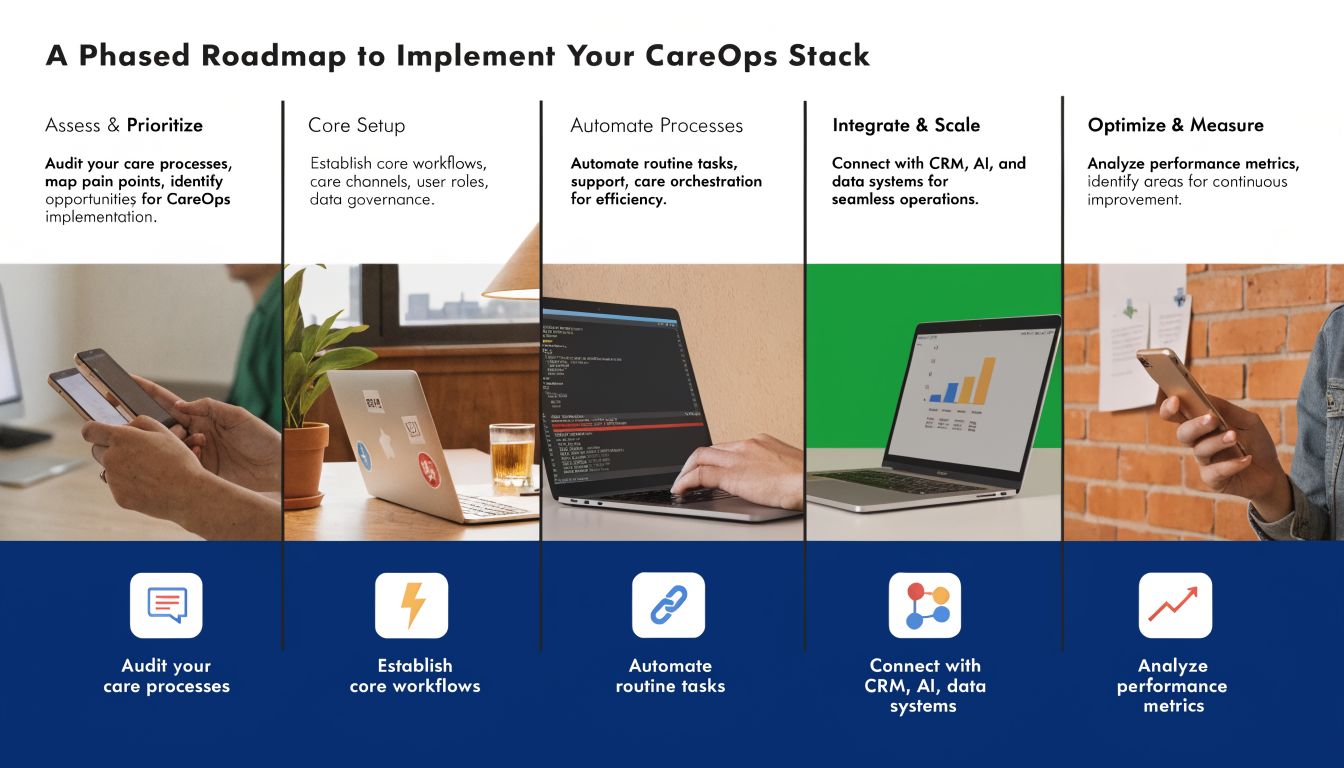
A Phased Roadmap To Implement Your CareOps Stack
Most failed implementations have the same flaw. They try to replace process confusion with a large technology programme. That usually creates more confusion, just with the new software attached to it.
A better path is phased delivery. Build the stack in layers. Validate each workflow before adding the next one.
Phase One Discovery and Operating Model
Start with the care pathway, not the product demo. Map how work currently moves from intake to closure. Identify where data gets re-entered, where queues stall, and where staff rely on unofficial workarounds.
Focus on decisions such as:
Which system is authoritative for each core data object
Which workflows need automation first
Which roles own exceptions and escalations
Which measures indicate operational health
This is where a structured planning approach helps. Teams that need a practical framework can adapt this technology roadmap template to sequence dependencies and avoid overloading the organisation.
Phase Two Foundation Systems
Next, stabilise the core. Confirm the clinical record, scheduling foundation, patient communication layer, and security model. If any of these are still undecided, don’t move on to advanced automation.
At this stage, good decisions usually look conservative:
Prefer products with strong APIs over feature-heavy tools with closed data models
Reduce overlapping systems where possible
Set naming, identity, and access standards early
Establish test and production environments before the rollout expands
Phase Three Integration and Orchestration
Once the core systems are stable, connect them intentionally. This is the point where organisations often rush. Don’t.
Begin with high-friction workflows, such as referral intake, appointment changes, visit completion, documentation review, and follow-up communications. Build one end-to-end path, then monitor what breaks in production conditions.
Start with a workflow that staff already complain about. Improvement is easier to prove when the pain is obvious.
This phase should also define operational ownership. Someone must monitor sync failures, investigate duplicate records, maintain mapping logic, and update automation rules when the care model changes.
Phase Four Optimisation and Scaling
After the first live workflows settle, use reporting to refine them. You’re looking for queue delays, repeated exception types, dropped hand-offs, and adoption gaps between teams.
Optimisation often means making small, disciplined changes:
Tighten forms so staff don’t enter unnecessary data
Adjust routing rules when cases are landing with the wrong team
Improve alert design to avoid noisy notifications
Refine dashboards so managers can act without manual analysis
A mature modern careops tech stack should keep improving after launch. If the stack becomes frozen because every change needs a long delivery cycle, it won’t keep pace with operational reality.
Real-World Considerations for Rollout and Scaling
Technology choices matter, but rollout success usually depends on the parts that don’t show up in architecture diagrams. Clinician trust, vendor behaviour, privacy design, and accessibility all shape whether the stack works in the field.
Change Management Is Operational Design
Clinicians don’t resist technology because they dislike change. They resist tools that add clicks, break context, or make them responsible for fixing system gaps. Adoption improves when teams can see that the new workflow removes the friction they already feel.
That means involving frontline staff early, piloting with real scenarios, and redesigning the process when the tool doesn’t fit the work. Training alone won’t rescue a poor flow.
Vendor Selection Should Go Beyond Features
When evaluating vendors, feature lists can be misleading. A strong CareOps product decision depends more on how well the tool fits your architecture than on how many functions it advertises.
Look for signals like:
API maturity: documentation quality, event support, versioning discipline
Operational support: responsiveness during incidents and integration troubleshooting
Data portability: clear export options and sensible ownership terms
Security posture: access controls, auditability, and privacy alignment
Workflow flexibility: whether admins can adapt the system without custom code every time
A product can be excellent on its own and still be the wrong fit for your stack.
Equity and Access Have To Be Built In
A modern careops tech stack also has to work for the people least well served by digital healthcare. In Canada, 45% of rural clinics lack reliable broadband for telehealth-integrated CareOps stacks, digital literacy shortfalls are reported by 62% of providers in Northern Ontario, and 19% of Canadians live in rural areas, according to Dalberg’s analysis on health technology design for equity and access.
Those constraints change design decisions. Video can’t be the only interaction mode. Forms need to work on low-bandwidth devices. Messaging flows must support asynchronous care. Support teams need fallback paths when patients can’t complete digital steps independently.
The stack isn’t modern if it only works for well-connected urban users.
Conclusion: Your Path to Operational Excellence
A modern careops tech stack isn’t a shopping list of healthcare software. It’s an operating system for care delivery. When the architecture is right, teams spend less energy stitching work together and more energy delivering care safely, consistently, and at scale.
The pattern is straightforward. Start with the care flow. Define system ownership. Build interoperability early. Add orchestration where hand-offs fail. Measure operations in ways managers and frontline teams can actually use. Then improve the stack continuously instead of waiting for another large replacement project.
Healthcare organisations don’t need perfect architecture on day one. They need a stack that fits the actual service model, supports staff, and can evolve without creating fresh silos.
If your organisation needs help designing, integrating, or modernising a healthcare platform, Cleffex Digital Ltd can support the journey with secure custom software, cloud architecture, and pragmatic delivery for complex operational environments.