

Insurance automation software development builds systems to remove manual steps from underwriting through claims and policy management. It cuts error rates and accelerates cycle times, delivering measurable efficiency gains.
Why Insurance Automation Software Development Matters

Underwriters, brokers, and MGAs often wrestle with complex rule sets and strict compliance demands. Embedding business logic, audit trails, and live analytics solves these headaches in real time.
Early adopters report underwriting cycles shrinking by up to 75%, so teams respond faster, and customers get decisions without delay.
Faster underwriting cycles by up to 60%, cutting approval time from days to hours.
Reduced manual errors by over 80%, improving data accuracy and compliance.
Scalable cloud solutions support peak loads and evolving business requirements.
Operational Benefits
Routine rule-driven tasks move to bots, letting underwriters tackle edge cases.
Self-service portals slash call volumes and boost agent productivity.
Cloud hosting lowers infrastructure bills and speeds up rollouts.
Automation isn't just a tool; it's a business imperative for modern insurers.
| Process Area | Manual Cycle Time | Automated Cycle Time |
|---|---|---|
| Underwriting | 48 hours | 12 hours |
| Claims | 72 hours | 18 hours |
| Policy Setup | 24 hours | 6 hours |
Capturing every interaction with built-in audit logs helps satisfy PIPEDA requirements and internal audits. That transparency builds trust with regulators and policyholders alike.
Effective insurance software development blends deep sector knowledge with proven frameworks. As we explored in our custom software development guide, weaving automation into your architecture design up front prevents expensive rewrites.
Context And Scale
In Canada, insurance automation software development drove North America’s market to $4.30 billion in 2024. Analysts predict a climb to $6.9 billion by 2030, growing at an 8.2% CAGR as carriers lean on AI for underwriting and claims fraud checks. Learn more about these findings.
Our software development services mix RPA, BPM, and AI for end-to-end solutions. You might be interested in our guide on business process automation to transform workflows.
This solid foundation paves the way for the detailed planning and design phases ahead.
Ready to start planning your project.
Gather Requirements And Plan Your Automation Project
Before diving into automation, build a clear plan that ties your insurance objectives to the real-world tech you’re using. When you sort out scope, constraints, and compliance needs early, you’ll sidestep expensive course corrections down the road.
It helps to bring underwriters, claims teams, and compliance officers into a single workshop. Outlining both functional requirements and regulatory must-haves together uncovers hidden roadblocks and creates a shared vision.
To get the most from these sessions:
Capture user stories with precise acceptance criteria
Review PIPEDA and relevant provincial regulations
Prioritise high-impact tasks for RPA or BPM pilots
Note any legacy system quirks and data model gaps
Map Existing Workflows And Highlight Bottlenecks
Mapping current processes makes inefficiencies and manual handovers impossible to ignore. You’ll quickly see where RPA can automate repetitive steps and where BPM should orchestrate complex sequences. For example, a detailed claims-intake flow often exposes duplicate data entry between policy and billing systems.
Use these workflow-mapping tips:
Leverage process-mining tools to trace real usage
Annotate each task with the time taken and error rates
Highlight decision points that cause delays or rework
Key Insight Workflow maps typically show that 60% of manual steps are repetitive.
Conduct Usage Analysis And User Interviews
Numbers alone don’t tell the full story. Pair quantitative process metrics with one-on-one chats to capture user frustrations. Underwriters, for instance, often point to manual premium calculations as a recurring source of errors.
During interviews:
Ask which manual tweaks consistently slow down cycle times
Note feedback on UI navigation and system responsiveness
Cross-check these insights against your data to prioritise fixes
Combining data metrics with user stories drives targeted enhancements.
Define Clear Metrics, Budgets, and Timelines
Without measurable criteria, testing success becomes guesswork. Set KPIs around processing time, error rates, and resource utilisation. Then align your budget and timeline to those targets so every decision ties back to a clear ROI.
Common KPIs include:
50% reduction in cycle time for underwriting
Error rate below 2% for data accuracy
Payback period within 12 months
Plan Communication And Governance
Transparent governance keeps everyone on the same page and accelerates approvals. Assemble a steering committee, ideally with executive sponsors, that meets weekly to review progress, risks, and decisions.
A solid communication plan might include:
Weekly status updates with dashboard snapshots
Monthly steering meetings summarised for executives
A living issue log that’s accessible to the core team
Clear governance reduces approval delays by 30%.
Document Integration Points And Data Constraints
Bringing IT into the conversation upfront uncovers legacy system boundaries and data-model quirks. Create a detailed list of every integration point: policy admin, billing, and CRM, to understand APIs, data formats, and security needs at a glance.
| System | Integration Type | Data Objects | Constraints |
|---|---|---|---|
| Policy Admin | API | Policy details, renewals | Rate-limit 1000 calls/hr |
| Billing Platform | Batch ETL | Payment records | Schema changes quarterly |
| CRM | Webhook | Customer info | OAuth2 authentication |
Select Tools And Platforms
Picking the right RPA, BPM, and integration stack now saves migration headaches later. Weigh both commercial suites and open-source options against your technical footprint and budget.
Key considerations:
Licence costs versus support and training
Community activity and documentation quality
Compatibility with .NET, Java, or cloud APIs
For instance, combining an open-source RPA tool with a managed BPM platform often balances cost with capability.
Establish Risk Register And Compliance Checklist
Getting ahead of risks and regulatory hurdles keeps the project on solid ground. Maintain a risk register alongside a PIPEDA compliance checklist to ensure nothing slips through the cracks.
Include items like:
Data residency requirements across Canadian provinces
Encryption standards for data in transit and at rest
Audit-trail completeness for OSFI reporting
Review this register regularly and assign owners for each mitigation.
Finalise Scoping And Align With Business Goals
A tightly defined scope prevents unexpected detours and keeps everyone pulling in the same direction. Remember to document roles and responsibilities with a RACI matrix and circle back to scope discussions at every milestone.
Scoping Best Practices:
Set boundaries by business function and data domain
Revisit the scope with stakeholders at each milestone
Include a compliance checklist under PIPEDA and OSFI guidelines
Effective planning cuts development rework by 40% and speeds deployment.
For holistic support, explore our insurance software development expertise and our custom software development solutions. Additionally, as we explored in our software development guide, thorough planning maximises project success.
Next, design workflows for specific processes to streamline automation implementation across key functions.
Design Automation Workflows For Insurance Processes
Getting the right technology in front of each task is where solid insurance automation begins. Underwriting triage, policy setup and claims handling all have their own rhythms – and shoehorning them into a generic process wastes time and resources. A straightforward decision framework at the outset helps your team pick between RPA, BPM or AI/ML with confidence.
Workflow design also builds in audit trails and compliance checkpoints from day one. By logging every approval step, routing decision and exception case, you cut down on manual handovers and spotlight bottlenecks before they escalate.
Below is an infographic that visualises how you move from stakeholder workshops through process mapping to metrics definition – highlighting the data points you really need to track.
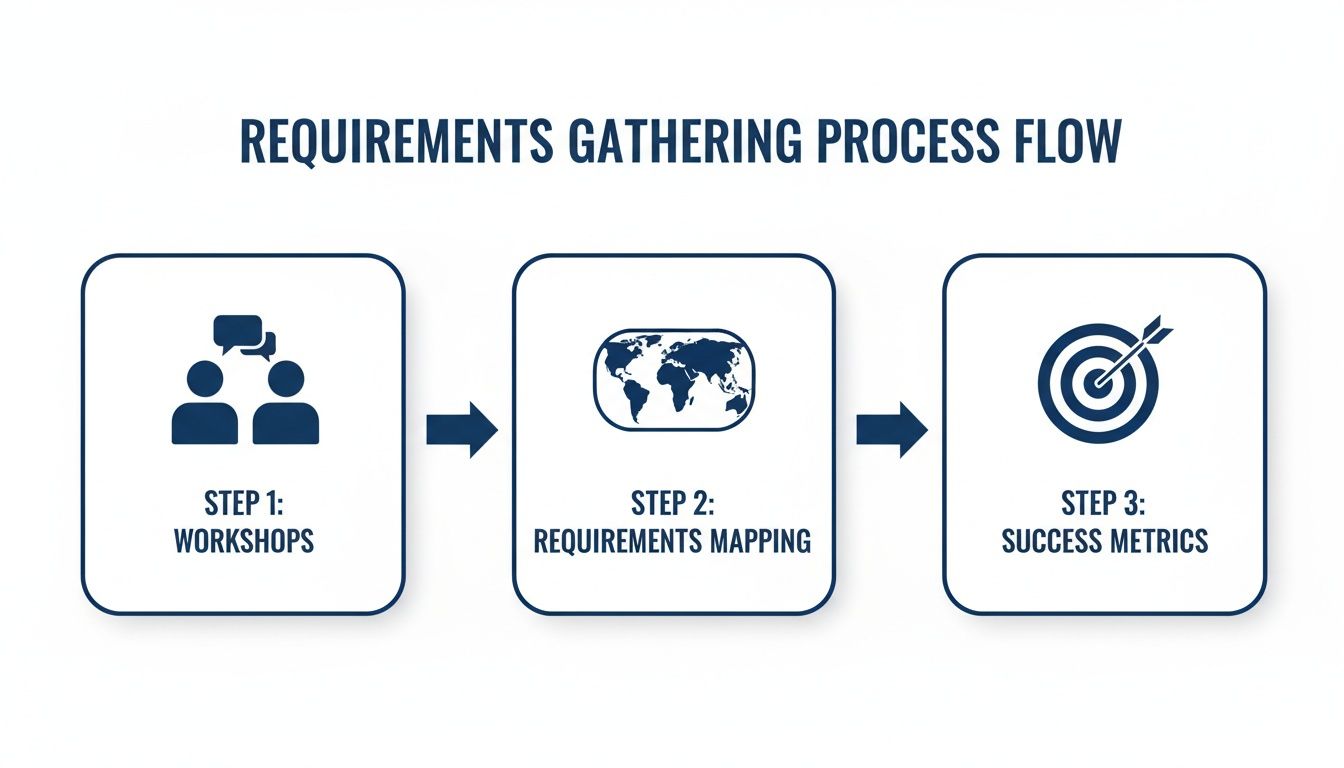
This flow breaks into three core phases: workshops, mapping and metrics, so everyone stays aligned and automation goes off without a hitch.
When To Use RPA, BPM, or AI/ML
Matching tool to task cuts complexity and speeds delivery:
Rule-driven, repetitive jobs with heavy volumes? RPA is your go-to. Bots can tackle data entry, validation and routing with minimal code.
End-to-end orchestration calls for a BPM engine. It’s perfect for enforcing approvals, branching logic and SLA tracking.
Unstructured content: think free-text forms, scanned documents or images, shines under AI/ML. These models extract insights and accelerate decision-making.
Key outcomes to share with stakeholders:
70% drop in manual keystrokes on high-volume data tasks
Consistent process enforcement and compliance tracking via BPM
Predictive risk scoring and anomaly detection powered by AI/ML
Claims Triage Example Walkthrough
Picture a mid-sized Canadian insurer’s Claims Triage team. Files stream in through email or portal uploads and hit an OCR AI service first. From there:
Document capture pulls policy numbers and claimant details
RPA populates the policy administration system fields
BPM kicks off approvals for files flagged as “manual review”
AI sentiment analysis highlights urgent or high-risk claims
Exception workflows divert complex cases to underwriters
This blend of tools speeds triage and surfaces red flags in real time.
Effective audit trails improve review times by 40% and satisfy compliance reviews.
Comparison Of Automation Approaches
Here’s a quick look at how RPA, BPM and AI-driven automation stack up against one another:
| Approach | Complexity | Scalability | Typical Use Cases |
|---|---|---|---|
| RPA | Low | Moderate | Data entry, validation |
| BPM | Medium | High | Approval chains, SLA enforcement |
| AI ML | High | Variable | Document analysis, risk scoring |
This side-by-side view helps you validate which approach aligns with your process needs and team strengths.
Personal Tips For Audit Trail Management
Staying onside with PIPEDA and OSFI means logs have to be bullet-proof. In my experience, these practices pay off:
Timestamp every state change in a central repository
Record user IDs, decision outcomes and exception reasons
Archive logs in immutable storage to streamline audits
Build these into your workflow design to dodge compliance gaps and simplify reporting.
A notable trend in Canada: the AI and analytics segment in insurance platforms is poised for a 13.4% CAGR between 2025 and 2030, according to MarketsandMarkets. Straight-through processing now handles routine policies in under two minutes, boosting efficiency by 60%.
For a deeper dive on automation in claims, check out our article AI in insurance claims processing explained.
Validating workflows often comes down to running focused design sprints. Get underwriters, claims leads, and IT folks in the same room to walk through a prototype and catch gaps early. Pilot tests on a narrow scope reveal edge cases you’d never see in theory.
Always test integrations, especially between your policy admin and billing systems. Automate API tests under realistic load, then watch response times. Continuous monitoring dashboards tracking queue lengths, SLA compliance, and failure rates give you real-time health checks.
Finally, version control for workflows lets you roll back if something breaks. Every tweak to your process logic should log who made the change, when, and why. That level of transparency keeps your whole team confident in the automation you ship.
Architect Integrations And Define Tech Stack

When you plan an insurance automation platform, your architecture choice becomes the backbone of every module. Breaking your system into independent pieces or keeping it in a single codebase both have upsides and challenges.
An API-first design ensures that connectors to policy, billing and CRM systems won’t need a rewrite down the road. It also fits neatly into event-driven workflows and cloud-native environments.
Microservices let you scale each feature separately and deploy with containers.
Monoliths keep transactions consistent and avoid cross-service latency.
API Gateways manage versioning, routing and security across your services.
Compare Microservices and Monolith
Microservices partition functionality into small, self-contained services. Each one can be updated or scaled on its own schedule.
Monoliths bundle all capabilities in a single codebase. Early-stage teams often find this simpler, with fewer moving parts to monitor.
Modularity: Services are siloed in microservices; everything lives together in a monolith.
Deployment: Use containers and orchestration for microservices; simple build pipelines work for monoliths.
Team Structure: Small, focused teams own each microservice; central teams handle the whole monolith.
Operational Complexity: More network traffic and coordination with microservices; single-point bottlenecks in a monolith.
Cloud Native Deployment Models
Running your automation in Kubernetes, via Amazon EKS or Azure AKS, brings built-in resilience and scale. Managed clusters heal themselves and spin up nodes when traffic spikes.
High Availability: Spread your workloads across regions to survive node outages.
Scalability: Horizontal Pod Autoscaling reacts to quote request surges.
Observability: Combine Prometheus and Grafana for real-time metrics and logs.
Canadian insurers must balance innovation with strict PIPEDA rules. At the same time, the global insurance software market is set to grow by USD 9.87 billion from 2025–2029 at a 9.3% CAGR, and IBM AI Hub pilots have slashed claims adjudication times by 50%. Learn more on market.us.
Evaluate RPA Frameworks And BPM Suites
Robotic Process Automation ranges from community-led tools like Robot Framework to enterprise editions such as UiPath. Your choice hinges on licensing costs, vendor support and the size of the user community.
Business Process Management suites, think Camunda or IBM Process Designer, add workflow orchestration, human approvals and business rules under one roof.
Open-Source: Zero licensing fees and active forums.
Commercial BPM: Service-level agreements and formal support.
Integration: Verify out-of-the-box connectors for policy admin, CRM and billing.
Scalability: Check multi-tenant capabilities, transaction throughput and clustering.
A hybrid event-driven setup might pipe mobile quote requests through Kafka or Azure Event Grid. Kubernetes hosts stateless microservices, while complex workflows run in your BPM clusters behind an API gateway. That way, if a downstream system lags, your front end still responds gracefully.
Hybrid Event-Driven Example
A mid-sized Canadian insurer piloted a mobile quoter that cut response times by 40%. Here’s how they wired it:
The mobile app posts JSON payloads to a REST endpoint.
Events flow into Kafka topics for data validation and enrichment.
RPA bots retrieve policy details and price rules.
A BPM engine routes approvals when risk thresholds are exceeded.
OCR services extract data from uploaded documents.
You might be interested in our guide on adopting an API-first approach in product development for robust integration patterns and version control. Learn more.
Data Security Under PIPEDA
Protecting personal data is non-negotiable in Canada. Build encryption and logging into your system from day one to avoid expensive retrofits.
Encryption: TLS 1.2+ for data in motion; AES-256 for storage.
Audit Logging: Immutable records of user IDs, timestamps and transaction details.
Residency: Keep data centres within Canada or PIPEDA-compliant regions.
Key Management: Rotate keys frequently and store them in secure vaults.
"Building encryption and audit-logging into architecture up front avoids costly retrofits and compliance gaps."
For your tech stack, mix Java Spring Boot or .NET Core microservices with a Node.js gateway. Add OCR and NLP through AWS Textract or Azure Cognitive Services. Evaluate both open-source RPA tools and commercial BPM suites like IBM and Camunda.
Explore our software development services for end-to-end support and check our insurance software development offerings for industry-specific expertise.
Test, Deploy, and Measure Your ROI
Solid testing is the backbone of any insurance automation project. Catching bugs up front means smoother launches and happier teams. That’s why we run unit checks, end-to-end simulations, load trials and security scans.
Unit Tests isolate each script to catch logic slips.
Integration Tests walk through bot-to-API workflows.
Performance Tests measure throughput under peak policy volumes.
Security Tests scan for vulnerabilities and PIPEDA gaps.
Keep staging and production environments in sync with real data. Simulating actual policy volumes in a mirror setup often uncovers integration quirks weeks before go-live. Once you’ve got that locked down, it’s time to define your QA and deployment blueprint.
Pipelines in Jenkins or GitLab CI automate everything from builds to releases. A single commit kicks off your Jenkinsfile or .gitlab-ci.yml. If a test fails, the pipeline halts – preventing buggy code from hitting your policy engine.
Document every result for traceability.
QA And Deployment Strategy
A hands-on QA plan ties each automation artefact to clear quality gates.
Write unit tests with NUnit or JUnit to cover your bot scripts. Mock policy administration APIs during integration runs so you know your workflows behave exactly as intended.
Performance trials rely on Apache JMeter to simulate hundreds of concurrent requests. On the security side, static code analysis and PIPEDA-focused penetration scans trap vulnerabilities before they become incidents.
80% code coverage highlights untested paths
Vulnerability reports map out PIPEDA risks
Feedback loops under 10 minutes keep fixes nimble
Centralise test outcomes in a dashboard tagged by feature. As we saw in our software development guide, early test automation accelerates releases. Continuous testing cuts production defects by over 50%.
Pilot Launch And Feedback
A small-scale pilot can surface hidden issues without jeopardising the entire operation. We once invited five underwriters to test a claims workflow in a data-mirrored sandbox, and uncovered two edge cases we’d missed.
Collect qualitative feedback through quick surveys or screen recordings
Track bot performance on real-time dashboards
Log exceptions and anomalies for rapid triage
Tweak orchestration rules based on user behaviour
Feature flags let you enable or disable specific workflows without fresh deployments. That means a rogue change won’t ripple across all policies. Feeding pilot insights back into your CI pipeline ensures each improvement rolls out automatically.
Defining And Tracking KPIs
Metrics are your compass, but raw figures can mislead without context.
| KPI | Target | Measurement Frequency |
|---|---|---|
| Processing Time | < 2 seconds per task | Daily |
| Error Rate | < 1% | Weekly |
| User Satisfaction | ≥ 4.5/5 | Monthly |
| Throughput | > 500 transactions/hr | Hourly |
Tools like Prometheus and Grafana power live dashboards. Automate alerts for drifts beyond thresholds, and balance quantitative data with direct user feedback. If error rates jump to 3%, pause the release and dig in. If satisfaction dips below 4, launch a UI-focused hotfix sprint.
Calculating Your ROI
ROI in automation is a simple equation: savings minus costs.
Estimate manual processing cost per transaction.
Calculate the automated cost per transaction.
Multiply savings by your annual volume.
Subtract development, licences and infrastructure expenses.
For instance, saving $15 per claim on 10,000 annual claims nets $150,000. If the build and launch cost $75,000, you achieve a 100% net gain in year one. Don’t forget ongoing maintenance when you model multi-year returns. Finance teams often look for a payback under 12 months.
Explore our real-world figures in the custom software development and insurance software development case studies. You’ll also find more examples on our main site.
Key Insight: A transparent ROI model builds confidence with underwriters, executives and investors. Continuous measurement helps you pivot based on what the data actually shows.
Insurance Automation FAQs
Insurance automation stirs up questions at every turn. Here, we cut through the noise with clear, concise answers on underwriting, claims, tool choices, compliance and ROI.
Benefits Of Underwriting And Claims Automation
Underwriting used to take days – now it’s often done in hours. For example, one Canadian carrier trimmed average quote time by 60% after weaving AI risk scoring and rule-based bots into its workflow. Underwriters can then zero in on complex applications, while routine data checks happen automatically.
Claims teams see quick wins too. Automated document capture and routing slashes intake errors by over 80%. When a modern workflow engine plugs into legacy systems, data silos simply disappear.
“Automating these processes freed up our team to handle intricate risk assessments, not paperwork,” recalls a senior claims manager.
Key Advantages:
Faster Processing: Automated document analysis and routing speed up decisions
Consistent Logic: Rules apply uniformly across all policies
Built-In Audit Trails: Ready for PIPEDA and OSFI reviews
Choosing Between RPA And BPM
Deciding on bots or a full-blown process engine really comes down to use case. RPA shines with high-volume, rule-driven tasks – think mass data entry. BPM takes the lead when you need branching logic, service-level agreements and human approvals.
Guidelines To Steer Your Choice:
Opt for RPA in scenarios with structured, repetitive steps
Lean on BPM if approvals, escalations or performance metrics matter
Blend the two by adding AI modules for unstructured data parsing
For instance, a mid-sized insurer uses RPA bots to extract claim details, then a BPM engine to route exceptions and sign-offs seamlessly.
Compliance Considerations Under PIPEDA
Under PIPEDA, you can’t afford to wing data privacy. Consent and transparency must be baked in from day one. As you automate, embed encryption and logging throughout your pipelines.
Top Compliance Tips:
Encrypt data in transit with TLS 1.2+ and at rest with AES-256
Capture user IDs, timestamps and actions in audit logs
Store logs in immutable repositories for easy OSFI reporting
In practice, one broker platform met PIPEDA fully by integrating encryption at its API gateway and automating nightly log archiving.
Measuring ROI Effectively
To win over finance teams, tie your automation to hard numbers. Compare labour and tool costs for manual work against bot-driven throughput and reduced errors. A simple table often does the trick:
| Metric | Manual Cost | Automated Cost |
|---|---|---|
| Underwriting per case | $45 | $18 |
| Claims per file | $30 | $10 |
ROI Calculation Steps:
Pinpoint all manual task costs, from salaries to software licences
Determine the per-transaction cost of bots or workflows
Multiply savings by annual volumes for a gross gain
Subtract development and licence expenses to find your net benefit
That approach paid off for one insurer: a $150K gain on claims automation delivered a 100% return within 10 months.
Scaling Your Automation Over Time
Start with a small, high-impact process and build out from there. This lets you iron out kinks before tackling critical workflows. Over time, you’ll find natural expansion points.
Common Expansion Paths:
Extend RPA to customer service and billing
Integrate new data sources like IoT devices and telematics
Layer in ML-powered fraud detection models
Review your performance dashboards regularly and tweak workflows so they stay aligned with evolving goals.
Avoiding Common Pitfalls
Even the best plans can falter without proper groundwork. Skipping user interviews leads to mismatched requirements. Ignoring legacy quirks causes painful integration headaches. And without change management, resistance is guaranteed.
Best Practices To Keep On Track:
Host stakeholder workshops to surface real needs
Pilot smaller workflows before scaling company-wide
Offer hands-on training and ongoing support
As we discuss in our software development guide, early user involvement and fast iterations help dodge costly rework.
Ready to dive deeper or kick off your own automation journey? Discover our custom software development services or learn more about our insurance software solutions. Curious about our team’s story? Visit our About Us page.
Book your next automation project with Cleffex Digital Ltd via our main site.