

Your latest policy update was approved by legal, circulated by email, uploaded to SharePoint, and mentioned in a team channel. Two weeks later, HR has one version, operations has another, and audit is asking who acknowledged the final copy. That's the moment most organisations realise they don't have a policy problem. They have an integration problem.
I see this most often when a policy platform was bought to “centralise documents”, but the surrounding systems stayed disconnected. The policy library sits in one tool. Employee records live in the HRMS. Controls and issue tracking sit in GRC. Identity and access decisions happen elsewhere. The result is predictable: manual handoffs, weak audit trails, and too much faith that people will follow the latest policy because someone sent a link.
Policy management system integration fixes that by turning policy from a static document set into an operational workflow. It connects the repository, approval process, acknowledgements, exceptions, and downstream enforcement points. In practice, that means policy updates can reach the right people automatically, acknowledgements can be tied to real users and roles, and compliance teams can see what changed, when, and what still needs action.
Why Disconnected Policies Are a Hidden Business Risk
A disconnected policy environment creates risk that tends to go unnoticed. Nobody notices the problem when documents are uploaded correctly. They notice it when a staff member follows an outdated procedure, an underwriter uses an old rule set, or a healthcare team can't prove which instruction was active at the time of an incident.
The hidden part is what makes this expensive. Teams often think they're compliant because the policy exists somewhere. But existence isn't enforcement, and publication isn't adoption. If your policy platform can't exchange data with HR, identity, ERP, and GRC systems, you usually can't answer basic operational questions with confidence.
What Breaks in the Real World
Here's what I watch for early:
Version confusion: Different teams keep local copies, export PDFs, or attach policies to tickets and emails.
Weak attestation tracking: Acknowledgements aren't linked cleanly to employee status, role changes, or contractor access.
Audit friction: Evidence is spread across folders, inboxes, spreadsheets, and application logs.
Control gaps: A policy change is approved, but no connected workflow updates training, tasks, or system permissions.
Practical rule: If a policy change still depends on someone remembering to send an email, the process isn't integrated.
This is no longer a niche governance issue. The global policy management software market was valued at USD 1.5 billion in 2024 and is projected to reach USD 5.64 billion by 2033, with North America holding over 42.7% of the market share in 2025, according to Straits Research's policy management software market report. That same source ties growth to organisations needing integration with ERP, HRMS, and GRC platforms to automate the policy lifecycle.
Why This Matters More in Insurance and Healthcare
In insurance, policy content often affects underwriting, claims handling, billing, and customer communication. A disconnected policy process leads to inconsistent decisions across teams that should be working from one approved ruleset.
In healthcare, the risk is broader than document control. Policy adherence depends on frontline workflow, role clarity, access, and timing. If the system only stores policies but doesn't guide the people doing the work, the gap between written policy and real practice stays open.
For Canadian organisations, especially in regulated settings, policy management system integration has become part of the governance infrastructure. It's how teams move from “we published it” to “we can show how it was distributed, acknowledged, monitored, and acted on.”
The Pre-Integration Readiness Checklist
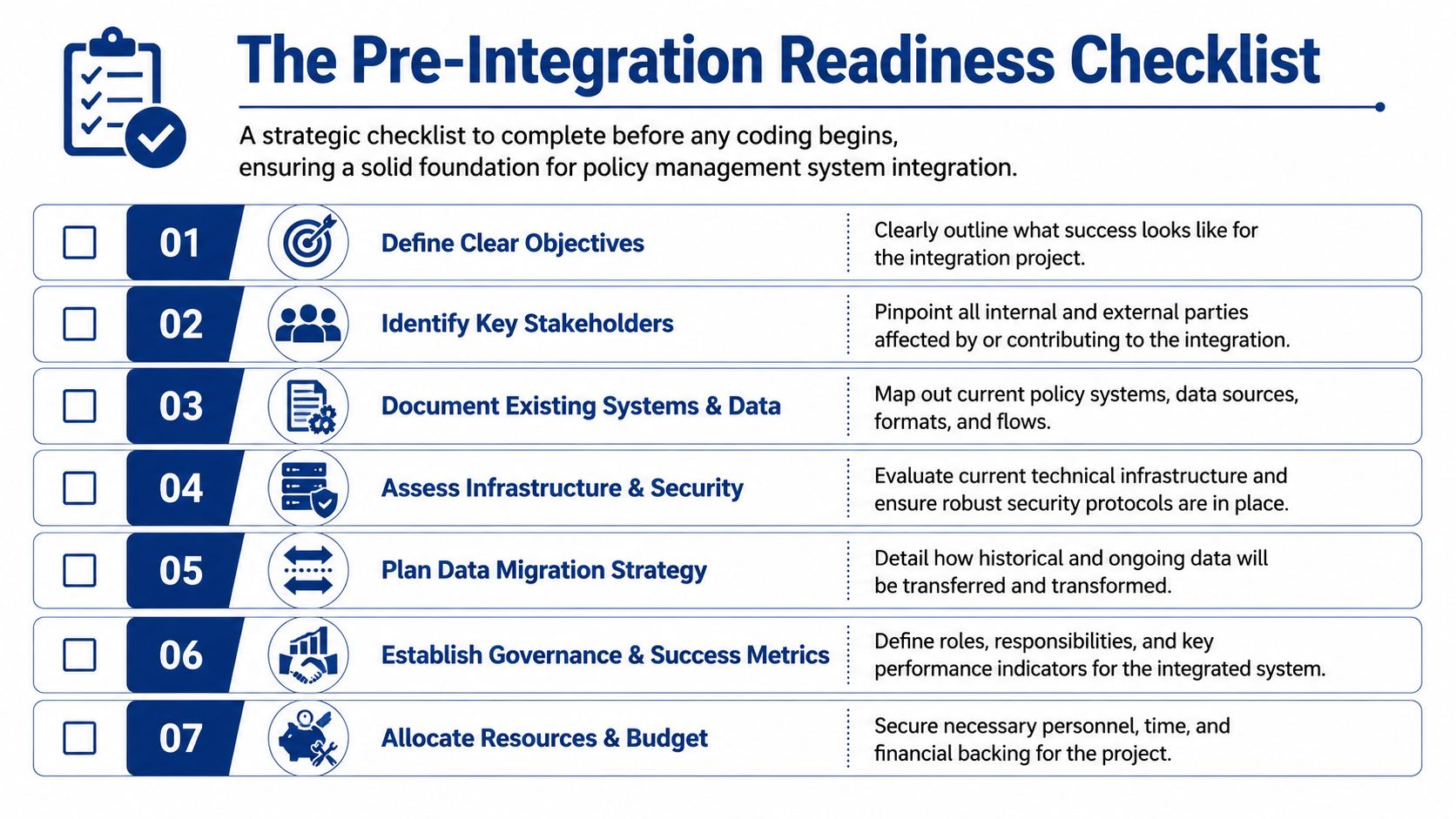
Most failed integration projects don't fail because the API was hard. They fail because the organisation started coding before it settled ownership, scope, data definitions, and governance.
The fastest way to burn time is to let each department describe the policy process differently and assume the tooling will reconcile the mess. It won't. Good integration exposes inconsistency. It doesn't hide it.
What To Settle Before Any Build Starts
A mature integration approach starts with business objectives and success metrics. It also requires early governance, because without clear systems of record and shared data models, teams usually create brittle point-to-point integrations that are hard to control and audit, as noted in Celigo's system integration guidance.
Use this checklist before anyone writes transformation logic or provisions connectors:
Define the business outcome: Be specific. Do you need reliable acknowledgements, better audit evidence, controlled policy publishing, or cleaner exception management?
Pick the system of record: Decide where the authoritative policy document lives, where employee identity lives, and where compliance events are stored.
Map every touchpoint: Include HRMS, LMS, IAM, GRC, ticketing, document management, ERP, and any line-of-business platforms that consume policy decisions.
Identify data owners: Someone must own policy metadata, user roles, organisational structure, distribution groups, and retention rules.
Classify your policy set: Not every policy needs the same treatment. Some require formal approval and attestations. Others only need publication and version control.
Review current workflows: Approvals, exceptions, escalations, reviews, retirements, and emergency updates often differ by department.
Set non-functional requirements: Security, hosting constraints, residency expectations, logging depth, and uptime tolerance affect architecture choices early.
Readiness Work That People Skip and Regret Later
Three items are easy to underestimate.
First, policy metadata. If one team tags a policy by department, another by risk domain, and a third by document owner, automation becomes unreliable. Distribution and reporting depend on consistent metadata.
Second, identity alignment. Your policy system can't route tasks accurately if role data is stale or if contractors sit outside the main HR structure. In regulated environments, access and attestation records need to reflect real organisational status.
Third, exception handling. Most clients design the happy path first and leave exceptions vague. But exceptions define operational maturity. Who can defer an acknowledgement? What happens when a worker is on leave? How are temporary policy waivers recorded and reviewed?
Governance needs names, not committees. If nobody owns the data model, every integration meeting becomes a debate.
A Simple Pre-Build Decision Grid
| Decision area | What you need agreed |
|---|---|
| Policy source | The authoritative repository and document lifecycle owner |
| User source | The system that defines active users, roles, and employment status |
| Event model | What counts as publish, view, acknowledge, exception, review, and retirement |
| Approval path | Which policies require legal, compliance, HR, or operational sign-off |
| Evidence model | What logs and records the audit will expect to retrieve |
| Operating model | Who supports incidents, retries, changes, and access requests |
If these decisions still live in meeting notes, you're not ready to build.
Choosing Your Integration Architecture
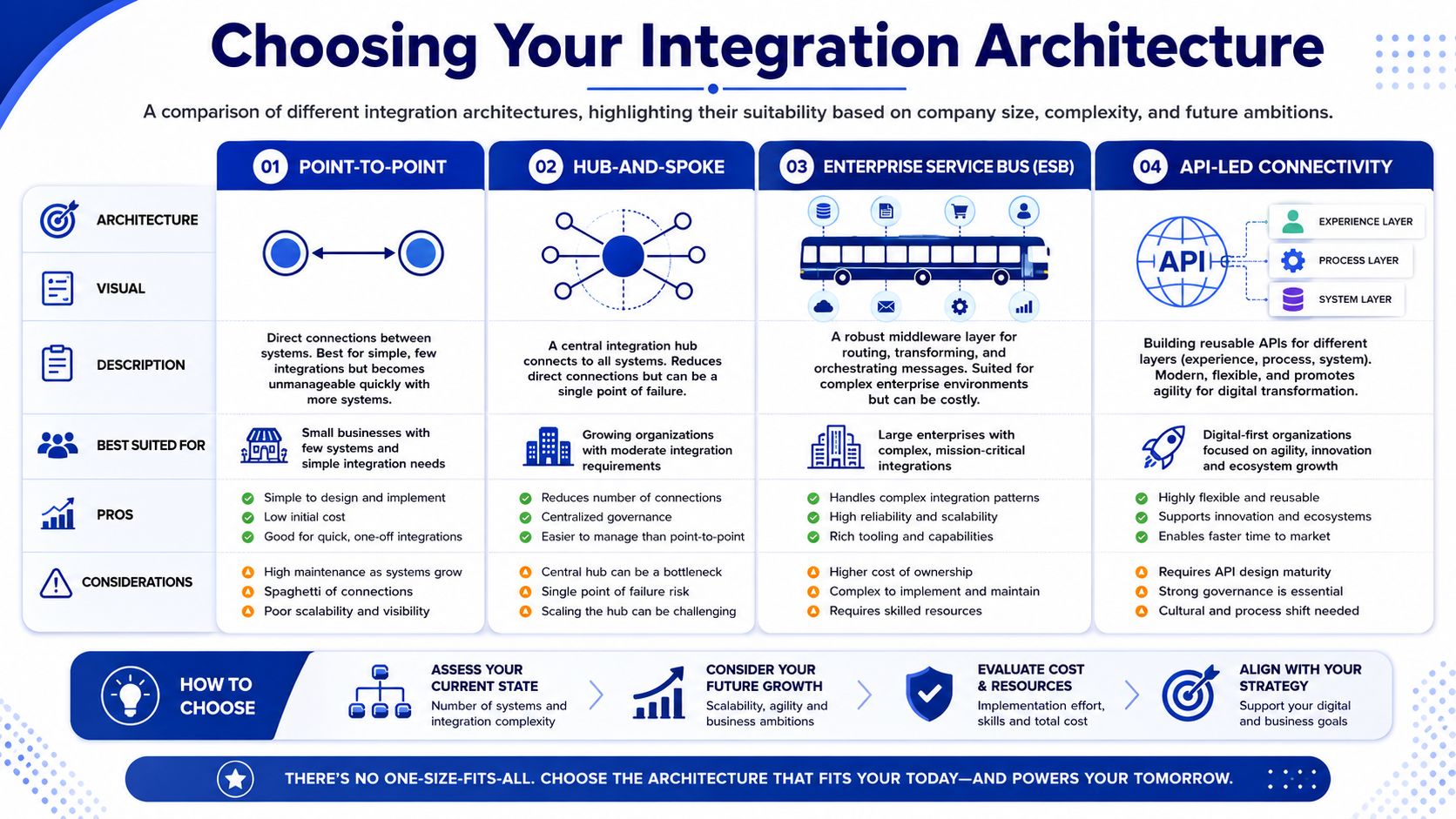
Architecture should match operating reality. An SMB with one HR system and one policy platform doesn't need the same pattern as a national insurer with legacy administration systems, identity controls, and a formal GRC stack.
The mistake I see most is picking architecture by trend rather than by integration load, governance requirements, and future change volume. A design that looks lightweight today can become expensive once policy data starts flowing to multiple endpoints with different security rules.
Integration Pattern Comparison
| Pattern | Best For | Pros | Cons |
|---|---|---|---|
| Point-to-Point | Small environments with very few systems | Quick to start, low upfront complexity | Hard to govern, fragile as endpoints grow |
| Hub-and-Spoke | Mid-sized organisations with several systems | Centralised routing and better visibility | Hub can become overloaded if poorly designed |
| Enterprise Service Bus | Large, complex enterprise landscapes | Strong orchestration and transformation options | Heavy operating model, can become costly and rigid |
| API-led Connectivity | Organisations building reusable digital services | Modular, scalable, cleaner reuse across channels | Requires discipline in API design and lifecycle management |
For a broader view of how these patterns fit enterprise environments, this overview of enterprise application architecture patterns is a useful companion when you're comparing target-state options.
What Works for SMBs
SMBs usually do best with restraint. If you have a policy platform, one HRMS, identity, and perhaps a ticketing tool, a tightly scoped point-to-point or lightweight hub approach can be enough.
What doesn't work is importing enterprise complexity too early. If your team doesn't have a dedicated integration operations function, don't create one accidentally by adopting a heavyweight middleware pattern that demands constant specialised support.
A practical SMB test is simple. If one person can no longer explain the integration flow end-to-end on a whiteboard, the architecture may already be too complicated for the team supporting it.
What Works for Insurance and Healthcare Enterprises
Larger regulated organisations need stronger separation of concerns. Policy content, user identity, exception handling, logging, and downstream enforcement usually shouldn't be bundled into ad hoc scripts or app-specific connectors.
Build for controlled change, not just initial delivery. Policy landscapes rarely stay still for long.
For insurers, legacy core platforms often force a mixed model. You may need API-led connectivity for modern platforms, adapters for older systems, and a central orchestration layer to keep lifecycle events consistent.
For healthcare organisations, architecture decisions should reflect not just data movement but workflow sensitivity. If frontline teams depend on timely guidance, integrations must tolerate downtime, surface clear errors, and avoid burying critical status changes in back-office queues.
A Practical Selection Lens
Choose architecture based on these questions:
How many endpoints need policy data or events?
How often do policy workflows change?
Which systems can expose usable APIs, and which require adapters?
How strict are your logging and audit requirements?
Who will operate this integration six months after go-live?
If the answer to the last question is “the project team, somehow”, simplify the design.
Executing the Technical Integration Workflow
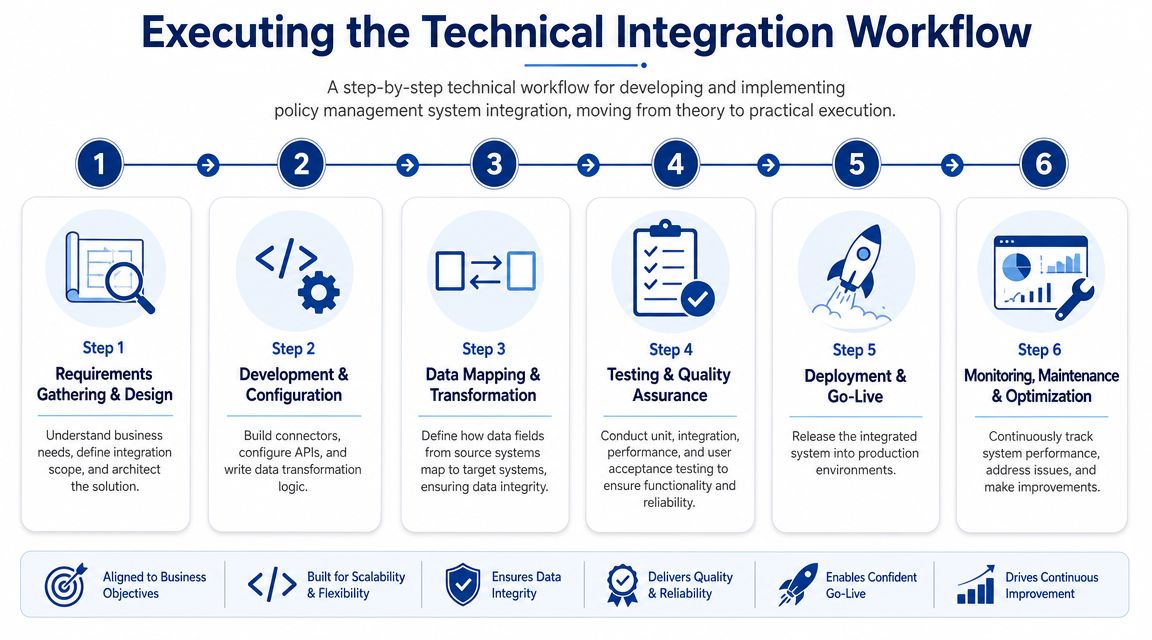
Once the architecture is chosen, critical work begins. Many teams then drift into connector-first thinking. They start by wiring systems together before they define the policy lifecycle, event model, and error paths. That approach creates movement, not control.
A practical integration methodology uses a centralised policy repository and a defined lifecycle of creation, review, approval, deployment, and monitoring, as described in Sogeti Labs' guidance on policy management in integration. That repository becomes the anchor for version control, workflow consistency, and downstream distribution.
Start With the Repository and Event Model
Before you discuss APIs, define the events that matter. In most policy management system integration projects, these include draft created, review requested, approved, published, superseded, acknowledgement required, acknowledgement completed, exception raised, and review due.
That event model matters because every connected system responds differently. HR may need to supply the audience. IAM may need to align access groups. GRC may need evidence of attestation or exception handling. If those events are vague, integrations become custom logic traps.
Build Connectors Around Stable Business Objects
A “policy” isn't just a file. It usually includes:
Core document data: Title, version, classification, effective date, owner, and retention status
Workflow state: Draft, in review, approved, published, retired
Audience data: Which users, roles, departments, or locations must receive it
Evidence data: Views, acknowledgements, exceptions, and timestamped changes
Field mapping often becomes difficult. One system may store employee status differently from another. One platform may treat policy categories as free text while another expects a controlled list. Don't map field to field blindly. Map business meaning to business meaning.
If you need to collect structured records from vendor portals, policy libraries, or other web-based systems that don't expose clean interfaces, tools such as Scrape API can help engineering teams pull source content into a controlled ingestion workflow before normalising it.
For teams building connectors and orchestration services, a reference point like third-party API integration services can help frame what belongs in reusable integration components versus one-off implementation logic.
Use Transformation Rules That Survive Policy Change
Transformation logic should be externalised wherever possible. Hard-coding policy category mappings or audience rules into scripts makes every policy change look like an engineering ticket.
Use configuration for items such as:
distribution rules by policy class
reviewer routing by business unit
acknowledgement requirements by role type
exception escalation by severity or owner
retention handling for retired versions
Insurance and healthcare diverge in useful ways. Insurers often need consistent propagation of policy-driven content across underwriting, claims, and billing operations. Healthcare teams often need workflow-aware guidance tied to roles, departments, or care settings. The integration design should reflect those operating realities instead of forcing one generic pattern onto all departments.
Design for Failure on Day One
Integrations fail. APIs time out. Identity records arrive late. A policy is published with incomplete metadata. Someone edits a source field value that downstream mappings depend on.
Build for that from the start:
Queue and retry safely: Temporary failures shouldn't create duplicate acknowledgements or repeated notifications.
Validate before writing: Reject malformed events before they corrupt downstream records.
Log with business context: “Request failed” isn't enough. Include policy ID, version, target system, event type, and user context where appropriate.
Separate technical and business errors: A timeout is different from “policy owner missing” or “unknown department code”.
The cleanest integration isn't the one with no errors. It's the one where operations can find, understand, and resolve errors quickly.
Keep Orchestration Central and Endpoint Logic Light
I prefer central orchestration for policy lifecycle events and lighter logic at the edge. Once business rules spread across every connector, nobody can predict the effect of a policy change. Centralising orchestration also makes audit and change control much easier.
In practice, good execution looks boring in the best way. Policies move through a standard lifecycle. Endpoints receive predictable events. Errors are visible. Support staff know what failed and who owns the fix. That's the level of discipline policy management system integration requires if you want it to hold up under audit and day-to-day operational pressure.
Implementing Robust Security and Compliance Controls
Security controls added late tend to be narrow and disruptive. Teams bolt on extra approval steps, mask a few fields, and call the design compliant. In policy management system integration, that approach usually creates blind spots because the risk isn't only in storage. It's in movement, access, evidence, and downstream use.
For insurance and healthcare, policy data can reveal more than document status. It can expose who was assigned a policy, who acknowledged it, which exception was granted, and which control failed. That means security design has to cover the whole integration path, not just the repository.
Controls That Should Exist in the First Design Draft
Start with the basics, but make them operational:
Least-privilege API access: Each connector should get only the permissions it needs. Read access for audience lookups is not the same as permission to update attestations.
Encryption in transit and at rest: This should apply to primary systems, message queues, logs, and archived evidence stores.
Immutable audit records were needed: Policy approvals, acknowledgements, exceptions, and administrative changes should be traceable.
Role-aware access control: A policy author, compliance reviewer, HR administrator, and frontline employee should not see or do the same things.
Secrets handling and credential rotation: Shared service accounts with long-lived credentials are still common, and they're still a bad idea.
If you want a practical benchmark for what mature platform-level controls can look like, Querio's robust security is a useful example of how vendors document security policies, access restrictions, and governance commitments in a way enterprise buyers can review.
Compliance Is Easier When the Integration Is Opinionated
A compliant integration doesn't just move records securely. It enforces process discipline. That means requiring approved states before publication, preserving historical versions, preventing unauthorised edits, and linking acknowledgements to verified user identities.
For Canadian organisations, that discipline matters because privacy and accountability requirements aren't satisfied by a document repository alone. You need to show who accessed what, who approved what, and which version applied at the relevant time. In healthcare and insurance, that often becomes the difference between a manageable audit and a painful evidence chase.
This guide to compliance management software is useful if your team is still aligning the integration design with broader compliance operating requirements.
What Not To Do
Avoid these shortcuts:
Don't let logging become a data leak. Teams often capture full payloads in logs without thinking about who can access those logs later.
Don't merge admin roles for convenience. Combining platform administration, policy administration, and security administration weakens accountability.
Don't trust downstream systems to enforce upstream intent. If your repository says a policy is retired, downstream consumers should receive and honour that state through controlled integration logic.
Security work can feel like a drag during delivery. In reality, it reduces rework. The more regulated the organisation, the more true that becomes. A well-secured integration becomes part of your compliance evidence. A loosely controlled one becomes the thing the audit asks about for the next year.
Managing Testing, Rollout, and Post-Launch Monitoring
Most integration defects don't appear in a unit test. They appear when real users hit unusual approval paths, when a department has a slightly different role structure, or when production timing exposes sequencing issues that were invisible in test.
That's why testing for policy management system integration has to cover behaviour, not just connectivity. A successful API response means very little if the wrong users receive the wrong policy version or acknowledgements aren't tied to the correct identity.
Test the Lifecycle, Not Just the Endpoint
A good testing plan follows the policy lifecycle from creation to retirement. I want to see business scenarios, not only technical assertions.
Include these layers:
Developer testing: Validate field mappings, transformations, retries, and negative cases.
Integration testing: Confirm end-to-end event flow across policy platform, HRMS, IAM, GRC, and notification layers.
User acceptance testing: Have policy owners, compliance staff, HR, and frontline users validate real workflows.
Operational testing: Check monitoring, alerting, support handoffs, and manual recovery procedures.
A useful test scenario is a policy replacement with a changed audience. That single event often exposes issues in identity sync, notification timing, superseded version handling, and attestation rules.
Roll Out in a Way Your Organisation Can Absorb
Big bang launches sound efficient. They rarely are for regulated process changes. A phased rollout by business unit, region, or policy class usually gives better control.
Use phased rollout when:
The policy estate is inconsistent
Teams use different approval paths
Identity data quality varies by department
Support capacity is limited
Audit sensitivity is high
A broader launch can work if the integration scope is narrow and the operating model is already standardised. That's more common in smaller organisations than in insurers or healthcare networks.
Go-live is not the finish line. It's the start of managed behaviour under production conditions.
What To Monitor After Launch
Post-launch monitoring should show whether the integration is healthy and whether the policy process is functioning as intended.
Track, at minimum:
Integration health: Failed jobs, retries, queue backlog, timeout patterns, and connector availability
Data integrity: Mapping errors, duplicate events, stale identity records, and sync mismatches
Policy process signals: Publish failures, incomplete acknowledgements, stuck approvals, and unresolved exceptions
Operational support trends: Repeated incident types, manual workaround frequency, and ownership gaps
Dashboards should separate technical issues from policy operations issues. If both are mixed, support teams can't triage efficiently.
The first month after launch usually reveals one hard truth: users will find the edge cases you didn't. That's normal. The goal isn't to avoid every issue. It's to detect them early, contain them quickly, and feed the lessons back into workflow and rule design.
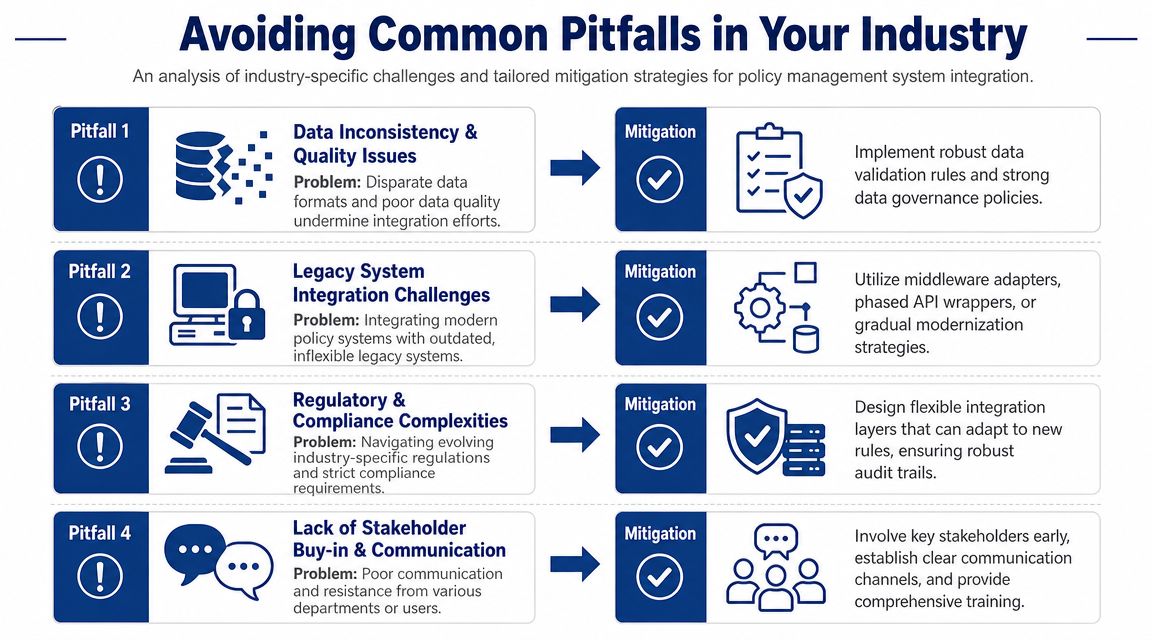
Avoiding Common Pitfalls in Your Industry
Generic integration advice usually breaks down at the point where industry constraints appear. Insurance has legacy cores, product-line variation, and long content histories. Healthcare has workflow pressure, fragmented governance, and frontline adoption issues. SMBs have lean teams and limited tolerance for architectural theatre.
That's why policy management system integration succeeds or fails differently by sector.
Healthcare Pitfalls
A recurring healthcare mistake is assuming the software rollout is the change programme. It isn't. A peer-reviewed study on institutionalisation of clinical information systems found that integration efforts are constrained by fragmented regulatory environments, weak institutional coordination, overlapping mandates, and professional resistance, even when national digital policies are clear, as discussed in this PMC study on clinical information systems institutionalisation.
That aligns with what teams see on the ground. If the policy workflow doesn't fit the clinician's reality, staff work around it. The integration may be technically sound and still fail operationally.
Mitigation in healthcare usually requires:
workflow design with frontline input
clear ownership across compliance, operations, and IT
exception processes that match clinical reality
role-based delivery that surfaces the right instruction at the right point in work
Another underused lens is access equity. Policy adherence isn't just about document availability. In care environments, language barriers and transportation barriers can affect missed appointments, longer stays, readmissions, and outcomes, as noted by Health Trust's discussion of access to care barriers. If an integrated policy system doesn't help frontline teams coordinate around those realities, it may centralise content without improving practice.
Insurance Pitfalls
Insurance programmes often underestimate content and rule sprawl. Policy changes touch underwriting, servicing, claims, billing, and customer communication. Older platforms may also store historical records in formats that don't fit modern APIs cleanly.
The common failure mode is partial integration. One team gets a polished workflow while another still works from shared drives, email attachments, or local exports. That creates mismatched evidence and inconsistent execution across the customer lifecycle.
What works better is a staged model:
Stabilise the central repository and version controls
Connect identity and audience logic
Integrate high-risk downstream workflows
Retire duplicate document stores where practical
SMB Pitfalls
SMBs usually don't fail because they lack sophistication. They fail because they bought too much of it.
The warning signs are easy to spot:
middleware with more features than the team can operate
custom logic for low-value edge cases
policy taxonomies nobody will maintain
rollout plans that assume enterprise-level support coverage
For smaller firms, the better path is usually a narrower scope, cleaner ownership, and fewer endpoints at the start. Simplicity is not a compromise if it's deliberate.
In every industry, the hard part isn't connecting systems. It's deciding which process deserves to be made standard before you automate it.
If you're planning policy management system integration and need delivery support across healthcare, insurance, or custom enterprise workflows, Cleffex Digital Ltd works on software integration and automation projects that connect operational systems, compliance processes, and industry-specific applications in Canadian and international environments.
The right integration approach doesn't start with tools. It starts with operating reality. If your organisation is dealing with siloed policy repositories, unreliable attestations, legacy platforms, or compliance-heavy workflows, Cleffex Digital Ltd can help design and implement a policy management system integration model that fits how your teams work.