

In 2024, 13.48% of EU enterprises used AI, rising to 41.17% among large enterprises, while information and communication firms reached 48.72% according to Eurostat's enterprise AI adoption data. That changes the conversation. AI in software development is no longer a speculative topic for innovation labs. It's part of how serious teams design, build, test, and run software.
For buyers in Canada and other regulated markets, that matters because competitive software delivery now includes AI-assisted workflows as a normal operating capability. Teams are using AI to reduce repetitive engineering work, improve review flow, support documentation, and catch issues earlier in the lifecycle. The practical question isn't whether AI belongs in software projects. It's where it adds value, where it creates risk, and how to adopt it without making delivery less predictable.
That's the lens we use at Cleffex. AI and software development only work well together when the implementation stays tied to business outcomes, engineering controls, and realistic team workflows. If you're also thinking about product strategy, this perspective on AI as a game changer for SaaS is a useful companion read because it frames the commercial shift behind the technical one.
Introduction: The New Standard in Software Creation
The old view was simple. Developers wrote code, QA tested it, operations deployed it, and AI sat outside the process as a future idea. That view doesn't match how modern delivery teams work now.
Today, AI is woven into day-to-day software creation. It helps teams turn vague requirements into clearer tickets, suggest implementation patterns, draft tests, summarise pull requests, and surface risky code before problems spread. Used properly, it behaves less like a replacement for engineers and more like a power tool that speeds up routine work while keeping humans responsible for judgment.
Why This Matters for Business Leaders
For a non-technical stakeholder, the main shift is operational. AI shortens the distance between idea and working software when teams use it in controlled ways. That can improve responsiveness for internal systems, customer portals, mobile apps, analytics tools, and integration projects.
The strongest teams don't ask AI to “build the product”. They give it bounded jobs inside an accountable process.
Practical rule: Use AI to accelerate execution, not to remove ownership.
Where Companies Get This Wrong
The common mistake is treating AI as a magic productivity switch. A team adds a coding assistant, sees faster output for a few weeks, then discovers review queues are growing, code consistency is slipping, and no one has agreed what acceptable use looks like.
That's why AI and software development have to be designed together. The process matters as much as the model. Regulated businesses, mid-market firms, and growing product companies need a method that fits existing delivery governance rather than bypassing it.
Understanding AI's Role in the Development Lifecycle
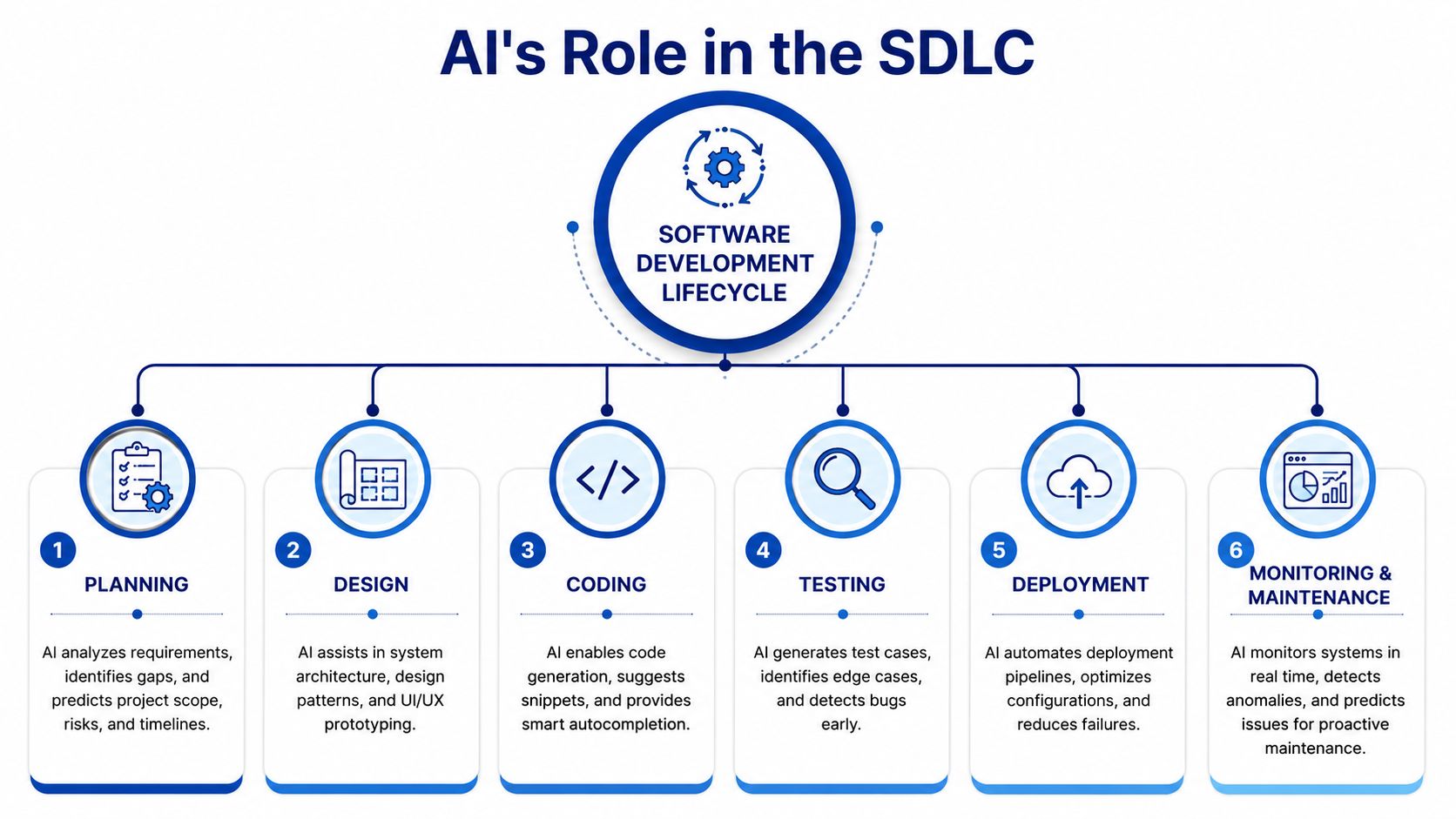
AI fits best when you see it as a smart assistant across the software development lifecycle, not a single feature bolted onto coding. It supports decisions, speeds up repetitive tasks, and helps teams focus their expertise where it counts.
Planning and Design
At the planning stage, AI can help teams turn workshop notes, support tickets, and business requirements into clearer user stories, edge cases, and acceptance criteria. It won't replace product judgment, but it can reduce the time spent structuring messy inputs.
In design, the value shifts to pattern recognition. Teams can use AI to compare architectural options, draft API contracts, propose data models, or generate first-pass UI copy. Product teams exploring feature strategy may also find this article on boosting product efficiency with AI helpful because it connects AI support to day-to-day product work rather than abstract transformation claims.
Coding and Testing
AI often first captures attention in coding, but coding is only one part of the story. Developers use AI for code completion, boilerplate generation, refactoring suggestions, and documentation support. That's useful, especially when teams need to move quickly without drowning in repetitive work.
Testing is often more valuable than coding assistance. AI can generate test cases from requirements, suggest negative scenarios, and help engineers think through edge conditions they may not have documented explicitly. In practice, this makes teams more systematic.
Deployment and Maintenance
AI also supports release and operational work. It can help review deployment scripts, summarise changes for release notes, classify incidents, and spot patterns in logs or application behaviour that deserve attention.
A simple way to explain this to stakeholders is to think of AI as a powerful tool for each phase:
| SDLC phase | What AI does well | What people still own |
|---|---|---|
| Planning | Organises requirements and drafts scenarios | Scope, priority, trade-offs |
| Design | Suggests patterns and structures | Architecture and compliance decisions |
| Coding | Generates boilerplate and assists refactoring | Code quality and implementation intent |
| Testing | Expands coverage and surfaces edge cases | Validation strategy and sign-off |
| Deployment | Supports automation and release tasks | Operational control and approval |
| Maintenance | Helps detect anomalies and summarise issues | Root cause analysis and remediation |
AI works best when the team narrows the task, reviews the output, and keeps the decision trail visible.
Practical AI Use Cases for Modern Development Teams
The most useful AI applications in software projects are practical, repetitive, and easy to verify. They remove friction from delivery. They don't remove the need for engineering discipline.
A particularly important point is that the key technical gain isn't only faster code generation. It's earlier defect containment, where AI helps analyse codebases, identify difficult edge cases, and flag higher-risk areas before manual review, as outlined in Pace University's discussion of AI in software development. That changes cost and quality dynamics across the project.
Use Cases That Create Real Value
AI-Assisted Coding for Routine Implementation
A developer building a form-heavy internal dashboard can use AI to generate validation rules, standard CRUD operations, or repetitive API wiring. The gain is less typing and more time for the tricky parts, such as business logic and exception handling.AI-Assisted Coding for Routine Implementation
A QA engineer takes a user story for insurance claims intake and asks AI to propose happy-path, negative, and edge-case scenarios. The human still reviews and refines the suite, but the first draft arrives faster and is often broader than what a rushed team might write manually.Code Review Triage
In busy repositories, reviewers often spend time on low-value comments. AI can help summarise pull requests, identify likely risk areas, and highlight files that deserve deeper attention. That makes senior reviewers more effective.Documentation and Knowledge Transfer
Teams lose time when system knowledge sits with two engineers. AI can draft API docs, onboarding notes, release summaries, and internal explanations from code and tickets. This is especially useful in team augmentation and handover scenarios.
What Works Better Than Generic Experimentation
The strongest adoption pattern is narrow and intentional. Start with tasks where output can be inspected quickly.
Examples include:
Boilerplate-heavy backend work
Regression-oriented test generation
Release note drafting
Legacy code explanation
Support ticket classification
If a team wants to move beyond ad hoc use, a structured delivery partner or an internal AI function should define the boundaries. For organisations evaluating implementation support, data science and AI development services are typically where model selection, integration approach, and workflow controls get formalised.
What Usually Disappoints
Fully hands-off generation of important product logic. That's where teams tend to create hidden rework.
AI can produce code quickly. It can't carry business accountability. In regulated environments, that distinction matters more than the speed of the first draft.
Key Implementation Patterns and MLOps
Many businesses adopt AI features before they're ready to operate them. That's where projects become fragile. A model works in a demo, but no one has defined how data is prepared, how versions are managed, how outputs are monitored, or what happens when performance drifts.
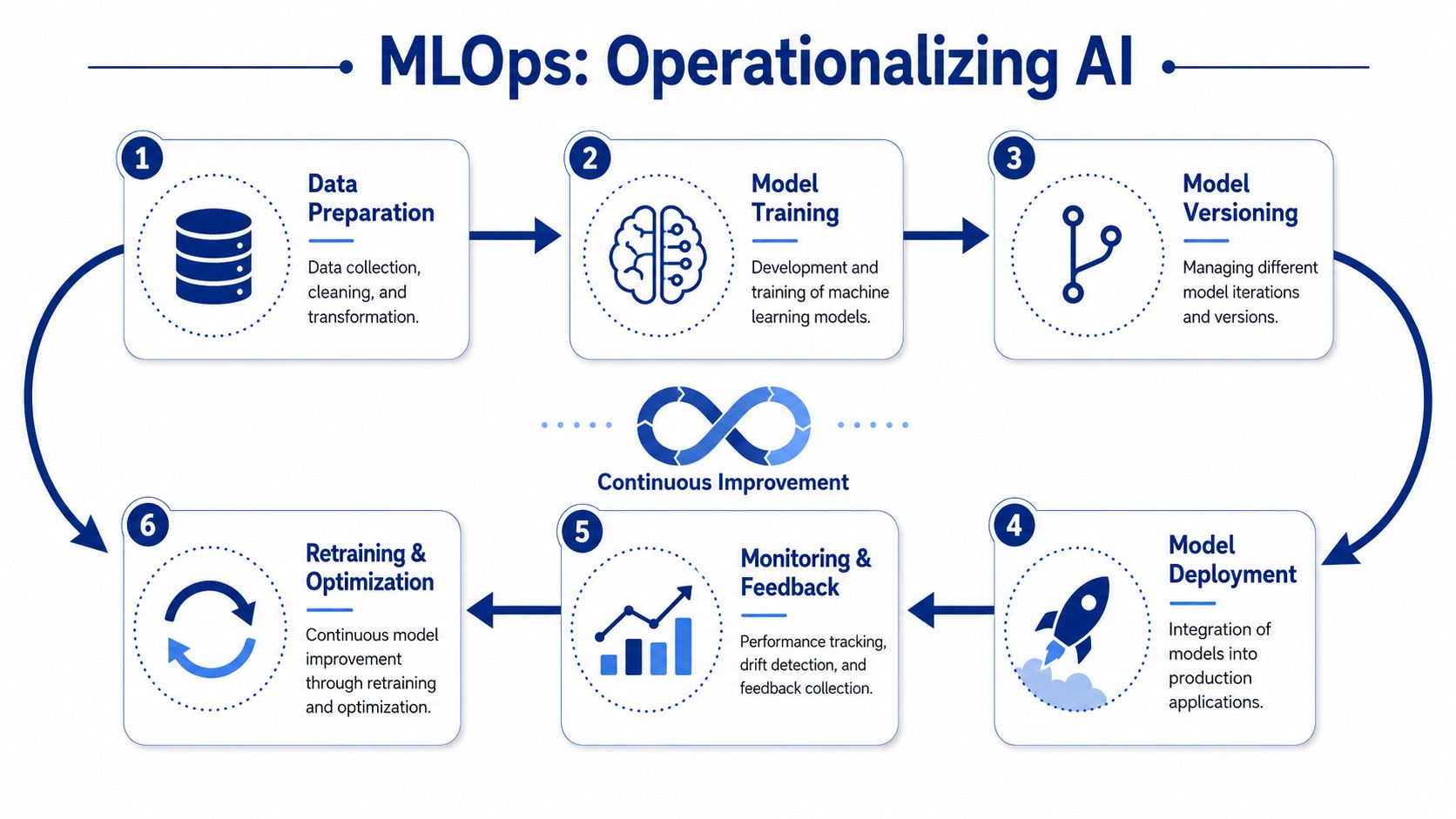
That operating layer is MLOps. The easiest way to understand it is to compare it with DevOps. DevOps gave software teams repeatable ways to build, test, release, and monitor applications. MLOps does something similar for AI-enabled systems, with extra attention on data, model behaviour, and retraining.
The Implementation Choices That Matter Most
A practical AI project usually starts with one of two routes.
The first is a pre-trained model approach. This is faster when the business problem is common, such as summarisation, classification, recommendation support, or document extraction. The second is a custom or fine-tuned approach, which makes more sense when the domain is specialised, the terminology is highly specific, or policy controls require tighter behaviour.
The right decision depends on the business context:
Use pre-trained models when speed, lower setup effort, and broad capability matter most.
Use domain-adapted models when the workflow depends on specialist data, stricter output control, or industry-specific terminology.
Use retrieval and grounding patterns when teams need AI to answer based on approved internal documents rather than open-ended generation.
MLOps Is Where Reliability Is Built
A sound AI implementation needs more than prompts and APIs. It needs operating discipline.
Key elements include:
Data Preparation
Teams need clean, relevant, permissioned data. Poor input quality produces weak output quality.Model Versioning
If nobody knows which model version produced which result, debugging gets messy fast.Deployment Controls
AI features should move through environments with the same care as application code.Monitoring and Feedback Loops
Teams need to watch for performance drift, failure patterns, and user feedback after release.
For engineering leaders thinking about how this connects to modern delivery pipelines, this article on AI in software development redefining DevOps gives useful context. If testing is a major concern, it's also worth reviewing current thinking around AI-powered testing, because test automation is one of the most practical bridges between AI experimentation and repeatable delivery.
The model is only part of the product. The operating system around it decides whether the feature stays useful in production.
AI in Action: Industry-Specific Examples
General AI advice is rarely enough for a buyer in a regulated or operationally complex sector. The value becomes clearer when you look at where software teams apply it.

Insurance and Claims Workflows
An insurance team often struggles with fragmented intake, inconsistent document handling, and manual review queues. AI can support claim classification, document summarisation, and case routing, so adjusters spend more time on judgment-heavy work.
That doesn't mean a model should approve claims on its own. It means the platform can organise incoming information, flag missing items, and help staff work in a more consistent flow. For firms exploring this direction, AI solutions in insurance are a relevant example of how domain-specific software and AI can fit together.
Healthcare and Life Sciences
Healthcare organisations need stronger controls around privacy, traceability, and workflow safety. In that setting, AI is most useful when it supports clinicians and operations teams rather than acting independently. Common patterns include clinical documentation support, triage assistance, scheduling optimisation, and structured data extraction from forms or records.
The implementation standard is higher here. Auditability matters. Integration with existing systems matters. So does the handoff between AI output and human approval. Businesses planning these projects usually need secure integration work alongside AI capability, which is why healthcare software integration services are often part of the same roadmap.
Automotive, Small Business, and Startup Delivery
Automotive service businesses can use AI inside booking systems, service reminders, customer communication flows, and internal reporting. The pattern is operational support, not novelty. The software should reduce missed handoffs and make customer interactions easier to manage.
Startups and mid-market firms usually care about a different outcome. They want to ship an MVP or a new internal platform without building unnecessary complexity. AI helps here by speeding up prototyping, generating first-pass documentation, and supporting smaller teams that need broader coverage across product, engineering, and QA.
In most sectors, the highest-value AI work sits inside an existing process that already matters to the business.
Navigating Risks and Measuring ROI
AI can improve throughput. It can also create hidden engineering debt when teams accept faster output without stronger review discipline.
That tension is already visible. DX reports that AI assistants are used across 91% of engineering organisations, users save an average of 3.6 hours per week, and daily users see 60% higher PR throughput, while the same source warns that teams need quality guardrails and acceptable-use policies to avoid shadow AI risks, as described in DX's AI-assisted engineering guidance. That's the trade-off many organisations miss.
The Risks That Deserve Real Attention
A balanced AI strategy should address at least four operational concerns:
Data Exposure
Teams need clear rules on what code, documents, and customer information can be sent to external tools.Inconsistent Output Quality
AI may produce workable code one day and weak code the next if prompts, context, or constraints are loose.Review Burden
More generated code can increase the volume of material that senior engineers must inspect.Policy Drift
If some staff use approved tools and others use unreviewed ones, governance breaks down quickly.
How To Measure Return Properly
The wrong metric is “how much code was generated”. The right question is whether delivery improved without damaging quality, compliance, or maintainability.
A sensible review framework includes:
| Measure | Why it matters |
|---|---|
| Cycle time | Shows whether work moves faster from start to completion |
| Review responsiveness | Reveals whether AI is helping or overloading reviewers |
| Deployment frequency | Indicates whether the release flow is becoming smoother |
| Defect escape patterns | Shows whether speed is creating downstream quality problems |
What to watch: If output rises but review queues, rollback effort, or defect follow-up rise with it, the team isn't improving. It's shifting work downstream.
Your Phased AI Rollout Strategy With Cleffex
Most businesses shouldn't start with a broad AI programme. They should start with a contained business problem, a measurable pilot, and a route to scale if the pilot works.
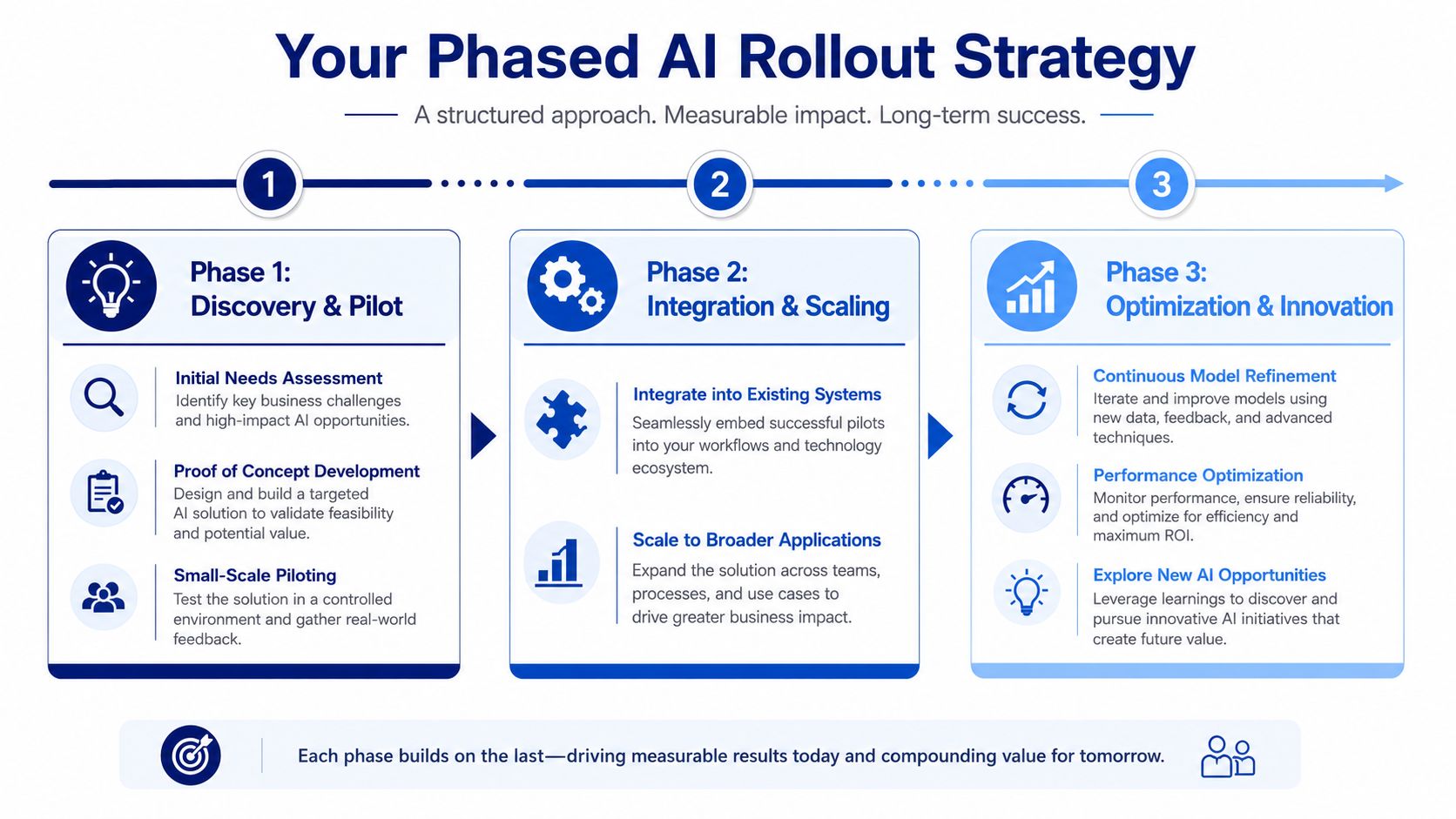
Phase 1: Discovery and Pilot
Pick one workflow where AI can help without raising unnecessary risk. Good candidates include internal document handling, support triage, test generation, reporting assistance, or development workflow support.
Define the baseline before changing anything. The most effective way to measure AI's impact is by benchmarking pre-AI cycle times, reviewing responsiveness, and deployment frequency, then comparing changes over time, as explained in Appfire's guidance on measuring AI in software development. Without that baseline, teams can't tell whether they've improved the process or just added activity.
Phase 2: Integration and Scaling
Once a pilot proves useful, integrate it into the workflow. That means connecting it to source systems, defining approval points, assigning ownership, and documenting acceptable use.
This is usually where businesses discover whether they're building a durable capability or a temporary demo. Mid-market and regulated teams often benefit from a staged adoption pattern similar to what's discussed in AI adoption in Canadian enterprises, because the primary challenge is operational fit, not initial enthusiasm.
Phase 3: Optimisation and governance
After rollout, the focus shifts. Teams refine prompts, tune workflows, improve review patterns, and decide where AI shouldn't be used. Governance becomes part of delivery, not a separate compliance exercise.
A practical engagement here may include architecture support, workflow integration, model evaluation, and AI implementation planning through Cleffex Digital Ltd as one delivery option among others. The useful test is straightforward: does the AI feature reduce friction in a controlled way, and can your team support it over time?
Frequently Asked Questions About AI in Software Development
Will AI replace software developers?
No. It changes the job more than it removes it. Developers still define architecture, make trade-offs, review outputs, handle edge cases, and stay accountable for software quality. AI is good at acceleration. It isn't good at owning the consequences.
What’s the difference between AI and machine learning?
AI is the broader concept of software performing tasks that usually need human-like reasoning or pattern recognition. Machine learning is one approach within AI, where systems learn from data rather than only following fixed rules. In software projects, people often use “AI” as the umbrella term.
Where should a small or mid-sized business start?
Start with one bounded use case. Choose something measurable, low-risk, and close to an existing workflow problem. Internal support tools, reporting assistance, documentation generation, and test support are often stronger starting points than customer-facing autonomous features.
Is AI in software development only useful for large enterprises?
No. Large enterprises may have more budget and more formal governance, but smaller firms often benefit quickly because AI can reduce repetitive work across lean teams. The key is choosing a use case that fits the team's maturity and review capacity.
What’s the biggest mistake companies make?
They optimise for speed alone. Faster output is only useful if the code, documentation, tests, and decisions remain reviewable and supportable.
If you're assessing where AI fits in your software roadmap, Cleffex Digital Ltd can help you evaluate practical use cases, plan a phased rollout, and integrate AI into delivery workflows without losing control of quality, governance, or business priorities.