

Canadian insurers have already committed budget to digital transformation, but claims remain the weak link. A Reuters-reported survey cited by Collision Repair Magazine found that 79% of Canadian insurance respondents had invested in data analytics, 72% had invested in automation, yet only 18% had used automation in claims, compared with 32% using data analytics in claims. That gap is the story behind insurance claims software development in Canada. The work is no longer about adding a portal; it's about building the orchestration layer that can survive regulation, legacy systems, and surge events.
What matters in practice is how claims software connects intake, triage, document handling, assessment, payment, and auditability without creating brittle handoffs. The insurers that get this right aren't chasing novelty. They're replacing manual review with controlled automation, and they're doing it in a market where weather losses, compliance pressure, and bilingual service expectations all land on the same workflow.
Why Canadian Insurers Are Rethinking Claims Technology
Canadian insurers are spending, but claims still absorb the friction. The Reuters-reported survey cited by Collision Repair Magazine showed that 79% of respondents had invested in data analytics and 72% in automation, while only 18% had used automation in claims. That gap is the key signal. Budget is no longer the issue; production control is.
Claims teams are being asked to do more with older workflows. Intake, triage, fraud review, payment, and audit logging still need to hold up under regulatory review, bilingual service expectations, PIPEDA, Quebec Law 25, and legacy policy and billing integrations. In practice, the winning claims platform is not the prettiest portal. It is the orchestration layer that keeps rules, documents, and exceptions aligned when volume spikes.
The market is buying capability, not polish.
That is why the hidden work matters. If a platform cannot route work correctly, preserve decision history, and support human review where judgment is required, it will fail in production even if the pilot looks clean. I have seen that happen when teams treat compliance as a later layer instead of part of the workflow design.
Catastrophic weather has sharpened the pressure. Insurance Business Canada reported C$2.1 billion in insured damage from extreme weather in 2021, citing the Insurance Bureau of Canada. That kind of loss environment exposes brittle claims operations fast, especially when adjusters need faster evidence capture, faster routing, and faster payment decisions.
For teams comparing adjacent vehicle-loss context, the salvage title insurance rate guide is a useful reference for how prior damage history affects claims and underwriting decisions.
Discovery and Requirements for Claims Platforms
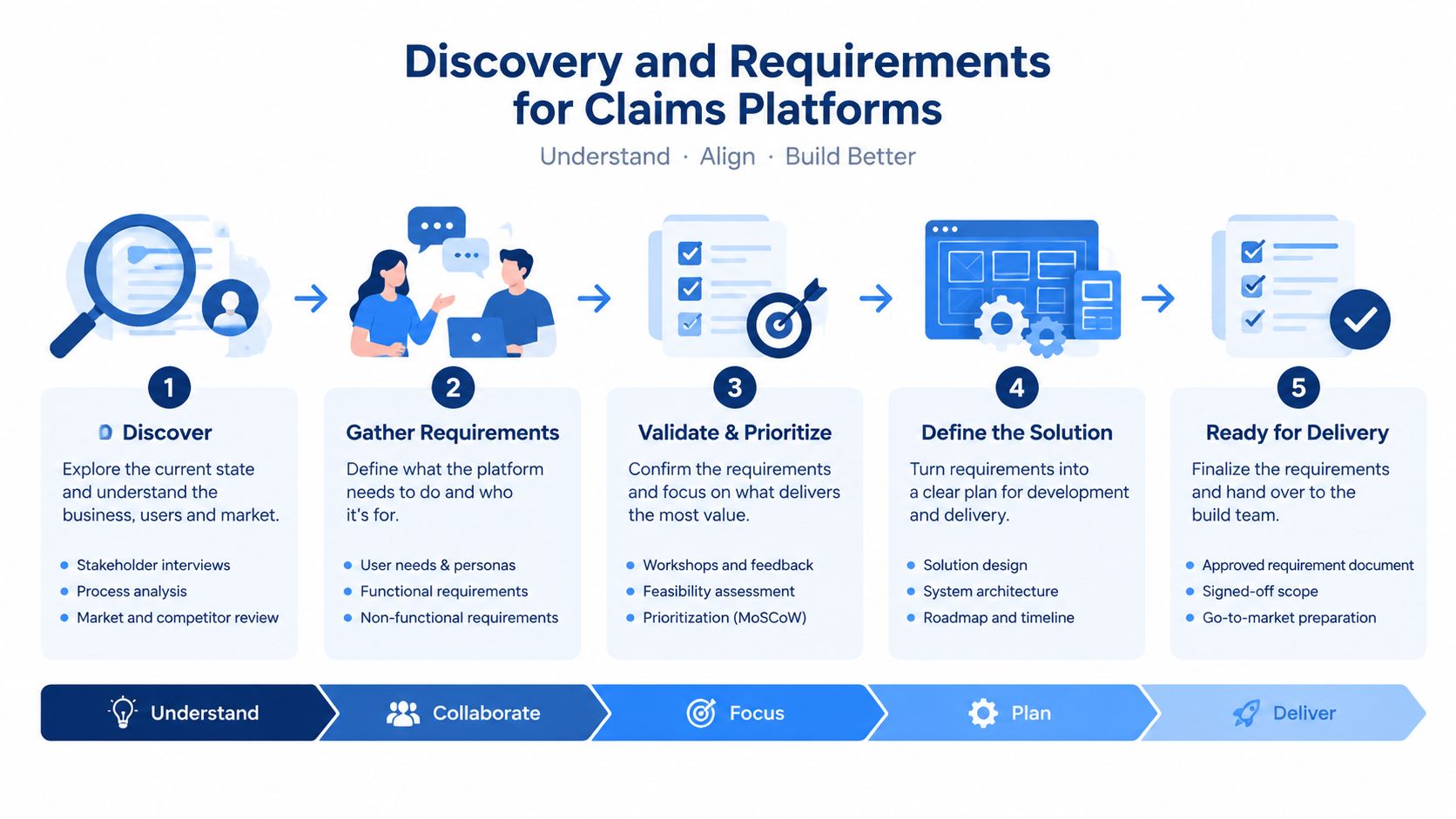
The best claims platforms start with process truth, not feature wish lists. In Canada, that means mapping where work is still manual, where people need judgement, and where the system should enforce repeatable rules. The Insurance Council of BC's State of InsurTech Report found that 75% of claims are reviewed manually with little to no technological support, and only 4% of companies said they fully automate claims assessment in most cases. Those numbers are a warning. If the discovery work misses exception handling, the pilot will look fine in demos and fail in production.
Start with the full claims lifecycle
Discovery needs to trace the path from First Notice of Loss to settlement, not just the front door. Intake, document capture, policy validation, triage, assessment support, approval, payment, and audit trail creation each have different rules. Some are deterministic; others depend on a human adjuster. Treating them all the same is where teams build elegant screens that never leave the pilot environment.
A useful interview sequence is simple:
Adjusters first: Ask where they lose time, where they re-key data, and which exceptions break the day.
Operations second: Map queues, escalation rules, and approval thresholds.
Compliance third: Confirm retention, consent, bilingual experience, and reporting obligations.
IT last: Identify legacy dependencies, identity boundaries, and integration constraints.
Digitise in layers, not all at once
The safest requirement stack is layered. Digitise intake and document handling first, then add decision support like OCR and image recognition, then introduce human-in-the-loop AI only after the controls are stable. That sequence fits the BC report's signal that many firms are still reviewing claims manually, because it reduces the chance of automating bad process logic instead of fixing it.
Build for verification before you build for speed.
The Canadian regulatory shape matters here too. Requirements need to account for PIPEDA, Quebec's Law 25, and bilingual policyholder interfaces from the start, because retrofitting those pieces later is expensive and usually visible to customers. For teams choosing a delivery partner, the practical considerations in finding your insurance IT development partner are worth reviewing before you lock scope.
Core Features and Workflow Architecture
A claims platform only works when each feature hands cleanly to the next one. In practice, that means designing around the claims lifecycle, not around departments. The core set should cover FNOL intake, document normalisation, automated routing, status communication, assessment support, payment orchestration, and audit logging as one flow.
Build the front end to reduce rework
FNOL should accept the channels claimants already use, then normalise the data immediately. Poor intake creates downstream exceptions, and those exceptions cost more than the form design. Once documents arrive, the system should classify them, check completeness, and attach consistent metadata so adjusters are not sorting files by hand.
Treat surge handling as a design requirement
Extreme weather is not an edge case in Canada. As noted earlier, the same surge losses make capacity planning part of core architecture. The platform needs queue management, prioritisation rules, and image-based evidence handling that can keep pace when claims arrive in bursts.
The fastest claims platforms earn their speed by removing unnecessary handoffs.
Make the workflow reusable
Opifiny's 2024 disclosure is a useful benchmark for workflow design. It reported reduced average medical-information request turnaround time from 27 days outside the platform to 10 days inside it, along with a 300% year-over-year increase in claims sent (Business Wire). The lesson for claims architecture is straightforward. Reusable digital workflows matter once adoption stabilises, because repeatable requests, provider reuse, and paper-to-digital migration all need to run without dragging service levels down.
For teams looking for practical pattern ideas, insurance claims tech examples from AI for Insurance can help translate lifecycle steps into real software components.
System Architecture and Integration Strategy
Canadian claims software development is less about building a portal and more about orchestrating a regulated operating model. The architecture has to connect policy administration, claims, billing, document services, signature tools, and external data sources without breaking auditability. Cloud-native and hybrid are both valid choices, but the decision changes resilience, release speed, and how much legacy can be modernised without disrupting operations.
Cloud-native versus hybrid
Cloud-native works well when the claims team needs elastic capacity, faster change delivery, and clearer service boundaries. Hybrid makes sense where core policy systems are still tightly coupled to older infrastructure and cannot move quickly. The trade-off is control versus agility. Cloud-native favours modular releases and simpler scaling, while hybrid often lowers migration risk at the cost of slower integration work.
API-first integration as the default pattern
Integrations work when they respect what already exists rather than forcing everything into one new database. API-first patterns let the claims workflow connect policy admin systems, CRM, imaging, payment rails, and partner services without repeated manual entry or brittle point-to-point scripts. They also make observability easier, because each request and response can be traced across systems instead of disappearing into a fax queue or inbox.
Ontario's fax dependence shows why this matters. As Business Wire reports, citing Ontario Ministry of Health estimates, paper intake still runs at a massive volume. Replacing it is not just a convenience upgrade. It is an integration problem that has to handle document normalisation and idempotent request tracking so duplicate submissions do not create duplicate work.
Legacy systems still need a place in the design
The integration layer belongs between modern services and older systems, not on top of them. It gives users a stable workflow while the platform handles routing, reconciliation, and exception handling behind the scenes. That matters in Canada, where insurers have to manage PIPEDA, Quebec Law 25, bilingual service, and legacy policy or CRM dependencies from the start.
A practical pattern set for that work is laid out in claims system integration for Canadian insurers. In production, the orchestration layer is where a platform either scales cleanly or turns into a stack of expensive one-off fixes.
AI Automation and Defensible Decision-Making
Speed is useful, but in claims it's not enough. Canadian insurers need automation that can be defended in front of auditors, adjusters, and regulators, especially when claim outcomes affect people's money and medical information. The core design question is not whether AI can act quickly. It's whether the system can explain what happened, preserve human oversight, and stay within privacy bounds.
Automate where the rules are clear
Robotic process automation is still one of the cleanest places to start. A UiPath case study on SCM Insurance Services reported that removing manual data entry from FNOL through RPA made new insurance claims complete 80% faster. That kind of gain is credible because it attacks waste, not judgement. It removes re-keying, not decision rights.
Keep AI in a governed lane
AI works best when it supports triage, fraud review, and evidence sorting, not when it overrides human judgement. Canadian market commentary shows that life and health insurers are expanding pooled claims-data efforts and using AI to spot fraud more quickly, but adoption is still early and concentrated among larger insurers. That tells you the operating model still matters more than the model itself.
A strong claims stack uses AI for three jobs:
Prioritisation: Route low-risk, routine claims faster.
Detection: Flag anomalies for human review.
Support: Summarise documents, images, and history for the adjuster.
The hard part is not the model. It's the controls around it. Every automated recommendation needs reason codes, audit trails, and escalation paths. That's especially important in a Canadian environment where privacy compliance and explainability can't be bolted on after launch.
If you want a useful adjacent example of AI interpreted through evidence-heavy operations, the Fleetalyse AI video analytics guide offers a practical view of how machine analysis still depends on sound process design. The same principle applies in claims. AI should make the workflow clearer, not less accountable.
For teams also evaluating service design, the Cleffex perspective on insurance AI software development sits naturally beside these questions because the software challenge is as much about governance as it is about automation.
MVP Planning and Scaling Roadmap
A claims MVP should solve one narrow problem well. If it tries to cover every line of business, every exception path, and every downstream system at once, it usually turns into a long integration project with weak adoption. The better approach is to pick a workflow that already causes visible friction, then prove that the platform can reduce manual touch without weakening controls.
Start with one contained workflow
Choose a claim type with clear rules, limited edge cases, and obvious manual waste. Build intake, document capture, routing, and status updates first. Leave advanced assessment automation until the data is clean and the exception logic is proven. That sequencing is important because Canadian claims failures often appear as missing records, broken handoffs, or reporting gaps, not obvious UI defects.
Plan for observability from day one
Logging, audit trails, and exception dashboards are part of the product, not an afterthought. If a claim is delayed, the team should be able to see where it stalled, which system handled the last event, and whether the issue was data, rules, or integration. Without that visibility, scaling just means you can fail faster.
A practical roadmap usually looks like this:
Phase one: Intake, document handling, and workflow tracking.
Phase two: Automated routing, OCR, and validation rules.
Phase three: Human-in-the-loop decision support and case prioritisation.
Phase four: Broader orchestration across products and regions.
The pace should match how quickly the organisation can absorb change. Ontario's fax-heavy environment and the BC report's manual-review numbers both point to the same constraint. Adoption, verification, and exception handling need to stabilise before AI can carry more weight. That's why burst traffic support and provider reuse matter as much as feature count.
Post-Launch Operations and Continuous Improvement
A claims platform does not prove itself at go-live. It proves itself when claims start flowing through real staff, real customers, and real exceptions. The insurers that keep systems healthy treat monitoring, user feedback, exception analysis, and regulatory upkeep as part of the product lifecycle, not as support work handed to another team.
Watch the workflow, not just the server
Post-launch analytics should track where claims stall, how often automation paths are accepted, and which exceptions keep recurring. That gives product teams evidence for whether a rule is too strict, a form is confusing, or an integration is failing. In claims, the useful signal is usually operational, not cosmetic.
Canadian insurers are moving toward cloud-native, modular systems and using automation tools to speed claims handling, while the Government of Canada note on claims automation and service delivery points to ongoing attention on traceability and control. Maintenance therefore goes beyond patching software. It means keeping the operating model aligned with compliance and service expectations as both shift, including PIPEDA, Quebec Law 25, bilingual UX, and legacy integrations that still carry real volume.
Durable claims software improves through exceptions, because every exception reveals the next fix.
The strongest teams review claims analytics with operations, compliance, and engineering together. A simpler upload flow, a tighter verification rule, or a better escalation path can all come out of that review. The platform improves when the people closest to the claim have a clear way to push evidence back into the roadmap.