

USD 33.24 billion in 2024, with a projection of USD 125.84 billion by 2033 at a 16.5% CAGR. That's where the Canadian healthcare cloud solution market stands, according to this market analysis. For Canadian clinics, hospitals, insurers, and health startups, that number changes the conversation. Cloud is no longer an IT upgrade. It's operating infrastructure.
The practical question isn't whether healthcare will move further into the cloud. It already has. The central question is how to design cloud healthcare solutions that work in Canada, where privacy rules, provincial fragmentation, rural connectivity, and clinical workflow realities all push against generic vendor playbooks.
Most failed projects don't fail because the software lacked features. They fail because teams underestimated governance, overestimated internet reliability, or tried to force a hospital architecture onto a small clinic. Good cloud decisions start with the service model, but they succeed only when security, interoperability, clinician workflow, and patient access are designed together.
The Future of Canadian Healthcare Is in the Cloud
A modern healthcare organisation needs a digital central nervous system. That's the clearest way to think about cloud healthcare solutions. The cloud connects records, virtual visits, secure messaging, reporting, third-party apps, and decision-support tools so information can move to the right person at the right time.
Without that connected layer, care stays fragmented. A front desk team books appointments in one system, clinicians document in another, billing runs elsewhere, and data for reporting needs manual extraction. That setup might be tolerable at low scale, but it breaks down fast when a clinic adds locations, launches virtual care, or needs faster coordination with labs, pharmacies, and specialists.
Canadian providers are already moving in this direction. The market itself reflects that shift, and so does the broader push toward digital care delivery, data accessibility, and scalable infrastructure described in Cleffex's perspective on digital healthcare transformation in Canada.
Cloud healthcare solutions matter when they reduce friction between care delivery, administration, and compliance. If they only relocate servers, they haven't solved much.
For large hospitals, the cloud often becomes the integration layer that ties legacy systems to newer services. For smaller clinics, it can be the first real chance to standardise operations without building an internal infrastructure team. For startups, it's the only practical way to launch quickly while keeping room for future compliance and interoperability requirements.
The future isn't just “paperless healthcare”. It's healthcare that can coordinate, adapt, and scale without forcing clinicians and administrators to work around the technology.
Core Components of a Digital Health Ecosystem
A workable digital health ecosystem isn't one product. It's a stack of capabilities that need to fit together cleanly.
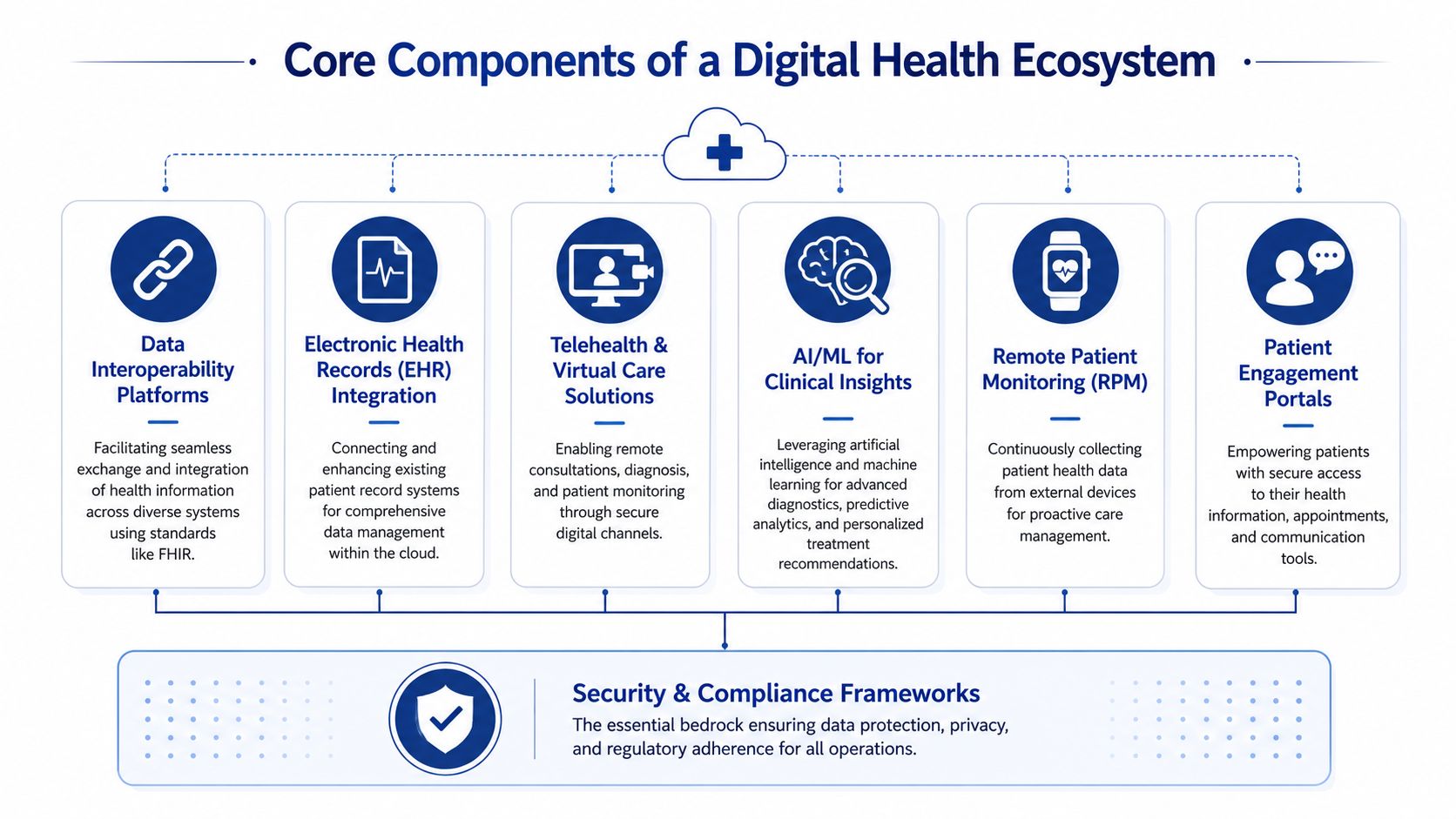
EHR and EMR hosting
For most providers, the electronic health record is still the centre of gravity. In cloud healthcare solutions, the core issue isn't just where the EMR runs. It's how reliably clinicians can access charts, results, notes, and documentation across locations and care settings.
A clinic should ask three direct questions:
Can staff reach records from every approved location?
Multi-site organisations need consistent access patterns, not improvised remote workarounds.
Can the system support structured data, not just scanned files?
Analytics, automation, and clinical decision support all depend on usable data.
Can the platform integrate cleanly with billing, scheduling, and patient communication tools?
If not, staff end up duplicating work.
Cloud-hosted EHR environments work best when teams simplify role design, screen layouts, and documentation workflows before migration. If a broken process moves to the cloud unchanged, it stays broken.
Interoperability and FHIR
Interoperability is the difference between a digital system and a digital ecosystem. In practice, that means cloud platforms need to exchange information with labs, pharmacies, imaging providers, insurers, and external applications without brittle custom work every time.
FHIR matters here because it gives teams a shared way to structure and exchange health data. It doesn't solve every integration problem, but it gives architects and vendors a better starting point than proprietary interfaces that are expensive to maintain.
A good interoperability layer does four things well:
| Need | What good looks like |
|---|---|
| Clinical exchange | Data moves between systems with minimal manual re-entry |
| Third-party integration | New tools can connect through documented APIs |
| Governance | Access is controlled by role, purpose, and auditability |
| Data quality | Standardised fields reduce reporting and workflow errors |
Telehealth and virtual care platforms
Virtual care isn't just video. It includes scheduling, identity verification, secure communications, documentation, follow-up, and patient instructions. That's why many telehealth rollouts disappoint. Teams buy the meeting tool and forget the care pathway around it.
For Canadian clinics, virtual care platforms need to handle uneven regulatory expectations and support local workflow choices. Some organisations need simple follow-up visits. Others need triage, intake, asynchronous messaging, and forms that feed directly into the patient record.
What works:
Integrated booking and reminders so no one manually reconciles calendars
Clinical documentation hooks so providers don't chart in two places
Clear patient instructions for joining, consent, and follow-up
Fallback options when video quality fails
What doesn't work is treating virtual care as an isolated channel. Patients don't experience it that way.
Analytics and reporting engines
Healthcare organisations generate operational and clinical data every day, but many still struggle to turn it into action. Cloud analytics platforms help by centralising data from scheduling, encounters, claims, messaging, and external systems into a reporting environment that leaders can use.
The main value isn't fancy dashboards. It's decision speed. Teams can spot bottlenecks, coding inconsistencies, no-show patterns, referral delays, or reporting gaps faster when the data isn't trapped inside separate systems.
Practical rule: Build the reporting model around operational decisions first. Start with access, flow, utilisation, and compliance needs. Add advanced analytics later.
AI and machine learning support
AI in healthcare should start with narrow, accountable use cases. Documentation support, triage assistance, classification, summarisation, and patient communication are easier to govern than tools that make direct clinical recommendations.
The cloud matters because AI workloads need flexible compute, secure data pipelines, and integration with source systems. But organisations shouldn't jump to AI before they've cleaned up identity management, auditability, and data structure. Otherwise they create faster confusion.
Secure APIs and patient engagement
Secure APIs make the ecosystem extensible. They let providers connect patient portals, intake forms, remote monitoring services, insurer workflows, and speciality applications without rebuilding the stack every time.
Patient engagement portals are often underestimated. A portal isn't just a convenience layer. It's where appointment workflows, forms, results access, education, and secure communication meet. When designed properly, it reduces inbound calls and administrative chasing. When designed poorly, staff still do all the work manually while patients ignore the tool.
For smaller clinics, simplicity usually wins. For hospital networks, governance and integration depth matter more. In both cases, the platform should support care delivery, not create another login maze.
Strategic Benefits Beyond the Buzzwords
The standard cloud sales pitch focuses on scalability, flexibility, and savings. Those benefits are real, but they're too abstract to guide healthcare decisions. Providers need to think in terms of care continuity, operational resilience, and service design.
Better continuity across fragmented care
Patients rarely move through one system. They move between family practice, specialist care, diagnostics, pharmacy, virtual follow-up, and insurer or administrative touchpoints. Cloud healthcare solutions help when they reduce the handoff failures between those points.
That doesn't mean every provider sees every record. It means the right teams can access the right information quickly enough to make care safer and operations smoother. In day-to-day practice, that often shows up as fewer callbacks, less duplicate intake, faster referral handling, and less time spent hunting for documents.
Faster service changes without rebuilding everything
Healthcare demand shifts. Clinics add virtual programmes. Hospitals open new service lines. Startups test care models that may need to pivot quickly. On-premise environments can support that, but changes are often slower because infrastructure and deployment work sit in the critical path.
Cloud-based environments make it easier to introduce new patient-facing services, automate specific workflows, or connect a specialised vendor without redesigning the whole environment. That agility matters more than generic “innovation”. It lets organisations respond without spinning up another disconnected tool.
Stronger collaboration between business and clinical teams
A good cloud programme narrows the gap between operations and care delivery. Administrative teams need scheduling, billing, reporting, and communication tools to work in sync. Clinical teams need records, alerts, results, and notes to flow without delay. The cloud is useful when both sides use the same underlying data architecture instead of maintaining separate islands.
Three strategic outcomes usually matter most:
Operational clarity because leaders can see workflow bottlenecks sooner
Service consistency because multi-site teams work from shared systems and controls
Technology readiness because future integrations become easier, not harder
A more durable foundation for startups and smaller providers
Smaller organisations often assume cloud strategy is mainly for large hospital systems. That's backwards. Small and medium clinics usually benefit sooner because they have less room for administrative waste and less capacity to maintain brittle local infrastructure.
A startup launching virtual care, remote intake, or insurer-connected workflows doesn't need the biggest platform. It needs a stable foundation that can add compliance controls, integrations, and patient-facing services without major rewrites. That's the strategic value. Not trend alignment, but fewer dead ends.
Mastering Security and Compliance in the Health Cloud
Security decisions in Canadian healthcare aren't abstract governance exercises. They shape architecture, vendor selection, workflow design, and even where data can physically reside.
The baseline requirement is clear. In the Canadian region, cloud healthcare solutions must be PIPEDA-eligible and store data exclusively on Canadian servers to comply with federal privacy laws and provincial PHIPAs. AWS HealthLake's launch in Canada reflects that requirement, with a managed service designed for Canadian healthcare data compliance in the CA region, as outlined in AWS HealthLake's Canada launch details.
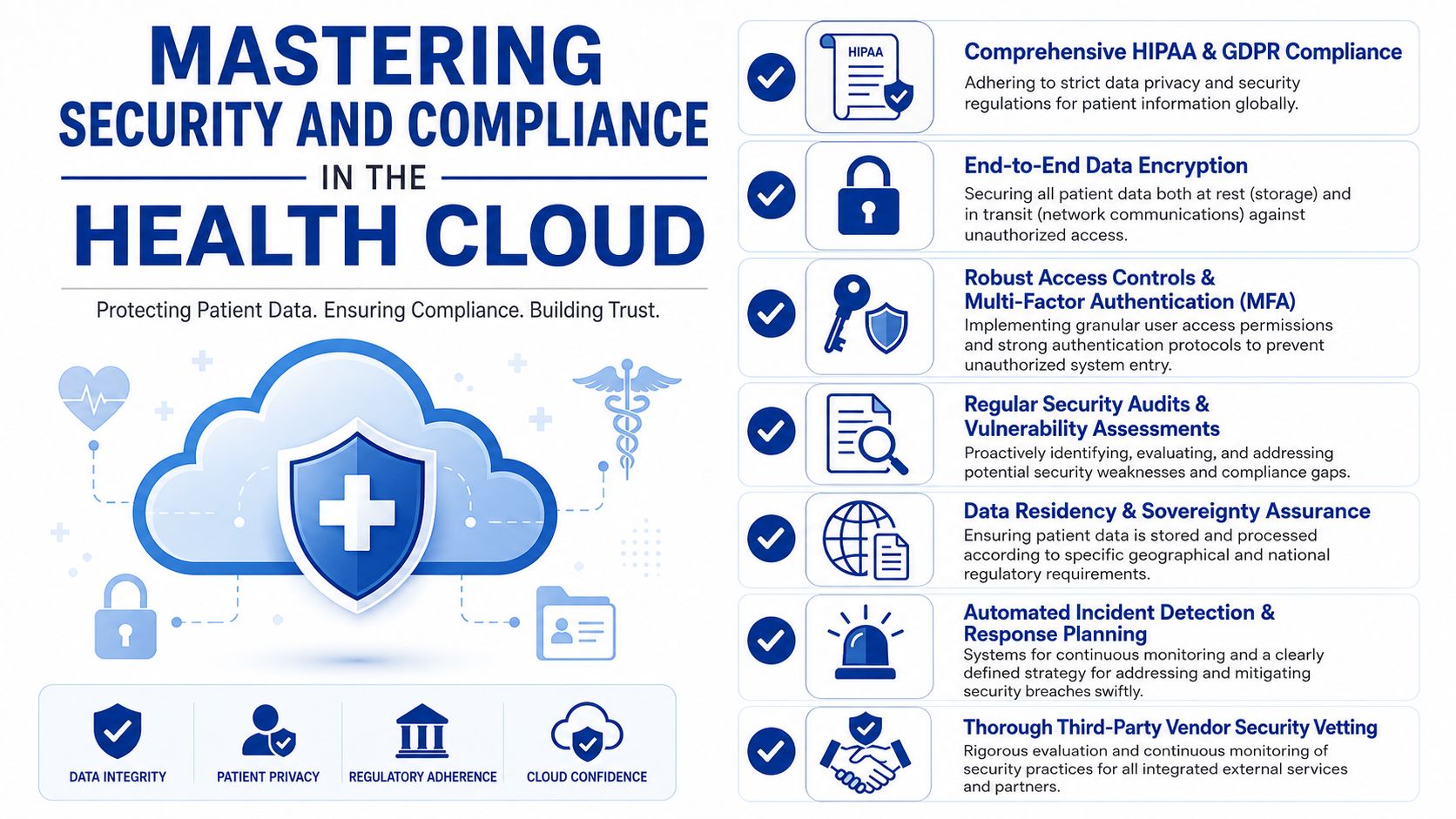
Data sovereignty is an architectural constraint
Many teams still treat residency as a procurement checkbox. It isn't. If patient data, backups, logs, analytics stores, or integrated services drift outside Canada, the organisation may create compliance exposure even if the main application claims Canadian hosting.
That's why security reviews need to inspect the full data path:
Primary storage for application and record data
Backup and recovery targets
Log retention locations
Analytics and reporting environments
Third-party integrations that may copy or cache data
A vendor can say “hosted in Canada” and still leave gaps in adjacent services. Buyers need that mapped in writing.
The controls that can't be optional
Technical security architecture for Canadian healthcare cloud environments needs a layered model. The required controls include AES-256 encryption at rest, TLS 1.3 in transit, role-based access control using least privilege, multi-factor authentication for all identities accessing PHI, and immutable audit logging of all PHI access events.
Those controls matter differently at different layers:
| Control | Why it matters in practice |
|---|---|
| AES-256 at rest | Protects stored patient data if storage media or repositories are compromised |
| TLS 1.3 in transit | Reduces exposure while data moves between users, apps, and integrated services |
| RBAC | Limits staff to the minimum access needed for their role |
| MFA | Adds a barrier when credentials are stolen or misused |
| Immutable audit logs | Supports investigations, oversight, and accountability |
Security posture is rarely broken by one dramatic failure. It's usually weakened by small exceptions, over-permissioned users, and unreviewed integrations.
Third-party risk is where many programmes slip
Healthcare systems rely on file exchange, specialist referrals, insurers, diagnostics partners, and external support vendors. That means secure transfer mechanisms matter just as much as the application itself. If your team needs a practical overview of methods for exchanging sensitive documents, this guide on discovering secure file transfer options is a useful operational reference.
The same principle applies to implementation partners, add-on apps, and support providers. Every third party touching PHI should be assessed for residency handling, access controls, logging, and incident response expectations.
Compliance has to survive real workflow conditions
The strongest policy set won't help if staff can't do their jobs without bypassing it. Security architecture has to support clinic reality, shared care models, after-hours access, and vendor support procedures.
That usually means:
Designing roles by actual workflow, not by job title alone
Separating admin access from clinical access
Reviewing privileged accounts regularly
Documenting break-glass procedures for urgent situations
Testing recovery and audit retrieval, not just writing policy
For a broader look at how these controls fit into healthcare systems, data security in healthcare information systems gives useful implementation context.
Designing Your Cloud Architecture and Migration Roadmap
Most healthcare migrations go off course in one of two ways. Either the organisation moves too cautiously and carries technical debt into the new environment, or it moves too fast and disrupts operations. The right roadmap balances risk reduction with momentum.
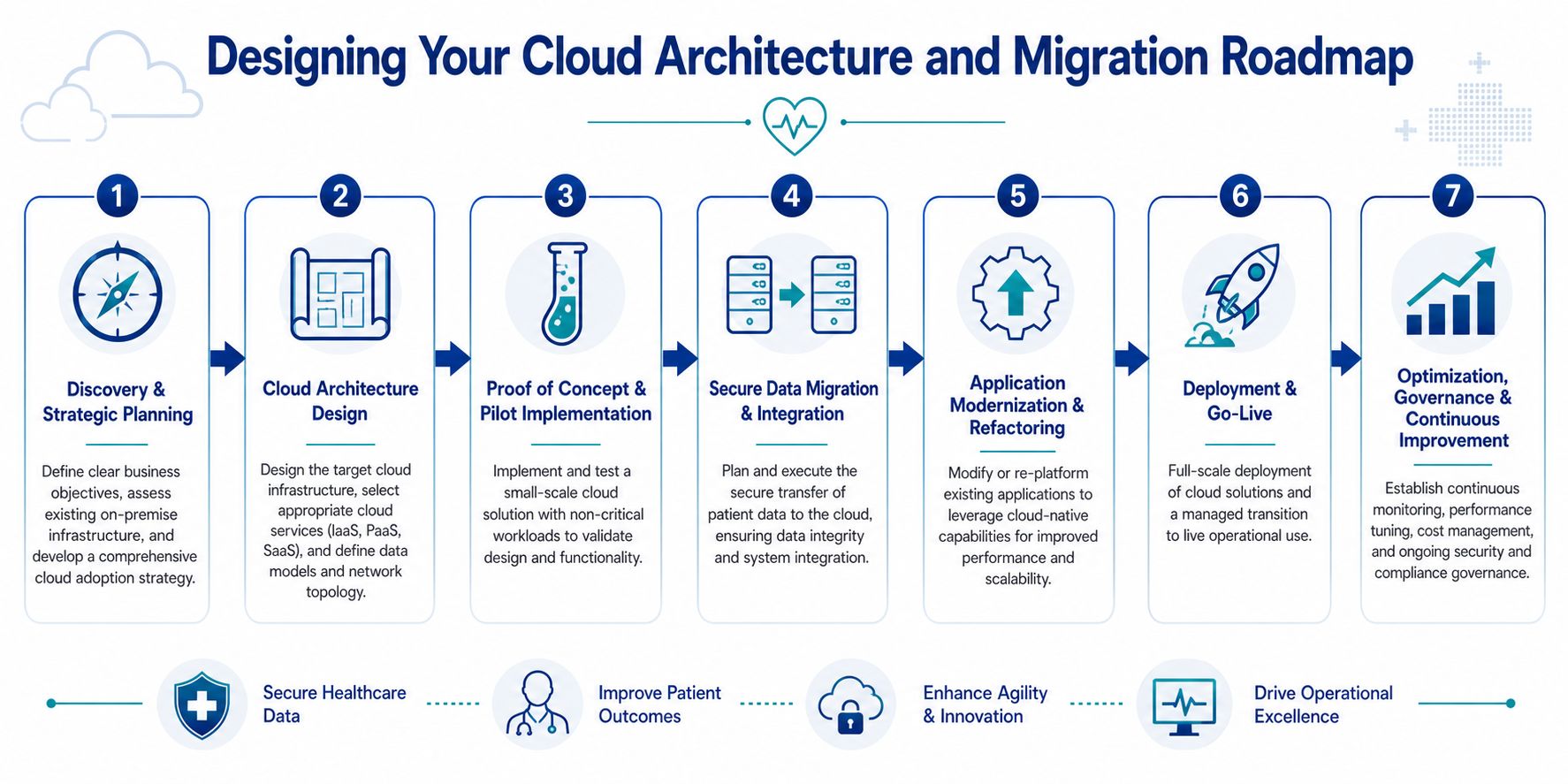
Choose the architecture that matches the organisation
Not every provider needs the same pattern.
A hybrid cloud model usually fits organisations with core legacy applications that can't be replaced immediately. Hospitals often use this approach when certain workloads remain on-premise while newer services such as analytics, portals, or integration layers move to the cloud.
A multi-cloud model can help organisations avoid overdependence on one provider or meet specialised workload needs across platforms. But it also increases governance complexity. Smaller clinics often underestimate the operational overhead of managing identity, security policy, logging, and support processes across multiple environments.
For teams comparing deployment choices, this primer on understanding on-premise data deployments helps clarify what you keep, what you move, and what trade-offs remain when some systems stay local.
A simple comparison helps:
| Pattern | Best fit | Main advantage | Main risk |
|---|---|---|---|
| Hybrid cloud | Clinics and hospitals with legacy dependencies | Gradual transition with lower disruption | Long-term complexity if temporary systems become permanent |
| Single-cloud | Startups and smaller providers | Simpler governance and faster delivery | More vendor dependence |
| Multi-cloud | Larger organisations with mature IT governance | Flexibility and workload choice | Higher operational complexity |
Start with workflow and data mapping
Before any migration, teams should map the current environment in plain business terms. Which systems support booking, charting, billing, communication, reporting, referral management, and document exchange? Which ones contain PHI? Which ones depend on local devices or custom interfaces?
This stage should also identify fragile processes. If staff still export spreadsheets to complete routine work, the migration plan needs to address that. Moving the server won't remove the manual workaround.
Run a pilot before touching critical care pathways
Proof-of-concept work is where architecture choices become real. Pick one non-critical but meaningful workload. That could be document management, a patient intake workflow, or a reporting environment. The pilot should test access controls, integration behaviour, logging, backup recovery, and user experience.
What the pilot should answer:
Can users work normally under the new identity and access model?
Do integrated systems exchange data reliably?
Are audit logs complete and retrievable?
Can support teams diagnose issues quickly?
A pilot that only proves the application launches has proved almost nothing.
Plan migration in controlled waves
Healthcare organisations should migrate in phases, not in one large event. Typical wave planning starts with lower-risk administrative or integration services, then moves toward more critical operational systems.
A practical sequence often looks like this:
Foundation build with identity, networking, security controls, and logging
Non-critical workloads such as internal portals or reporting environments
Integration services that connect systems without fully replacing them
Clinical and operational applications once support processes are proven
Optimisation and decommissioning of old environments
This is also the right point to set hard technical baselines. Canadian healthcare cloud architectures require AES-256 encryption at rest, TLS 1.3 in transit, least-privilege RBAC, MFA for all PHI-accessing identities, and immutable audit logging, and those controls should be built into the landing environment before migration waves begin.
Field note: The cleanest migrations aren't the fastest on paper. They're the ones where support staff, clinicians, and compliance leads all know what changes on day one and what doesn't.
Don't neglect application refactoring and governance
Some systems can be lifted and shifted. Others shouldn't be. Old applications with brittle integrations, hard-coded assumptions, or weak auditability often need refactoring or replacement. Teams should be honest about that early.
Governance also needs to continue after go-live. Cloud healthcare solutions need ongoing cost review, access recertification, vendor oversight, backup testing, and security drift detection. Infrastructure as code helps here because it reduces manual configuration changes that create inconsistency over time.
For organisations exploring implementation options, one factual example in the market is Cleffex Digital Ltd, which offers custom software and healthcare-focused digital solutions including IoT and AI-related development capabilities. That kind of partner may be relevant when a clinic or startup needs integration and application work beyond basic infrastructure migration.
How to Select the Right Cloud Healthcare Vendor
Vendors often look similar during the first demo. Everyone shows dashboards, workflow automation, secure hosting, and interoperability language. The differences only become visible when you test how they handle Canadian operating conditions.
The first filter should be regulatory fluency. A vendor doesn't need to be a law firm, but they do need to understand that Canada isn't one uniform operating environment for virtual care. The issue is especially important for smaller providers because fragmented provincial governance creates real delivery and compliance friction, as discussed in this analysis of Canada's patchwork virtual care landscape.
Compare vendors on the issues that create operational risk
A practical scorecard works better than a feature wishlist.
| Evaluation area | What to ask |
|---|---|
| Canadian compliance fit | Where does all patient data, logging, backup, and support access occur? |
| Provincial flexibility | How does the platform adapt to different privacy and virtual care workflow needs across provinces? |
| Interoperability | Which APIs, standards, and integration patterns are supported out of the box? |
| Support model | Who responds during incidents, and how are escalations handled? |
| Workflow fit | Can the product adapt to clinical and admin processes without expensive customisation? |
| Commercial model | Are costs predictable as users, storage, integrations, and services grow? |
Watch for four common warning signs
The vendor answers compliance questions with marketing language: If they can't clearly explain residency, access control, and audit handling, expect trouble later.
Every workflow change requires custom development: That's expensive and slows operational improvement.
Interoperability depends on one specialist: If one person “knows the integration magic”, you have fragility, not architecture.
The support model is vague: Healthcare operations need clear incident paths, not generic ticket queues.
Ask for proof in the form of process
The best vendor conversations focus on implementation behaviour, not branding. Ask how they handle role design, audit log review, migration testing, support access, and rollback planning. Ask what happens when a clinic expands to another province or adds a virtual service line with different operating rules.
One useful way to structure the search is to evaluate the vendor like a strategic delivery partner, not just a software supplier. That's where guidance on choosing a healthcare technology partner in Canada can help frame the discussion.
The right vendor isn't the one with the longest feature sheet. It's the one whose architecture, governance, and delivery model reduce risk while still fitting the realities of your organisation.
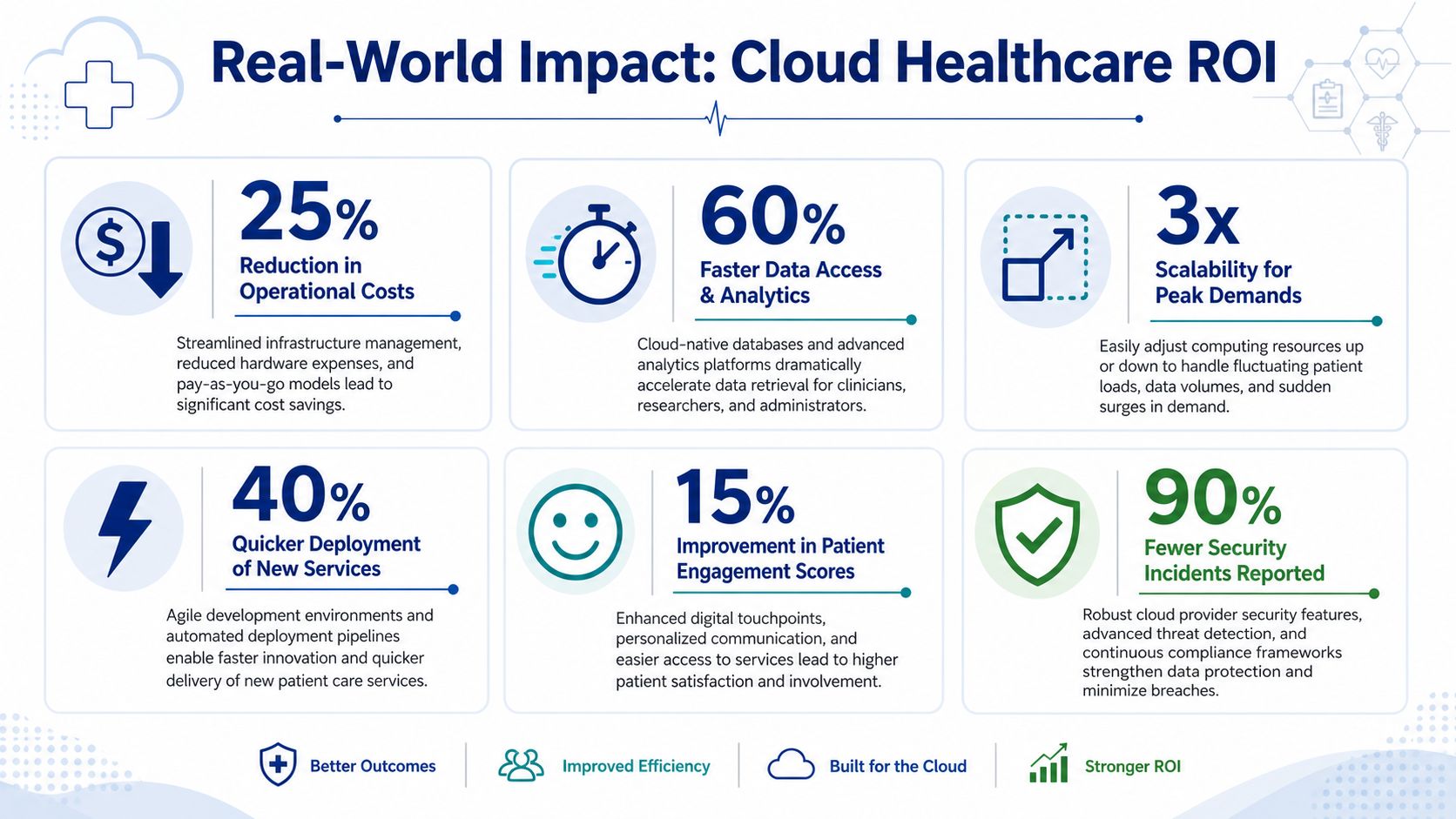
Real-World Impact Case Studies and ROI
The strongest return from cloud healthcare solutions often shows up in workflow quality before it appears in budget reports. A small clinic may see it in faster patient intake, fewer duplicated records, and less time spent coordinating between front desk and clinicians. A hospital network may see it in cleaner reporting, more dependable integration, and better visibility across distributed teams. A startup may see it in speed to launch and the ability to add new services without rebuilding the platform.
Small clinic scenario
A multi-provider clinic usually gets early value from centralised scheduling, digital intake, secure communications, and tighter integration between the EMR and administrative processes. The gain isn't theoretical. Staff stop re-entering the same information across tools, and the clinic becomes less dependent on local hardware or informal workarounds.
Hospital and network scenario
Larger organisations tend to benefit from standardisation and visibility. Once data pipelines and access controls are organised properly, leadership teams can monitor operations more consistently across programmes and sites. Clinical users also benefit when systems are more predictable, and records are easier to retrieve through approved pathways.
Rural and remote care scenario
One of the hardest ROI conversations in Canada involves care delivery where connectivity is weak. Existing guidance often skips this. Yet the issue is central for remote patient monitoring and virtual care. As noted in this discussion of the rural digital divide in Canadian digital health, many rural and remote communities still face internet limitations that complicate real-time monitoring, even though RPM plays an important role in reducing hospital admissions.
That means cloud architecture in these settings has to account for low-bandwidth resilience. In practice, that can include delayed synchronisation, lightweight patient-facing interfaces, offline-first field workflows, and hybrid engagement models that don't assume every patient can stay continuously connected.
Rural healthcare cloud design shouldn't start with the app. It should start with the connection constraints patients and care teams actually live with.
Real ROI in healthcare isn't only financial. It also includes safer access patterns, smoother continuity, less staff friction, and better reach into communities that standard implementations often leave behind.
If your organisation is planning cloud healthcare solutions for a clinic, insurer, hospital programme, or health startup in Canada, Cleffex Digital Ltd can be considered for custom software, secure healthcare platform development, and integration work that aligns cloud architecture with operational realities, including AI-driven and IoT-enabled healthcare use cases.