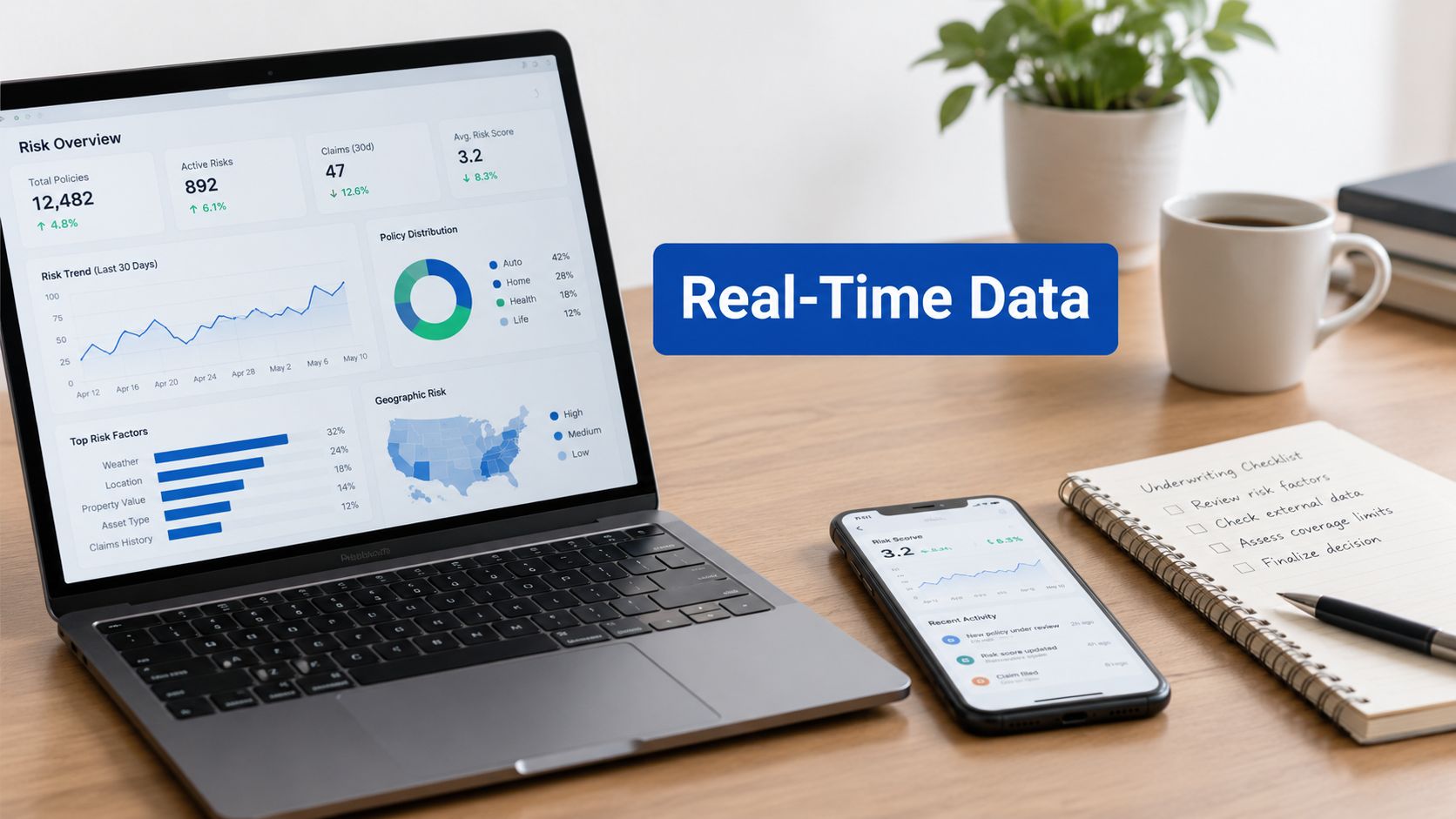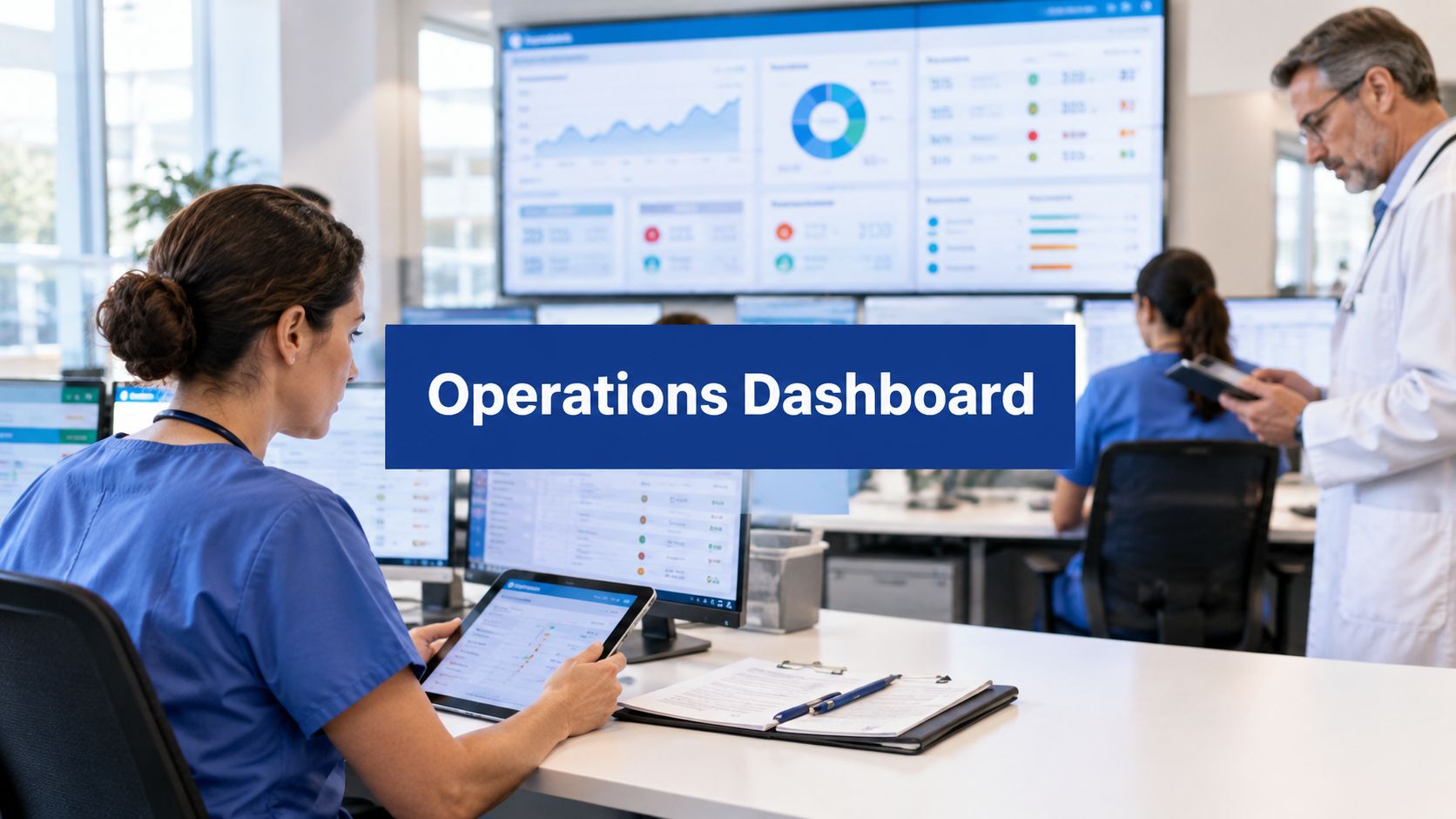


On Monday morning, your front desk is already fielding calls, clinicians are moving between patients, and someone in billing is opening a spreadsheet full of unpaid claims. A rejected code from last week still needs attention. An insurer portal shows another status change. A patient account has the wrong demographic detail, so the claim has to be touched again.
That pattern is common in small and mid-sized clinics. The work isn't only time-consuming. It's also risky. Every manual handoff creates another chance for a typo, a missed eligibility issue, or a delay that pushes cash collection further out.
Most clinic directors don't need more software for its own sake. They need fewer preventable denials, cleaner workflows, and better control over revenue. That's where medical billing automation solutions become useful. Not as a vague AI promise, but as a practical operating model for getting repetitive work out of people's hands and putting judgement-heavy work where experienced staff can add value.
The End of Manual Medical Billing Chaos
A clinic manager I've advised once described billing as “death by a hundred small tasks”. That phrase sticks because it's accurate. Burden rarely comes from one dramatic problem. It comes from constant interruptions. Staff re-enter patient data, check eligibility on multiple portals, correct coding mismatches, chase unpaid claims, and reopen old accounts when a denial arrives with little explanation.
Small errors create large friction. A wrong subscriber number can stop a claim before it starts. A missing modifier can trigger a denial that takes far longer to fix than it would have taken to prevent. By the time your team notices the pattern, cash flow is already feeling the pressure.
Where clinics usually get stuck
Three bottlenecks show up again and again:
Front-end mistakes: Insurance details, demographic fields, and authorisation requirements aren't confirmed early enough.
Claim quality issues: Coding and claim formatting problems slip through because staff are moving too quickly or working with fragmented systems.
Back-end follow-up: Denials, underpayments, and unpaid claims pile up because the team spends most of the day reacting instead of managing exceptions strategically.
Manual billing rarely fails because staff don't care. It fails because the process asks humans to act like machines all day.
Medical billing automation solutions address those bottlenecks by shifting repetitive tasks into software workflows. Instead of asking your team to manually check every eligibility response or post every payment line by line, the system handles high-volume, rules-based work and flags exceptions for review.
What changes when automation enters the workflow
The first shift is visibility. You stop guessing where work is stuck. The second is consistency. The same claim checks happen every time, not only when an experienced biller remembers them. The third is capacity. Staff can spend more time on complex denials, patient communication, and payer follow-up.
For a clinic director, that matters because automation isn't just a billing tool. It's an operational decision. It affects cash flow, staff workload, compliance discipline, and the day-to-day predictability of the revenue cycle.
What Are Medical Billing Automation Solutions
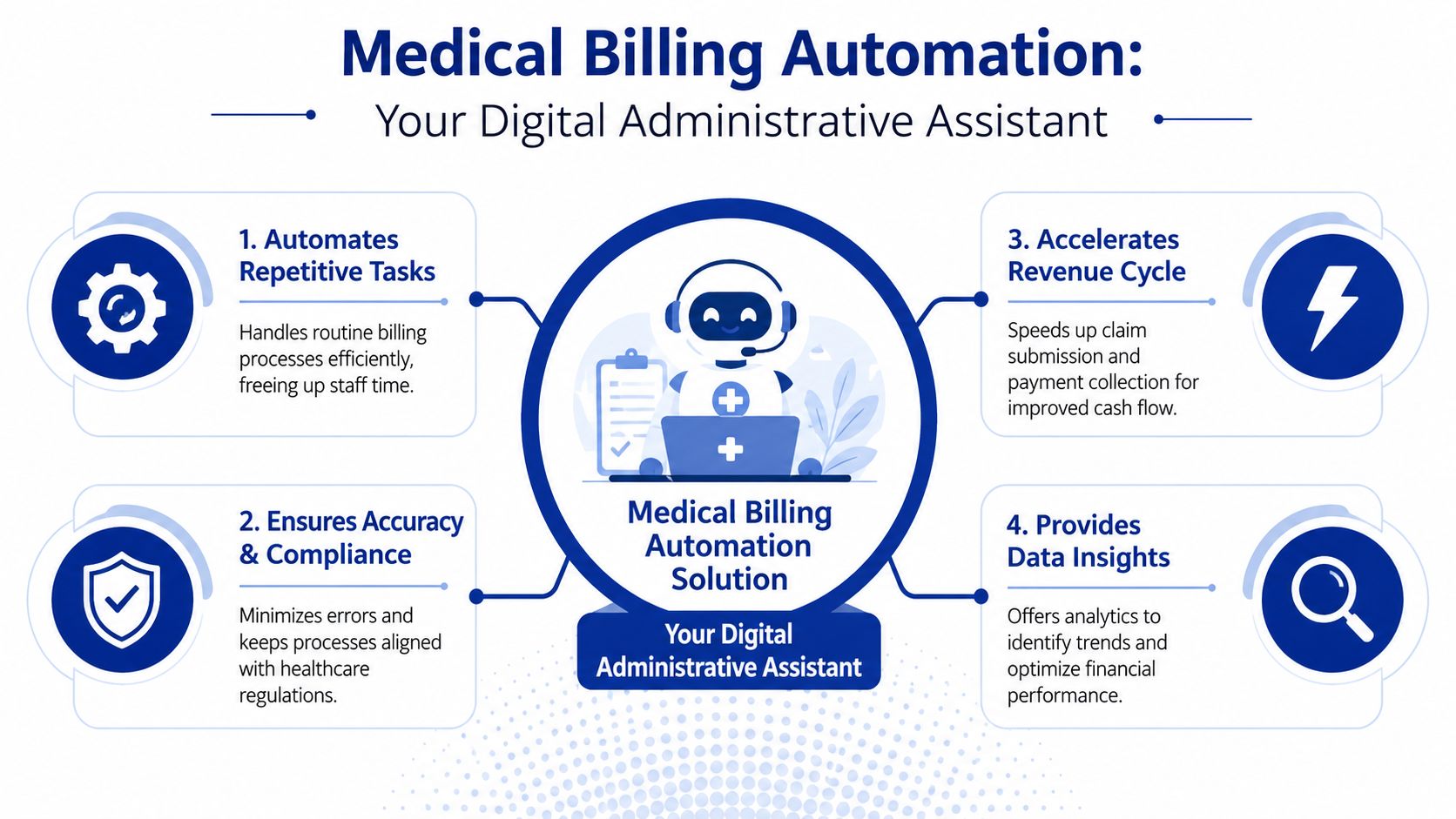
Think of medical billing automation solutions as a digital administrative team built inside your revenue cycle. Not a single feature. Not a magic button. A coordinated set of tools that handles repetitive billing work, checks for problems, and routes exceptions to humans when judgement is needed.
That's why the term can feel confusing at first. Many buyers expect one software function. In practice, automation usually combines workflow rules, integrations, and AI-supported analysis.
The simple version
If a human normally performs a repetitive billing step by following the same instructions each time, software can often automate it.
If a task requires pattern recognition, such as spotting likely denials or unusual claim activity, AI may assist by analysing billing data and highlighting risk.
Here's a practical way to separate the two.
RPA handles routine actions: It can move data between systems, trigger eligibility checks, submit claims, or post standard payments.
AI adds decision support: It can review coding consistency, flag anomalies, predict claim issues, and help staff prioritise work queues.
Workflow logic ties it together: Rules decide what should happen automatically, what needs review, and where each item goes next.
What this looks like in a clinic
A patient is booked for a visit. The system checks insurance eligibility, confirms demographic completeness, and alerts staff if information is missing. After the encounter, billing data moves from the clinical record into the claim workflow. The software checks for mismatches, formats the claim, and sends it electronically. If something looks wrong, it stops the claim before submission instead of letting the error travel downstream.
That's the core value. Automation pushes error detection earlier, where fixes are cheaper and faster.
Practical rule: The best automation doesn't hide the process. It makes each handoff clearer, faster, and easier to audit.
For teams thinking beyond claims alone, it helps to see how receivables automation fits into the larger financial picture. A useful companion read is how Resolut helps automate receivables, especially if you're comparing front-end billing automation with back-end collection workflows.
What automation is not
It's not a substitute for billing leadership. It won't correct a broken process by itself. It also won't remove the need for experienced staff who understand payer nuance, appeals, and compliance obligations in Canadian healthcare settings.
What it can do is remove the low-value repetition that drains those people every day.
Core Features That Transform Your Revenue Cycle
Most clinic leaders evaluate software by feature lists. That's understandable, but it can hide the core question: what problem does each feature solve in the billing lifecycle?
The strongest medical billing automation solutions work because they connect several functions into one operational chain rather than automating one isolated step.
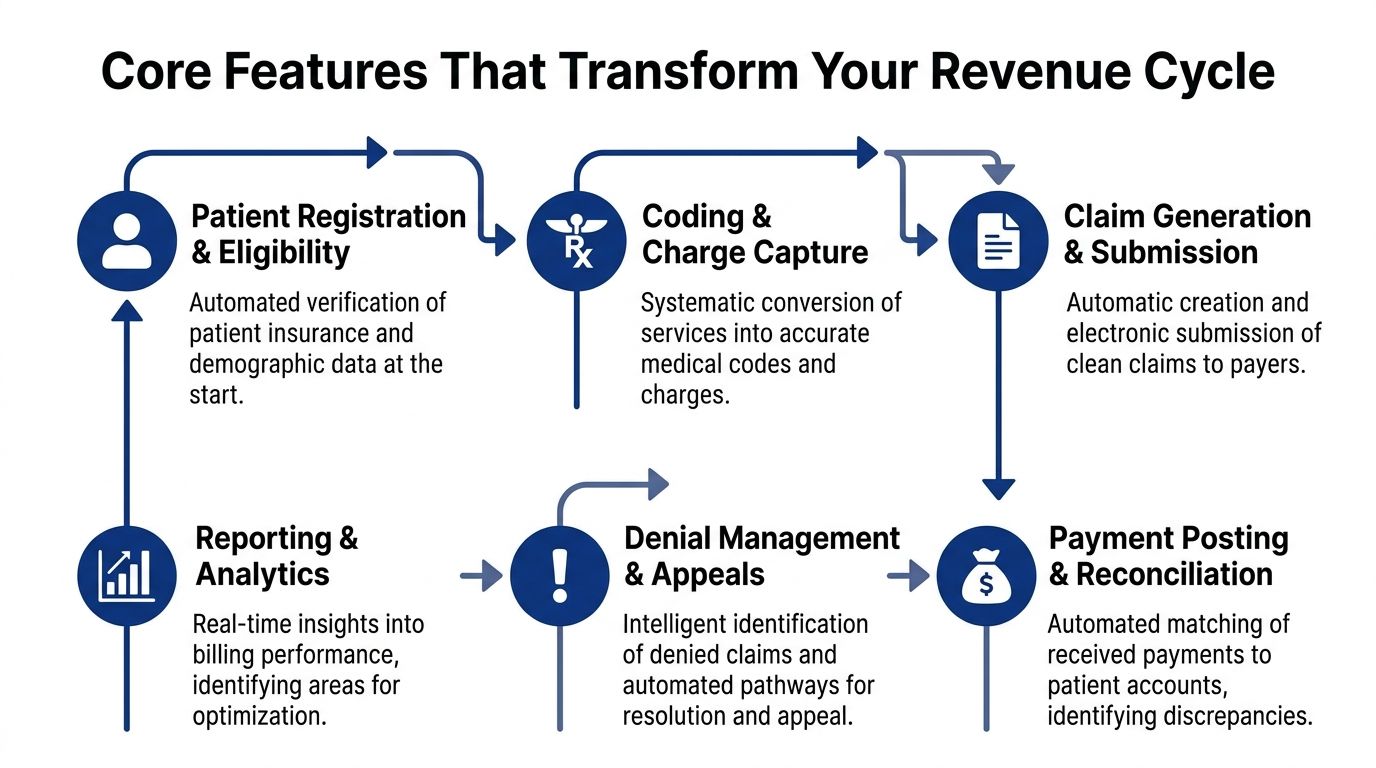
Integration with EHR and practice systems
Automation loses value quickly if staff still have to retype data. A good platform connects directly with your EHR, practice management system, clearinghouse, and payer portals. That's why interoperability isn't a technical extra. It's foundational. Tebra's implementation guidance notes that automation effectiveness drops significantly without well-integrated system interoperability, and it recommends baseline measurement over 5 to 10 business days before full deployment to capture minutes per transaction, human touches per claim, and exception rates in its medical billing automation implementation checklist.
If you're comparing platforms, this is also where integration architecture deserves a closer look. For a broader view of what healthcare teams should ask about APIs, workflows, and data movement, this overview of EHR integration for healthcare providers is useful background.
Claim scrubbing and pre-submission checks
This is the feature many buyers hear about first, and for good reason. Claim scrubbing tools review billing data before submission to catch missing fields, invalid combinations, coding inconsistencies, and payer-specific formatting problems.
In plain language, it's a pre-flight check for claims.
The key benefit isn't only fewer mistakes. It's fewer expensive mistakes. Catching an issue before a claim leaves your system is much easier than correcting a denial days or weeks later.
Submission and tracking
After a claim is built, automation can route it electronically, record the submission event, monitor status changes, and place exceptions into work queues. That removes a surprising amount of manual follow-up. Staff no longer have to spend so much of the day checking multiple systems just to confirm whether something moved.
Useful tracking functions often include:
Status monitoring: Following claims from submission to adjudication.
Work queue routing: Sending stalled or rejected claims to the right team member.
Payment matching: Posting standard remittances and flagging mismatches for review.
Denial prediction and management
Buyers often overestimate what automation can do and underestimate what it should do. The software can identify recurring denial patterns, validate coding logic, flag anomalies, and prioritise claims that need intervention. It can also suggest the likely cause of a rejection.
But software doesn't replace payer negotiation, documentation judgement, or escalation strategy.
That distinction matters even more in markets with changing rules. A frequently missed issue is payer policy flux. According to Enter Health, practices using non-adaptive automation can see a 15 to 20% denial rate spike when rules change, costing a mid-sized hospital an estimated $1.2M per year in lost revenue, as explained in its discussion of how AI reduces manual errors in medical billing automation.
Adaptive rule management matters more than flashy dashboards. If payer logic changes and your system doesn't, your denials will tell you before your vendor does.
The Business Case: Benefits and ROI of Automation
For many providers, the decision comes down to one question. Will this pay for itself?
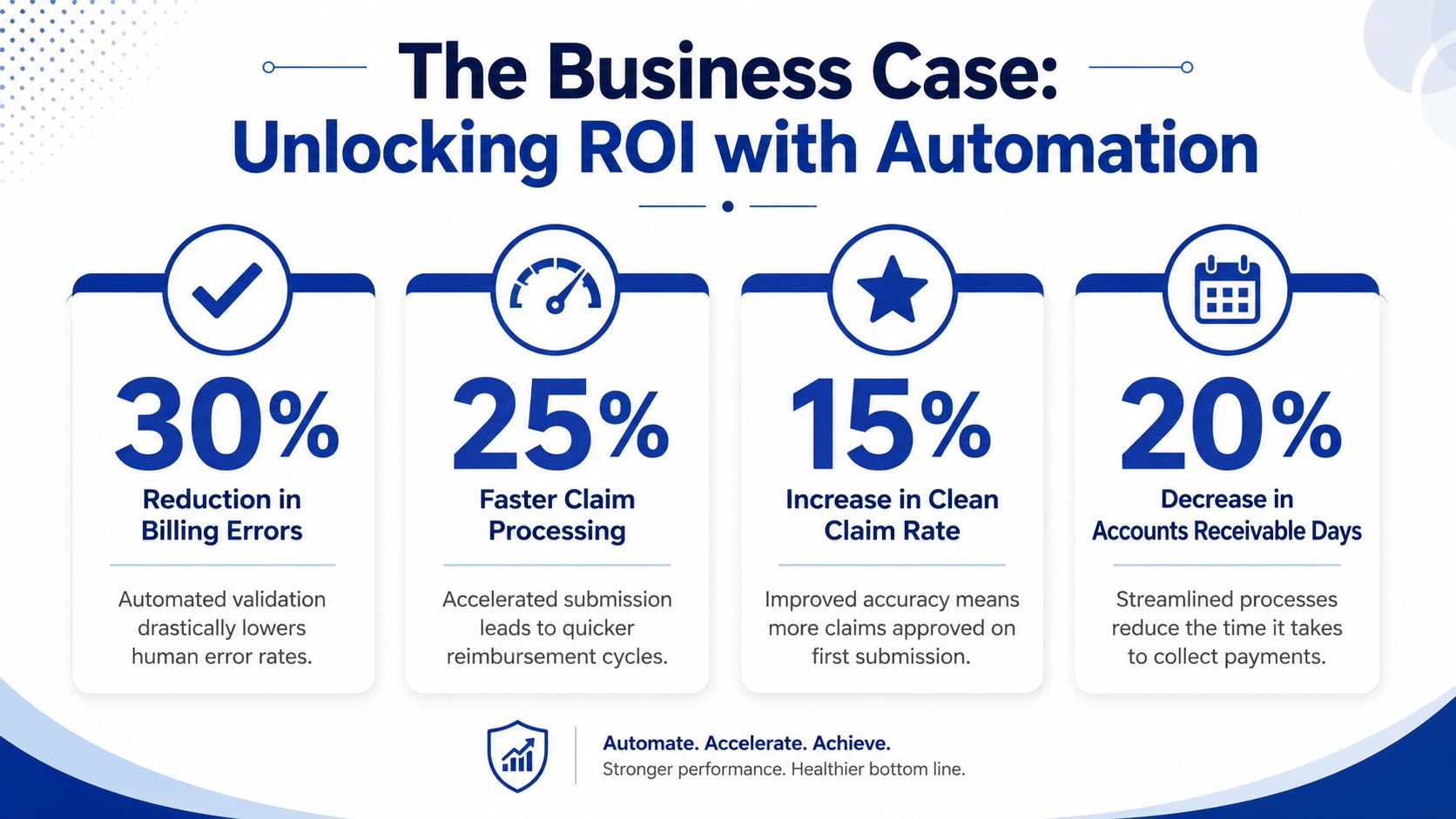
In many cases, yes. According to Bridge Global, healthcare providers in North America, including Canada, have achieved 300% to 600% ROI within the first year of implementing AI-powered medical billing automation solutions, driven by reduced administrative workload and accelerated claim processing in its analysis of medical billing automation solutions.
That headline number gets attention, but the underlying business case is more useful when you break it into operational gains.
Financial impact
Automation improves revenue performance in two ways. First, it helps prevent avoidable claim issues before submission. Second, it speeds the movement of valid claims through the cycle. When fewer staff hours go into rework, the organisation spends less effort recovering revenue it should have collected cleanly the first time.
That's why ROI often appears quickly. The savings don't come from one dramatic cut. They come from hundreds of daily billing actions handled faster and more consistently.
Operational impact
The administrative burden of billing is easy to underestimate because it spreads across departments. Registration staff verify details. Billers correct errors. Supervisors chase ageing claims. Managers reconcile reports that never quite match.
Automation reduces that friction by:
Lowering repetitive workload: Staff stop rekeying the same information across systems.
Reducing rework: Claims are checked earlier, so fewer return for correction.
Improving visibility: Dashboards and exception queues make bottlenecks easier to identify.
Supporting phased control: Teams can monitor KPIs such as clean claim rates and days in Accounts Receivable during rollout, rather than waiting for month-end surprises.
Human impact
Effective automation distinguishes good projects from disappointing ones. The point isn't to remove knowledgeable billing staff. The point is to stop spending their time on work that software can do reliably.
That creates room for activities such as complex denial follow-up, payer communication, patient financial counselling, and internal quality review. If you need a structured way to think about expected payback and business justification, this guide for enterprise leaders on automation ROI is a helpful planning reference.
A strong ROI case is rarely about replacing people. It's about shifting people from clerical effort to revenue-protecting work.
Navigating Compliance and Security Requirements
Healthcare leaders are right to be cautious here. Billing data includes personal information, financial details, clinical context, and payer interactions. If your automation platform handles that data poorly, efficiency gains won't matter.
In Canada, the compliance conversation usually starts with PIPEDA and then extends into provincial privacy obligations, internal access controls, vendor contracts, and audit readiness. If your organisation also touches cross-border workflows, you may need to map those controls against HIPAA requirements as well.
What secure automation should include
A credible platform should support:
Role-based access: Staff should only see the data needed for their role.
Encryption and secure transmission: Data should be protected at rest and in transit.
Audit trails: The system should log who accessed records, changed data, and triggered billing actions.
Vendor accountability: Contracts and technical controls should define how protected information is handled.
For teams reviewing the basics, this primer on data security in healthcare information systems gives a practical overview of the controls worth checking during vendor due diligence.
How AI can strengthen compliance
Automation doesn't only create efficiency. It can also help you spot risk earlier. Peer-reviewed research has shown that AI-based analytics in medical billing can reduce fraudulent claims by up to 20% to 30% because the algorithms identify discrepancies and detect potential fraud before submission, improving transparency and compliance in this peer-reviewed analysis of AI in healthcare billing systems.
That matters operationally because suspicious patterns often don't appear obvious when staff review claims one at a time. Analytical models can identify anomalies across a larger dataset, then push the questionable claims into review.
Questions clinic directors should ask vendors
Security reviews often stall because buyers ask broad questions and get broad answers. Be specific.
Ask things like:
How are user permissions managed?
What audit logs can administrators access?
How are payer rule updates validated before going live?
How is protected data isolated in testing and training environments?
If your team uses general SaaS tools around healthcare workflows, it also helps to understand how compliance claims differ from one vendor to another. For example, this piece on Check SurveyMonkey HIPAA compliance shows the sort of questions teams should ask before assuming a popular platform is suitable for protected health information.
The larger point is simple. Good automation should make your compliance posture stronger, more traceable, and easier to manage.
Your Implementation Roadmap and Vendor Selection
A clinic can buy capable billing software and still end up with longer queues, more staff frustration, and no clear return. The usual cause is not the software itself. It is the rollout. Teams often automate a process they have not standardised, feed poor data into new workflows, or choose a vendor whose rules fall behind payer changes.
A better approach is to treat implementation like renovating a busy clinic. You do not start by installing new equipment in every room on day one. You first fix the wiring, decide how patients will move through the space, and test the new setup in one area before expanding.
A practical rollout sequence
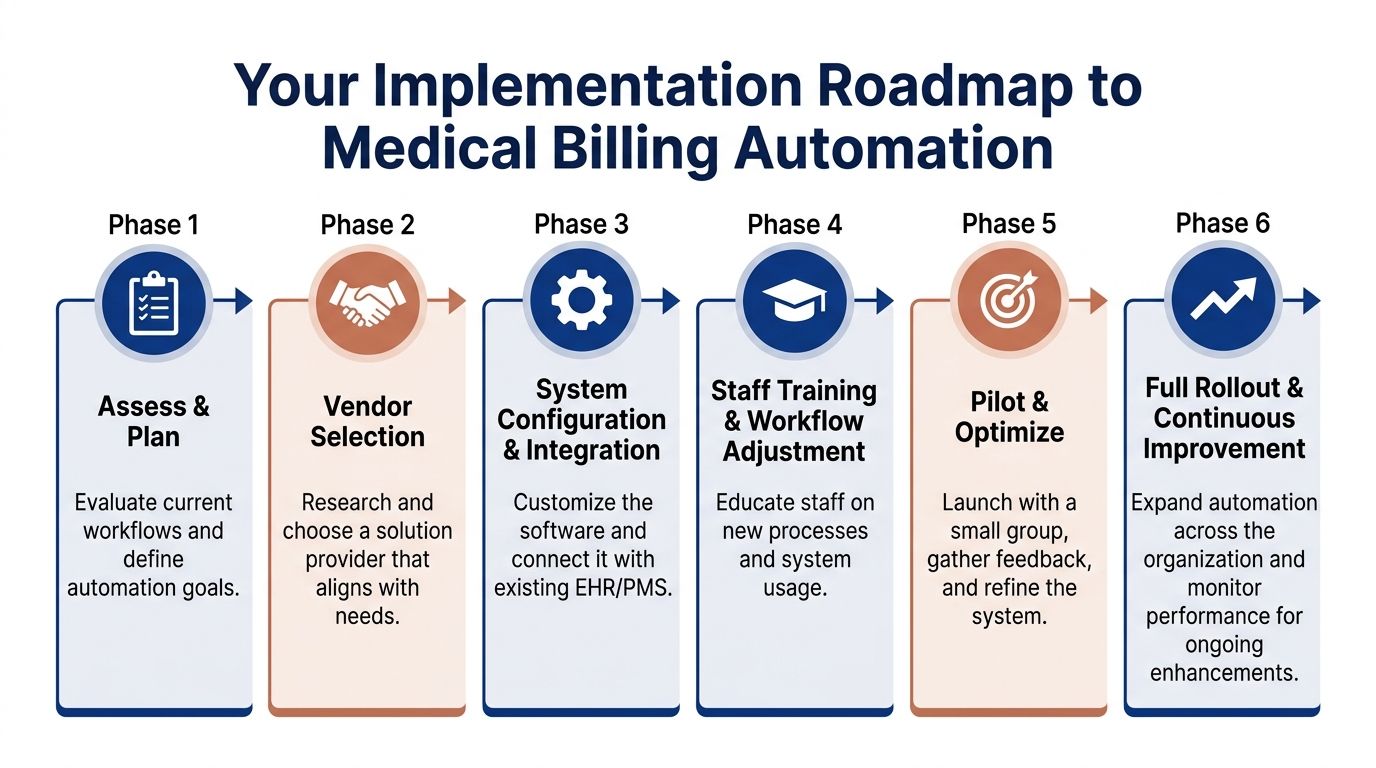
Cleffex outlines a phased approach in its healthcare automation software implementation guidance: stabilise workflows, clean data, automate high-volume tasks, add AI where pattern recognition helps, and refine results with ongoing reporting. That order matters because billing automation works best when process discipline comes before software expansion.
Here is how a clinic director can turn that into an adoption plan.
Stabilise the process before automating it
Review payer mappings, billing edits, coding handoffs, patient intake fields, and follow-up queues. If two billers handle the same exception in different ways, automation will repeat that inconsistency faster.Clean the data that drives claims and payment workflows
Focus on patient demographics, insurance records, provider identifiers, fee schedules, and denial reason categories. Clean data is the difference between an automated system that catches errors early and one that keeps producing the same avoidable rework.Start with repetitive, high-volume tasks
Eligibility checks, claim scrubbing, claim routing, payment posting, and standard claim-status follow-up are usually the safest first targets. They are easier to test, easier to measure, and less risky than automating complex edge cases too early.Add AI to support staff judgment, not replace it
Neglecting this approach often leads projects off course. Predictive denial models, coding suggestions, and anomaly detection can improve performance, but only if experienced staff review the exceptions and feed corrections back into the system. The strongest setups use human-AI workflows, where the software handles pattern detection and the billing team handles the claims that need context.Measure, adjust, and expand in stages
After go-live, track clean-claim rate, days in A/R, denial categories, touch time per claim, and queue ageing. Then expand to the next provider group, location, or speciality only after the first rollout is stable.
Start small if you can.
A pilot with one speciality, one site, or one payer mix gives your team room to find bottlenecks without exposing the entire revenue cycle to preventable disruption.
Key Vendor Selection Criteria
Choosing a vendor is less like buying office software and more like choosing an operating partner for your billing workflow. The right questions are practical. Can the system fit your current environment, adapt when payer rules change, and give your staff a clear way to handle exceptions?
| Criterion | Why It Matters | Red Flag to Watch For |
|---|---|---|
| Integration with EHR and payer systems | Reduces rekeying, supports cleaner handoffs, and lowers the risk of mismatched claim data | The vendor depends on manual exports, CSV uploads, or duplicate entry |
| Rule update process | Billing logic has to change as payer requirements change, including provincial and regional variations in Canada | The vendor cannot explain who maintains rules, how updates are tested, or how clients are notified |
| Exception management | Staff need work queues for denials, mismatches, prior auth issues, and incomplete records | The system automates submission but leaves follow-up work scattered across inboxes or spreadsheets |
| Reporting and KPI visibility | Leaders need to see claim quality, staff workload, cash flow patterns, and the financial effect of automation | Basic operational reporting requires custom work or vendor intervention |
| Implementation and change support | Workflow redesign, role clarity, and training often determine whether adoption sticks | The vendor talks mainly about go-live and provides little support after launch |
| Security and auditability | Clinics need traceable user activity, access controls, and records for internal review and compliance checks | Answers about logs, permissions, hosting, or data retention stay vague |
| Human-AI workflow design | Complex claims still need experienced billers, coders, and managers in the loop | The vendor frames automation as a full replacement for billing staff |
| Fit for Canadian operations | Provincial billing realities, privacy obligations, and local payer processes affect implementation details | The vendor speaks only in generic U.S. revenue cycle terms and cannot explain Canadian use cases |
Questions that separate a workable vendor from a risky one
Ask vendors to walk you through real situations, not just product screens.
For example:
How are payer rule changes reviewed, tested, and released?
What happens when the system is unsure and a claim does not fit the rule set?
Which tasks stay with staff after automation goes live?
How do supervisors review queues, overrides, and user actions?
What implementation work is handled by your team versus ours?
How would you configure the system for our mix of specialities, locations, and provincial requirements?
Those questions reveal whether the vendor understands billing as an operating system, not just a software feature set.
For organisations comparing packaged platforms with custom development, some may prefer an out-of-the-box revenue cycle tool. Others have specialized workflows, payer logic, or reporting needs that justify customised software. Cleffex Digital Ltd is one example of a provider that offers AI-driven healthcare operations support, including automated medical coding and insurance claims submission, for organisations that need bespoke software rather than generic tooling.
Automation in Action Short Case Examples
A clinic director usually sees the effect of billing automation before they see the software. Fewer charts come back for missing information. Fewer staff hours disappear into rework. Cash arrives with less friction because problems are caught earlier, routed faster, and resolved by the right person.
The pattern looks different in each setting, but the lesson is the same. Automation pays off when it is fitted to the workflow, the payer mix, and the points where staff lose time today.
Example one from a community clinic
A family clinic with several physicians often starts with front-end mistakes, not complex coding issues. Reception staff are answering phones, checking patients in, updating coverage details, and trying to confirm eligibility at the same time. One missing field at registration can travel through the whole revenue cycle like a typo on a mailing label. The claim still goes out, but it has a higher chance of coming back.
In this case, the clinic introduced automated eligibility checks, claim scrubbing, and exception queues. Routine claims moved through the system with limited manual touch. Billers focused on the smaller set of claims that needed judgment, such as coverage mismatches, referral questions, or unusual service combinations.
That shift matters.
Instead of asking experienced staff to spend their day on repetitive verification, the clinic used them where they had the most value. Front-desk pressure dropped. Rework fell. Supervisors also had a clearer view of where errors started, which made coaching easier and improved registration discipline over time.
For a Canadian clinic, this kind of setup is often the right first step because it supports cleaner submissions without forcing a full rebuild of the billing operation. It also creates an audit trail that helps managers review who changed patient data, who approved overrides, and which exceptions required human review.
Example two from a mid-sized hospital setting
A mid-sized hospital faces a different problem. Volume is higher, contracts are more varied, and billing logic changes across departments. Automation in that environment works less like an autopilot and more like an air traffic control system. It routes standard activity efficiently, but it also needs people watching for edge cases, congestion, and rule changes.
A useful public example comes from the Canadian context. Canada Health Infoway describes how automation and digital workflows can reduce administrative burden and improve the flow of information across care and operations in its overview of connected care and digital health in Canada. For billing leaders, the practical takeaway is straightforward. Systems create value when they reduce handoffs, standardise repetitive tasks, and leave staff free to resolve exceptions that software cannot interpret safely on its own.
In a hospital billing office, that often means automating claim creation, status checks, posting, and work queue routing while keeping coders, analysts, and supervisors responsible for exception review. If a payer changes an edit rule or a provincial billing requirement shifts, staff should be able to see the impact quickly, test the new logic, and confirm that the automation is still producing clean claims. Without that feedback loop, a fast system can process errors at scale.
The better model is a human-AI workflow with clear boundaries. Software handles volume, pattern detection, and repeatable steps. Staff handle ambiguity, policy interpretation, escalations, and appeals.
That is the actual business case shown by short examples like these. The return does not come from replacing people. It comes from redesigning work so the system does the predictable part and the team protects revenue where judgment is still required.
Frequently Asked Questions
Will automation replace my billing staff?
Usually, no. It changes their work. Data shows that 30% to 40% of complex claim denials still require manual negotiation that AI can't fully automate, and over-reliance on AI for these appeals can lead to a 12% to 18% loss in appeal revenue, which is why a human-AI hybrid workflow matters according to this review of AI and automation in medical billing in 2025.
Can a small practice afford medical billing automation solutions?
Often, yes, if the project starts with a narrow scope. Small practices usually get better results when they begin with eligibility, claim scrubbing, and payment posting instead of trying to automate every billing function at once.
How long does implementation take?
That depends on data quality, system integration, and staff readiness. A clinic with messy workflows will take longer than a clinic that has already standardised its billing process. The safer approach is a pilot, then a staged rollout.
What should I worry about most during vendor selection?
Rule adaptation, integration depth, and exception handling. Many products look capable in a demo. Fewer perform well when payer requirements change, and your staff needs clean, usable queues rather than more alerts.
If your organisation is evaluating medical billing automation solutions and wants a practical path that balances workflow efficiency, Canadian compliance, and real integration needs, Cleffex Digital Ltd can help you assess requirements, design secure healthcare workflows, and build or implement systems that support billing accuracy without losing the human oversight complex claims still require.