

A healthcare data breach in Canada carries an average cost of $11.56 million CAD, according to IBM's 2021 Cost of a Data Breach Survey, cited by Shred-it Canada. That figure alone should end the idea that data security is a back-office IT issue. In healthcare, security failures disrupt care, expose sensitive personal information, trigger legal obligations, and damage trust that can take years to rebuild.
For clinics, hospitals, and health-tech startups, Protected Health Information (PHI) includes the records and identifiers that tie a patient to their care. Appointment histories, lab results, diagnoses, billing details, intake forms, and messages in patient portals all fall into the risk zone. If your team stores, transmits, analyses, or shares that information, data security for healthcare is already part of your operating model whether you planned for it or not.
The hard part is that most advice swings to extremes. One camp treats security as a pure compliance exercise. The other pushes enterprise-grade tooling that small teams can't realistically run well. The practical middle ground is what matters. Strong controls, simple workflows, clear permissions, tested backups, and a plan for when something goes wrong. If you need a broader business case for why this matters across the sector, this overview of cybersecurity in healthcare is a useful companion read.
The High Stakes of Healthcare Data Security
Healthcare breaches cost more than breaches in any other major sector, as noted earlier. For a clinic or startup, that headline number matters less than what sits underneath it. Lost access to records, rushed manual workarounds, legal review, patient notice obligations, vendor coordination, and weeks of operational cleanup can strain a small team faster than the technical failure itself.
The harder problem is that healthcare data is durable. Patients can replace a card. They cannot replace a diagnosis, a medication history, a fertility treatment record, or a mental health note. Once exposed, that information can affect trust in a way that lasts well beyond the incident.
Why healthcare data creates a different kind of risk
An outage in a retail system delays sales. An outage in a clinic changes how care gets delivered that same hour. Front-desk staff start writing appointment details on paper. Clinicians text colleagues from personal phones because the normal system is down. Someone shares a login to keep the day moving. Those decisions are understandable. They are also where small organisations often lose control of PHI.
This dual network problem gets missed in generic security advice. There is the official network, made up of the EHR, scheduling system, cloud storage, and approved devices. Then there is the human backup network, made up of personal email, consumer messaging apps, paper notes, USB drives, and verbal handoffs. In smaller clinics and health-tech startups, the second network appears the moment the first one becomes slow, confusing, or unavailable.
That is why security design has to account for human behaviour under pressure, not just ideal policy. If staff will route around a control to keep patients moving, the control needs to be changed.
Practical rule: If an outage would push staff to use personal tools or ad hoc paper processes for patient information, that workflow is part of your security risk, and it needs a safer fallback.
PHI also travels farther than many founders and practice managers expect. A single patient record may pass through reception, clinicians, billers, labs, referral partners, insurers, and software vendors. Every transfer adds another place where permissions can drift, messages can be misdirected, or data can leave the approved system.
What holds up in real operations
The organisations that handle this well usually do a few things consistently. They define who approves access, who removes it when roles change, who checks vendors, who tests backups, and who leads incident response. Without that ownership, security work gets treated as a side task for whoever is least busy, which usually means it does not happen on time.
For smaller teams, the answer is not buying the largest stack on the market. The answer is choosing a few controls you can run reliably every week. Tight role-based access. Approved messaging channels. Device standards for any system that touches PHI. Restore-tested backups. A short outage playbook that tells staff exactly what to do if the EHR, internet connection, or patient portal fails.
If you need a wider business case before setting those priorities, this overview of why cybersecurity matters in healthcare operations is a useful reference.
A practical healthcare security posture usually includes:
Access limits tied to job role so staff only see the records and functions they need.
Approved communication methods for internal coordination and patient contact, especially during outages.
Fallback procedures for downtime that protect privacy without forcing staff onto personal tools.
Backup testing and recovery checks so leadership knows systems can be restored, not just backed up.
Named owners for key tasks such as onboarding, offboarding, vendor review, and breach response.
For clinics and startups, that last point matters more than many realise. Security failures often start with a very ordinary gap. A former contractor still has access. A nurse uses a personal phone because the secure app is clunky. A founder gives a vendor broad permissions to speed up integration. None of that looks dramatic on day one. It still creates exposure.
Navigating the Healthcare Regulatory Maze
Healthcare privacy rules work a lot like regional driving laws. The purpose is the same everywhere: keep people safe, set minimum standards, and define what happens when someone breaks the rules. But the specific obligations depend on where you operate, where the data sits, and whose information you handle.
For Canadian clinics and startups, the first question isn't “Which law is the most famous?” It's “Which law applies to our operations, our vendors, and our patient data flows?” That's where many projects go sideways. Teams build a product first, then discover their hosting choices, consent flows, or breach processes don't fit the jurisdiction.
What Canadian organisations need to lock in early
Canadian experts have argued for “encryption by design” and strict data localisation, meaning health data should be hosted physically on Canadian soil so Canadian law applies and data sovereignty is preserved, as discussed in this Canadian health data sovereignty analysis. For clinics and founders, that has direct architecture implications. Your hosting region, backup location, support model, and vendor contracts all matter.
Compliance and engineering need to talk to each other early. If product, legal, and infrastructure teams work in separate lanes, you get expensive rework later. A good starting point is a development process that treats regulation as a design input, not a final review item. That's the idea behind compliance-driven software development.
PIPEDA in practice
In practical terms, PIPEDA pushes organisations to do three things well:
| Focus area | What it means in practice |
|---|---|
| Responsibility | Assign someone to own privacy handling, vendor reviews, and breach response. |
| Purpose and consent | Be clear about why you collect data and avoid collecting information “just in case.” |
| Safeguards and response | Protect records appropriately and act quickly when a breach creates real risk. |
PIPEDA becomes operational when teams write actual procedures. Who approves access? Where are records stored? How are former employees removed from systems? Which incidents trigger legal review? Those aren't policy binder questions. They're weekly operating questions.
HIPAA and GDPR as practical reference points
If you serve US patients, integrate with US providers, or sell into that market, HIPAA matters because it drives expectations around access control, auditability, and PHI handling. For developers and clinic managers, three practical HIPAA habits stand out:
Limit access by role, not convenience.
Log access and changes so you can investigate.
Document handling rules for staff and vendors.
If you handle data linked to individuals in Europe, GDPR introduces a different set of design pressures. The practical themes are familiar but stricter in execution:
Collect the minimum necessary data
Support access and correction rights
Know where data moves and why
Regulations differ, but the operational lesson is consistent. If you can't map your data, you can't protect it or govern it.
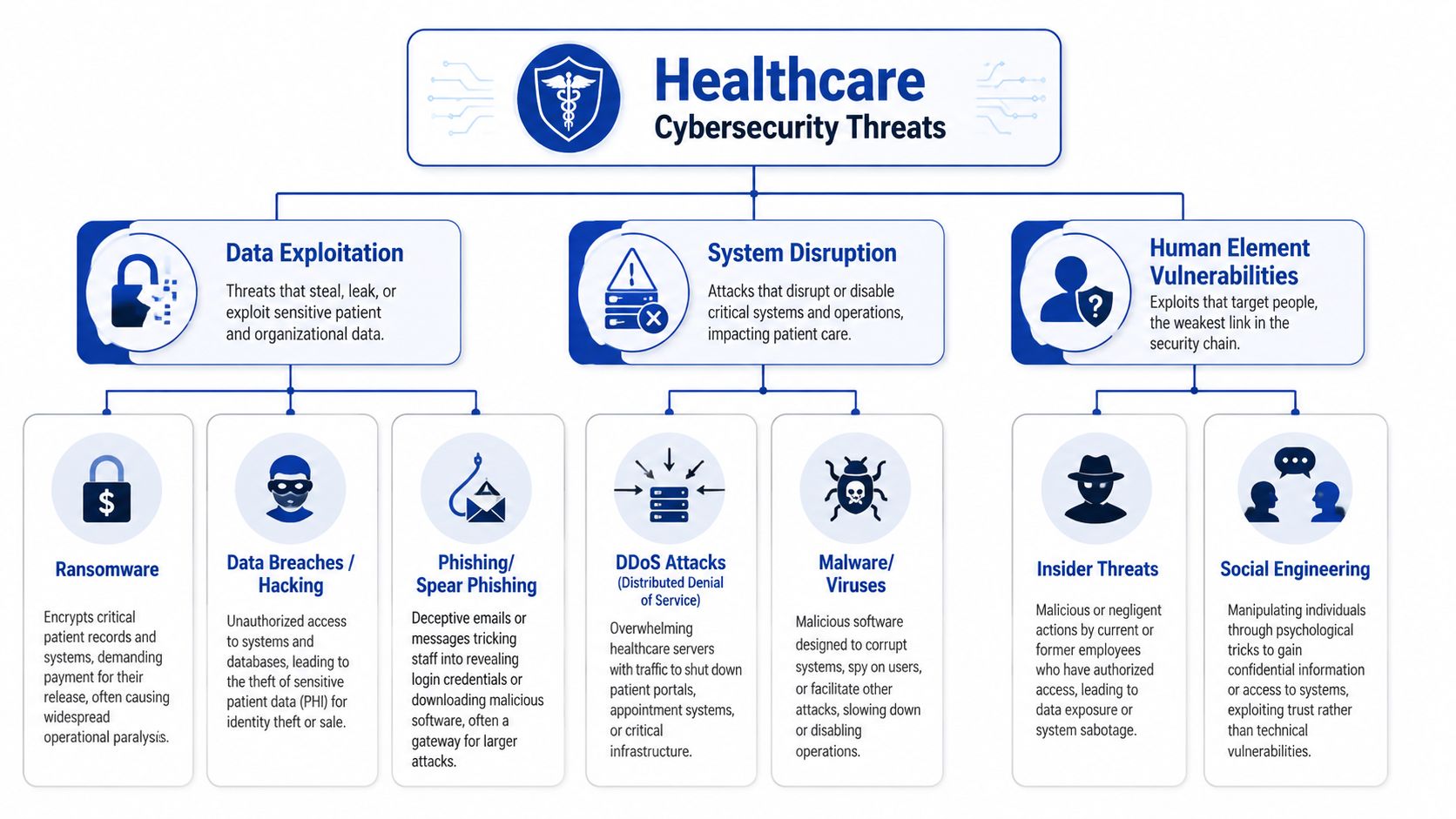
Understanding Top Cybersecurity Threats
Most healthcare attacks don't begin with cinematic hacking. They begin with something ordinary. An email, a reused password, a shared workstation, a forgotten remote access account, or an internet-connected device no one has reviewed since it was installed.
Ransomware in a clinical setting
A staff member opens a file that looks like a referral attachment. Nothing obvious happens at first. Later, chart access slows, then fails. Shared folders become unreadable. The front desk can't confirm appointments properly, clinicians can't pull prior notes, and the billing queue starts backing up. The technical event is ransomware. The business impact is immediate care disruption.
Phishing that slips past busy people
A receptionist receives what looks like a cloud password reset notice. The branding is close enough. The timing is plausible. They're between calls and click through. Their credentials are captured, and the attacker signs in through a normal login page. No malware appears. No dramatic alerts fire. The compromise blends into legitimate traffic because the attacker used a real account.
That's why phishing isn't just an email problem. It becomes an identity problem.
Insider risk is often accidental
A clinician wants to help a colleague and shares access informally because the permissions request is slow. Another employee exports a patient list to a spreadsheet for scheduling and saves it on an unmanaged laptop. No malicious intent exists, but the control failure is real. In healthcare, accidental insiders create exposure because teams are under time pressure and workflows are often patched together.
Security controls fail fastest when they obstruct care without offering a safe alternative.
Medical and connected device exposure
Connected printers, imaging systems, tablets, and specialised devices often stay in service for years. Some can't be patched on a normal cycle. Others depend on vendor access or legacy software. In practice, that means they should never sit on the same flat network as your core patient systems if you can avoid it. The more mixed your environment becomes, the more one weak point can affect everything else.
Why these threats keep landing
Healthcare environments tend to share the same weaknesses:
Legacy dependencies that are difficult to update
Shared workflows where one login or one device serves multiple people
Time pressure that rewards shortcuts
Third-party reliance on EHRs, billing tools, messaging apps, and support vendors
Threat awareness matters, but recognition alone won't protect a clinic. Protection comes from the controls and habits that make these common attack paths harder to exploit.
Building Your Digital Defence System
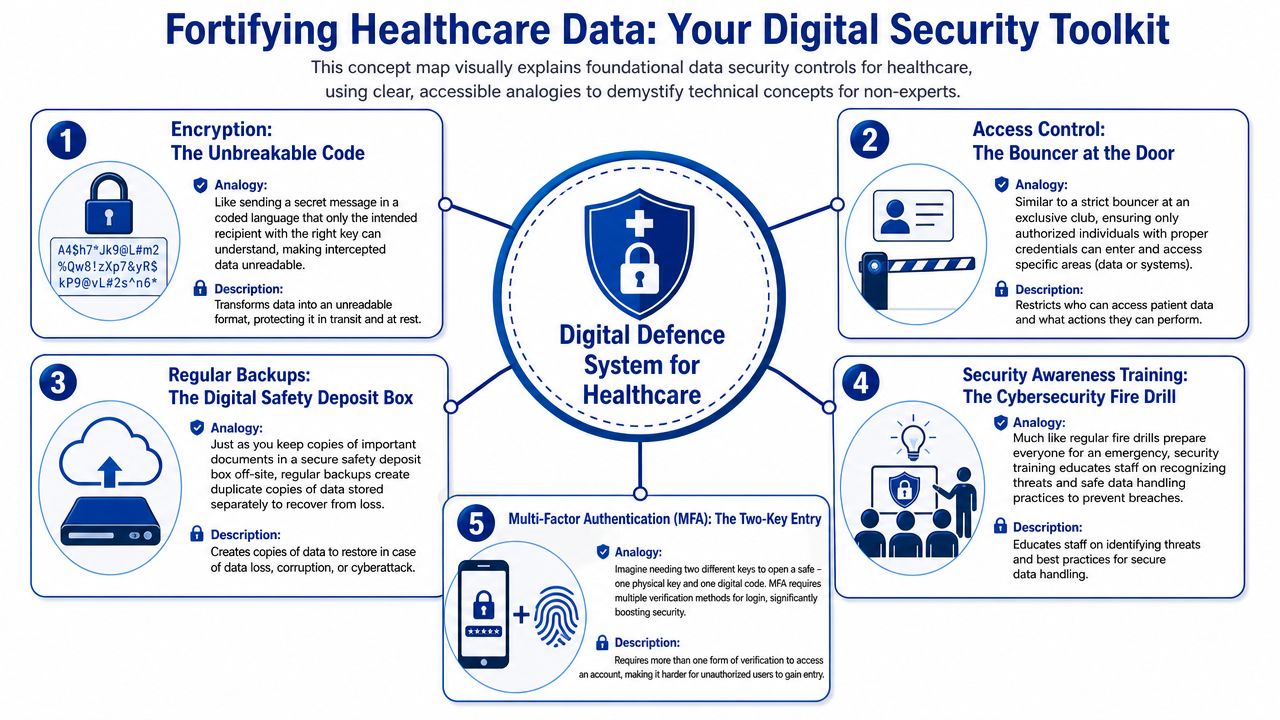
The easiest way to explain security architecture to a clinic manager is to compare it to a physical healthcare facility. You don't run a hospital as one giant unsecured room. You have a public entrance, restricted staff areas, locked medication storage, private consult spaces, and records that only certain people can access. Your digital environment should work the same way.
Start with the digital envelope
Encryption is the sealed envelope of healthcare data. It protects records when they're stored and when they move between systems. If your EHR vendor, messaging tool, backup platform, or analytics provider can't explain how data is protected at rest and in transit, that's a procurement problem, not a technical footnote.
For smaller organisations, the practical test is simple. Ask vendors to show where data is stored, how it's protected, who can access it for support, and how access is logged. If the answers are vague, move on.
Build a keycard system for people
Identity and Access Management works like staff keycards in a facility. A receptionist doesn't need pharmacy storage access. A contractor shouldn't retain access after a project ends. A developer shouldn't be able to browse production patient data because it's convenient for debugging.
The controls that matter most here are straightforward:
Role-based access so permissions follow job function
Multi-factor authentication for email, admin consoles, and clinical systems
Joiner, mover, leaver processes so access changes when people change roles or leave
For teams using AI tools, document handling deserves the same scrutiny. If your staff paste patient-related content into assistants or support bots, you need to verify retention, access controls, and data handling terms. A useful example is DocsBot's robust security measures, which outline the kinds of safeguards healthcare buyers should look for before introducing AI into workflows.
Segment your environment like separate wings
Network segmentation is the digital version of secure hospital wings. Public Wi-Fi should not sit beside systems that store or process patient records. Guest devices should not have a path to admin consoles. Vendor support access should be isolated and controlled, not broad and permanent.
A simple segmentation model for a smaller clinic often looks like this:
| Zone | What belongs there | Rule |
|---|---|---|
| Public zone | Guest Wi-Fi, visitor internet access | No route to internal systems |
| Staff operations zone | Office devices, scheduling, internal communications | Restricted access to clinical apps |
| Clinical data zone | EHR, records, billing platforms, backups | Tightly limited users and monitored admin access |
This doesn't have to begin with enterprise complexity. It does have to be intentional.
Harden the systems you already depend on
Many organisations chase new tooling while neglecting the basics on existing systems. In healthcare, hardening usually means turning off unused accounts, removing default settings, tightening remote access, reviewing third-party integrations, and patching what can be patched on a defined schedule. Where updates are difficult because of medical or legacy dependencies, isolation and strict access rules become more important.
Field note: The most common weak point isn't the obvious server. It's the exception everyone agreed to “for now” and never revisited.
Build security into software delivery
Health-tech startups often treat security as a pre-launch checklist. That approach creates avoidable risk. Secure software delivery should cover environment separation, secrets management, audit logging, test data controls, and approval paths for production changes. If your team is building a patient-facing platform, this guide to secure healthtech applications is a solid reference for framing those development decisions early.
The best control set isn't the most advanced one. It's the one your team can operate consistently under normal pressure and during an incident.
Practical Security for Clinics and Startups
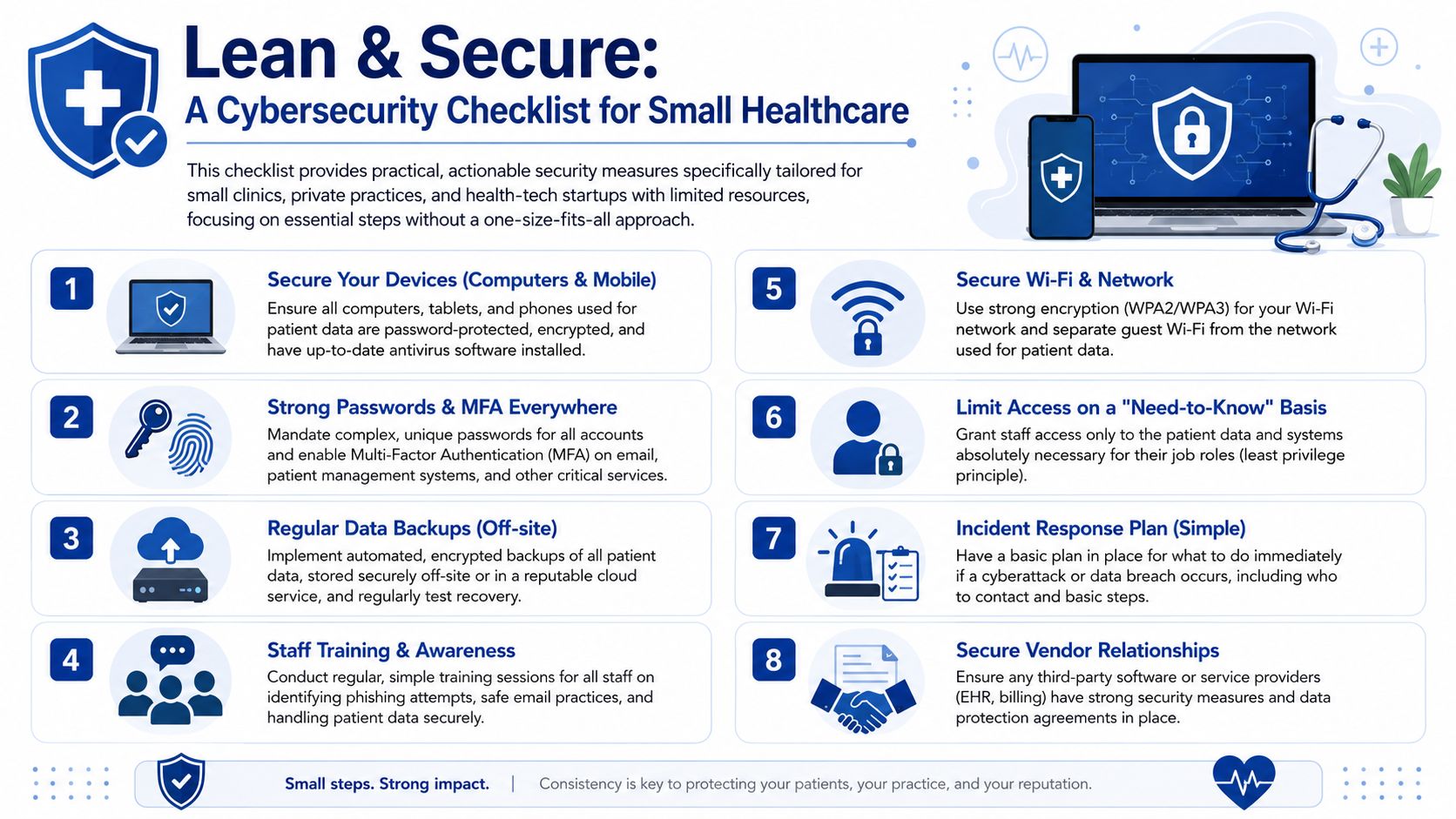
Small clinics and startups get some of the worst security advice in the market. They're told to deploy the same patterns used by large hospitals, then left to manage them without dedicated security staff. That gap matters. Existing healthcare cybersecurity guidance often fails to address how smaller organisations can practically implement dual networks and Role-Based Access Control, leaving them exposed when untrained staff misconfigure the very tools meant to protect them, as noted in this discussion of Canadian healthcare cyber risk for smaller providers.
The dual network problem
“Separate the guest network from the patient network” is good advice. But in a small clinic, that often turns into a router with multiple names and no one checking whether the separation works. Staff then connect printers, tablets, and phones wherever it's easiest. A vendor adds remote access. Someone resets hardware after an outage. The intended design slowly disappears.
That's why more tech isn't always the answer. For smaller environments, the priority is a setup the team can understand and maintain.
A workable model looks like this:
Keep only two clearly defined networks rather than several partially managed ones.
Label device ownership and approved network placement so staff know where each device belongs.
Document one change process for routers, Wi-Fi settings, and vendor access. If a change isn't recorded, it didn't happen properly.
A simple three-step RBAC setup
Most small teams don't need a complex access matrix. They need a disciplined minimum.
Step one: Define roles by work, not by person
Create a short list of roles such as reception, clinician, billing, practice manager, and technical admin. Don't build permissions around individual preferences. If one person performs multiple jobs, assign multiple approved roles rather than broad “super user” access.
Step two: Map each role to systems and actions
List the systems you use. EHR, scheduling, billing, cloud storage, email, support tools. Then decide what each role can do in each one. View only, edit, export, administer, or no access. Keep it on one page if possible.
Step three: Review every access change as an operating task
New hire, role change, contractor start, contractor end, resignation, parental leave, temporary coverage. Each event should trigger an access review. This sounds basic because it is basic. It's also where many smaller organisations fail.
If your clinic can't answer “who currently has access to what” without asking three people and checking old emails, RBAC isn't in place yet.
Low-resource controls that pay off fast
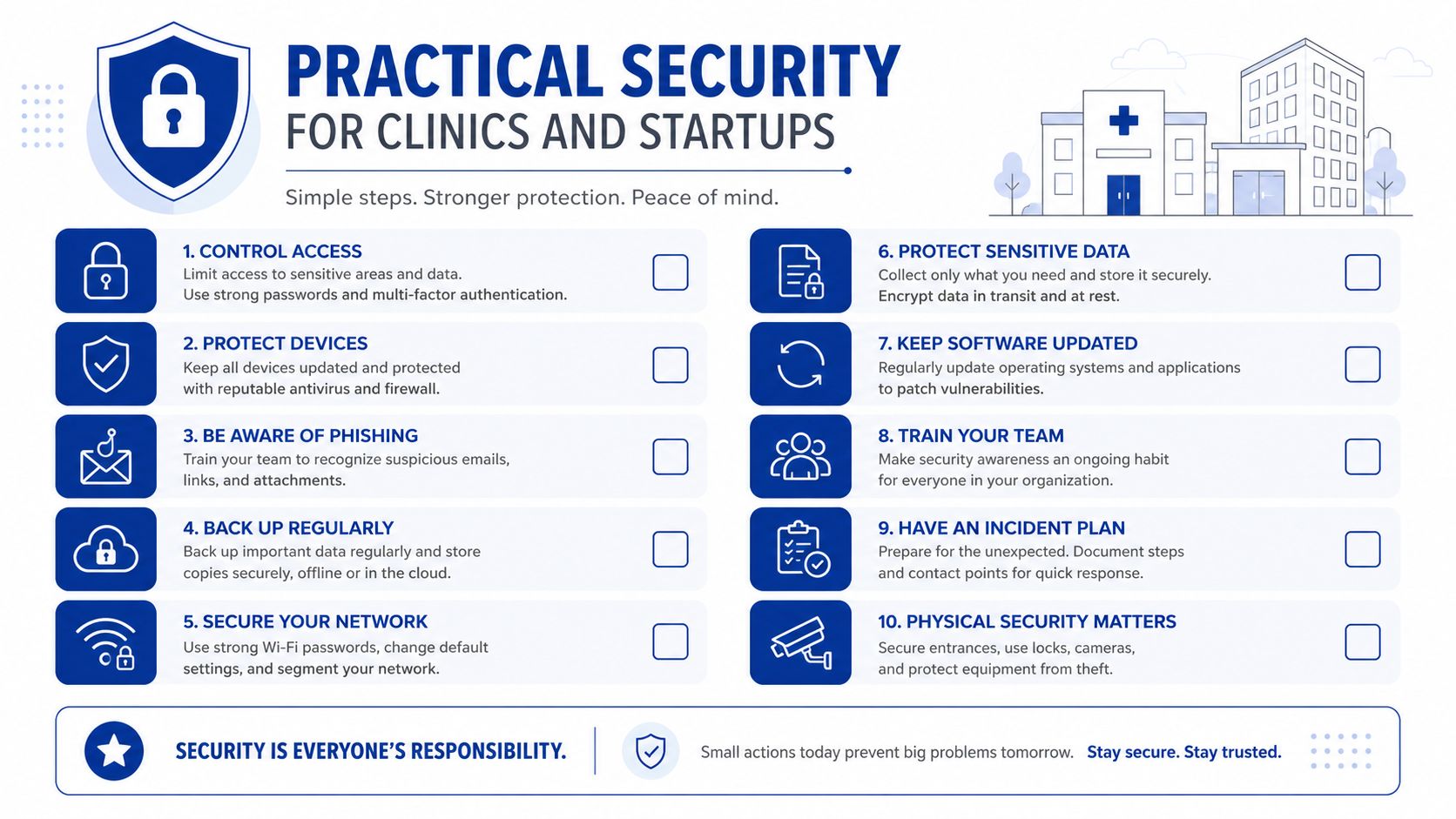
Instead of chasing every advanced control, smaller organisations should prioritise a short set of actions they can sustain.
Protect email first because it's often the front door for account compromise.
Use MFA broadly on business-critical systems, not just admin tools.
Run phishing drills so training moves from theory to habit.
Restrict exports from systems that hold patient data whenever possible.
Review vendors carefully before adding file sharing or messaging tools.
Managing an Incident and Notifying Authorities
When a breach happens, the first goal isn't perfect diagnosis. It's controlled action. Teams lose time when they argue about whether an event is “really” a security incident while accounts remain active and evidence keeps changing. Treat incident response like a fire drill. Recognise the smoke, isolate the area, assess the damage, then meet your notification duties.
Detection and containment
Detection usually starts with a user report, an unusual login, a locked file, a vendor alert, or a system behaving abnormally. Your first moves should be operational, not philosophical.
Use a short sequence:
Record the trigger: Note what was seen, when, and by whom.
Contain affected access: Disable compromised accounts, isolate impacted devices, pause risky integrations if needed.
Preserve evidence: Don't wipe systems before someone has captured what happened.
Assemble decision-makers: Privacy, leadership, IT support, legal, and relevant vendors need one communication path.
Eradication and recovery
After containment, identify the path of compromise and close it. That might mean credential resets, malware removal, patching, restoring from backup, revoking vendor sessions, or rebuilding affected systems. Recovery should be staged. Don't reconnect everything at once just because operations are under pressure.
A practical recovery review should answer:
| Question | Why it matters |
|---|---|
| What data was affected | Determines legal, patient, and business impact |
| How did access occur | Guides containment and future prevention |
| Which systems are trustworthy | Prevents reinfection or repeated exposure |
| What must change now | Turns response into improvement |
Canadian breach notification rules
Under PIPEDA, organisations must report breaches that create a “real risk of significant harm” to the federal regulator and notify affected individuals simultaneously and without unreasonable delay, as outlined by Health Canada's privacy guidance. Similar expectations also appear in Alberta's PIPA and Quebec's Private Sector Act.
This means two things in practice. First, you need a decision process for assessing that threshold quickly. Second, you can't leave notification planning until after the breach. The contact paths, approval chain, and message templates should already exist.
A breach plan that lives only in a policy folder will fail under real pressure. Staff need names, numbers, decision authority, and a draft process they can use immediately.
For teams that need a broader operational reference across jurisdictions and scenarios, this complete guide to breach compliance is a helpful checklist to review alongside your own legal advice.
What a workable notification process includes
A breach assessment lead who decides whether the incident meets reporting thresholds
A regulator notification path with approved reviewers
Affected individual notices that are clear, accurate, and ready to customise
An internal record of what happened, what was affected, and what actions were taken
The point of incident response isn't to look polished. It's to reduce harm, restore safe operations, and meet your obligations without chaos.
Your Path to Secure Healthcare Innovation
Strong data security for healthcare doesn't slow good organisations down. It stops them from building fragile systems that collapse under routine stress. This is the key distinction. Secure teams can adopt cloud tools, launch patient apps, integrate AI, and expand services with fewer surprises because the guardrails are already there.
The practical pattern is consistent. Know which rules apply. Keep health data in the right jurisdiction when required. Limit access tightly. Separate public and clinical environments in ways your team can maintain. Train people using realistic scenarios, not generic reminders. Prepare for incidents before they happen, including the reporting steps that follow.
For smaller clinics and startups, the biggest shift is mindset. Don't mistake complexity for maturity. A simple access model that's reviewed consistently beats an elaborate permission scheme no one understands. A clearly separated two-network setup beats a sprawling design that drifts into misconfiguration. A short incident plan people can execute beats a beautiful policy nobody has rehearsed.
Healthcare organisations also need to stop treating the human layer as secondary. Staff behaviour, temporary workarounds, account sharing, vendor shortcuts, and unclear ownership create more risk than many leaders want to admit. That isn't a reason to lower standards. It's a reason to design security around real working conditions.
The organisations that do this well treat security as part of care delivery and product quality. Patients may never see your backup tests, access reviews, hosting decisions, or breach drills. They do experience the result. Reliable systems, safer communication, better privacy handling, and greater trust in how their information is treated.
If you're building or modernising healthcare software, the best time to make those decisions is before growth, vendor sprawl, and rushed exceptions harden into your operating model.
If your clinic, health-tech startup, or enterprise team needs help designing secure healthcare platforms, modernising legacy workflows, or building compliant digital products, Cleffex Digital Ltd can support the work with practical software engineering and agile delivery grounded in real business constraints.