

You've done the hard parts already. You found products people want, built the store, paid for traffic, and polished your brand. Then customers reach checkout, hesitate, and disappear.
That's the moment many ecommerce owners realise they don't have a marketing problem. They have a payment problem.
A checkout can fail subtly. Maybe it doesn't show the wallet your customer prefers on mobile. Maybe it asks for too many fields. Maybe it routes payments through a provider that's fine for day one, but painful once order volume grows. For Canadian merchants, the issue gets even more specific. Local expectations matter. Interac-linked debit matters. Settlement timing matters. Cross-border selling matters.
Choosing payment solutions for ecommerce isn't just about taking money online. It's about deciding how customers pay, how quickly you get funds, how much operational risk you carry, and whether your payment stack helps or hurts growth.
Why Your Checkout Is Leaking Money
A common story goes like this. A Toronto merchant launches a well-designed Shopify store, runs paid campaigns, and sees plenty of add-to-cart activity. Product pages are working. Traffic is decent. Yet orders lag behind expectations.
The owner assumes the issue is pricing or shipping. After a closer look, the drop-off happens at the last step. Customers reach payment, then leave.
That usually happens for practical reasons, not mysterious ones. The checkout may feel clunky on mobile. It may ask people to type card details when they'd rather use a wallet. It may not support the payment method they trust most. Sometimes the page itself looks secure enough, but the flow feels slow or unfamiliar.
For many businesses, this is the first time they see payments as a revenue system instead of a back-office utility.
Practical rule: If customers are reaching checkout but not finishing, don't assume demand is weak. First, test whether your payment experience is creating friction.
Effective instrumentation is crucial. You need to see which channels, campaigns, and customer journeys lead to paid orders, not just clicks. Tools like Stripe revenue attribution solutions can help connect payment outcomes to marketing performance so you can spot whether revenue is being lost before or during checkout.
For Canadian ecommerce teams, the consequences of their payment solution are more significant than readily apparent. A weak payment setup affects more than conversion. It affects trust, customer support load, refund handling, cash flow, and your ability to expand into new markets without rebuilding the whole stack later.
A payment solution should do three things at once. It should help customers pay the way they want, protect the business from avoidable risk, and support growth without turning operations into a mess.
The Core Components of Ecommerce Payments
If payment systems feel confusing, it's usually because several jobs are happening at once behind a single “Pay now” button.
A simple way to understand it is to think of a restaurant.
The restaurant analogy
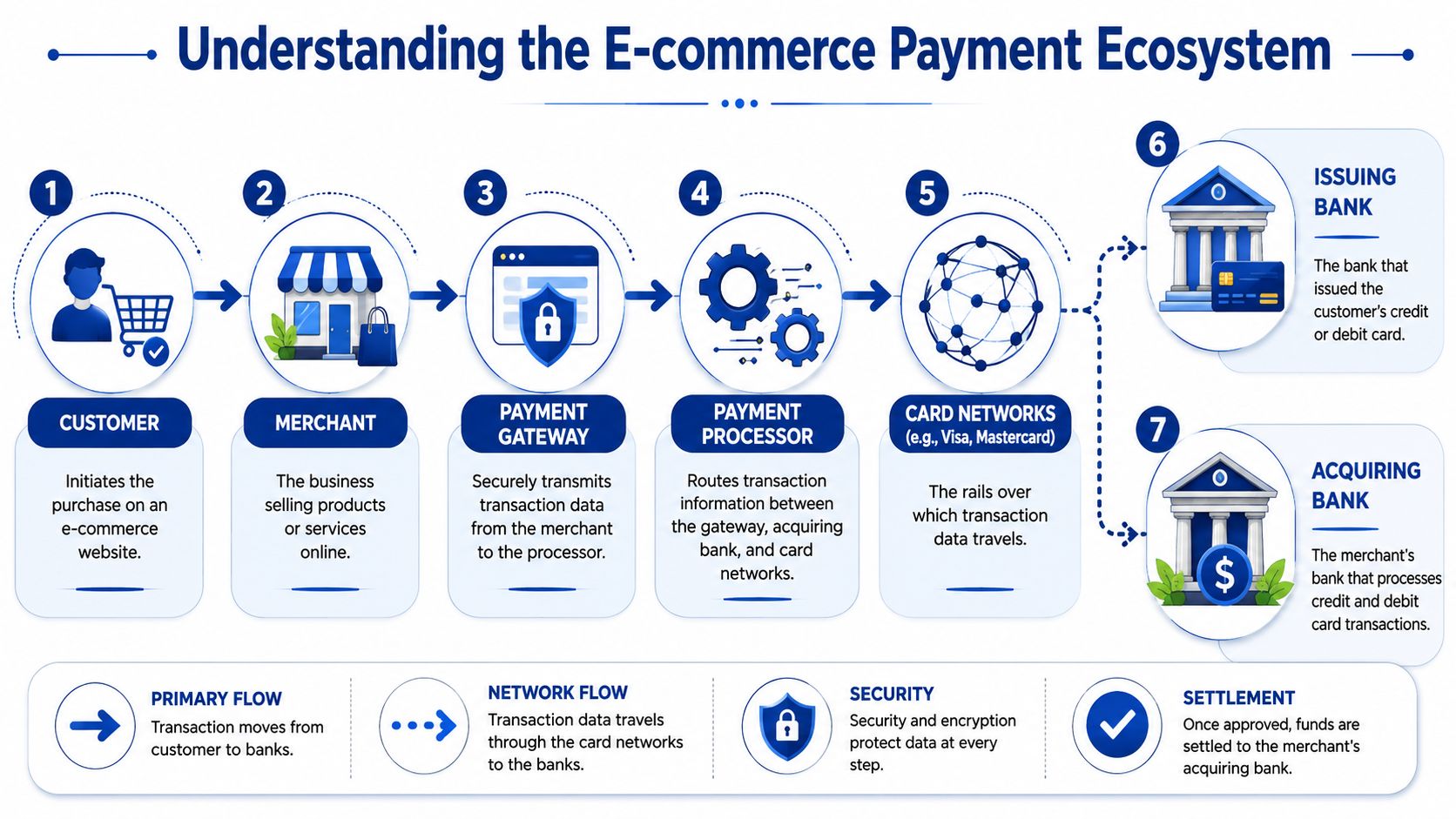
The payment gateway is like the waiter. It takes the customer's order and carries the information securely to the right place.
The payment processor is like the kitchen. It handles the actual work of moving the transaction through the payment system, connecting the merchant side, the customer's bank, and the card networks.
The merchant account is like the cash register drawer where approved funds land before they're settled into your business bank account.
Here's the ecosystem visually:
That sounds neat in theory, but many business owners get tripped up because modern providers often bundle these roles together. A platform might offer gateway, processing, fraud screening, and merchant account services in one product. Another provider might let you pick each layer separately.
What happens in a live transaction
When a customer enters payment details or selects a wallet, the gateway encrypts and passes that information onward. The processor then routes it through the payment rails. The issuing bank checks whether the payment should be approved. If it is, the transaction is authorised. After that, the settlement moves the money into the merchant's side of the system.
That's why payment issues can have different causes:
Gateway problem means the data capture or handoff fails.
Processor problem means the transaction routing or approval flow breaks down.
Merchant account problem means the money is accepted but gets delayed, reviewed, or held.
The scale of this industry shows why the processor layer matters so much. The ecommerce payments market is projected to handle $8.3 trillion in transactions in 2025 and $13 trillion by 2030, while payment processing services hold 52.7% share of that market, according to Juniper Research market analysis.
Why this matters to a Canadian merchant
If you're selling online in Canada, you don't need to become a payments engineer. You do need to know which part of the stack is responsible for what.
That knowledge helps you ask better vendor questions:
Who owns the merchant account
How are failed payments handled
Where do funds sit before payout
What happens if transaction volume spikes
Can the system support domestic and cross-border settlement
The provider you choose isn't just a checkout widget. It's part of your operational infrastructure.
Once you understand the moving parts, provider comparisons become much easier. You're no longer buying “payments” as one vague feature. You're choosing how much control, flexibility, and responsibility your business wants to keep.
Types of Payment Solutions and Integration Methods
Most ecommerce merchants end up choosing between two broad models. One bundles everything into one service. The other lets you assemble the parts yourself.
All-in-one versus modular setups
An all-in-one payment service provider, or PSP, usually combines gateway, processor, and merchant account functions. Stripe and Shopify Payments are familiar examples. These setups are attractive because they're fast to launch, simpler to manage, and often easier for smaller teams.
A modular setup separates those layers. You may use one gateway, another processor, and a separate acquiring or merchant account arrangement. This model takes more work, but it gives larger or more specialised businesses more control over routing, costs, risk management, and custom workflows.
This visual comparison captures the trade-offs:
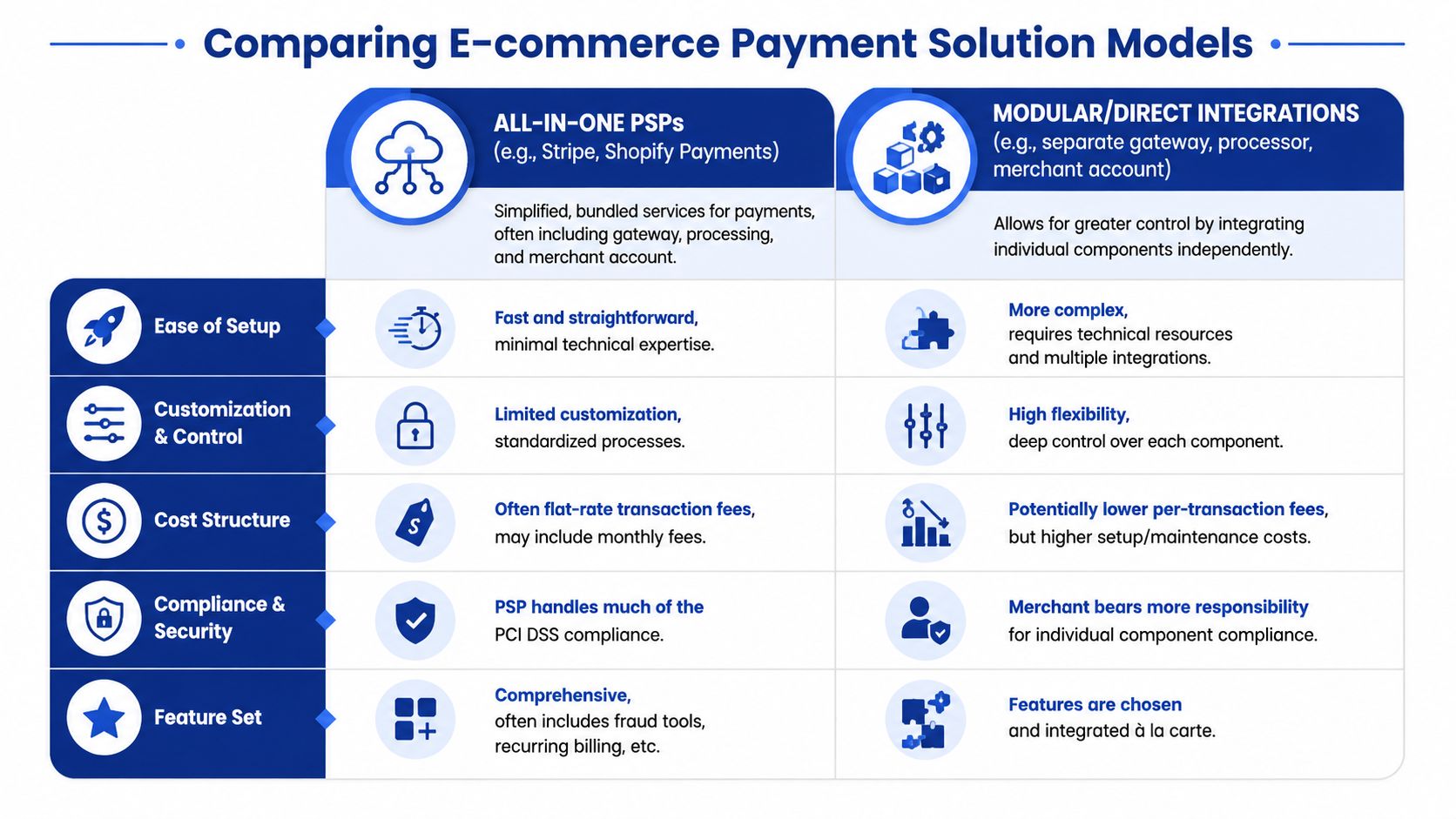
Neither model is automatically better. The right choice depends on how much complexity your team can realistically manage.
Why wallets changed the decision
A lot of older ecommerce advice still treats card acceptance as the centre of the payment strategy. That's no longer enough.
Globally, digital wallets accounted for about 50% of ecommerce transaction value in 2023–2024, with over 4.3 billion users, according to Market.us ecommerce payments analysis. In plain terms, shoppers increasingly expect fast, mobile-friendly, one-click payment experiences.
That changes what “good payment solutions for ecommerce” means. It's no longer only about taking Visa or Mastercard. It's about supporting wallets, mobile flows, saved credentials, and a checkout that doesn't feel like a desktop form squeezed onto a phone screen.
Integration methods you'll actually choose between
Once you pick the solution model, you still need to decide how it connects to your store.
Hosted payment pages
With a hosted payment page, the customer is redirected to the provider's checkout environment, or the provider hosts the key payment fields. This reduces the merchant's security burden and speeds up implementation.
Hosted pages work well when:
You need speed: Launch matters more than deep customisation.
Your team is small: You don't want to own complex security work.
You prefer proven flows: Standardised checkout often means fewer implementation mistakes.
The downside is less control over the experience and branding.
Direct API or SDK integration
With an API or SDK integration, your team builds a more customised checkout on your own site or app while connecting directly to the provider's payment services.
This is better when:
Brand control matters: You want a smooth experience.
The checkout has custom logic: For subscriptions, marketplaces, or mixed fulfilment rules.
You need orchestration: Routing payments, controlling retries, or supporting multiple entities.
It also means more development work and more responsibility.
Platform plugins and extensions
For Shopify, WooCommerce, Magento, and similar systems, pre-built plugins sit in the middle. They're often the practical choice for merchants who want reasonable flexibility without a custom integration project.
If your store is growing and your back-office tools are becoming fragmented, it's worth reviewing how payments fit into the rest of your stack. This guide to ecommerce integrations in Canada is useful for thinking through that broader systems picture.
A clean payment integration doesn't just collect money. It fits with order management, customer support, accounting, fraud review, and reporting.
For Canadian businesses, there's one more filter to apply. Don't judge a provider only by its global brand recognition. Ask whether its integration supports the handful of payment methods and settlement patterns your customers and finance team need.
Navigating Security Compliance and Fraud Prevention
Security language scares people because it's often presented as if only specialists can understand it. You don't need to memorise standards. You need to know what responsibilities stay with the provider and what responsibilities stay with you.
PCI DSS in plain English
PCI DSS is the security standard for handling card data. The practical question isn't “What are all the rules?” The practical question is “How much sensitive payment data does my business touch?”
If you use hosted checkout or provider-hosted fields, the provider usually carries more of that burden. If your team builds a bespoke payment form, your responsibilities tend to increase.
That's why simplicity can be a strategic decision, not just a technical one.
Tokenisation and customer trust
Tokenisation replaces sensitive card details with a token that can be used for future charges or stored payment methods without exposing the raw card number in your systems.
For a merchant, that matters because it reduces risk while still enabling useful customer experiences such as saved cards, subscriptions, and smoother repeat purchases.
A secure checkout should feel easy for the customer and boring for your operations team. Boring is good here. It means fewer surprises.
Fraud prevention is part policy, part tooling
Fraud prevention is not only about blocking suspicious transactions. It's also about avoiding false declines, protecting legitimate customers, and giving your team review tools that fit your order patterns.
A business that sells low-risk replenishment products needs a different fraud posture than one selling high-ticket electronics or accepting international orders. If you're reviewing tools and workflows, this overview of AI fraud detection for ecommerce is a practical starting point.
Why Canada's Real-Time Rail matters
Canada's payment infrastructure is changing in a way that ecommerce operators should pay attention to. Payments Canada's Real-Time Rail is being built to support instant, irrevocable payments with ISO 20022 messaging, which shifts settlement from batch timing toward immediate confirmation, as explained in this RTR overview.
That has real implications:
Cash flow can improve because confirmation and reconciliation can happen faster.
Operational rules may change because irrevocable payments aren't the same as card-based timing.
API readiness becomes important because systems need to route and reconcile faster-moving payment events.
If your payment stack can't adapt to new rails, your checkout may still work, but your operations can become harder to manage as the market modernises.
Decoding Pricing Models and Global Sales Fees
Payment pricing often looks simple in sales copy and messy in real life.
Most providers present an easy headline. The trouble starts when you compare different transaction types, card categories, refund handling, cross-border charges, and settlement options. To choose well, you need to understand the pricing model before you compare the rates.
The three pricing models you'll see most often
Flat-rate pricing
With flat-rate pricing, the provider charges one standard fee structure across many transactions. This is the easiest model to understand and forecast.
It works well for early-stage stores because administration stays simple. The trade-off is that simplicity can hide inefficiencies if your volume grows or your payment mix changes.
Interchange-plus pricing
With interchange-plus, the underlying card cost is passed through, and the provider adds a markup. This model is usually more transparent, but it's harder to read if you've never seen payment statements before.
For businesses with enough scale, it can offer better clarity on what they're paying for processing versus provider margin.
Tiered pricing
With tiered pricing, transactions are grouped into buckets with different pricing. This can be harder to audit because the criteria behind each tier may not be obvious.
If you're comparing offers and one proposal seems strangely difficult to decode, slow down. In payments, confusion is rarely your friend.
If you can't explain a provider's pricing to your finance lead in plain language, you probably don't understand the full cost yet.
The Canadian payment mix changes the cost discussion
Canada has a distinct payment mix. In 2024, 62% of Canadian ecommerce sales were paid by credit card and 23% by debit card, according to Gorgias coverage of ecommerce payment processing. That means Canadian merchants shouldn't choose a solution that treats debit support as an afterthought.
This matters for both conversion and economics. If your processor is excellent for credit cards but weak on bank-linked debit rails such as Interac-linked flows, you may pay for traffic that never converts efficiently.
The hidden costs of selling beyond Canada
Cross-border sales add another layer. Even when the provider supports international payments, you need to ask:
How is currency conversion handled
Can you settle in more than one currency
Are domestic and international transactions handled through one framework
Will refunds and disputes become harder across markets
A provider can look affordable for domestic orders and become an expensive operation once you expand. The issue isn't only fees. It's also reconciliation, payout timing, accounting complexity, and customer experience in foreign markets.
A better way to compare providers
Build your own cost view around your order profile:
| Cost area | What to ask |
|---|---|
| Domestic card payments | How are Canadian credit and debit transactions priced? |
| Wallet transactions | Are wallet payments routed efficiently or treated like generic card flows? |
| Cross-border orders | What extra charges apply when the customer or card is outside Canada? |
| Currency handling | Do you absorb conversion at settlement, or can you localise pricing and payout? |
| Operational costs | How much manual work will finance and support teams inherit? |
The cheapest quote on paper often stops being the cheapest once your store adds multiple markets, refund volume, or more than one payment rail.
Choosing the Right Solution for Your Business Stage
The right payment setup for a new brand is rarely the right setup for a mature ecommerce operation. A founder shipping the first orders has different priorities than a finance and operations team managing multiple channels.
The mistake I see most often is overbuying too early or underbuilding for too long.
Startups need speed, not a custom payments project
If you're just launching, an all-in-one provider is usually the sensible choice. You want a payment system that works quickly, supports wallets, plugs into your store platform, and doesn't force your team into a long compliance exercise.
At this stage, the questions are practical:
Can customers pay easily on mobile?
Does the checkout support the Canadian methods your audience expects?
Can you issue refunds without operational drama?
Will the provider let you grow before asking for a rebuild?
A startup usually benefits more from a clean, reliable setup than from squeezing every last basis point out of fees.
SMEs need room to grow without friction
Once the business has steady order volume, payment decisions become less about launch and more about efficiency. You may need recurring billing, stronger fraud controls, better reporting, multiple storefronts, or improved cross-border support.
Provider limits start to matter. For scaling Canadian merchants, one of the biggest risks is choosing a provider that later imposes holds, freezes, or volume caps, as noted in this guidance on ecommerce payment providers.
That's why the cheapest provider isn't always the safest business decision. If your processor becomes a bottleneck during peak season, a dispute spike, or international expansion, the commercial damage can outweigh any headline savings.
Enterprises need orchestration and resilience
Larger merchants tend to care about things that smaller businesses barely think about at first. They may need multi-entity support, local settlement across markets, backup routing, hybrid online and offline sales, and stricter internal controls between ecommerce, finance, and risk teams.
For these businesses, modular or semi-modular setups often make more sense. Not because complexity is fashionable, but because scale changes the cost of dependency. If one provider controls everything and something breaks, the blast radius is larger.
The more your business depends on payments, the less wise it is to treat payments as a plug-in you never revisit.
Payment Solution Checklist by Business Size
| Feature/Consideration | Startup (Focus: Speed & Simplicity) | SME (Focus: Growth & Efficiency) | Enterprise (Focus: Scale & Optimisation) |
|---|---|---|---|
| Setup model | Prefer all-in-one PSP | Choose based on flexibility and reporting needs | Consider modular or orchestrated setup |
| Checkout experience | Prioritise fast mobile checkout and wallet support | Optimise for repeat buyers and lower friction | Customise by market, brand, and channel |
| Canadian payment fit | Ensure cards and local debit-friendly options are covered | Add stronger local method support and better routing | Align payment methods by region and entity |
| Security burden | Keep compliance scope lighter with hosted flows | Balance hosted tools with selective customisation | Build governance across teams and systems |
| Reporting | Basic dashboard may be enough | Need finance-friendly exports and operational visibility | Require unified reporting across markets |
| Fraud tools | Use provider defaults first | Add tuned rules and review workflows | Combine tooling, policy, and team processes |
| Cross-border readiness | Useful, but not urgent for every launch | Important if expanding beyond Canada | Essential, including settlement strategy |
| Scalability risk | Check for onboarding limits | Ask directly about volume reviews and reserves | Demand clear service and escalation paths |
| Integration depth | Plugin or native platform app | Integrate with ERP, CRM, and support systems | Support multiple systems and custom logic |
| Provider dependency | Acceptable early on | Needs periodic review | Must be actively managed |
The decision filter that works best
When comparing payment solutions for ecommerce, sort providers using three lenses:
Customer fit
Does the checkout match how your Canadian customers prefer to pay?Operational fit
Can your team reconcile, refund, review, and support payments without manual chaos?Growth fit
Will this setup still work when volume rises, channels expand, or international orders increase?
A provider that scores well in only one category is rarely the right long-term choice.
Your Implementation Roadmap
Once you've chosen a direction, implementation should run like a business project, not a last-minute plugin install.
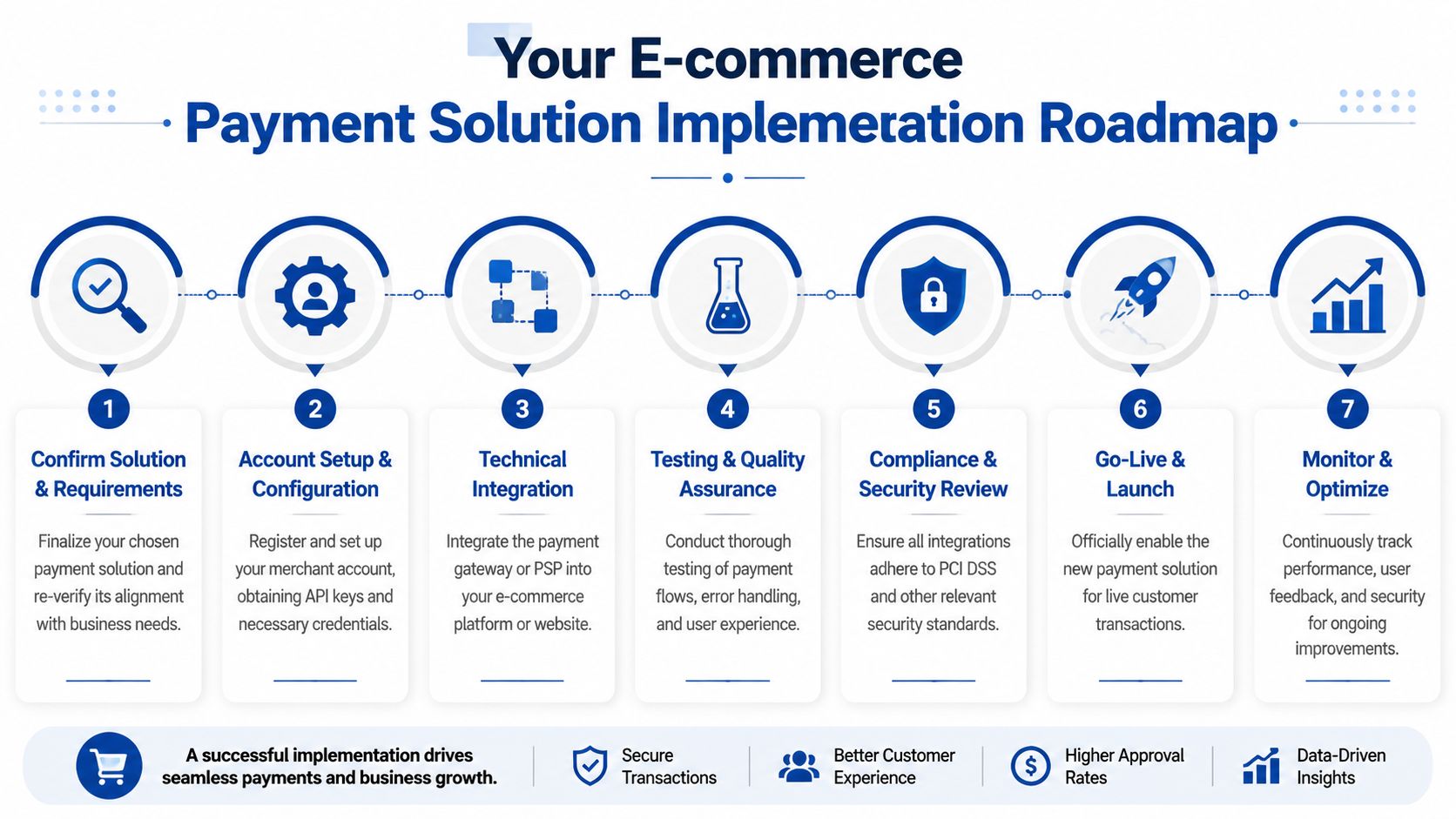
The sequence that keeps teams out of trouble
Audit the current sales flow
Map how customers move from cart to paid order. Note where support tickets, failed payments, manual reviews, or refund delays already happen.Define essential requirements
Write down what the new setup must support. That might include Interac-linked debit, wallets, subscriptions, cross-border settlement, or a lighter PCI scope.Shortlist vendors carefully
Don't just compare homepage promises. Ask about payout timing, reserves, onboarding checks, and what happens during sudden growth.Plan the integration properly
If you're building more than a basic plugin setup, review the technical work in advance. This guide to payment gateway software development is useful for framing the implementation work with your internal team or development partner.Test real checkout scenarios
Test desktop and mobile. Test wallets, failed payments, refunds, and customer service workflows.Prepare for cross-border complexity
If international sales are part of the plan, study how providers handle settlement, currencies, and global rails. For a practical perspective, this overview of Zaro for international payments is a helpful comparison point.Monitor after launch
Watch payment success, customer complaints, payout behaviour, and finance reconciliation. The first launch is the start of optimisation, not the end.
A solid rollout is less about coding speed and more about making sure payments, finance, operations, and customer experience all work together.
Frequently Asked Questions
Can I change payment providers later?
Yes, but it's easier if you plan for it early. Hosted setups are often faster to replace than highly custom checkouts with lots of provider-specific logic. If portability matters, ask about token migration, reporting exports, and integration lock-in before you sign.
What's the difference between a gateway and a processor again?
The gateway captures and securely sends payment information. The processor moves the transaction through the payment system and coordinates with banks and networks. One takes the order details. The other gets the payment moving.
Do I need a separate merchant account with modern PSPs?
Usually not. Many modern PSPs bundle merchant account functions into their platform. That's one reason they're easier to launch with. In more custom or enterprise setups, merchant account arrangements may still be separate.
Should Canadian merchants always add more payment methods?
Not always. More options can help, but only if they match what your customers use and your team can support them operationally. The smarter approach is to prioritise the methods most relevant to your audience and device mix.
If you're evaluating payment solutions for ecommerce and need help turning strategy into a working implementation, Cleffex Digital Ltd can support the build side of the project, from ecommerce integrations and custom checkout workflows to secure, scalable payment system development for Canadian businesses.