

Top-performing organisations aren't treating AI as a coding novelty. They're using it across the software development life cycle and seeing 16% to 30% improvements in team productivity, customer experience, and time to market, plus 31% to 45% improvements in software quality, according to McKinsey's research on AI in software development.
That changes the conversation. For SMBs and mid-market companies, the question isn't whether AI belongs in software delivery and operations. The key question is where to integrate it first, how to govern it properly, and how to avoid building a messy stack that creates more risk than value.
In practice, AI integration in software development and operations works when teams stay disciplined. They choose narrow use cases, tighten their delivery process, protect sensitive data, and measure results beyond coding speed. That matters even more in healthcare, insurance, and other regulated environments where faster delivery only helps if quality, auditability, and control remain intact.
Why AI Integration Is Now a Competitive Necessity
Teams that scale AI across software delivery outperform those that keep it in pilot mode. As noted earlier, high-performing organisations report measurable gains in productivity, time to market, customer experience, and software quality. The gap is not about curiosity. It is about operating discipline.
For SMBs and mid-market companies, that distinction matters. Larger enterprises can absorb a few disconnected AI experiments and sort out the mess later. Smaller teams usually cannot. If a new assistant introduces compliance risk, produces unreliable output, or adds another tool nobody governs, the cost shows up fast in missed releases, rework, and leadership scepticism.
The competitive pressure is already visible in day-to-day hiring and delivery expectations. Developer use of AI tools is now common, and that changes the baseline your team is measured against. Clients expect faster iteration. Internal stakeholders expect better forecasting. Engineers expect some level of assisted workflow, whether that means code suggestions, incident summaries, test generation, or support for developing AI mobile apps with Capacitor.
What separates useful adoption from expensive noise is where AI is applied and how tightly it is governed.
The Real Shift Is Operational
AI integration matters because it changes how work moves through the delivery system. A code assistant may save minutes in the IDE, but the bigger business result comes from reducing friction across handoffs, approvals, testing, release prep, and operational response.
I see the same pattern in first-time AI programmes. Teams start with coding help because it is easy to buy and easy to demo. Then they discover the harder questions. Which repositories can feed the model? What data cannot leave the environment? Who reviews AI-generated test cases? Whether change records and incident actions are still auditable. In healthcare and insurance, those questions are part of the implementation plan, not a later cleanup task.
That is why AI should be treated as a delivery capability, not a collection of point features.
Where Companies Lose Momentum
The common failure mode is not a lack of ambition. It is poor sequencing.
A mid-market firm might deploy an AI coding tool to every developer before defining acceptable use, logging requirements, or success metrics. Six months later, leadership has anecdotal enthusiasm but no clear evidence of faster releases or fewer defects. Security teams are asking where prompts are stored. Compliance teams want to know whether regulated data entered a third-party model. Engineering managers are trying to standardise practices after usage has already spread.
A better approach starts with four decisions:
Choose the first workflow, not the first tool: Release notes, test generation, ticket triage, deployment checks, and incident summarisation each carry different value and risk.
Set business metrics before rollout: Measure lead time, escaped defects, change failure rate, review time, or support load. Do not stop at coding speed.
Match governance to the industry: Healthcare, insurance, and other regulated teams need traceability, approval rules, vendor review, and clear boundaries for sensitive data.
Fit the platform to team size: SMBs usually need tools that plug into existing systems quickly. Mid-market companies often need stronger policy controls, role separation, and integration with their broader DevOps stack.
This is also where regional and organisational context matters. Teams working through budget limits, privacy obligations, or uneven internal AI maturity often benefit from a broader change plan, not just a developer tooling plan. From that perspective, Cleffex's guide to AI adoption in Canadian enterprises is a useful companion read.
Competitive necessity does not mean every company needs a large AI platform on day one. It means firms that treat AI as a governed, measurable part of software delivery will ship more reliably than firms that treat it as an isolated experiment.
Key AI Integration Patterns and Architectures
A practical architecture discussion should stay simple. Most AI integration in software development and operations falls into three patterns. Think of them like kitchen equipment.
A toaster handles one job quickly. A food processor helps with prep across multiple tasks. A commercial kitchen line coordinates ingredients, timing, safety, and output at scale. AI systems behave in much the same way.
Embedded Models
This is the toaster. An embedded model sits inside an existing tool or workflow and performs a narrow function.
Common examples include code completion, pull request summaries, automated documentation drafts, and issue classification. These are usually the fastest to trial because the integration work is light and the user experience is already familiar.
For SMBs, embedded models are often the right starting point because they don't require a major platform build. They work best when the business wants immediate support for known friction points, such as repetitive coding or support-heavy release notes.
Assistive Agents
This is the food processor. An assistive agent works across several inputs and can support more complex tasks, often with some autonomy but still under human review.
Examples include release copilots that analyse ticket history and deployment notes, operational agents that summarise incidents and suggest next actions, or QA assistants that generate test cases from requirements and code diffs. These systems need better process design because they rely on context from source control, ticketing, runbooks, and team conventions.
IBM notes that AI in software delivery now extends beyond code generation into debugging, testing automation, documentation, refactoring, security enhancement, and DevOps/CI-CD support, as outlined in IBM's overview of AI in software development. That wider footprint is exactly why assistive agents can be powerful and why they can also become unreliable if your underlying data is disorganised.
MLOps and Operational AI Pipelines
This is the commercial kitchen line. MLOps pipelines support AI systems that must be deployed, monitored, updated, governed, and integrated with production operations.
This pattern fits use cases such as anomaly detection in infrastructure, failure prediction, intelligent environment promotion, or automated quality controls tied to release gates. Established guidance on AI for software and IT operations stresses that AI now touches every phase of the lifecycle, including monitoring, scaling, failure prediction, and environment promotion, which means teams need different integration patterns for different tasks, as described in Booz Allen's discussion of AI for software development and IT operations.
| Pattern | Primary Use Case | Implementation Complexity | Best For |
|---|---|---|---|
| Embedded models | Code suggestions, summaries, simple automation | Low | SMBs starting quickly |
| Assistive agents | Multi-step engineering and operational assistance | Medium | Teams with organised workflows and shared tooling |
| MLOps pipelines | Production AI tied to delivery and operations controls | High | Mid-market and enterprise teams with governance needs |
How To Choose Without Overbuilding
A common mistake is choosing the most advanced pattern before the team has earned it operationally.
Use this filter instead:
Start with embedded models if your process is still maturing and you need quick wins.
Move to assistive agents when your tickets, repos, and operational notes are reasonably structured.
Adopt MLOps pipelines only when the use case affects production decisions and needs monitoring, audit trails, and controlled rollout.
Practical rule: Match the architecture to the business risk. The more autonomy the system has, the more governance and observability you need.
This also applies to mobile and cross-platform delivery. If your team is exploring embedded AI inside apps, the guide to developing AI mobile apps with Capacitor is useful because it shows how architectural choices change when AI features move from internal tooling into user-facing products.
A Phased Roadmap for AI Integration
Most failed AI rollouts don't fail because the models are weak. They fail because the company tries to jump from curiosity to production without a sequence.
A workable roadmap has four phases. Each phase should answer one business question before moving to the next.
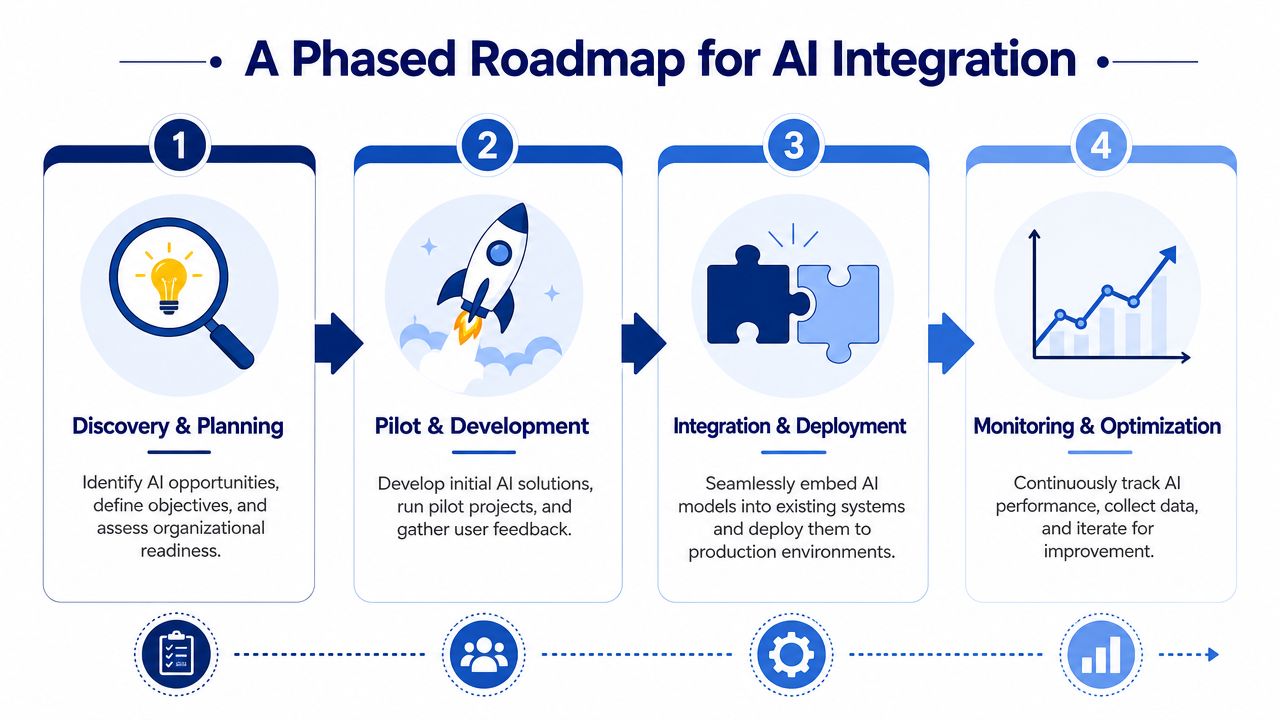
Discovery and Planning
The first phase is about choosing where AI can remove drag without introducing uncontrolled risk.
For SMBs, this usually means identifying two or three repetitive workflows that consume skilled time. Examples include writing test scaffolds, drafting technical documentation, triaging support tickets, or producing deployment summaries. Mid-market firms should go further and map dependencies across compliance, data classification, release approval, and vendor risk.
This phase should produce a short written brief covering:
Target workflows: Where teams lose time, quality, or visibility.
Decision rights: Who approves pilots, who owns the security review, and who signs off on production use.
Data boundaries: Which repositories, tickets, logs, and documents can be used by AI systems.
Success criteria: What must improve for the pilot to continue.
A lightweight planning artefact helps here. Teams that need structure can adapt a technology roadmap template to align engineering, operations, and leadership before tools are selected.
Pilot and Development
The second phase should stay narrow. Pick one use case with visible operational pain and manageable risk.
Good pilot candidates tend to share three traits. They are frequent, measurable, and reversible. AI-assisted test generation, documentation support, and incident summarisation usually fit that profile better than autonomous production changes.
For SMBs, one pilot may be enough. Mid-market companies often run two pilots in parallel if they separate them by risk level. For example, one internal engineering pilot and one operations-facing pilot with tighter controls.
A useful pilot design includes:
A fixed workflow boundary: Don't let the pilot sprawl into adjacent processes.
Human review points: AI outputs should be checked before they affect releases, infrastructure, or customer data.
A baseline: Capture current effort, defects, or cycle time qualitatively if you don't yet have strong metrics.
An exit rule: If the pilot creates rework, confusion, or security concerns, stop and redesign it.
Integration and Deployment
The third phase is where many organisations discover that the actual project was never the model. It was the workflow.
AI systems need identity controls, environment separation, observability, structured prompts or retrieval logic, and integration into the tools people already use. If engineers must leave their normal workflow to use the AI, adoption usually drops.
This is also where regulated firms need stricter controls. A healthcare or insurance team should define what data can be sent to external services, where outputs are logged, how approvals are captured, and how exceptions are escalated. Production use without those basics turns a promising pilot into an audit problem.
The safest deployment pattern is usually assistive first, autonomous later. Let AI recommend before it acts.
Monitoring and Optimisation
The fourth phase is about keeping the system useful after the launch excitement fades.
Optimisation means reviewing output quality, adoption quality, operational cost, and workflow fit. Many teams discover that the first version of an AI workflow generates plenty of activity but not enough reliable value. That isn't failure. It's a signal to tighten prompts, improve context sources, refine approval rules, or remove a weak use case.
For mid-market organisations, this is the point where MLOps-style thinking becomes necessary. Models and AI-driven services need lifecycle management, not one-time implementation. Even SMBs benefit from a simple review cadence with engineering, operations, security, and product stakeholders in the room.
A practical roadmap looks like this:
| Phase | Primary question | SMB focus | Mid-market focus |
|---|---|---|---|
| Discovery and planning | Where can AI remove friction safely? | Pick 2 to 3 narrow use cases | Map use cases to risk, data, and owners |
| Pilot and development | Does this use case work in practice? | Run one contained pilot | Run controlled pilots by risk tier |
| Integration and deployment | How does it fit production workflows? | Embed in existing tools | Add controls, approvals, and auditability |
| Monitoring and optimisation | Is value holding over time? | Review adoption and usefulness | Formalise lifecycle management and governance |
Building Your AI-Enhanced Toolchain for DevOps
Teams usually get more value from AI in DevOps by tightening a few high-friction steps than by buying a broad platform and hoping adoption follows. For SMBs and mid-market companies, that matters because tool sprawl drives cost, weakens accountability, and creates security gaps long before it improves delivery speed.
The right starting point is the path from ticket to production. Review where work slows down, where handoffs fail, and where engineers repeat low-value tasks. Then choose AI tools that fit those points and your existing controls, especially if you operate in healthcare, insurance, or another regulated environment where audit trails and data boundaries matter as much as productivity.
Planning and Coding
AI helps most at the planning stage when backlog inputs are messy. Product notes, support tickets, meeting transcripts, and incident follow-ups often contain useful signals, but they arrive in different formats and with inconsistent detail. A good planning assistant can cluster related issues, draft acceptance criteria, summarise requirement changes, and expose gaps before they turn into rework.
Coding tools follow the same rule. They perform better when the repository structure, branch conventions, pull request history, and ticket metadata are clean enough to provide usable context. If engineering hygiene is weak, suggestion quality drops, and review effort goes up. AI will reflect the state of the delivery system that feeds it.
For smaller teams, a single coding assistant tied to the IDE and source control platform is often enough. Mid-market teams usually need more discipline. They should check tenant isolation, retention settings, code ownership rules, and whether prompts or generated output can be logged for review. In regulated environments, that tool selection process should sit alongside your broader AI and machine learning security engineering practices, not outside them.
Testing and Release Engineering
Testing is often the first place where the return is clear. AI can draft unit tests, suggest coverage for changed code paths, summarise risky diffs, and help keep regression suites current. The savings are real when teams review output carefully and limit use to patterns the team can verify.
A practical stack often includes:
Coding assistance: GitHub Copilot or similar tools for code suggestions, code explanation, and small refactors.
Test support: AI-enabled test generation or maintenance tools used under engineer review.
Repository intelligence: Pull request summaries, change-risk signals, and CI-aware recommendations.
Documentation support: AI drafting for release notes, change logs, and operational handoff notes.
Selection should be conservative. A smaller company rarely needs a separate AI product for every stage of delivery. In many cases, one coding assistant, one repository intelligence layer, and targeted test automation cover most of the opportunity without creating a second integration program to manage.
For teams that do not want to assemble every component internally, custom implementation support can sit beside commercial tooling. Cleffex Digital Ltd is one option for teams that need customised software and AI workflow integration alongside existing DevOps processes.
Deployment and Operations
Operations tooling needs a higher bar than coding assistance because poor output affects uptime, change risk, and incident response. The best tools reduce noise and improve context for people making decisions. They should not hide the source of a recommendation or trigger production actions without clear approval rules.
Useful patterns include:
Deployment checks: Reviewing release notes, configuration changes, dependency updates, and known risk flags before promotion.
Incident triage: Summarising alerts, recent deployments, service dependencies, and probable fault domains.
Runbook assistance: Recommending remediation steps based on prior incidents and current environment data.
Post-incident analysis: Drafting timelines and action items from logs, tickets, and chat records.
I advise clients to test operational AI in read-only mode first. Let it summarise, correlate, and suggest. Require humans to approve the next step until the team has enough evidence that the tool is accurate, explainable, and aligned with your controls. If your infrastructure strategy already includes segmentation and strict access policies, this roadmap for developers on Zero Trust is a useful companion for deciding how AI tools should access build, deployment, and runtime systems.
A good AI toolchain feels connected and governed. Fewer tools, integrated well, usually outperform a larger stack of overlapping features with unclear ownership.
Managing Risk With AI Governance and Security
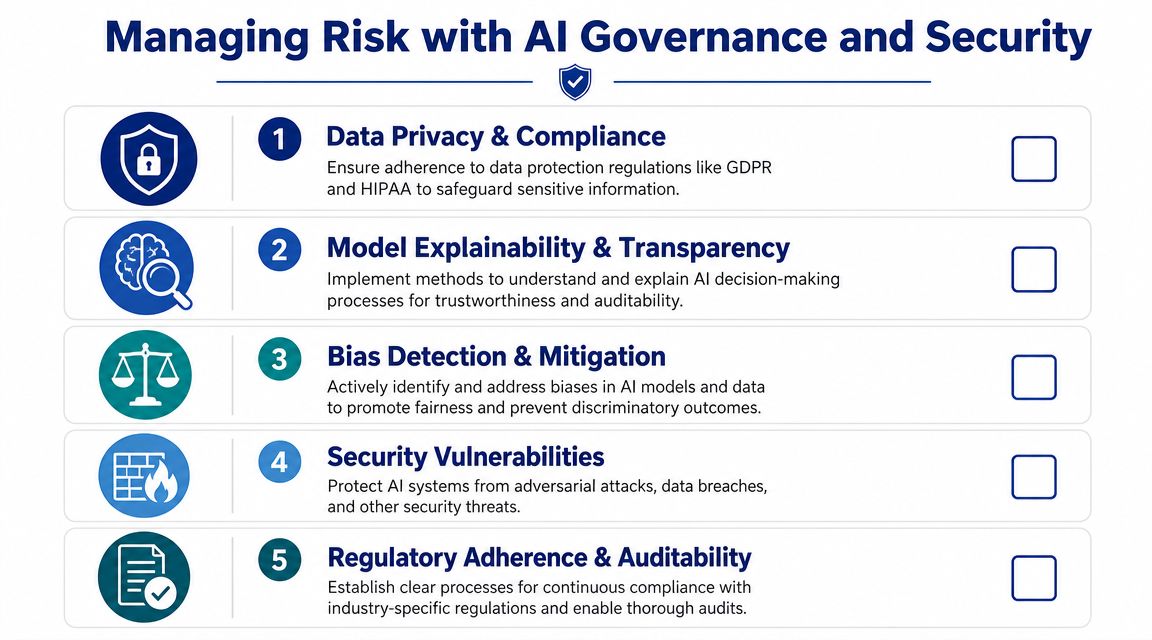
AI projects in regulated industries rarely fail because the model output is slightly imperfect. They fail because nobody decided what data could be used, who approved the workflow, or how the business would defend the process during an audit.
That's why governance has to be operational, not theoretical. Healthcare and insurance teams need rules that fit delivery reality, including source code access, sensitive records, support logs, deployment histories, and third-party services.
The Risks That Matter Most in Practice
The first risk is data leakage. Teams often paste production errors, customer examples, or policy language into external AI tools without a clear rulebook. In regulated environments, this can expose personal, financial, or proprietary information.
The second is unverifiable output. AI can generate code, documentation, and operational guidance that looks convincing but doesn't align with your architecture, controls, or compliance obligations. If nobody is accountable for review, the business absorbs the risk.
The third is security drift. AI-generated snippets may introduce unsafe dependencies, poor secret handling, or flawed authorisation logic. Security teams need review patterns that treat AI-assisted changes like any other code, with increased change scrutiny where appropriate.
For organisations tightening broader infrastructure access and trust boundaries, a practical roadmap for developers on Zero Trust is worth reading alongside AI governance work because identity, least privilege, and environment segmentation directly affect AI rollout safety.
A Governance Checklist for SMBs and Mid-Market Teams
Use this as a working checklist, not a policy document that sits unread in a folder.
Define approved use cases: Which AI-supported tasks are allowed today, and which remain prohibited until more controls exist?
Classify allowed data: Can developers use customer tickets, production logs, claims data, health records, or internal architecture documents? The answer should be explicit.
Set review requirements: Which outputs require human approval before merge, deployment, communication, or remediation?
Clarify IP and ownership: Who is responsible for reviewing generated code, validating licensing concerns, and confirming that reusable output meets company standards?
Log decisions and exceptions: If a team uses AI in a non-standard way, where is that recorded, and who approved it?
What Good Governance Looks Like Day to Day
Good governance doesn't slow delivery when it's designed well. It gives teams clear lanes.
A mature operating pattern usually includes security review for new tools, approved prompt and data-handling guidance, code review expectations for AI-generated changes, and periodic checks on whether the tool is still being used for the purpose originally approved. Teams should also know how to report failures, bad outputs, and near misses.
For deeper guidance on how engineering and security controls intersect in these environments, Cleffex's article on AI and machine learning security engineering adds useful context.
Governance should answer a daily question: what can this tool touch, who checks the output, and how do we prove that later?
How To Measure the True Impact of AI Integration
Teams that track only usage almost always overstate AI value. Logins, prompt counts, and generated lines of code show activity, but they do not show whether delivery improved, risk dropped, or costs stayed under control.
For SMBs and mid-market companies, that distinction matters fast. A large enterprise can absorb a few quarters of noisy experimentation. A 60-person product team in healthcare or insurance usually cannot. If an AI tool adds review overhead, creates audit gaps, or shifts work from junior staff to expensive senior engineers, the business feels it immediately.
The measurement model should cover three areas together: utilisation, impact, and cost. Looking at one without the others creates false confidence. High adoption with weak output quality is not a success. Lower adoption in a narrow workflow can be a good result if it removes a recurring bottleneck in testing, incident response, or release preparation.
Measure Utilisation in the Context of Work
Utilisation is not a popularity metric. It should answer a practical question: where is the tool changing how work gets done?
Start with workflow-level adoption, not overall seat counts. In client programs, I usually look for evidence that AI is being used in a defined task such as test case generation, pull request summarisation, runbook drafting, or incident triage support. That tells you far more than monthly active users.
Useful utilisation checks include:
Workflow fit: Is the tool being used in the stage it was approved for?
Depth of use: Is it saving time on production work or just supporting occasional experiments?
Role alignment: Are the expected teams getting value, such as engineering, QA, support, or platform operations?
Exception patterns: Are regulated teams avoiding the tool because the controls are too restrictive or too unclear?
That last point matters in healthcare and insurance. Low usage can indicate poor product fit, but it can also reveal that governance rules were written too broadly for day-to-day work.
Measure Impact Where Teams Feel the Result
Impact belongs in delivery and operational metrics that leaders already care about. Review cycle time, escaped defects, test maintenance effort, incident response quality, release predictability, and time spent preparing audit evidence are all better indicators than raw output volume.
Research summarised in Jellyfish's review of AI use cases and best practices points to meaningful gains in testing and maintenance work, but the result only holds when teams also check output quality and cost per change. That matches what I see in practice. AI often improves the first draft of a task. The key question is whether the total path to a safe, accepted, production-ready result gets shorter.
Measure impact close to the business decision. For an SMB software company, that may mean faster release flow with no increase in rollback risk. For a mid-market insurer, it may mean fewer hours spent updating repetitive test assets while maintaining traceability. For a healthcare platform, a better result may be more consistent documentation and incident summaries that stand up to internal review.
Measure Cost as Part of Operating Reality
Cost is where weak AI programs get exposed.
License fees are only one line item. The full cost includes setup, integration work, prompt and policy training, security review, human validation, rework, and support for teams that do not trust the output yet. In smaller organisations, the hidden cost is often senior attention. If architects, staff engineers, or compliance leads spend too much time correcting low-quality output, the tool is not reducing cost. It is relocating it.
A practical scorecard usually looks like this:
| Dimension | What to look at | Why it matters |
|---|---|---|
| Utilisation | Who uses it, in which workflows, and how consistently | Shows whether the approved use case is part of daily work |
| Impact | Changes in delivery speed, quality, operational effort, or audit readiness | Connects AI to outcomes the business already measures |
| Cost | Tool spend, review time, rework, training, and integration overhead | Prevents inflated ROI and helps compare vendors fairly |
For regulated industries, add one more lens: control effort. If one tool requires extensive logging workarounds or manual evidence capture to satisfy compliance, its apparent price advantage may disappear within a quarter.
There is a useful parallel outside engineering. Teams responsible for AI-driven visibility in marketing have learned that performance can change subtly, which is why a playbook for AI search for marketers is relevant here. The lesson is the same. Review the system on a schedule, track drift, and verify that the output still supports the business outcome you approved it for.
Good AI metrics show whether work moved faster, output stayed reliable, and the economics still hold.
Case Studies for SMBs and Enterprises
SMBs usually begin with a capacity problem. A 20-person software services firm does not need an AI program office on day one. It needs fewer hours lost to repetitive coding, weak handoff notes, and release prep that depends on one or two overstretched engineers.
A practical first rollout is narrow. Use AI to draft boilerplate code, prepare first-pass technical documentation, and summarise pull requests before review. Keep the guardrails simple and strict. Clean up repositories, standardise ticket templates, and require human approval for every generated output that affects production code or customer-facing documentation. That approach gives smaller teams a real productivity gain without adding an enterprise-style process that they cannot support yet.
I have seen this work best when the company fixes context before it buys more tools. If issue descriptions are vague and internal docs are outdated, the model will produce fast but unreliable output. For SMBs, that is usually the turning point. The project succeeds when the team treats documentation quality, naming standards, and review discipline as part of the integration.
A mid-market insurance company starts from a different position. Delivery speed still matters, but audit trails, claims logic, retention policies, and access controls matter just as much.
In that setting, the better pattern is controlled expansion. Teams often get value first from AI for regression test maintenance, incident summarisation, release note preparation, and change-risk review. They hold a harder line on policy decisions, customer communications, and anything that touches regulated data without clear approval and logging. Healthcare teams often need the same posture. Start with internal engineering workflows, then extend only after legal, security, and compliance teams agree on data handling, evidence capture, and vendor terms.
Tool choice also changes by company size and regulatory pressure. A small services firm can often start with one coding assistant and a documentation workflow inside existing tools. An insurance or healthcare platform usually needs more. Role-based access, model controls, audit logs, data residency options, and clear retention settings should be part of vendor selection from the start. A cheaper tool can become the expensive option if it creates manual compliance work every sprint.
What both cases share is straightforward:
Start with an expensive workflow problem, not a general interest in AI
Set review rules and data boundaries before expanding access
Improve source context, including tickets, docs, and repository hygiene
Choose tools that match the company's control requirements and team capacity
Judge success by delivery, quality, and operational outcomes
The point is not to copy enterprise patterns into a smaller company. It is to build a roadmap that fits the business you have now, while leaving room to scale. For SMBs and mid-market firms, especially in healthcare and insurance, good AI integration is a staged operating model change with clear ownership, usable controls, and tool choices that will still make sense six months later.
If your team is planning its first serious AI initiative, Cleffex Digital Ltd can help map the use cases, delivery workflow, governance model, and implementation approach to your business context, especially if you're balancing speed with security and compliance in healthcare, insurance, or other regulated environments.