

Your operations lead is chasing a missing shipment. Your customer service team is promising delivery dates they can't verify. Purchasing ordered more of one item because the spreadsheet looked low, then discovered a second location already had plenty. Meanwhile, one delayed part holds up a larger order, and nobody can say with confidence where the bottleneck started.
That's the moment many businesses realise they don't have a supply chain problem so much as a coordination problem.
Supply chain management software helps fix that. It acts like an air traffic control system for purchasing, stock, warehouses, suppliers, shipments, and customer orders. Instead of each team working from a different version of reality, everyone works from the same operational picture. For Canadian SMBs and mid-market firms, that's often the difference between reacting late and staying ahead.
Why Your Business Needs Supply Chain Control
A lot of businesses run their supply chain through email threads, spreadsheets, phone calls, and staff memory. That approach can work for a while. Then volume grows, suppliers change, customer expectations rise, or a cross-border shipment gets delayed, and the cracks show up fast.
Control doesn't mean slowing things down. It means knowing what you have, what you need, what's late, what's at risk, and who needs to act next.
The market shift makes that clear. The North American SCM software market was valued at approximately USD 36.39 billion in 2026 and is projected to grow at a 9.01% CAGR, while in Canada, cloud deployments hold 55.05% market share, SMEs are expanding fastest at 13.92% CAGR, and 94% of Canadian companies report revenue impacts from supply issues, according to Mordor Intelligence's supply chain management software market analysis.
What Control Looks Like in Practice
For a manufacturer, control means a missing component doesn't shut down production without warning.
For a clinic, it means critical supplies are available in the right location when staff need them.
For an insurer handling repair or replacement logistics, it means claims operations can coordinate vendors, parts, and delivery status without guesswork.
Practical rule: If your team spends too much time asking “Where is it?” or “Did anyone order this?”, you likely need a system, not just better follow-up.
Canadian firms that import goods also face added complexity around ports, customs, and overseas suppliers. If that's part of your world, practical guidance on mastering China import strategies can help you think beyond software and improve the process around it, too.
Decoding SCM Software Core Modules
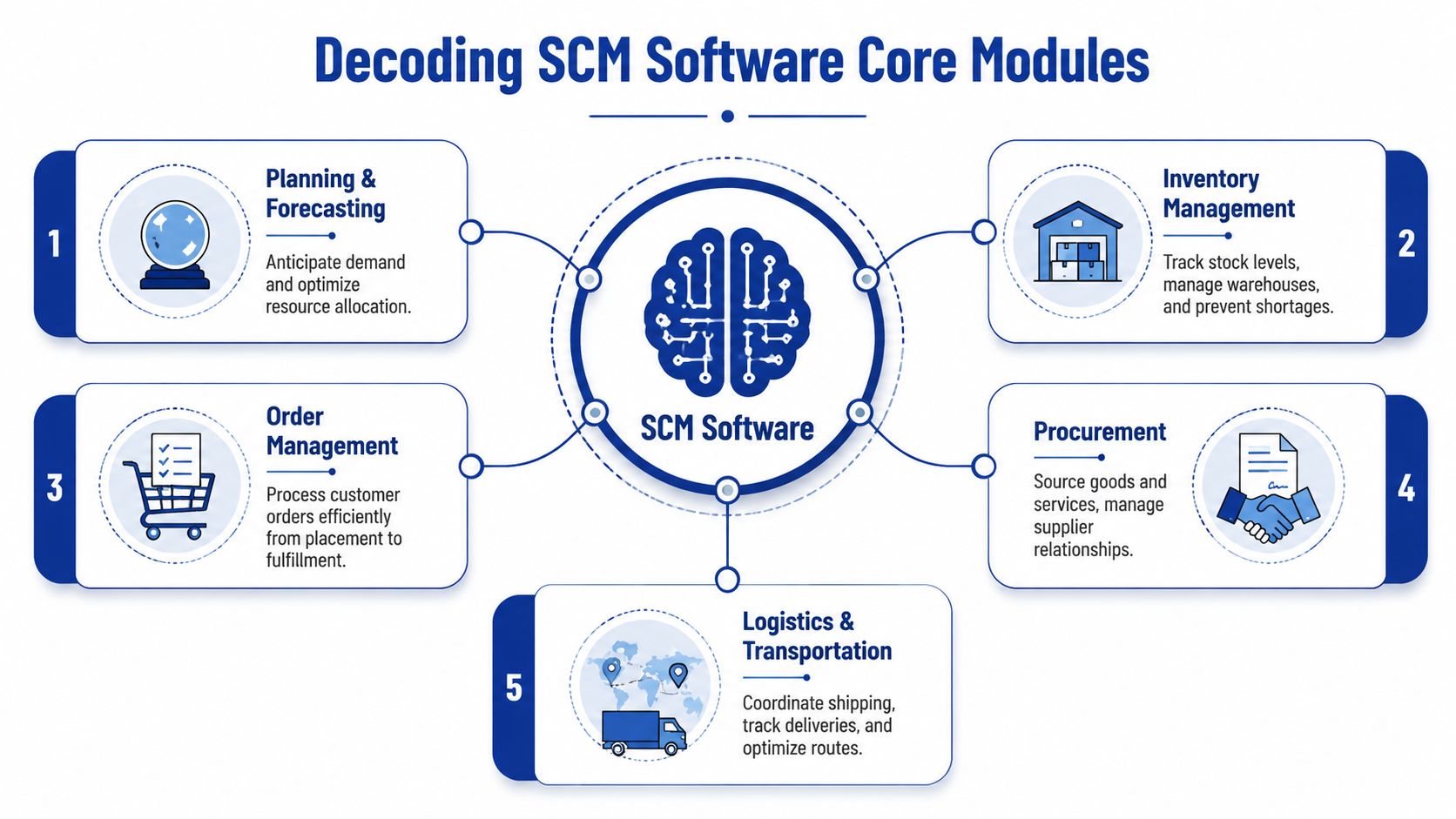
Think of supply chain management software as your business's central nervous system. Sales create demand. Purchasing responds. Inventory moves. Warehouses receive and ship. Finance needs accurate records. Leadership wants a clear view of risk and performance. The software connects those signals so one decision doesn't create chaos somewhere else.
Here's the basic shape of a modern SCM platform.
Planning and Forecasting
This module answers a simple question. What are we likely to need, and when?
Planning tools combine sales history, open orders, supplier lead times, and business rules to help you prepare inventory and purchasing plans. If you sell seasonal items, manage service parts, or support multiple branches, this matters quickly.
A practical example: a business that sees a predictable rise in orders before holidays can use planning software to buy earlier, reserve warehouse space, and avoid expedited shipping later.
Planning also helps stop overcorrection. Without it, teams often react to one shortage by buying too much of everything.
Procurement
Procurement handles what you buy, from whom, at what price, and under what terms.
Good procurement features track suppliers, purchase orders, approvals, lead times, and receipts. They also reduce the risk of duplicate ordering or buying the wrong specification. This matters even more when different branches or departments buy similar items under different names.
In Canadian operations, product and supplier data quality becomes a hidden issue fast. Verdantis notes that stronger master data management for materials, suppliers, and locations can improve procurement efficiency by 25 to 35%, while inconsistent material IDs can drive errors and downstream delays, as outlined in its overview of supply chain master data management.
One of the most expensive supply chain mistakes is basic confusion. Two teams think they're ordering different items, but they're really buying the same thing under different codes.
Inventory Management
Inventory management is where many owners first feel the value of SCM software.
This module tracks stock levels, item locations, reorder points, lot or serial details, and transfer activity across sites. It helps prevent both stockouts and dead stock. If your warehouse team currently updates counts when the shift concludes, or your branches call each other to ask who has what, the software provides the solution by paying attention to reality in real time.
Inventory management is especially useful when one item exists in many forms. A clinic may stock the same supply by package size. An auto business may carry several compatible part variants. An insurance repair network may need to manage substitute materials depending on vendor availability.
Order Management
Order management sits between customer demand and fulfilment. It captures the order, validates availability, routes the work, and updates status as the order moves.
If you want a deeper look at this piece, Cleffex has a useful guide to order management system software that explains how order flow connects with fulfilment and customer communication.
A straightforward example: when a customer places an order, the system can check available inventory, reserve stock, trigger picking, and alert the buyer if only a partial shipment is possible. Without that workflow, sales may promise what operations can't deliver.
Logistics and Warehouse Management
This module deals with movement. It covers receiving, put-away, picking, packing, shipping, carrier coordination, and often route or delivery tracking.
Warehouse management systems, often called WMS, are especially important once your team outgrows simple shelf-based operations. They help answer questions such as:
Where should this item go? Based on size, turnover, or storage rules.
Which order should be picked first? Based on priority or route.
What was shipped, and when? So customer service doesn't rely on carrier websites alone.
A business doesn't need every module on day one. But understanding these five helps you evaluate software without getting distracted by jargon. Most platforms are just different ways of connecting these same operational building blocks.
The Tangible Business Case for SCM Software
Software is easy to dismiss as overhead until you connect it to the costs you already carry.
Those costs show up as rush freight, excess stock, delayed invoicing, manual re-entry, write-offs, missed service windows, and frustrated staff who spend half their day reconciling conflicting information. Supply chain management software doesn't remove complexity from your business. It makes that complexity visible and manageable.
Cost Reduction That Comes From Fewer Mistakes
A common misconception is that supply chain software only helps giant distributors with huge warehouses. In practice, SMBs often feel the savings faster because their teams have less slack.
A system can stop duplicate purchase orders, flag pricing mismatches, and route approvals before someone buys outside policy. It can also reduce carrying costs by showing which stock is moving, which isn't, and where transfers make more sense than new purchases.
That's especially valuable when margins are under pressure and cash is tied up in inventory no one notices until year-end.
Efficiency That Removes Manual Admin
The biggest operational gain is often boring work disappearing.
Instead of copying order details from email into accounting software, then into a warehouse list, then into a carrier portal, the system passes data through once. Instead of staff checking three files to confirm whether stock exists, they search one record. Instead of calling suppliers for updates, buyers review status in one dashboard.
Operational shortcut: If a task requires someone to retype the same data into two systems, that task is a candidate for automation.
If you're evaluating integration more broadly, this overview on how to improve ROI through industrial integration is a useful companion because SCM software creates the most value when it connects to ERP, finance, warehouse, and customer-facing tools.
Visibility That Changes Decision-Making
Visibility is one of those words vendors overuse, but it matters because it changes behaviour.
When teams can see inbound stock, open orders, delayed receipts, and low inventory in one place, they stop making isolated decisions. Sales can set realistic expectations. Purchasing can prioritise real shortages. Operations can spot bottlenecks before they become customer complaints.
That visibility also helps managers move from anecdotal decisions to pattern-based ones. You stop hearing, “I think this supplier has been late lately,” and start seeing a track record of missed delivery commitments.
Resilience During Disruption
Resilience sounds abstract until a supplier misses a ship date or weather affects inbound freight.
A connected SCM setup helps you reroute, substitute, split shipments, or rebalance stock between locations faster. It doesn't guarantee a smooth supply chain. It gives your team a way to respond without improvising from scratch every time something breaks.
For SMBs and mid-market firms, that's a practical advantage. Bigger firms may absorb disruption with larger buffers. Smaller and medium-sized businesses usually need better coordination instead.
Navigating Modern SCM Platforms, AI, and Automation
Not all SCM platforms are built the same way. One of the first decisions is where the system lives and how much control you need over it. The second is how much intelligence you want the platform to apply automatically.
Those two choices shape cost, flexibility, rollout speed, and future fit.

Cloud, On-Premise, and Hybrid
For many Canadian SMBs, cloud SCM is the easiest starting point. It usually means lower upfront infrastructure demands, easier remote access, and faster updates. That's helpful if your business has multiple sites, external partners, or a lean internal IT team.
On-premise SCM gives you more control over the environment, configuration, and, in some cases, data handling. Some firms prefer this when they already run core systems in-house or have strict internal governance requirements.
Hybrid models combine both. You might keep some systems on-premise while using cloud-based modules for planning, analytics, or supplier collaboration.
A practical comparison helps:
| Deployment model | Best fit | Main trade-off |
|---|---|---|
| Cloud | SMBs and growing mid-market firms that need speed and flexibility | Less infrastructure control |
| On-premise | Firms with complex internal IT policies or legacy environments | More maintenance responsibility |
| Hybrid | Businesses transitioning gradually from older systems | Integration complexity |
The right answer depends less on trends and more on your existing systems, compliance requirements, and appetite for change.
What AI Is Actually Doing in SCM
AI in supply chain management software isn't magic. It's pattern recognition applied to decisions people used to make manually.
That includes forecasting demand, identifying likely delays, recommending reorder timing, prioritising exceptions, and improving route or fulfilment choices. In plain terms, AI helps teams focus on the few decisions that need judgment instead of drowning in routine transactions.
The business case is becoming hard to ignore. According to Procurement Tactics' supply chain statistics, AI adoption in SCM software cuts logistics costs by 15%, reduces inventory holding by 35%, and boosts service efficiency by 65%. The same source notes that only 6% of Canadian businesses have full supply chain visibility, which is why AI-driven platforms stand out when firms want lower costs and stronger performance.
Where Automation Helps Most
Automation usually delivers the most value in repetitive, rules-based work:
Replenishment triggers that raise a purchase request when stock falls below the target
Exception alerts that surface late suppliers or at-risk orders
Order routing that sends work to the right warehouse or vendor
Forecast updates that adjust when demand patterns shift
Workflow approvals for purchasing, substitutions, or expedited shipping
If you want a broader view of how this works in practice, Cleffex also explores AI in supply chain and logistics operations with examples relevant to operational teams.
The best automation doesn't replace your staff. It removes the repetitive checking, chasing, and re-keying that prevents them from solving real problems.
A Grounded Way To Evaluate AI Claims
Ask vendors to show where AI affects a real decision in your workflow.
Can it improve demand planning for multi-site inventory? Can it identify shipment risk before a customer calls? Can it recommend substitutes when a supplier is late? If the answer stays vague, the AI may be more marketing than operations.
For SMBs and mid-market firms, the strongest platforms usually combine practical automation with plain-language exception handling. Fancy dashboards matter less than whether your buyer, warehouse lead, and operations manager can act on what the system reveals.
Choosing the Right SCM Software for Your Business
Many smaller Canadian businesses know they need better control, but stall at the buying stage. They assume supply chain management software is too expensive, too complex, or only suited to enterprise operations.
That hesitation is understandable. According to Incora's review of supply management software features, only 23% of Canadian SMEs under $10M revenue use dedicated SCM software, while 62% still rely on spreadsheets. The same source says implementation costs typically range from CAD 50,000 to 150,000 annually, which explains why many firms delay the decision.
The problem is that spreadsheets feel cheap only until errors, delays, and manual coordination start costing more than the software would.
Start With Scope, Not Vendor Demos
Before comparing products, decide what problem you need to solve first.
For one business, the priority may be inventory visibility across locations. For another, it's procurement control. A healthcare group may care most about traceability and purchasing workflows. An insurer may need vendor coordination and status tracking more than warehouse depth.
If you skip this step, every vendor demo will look polished, and none will be comparable.
A helpful approach is to write down three things:
Your current pain point
Example: stockouts, duplicate ordering, poor shipment visibility, and disconnected claims vendors.The process that breaks most often
Example: replenishment, receiving, inter-branch transfers, order promising.The outcome you need
Example: cleaner purchasing controls, better service levels, fewer manual updates.
SCM Vendor Selection Checklist for SMBs and Mid-Market Enterprises
Use this as a practical filter during discovery calls and demos.
| Evaluation Criterion | Key Question to Ask the Vendor | Why It Matters for Your Business |
|---|---|---|
| Scalability | Can the platform support more users, locations, and transaction volume without a rebuild? | You don't want to outgrow the system just as operations become more complex. |
| Integration capabilities | Does it connect with our ERP, accounting, ecommerce, CRM, WMS, or claims tools? | Disconnected software creates the same silos you're trying to remove. |
| Industry-specific functionality | Can it handle the workflows our sector actually uses? | Generic tools often miss healthcare traceability, service parts logic, or claims-related vendor coordination. |
| User experience | Can non-technical staff use it without heavy workarounds? | If buyers, warehouse staff, or branch teams avoid it, the data quality collapses. |
| Total cost of ownership | What are the implementation, licence, support, training, and integration costs? | The cheapest subscription can become the most expensive project. |
| Vendor support | Who handles onboarding, support, and post-launch changes? | Supply chain systems touch daily operations. Slow support quickly becomes a business issue. |
| Reporting and alerts | Can the system flag late orders, low stock, and supplier issues in plain language? | Teams need action-oriented visibility, not just static dashboards. |
| Compliance fit | Can it support Canadian tax, privacy, customs, or industry-specific requirements? | Compliance gaps create risk that may not show up during a sales demo. |
What SMBs and Mid-Market Firms Should Watch For
Some products are strong in warehousing but weak in procurement. Others shine in planning but struggle with execution. ERP suites such as Microsoft Dynamics 365, Oracle NetSuite, SAP, and Sage can be part of the conversation, but the right fit depends on your workflow, not brand recognition alone.
If freight coordination is central to your operation, especially for import-heavy or multi-carrier environments, these essential freight forwarding tools can help you evaluate what transport-related capabilities may need to sit beside your core SCM platform.
You should also ask whether customisation is necessary or whether configuration is enough. Too much custom code can make upgrades painful. Too little flexibility can force staff into awkward manual workarounds.
Buy for the process you run most often, not the edge case you talk about most loudly in meetings.
One Sensible Shortlist Method
When choices start to blur together, score vendors against your top operational needs. Keep it simple.
Must-have workflows such as replenishment, receiving, traceability, or supplier approvals
Existing systems that must connect cleanly
Team fit based on whether day-to-day users can work comfortably in the interface
Growth fit based on likely expansion in sites, channels, or product complexity
One option some firms consider is a custom or semi-custom approach. For example, Cleffex Digital Ltd builds software for operational challenges and offers hospital materials management software with inventory tracking and automated purchasing tied to stock thresholds. That kind of fit can matter when off-the-shelf tools don't align with industry-specific workflows.
The goal isn't to find perfect software. It's to choose software that solves the operational bottlenecks hurting your business now, while still fitting where the business is headed.
A Practical Guide to SCM Software Implementation
Implementation is where good intentions meet operational reality.
This is also where many businesses worry most, and for good reason. For Canadian medium enterprises, integration can be difficult because of regulatory and system complexity. As noted in Z2Data's discussion of supply chain intelligence software, only 18% report smooth SCM integration, and firms can face average fines of CAD 200K for compliance failures tied to issues such as Bill C-27 and CBSA-related requirements.
The lesson isn't to avoid implementation. It's to treat it as an operational project, not just a software install.
Phases One and Two
Discovery and planning come first. Define the workflows that matter most, the systems that must connect, and the roles that need access. Decide what success looks like in business terms. Faster receiving, cleaner purchasing approvals, fewer stock discrepancies, better order status visibility.
Then move into data migration and cleansing. This step is rarely glamorous, but it matters more than the software demo ever suggested. Duplicate supplier records, inconsistent item names, and outdated units of measure can derail an otherwise sound rollout.
A good rule is simple. If your item master is messy now, the new system will expose it immediately.
Phases Three and Four
System configuration and integration is where your process gets translated into workflows, alerts, permissions, and data exchange. This is also the stage where Canadian compliance needs should be reviewed carefully. Privacy controls, customs-related fields, and auditability aren't extras if your business operates in regulated or cross-border environments.
After that comes training and go-live. Training works best when it's role-based. Buyers need different scenarios than warehouse staff. Finance needs different views than customer service. A generic walkthrough usually leaves teams confused because it shows screens, not decisions.
Go live with the critical workflows first. You can always add refinements later, but you shouldn't launch with unresolved confusion around core transactions.
Phases Five
Post-launch support and optimisation often decide whether the implementation sticks.
The first weeks reveal where users hesitate, where alerts are too noisy, and where approvals slow down unnecessarily. Good teams review those issues early, make practical adjustments, and tighten the workflow before bad habits return.
Here are the most common implementation pitfalls to avoid:
Skipping process mapping because everyone assumes the current process is already understood
Migrating bad data and hoping users will clean it up later
Undertraining frontline staff who handle the daily transactions
Ignoring compliance details until after integration issues appear
Trying to launch everything at once instead of stabilising the highest-value workflows first
A phased approach is usually more durable than a dramatic all-at-once rollout. Most businesses don't need perfection on day one. They need a controlled start that builds trust in the system.
SCM Software in Action: Industry-Specific Use Cases
The easiest way to understand supply chain management software is to see how it behaves in real operating environments. The core logic stays the same. Visibility, coordination, and control. But the pressure points differ by industry.

Healthcare
A clinic network with multiple locations often struggles with uneven inventory. One site over-orders. Another runs short. Staff place urgent requests because they can't see what's already in transit or available elsewhere.
In healthcare, demand forecasting matters because availability isn't just a service issue. It can affect patient care. According to SAP's SCM overview, AI-driven demand forecasting in Canadian healthcare can improve accuracy by 30 to 40% while helping maintain 99% availability for critical pharma SKUs by using signals such as weather and holidays.
That means a better system can help healthcare teams position stock before demand spikes rather than scrambling after shelves run low.
Automotive
An automotive business rarely deals with “inventory” as one simple category. It manages service parts, fast-moving consumables, special orders, returns, supplier timing, and customer appointment promises.
A dealership or service chain can use SCM software to connect parts availability with workshop scheduling. If a required part hasn't arrived, the service appointment can be flagged early instead of disappointing the customer at the counter. If one branch has the part and another doesn't, the system supports transfer decisions instead of fresh purchasing.
The result is less guesswork and a smoother handoff between front office, parts, and service operations.
Insurance
Insurance isn't usually the first sector people think of when they hear supply chain management software, but the fit is stronger than it seems.
After a major weather event, an insurer may need to coordinate inspectors, temporary replacements, repair vendors, materials, and status updates across many claims. That's a supply chain problem in all but name. The business is moving information, services, and physical goods through a network under time pressure.
SCM logic helps insurers track vendor commitments, monitor delays, and keep claims teams working from a shared operational view instead of scattered updates.
In insurance, the “product” moving through the chain may be a repair workflow rather than a pallet. The coordination challenge is still real.
Startups and Growing Firms
Startups often think they can postpone supply chain systems until they're much larger. That usually works right up until manual work starts consuming founder time and operations become fragile.
Cloud-based platforms are especially useful here because they give smaller firms structure without requiring a large internal IT footprint. A startup shipping products across channels can use the same operational discipline that larger firms rely on. Purchase orders, stock levels, fulfilment status, and supplier records all become easier to manage before complexity piles up.
For businesses selling across locations or channels, this broader guide to supply chain software for retail in Canada adds useful context on how retail-oriented workflows connect with inventory and fulfilment.
The pattern across all four examples is the same. The software doesn't just track things. It helps people make better decisions when timing, availability, and coordination matter most.
If your business is dealing with stock uncertainty, supplier delays, disconnected systems, or industry-specific workflow challenges, Cleffex Digital Ltd can help you assess whether a packaged SCM platform, a custom solution, or a hybrid approach fits your operation. For Canadian SMBs and mid-market teams, the right next step is often a practical process review before any software decision is made.