

A lot of Canadian businesses don’t realise their ecommerce problem isn’t the storefront people can see. It’s the backend nobody wants to touch.
The pattern is familiar. Marketing wants to launch a new landing flow before a seasonal promotion. Sales wants cleaner lead routing from the site into the CRM. Operations wants inventory and fulfilment to stop drifting out of sync. Compliance wants clearer audit trails. The technical lead knows each request is reasonable, but also knows every small change means working around a brittle codebase, old integrations, and deployment anxiety.
That’s where ecommerce backend modernization becomes a business decision, not a developer preference. If you run a Shopify store, a custom platform, or a hybrid stack with legacy systems behind it, the backend determines how quickly you can change pricing logic, launch channels, add automation, and stay compliant without slowing the whole company down.
Is Your Ecommerce Platform Holding You Back?
Black Friday pressure usually exposes the truth. The site is live, traffic climbs, and nobody on the leadership team is asking whether the checkout page uses a monolith or microservices. They’re asking why the search feels slow, why one integration failed, and why every urgent fix suddenly needs a war room.

For Canadian firms, that pressure is rising. In North America, the ecommerce platform market is projected to grow from USD 9.08 billion in 2025 to USD 16.51 billion by 2030 at a 12.7% CAGR, and legacy systems can produce 3x lower conversion rates than modern architectures, according to MarketsandMarkets research on ecommerce platform growth.
What that looks like in practice
A slow backend rarely fails in one dramatic way. It creates small losses that stack up:
- Channel friction means your team can’t easily add marketplace feeds, mobile experiences, or dealer portals.
- Release anxiety means developers batch changes together because every deployment feels risky.
- Integration brittleness means your ERP, CRM, shipping, and payment logic depend on custom workarounds that only a few people understand.
- Operational blind spots mean executives get reports late, or get conflicting answers from different systems.
- Security and compliance debt means old data flows stay in place because nobody wants to break them.
A CEO usually feels this as lost speed. A technical lead feels it as constant compromise.
Practical rule: If routine business changes keep turning into platform projects, your backend is already holding growth back.
Why Canadian SMBs feel this differently
Small and medium businesses in Canada often sit in an awkward middle ground. They’re too complex for a simple plug-and-play setup, but they don’t have the budget margin to tolerate a failed rewrite. That’s especially true in healthcare, insurance, and regulated services, where customer experience, operational accuracy, and compliance all depend on the same backend decisions.
Shopify’s footprint in Canada also changes the conversation. Many businesses start there for good reasons. It gets them selling fast. But once the company adds subscriptions, B2B workflows, multiple fulfilment paths, custom pricing, or protected data requirements, the default app stack can become a maze. At that point, the main question isn’t whether to modernise. It’s how to do it without breaking what already works.
If your leadership team is also trying to connect ecommerce changes to sales operations and revenue planning, this comprehensive guide to B2B revenue operations gives useful context on how commerce systems affect the broader commercial engine.
Conducting a Backend Modernization Audit
Don’t start with technology choices. Start with evidence.
A useful audit doesn’t ask, “Should we move to microservices?” It asks, “What business changes are we currently unable to make, and why?” That shifts the conversation from architecture jargon to operational facts your CEO, CFO, and technical lead can all evaluate.
Audit the business symptoms first
Bring your commercial lead, operations owner, and technical lead into the same room. Then walk through recent requests that took too long, cost too much, or were abandoned.
Use questions like these:
How hard is it to launch a new selling motion?
If adding wholesale pricing, a clinic booking flow, a new financing journey, or a regional product catalogue requires deep custom work, the backend is constraining the business model.Where do teams rely on spreadsheets or manual patches?
Manual exports between Shopify, ERP, inventory, accounting, or CRM systems usually point to backend gaps, not staff failure.What changes are avoided because they feel dangerous?
If teams postpone promotions, checkout changes, tax logic updates, or integration work because of release risk, that’s technical debt with direct commercial impact.Which systems are understood by too few people?
A platform that depends on one agency, one senior developer, or one long-serving employee is harder to scale safely.
Then inspect delivery and platform health
Your technical lead should map current delivery performance in plain language. Don’t overcomplicate the first pass. A non-technical executive should be able to follow the results.
Focus on:
Deployment frequency
How often can the team safely release backend changes?Change failure rate
How often does a release create an incident, rollback, or urgent patch?Lead time for change
How long does it take from approved request to production?Integration dependency map
Which processes break if one API, batch job, or plugin fails?Data ownership
Which system is the source of truth for product, inventory, customer, order, and pricing data?Environment consistency
Are staging and production close enough to trust test results?
A modernization audit should expose bottlenecks, not defend old architecture.
Look for the patterns that usually justify action
Some issues look cosmetic but are structural. If you see several at once, modernization is usually overdue.
| Audit signal | What it usually means |
|---|---|
| Releases are infrequent and stressful | The delivery model is too fragile |
| New features require touching unrelated code | The system is tightly coupled |
| Frontend work stalls on backend constraints | APIs or business logic are bottlenecked |
| Reporting differs across systems | Data contracts and ownership are weak |
| Third-party apps solve core processes | The platform strategy is fragmented |
What to document before any roadmap discussion
Keep the output concise. Most failed modernization efforts suffer from vague goals, not lack of ambition.
Your audit pack should include:
- A list of business capabilities under strain such as checkout customisation, omnichannel inventory, partner pricing, returns, or consent management
- A dependency diagram covering core systems and human workarounds
- A risk register for uptime, data quality, compliance, and vendor lock-in
- A delivery baseline using your current release rhythm and incident patterns
- A target state statement written in business terms, not only technical terms
For a Canadian SMB, the strongest business case is usually not “we want modern architecture.” It’s “we need to add revenue channels, reduce release risk, improve compliance, and stop overpaying for complexity.”
Replatform, Refactor, or Re-architect? Choosing Your Path
Teams often don’t fail because they pick the wrong tool. They fail because they pick the wrong scale of change.
The three common paths are replatform, refactor, and re-architect. Each can be the right move. Each can also be expensive if it doesn’t match your actual constraints.
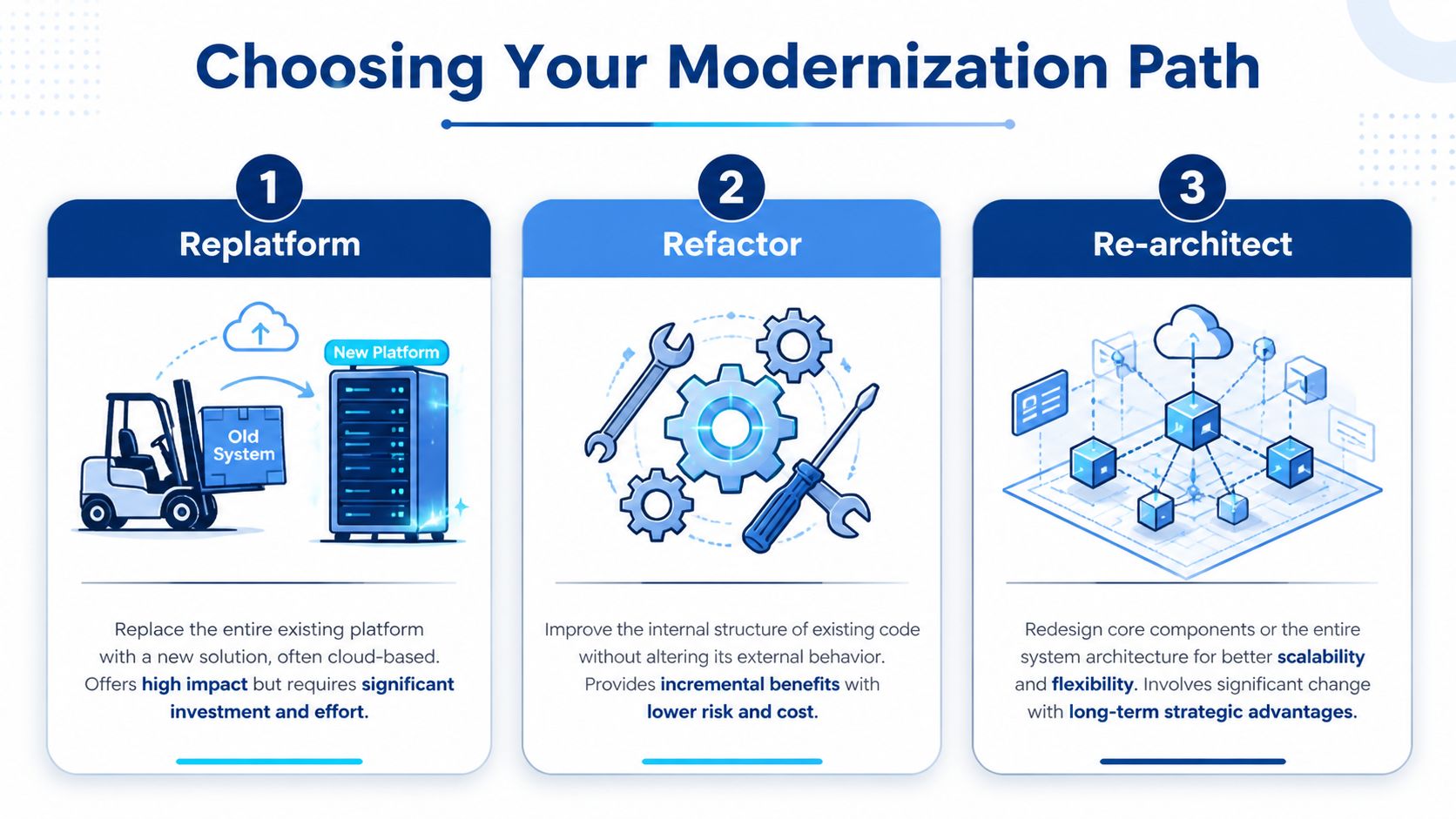
North America has already moved in this direction at scale. A post-2025 replatforming wave saw 79% of North American organisations migrate to composable architectures, with scalability as the top driver and 78% faster innovation as another major reason, according to the commercetools migration report.
Ecommerce modernization strategies compared
| Strategy | Best For | Cost | Risk | Time to Value |
|---|---|---|---|---|
| Replatform | Businesses outgrowing their current commerce platform and app stack | Medium to high | Medium | Medium |
| Refactor | Teams with a workable core platform but poor code quality or integration design | Lower than a full replacement | Lower to medium | Faster |
| Re-architect | Businesses needing long-term flexibility across channels, domains, and services | High | High if done too broadly | Slower at first, stronger long-term |
When replatforming makes sense
Replatforming means moving from one commerce foundation to another. That could mean shifting from a heavily customised legacy stack to Shopify Plus with custom services around it, or from an older on-prem setup to a cloud-native platform.
It works best when the current platform itself is the bottleneck.
Typical signs:
- core capabilities depend on outdated plugins or unsupported modules
- infrastructure operations eat too much internal time
- vendor limitations block pricing, catalogues, workflows, or integrations
- your team spends more time patching than building
Replatforming is often the most understandable option for executives because it has a visible milestone. But it can also tempt teams into a big-bang cutover. That’s where budgets and timelines start drifting.
When refactoring is the smarter answer
Refactoring improves the internals without changing the whole platform first. For many Canadian SMBs, this is the most rational move.
If your storefront is acceptable and your commercial model is stable, you may get more value by cleaning up services, replacing brittle integrations, tightening data models, and improving deployment practices before changing the front-end stack.
This path is useful when:
- the business can’t tolerate major disruption
- the current platform still supports revenue goals
- the biggest problem is custom code, not core platform capability
- you need to lower risk before a larger move later
Board-level test: If the current platform can still sell, but your team can’t change it safely, refactoring deserves serious consideration.
When re-architecting is justified
Re-architecting changes the system shape. In this context, headless, event-driven, and microservices patterns usually enter the conversation.
Use it when the company needs structural flexibility, not just cleaner code. A dealership group with separate inventory feeds, finance journeys, location-specific offers, and partner integrations may need this. So might a healthcare or insurance business that must isolate sensitive data flows while still delivering better digital experiences.
Re-architecting is powerful, but teams overprescribe it. Not every business needs dozens of services. If your order flow is straightforward and your team is small, building a complex distributed system may create more operational overhead than value.
A simple decision lens
Pick the path based on the primary constraint:
- Platform constraint points to replatforming.
- Code and integration constraint points to refactoring.
- Business model and scalability constraint points to re-architecting.
For teams evaluating platform migration in more detail, these ecommerce replatforming best practices are a practical companion to the decision.
The right answer is often staged. Start with refactoring high-risk integration points, replatform selected capabilities, then re-architect only the domains that need independence. That sequence is usually more affordable and easier to govern than a grand replacement plan.
Designing a Modern Composable Commerce Architecture
A modern backend isn’t “modern” because it uses trendy tooling. It’s modern when the business can change one capability without destabilising five others.
That’s the core idea behind composable commerce. Instead of one tightly coupled application handling everything, you assemble core capabilities through well-defined services and APIs. Product, cart, checkout, pricing, inventory, search, content, customer identity, and analytics don’t all need to live in the same codebase.

For Canadian ecommerce backends, the payoff can be substantial. Benchmarks show monolithic applications in medium enterprises often have 6-month lead times for changes, which can drop to one day post-modernization using Domain-Driven Design and cloud-native technologies, according to Digital Commerce 360 reporting on outdated technology and ecommerce growth.
What the architecture should actually include
For most SMB and mid-market organisations, a pragmatic composable stack usually includes:
- An API-first commerce core for orders, products, pricing, and customer logic
- A headless presentation layer so web, mobile, and other channels can evolve independently
- Event-driven messaging for inventory updates, order state changes, and notifications
- Integration services that isolate ERP, CRM, payment, shipping, and marketing connections
- Identity and access controls that support both staff and customer roles
- Observability tooling so the team can trace failures before customers report them
A car dealership is a good example. One backend inventory domain can power the public website, a sales app, a trade-in tool, and showroom screens. The frontend surfaces differ, but the core business rules stay consistent.
What to centralise and what to split
Don’t split everything into microservices on day one. Split the areas that change at different speeds, serve different risk profiles, or require different compliance controls.
Good candidates for separation:
- catalogue and search
- checkout and payments
- customer accounts and consent
- promotions and pricing
- fulfilment, inventory, or appointment booking
Keep some functions together if the business process is still simple. Over-segmentation creates integration overhead and operational burden.
Architecture judgement matters more than service count. A small number of clear domains beats a sprawling service map no one can support.
Technology choices that fit Canadian realities
The best stack is the one your team can operate. In practice, that often means a measured combination of managed cloud services, containerised workloads, and stable integration patterns rather than chasing maximum novelty.
Typical choices include:
- Shopify as the commerce front-end platform with custom backend services around it
- Node.js or .NET for API and integration layers
- Kubernetes only where scale and deployment independence justify it
- Kafka or similar messaging tools when event-driven workflows are needed
- OAuth2 and mTLS where identity and service-to-service security matter
- Prometheus and Grafana for monitoring distributed systems
If you’re comparing architectural models before locking in technology, these headless commerce platform insights help frame the trade-offs well, and Cleffex has also published a useful overview of headless architecture technologies for teams weighing implementation options.
Executing a Seamless Data Migration Strategy
Data migration is where confident plans become nervous meetings. That’s justified. Product data, order history, customer records, pricing rules, loyalty states, clinic workflows, and consent logs rarely move cleanly if the team treats migration as a final-step export job.
The safer pattern is the strangler fig approach. This is similar to renovating a house one room at a time while you’re still living in it. You don’t bulldoze the whole property on Friday and hope the kitchen works again on Monday.

That caution is backed by hard outcomes. Canadian IT leaders report that a step-by-step strangler fig methodology can reduce long-term change failure rates by 40%, while 83% of data migrations exceed budgets when teams skip that structure, based on migration statistics discussed in Swell’s ecommerce migration guide.
The migration sequence that works
The sequence matters more than the tool choice.
Identify the first service boundary
Start with a domain that is valuable but controllable. Inventory, pricing, product data, or payments are common candidates. Don’t begin with the most politically sensitive workflow if your organisation hasn’t built migration discipline yet.Stand up the new service in parallel
Run the modern service beside the legacy one. That often means new APIs, isolated data stores where appropriate, and explicit contracts for inputs and outputs.Synchronise data continuously
Change Data Capture tools such as Debezium can help keep old and new systems aligned while traffic is shared. Here, many projects either build confidence or accumulate hidden drift.Route traffic gradually
Use API gateways and blue-green deployment patterns to send selected traffic to the new service. Start narrow. Expand after validation, not optimism.Retire the legacy slice only after evidence
Don’t decommission because the replacement exists. Decommission when operational metrics, data quality checks, and user acceptance all hold steady.
Migration controls executives should insist on
A CEO doesn’t need to manage CDC tooling, but leadership does need governance over how risk is reduced.
Require these controls:
- A rollback path for every migration phase
- Parallel-run validation before full cutover
- Named business owners for each migrated domain
- Data reconciliation routines between source and target systems
- DORA-style operational tracking so release performance is visible
- Compliance checkpoints before sensitive data moves
For businesses with several existing platforms, agencies, or custom systems in play, this guide to ecommerce integrations in Canada is a useful planning reference.
Migrations fail when teams treat data as a technical artefact. The business treats that same data as orders, claims, appointments, and revenue.
What usually goes wrong
The same mistakes show up repeatedly:
- Teams map tables but miss business rules
- They move data before fixing ownership
- They test happy paths but not edge cases
- They cut over too much scope at once
- They declare success before downstream systems stabilise
The best migrations are boring. That’s a compliment. Nobody outside the project team should notice much beyond fewer issues and cleaner operations.
Balancing Costs, Compliance, and Go-Live Planning
Modernization only works if the financial model, compliance model, and release plan make sense together.
That’s where many Canadian businesses need a more grounded conversation. A technically elegant architecture can still be the wrong decision if cloud spend rises faster than the business benefit, if compliance controls are bolted on late, or if the go-live model assumes a level of internal maturity the team doesn’t have.
What the cost discussion should sound like
For SMBs, the primary choice usually isn’t “modernise or don’t.” It’s “which sequence gets us value without creating a long payback period and operational stress?”
The practical cost buckets are:
- Platform and licensing costs for commerce tools, middleware, search, observability, and security
- Build costs across engineering, QA, architecture, and migration effort
- Change costs including training, process rewrites, and stakeholder time
- Run costs for cloud hosting, support, and incident handling
- Risk costs tied to downtime, defects, and compliance exposure
In many cases, incremental replatforming is easier to justify than a full rewrite. It contains risk, exposes assumptions earlier, and gives finance teams clearer checkpoints for additional investment. Programmes such as CDAP can also improve the economics if they are built into the planning early rather than treated as an afterthought.
Compliance cannot be a final-stage review
For healthcare and insurance, backend decisions directly affect legal and operational exposure. PIPEDA and PHIPA alignment is critical, and Health Canada reported that 42% of mid-sized clinics failed modernization audits in 2025 due to non-compliant legacy backends, incurring average fines of $250,000, as noted in Shopify’s discussion of technology modernization and enterprise compliance.
That should change how projects are scoped.
Key controls for regulated Canadian businesses include:
- Data residency design before choosing hosting and vendors
- Consent management flows embedded into core services, not handled through scattered front-end logic
- Audit trails for sensitive transactions and access events
- Role-based access across staff, partners, and service accounts
- Segregation of sensitive domains where health or insurance data shouldn’t move through broad-purpose services
If compliance is discovered during UAT, the project started too late on the wrong work.
A safer go-live model
Go-live should be staged around business confidence, not just sprint completion. For most organisations, that means limiting exposure in early releases and expanding only after operational proof.
A practical rollout pattern looks like this:
| Go-live phase | What happens |
|---|---|
| Controlled launch | Internal teams and a narrow customer segment use the new flow |
| Parallel validation | Old and new systems are compared for data and transaction accuracy |
| Limited public release | Selected traffic shifts while support and monitoring stay elevated |
| Progressive expansion | More traffic and more capabilities move after each stable checkpoint |
| Legacy retirement | Old components are removed only after repeated stable cycles |
The technical lead should own release readiness. The business owner should own acceptance criteria. Finance and compliance should both have checkpoint visibility before major cutovers.
If you need implementation support, Cleffex Digital ltd is one option for businesses that want help with custom development, team augmentation, microservices integration, containerisation, and agile delivery in a Canadian operating context.
What success should look like after launch
Don’t judge success by whether the migration finished. Judge it by whether the business can now operate differently.
Good post-launch signals include:
- releases happen with less friction
- integrations are easier to reason about
- incidents are easier to trace and resolve
- compliance evidence is easier to produce
- new revenue or service ideas no longer require structural rework
A modern backend should lower the cost of change. If it doesn’t, you’ve replaced technology without improving the operating model.
If your ecommerce platform feels harder to change than it should, Cleffex Digital ltd can help you assess the backend, prioritise the right modernization path, and plan a phased rollout that fits Canadian business realities, including Shopify complexity, compliance requirements, and budget constraints.