

Monday starts with a full waiting room, two clinicians already behind, one staff member trying to confirm appointments by phone, and another re-entering insurance details because the billing system doesn’t match the charting system. A referral is buried in email. A lab result is sitting in a fax inbox. Someone asks whether the patient’s consent form is the latest version. By noon, the team isn’t just busy. They’re working around the software.
That’s the moment most clinic owners start looking seriously at healthcare SaaS products. Not because “digital transformation” sounds modern, but because the current setup is expensive in quieter ways. It slows intake, creates duplicate work, frustrates staff, and leaves too much room for billing mistakes and compliance risk.
In Canada, that problem has an extra layer. Many guides focus on U.S. workflows and HIPAA-first tooling. Canadian clinics still have to deal with privacy law, but they also have to make software work across provincial billing realities, payer rules, and public health system integrations that are rarely simple. That’s where many first projects go off course.
A workable rollout starts with the basics. Know which product category solves which operational problem. Know which security controls are essential. Know where vendor demos tend to hide complexity. And know that insurance and claims integration should be treated as a core requirement, not a later phase. If you’re weighing that shift now, digital transformation in healthcare is less about replacing paper with screens and more about building a clinic that can run cleanly under pressure.
The Digital Shift in Modern Canadian Healthcare
A clinic manager in Ontario often doesn’t describe the problem as a software problem. They’ll say the front desk is overloaded, billing takes too long, charts are hard to find, and every process seems to depend on one person remembering the next step. That’s the starting point.
Healthcare SaaS changes that when it’s chosen for workflow, not for buzzwords. Instead of asking staff to jump between disconnected tools, the clinic moves core tasks into systems designed to work together. Scheduling, charting, billing, messaging, and reporting stop living in separate pockets. The daily work becomes more organised, and staff spend less time patching gaps manually.
What the Pressure Looks Like on the Ground
A first major digital project usually comes after months or years of tolerated friction:
Appointments drift off track because reminders, intake, and documentation aren’t connected.
Billing teams rework claims when data entered in one system doesn’t carry into another.
Clinical staff lose time searching for records, signatures, referrals, and prior notes.
Owners carry hidden risk when privacy controls depend on staff habits instead of system rules.
That pressure is why cloud software has become part of ordinary healthcare operations, not a niche IT decision.
Most clinics don’t need more software. They need fewer workflow handoffs.
What a Sensible Modernisation Effort Focuses On
The first win usually isn’t dramatic. It’s operational clarity. Staff know where information belongs, who owns the next step, and how the system supports the process instead of interrupting it.
For a clinic owner, that means looking at three things at once:
| Focus area | What to look for |
|---|---|
| Operational flow | Fewer duplicate entries, cleaner scheduling, better chart access |
| Compliance control | Permissions, auditability, secure storage, documented workflows |
| Integration reality | Fit with labs, pharmacies, payer requirements, and provincial billing rules |
Canadian providers often discover that the hardest part isn’t buying software. It’s making sure the product fits how care is delivered here.
Decoding Healthcare SaaS Products and Categories
Think of healthcare SaaS products as a secure digital toolkit you subscribe to rather than software you install and maintain like old on-premise systems. The vendor handles updates, hosting, patches, and platform maintenance. Your team focuses on using the tool well.
That model matters in healthcare because systems don’t stay still. Privacy requirements change. Workflows evolve. New integrations become necessary. A clinic rarely wants to rebuild its own infrastructure every time one of those things shifts.
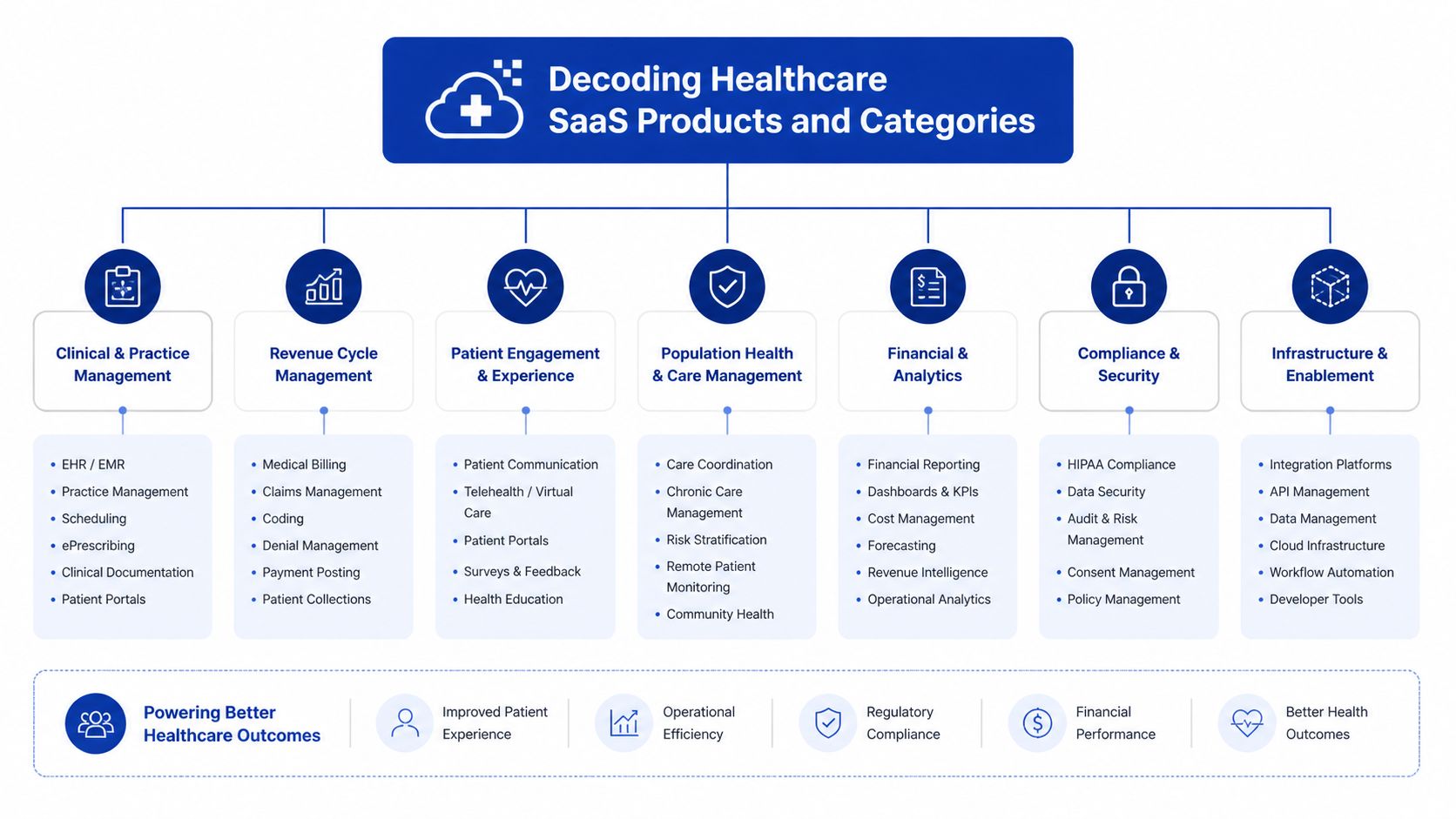
The product environment gets confusing because vendors often bundle features under broad labels. It helps to separate products by the operational job they do.
The Core Categories Clinics Usually Evaluate
Electronic health records sit at the centre of most stacks. In North America, the EHR segment holds 29.48% market share in 2025 and manages over 1.2 billion patient records, which is why it remains the core system for data-centred care according to North American healthcare SaaS market analysis.
Telehealth platforms support virtual consultations, remote follow-up, and patient communication. Their value depends less on video quality alone and more on whether appointment data, notes, and follow-up tasks move back into the rest of the clinic workflow.
Practice management software handles the operational spine of the clinic. Scheduling, intake, resource allocation, task routing, and front-desk coordination often live here.
Revenue cycle management tools focus on claims, coding workflows, payment tracking, and collections. In small clinics, these tools can prevent billing from becoming a backlog-driven fire drill.
Patient engagement platforms include portals, reminders, forms, messaging, and self-service features. These products reduce phone traffic when they’re designed around patient behaviour rather than internal assumptions.
Where Clinics Get Confused
A lot of vendors market an “all-in-one” system. Sometimes that’s useful. Sometimes it means one strong module and four average ones. The practical question isn’t whether a platform has every feature. It’s whether the feature is good enough for the people who’ll rely on it every day.
A simple way to sort products is by primary owner:
Clinicians rely on charting, documentation, order support, and clinical history.
Front-desk teams need scheduling, registration, reminders, and patient flow tools.
Billing staff need payer-ready data, claims support, and reconciliation visibility.
Patients need easier access to forms, messages, records, and appointment actions.
A category label tells you what a product claims to do. The workflow tells you whether it belongs in your clinic.
A Practical Way To Think About Product Fit
If your clinic is early in digitisation, start by identifying the system of record. That’s usually the EHR. Then map what has to connect to it cleanly. Scheduling may need real-time sync. Billing may need coded visit data. Messaging may need patient identity and consent rules.
Some clinics also explore niche tools before committing to a larger stack. For example, teams comparing virtual care options may want to discover Telldoc Ai as one example of how specialised health-tech products frame AI-assisted patient interactions and telehealth use cases.
What Each Category Is Best At
| Category | Best used for | Common mistake |
|---|---|---|
| EHR | Clinical records, documentation, care coordination | Expecting it to solve every business workflow by itself |
| Telehealth | Virtual visits and remote follow-up | Buying it as a standalone tool with no charting link |
| Practice management | Scheduling, intake, daily operations | Ignoring front-desk adoption during setup |
| RCM | Claims and payment operations | Treating payer integration as a minor detail |
| Patient engagement | Portals, forms, reminders, communication | Launching features patients won’t realistically use |
The right mix depends on your bottleneck. If billing is leaking time and revenue, start there. If clinicians are documenting in one place and communicating in another, start with the record and workflow layer.
The Business and Clinical Value of SaaS in Healthcare
The business case for SaaS usually becomes obvious before the technical case does. Owners see overtime, delays, claim rework, and admin strain long before they start discussing architecture. That’s why the most useful evaluation lens is simple. Does the software remove friction from work people already do?
The market is moving in that direction for a reason. North America accounts for approximately 48% revenue share in the healthcare SaaS market in 2025, and the sector is projected to grow from USD 10.58 billion in 2025 to USD 53.38 billion by 2035. The same market analysis notes that efficient workflows can improve patient throughput by 10-15%, which ties directly to operational efficiency for clinics and hospitals according to healthcare SaaS market projections in North America.
The Business Value Owners Feel First
The first gains tend to show up in labour and process quality, not in some abstract dashboard score.
When scheduling, intake, and billing are connected, staff stop re-entering the same information in multiple places. Fewer manual handoffs usually mean fewer avoidable mistakes. Owners also gain a more stable way to train new staff because the process lives in the software, not only in the memory of the most experienced employee.
A practical business benefit is lower infrastructure burden. A cloud model shifts maintenance away from internal teams, which is especially helpful for independent clinics without in-house IT depth. If you’re comparing what hosted operations can look like in practice, Cloudvara's cloud hosting for practices is one relevant example of how practice management and hosting are framed together.
The Clinical Value Is Just As Important
Clinical teams care less about software categories than about whether the system helps them make safe, timely decisions. Good SaaS supports continuity. A provider can see the right history, document in context, follow up consistently, and share information with fewer blind spots.
That matters in everyday care situations:
A nurse sees medication history quickly instead of waiting for records to be located or faxed.
A physician documents once and the information becomes usable for follow-up and billing.
A patient receives reminders and portal access that reduce missed information and back-and-forth calls.
The clinic can coordinate care more cleanly when records are centralised rather than scattered.
Better software doesn’t replace clinical judgement. It gives clinicians cleaner information and fewer distractions.
Where Value Often Gets Overstated
Not every feature creates meaningful return. Clinics often overpay for analytics they won’t use, automation that doesn’t match local workflows, or patient engagement modules that staff end up bypassing.
What usually works:
Tight workflow alignment with real staff tasks
Clean billing and payer processes
Simple patient-facing tools that reduce calls and paperwork
Strong permissions and auditability that reduce operational risk
What often disappoints:
| Promising feature | Why it can underperform |
|---|---|
| Broad all-in-one suite | One weak module can force workarounds everywhere |
| Complex automation | Staff bypass it if it adds clicks at the wrong point |
| Fancy dashboards | Owners need actionability, not just visibility |
| Standalone communication tools | They fragment the patient record if not integrated |
The return comes from fit. Software pays off when it supports the actual rhythm of the clinic.
Navigating Canadian Healthcare Compliance and Security
Most clinic owners don’t need a legal lecture. They need a shortlist of what must be true before patient data touches a vendor system. In Canada, that starts with understanding that privacy compliance isn’t only a policy issue. It has to be built into product design, user permissions, data handling, and daily operations.
For many clinics, the core legal frame includes PIPEDA at the federal level and PHIPA in Ontario. Other provinces bring their own requirements and interpretations. The practical takeaway is that you can’t assume a vendor that sounds “healthcare ready” is configured for Canadian obligations.

The Controls That Should Be Non-Negotiable
In Canadian healthcare SaaS, compliance with PHIPA and PIPEDA mandates AES-256 encryption and role-based access controls. The same source notes that cloud-based EHR systems can contribute to a 40-55% reduction in prescription errors, and automating compliance tasks with DevOps tools can reduce deployment risks by 30%, based on health tech stack guidance for healthcare SaaS companies.
That gives you a practical buyer checklist:
Encryption at rest and in transit using the required standard
Role-based access controls so staff only see what they need for their role
Audit trails that show who accessed or changed data
Interoperability support such as FHIR where integration is expected
Controlled deployment practices rather than ad hoc updates in production
Questions Worth Asking Vendors Directly
Ask plain questions and listen for plain answers.
Where is patient data hosted? If they answer vaguely, push further.
How do roles and permissions work? You want specifics, not “enterprise-grade security.”
Can you show audit logging in the product? A brochure isn’t enough.
How are updates tested and released? Rushed changes create risk.
How do you handle integrations with legacy systems? Many compliance failures begin at the edge of the core platform.
If your clinic also relies heavily on document management and internal collaboration systems, strategies for healthcare SharePoint projects can be useful context for understanding migration, structure, and records handling in regulated environments.
Security should be visible in the workflow. If staff can bypass controls easily, the policy won’t save you.
Compliance in Practice, Not Theory
A compliant system still fails if staff can’t use it properly. That’s why governance matters. Access reviews, onboarding rules, device policies, and process documentation all matter alongside the software itself.
Clinics often benefit from technical partners who can translate legal requirements into product requirements. That usually includes authentication design, logging, data movement rules, and release procedures. For a Canada-focused view of that translation, healthcare compliance software development practices give a useful reference point for what secure implementation should consider.
What Good Compliance Work Looks Like
| Area | Strong sign | Weak sign |
|---|---|---|
| Access control | Permissions map cleanly to job roles | Shared logins or broad default access |
| Data handling | Storage, transfer, and backup are documented | Vendor explanations stay general |
| Auditing | Access and change logs are reviewable | Logs exist but aren’t visible or usable |
| Release management | Updates follow a controlled process | Changes happen without clear testing path |
Compliance should make the clinic safer and more manageable. If a product adds fear and confusion, the implementation is wrong.
How To Evaluate and Select the Right SaaS Vendor
Vendor selection falls apart when teams compare feature lists without comparing operating reality. Demos are polished. Daily use isn’t. The right question is whether the vendor can support your clinic’s specific mix of workflows, constraints, and integrations over time.
A good buying process doesn’t start with price. It starts with failure points. Where do appointments break down? Which records get duplicated? Which claims need manual cleanup? Which handoffs depend on one staff member knowing the workaround? That list tells you what the software must solve.

A Practical Shortlisting Method
Use a weighted scorecard, but keep it grounded in operations. Don’t let marketing categories dominate the decision.
Define the Must-Work Workflows
Start with three to five scenarios your clinic handles every day. New patient intake. Follow-up visit. Referral processing. Claim submission. Medication renewal. Ask every vendor to show those exact workflows.Test Interoperability Early
Don’t leave integrations for the contract stage. Ask what the product already connects to, what requires custom work, and who owns support when an interface breaks.Review Support Like a Service, Not a Promise
Good support means training materials, implementation guidance, escalation paths, and help during the hours your clinic operates.
What To Compare Beyond Features
Some evaluation criteria matter more than they seem at first.
| Evaluation area | What to verify |
|---|---|
| Workflow fit | Can staff complete common tasks without workarounds? |
| Integration readiness | Does the vendor support the systems you already depend on? |
| Security posture | Are controls documented and demonstrable? |
| Implementation model | Who handles migration, configuration, and training? |
| Long-term flexibility | Can the product adapt as your clinic grows or changes? |
Signs a Vendor Is a Poor Fit
Not every bad fit looks obviously bad. Some are just too vague.
They answer operational questions with product jargon
They can’t explain implementation responsibilities clearly
They minimise data migration complexity
They treat payer or provincial integration as a future enhancement
They show polished dashboards but weak task-level workflows
A strong demo shows your real process. A weak one shows a generic ideal world.
How To Run the Final Comparison
Bring in the people who’ll live with the system. That usually includes a clinician, front-desk lead, billing lead, and operations owner. Their objections are useful. If they spot friction now, it will multiply later.
A custom development or integration partner can also be relevant when off-the-shelf products don’t fully match the clinic environment. In those situations, Cleffex Digital Ltd is one option clinics may consider for secure healthcare software and integration work where customisation is part of the requirement.
At final stage, ask every vendor for the same things:
A workflow demonstration using your scenarios
A written implementation scope
A data migration approach
A support model after go-live
A clear explanation of integration dependencies
The best choice usually isn’t the broadest platform. It’s the vendor whose product and delivery model create the fewest avoidable surprises.
Integrating SaaS With Your Existing Clinic Systems
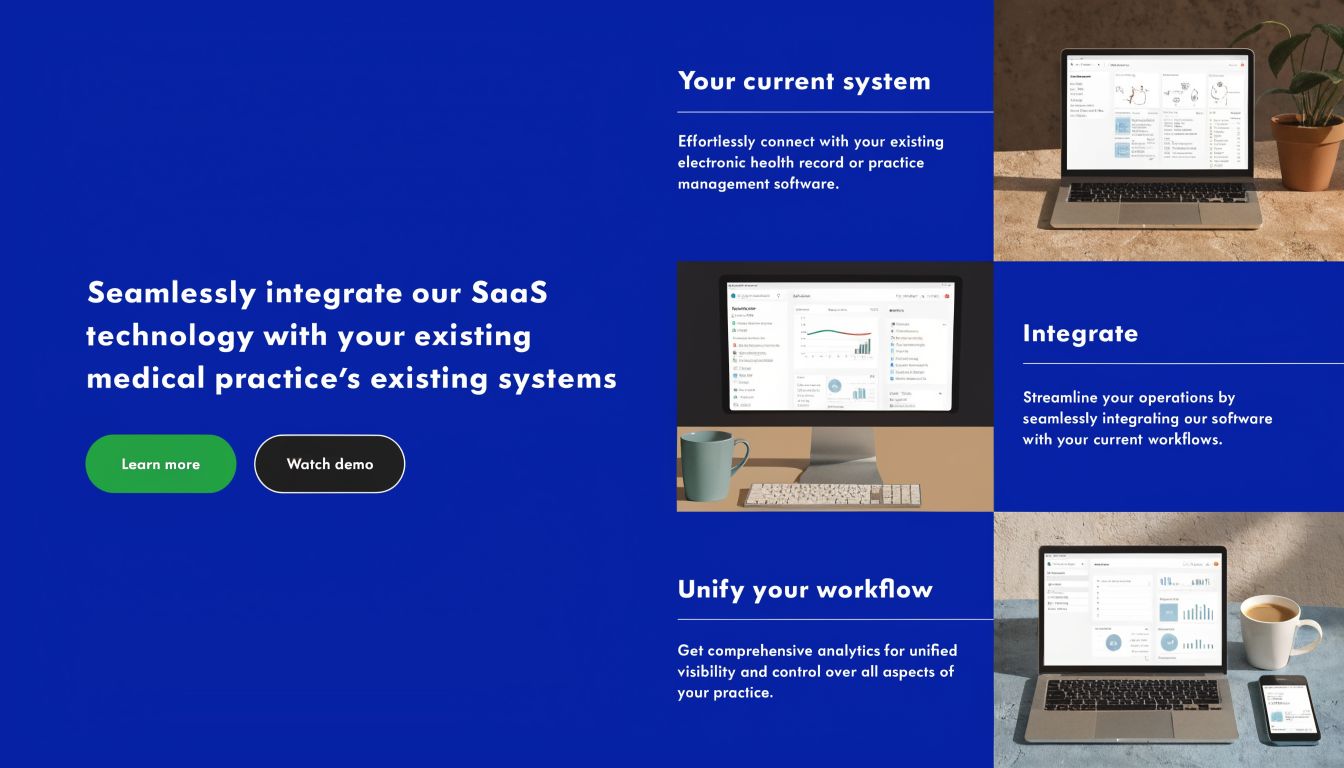
Many projects succeed or fail at this juncture. The contract is signed, the product looks capable, and then the substantive work begins. Lab feeds, appointment data, old charts, billing rules, pharmacy connections, identity management, and staff habits all have to meet one new system without breaking care delivery.
In Canada, the hardest part is often not clinical data. It’s payer and claims integration across provincial systems. Clinics can manage a decent charting rollout and still lose money if billing connections remain brittle.
The Canadian Integration Problem Most Vendors Underplay
A critical challenge is connecting software to Canada’s 13 provincial and territorial insurance systems. A 2023 CIHI report noted only 45% of SaaS tools achieve full interoperability with public payers, leading to 20-30% revenue leakage for small providers due to claim denials, as cited in this analysis of provincial payer interoperability gaps in Canadian SaaS.
That matters because a clinic can feel digitally modern while still carrying manual billing risk in the background. Generic HIPAA-focused products often miss that entirely. They may support healthcare security but still fail to handle OHIP, MSP, or other provincial billing realities cleanly.
What Good Integration Planning Looks Like
Strong implementation teams treat integration as workflow design, not just technical plumbing.
Map the Current State First
List every system that sends, stores, or receives patient, scheduling, billing, and reporting data. Include spreadsheets and shared inboxes. They count because staff rely on them.
Separate Critical From Convenient Interfaces
Some connections are required for go-live. Others can wait. Billing, patient identity, and chart access usually belong in the first group.
Use Standards Where Possible
FHIR and HL7 help, but standards alone don’t remove local complexity. They give you a cleaner basis for exchange. They don’t guarantee your payer workflow will behave correctly in production.
Safer Rollout Patterns
The most reliable go-lives are usually phased.
Pilot one workflow first such as intake plus scheduling
Run old and new processes in parallel briefly for high-risk functions
Validate migrated data with staff who know the records
Train by role rather than giving every employee the same generic session
Track exceptions daily during the first weeks after launch
If billing is involved, test real claim paths before you call the rollout complete.
The Human Side of Integration
Integration work often gets framed as technical, but adoption decides whether it sticks. Front-desk staff need confidence in registration and appointment steps. Clinicians need fast, predictable charting. Billing teams need to trust what reaches the claim stage.
One of the best ways to reduce go-live friction is to document exact future workflows and rehearse them with real staff before launch. For clinics planning record and platform connectivity in more detail, EHR integration for healthcare providers is a useful reference on the implementation side.
Common Mistakes During Implementation
| Mistake | Result |
|---|---|
| Migrating everything at once | Errors become harder to trace and fix |
| Treating provincial billing as a minor interface | Revenue problems appear after go-live |
| Undertraining staff | Users create manual workarounds immediately |
| Skipping parallel validation | Bad data reaches live operations unnoticed |
The clinic doesn’t need a perfect system on day one. It needs a controlled rollout with known risks, clear ownership, and tested billing paths.
Measuring ROI and Preparing for Future Health Tech
Return on investment in healthcare software isn’t measured well by “we launched on time.” It shows up in daily indicators. How many claim issues need rework. How much staff time goes into admin tasks. How quickly clinicians can complete documentation. How often patients complete forms before arrival. If you don’t define those measures early, the project will feel subjective even if it’s helping.
A practical ROI review starts with baseline capture before implementation. Pull current workflow timings, denial patterns, staff pain points, backlog areas, and patient communication issues. Then compare after rollout in intervals that make sense for actual adoption. Early weeks often reflect training friction more than steady-state value.
KPIs That Are Useful in a Clinic Setting
The best measures are the ones your team can observe and act on.
Administrative Workload
Track whether staff spend less time on repetitive entry, scheduling corrections, and chasing missing information.Claims Quality
Review denials, resubmissions, and payment delays. This is especially important in provincial billing environments.Clinical Workflow Speed
Measure whether documentation and follow-up tasks are completed more consistently within the same working day.Patient Experience
Watch portal use, intake completion, response times, and common call reasons.
What Future-Ready Actually Means
Future-ready doesn’t mean chasing every AI feature that appears in a vendor deck. It means choosing a platform foundation that can support automation, analytics, and interoperability when your clinic is ready for them.
Canadian healthcare SaaS is moving toward advanced workflow automation and analytics. Looking ahead, Google Cloud Healthcare API can support AI-powered workflow automation that has been shown to boost diagnostic accuracy by up to 55% and cut administrative burdens by 40%, and the market is projected to see $38.5B in growth driven by these applications according to healthcare SaaS infrastructure and AI projections. Because that source discusses forward-looking developments, treat these as projected and emerging capabilities rather than automatic outcomes of any software purchase.
A Grounded Way To Think About Next Steps
| Near-term focus | Future payoff |
|---|---|
| Clean workflows | Better data for automation later |
| Reliable integrations | Easier expansion into analytics and remote care |
| Role-based adoption | Less resistance when new features arrive |
| Structured data capture | More useful reporting and decision support |
A mature clinic doesn’t adopt technology to look advanced. It adopts tools that reduce friction now and create options later. That’s the core value of a strong SaaS foundation.
If your clinic is planning its first major digital transformation, Cleffex Digital Ltd works with organisations that need secure, custom healthcare software, integration support, and compliant cloud-based solutions designed for Canadian operating realities.