

Building a Shopify AI app starts with a solid plan, long before you write a single line of code. It’s all about zeroing in on a real-world merchant problem, figuring out who you're building it for, and then defining the AI-powered features that will make their life easier. This groundwork is absolutely essential for creating an app that merchants will actually trust and use every day.
Laying the Groundwork for a Winning AI App
Before you get caught up in choosing the right frameworks or AI models, the most successful Shopify apps always start with one simple question: What specific problem am I solving for a Shopify merchant? A cool idea isn't enough. You need a blueprint built on a genuine understanding of a merchant's daily headaches. Without that, even the most advanced AI tool will just gather dust on the App Store.
The AI boom in ecommerce isn't just hype; it's changing how online businesses are run. In fact, adopting AI has become a must-do for staying competitive. A whopping 84% of ecommerce business owners report seeing real benefits from their AI investments, from streamlining operations to creating better customer experiences. This context is key; merchants aren't looking for novelty; they're looking for results that impact their bottom line.
Identifying the Core Problem and Ideal User
Your first job is to get specific. An idea like "AI for marketing" is too broad. Instead, focus on a concrete pain point. Are you trying to automate the mind-numbing task of writing product descriptions for a store with thousands of items? Or maybe you want to predict which customers are about to churn and automatically send them a personalised offer to stay.
Think about real-life scenarios you can solve:
A fashion boutique owner who spends hours manually tagging new arrivals with attributes like "bohemian," "summer," or "floral print."
A home goods store that struggles to recommend the right cushion covers to go with a new sofa, leaving money on the table.
A subscription box service that needs to accurately forecast inventory demand to stop over-ordering or, worse, running out of popular products.
Once you’ve nailed down the problem, define your ideal user. Is this app for a solo entrepreneur who needs something simple they can set up and forget? Or is it for a larger brand with a marketing team that wants deep analytics and plenty of customisation options? These two users have completely different needs, and your app's features and user interface have to reflect that. If you need a refresher, you can explore our guide on the broader aspects of Shopify app development.
This planning process is all about moving from a problem to a solution in a structured way.
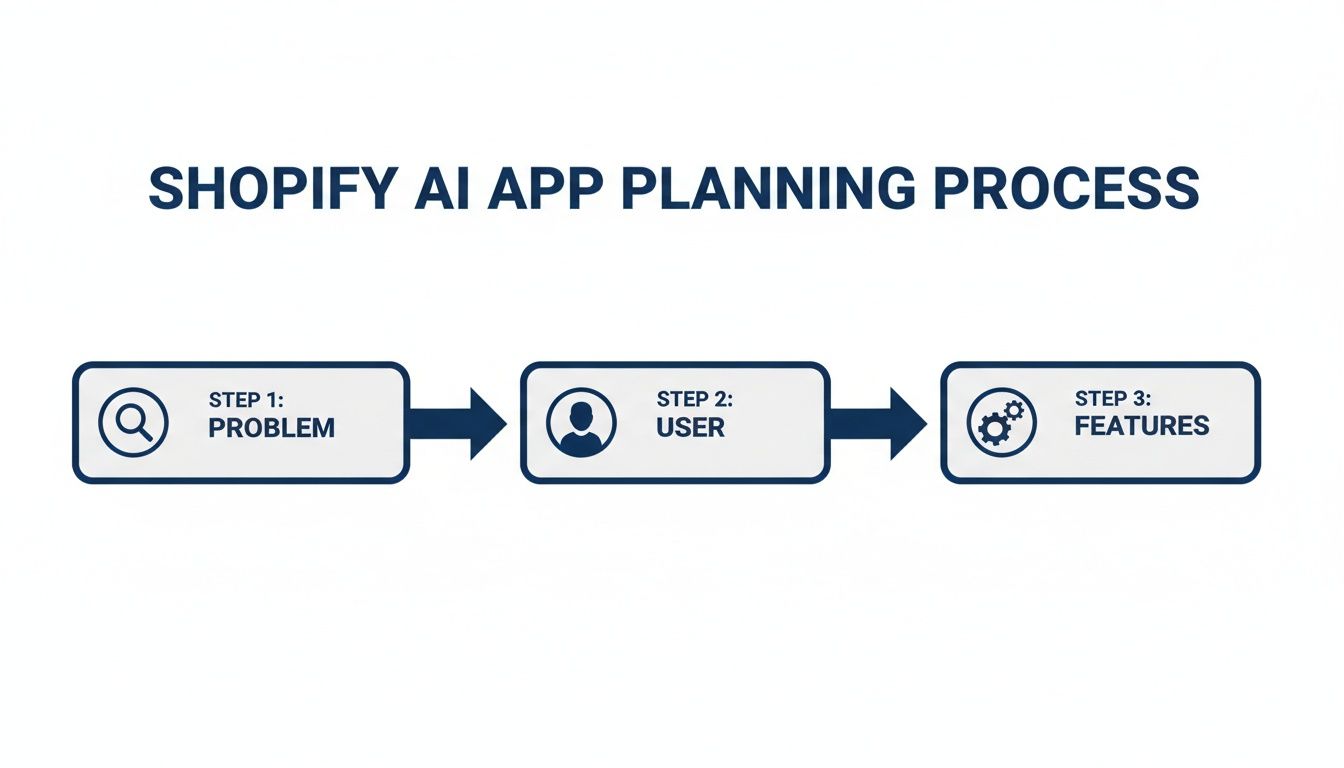
As the flowchart shows, this focused approach ensures every feature you decide to build is directly tied to solving a real problem for a specific user.
Mapping Features and Data Strategy
With a clear problem and user in mind, you can start mapping out the core features. The key here is to stick to what delivers genuine value. If you're building a product recommendation engine, the core feature isn't just showing random items; it's using AI to analyse purchase history and browsing behaviour to make smart suggestions.
A great AI app doesn't just add features; it removes friction. The goal is to create a tool that feels so intuitive and essential that the merchant can't imagine running their store without it.
This brings us to the most critical piece of the puzzle: your data strategy. An AI is only as good as the data it learns from. You have to figure out exactly what data your app needs to work its magic.
Data Sources: Will you only use a merchant's product catalogue and order history? Or will you need to pull in data from other third-party sources?
Data Handling: How will you securely access, process, and store merchant and customer data? Privacy is non-negotiable.
Data Flow: Map out the entire journey. How does data get from Shopify (through APIs and webhooks) into your system, how is it processed by your AI model, and how is it presented back to the merchant in a useful way?
Getting this right from the beginning builds a foundation of trust and compliance: two things that are absolutely vital for getting approved and succeeding on the Shopify App Store.
Selecting Your Tech Stack and AI Models
Alright, you've got a solid plan. Now it's time to get your hands dirty and pick the tools for the job. This is where your big ideas start turning into actual code. The decisions you make right now: about your backend, which AI models to use, and how you'll handle data, will make or break your project down the line.
Your app's backend is its engine room. It’s where all the heavy lifting happens: processing data, running your logic, and talking to Shopify. In the Shopify world, the conversation usually comes down to Node.js versus Ruby on Rails. Node.js is a powerhouse for performance and real-time features, while Rails is famous for getting you from zero to a working product incredibly fast.
Honestly, the "best" choice is the one your team already knows and loves. If your developers are Rails wizards, don't force them onto Node.js just because it's trendy. A framework your team can build and maintain with confidence is always the right call. For a more detailed breakdown, you might find it helpful to learn more about selecting the right tech stack for your project.
Choosing Your AI Integration Strategy
This is the heart of your app. You have a big decision to make: do you plug into a pre-built AI model through an API, or do you build (or at least fine-tune) your own? Your answer will directly shape your budget, your launch timeline, and what makes your app special.
Using a third-party API from a provider like OpenAI or Google AI is the fastest way to get moving. You can have powerful features, like generating product descriptions or analysing customer reviews, up and running with just a few API calls. This is a fantastic approach for building an MVP and testing your idea in the market quickly.
The other path is to take an open-source model and fine-tune it for your specific needs, or, if you're feeling ambitious, train a model from scratch. This gives you total control and a unique feature set that no one can easily copy. The catch? It requires serious machine learning expertise, a lot of computing power, and a mountain of high-quality training data.
To help you decide, let's look at the trade-offs.
Comparing AI Model Integration Approaches
Understanding the trade-offs between using third-party AI APIs and building custom models for your Shopify app.
| Approach | Development Speed | Cost | Customisation | Best Use Case |
|---|---|---|---|---|
| Third-Party APIs | Fast | Pay-per-use, potentially high at scale | Limited | MVPs, rapid prototyping, standard AI tasks (e.g., text generation) |
| Custom/Fine-Tuned Models | Slow | High upfront (dev, data, training) | High | Unique features, core competitive advantage, domain-specific tasks |
Ultimately, you don't have to choose just one. Many of the most successful apps I've seen take a hybrid approach.
Start with third-party APIs to get your app into the hands of real merchants and validate your core idea. As you start collecting user data and feedback, you can then invest that revenue and insight into building a custom-tuned model that truly sets your app apart.
Powering Your App with Data
For any sophisticated AI feature like semantic search or truly personalised recommendations, you’ll need to handle data in a new way. This is where a vector database comes in. Tools like Pinecone or Weaviate are built specifically to store data as numerical vectors and find "conceptually similar" items at lightning speed.
Think about an app that suggests products that go with another item. A vector database can understand that a "wicker beach bag" and "strappy sandals" are contextually related to a "summer floral dress," even though they don't share any keywords. That’s the kind of magic that creates a great user experience.
But where does all this data come from? Shopify's APIs are your lifeline.
Admin API: This is your go-to for all the core store data: products, orders, customers, you name it. It's what you'll use to train your models and run your backend logic.
Storefront API: This lets you pull public data, which is perfect for AI features that run on the customer-facing side of a store.
Webhooks: Instead of constantly polling Shopify for new information, webhooks are your secret weapon. They send your app a real-time notification when something happens, like a new order or an inventory update. This is absolutely critical for keeping your AI's knowledge up to date.
The Shopify developer documentation is your best friend here; it lays out everything you can do with their different APIs.

Getting comfortable with these APIs is non-negotiable. It’s how you build a deeply integrated app that feels like a natural part of the Shopify experience, not just a clunky add-on.
Building and Testing Your Application
Alright, you've got your strategy mapped out and your tech stack chosen. Now it’s time to get your hands dirty and bring your idea to life. This is where the rubber meets the road – turning a solid blueprint into a functional, reliable product that merchants will love.
Your best friend during this phase is the Shopify CLI. It’s the essential tool for everything from scaffolding your initial app structure to spinning up a local development server that perfectly mirrors the live Shopify environment. This setup is a game-changer because it lets you build, test, and iterate in a safe, controlled sandbox without ever touching a real merchant's data.
Getting a secure, efficient workflow established from day one is fundamental to modern Shopify AI app development, and the CLI is at the heart of it.
Implementing Secure Authentication and Data Flow
First things first: your app needs permission to interact with a merchant's store. This critical step is handled through OAuth 2.0, the industry standard for secure authorisation. It lets merchants grant your app-specific permissions without ever having to share their password. Nailing this authentication flow isn't just a technical requirement; it's the foundation of trust with your users.
Once your app is authenticated, you need a way to react to store events as they happen. That’s where Shopify Webhooks come in. Instead of your app constantly polling Shopify to ask, "Anything new?", webhooks proactively notify you in real-time.
For an AI application, this event-driven approach is absolutely vital. Imagine the possibilities:
A new order is created: A webhook instantly triggers your AI to analyse the order for fraud signals or kick off a personalised post-purchase email sequence.
A product gets updated: Your AI is notified immediately, allowing it to generate a new SEO-optimised description or recategorise the item based on the changes.
A new customer account is made: This event could start an AI-powered onboarding journey, sending a welcome message with product recommendations tailored to that specific user.
This architecture ensures your app is always responsive and that your AI models are working with the most current data. Shopify's Winter 2026 Edition has also given developers a significant boost here, especially for handling large datasets. The Bulk Operations API, for example, now supports 100MB files and up to 5 concurrent operations, which makes processing the large volumes of data needed for AI training far more manageable.
Adopting a Rigorous Testing Strategy
A buggy app is a dead app. It won't take long for poor reviews to roll in and uninstalls to pile up. Your best defence is a comprehensive testing strategy that catches issues long before they ever reach a merchant. This means testing at every level, from individual code functions to the complete user journey.
Start small with unit tests. These verify that the individual building blocks of your code, like a function that formats product data, work perfectly in isolation. From there, you'll want to move on to integration tests, which confirm that different parts of your system can communicate correctly. This is where you’ll test your app’s conversations with Shopify’s APIs, ensuring you handle both successful responses and potential errors gracefully.
The goal of testing isn't just to find bugs; it's to build confidence. You need to be confident that your app will perform reliably under real-world conditions, from a small store with ten products to an enterprise with a million.
Finally, it's time for end-to-end (E2E) testing. Here, you simulate real merchant scenarios from start to finish. Set up a dedicated development store and walk through the entire user experience: install the app, grant permissions, process a test order, and verify that your AI feature triggers exactly as expected. This manual process is invaluable for catching usability quirks and logical flaws that automated tests might miss.
For those looking to supercharge their quality assurance, you can explore the growing field of AI-enhanced testing tools. You might be interested in our article on the most powerful AI-enhanced testing tools available.
Deploying and Submitting to the App Store

Alright, you've built and rigorously tested your app. Now it’s time for the final push: getting it out of your local environment and into the hands of real merchants. This last leg of the journey involves picking the right hosting solution and successfully navigating the Shopify App Store submission gauntlet.
Making the leap from your development machine to a live, production-ready application requires a solid infrastructure plan. The hosting you choose will directly define your app's speed, uptime, and its ability to handle a growing number of users without breaking a sweat.
Choosing Your Hosting and Deployment Strategy
Today's cloud platforms give you plenty of options, but a few are clear favourites in the Shopify dev community. Platforms like Heroku, AWS, and Google Cloud have proven they can provide the scalable infrastructure needed to run a professional-grade app.
Heroku: Often the go-to for its simplicity, Heroku is fantastic for getting your app launched quickly. It handles a lot of the server management grunt work, so you can stay focused on your code.
Amazon Web Services (AWS): If you want maximum control and near-infinite scalability, AWS is the industry heavyweight. Services like EC2 for servers and RDS for databases offer granular control, which is perfect for complex AI apps with very specific resource demands.
Google Cloud Platform (GCP): A major competitor to AWS, GCP is particularly strong in the machine learning and data analytics arena. This can give AI-heavy apps a serious performance advantage.
To make your life easier, I strongly recommend setting up a CI/CD (Continuous Integration/Continuous Deployment) pipeline. This automates the whole process of testing and deploying new code, letting you push updates and bug fixes quickly and with confidence. Tools like GitHub Actions or GitLab CI/CD integrate beautifully with most hosting providers, creating a seamless workflow from the moment you commit your code.
Mastering the Shopify App Store Submission
Getting your app listed on the Shopify App Store is about much more than just uploading your code. You need to build a compelling, compliant app listing that not only catches a merchant's eye but also breezes through Shopify's review process. Think of your app listing as your primary marketing tool.
The Shopify review team is the gatekeeper for quality and trust on the platform. They have strict criteria focused on security, performance, and providing a clear, honest user experience. Getting their approval is a huge vote of confidence that tells merchants your app is professional and reliable.
When you're preparing your AI app, understanding the nuances of embedding chatbots into your Shopify website can be a big help. This knowledge ensures that any user-facing elements you build meet Shopify's standards for a smooth, integrated merchant experience.
Your app's listing page is your first, and often only, chance to make an impression.
This example from Shopify's own documentation shows all the pieces of a great app listing, from the icon and name down to the feature descriptions. Every single element needs to be crafted to communicate value and build trust with merchants.
Your Pre-Submission Checklist
Before you hit that submit button, do yourself a favour and run through one final check. The Shopify reviewers are incredibly thorough, so your attention to detail here will pay off.
Craft a Compelling Description: Clearly explain the problem your app solves. How do your AI features give merchants a real advantage? Cut the jargon and focus on the value.
Create High-Quality Visuals: Use sharp, well-annotated screenshots. Better yet, create a short video showing your app in action. It's always better to show than to just tell.
Implement the Billing API: If your app isn't free, you must use Shopify's Billing API for any subscriptions or one-time charges. This is non-negotiable for any paid app.
Write a Clear Privacy Policy: Be upfront about the data you collect and how you use it. Your app listing needs to link to a comprehensive privacy policy that accurately reflects your practices.
Provide Detailed Test Instructions: Make it easy for the review team. Give them step-by-step instructions on how to test every single feature, and don't forget to include login credentials for a test account.
A well-prepared submission doesn't just get you approved faster; it sets the tone for a successful launch and ensures all your hard work on Shopify AI app development pays off.
Lessons from the Trenches: Avoiding Common Pitfalls
It's one thing to follow a tutorial in a perfect, clean development environment. It's another thing entirely to see your app in the wild, grappling with the chaotic reality of live merchant stores. The biggest lessons in Shopify AI app development often come from the mistakes you make along the way. I'm sharing some hard-won advice here to help you sidestep a few of those common traps.
The single most important piece of advice I can give you? Start small. It’s incredibly tempting to cram a dozen AI-powered features into your first release, but that's a recipe for disaster. Instead, build a Minimum Viable Product (MVP) that does one thing exceptionally well. Get it into the hands of real merchants, listen to their feedback, and then decide what to build next. You'll save yourself a ton of wasted effort building features nobody actually wants.
Build for Failure, Not Just for Features
From the very first line of code, you need to be thinking about what happens when things break. Don't make the classic mistake of bolting on logging and monitoring as an afterthought. When a merchant emails you saying, "it's not working," you need the ability to see exactly what went wrong. Without detailed logs, you’re just guessing in the dark.
And monitoring isn't just for catching catastrophic failures. It's about keeping a finger on the pulse of your app's performance. You should be tracking:
API Response Times: Is that call to your LLM getting sluggish? Is the Shopify API lagging?
Resource Usage: Are you seeing surprise CPU or memory spikes on your server?
Job Queue Lengths: If you use background jobs, are they getting backed up? A long queue is a classic sign of a bottleneck.
This kind of proactive monitoring helps you spot and fix problems before they escalate and affect your users.
Another landmine that catches new developers is underestimating Shopify's API rate limits. They seem generous when you're testing on a dev store with 10 products. But imagine your app on a store with 50,000 products during Black Friday. Those limits can bring your entire service to a grinding halt. You need to code defensively from day one, implementing smart error handling with exponential backoff to manage rate limits gracefully.
Trust is Your Most Important Feature
In ecommerce, data is currency. You absolutely cannot afford to be careless with merchant or customer data. Get obsessive about privacy and security. Figure out the bare minimum amount of data your app needs to function, and don't ask for a single byte more. This isn't just good practice; it's often a legal requirement.
If you're dealing with personal data, especially in European markets, you need to get familiar with the regulations. A resource like a practical AI GDPR compliance guide is a great starting point for navigating the legal complexities.
An app's long-term success isn't just about clever code; it's about the trust you build with your users. Excellent support and clear documentation are just as critical as your AI model. Merchants are running their businesses – a fast, helpful response when they need it goes a long way.
Finally, remember the scale of the opportunity you're tapping into. The Shopify ecosystem is booming. North American revenue is projected to jump by 27.3% in the holiday quarter, largely driven by AI integrations. On top of that, the number of merchants on the platform grew by 20% in the last reported period. The market is huge and hungry for good apps.
This growth means there's plenty of room to succeed, but it also means more competition. The best way to stand out isn't just with flashy features, but with rock-solid reliability, trustworthiness, and a genuine focus on helping merchants grow their businesses.
A Few Common Questions You Might Be Asking
When you're diving into Shopify AI app development, it's natural for questions to pop up. You're probably wondering about everything from the budget and tech stack to the sticky wickets of data privacy and platform rules. Let's tackle some of the most common questions I hear from developers starting this journey.
What's the Real Cost to Build a Shopify AI App?
This is the big one, and the honest answer is: it varies wildly. There’s no simple price tag because the final cost is tied directly to how ambitious your project is.
If you're building a relatively straightforward app that plugs into a third-party AI API for something like text generation, you could be looking at a budget somewhere between £10,000 and £30,000. That usually covers a clean UI, the necessary backend logic, and the integration work.
But if you're aiming for something more sophisticated, say, an app with custom-trained AI models, complex data processing, and a seamless embedded UI, the investment can easily climb. We're talking £50,000 to over £150,000 in many cases.
Several key factors will move that number up or down:
The size and hourly rate of your development team.
The complexity of the AI itself (is it a simple API call, or are you training a custom model from scratch?).
The number of features and the overall polish of the user experience.
Don't forget the ongoing costs for hosting, API usage, and databases.
What's the Best Programming Language for a Shopify App?
While Shopify’s backend is pretty flexible when it comes to language, a couple of clear winners have emerged in the developer community. It really comes down to their excellent library support and how smoothly they integrate.
For the backend, the most popular choices are hands-down Node.js (with JavaScript or TypeScript) and Ruby (usually with the Ruby on Rails framework). Shopify provides fantastic official libraries and deep documentation for both, so you can't go wrong. Honestly, the best decision here is to go with what your team already knows and loves.
On the frontend, especially for an app embedded right in the Shopify admin, the standard is React. Developers almost always pair it with Shopify’s own Polaris design system and App Bridge library. This trio is the secret to building a UI that feels like it truly belongs in the Shopify dashboard, giving merchants that smooth, native experience they expect.
How Do I Navigate Data Privacy and GDPR?
Let's be clear: data privacy isn't just a checkbox. It’s the foundation of a trustworthy app. You have to be upfront and crystal clear about what data you collect from merchants and their customers, and exactly what you’re doing with it.
Your first step should be to draft a simple, easy-to-read privacy policy and make sure it’s linked prominently on your App Store listing. If your app handles personal data from anyone in the EU, you are legally required to comply with the General Data Protection Regulation (GDPR).
Adhering to GDPR principles isn't optional. It means practising data minimisation: only collecting what you absolutely need, getting explicit consent before processing data, and giving users the power to access, change, or delete their information whenever they ask.
Always store data securely. That means strong encryption, both for data in transit and when it's sitting on your servers. Given how complex this can get, I always recommend talking to a legal professional to make sure you're fully compliant before you launch. It's a small investment that can save you a world of trouble later.
How Should I Handle Shopify's API Rate Limits?
Shopify’s API rate limits are there to keep the platform stable for every single user. If you ignore them, your app will inevitably break, especially when a store gets busy. The trick is to design your app to be respectful of these limits from day one.
Shopify has two different systems you need to be aware of:
REST Admin API: This uses a "leaky bucket" algorithm. You start with a "bucket" of 40 requests (by default) that refills at a rate of two requests per second.
GraphQL Admin API: This is a bit more advanced, using a calculated query cost. More complex queries "cost" more points than simple ones, so you have to be efficient.
To stay out of trouble, you need a few strategies in your back pocket. Caching data you access often is a huge one; it cuts down on so many unnecessary API calls. For big jobs, like importing thousands of products, always use Shopify's bulk operations instead of hitting the API over and over.
It's also smart to use webhooks to get real-time updates pushed to you, rather than constantly polling the API to see if anything has changed. And finally, build exponential backoff logic into your code. It’s a simple but powerful technique that gracefully retries a failed request after a short, and then slightly longer, delay.
At Cleffex Digital Ltd, we turn complex business challenges into powerful, AI-driven software solutions. If you're looking to build a smart, scalable Shopify app that genuinely helps merchants, we can help bring your vision to life.