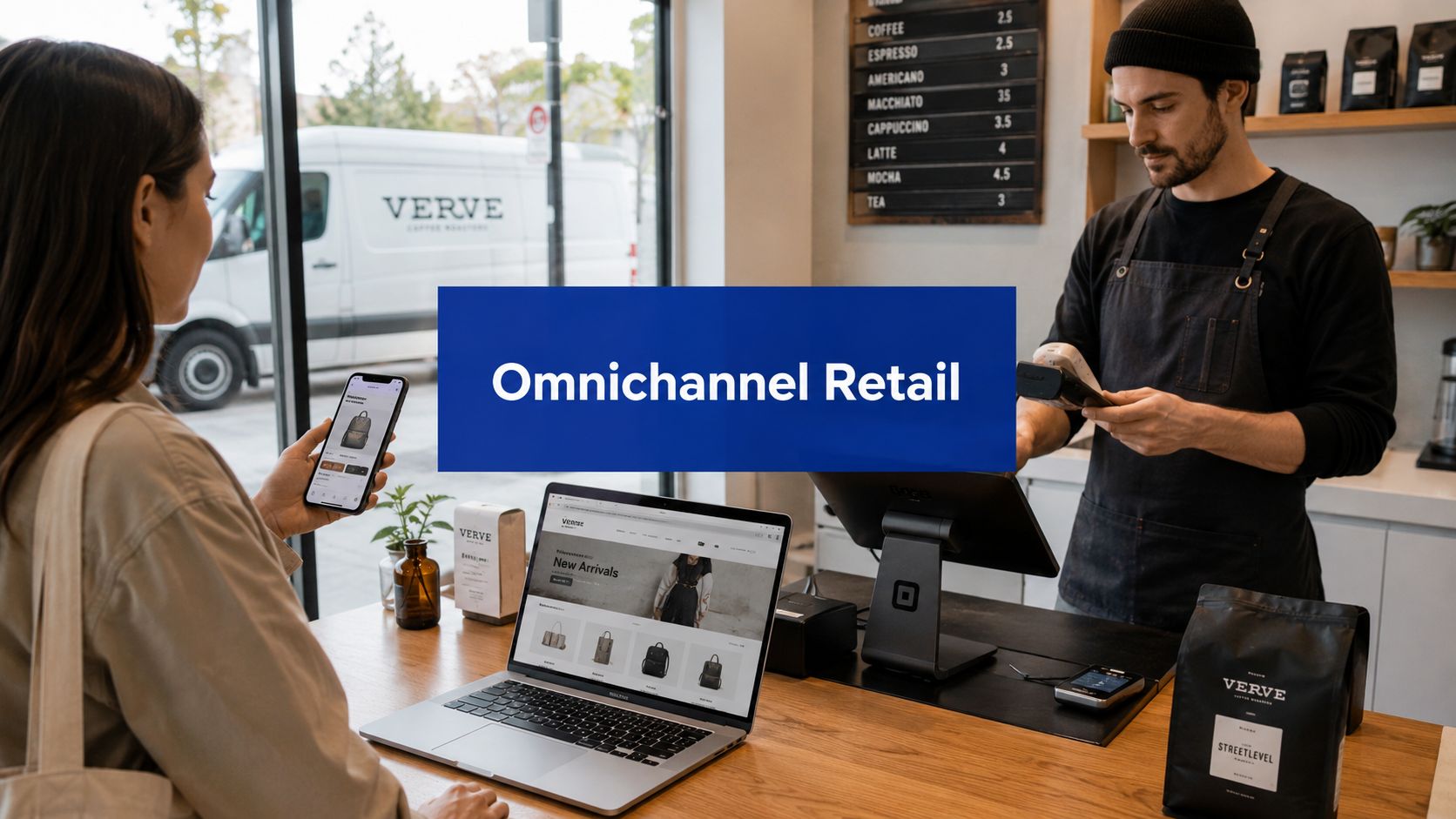


A customer buys from your website on Tuesday, walks into your store on Thursday, and asks to exchange the item for a different size. Your staff can't see the online order. The store system doesn't recognise the web discount. Inventory says the replacement is available, but the shelf is empty. The customer leaves annoyed, and your team feels set up to fail.
That's the point where many mid-sized retailers realise they don't have a channel problem. They have a coordination problem.
For Canadian SMEs, omnichannel retail solutions aren't about copying a national chain's tech stack. They're about making sure the systems you already depend on, such as POS, ecommerce, inventory, customer records, and fulfilment, stop working against each other. The practical goal is simple. A customer should experience one business, not four disconnected departments.
Beyond a Single Channel: The Omnichannel Imperative
A lot of businesses think they're already doing enough because they sell in-store and online. That's multichannel presence. It's not the same as an integrated customer experience.
If you want a clear framework, this guide to compare omnichannel and multichannel strategies is useful because it separates “being on multiple channels” from “connecting those channels so the customer doesn't have to start over every time.”
What customers actually experience
Customers don't think in internal system boundaries. They don't care which database holds their order history or whether your store runs a different platform than your website. They expect your business to know what they bought, what's available, what price applies, and how a return or pickup should work.
That expectation is now mainstream in Canada. Around 65–70% of Canadian shoppers regularly use two or more channels during a single purchase journey, according to a 2023 national survey cited by Polaris Market Research.
That matters because the failure points are no longer edge cases. They happen in ordinary buying journeys:
Research online, buy in-store: Product details, availability, and pricing need to match.
Buy online, resolve in-store: Staff need access to order context and return rules.
Browse in-store, complete later: The cart, customer profile, or follow-up campaign should reflect that interaction.
Practical rule: If a customer has to re-explain their purchase history when moving from web to store, you don't have omnichannel. You have separate channels with shared branding.
Why SMEs should care now
Large retailers didn't make omnichannel important. Customers did.
For SMEs, the risk isn't just losing a sale. It's creating friction at exactly the point where a smaller brand should win on service. A disconnected experience makes your business look less organised than it really is. It also creates hidden operating costs through manual order checks, refund exceptions, staff workarounds, and customer service follow-ups.
The good news is that omnichannel doesn't require a massive transformation programme on day one. The practical version starts by fixing the customer journeys that break most often, then connecting the systems behind them.
The Core Components of an Omnichannel Ecosystem
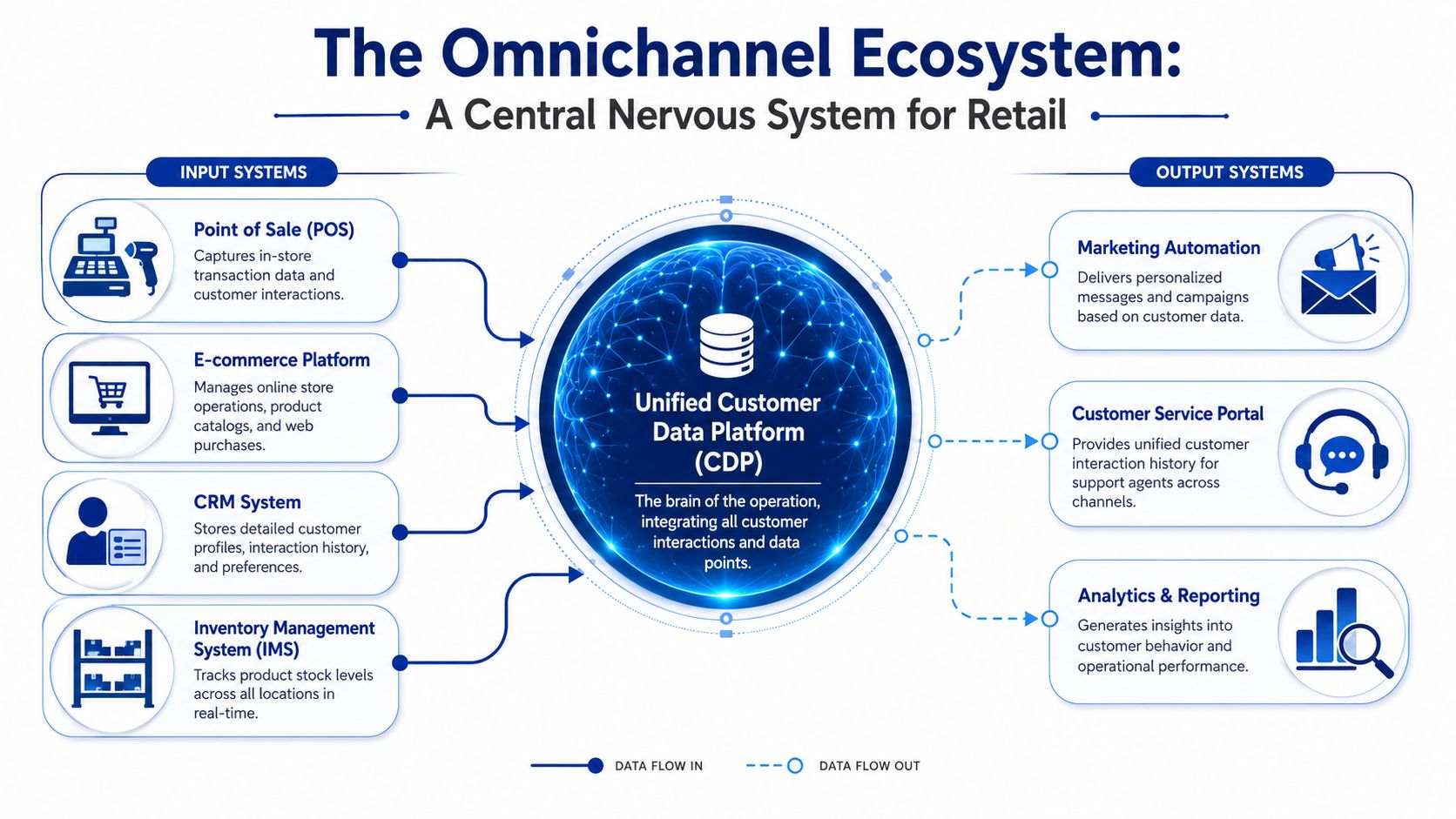
An omnichannel setup works like a central nervous system. Different tools handle different tasks, but they need to send signals to the same brain. If they don't, one part of the business reacts while the others stay blind.
The systems that matter most
Here's the plain-English version of the core stack.
| System | What it does | What breaks without integration |
|---|---|---|
| POS | Records in-store sales, returns, and cashier activity | Store staff can't see online history or apply consistent policies |
| Ecommerce platform | Runs the website, catalogue, cart, and checkout | Online orders sit outside store operations |
| OMS | Orchestrates where orders go and how they're fulfilled | Click-and-collect, split fulfilment, and exceptions become manual |
| ERP or finance back end | Handles core business records such as products, purchasing, accounting, and tax logic | Pricing, stock, and reporting drift across channels |
| CRM | Stores customer profiles, purchase history, and communication context | Marketing and service stay generic and fragmented |
| Inventory management | Tracks stock by location and availability | Customers see items that staff can't actually fulfil |
An OMS often becomes the operational hinge point once a retailer offers pickup, returns across channels, or store-based fulfilment. If you need a practical breakdown of where it fits, this guide to order management system software explains the role without drowning the topic in vendor jargon.
What should be connected first
Not every system needs a deep integration on day one. Mid-sized businesses usually get the fastest operational value by connecting the pieces that touch revenue and service most directly:
POS and ecommerce: So orders, returns, and product data stop diverging.
Inventory and order flows: So availability is credible.
CRM and transaction history: So staff and marketing teams can see the same customer context.
When teams launch BOPIS before inventory, and order status are reliable, they create a customer promise the operation can't keep.
That's why fulfilment design matters as much as front-end convenience. If curbside or in-store pickup is part of your plan, this comprehensive guide on curbside fulfilment is worth reading because it focuses on the operational handoff, not just the checkout button.
What doesn't work
Three patterns cause most SME omnichannel projects to stall:
Buying a large platform to solve a process problem: Software won't fix unclear return rules or weak store procedures.
Integrating everything at once: That creates cost and testing complexity before the business has proven value.
Treating customer data as a marketing-only issue: In practice, customer context matters just as much at checkout, service, and fulfilment.
The best ecosystems aren't the biggest. They're the ones where each system has a clear role and shared data moves predictably.
Designing Your Omnichannel Technical Architecture
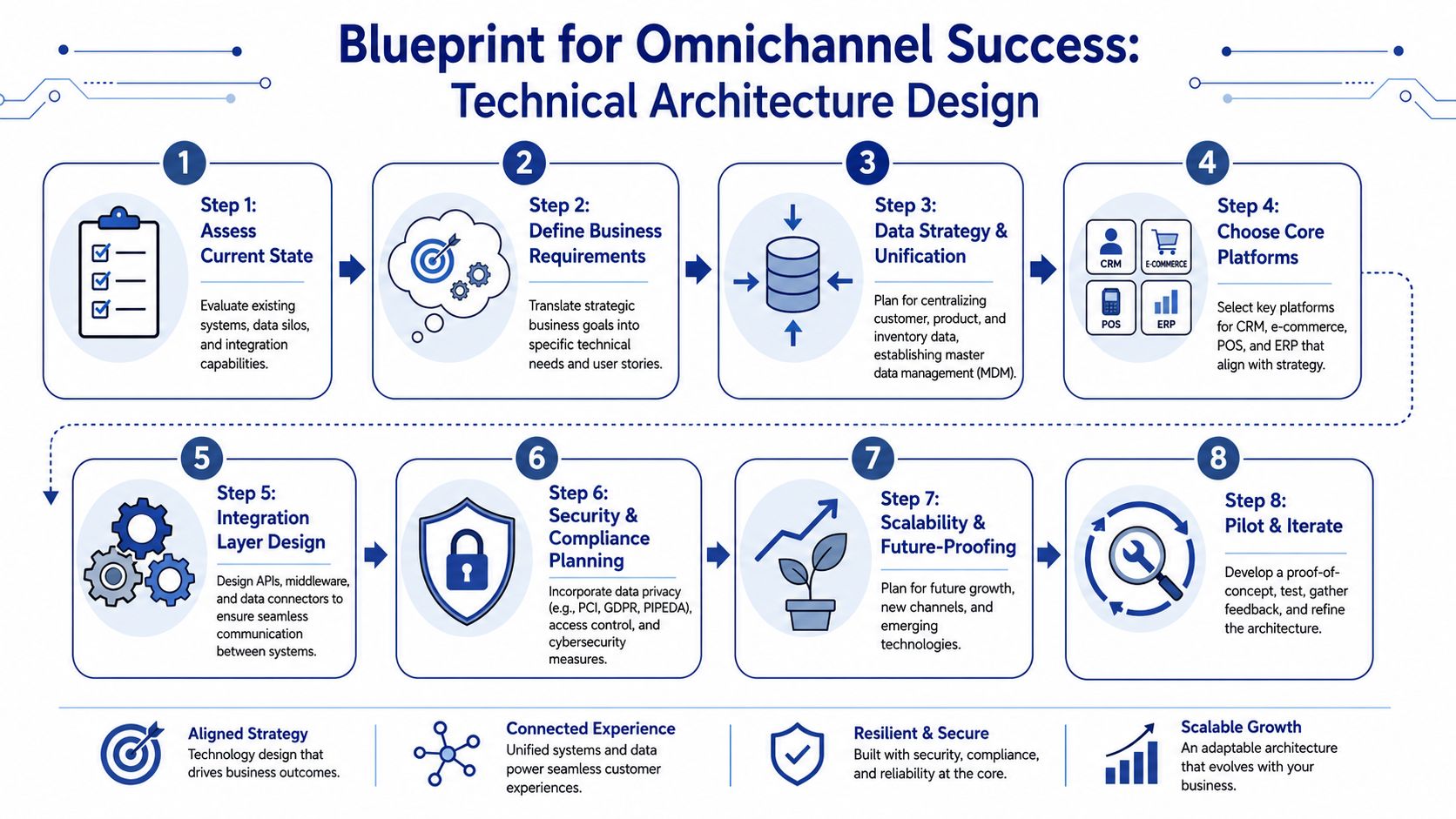
Most retailers don't fail because they chose the wrong software category. They fail because the systems exchange information too slowly, too inconsistently, or only through manual work.
That's why architecture matters. Not in an abstract enterprise sense, but in the everyday retail sense of “Can my website, store, and fulfilment teams trust the same information at the same time?”
Batch sync versus real-time
A lot of older retail environments still rely on scheduled batch updates. Stock changes in one system, then another system catches up later. That may be acceptable for overnight reporting. It's a poor fit for pickup promises, fast-moving stock, or stores that also act as fulfilment points.
A stronger pattern is event-driven architecture. When something important happens, such as an order being placed, an item being returned, or store stock changing, the system publishes an event immediately. Other systems subscribe and react.
Examples are straightforward:
OrderCreated: The OMS reserves stock and triggers fulfilment logic.
InventoryUpdated: The website refreshes product availability.
ReturnProcessed: Customer history, stock position, and refund workflows update together.
For example, the business case is clear: a study of Canadian omnichannel retailers found that those using event-driven inventory synchronisation reduced stock-out-related sales loss by up to 23% compared with batch-style integration, as cited in Salesforce's omnichannel retail guide.
The practical architecture SMEs should aim for
You don't need a perfect target state. You need a reliable one.
A pragmatic architecture for a growing retailer usually includes:
API-first connections: Each core platform should expose or consume data through stable APIs.
An integration layer: Middleware, iPaaS, or custom services should mediate data exchange instead of hard-wiring every system to every other system.
Event handling for high-risk workflows: Inventory, orders, returns, and fulfilment status deserve immediate updates.
A source-of-truth model: Decide which system owns product data, stock, customer profiles, and pricing rules.
For retail operations where stock movement, vendor feeds, and multi-location replenishment matter, this overview of supply chain software for retail in Canada is a useful companion because omnichannel reliability often depends on upstream inventory discipline.
Where headless commerce fits
Headless commerce can help, but it's not mandatory.
If your current website limits UX changes, localisation, or channel expansion, separating the front end from the commerce engine can give you flexibility. That's useful when you want different buying experiences across web, mobile, kiosks, or dealership-style product journeys. But headless also introduces delivery complexity. You need stronger front-end engineering, better API governance, and tighter release discipline.
Architecture advice: Choose headless because you need flexibility across channels, not because it sounds more modern.
For many SMEs, the better first move is simpler. Keep the current commerce platform if it supports APIs well enough, then invest in data quality and order flow consistency before redesigning the entire customer experience layer.
A Phased Implementation Roadmap for Canadian SMEs
Many owners become stalled at this point. They understand the value, then assume omnichannel requires a full platform replacement, a long integration project, and a budget that only enterprise retailers can absorb.
That assumption is one reason adoption still lags. A 2023 CFIB survey found that only 39% of small businesses had a website, and only 13% were selling online, as cited by Emarsys. The gap isn't only about awareness. It's also about practical implementation paths that feel manageable.
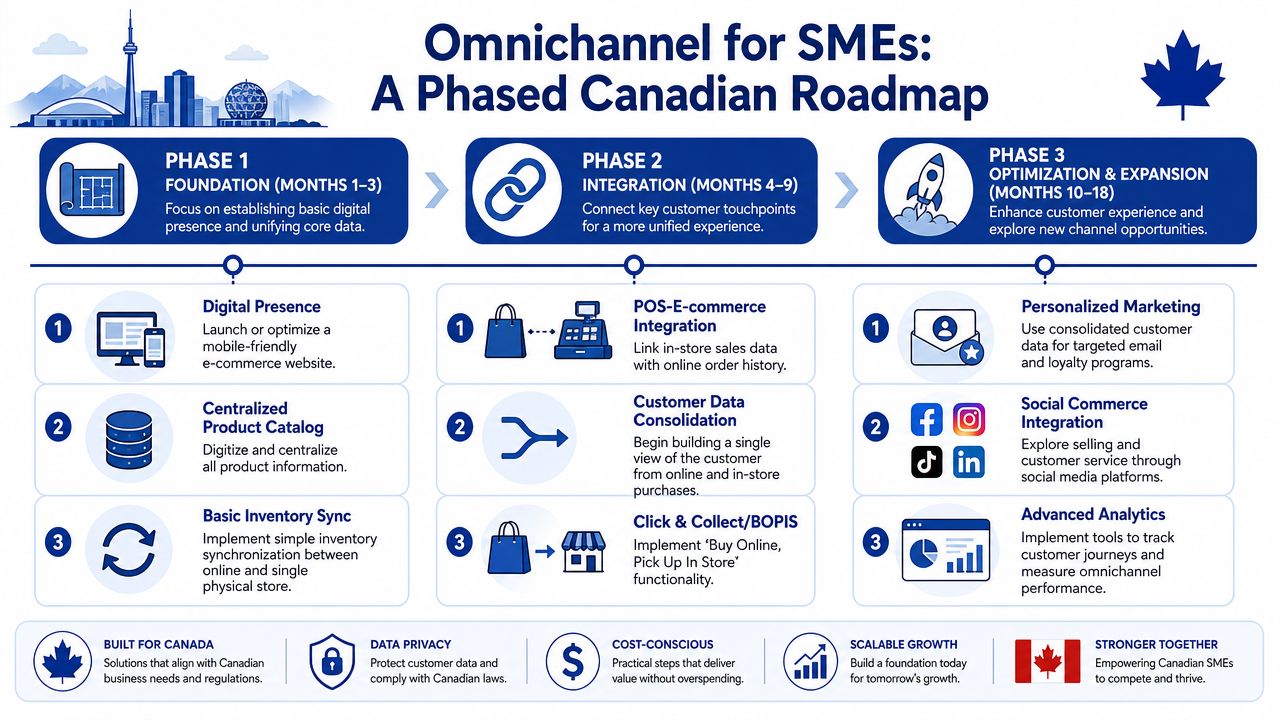
Phase 1: Build a dependable foundation
Start with the parts customers see first and the processes your staff can maintain consistently.
For most SMEs, that means:
Launch or clean up the ecommerce channel: A mobile-friendly storefront with an accurate catalogue, clear pickup or delivery options, and a checkout your team can support.
Connect POS and online product data: Even basic synchronisation is better than running separate catalogues and prices by hand.
Define one returns policy across channels where possible: If exceptions are necessary, document them clearly for staff and customers.
At this stage, avoid over-customisation. Choose tools that your team can operate without specialist developers for every small change. Shopify, Lightspeed, Square, and similar platforms can be viable depending on store complexity, but the decision should come down to fit, not trend.
What works in Phase 1 is disciplined simplicity. What doesn't work is trying to add loyalty, marketplaces, advanced segmentation, and ship-from-store before the basics are stable.
Phase 2: Connect customer and inventory context
Once orders flow cleanly, the next problem is visibility. Customers want accurate availability. Staff need context. Marketing needs cleaner data.
This phase usually includes a tighter connection between:
| Priority | Outcome |
|---|---|
| Inventory by location | Staff can trust whether an item is sellable, pickable, or reserved |
| CRM and transaction history | Service and marketing stop operating blind |
| Order status across systems | Pickup, return, and exception handling become faster |
Canadian SMEs have some added realities to account for. Multi-province tax handling, bilingual customer journeys in some markets, and uneven rural connectivity all shape design choices. That doesn't mean you need a complex enterprise blueprint. It means your phase plan should reflect the operating conditions you have.
Phase 3: Optimise what customers notice
Only after the business can execute consistently should you add more advanced customer-facing capabilities.
Good candidates include:
Personalised messaging: Based on actual purchase and browsing context, not broad assumptions.
Clienteling in-store: Giving staff access to useful customer history when it helps service.
Selective channel expansion: Social commerce, additional marketplaces, or appointment-led flows where they fit the product and buying cycle.
Don't scale inconsistency. Optimise only after your core order, stock, and service processes are boringly reliable.
How to budget the decision
A phased model lowers risk in three ways.
First, it limits rework. You learn what your business needs before adding another platform. Second, it reduces change fatigue for store teams. Third, it ties spending to visible operational gains such as cleaner pickup workflows, fewer service escalations, and less manual reconciliation.
The most expensive omnichannel project is usually the one that starts too large, too early, with unclear ownership and too many promised features.
Beyond Technology: The People and Process Factor
Retail owners often underestimate where omnichannel projects succeed or fail. It's not only in integrations, APIs, or vendor selection. It's at the till, on the shop floor, in the stock room, and during the first awkward month after launch.
A 2023 Retail Council of Canada report highlighted that front-line staff are often under-equipped to handle omnichannel services such as ship-from-store, real-time inventory lookup, and mobile checkout, leading to inconsistent experiences, as cited by Cleffex.
New tools change store roles
When a store becomes part showroom, part pickup point, part fulfilment node, the role of front-line staff changes. Team members who were hired mainly for sales and merchandising may now need to:
verify online orders before handoff
handle channel-neutral returns
look up inventory across locations
explain delivery or pickup status
use mobile devices at the point of service
If you don't redesign workflows around those tasks, staff will improvise. Improvisation is expensive. It creates inconsistent answers for customers and hidden friction for managers.
Training has to be operational
Generic training sessions don't stick. Staff need short, scenario-based training tied to actual store moments.
Use role-based practice such as:
Pickup handoff drills: How to verify identity, confirm order status, and handle missing items.
Return exception scripts: What to do when web and store policies collide.
Inventory lookup workflows: Which system to trust first, and when to escalate.
Mobile checkout behaviour: How to complete a sale away from the fixed till without creating reconciliation problems later.
A good training plan doesn't teach every feature. It teaches the handful of actions that most affect customer trust.
Incentives and ownership matter
Many omnichannel rollouts create conflict because the business still rewards channel silos. Store managers protect store metrics. Ecommerce teams optimise web conversion. Service teams inherit the fallout.
Fix that with shared ownership. If an online order picked up in-store creates work for store staff, recognise that in process design and reporting. If store associates support a sale that closes later online, the business should still treat that as a win.
Strong change management usually includes:
Clear process ownership: One person owns returns logic, order exceptions, and escalation rules.
Simple job aids: Laminated steps, POS prompts, or mobile checklists beat long manuals.
Feedback loops: Store teams should report where the process breaks, not just absorb the pain without communicating.
Technology can connect channels. Only process design and staff confidence can make the experience feel connected to the customer.
Measuring Success with the Right Omnichannel KPIs
The wrong KPI model makes omnichannel look weaker than it is. If one team reports website conversion, another reports store sales, and a third tracks support tickets, nobody sees whether the whole customer journey is improving.
That's why channel-specific reporting often misleads owners. Omnichannel success shows up in fewer broken journeys, smoother fulfilment, and stronger customer continuity across touchpoints.
The KPIs worth tracking
A useful scorecard combines commercial, operational, and service signals.
Cross-channel conversion: How often customers move from one touchpoint to another and still complete the purchase.
Order fulfilment accuracy: Whether orders are picked, packed, or handed over correctly.
Inventory trust rate: How often displayed availability matches what the operation can fulfil.
Returns cycle friction: Whether cross-channel returns are smooth or repeatedly escalated.
Customer lifetime value across channels: Not by store or web in isolation, but by customer relationship over time.
For teams building reporting discipline, this introduction to ecommerce analytics metrics and KPIs is a practical reference point.
What a healthy KPI set looks like
A strong omnichannel dashboard answers questions like these:
| KPI area | Question it should answer |
|---|---|
| Customer behaviour | Are customers completing journeys that start in one channel and end in another? |
| Operations | Are pickup, return, and fulfilment workflows becoming more reliable? |
| Service | Are staff resolving channel-related issues faster and with fewer handoffs? |
| Commercial impact | Are connected journeys producing better repeat purchase patterns? |
If a metric can only be improved by shifting sales from one channel to another, it's a weak omnichannel KPI.
What to avoid
Don't overbuild the dashboard early. A handful of trustworthy metrics is better than a large set assembled from inconsistent definitions.
Also, avoid reporting that punishes the team for exposing reality. Once inventory visibility improves, some businesses initially see more exceptions because the operation is finally measuring them properly. That's not failure. That's the beginning of control.
Your Omnichannel Readiness Checklist
Most businesses don't need a grand strategy document first. They need an honest read on what's already working, what's fragile, and what should be fixed before another tool gets added.
Use this checklist as a practical self-assessment with your operations lead, store manager, ecommerce owner, and whoever supports your systems.
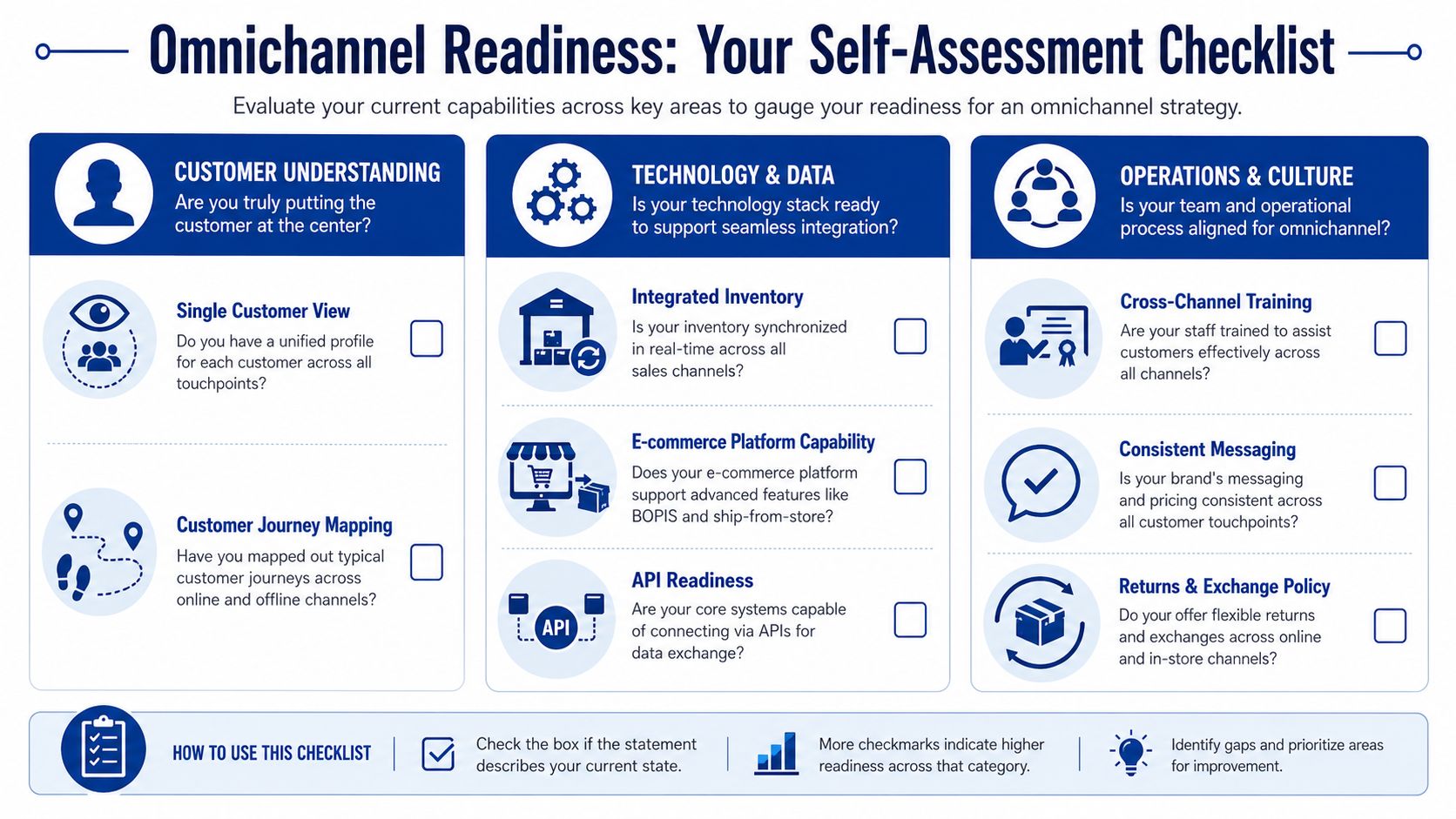
Customer experience checks
Ask these first, because customers feel these problems immediately.
Journey continuity: Can a customer move between website, phone, and store without restarting the conversation?
Pricing consistency: Are offers, promotions, and product details aligned across touchpoints?
Returns flexibility: Can staff handle common cross-channel returns without manager intervention?
Pickup confidence: Does the business make promises about pickup or availability that operations can reliably keep?
Technology and data checks
Many hidden issues are present.
Inventory integrity: Is there one trusted view of stock by location?
System connectivity: Do your POS, ecommerce platform, CRM, and fulfilment tools exchange data cleanly?
Ownership clarity: Do you know which system is the source of truth for products, pricing, customers, and orders?
API readiness: Can your key tools integrate without brittle one-off workarounds?
Operations and people checks
Even strong systems fail when day-to-day execution is vague.
Staff readiness: Can front-line teams complete pickup, return, lookup, and mobile checkout tasks confidently?
Escalation rules: When data conflicts or fulfilment exceptions happen, does the team know exactly what to do?
Store process fit: Have in-store workflows been updated for omnichannel tasks, not just layered on top of old routines?
Shared incentives: Are teams rewarded for total customer outcomes rather than channel turf?
Measurement checks
Don't wait for perfection. Start with measurement discipline.
Unified reporting: Can leadership view customer, operational, and service performance together?
Exception tracking: Are failed pickups, stock mismatches, and cross-channel return problems visible?
Learning loop: Does the business review breakdowns regularly and update process, training, or integration rules?
Phase discipline: Are you improving one high-friction journey at a time instead of launching too many changes at once?
If you answer “no” to several of these, that doesn't mean you're behind. It means you know where to start. That's far more useful than buying another platform and hoping complexity turns into capability.
If your business is ready to turn disconnected channels into a practical omnichannel operation, Cleffex Digital Ltd can help you map the gaps, prioritise the right integrations, and build a phased solution that fits your budget, team, and growth stage.