

A growing business can survive on workarounds for longer than most leaders expect. People learn where the gaps are. They build manual checks. They keep private notes. They message each other for status updates because the system itself can't answer basic operational questions.
That approach eventually breaks. It breaks when more customers arrive, when a regulator asks for a clean audit trail, when a finance lead wants reliable month-end numbers, or when a clinical or insurance workflow depends on accurate data moving between teams without delay.
Enterprise software solutions are the practical response to that problem. They don't exist to impress boards with digital language. They exist to standardise how work gets done, how data is captured, and how decisions get made. In a healthy implementation, software becomes the operating backbone of the business rather than another disconnected tool.
What Changes When the Backbone Is in Place
Three shifts usually matter most:
Data becomes consistent: teams stop arguing about whose spreadsheet is right.
Processes become visible: approvals, exceptions, and bottlenecks stop hiding in inboxes.
Leaders get control: reporting moves closer to real time, which improves planning and response.
Businesses rarely need more software. They need fewer gaps between systems, teams, and decisions.
That's especially true in regulated Canadian sectors. Insurance and healthcare teams don't just need efficiency. They need traceability, controlled access, retention discipline, and workflows that stand up under scrutiny. Automotive and IT services firms have a different pressure set, but the core issue is similar. Fragmented systems slow execution and make scaling expensive.
The rest of this guide stays focused on the decisions that determine success: what enterprise software solutions are, which categories matter, whether to customise or buy, how to select a platform, how to implement without avoidable disruption, and how to measure whether the investment is paying off.
What Are Enterprise Software Solutions
Enterprise software solutions are the systems a business uses to run its core operations in a structured, repeatable way. They aren't single-purpose apps built for one person's convenience. They're shared platforms that connect departments, rules, approvals, records, and reporting across the organisation.
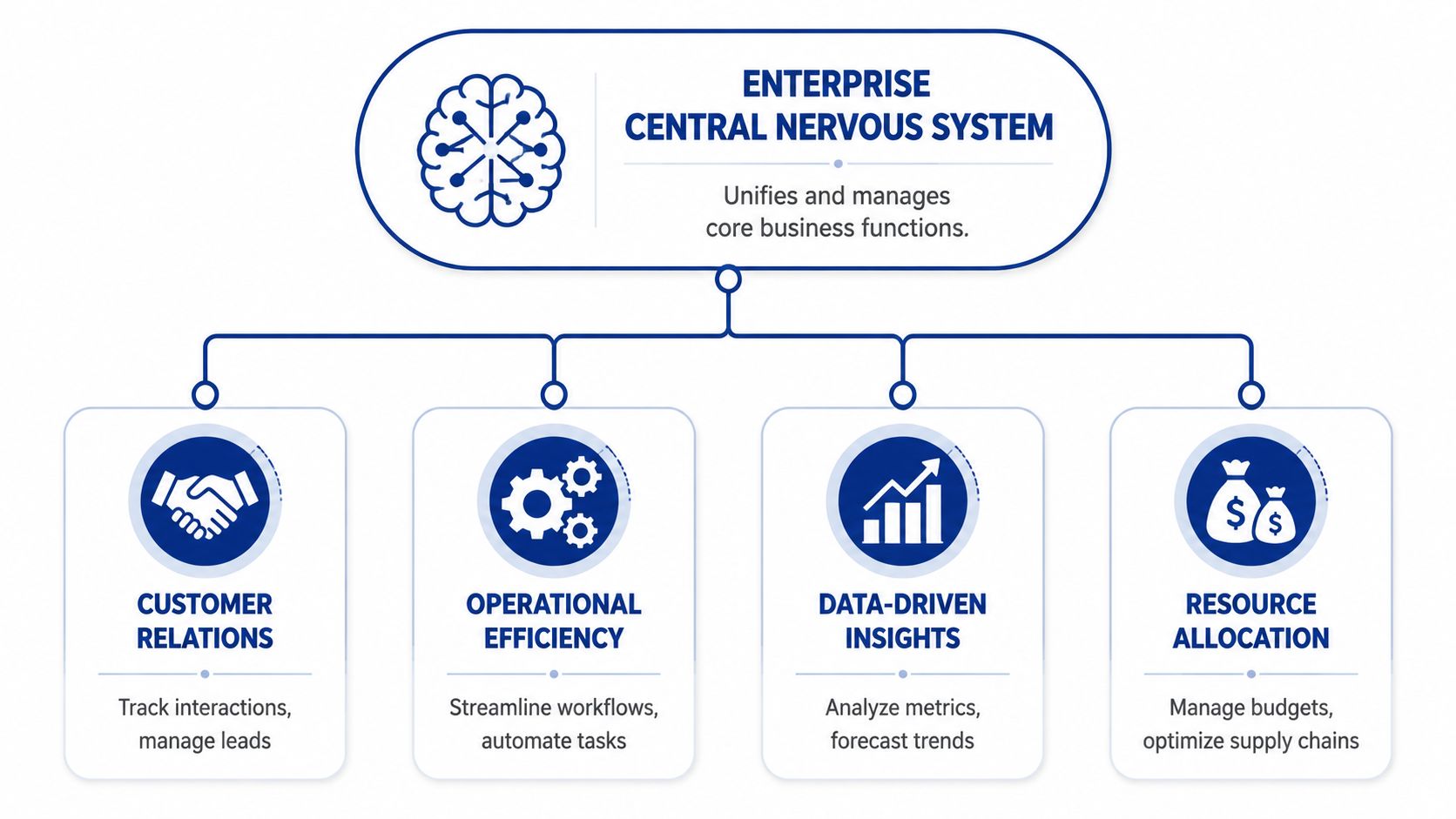
A simple way to think about them is as the central nervous system of a company. Sales, finance, HR, operations, customer support, procurement, and compliance all generate signals. Enterprise software coordinates those signals so the business can act as one system instead of a collection of isolated teams.
The Real Job of Enterprise Software
The practical purpose is straightforward. Good enterprise software solutions create a single source of truth for important business data and then use that data to drive workflows, controls, and reporting.
That usually means the software should help your business do the following:
Centralise records: customer data, invoices, claims, tickets, inventory, contracts, and employee information should not live in conflicting systems without governance.
Automate repeatable work: approval chains, billing steps, reminders, routing, and standard document generation should not depend on memory.
Enforce rules: permissions, validation logic, audit history, and policy-driven actions should be built into the process.
Support decisions: dashboards and reports should reflect current operational reality, not stale exports.
The difference between enterprise software and ordinary business software is scope. A small point tool helps with one task. An enterprise platform shapes how several teams work together.
What It Should Feel Like in Day-to-Day Operations
You don't judge enterprise software solutions by the sales demo. You judge them by what happens on a normal Tuesday.
A claims team should see current policy information without chasing another department. A clinic administrator should know whether a document is complete, approved, and attached to the right patient workflow. A dealership manager should be able to trace a lead from intake to follow-up without checking three systems. Finance should close with fewer manual reconciliations.
Practical rule: if staff still need shadow spreadsheets to complete critical work, the software isn't solving the operating problem.
Core Characteristics That Matter
Most buyers get distracted by features and miss the structural qualities that determine whether a system will hold up.
A workable enterprise platform needs:
| Characteristic | Why it matters in practice |
|---|---|
| Scalability | The system must handle more users, more transactions, and more complexity without requiring a full replacement. |
| Reliability | Core processes like billing, scheduling, claims, and reporting can't stop because one integration fails silently. |
| Security and access control | Regulated industries need controlled permissions, logging, and defensible data handling. |
| Integration capability | Most businesses already have payroll tools, websites, data stores, or specialist apps that must remain connected. |
| Configurability | You need room to model your process without rewriting the product every time the business changes. |
For Canadian businesses, this matters even more because technology choices often collide with compliance obligations, regional data handling concerns, and legacy software that can't readily be switched off. The right system doesn't just modernise workflows. It creates control where the informal process used to sit.
Core Types of Enterprise Software Explained
Not all enterprise software solutions solve the same problem. Buyers often use the term as if it describes one category, but in practice, you're choosing among several operating models. The right fit depends on where the friction sits in your business.
ERP for the Operational Core
Enterprise Resource Planning, or ERP, sits at the centre of many enterprise environments because it connects finance, purchasing, inventory, operations, and often HR or project accounting into one system.
That central role is reflected in the market. ERP secured the largest software segment share of 23.2% in 2025 in the North American market, driven by demand for integrated management of finance, supply chain, and HR for better real-time visibility, according to Grand View Research's enterprise software market analysis.
An ERP system makes sense when the main problem is operational fragmentation. A distributor might need one view of purchasing, stock, supplier commitments, and invoicing. A healthcare organisation may need finance and operational data to line up cleanly for reporting and internal control. A medium enterprise in insurance may need cleaner policy, billing, and back-office coordination than a patchwork stack can provide.
ERP is powerful, but it's also demanding. It works best when a business is willing to standardise processes instead of preserving every local exception.
CRM for Pipeline, Service, and Relationship Management
Customer Relationship Management, or CRM, focuses on the customer lifecycle. It helps teams manage leads, contacts, opportunities, communication history, renewals, and service interactions.
For a Canadian automotive business, that can mean tracking lead origin, sales follow-up, appointment scheduling, and post-sale engagement in one place. For an insurance broker or agency, CRM often becomes the control point for prospect handling, account notes, and renewal workflows.
CRM is usually the right starting point when sales execution is the visible pain. If your business is losing opportunities because nobody owns follow-up, response times vary by rep, or marketing data never reaches operations, CRM can deliver value faster than a broad ERP programme.
SCM and Connected Transaction Flows
Supply Chain Management, or SCM, covers sourcing, logistics, planning, fulfilment, and supplier coordination. Manufacturers, distributors, and automotive firms tend to feel this pain first because delays and data mismatches quickly become revenue problems.
In practice, SCM becomes critical when teams need visibility beyond shipment tracking. They need order status, inventory implications, supplier performance, and exception handling tied together. That often requires disciplined data exchange between partners, warehouses, and internal systems. If your team is dealing with partner document formats and transactional handoffs, this overview of modern EDI mapping for engineers is useful because integration quality often determines whether supply chain software performs as expected.
BPM for Workflow Discipline
Business Process Management, or BPM, is less about one department and more about how work moves. It helps businesses design, automate, monitor, and improve workflows that span people and systems.
Typical BPM use cases include:
Claims routing: assign submissions, escalate exceptions, and record approvals.
Patient intake workflows: validate forms, trigger follow-up actions, and track completion.
Procurement approvals: apply thresholds, enforce sign-off rules, and maintain audit trails.
Internal service requests: route tasks across finance, HR, operations, and IT.
BPM is especially useful when the core issue isn't missing data but inconsistent execution.
A process that depends on tribal knowledge will eventually fail under growth, staff turnover, or audit pressure.
The Newer Layer of Enterprise Tooling
The market also includes cloud platforms, custom applications, analytics layers, and AI-enabled tools. These aren't replacements for the categories above. They often sit around them.
A business might run Microsoft Dynamics 365 as CRM or ERP, use Shopify for commerce, add a custom portal for brokers or patients, and connect everything through APIs and reporting tools. That's common, especially in firms that need a balance between packaged software and customised workflows.
The key is not to buy categories. Buy solutions to concrete operating problems.
Choosing Between Custom and Off-the-Shelf Software
This is usually the first strategic fork in the road. Should you adopt an existing platform and adapt your business to it, or should you commission software built around your process?
The honest answer is that most businesses need some mix of both. The mistake is treating the choice like ideology. Custom isn't automatically smarter. Off-the-shelf isn't automatically safer. The right decision depends on where your process is standard, where it's differentiating, and where regulation limits your tolerance for compromise.
If your workflow gives you a competitive edge or carries compliance risk, don't force it into a product that only supports it awkwardly.
A Side-by-Side Comparison
| Criterion | Off-the-Shelf (Vendor) | Custom-Built Solution |
|---|---|---|
| Initial cost | Usually lower at the start because licensing and implementation patterns are already defined | Usually higher upfront because design, development, and testing are specific to your business |
| Implementation speed | Faster if your requirements fit the product with a limited configuration | Slower because requirements, architecture, and delivery need to be created intentionally |
| Flexibility | Good for standard processes, limited when your workflows fall outside the product model | High flexibility for industry-specific logic, user roles, and workflow design |
| Scalability | Strong if the vendor platform is mature and aligned to your growth path | Depends on architecture and delivery discipline, but it can scale well if built properly |
| Competitive advantage | Low if competitors can buy the same workflow and use it the same way | Higher when the software reflects a distinctive operating model |
| Maintenance | Vendor manages roadmap, updates, and platform stability, but you inherit their release cycle | Your team or partner controls changes, but you also own long-term maintenance decisions |
When Off-the-Shelf Is the Better Decision
Packaged software is often the right call when your needs are common, and your timeline matters more than deep differentiation.
That tends to fit cases like:
A startup needing a fast structure: a standard CRM or finance platform may be enough to replace ad hoc tools.
A small business cleaning up sales operations: a known platform can impose a process quickly without a long build cycle.
A medium enterprise adopting standard back-office practices: if procurement, accounting, and reporting are relatively conventional, buying is often more rational than building.
Vendor software also reduces decision load. You're usually buying proven patterns, not designing everything from scratch.
When Custom Starts To Make Sense
Custom software earns its keep when packaged tools create more friction than value. That often happens in regulated industries, hybrid workflows, or service businesses with unusual operating logic.
Common triggers include:
Compliance-specific workflows: insurance and healthcare teams often need document handling, role-based access, retention logic, and approval paths that standard products don't model well.
Legacy integration demands: if critical data lives in older systems that can't be retired soon, custom middleware or applications may be more practical than forcing a full rip-and-replace.
Cross-platform operating models: a business combining ecommerce, internal operations, client portals, and analytics may need customised orchestration rather than one monolithic package.
One useful reference if you're weighing this choice in more detail is Cleffex's guide to custom software vs off-the-shelf software.
The Trade-Off Leaders Underestimate
The cost isn't just software. It's a misfit.
A fast deployment that users work around for years becomes expensive. A fully custom platform with weak governance becomes fragile. Leaders usually regret one of two things: buying too much software they can't absorb, or buying too little flexibility for a process that is critical.
A good decision starts by separating your business into three buckets:
Commodity processes that can follow standard software patterns.
Important but adaptable processes that can be configured with moderate compromise.
Critical or differentiating processes that deserve custom design or extension.
That exercise often makes the answer clearer than any product demo.
A Practical Guide to Selecting Your Solution
Software selection goes wrong when teams treat demos as discovery. By the time you're watching a polished sales workflow, most of the important thinking should already be done internally. You need to know which process problems you're solving, which constraints can't be negotiated, and which stakeholders have veto power for legitimate reasons.
Start With Internal Clarity
A sound selection process begins inside the business.
Write down the workflows that are failing now. Not broad statements like “we need digital transformation”. Actual failures. Duplicate entry between finance and operations. Claims approvals are stuck in email. Missing audit history. Inconsistent sales follow-up. Reporting delays caused by disconnected data.
Then identify the people who own those problems:
Operational leaders who know where process breaks.
Finance and compliance stakeholders who understand control requirements.
IT or technical leads who can assess integration and security implications.
Executive sponsors who can make trade-off decisions when priorities conflict.
If these people aren't aligned before vendor engagement, selection turns into politics.
Build Requirements in Business Language First
Teams often jump too early into feature checklists. That creates weak requirements because the list reflects what software can do, not what the business needs.
Start with scenarios instead:
A patient intake form is submitted with missing consent information.
A policy renewal requires review because a data point has changed.
A dealership lead arrives from a web form after hours and needs an assignment.
A finance team needs month-end numbers tied to current operational records.
Those scenarios tell you what the solution must support across process, access control, validation, notification, reporting, and integration.
For regulated industries, this discipline is mandatory. In Canada, 62% of SMBs in insurance and healthcare struggle with PIPEDA and provincial health data compliance during digital transformations, yet only 28% have adopted compliant cloud-AI solutions, according to People10's review of enterprise software development challenges. That gap is exactly why selection has to include compliance fit, not just user experience and price.
Don't ask whether the software has a compliance module. Ask how it handles your actual records, permissions, approvals, retention needs, and audit trail expectations.
A useful starting point for this stage is this custom enterprise software development guide, especially if you're considering a blended approach with packaged tools plus customised workflows.
Run Better Demos and Due Diligence
Once you shortlist vendors or development partners, make them respond to your use cases. Don't let them choose the script.
Ask each supplier to walk through the same scenarios with the same assumptions. Make them show exceptions, not just happy-path flows. If integrations matter, ask what data moves where, how failures are logged, and who resolves them. If permissions matter, ask them to demonstrate role differences. If reporting matters, ask whether dashboards rely on live operational data or delayed extracts.
Then do the quieter work that buyers often skip:
| Due diligence check | What to verify |
|---|---|
| Reference calls | Speak with customers that resemble your size, sector, and complexity |
| Implementation model | Clarify who configures, migrates, tests, and supports the system |
| Roadmap fit | Check whether the vendor's product direction supports your likely needs |
| Exit risk | Understand data portability, customisation lock-in, and support obligations |
Selection discipline rarely feels exciting, but it prevents the expensive kind of surprise.
Your Roadmap for Successful Implementation
A software project usually fails long before go-live. It fails when leaders treat implementation as installation, when process decisions stay unresolved, or when data migration is left for later because it feels operational rather than strategic.
Implementation needs to be run like a business change programme. The software matters, but process ownership, user behaviour, and sequencing matter just as much.

The Phases That Deserve Attention
Most successful implementations move through a few predictable stages.
Discovery and Planning
The project should define scope, owners, dependencies, and business rules at this stage. Teams often rush this because they want visible progress, but an unclear scope is one of the fastest ways to create rework later.
You need decisions on which processes are in phase one, which systems remain in place temporarily, what data will move, and how success will be judged after launch.
Design and Configuration
Many teams over-customise at this stage. They try to replicate every historical quirk because users are comfortable with it. That usually creates complexity without preserving meaningful value.
A better approach is to distinguish between required control and inherited habit. Some process variation exists for good reasons. A lot of it exists because the old system was awkward.
Data Migration
This is the point where optimism gets tested. Legacy data is often incomplete, duplicated, inconsistent, or poorly structured.
That's why migration planning needs business ownership, not just technical ownership. Someone has to decide what data is authoritative, what can be retired, what needs cleansing, and what historical context must remain accessible.
A useful concrete benchmark exists here. SAP S/4HANA implementations can deliver a 25-30% reduction in total cost of ownership over five years for medium enterprises, largely due to its in-memory database enabling real-time analytics and 40% faster data migration processes, according to Fingent's overview of enterprise software solutions. The technical capability matters, but the lesson is broader. When architecture and migration are planned properly, implementation value shows up in both operating cost and reporting quality.
The Work That Protects Go-Live
Testing and training are where projects prove whether design decisions survive real usage.
Use User Acceptance Testing with realistic scenarios, not generic scripts. A claims adjuster, scheduler, finance analyst, or service lead should test the same edge cases they deal with in normal work. If the software only works under ideal assumptions, the project isn't ready.
Training should also be role-based. The executive sponsor doesn't need the same view as the person entering records all day. Generic training creates false confidence and poor adoption.
A system goes live once. User judgment about whether it helps or hinders forms much faster.
A Practical Implementation Checklist
Assign one accountable project lead: someone must own sequencing, issue management, and cross-team communication.
Freeze unnecessary changes: don't let every department add “just one more requirement” midstream.
Track migration risks openly: unresolved data issues don't improve by staying off the status report.
Prepare operational support: users need a known path for help during the first weeks after launch.
Document the next phase early: implementation should create a roadmap, not a dead stop.
For teams that need a structured planning framework before delivery starts, a technology roadmap template can help align business goals, sequencing, and ownership.
Measuring ROI and Partnering for Agile Growth
Implementation isn't the finish line. It's the point where the investment starts proving itself.
Too many businesses wait until after launch to ask whether the project worked. By then, teams are arguing from memory. One leader says productivity improved. Another says users still struggle. Finance sees cost. Operations sees friction. Nobody has a shared scorecard.
Define Value Before the Project Starts
ROI should include both hard metrics and operational evidence.
That often means tracking a mix like this:
Process efficiency: time to complete approvals, onboard records, reconcile transactions, or close month-end work.
Quality and control: fewer manual corrections, cleaner audit history, stronger access discipline.
Commercial outcomes: improved lead handling, faster response, better service continuity.
User adoption: whether teams complete work inside the system rather than outside it.
For medium enterprises, dashboards become important because they turn assumptions into evidence. Medium enterprises in Canada's automotive sector using Microsoft Dynamics 365 with Power BI have reported 35% operational efficiency gains, demonstrating clear ROI through real-time KPI dashboards processing massive data volumes, according to Velvetech's write-up on acquiring enterprise software solutions. The broader lesson is simple. If you can't see process performance clearly, you can't manage improvement properly.
Why the Partner Still Matters After Launch
Post-launch growth usually introduces a new problem. The first system works, but the business keeps changing. New reporting needs appear. A compliance rule change. A portal needs to connect. An AI workflow looks useful, but doesn't fit the current stack cleanly.
That's where an agile development partner becomes valuable. Not because every business needs constant custom builds, but because most growing companies need ongoing adjustment across integrations, automation, user experience, and data flow. For firms operating in healthcare, insurance, automotive, ecommerce, or outsourced IT delivery, that evolution is normal.
Cleffex Digital Ltd can be one such option for organisations that need custom software development, AI-enabled workflows, cloud integration, or product delivery support alongside packaged enterprise systems. The practical advantage of that model is flexibility. You don't have to treat your software investment as frozen the day it goes live.
A good enterprise system should stabilise operations first. Then it should give your business room to evolve without starting over.
If your team is weighing enterprise software solutions and needs help deciding what to standardise, what to customise, and how to deliver the work without creating operational drag, Cleffex Digital Ltd supports businesses with custom software development, cloud and AI integration, and agile delivery for regulated and growth-focused organisations.