

A claim arrives as a photo. An intake form arrives as a PDF. A customer update sits in an inbox while the actual record lives somewhere else. Your team isn't short of software. You're short of flow between them, and that's where intelligent workflow automation earns its keep.
The Hidden Manual Work Holding Modern Teams Back
It's Monday morning at a mid-sized Canadian insurer. An adjuster opens a claim, then opens three more screens to verify the policy, retype details from a PDF and chase a missing document by email. Down the corridor, a clinic administrator does the same dance with intake forms, while a small business owner copies invoice totals from a spreadsheet into accounting software.

None of these people lacks tools. They lack connection between tools, so they become the human glue. They read, interpret, copy, check and forward work that their systems can't hand to each other. That's the hidden cost. It's not dramatic; it just eats the hours meant for judgement, service and follow-up.
Where the glue work hides
Reading and retyping: Staff pull names, dates and totals from forms, emails and scans into a CRM, policy system or electronic health record.
Routing by memory: Someone who knows the unwritten rules decides which queue, adjuster or clinician should see each item next.
Chasing status: Customers and patients ask for updates because no system sends them automatically.
Fixing exceptions late: Missing information surfaces days later, when fixing it costs far more effort.
Intelligent workflow automation is the layer that sits across those systems. It reads what arrives, decides what it is and where it belongs, and routes it to the next step, asking a person only when the case is unclear or consequential.
Think of your existing enterprise software as the filing cabinets and workbenches. Automation is the conveyor belt between them. The intelligence is the experienced colleague standing at the belt, sorting items she'd never seen in quite that format before.
You'll take five things from this guide. A plain definition, the core capabilities, where it's already working, how to adopt it without overbuying, and how to govern it so people stay in charge of the decisions that matter.
What Intelligent Workflow Automation Actually Means
Strip away the jargon and a workflow is work moving through steps. Intake, review, approval, fulfilment, follow-up. Every organisation runs hundreds of these, whether or not anyone has drawn them on a whiteboard.
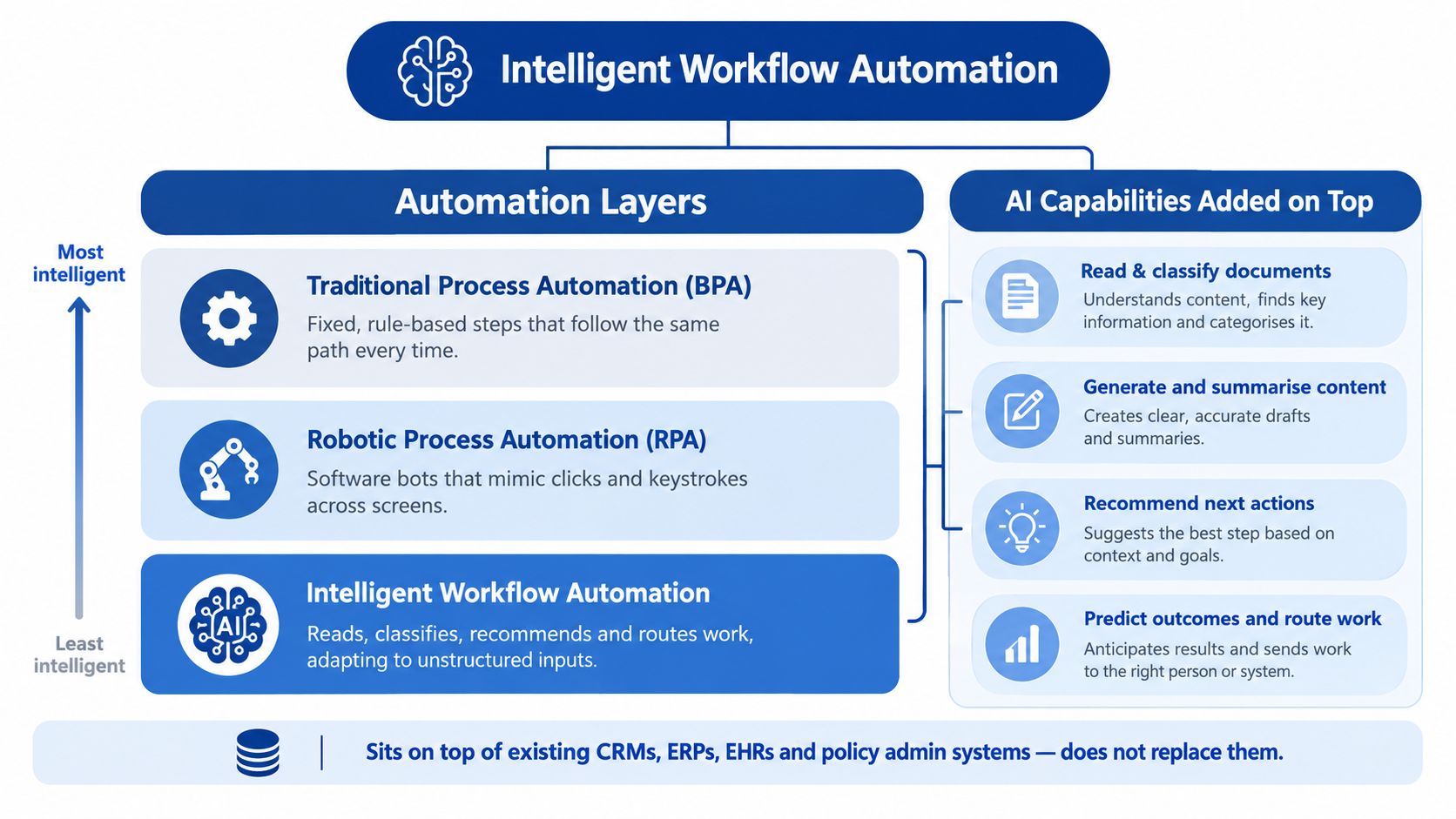
Traditional process automation, often called BPA, is a fixed set of rules. If the form field says X, send it to queue Y. It works beautifully until the input doesn't match the rule. Robotic process automation, or RPA, goes a step further. A software bot mimics clicks and keystrokes, copying data between screens the way a very fast, very literal temp would.
What the word intelligent adds
Intelligent workflow automation keeps those rule-based steps, then adds AI for the steps rules can't handle. A rule can't read a handwritten referral or a rambling customer email. An AI model can extract the meaning, classify the document and suggest the next action. That's the difference between a conveyor belt that only moves identical boxes and one that can sort parcels of any shape.
Rules-based steps: Predictable, identical every time, easy to audit. Send the reminder. Create the task. Update the status.
AI-driven steps: Interpretive and variable. Read this document. Summarise this thread. Which queue fits this request?
Human steps: Consequential or ambiguous. Approve this claim. Confirm this clinical decision.
These AI software solutions sit on top of your CRM, ERP, EHR or policy administration system. They don't replace them. APIs and connectors move data between systems, while an orchestration layer decides the order of operations. If you want a plain-language primer on that coordination layer, this guide to orchestrating AI tools for sales explains how multiple AI components can be sequenced rather than left to act alone.
Quick self-test: If a step needs someone to read and interpret before acting, it's a candidate for the intelligent layer. If it's the same keystrokes every time, plain automation will do.
That distinction matters for cost. Teams that label everything intelligent overbuy. Teams that map each step to the right execution mode, rules, AI or human, get enterprise automation that holds up in production.
The Five Core Capabilities That Power AI Workflow Automation
AI workflow automation sounds like one technology. It isn't. It's five capabilities working in sequence, and you can adopt them one at a time.
Read and classify
Document understanding extracts structured data from messy inputs, scanned forms, photos, PDFs, emails, and then labels what each item is. A claims team uses it to sort first notices of loss from repair estimates without opening every file. The value is simple. Work arrives pre-sorted and pre-filled instead of raw.
Generate and summarise
Models draft the status update, summarise the long email thread or produce a case summary for the reviewer. Nobody should send these unchecked in sensitive contexts, but editing a draft is far faster than writing from a blank screen.
Recommend the next action
Based on the content and your rules, the system proposes what happens next. Route to a senior adjuster, request a missing document, book a follow-up. In field services, the same pattern appears when a repair ticket system organises incoming jobs so technicians see prioritised, complete tickets instead of scattered requests.
Predict and prioritise
Patterns in past cases flag what's likely urgent, incomplete or at risk of delay. Prediction doesn't decide. It orders the queue so humans spend attention where timing matters most.
Orchestrate across systems
The fifth capability ties the others together, triggering tasks in connected systems, escalating overdue work and logging every step. These capabilities explain the outcomes in the evaluation of the Pan-Canadian Artificial Intelligence Strategy, where 44% of respondents reported reduced manual workloads, 40% cited operational automation, and 40% cited data-driven decision-making. Reading, routing and drafting are exactly the manual tasks that shrink first.
Where Intelligent Workflow Automation Is Already Working
The clearest proof isn't a vendor demo. It's ordinary operations where documents, approvals and follow-ups dominate the day.

Insurance claims intake
A claim arrives with photos, a police report and a repair estimate. The workflow classifies each document, extracts the policy number and loss details, checks for missing items and assembles a review-ready file. Straightforward claims move quickly. Anything ambiguous stops at a human approval gate with the AI's reasoning attached. It's no surprise this sector moves early. Statistics Canada reported that 16.9% of Canadian finance and insurance businesses were already using generative AI in the first quarter of 2024, another 5.8% planned to adopt it, and 46.1% of businesses using or planning to use it cited increased task automation without reducing employment or hours as a source of value, in its analysis of generative AI use by Canadian businesses. For a deeper look at this pattern, see how AI is reshaping insurance automation across intake and servicing.
Healthcare administration
A referral lands in a clinic inbox. The workflow checks it for missing information, routes it by specialty and urgency, creates tasks and messages the patient about next steps. Clinical staff stop doing inbox triage. Clinicians still make every care decision, because scheduling and paperwork were never clinical work in the first place.
Small business operations
A retailer or dealership connects its existing inbox, invoicing tool and CRM. Incoming enquiries get classified, leads route to the right person, and follow-ups go out on schedule. Tools that streamline customer email replies show the smallest version of this pattern, sorting and drafting responses so a lean team answers faster without hiring a coordinator.
The common thread is augmentation. The workflow clears the desk. People keep the judgement calls.
How Canadian Businesses Can Adopt It Without Overbuying
Here's the uncomfortable reality for smaller firms. Most already own digital tools. What they don't own is integration between them, or spare staff to evaluate platforms for months. The Canadian Federation of Independent Business found in 2025 that 92% of Canadian SMEs used at least some digital tools, yet only 10% were fully digitalised, with leading barriers including lack of digital skills at 51%, insufficient time to assess options at 49%, high setup costs at 48% and difficulty finding suitable solutions at 43%, in its report on the SME digital transformation journey.
That evidence points to an integration-first strategy. Don't replace your platform. Connect what you have, automate one painful workflow end to end, and prove the value before expanding.
A staged path that respects a small team
Map one bottleneck: Pick the workflow where work waits longest. Claims intake, referral processing, invoice handling. Just one.
Define the outcome first: Choose a metric you'll check, such as cycle time, rework rate, error rate or customer response time. Record the baseline before you build anything.
Automate narrowly: Connect the two or three systems that the workflow already touches. Classify, extract, route, notify.
Add human review on exceptions: Low-confidence or high-impact cases go to a person with full context, not through.
Expand only after proof: A second workflow gets funded by the hours the first one returned.
The smallest useful question isn't which platform to buy. It's which single automation, connecting tools you already pay for, would pay for itself.
The productivity case supports this patience. Statistics Canada's firm-level analysis indicated that Canadian businesses adopting AI had a 16.8% higher labour-productivity level than non-adopters, with potential gains of 0.4 to 1.1 percentage points annually over the next decade tied to complementary process and skill investment, as set out in its research on AI and labour productivity. Read that carefully. The gains depend on redesigned processes and skills, not software alone. Our overview of AI adoption in Canadian enterprises explores that wider adoption picture.
When to Keep Humans in the Loop and How to Govern the Rest
Not every workflow step should be automated, and pretending otherwise is how automation projects lose trust. The honest question is which steps, not whether.

Hesitation is rational. Statistics Canada found that 8.1% of Canadian businesses not planning to adopt AI cited privacy and security concerns and 2.2% cited laws and regulations, while 89.4% of businesses using AI in 2025 experienced no change in employment levels after implementation, in its analysis of AI use by Canadian businesses. The goal is augmentation with guardrails, not unrestricted automation.
Sort every step by risk
Low-risk steps, light oversight: Document classification, reminders, status updates, routing and data extraction. Errors here are cheap to catch and reverse.
High-impact steps, human approval: Decisions affecting health, claim outcomes, employment or personal information. These need a named person accountable for the result.
Steps to leave alone for now: Rare, judgement-heavy work where the volume doesn't justify building and monitoring an automation.
Canadian privacy guidance offers a useful benchmark. The Office of the Privacy Commissioner describes how the federal Directive on Automated Decision-Making requires federal institutions to assess risks and publish an Algorithmic Impact Assessment before production use, alongside privacy by design and privacy impact assessments for high-risk activities, in its guidance on automated decision-making and privacy. Private firms aren't bound by that directive, but borrowing its controls is smart practice.
The governance checklist
Data minimisation: Feed the workflow only the data each step needs.
Role-based access: People and systems see only what their role requires.
Audit trails: Log inputs, model confidence, decisions and overrides so any outcome can be reconstructed.
Escalation paths: Define exactly who receives low-confidence or out-of-scope cases.
Review quality checks: Sample automated decisions regularly and track error patterns, including bias across groups.
Done well, governance speeds adoption rather than slowing it, because staff trust a system they can inspect. Our article on AI integration in software development and operations covers the delivery side of building those controls in from the start.
A Practical Playbook for Your First Intelligent Workflow
You don't need a transformation programme. You need one workflow, built properly, measured carefully. Here's the playbook to take into your next planning meeting.
Choose one measurable bottleneck: Look for high volume, frequent handoffs and a queue your team complains about. Claims intake, appointment administration, invoice processing and lead routing all qualify. If nobody can describe the pain in one sentence, keep looking.
Design the workflow with explicit human checkpoints: Map each step as rules, AI or human before you touch any tooling. Decide in advance what confidence level sends a case to a reviewer, and what that reviewer sees. A good checkpoint shows the original document, the extracted data and the recommended action, so approval takes seconds.
Measure like you mean it
Cycle time: How long from arrival to completion, before and after?
Rework and error rates: How often does work bounce back for correction?
Exception rate: How many cases still need human rescue downstream?
Hours returned: Time staff get back for judgment, service and relationships?
Review those numbers on a fixed cadence, monthly at first. If a metric doesn't move, the workflow design is wrong, and that's useful information, not failure. Adjust the routing rules, the confidence thresholds or the training examples.
The mindset shift: Treat your first workflow as buying a capability, not installing a product. The second and third workflows reuse the same connections, checkpoints and measurement habits.
That's the iterative journey. Start narrow, prove it, expand. If you'd rather design that first workflow with a team that builds these systems daily, Cleffex Digital Ltd offers data science and AI development services covering workflow design, system integration and AI-enabled applications for insurance, healthcare and growing enterprises.
Frequently Asked Questions About Intelligent Workflow Automation
How can a small business start without hiring specialists?
Start with integration, not headcount. Pick one bottleneck where staff copy information between tools you already use, then connect those tools so documents are classified, data is extracted, and tasks route automatically. Keep a person approving exceptions. You'll need a partner or platform for the initial build, but you won't need an in-house AI team to run a narrow, well-scoped workflow day to day.
Which workflow steps should stay human-controlled?
Any step where a wrong decision seriously affects a person's health, claim, livelihood or personal information. Denials, clinical decisions, eligibility determinations and anything hard to reverse belong with an accountable human. Administrative steps around those decisions – sorting, summarising, reminding, routing – are safe to automate with monitoring. The AI prepares. The person decides.
How do we measure real return on investment?
Ignore adoption counts. Measure outcomes against your pre-automation baseline. Track cycle time, rework, error rates, customer response time and hours returned to staff. If claims move faster, fewer files bounce back, and your team spends its day on exceptions instead of data entry, the workflow is paying. If only the dashboard looks busy, it isn't.
When is intelligent workflow automation the wrong choice?
When volume is low, the process changes constantly, or the data feeding it is unreliable. Automating a rare, unstable process costs more to maintain than it saves. It's also wrong when nobody owns the outcome. Without an accountable owner reviewing exceptions and metrics, even a well-built workflow drifts. Fix the process and ownership first, then automate.
If your team is still acting as the glue between disconnected systems, Cleffex Digital Ltd can design and build an integration-first workflow that connects your existing software, adds AI where it helps and keeps your people in control of consequential decisions. Start with one measurable bottleneck and a conversation. Visit Cleffex Digital Ltd to talk through your first intelligent workflow.